
Pacer
Two rings in the macOS menu bar that tell you whether your AI coding subscriptions will last until their reset — and what to change if they won't. Claude Code, Codex, Cursor, Antigravity and more, every account you are logged into, side by side.

The rings are the session and the week of whichever tab is open — the Claude login you used last, until you pick another. Each fills to its speed: the projected % at reset if you keep going like this. 100 = you run out exactly at reset. Green ≤ 80, amber ≤ 100, past 100 red fills over a full orange ring, and from 200 it is a solid red disc. (A tab you are not logged into has no speed: its rings show what was used, on a tighter scale, the way its card does.) No numbers up there.
Click it:
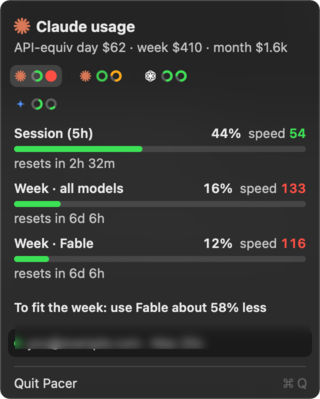
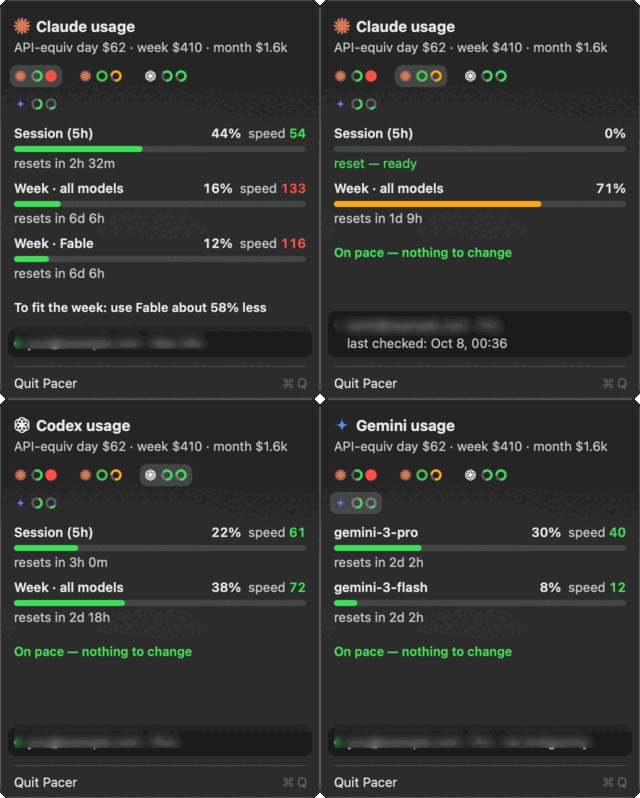
Click a tab to see that account, and the menu bar follows it — the rings up there and the card always mean the same subscription. Click anywhere else on the card to sample now.
What's different
Every other menu-bar tool shows the percent. Pacer shows the speed: where you land at reset if you keep going like this. 16% used sounds fine — until you notice it's 10% into the week.
- One sentence of advice. Computed from your actual model mix: stop/reduce Fable, move X% of Opus work to Sonnet, or do less. "On pace — nothing to change" when you're fine.
- Per-model weights measured on your own account. Anthropic doesn't publish how Opus/Sonnet/Fable count against the limits. Pacer joins the official usage % with your local transcripts and fits the weights from the data (and whether cache reads are discounted). Until there's enough data it uses API price ratios.
- API-equivalent cost over a rolling day, week and 30 days, across every Claude Code profile whose transcripts are in
~/.claude/projects(aCLAUDE_CONFIG_DIRprofile counts when itsprojectsis a symlink there), so you know what the subscriptions are worth to you. - Notifications when the pace crosses 100, when it comes back, and when any window passes 90%.
- Every account, remembered. Each subscription seen on the machine keeps its last reading. One you are not logged into shows what was used and "last checked"; when its reset passes, that window drops to 0 and its ring turns green — the cue to switch back. Forgotten after a week unseen (an Antigravity tab counts as seen only while the app is open).
- A subscription that stopped says so. A canceled or failed payment can end access mid-week, and the usage read then just fails like a busy server. Pacer asks the account's profile, and a plan that is no longer active gets one red line in place of its windows ("Subscription canceled · since … — re-subscribe, or it drops off …"), empty red rings, and the last tab. Other tools reading
status.jsonseelevel: "ended". - It asks again when a reset is due, instead of waiting for the next 10-minute sample.
- Tiny. One Node script (no dependencies) + one Swift file. The data is a JSON file other tools can read.
Install
Requires macOS 13+, Node ≥ 18, Xcode Command Line Tools (xcode-select --install), and at least one login from the table below.
brew install dkremsa/tap/pacer
brew services start pacer                 # samples every 10 min, survives reboots
cp -R "$(brew --prefix)/opt/pacer/Pacer.app" /Applications/ && open "/Applications/Pacer.app"
The formula was called claude-pacer before v2.0.0. That name still resolves, but an installed claude-pacer
does not upgrade across the rename — run brew uninstall claude-pacer first.
Or from source: git clone https://github.com/dkremsa/claude-pacer.git ~/.claude/pacer && cd ~/.claude/pacer && ./build.sh — compiles the app into /Applications and installs a launchd agent that samples every 10 minutes.
Start at login: System Settings → General → Login Items & Extensions → + → pick Pacer from Applications. The sampler already runs at boot; this is for the menu-bar icon.
Reminders
A reminder to start a Claude Code session later — set it now, paste it when you are ready:
pacer remind add 2026-10-13T09:00 "Ads check" "check the ads spend and promo credit" --dir ~/code/site --flags --chrome
pacer remind add 2026-10-13T09:00 "Weekly review" "summarise last week's commits" --every week
pacer remind add 2026-10-13T10:00 "Campaign check" "how is the campaign doing" --every day --times 8
pacer remind list
pacer remind done <id>
When one falls due Pacer posts a notification; clicking it copies cd <dir> && claude <flags> '<prompt>' to the clipboard. Nothing runs on its own. --every day|week|month makes it recurring: when it fires it moves to its next date, skipping any it missed while the Mac was asleep, and --times N stops it after N (the last one stays listed until Done); Done removes it for good. Due and upcoming reminders are also listed in the menu, each with Copy command and Done. They are kept in ~/.claude/pacer/reminders.json.
For other tools
~/.claude/pacer/status.json is refreshed every 10 minutes: pace, level, advice, windows[] (used %, speed, projected, hours left), cost (all transcripts under ~/.claude/projects, rolling day/week/month), fit — the rest for the default Claude Code login (acct names it; it falls to the login used last only when the default one cannot be read) — plus accounts[], the same windows for every account with its own pace/level (same verdict as the top level; a window already at 100% is red) and, for Claude, dir — the CLAUDE_CONFIG_DIR it was read from, null for the default login, absent until a tick has read it, read at accountsAt. An account whose subscription stopped (the profile's subscription_status is not active, or a refusal body says oauth_org_not_allowed) carries ended: { status | reason, at } and level: "ended" until a read shows it active again. When the Claude read fails, error and errorAt are set and t is left alone, so check t for freshness before trusting the top-level figures. node pacer.mjs status prints the same.
How the number is made
- Week windows:
projected = used% / fraction of the window elapsed. - The 5-hour session: rate over the last 45 minutes, projected to the reset (a session is bursty; an average since it opened lags).
- The headline is the worst window.
Providers
| read from | windows | |
|---|---|---|
| Claude Code | the keychain login, for the default profile and every CLAUDE_CONFIG_DIR profile in ~/.claude-* |
session, week, per-model week |
| Codex | ~/.codex/auth.json, live; its session transcripts as the fallback |
5 h, week |
| Antigravity | the running app's local language server — one tab per model vendor it resells | per-model allowance |
| Cursor | the IDE's login | billing month (paid seats) |
| Gemini CLI, GitHub Copilot | their stored logins — untested, written from their public clients | daily per model · monthly premium requests |
A provider with no login on the machine costs nothing and shows nothing. Pacer only ever talks to a provider's own usage endpoint, with the login that provider already stored, and never refreshes or writes a token. Per-model weights, advice from your model mix and the API-equivalent cost are Claude-only.