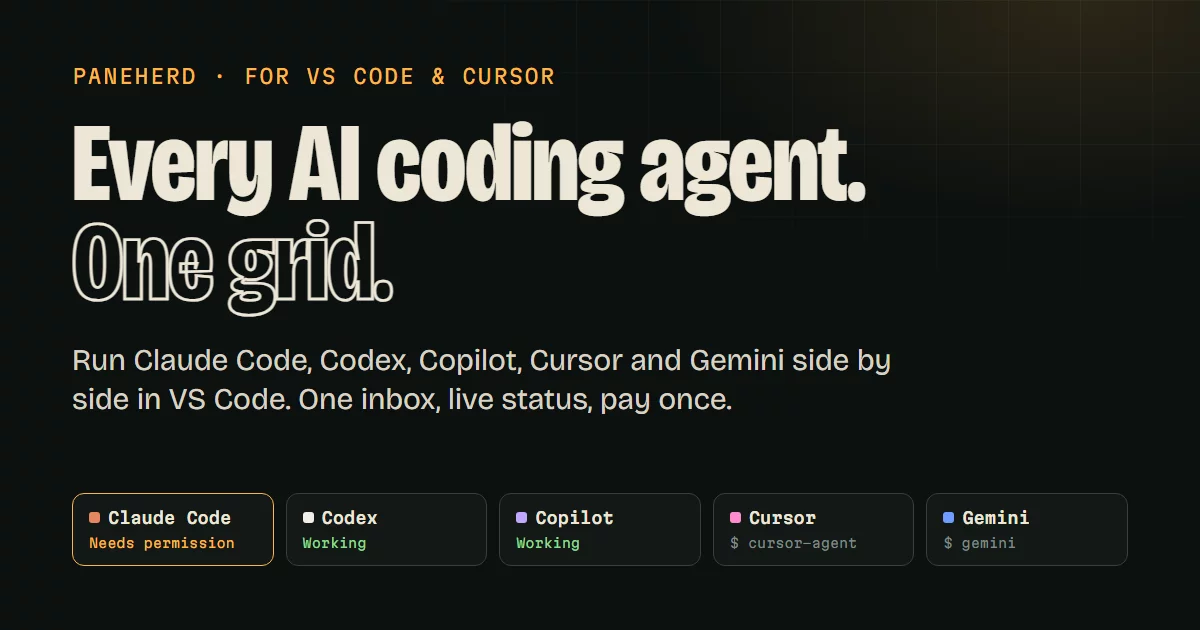

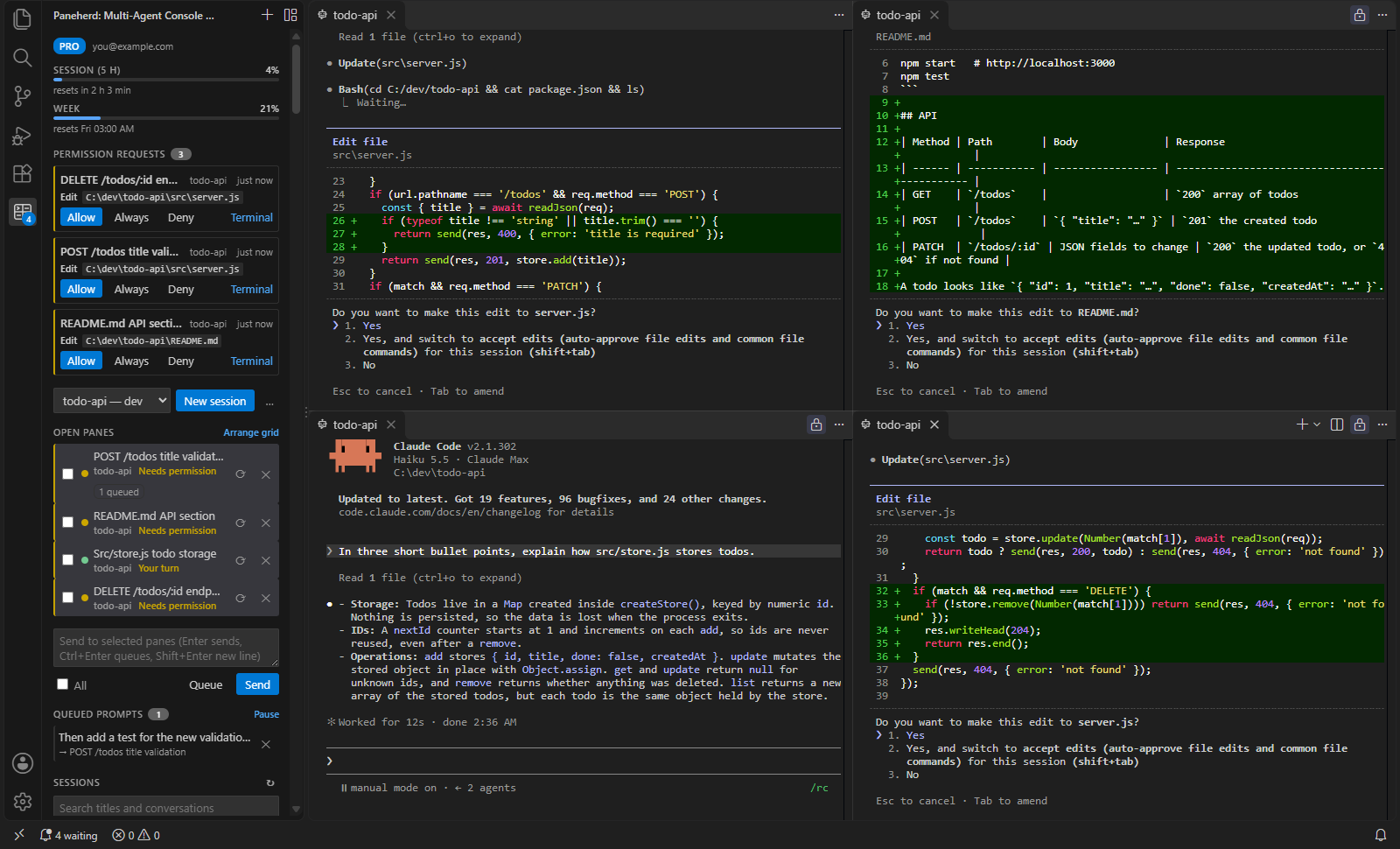
A multi-agent console for Claude Code. Run several Claude Code sessions side by side in split panes in your editor, answer all their permission prompts in one place, see your plan's usage limits, and catch agents that loop or step on each other's files.
Paneherd opens each session as a real terminal in the editor area and lays them out as a grid. A sidebar lists your open panes with live status and every saved Claude Code conversation, so you can resume any of them in one click.
Website: paneherd.com. Guides: run several Claude Code sessions at once, Claude Code worktrees, run Codex and Claude Code together, Claude Code usage limits and how Paneherd compares with Claude Code's own tools, VS Code, Superset, Conductor, Claude Squad and cmux.
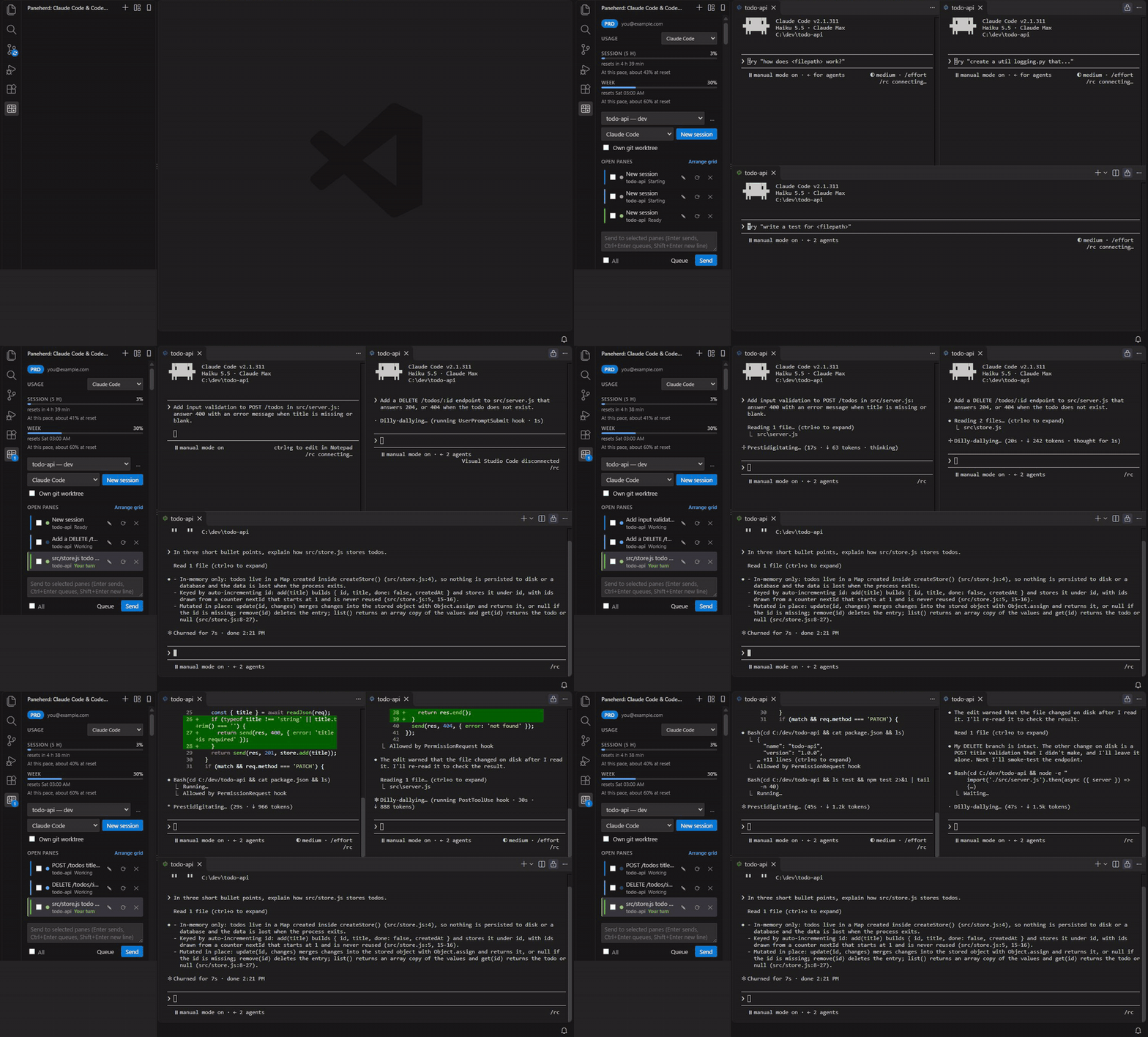
Features
- Grid of sessions: new sessions and resumed conversations open as editor-area terminals arranged in 1–4 columns. Arrange Panes in a Grid tidies them up at any time.
- Live status from Claude Code itself: each pane shows Working, Needs permission, Has a question, Your turn or Ended. The status comes from Claude Code hook events, not from guessing at terminal output.
- Know who is waiting: panes that need you are highlighted, counted on the sidebar badge and in the status bar. Go to Next Pane That Needs You jumps straight to them.
- Every saved conversation: the sidebar lists your Claude Code sessions with their titles and last prompts, searchable by title, prompt or folder, and by what was said in the conversation. Matching messages appear under each session. It warns before you open a session that may still be running in another window. Filter the list by agent and by one or more project folders with the dropdowns above it.
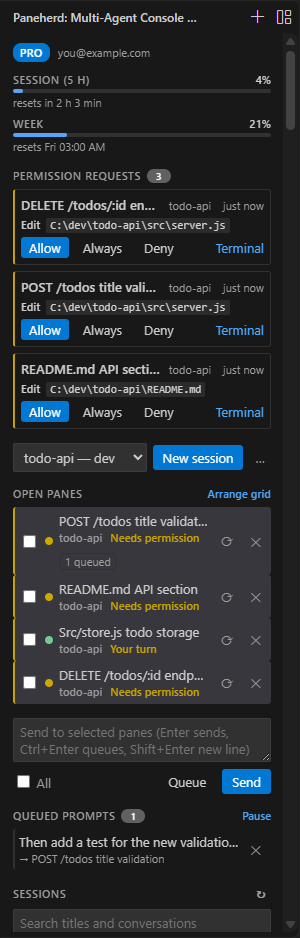
- Usage limits at the top: the sidebar shows how much of your Claude plan's current session (5 hours) and week you have used, and when each resets. Claude Code reports these to the status line on Pro and Max plans, after a pane's first reply. Codex's limits show under them, read from the session logs Codex keeps on this computer, and Copilot's monthly premium requests once you click Connect GitHub (see How it works).
- Which pane uses the limit, and when it runs out (forecast: Pro): each pane shows roughly how much of the 5-hour session limit it has used. With Pro, a forecast under the session meter says when you hit the limit at the pace of the last 30 minutes, or where you will be when it resets. Both are estimated from the tokens in your local Claude Code transcripts, weighted by API prices. Usage that leaves no transcript on this computer (claude.ai, other machines) is counted against these sessions.
- Permission inbox (Pro): every pane's permission prompts collect in the sidebar, with the command, file or URL. Allow, Always (saves the "don't ask again" rule Claude offers, where Claude's own dialog would: usually the project's
.claude/settings.local.json), Deny, or answer in the pane. Claude's dialog stays open in the pane, and whichever answers first wins. A notification offers Allow and Deny too. - Conflict guard (Pro): before a pane edits a file that another open pane changed in the last 10 minutes, Claude asks you first and says which pane changed it.
- Pane budget (Pro): set
paneherd.paneBudgetto the share of your 5-hour Claude limit one pane may use, and Claude asks before that pane's next tool call once it passes it, then again after every further step. Off by default. - Prompt cache clock: a pane's row shows when its conversation's prompt cache runs out, and once it has, roughly what the next reply costs in points of your limit.
- Loop and stall alarms: a pane that repeats the same tool call, fails several tool calls in a row, or shows no activity for 10 minutes while working is flagged in the sidebar (and notified on Pro).
- Own git worktree: tick Own git worktree next to New session (or run New Session in Own Git Worktree) and the pane runs in a fresh worktree of the repository, on its own
paneherd/branch, under.claude/worktrees/(kept out ofgit statusthrough the repository's local exclude file). Agents working in the same repository can no longer overwrite each other's files. When you close the pane, a worktree that never took a prompt and has no changes or commits of its own is removed with its branch; any other is kept, so no work is lost and the conversation can still be resumed from its folder. Merge or delete the branches yourself. A folder that is not in a git repository opens as it is. Claude Code may ask to trust each new worktree folder. - Broadcast: type once and send it to any set of panes. Multi-line text arrives as a single paste. A pane that is still starting gets the text once its prompt is up.
- Task queue (Pro): queue a prompt instead of sending it (Queue, or Ctrl+Enter). The first selected pane to end its turn takes it, so prompts queued for one pane run one after another without interrupting the current task, and prompts queued for several panes are shared out among them. The queue can be paused, and a prompt that has not started can be removed.
- Notifications (Pro): a notification appears when a pane needs you and you are looking at something else. A paired phone can get them too (see Phone remote).
- Sound: set
paneherd.soundto finished or needsYou and the computer plays its own short notification sound when a pane ends its turn (or, with needsYou, asks a question or needs permission) while you are looking elsewhere. Free and off by default; it uses only the system's stock sounds and is silent over Remote-SSH, WSL and dev containers. - Phone remote: click the phone icon at the top of the sidebar (or run Pair a Phone…), scan the QR code with your phone and click Allow. Your phone opens paneherd.com/remote, with no app to install, and shows every window's panes and their status and sends prompts to the panes you pick. Tap a pane to read its recent conversation (your prompts, the agent's replies and a line per tool call, for Claude Code and Codex panes) and to prompt just that pane. The paperclip next to the prompt box attaches images, such as a screenshot of a bug: each is saved in the pane's folder under
.paneherd/phone(ignored by git, deleted after 7 days) and its path goes into the prompt for the agent to open. With Pro it also answers permission prompts (Allow, Always, Deny), answers a pane's question with Accept (asks twice, then presses Enter in the terminal) or Cancel (Esc), and, once you tap Notify me on this phone, gets a notification when a pane has needed you for 20 seconds (2 minutes while VS Code has that pane in front of you, since an open window does not mean you are at the computer); on an iPhone, add the page to the Home Screen and pair it there (it has a Scan the QR code button) for that. Messages go through Paneherd's relay encrypted end to end, see How it works. A phone icon in the status bar shows while a phone is connected, and Disconnect Phones… removes any phone. - Chrome companion: the Paneherd Companion extension for Chrome (coming to the Chrome Web Store) counts the panes that need you on its toolbar badge and lists every window's panes, so you can see who is waiting without leaving the browser. With Pro it also notifies you and lets you answer permission prompts from Chrome. Pair it once with a code from Connect the Chrome Companion….
- Codex, Copilot, Gemini and Cursor next to Claude Code: pick the agent beside New session (or run New Codex Session, New Copilot Session, New Gemini Session or New Cursor Session) and the pane runs that CLI in the same grid. Broadcast, arrange and restart work for every agent, and status for all but Gemini and Cursor, see Other agents. The permission inbox, conflict guard and conversation list are Claude Code's only.
- Make panes easy to tell apart: each new pane gets the next free color on its terminal tab and sidebar row. The pencil on a pane sets its name, color and icon. The sidebar changes at once; the terminal tab takes the name as soon as it is the active terminal, and the color and icon when the pane restarts with ⟳. A pane you have not named is named after its first prompt.
- Make the sidebar yours:
paneherd.density(comfortable or compact),paneherd.fontScale,paneherd.paneDetailsandpaneherd.sessionPromptchoose what each row shows, andpaneherd.statusPalette(a color-blind-safecolorblindpalette) andpaneherd.statusColorsset the status colors. The sidebar follows your color theme; the terminal font is the editor'sterminal.integrated.fontFamilyandfontSize. - Panes survive a reload: after Reload Window or an extension update, the panes that were running are picked up again where they are, with their status, name and color. After you quit the editor, the panes you had open are offered for reopening with
--resume.
Free and Pro
| Free | Pro | |
|---|---|---|
| Sessions open at once | 4 | Unlimited |
| Live status, sidebar, session browser | ✓ | ✓ |
| Broadcast to several panes | ✓ | ✓ |
| Usage limits, per-pane usage, loop and stall alarms | ✓ | ✓ |
| Permission inbox | ✓ | |
| Conflict guard | ✓ | |
| Pane budget | ✓ | |
| Task queue | ✓ | |
| Limit forecast | ✓ | |
| Notifications when a pane needs you | ✓ | |
| Phone remote: status, conversation history and sending prompts | ✓ | ✓ |
| Phone remote: answering permission prompts and questions | ✓ | |
| Phone remote: notifications when a pane needs you | ✓ | |
| Chrome companion: badge and pane list | ✓ | ✓ |
| Chrome companion: notifications and answering prompts | ✓ |
Try every Pro feature free for 7 days first: click Try Pro free in the sidebar or run Paneherd: Start 7-Day Pro Trial. No card or account; the trial can be started once (it follows Settings Sync), and when it ends, open panes keep running.
Pro is a one-time $2.99 purchase with a perpetual license key, sold at paneherd.com with a 14-day refund. Activate the key from the page that shows it after checkout (Activate in VS Code or Activate in Cursor, then confirm in the editor), or enter it with Paneherd: Enter License Key…. Keys are checked offline on your machine.
Requirements
- The Claude Code CLI, signed in. Paneherd finds
claudeonPATH, in the standard install locations, or inside the Claude Code editor extension. You can also setpaneherd.claudePath. - Optional, for Codex panes: the Codex CLI. Paneherd finds
codexonPATH, in the standard install locations, or inside the OpenAI editor extension. You can also setpaneherd.codexPath. - Optional, for other panes: the GitHub Copilot CLI (
copilot), the Gemini CLI (gemini) or the Cursor CLI (cursor-agent), signed in. Paneherd finds them onPATHor where their installers put them;paneherd.copilotPath,paneherd.geminiPathandpaneherd.cursorPathoverride that. curl, which ships with Windows 10 and later, macOS, and most Linux distributions. Without it panes still work, but they cannot show status.- A trusted workspace.
How it works
Each pane runs claude with an extra --settings file that Paneherd writes for that pane. The file adds hooks for session start, prompt submit, tool use, permission requests, notifications, stop and session end. Your own hooks and settings stay in effect. The hooks run curl directly, without a shell, and post the event to a server inside the editor. That server listens only on 127.0.0.1 and checks a random per-window token.
Two hooks wait for the server's answer: the permission request hook (so the sidebar can decide while Claude's own dialog is up; with no decision within an hour it steps aside) and the pre-tool-use hook (so the conflict guard can ask first). The pane's status line, when Paneherd adds one, posts Claude's status line input, which carries the usage limits. Paneherd adds it only when neither you nor the project set a statusLine, so yours is never replaced; with your own status line the limits are not shown.
The Chrome companion connects to a second server in each editor window, which runs only after you pair a browser. It listens on 127.0.0.1, on the first free port from 47470 to 47479, and accepts only browser extensions (by their origin) that paired with a one-time code shown in the editor, or that hold the token pairing gave them. Disconnect Chrome Companions revokes every browser.
The phone remote is off until you pair a phone. Then each editor window and the phone connect to Paneherd's relay (wss://relay.paneherd.com, a Cloudflare Worker; paneherd.remoteRelay points elsewhere). Everything between them is encrypted end to end with AES-256-GCM under a key made on the phone during pairing, which reaches the editor sealed with the one-time code in the QR code; that code sits in the part of the link browsers never send to a server. Through it go your panes' titles, folder names and status, your permission prompts, the prompts and images you send from the phone and, while you read a pane's conversation on the phone, that conversation as Claude Code or Codex saved it (~/.claude/projects, ~/.codex/sessions); the editor reads those files only for a pane the phone asks about. Phone notifications skip the relay: the editor posts them to the push service the phone's browser uses (Google's, Apple's, Mozilla's or Microsoft's; no other host), encrypted for that phone with Web Push, so the push service delivers them without reading them. The relay forwards sealed messages and cannot read or keep them. A QR code works once, for 5 minutes, and only after you click Allow in VS Code; each phone has its own key, and Disconnect Phones… makes it useless. See the privacy notes.
Copilot's premium requests come from GitHub: after you click Connect GitHub in the sidebar and allow it in VS Code's sign-in, Paneherd sends your VS Code GitHub sign-in to api.github.com/copilot_internal/user, the endpoint the Copilot editor extensions read it from, every few minutes while the sidebar is open. That endpoint is not documented and may change.
Claude's usage figures normally come from Claude Code's status line, so they update with each reply. paneherd.liveClaudeUsage is off by default; when you turn it on, Paneherd reads the sign-in token Claude Code keeps in ~/.claude/.credentials.json and, once a minute, sends it to api.anthropic.com/api/oauth/usage, the request Claude Code's own /usage makes, so the figures stay current between replies. It never refreshes or stores the token, and an expired one is not sent. That endpoint is not documented and may change or stop working.
Apart from that and a paired phone, nothing leaves your machine. Paneherd has no telemetry, and the license check needs no network access.
Settings
| Setting | Default | |
|---|---|---|
paneherd.claudePath |
"" |
Path to claude. When empty, Paneherd looks for it automatically. |
paneherd.extraArgs |
[] |
Extra arguments for every new session, for example ["--model", "opus"]. |
paneherd.gridColumns |
auto |
Columns in the grid (auto, 1–4). |
paneherd.notifications |
true |
Notify when a pane needs you (Pro). |
paneherd.usageLimits |
true |
Show the plan usage limits; adds a status line to panes that have none. |
paneherd.liveClaudeUsage |
false |
Keep Claude's usage figures current between replies by asking Anthropic once a minute with Claude Code's sign-in token (see Privacy). |
paneherd.permissionInbox |
true |
Collect permission prompts in the sidebar (Pro). |
paneherd.conflictGuard |
true |
Ask before editing a file another pane just changed (Pro). |
paneherd.paneBudget |
0 |
Ask once a pane has used more than this many percentage points of the 5-hour Claude limit; 0 is off (Pro). |
paneherd.paneBudgetStep |
10 |
Points added to a pane's budget each time it is asked. |
paneherd.stallMinutes |
10 |
Flag a working pane silent this long; 0 turns it off. |
paneherd.remoteRelay |
"" |
Relay for the phone remote (wss://). Empty uses Paneherd's own. |
paneherd.defaultAgent |
claude |
The agent a new session starts with (claude, codex, copilot, gemini, cursor). |
paneherd.<agent>Path, paneherd.<agent>ExtraArgs |
Path and extra arguments for codex, copilot, gemini and cursor panes. |
Codex panes
Codex has no per-session settings file, so Paneherd passes its hooks with -c options. Codex runs a hook only after you trust it, and it recognises a hook by its text, so every Codex pane gets exactly the same hook commands: each one runs curl with a small config file in the extension's storage, and curl reads the pane, port and token from PANEHERD_* environment variables of the pane's terminal. The token's name keeps Codex from passing it on to the commands it runs.
The first time, Codex asks "7 hooks are new or changed" when the pane starts: choose Trust all and continue. Codex remembers the approval in its config.toml (as hashes of the hook text under [hooks.state]), so later panes, other ports and other windows are not asked again. Until the hooks are trusted the pane shows — instead of a status, and broadcast still works with a short fixed wait for Codex to start. Codex reports its session with the first prompt, so a new Codex pane shows no status before you send one.
Hooks need curl 8.3 or newer and paths without spaces or quotes; otherwise the pane runs without status. Codex hooks only report status: permission prompts stay in Codex's own dialog. Paneherd's hooks are not removed by anything you trust in config.toml; to undo the approval delete the [hooks.state] entries whose key contains <session-flags>.
Other agents
Every agent's hooks post to the same local server as Claude Code's, under Claude Code's event names, so the sidebar shows the same states. They only report status: permission prompts and questions stay in the agent's own dialog, and the permission inbox, conflict guard, conversation list and per-pane usage are Claude Code's only. The usage block shows Codex's limits and, once connected, Copilot's premium requests; Gemini and Cursor keep no usage Paneherd can read. A pane takes its title from its first prompt.
- GitHub Copilot CLI: Paneherd passes a small plugin folder with
--plugin-dirand starts the session with--session-id, which a restart passes again to resume it. Copilot reports from the first prompt on, after you answer whether you trust the folder, including Needs permission and *Ha