
Plates
A Slack app that keeps every ask on someone's plate until the person who asked says it's done.
Tag @plates when you ask a colleague for something. It reads the thread, works out who is asking whom for what, posts a confirmation, and then tracks each ask as it moves between the two of you. Nothing is closed until the requester closes it, so asks stop quietly dropping. Self-hosted on Cloudflare Workers, one workspace per install.
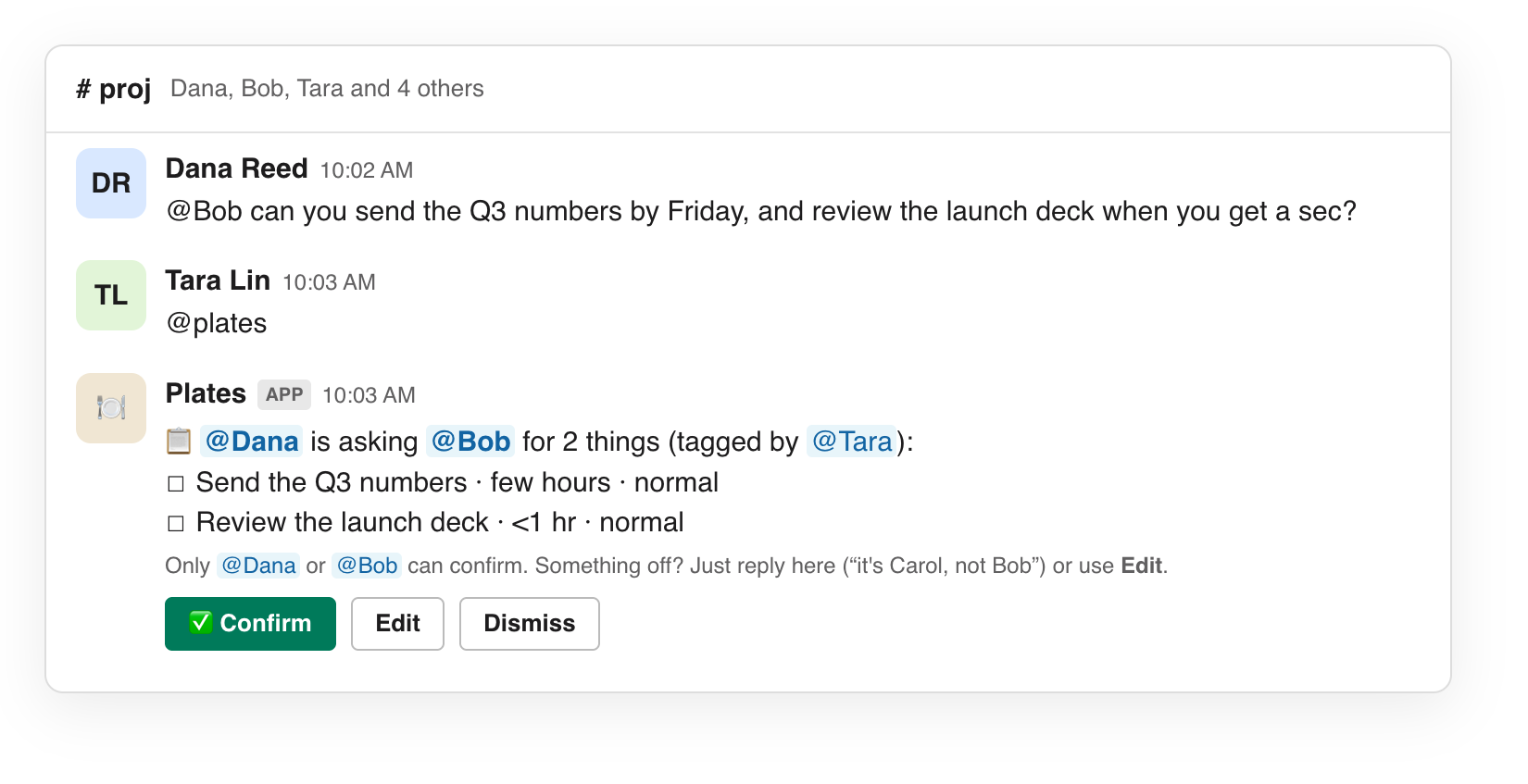
Dana   @Bob can you send the Q3 numbers by Friday, and review the deck?
Tara   @plates
Plates 📋 Dana is asking Bob for 2 things (tagged by Tara)
         1. Send the Q3 numbers · few hours · by Fri
         2. Review the deck · <1 hr
         [✅ Confirm]
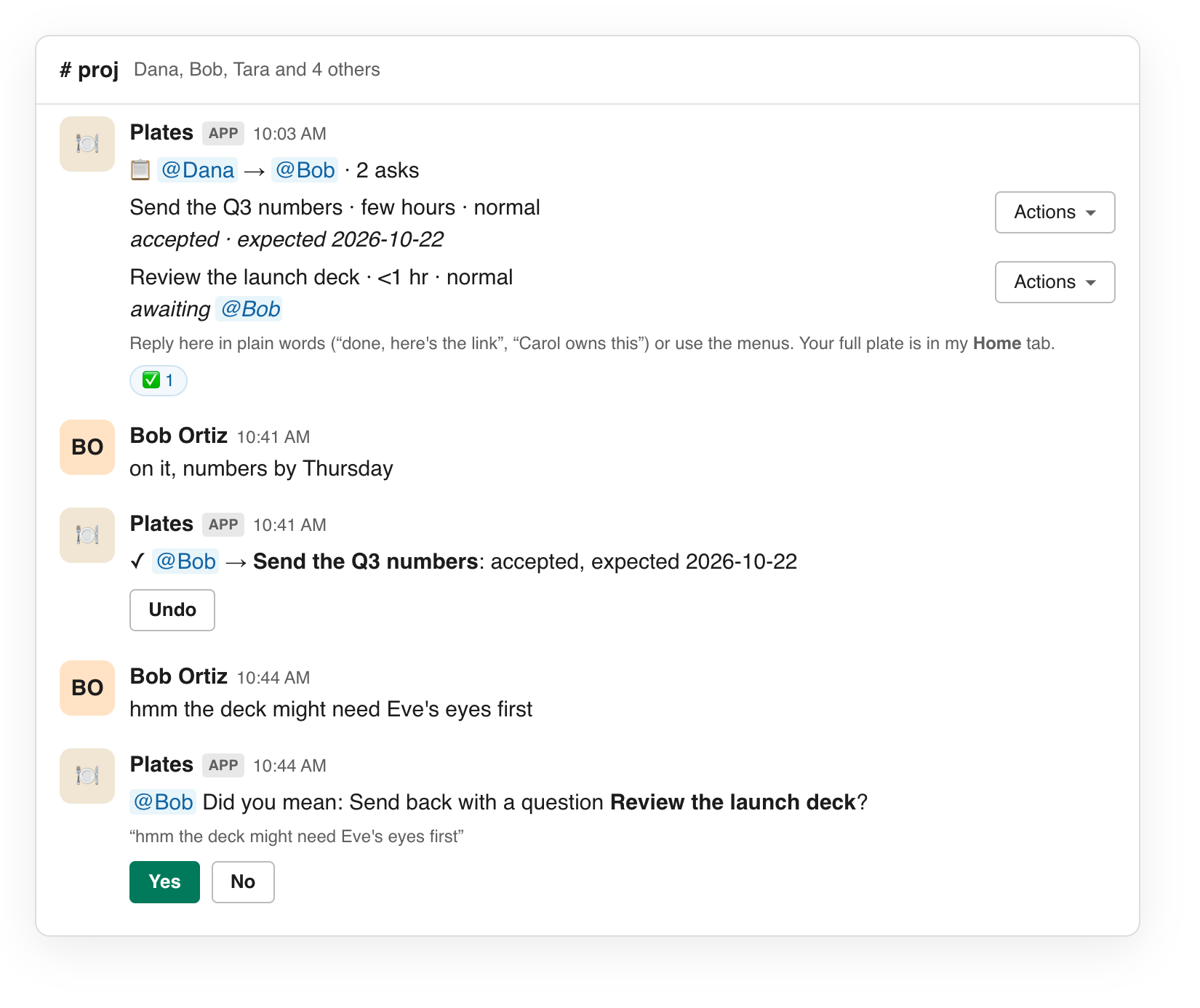
Bob    on it
Plates ✓ @Bob → Send the Q3 numbers: accepted, working on it  [Undo]
Bob    here it is: https://…/q3.xlsx
Plates ✓ @Bob → Send the Q3 numbers: marked done, now with @Dana to close (result)  [Undo]
Dana   thanks, perfect
Plates ✓ @Dana → Send the Q3 numbers: closed  [Undo]
What it does
- Captures asks from where they happen.
@platesin a thread,/plates @bob send the deck by Friday, the Put on someone's plate shortcut on any message, or a DM to the bot. Claude extracts the asks, splits a message into separate items, and infers requester and owner from the conversation, not from who tagged it. - Always confirms first. The requester or owner confirms with a button or a ✅ reaction, or replies to correct it ("it's Carol, not Bob"). Anyone else is told they can't.
- One plate per person. Every ask is on exactly one person's plate. Owners start, accept for later with a deadline, snooze, deliver, reject with a reason, send back with a question, or hand off. Only the requester can close or withdraw, from any state.
- Understands plain replies. "on it", "I'll get to it Thursday", "rejecting this, marketing owns it", "here it is: link" become actions in the thread, applied with an Undo button when the model is sure and offered as "Did you mean…?" when it isn't. Emoji reactions work the same way.
- Keeps things visible. A Home tab per person (needs your response · on your plate · unconfirmed · waiting on others), a daily digest at the time you choose, deadline reminders with a daily cap, snooze counts and round counts that both people can see, and a nudge after the third snooze.
- Optional mirrors. Deliverable asks can become Jira or Linear issues that follow the ask's state. People can connect a user token so
@platesworks in DMs the bot isn't in.
In Slack
Reply in plain words. The owner replies in the thread; Plates applies the move with an Undo button, or asks "Did you mean…?" when it is less sure.
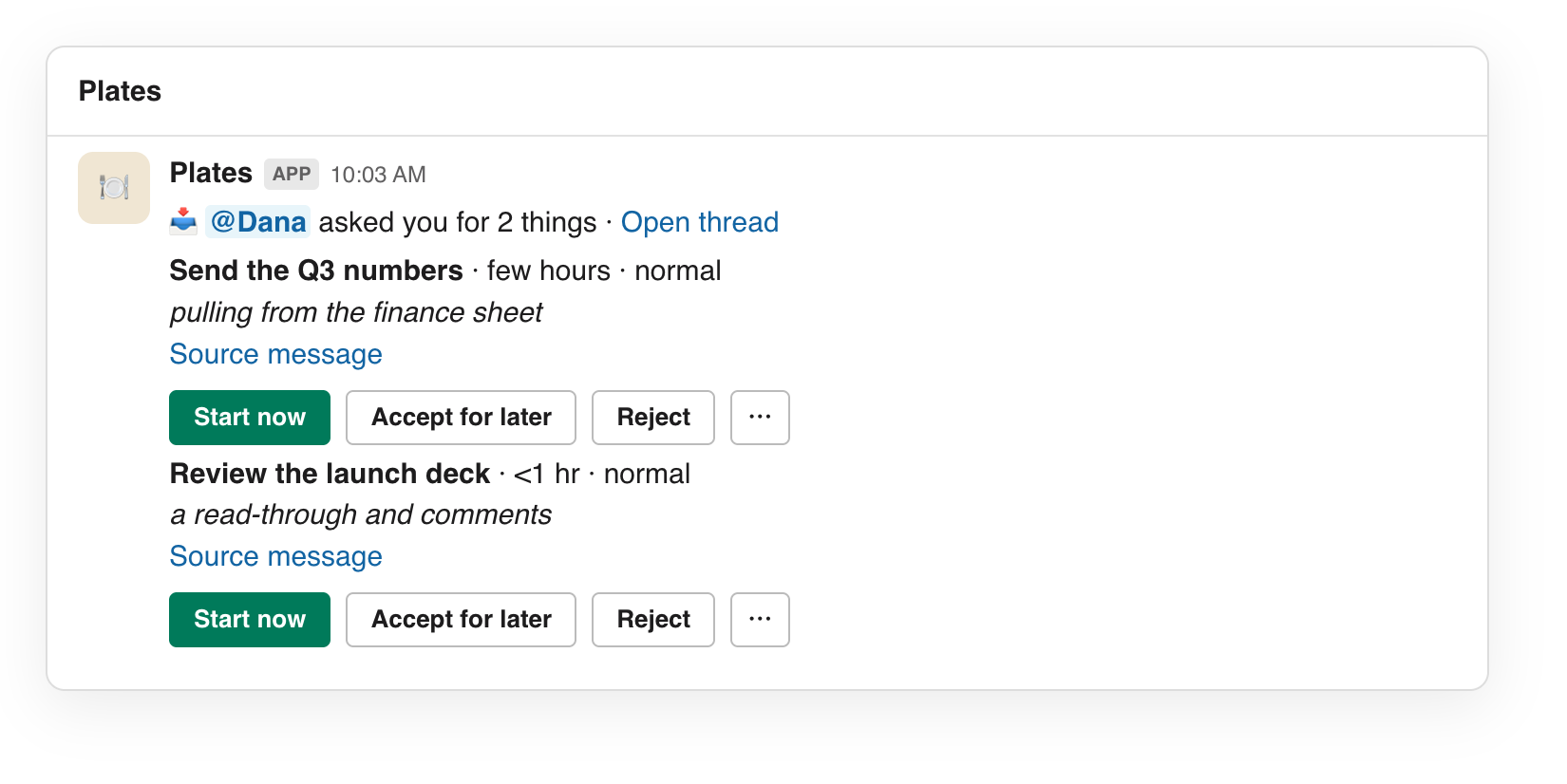
The owner's DM. Every confirmed request lands in the owner's DM with the few buttons that matter and a menu for the rest.
The Home tab. Each person's plate: what needs a response, what is on it, what they are waiting on.
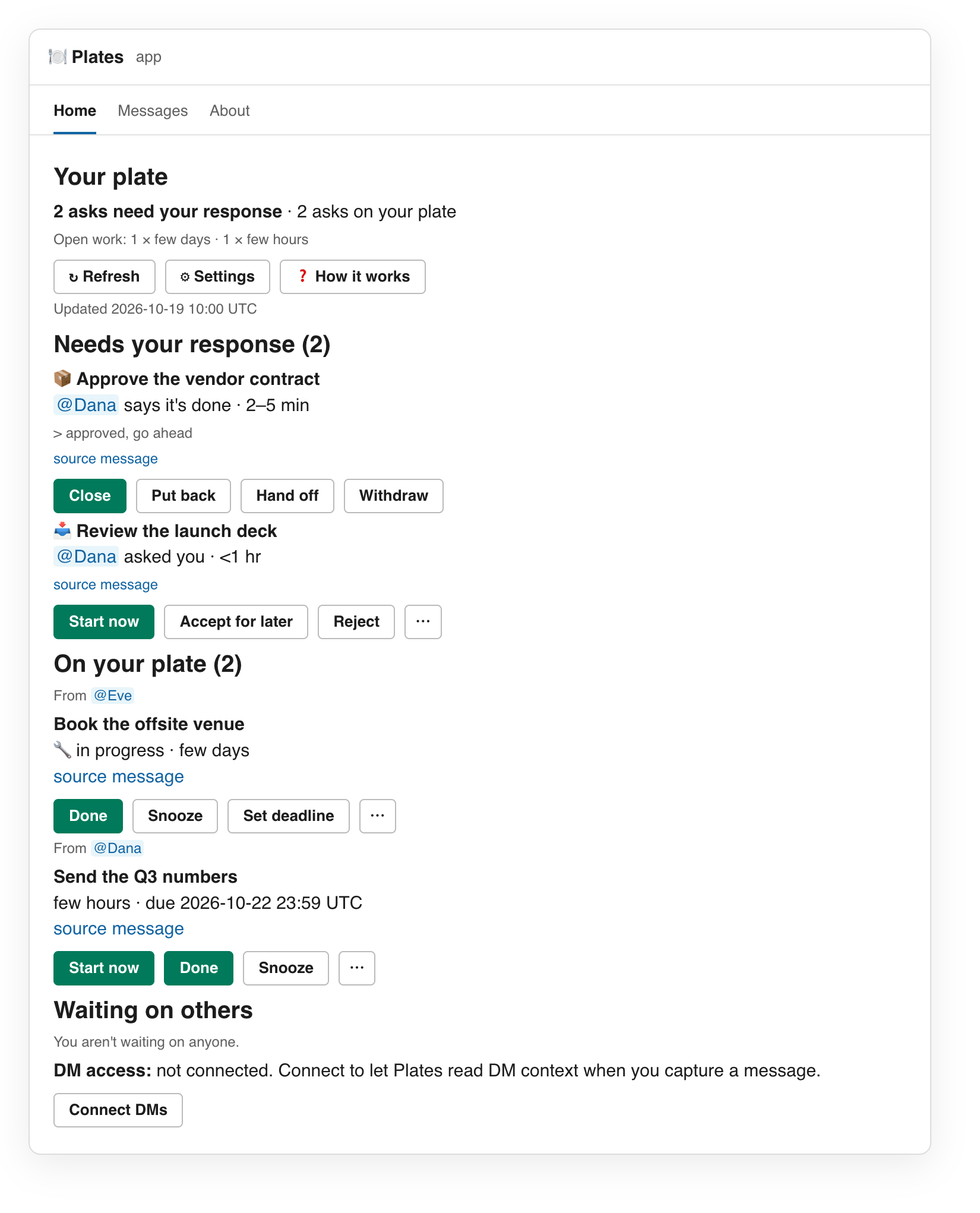
These are rendered from the Block Kit the app really produces, captured by npm run screenshots through the test harness.
How it works
Slack calls one Worker. The Worker verifies the signature, answers within three seconds, and pushes the slow work to a queue. In the queue, Claude turns the thread into structured asks through a strict tool schema, and the result is validated against the thread before anything is stored. Thread replies and emoji go to a System One decision model, which answers typed multiple-choice and yes/no questions with probabilities. The options are built from the state machine, so the model can only pick something that could actually be applied, and each model's thresholds are tuned with a committed eval. A Durable Object per person handles snoozes, reminders and the digest. Everything lives in one D1 database.
Read more in docs/architecture.md and the product spec. The ask state machine is in docs/state-machine.md, generated from the code.
Self-hosting
You need a Cloudflare account on the Workers Paid plan (for Queues), a Slack workspace where you can install a custom app, and an OpenRouter key. The install is a handful of commands plus pasting a manifest into Slack; the first deploy creates the database.
git clone https://github.com/sdawka/plates.git && cd plates
npm install
npx wrangler login
npx wrangler queues create plates-extract
npx wrangler queues create plates-extract-dlq
npm run deploy && npm run db:migrate:remote
Then create the Slack app from slack-manifest.yaml and set three secrets. The full guide is docs/self-hosting.md; every variable is in docs/configuration.md; docs/walkthrough.md is a scripted tour to check an install.
Running costs. Cloudflare's Workers Paid plan, plus model usage through OpenRouter: one Claude call per capture or correction, one short Haiku call per unclear emoji, and one decision-model call per thread reply, reaction and DM. The decision calls are small and cheap; extraction dominates and is still a fraction of a cent per thread.
Development
npm run typecheck
npm test             # 1,200+ unit and end-to-end tests against docs-shaped fakes, no network
npm run local:e2e    # the real Worker in workerd against mock Slack and model servers
None of the checks need credentials. npm run eval measures a decision model against the labelled cases in eval/ and sweeps its thresholds. See docs/development.md and CONTRIBUTING.md.
Documentation
| Doc | What it covers |
|---|---|
| docs/self-hosting.md | Install on your own Cloudflare account and Slack workspace, optional features, updating, operations, data and privacy |
| docs/configuration.md | Every secret and variable |
| docs/walkthrough.md | A scripted tour in Slack |
| docs/architecture.md | Components, request lifecycle, module map, data model, design rules |
| docs/development.md | Tests, the local end-to-end run, the decision-model eval, how to add things |
| docs/product.md | The product spec: problems, flows, rules, decisions log |
| docs/state-machine.md | The ask state machine, generated from the code |
| docs/clairic-spike.md | Research: Cloudflare's Clairic model measured against the current date extraction |
Scope and status
Plates is built for a single Slack workspace: one install, one set of secrets, no multi-tenancy, no billing, no Slack Marketplace listing. It is in daily use. The model layer is the youngest part; thresholds are set from the eval in eval/results/, and a new model needs its own run before it goes live.
License
MIT.