

A study tutor that runs on your own computer.
Give it your course material and an exam date. It builds the plan and cites your sources in every lesson.

Download · Documentation · Contributing · Security
Why Pyxis
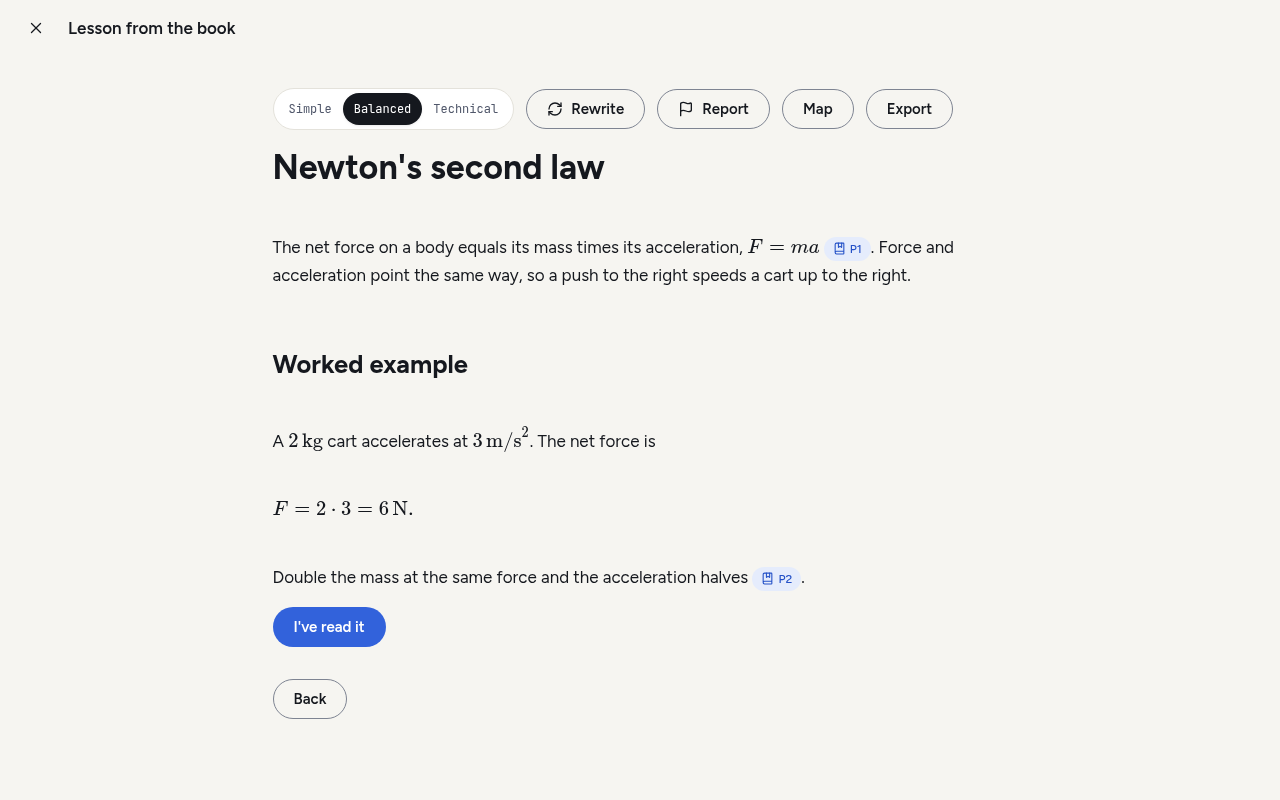
A fluent answer is no use if you can't check it. Pyxis answers from the material you import. Lessons and chat replies carry numbered citations that open the exact passage they came from, and each flashcard shows its source passage on the back. When Pyxis writes from general knowledge instead, it labels the text that way.
Pyxis has no account, no subscription and no server of its own. The workspace is a SQLite file and a folder of blobs on your disk. You connect the AI tools you already use: Claude Code, Codex, Cursor Agent or Antigravity, or an Anthropic or OpenAI API key. Your provider may charge for usage. Pyxis doesn't.
The app is in English and Italian, with dark and light themes.
What you can do
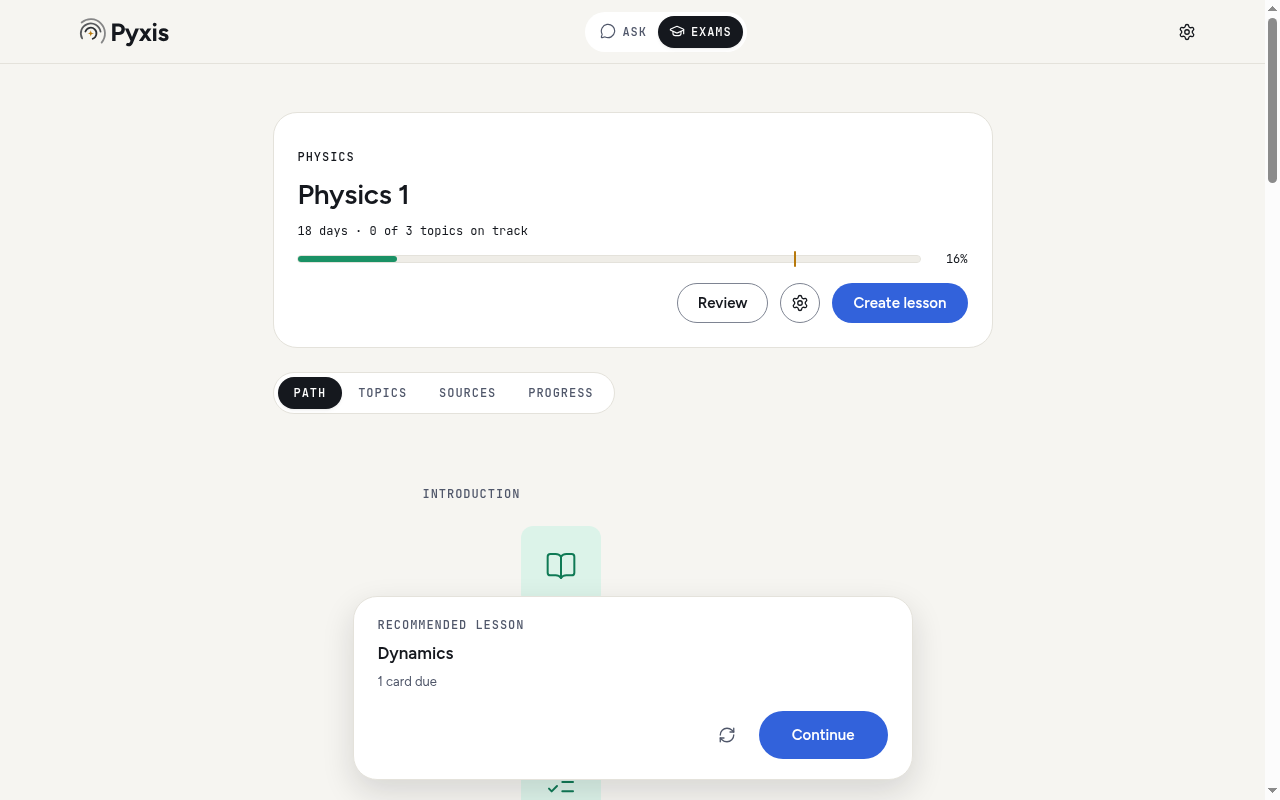
Plan for an exam. Import your sources, set the exam date and a target score, and Pyxis splits the material into topics. Each topic gets a lesson, practice, flashcards and a gap check, and the plan ends with a timed simulation and a final check. The next step is always on screen, chosen from due cards, open gaps, mastery and days left. The rules are documented, not hidden in a model.
Learn from cited lessons. Pick a simple, balanced or technical register. Math renders with KaTeX. Rewrite a lesson, flag a wrong claim, export it as PDF, or turn the topic into a concept map.
Practise. Quizzes mix multiple choice, true/false, matching, fill-in and open questions. The model grades open answers and written simulations against a reference answer and tells you which points you missed. Flashcards are scheduled with FSRS and export to Anki. The Flashcards tab under Exams lists every card from every plan, grouped by subject. You can search it without worrying about accents, filter by exam and topic, and edit, suspend, delete or restore a card there. It also imports an Anki deck (.apkg, with or without its review history) and exports one.
Close knowledge gaps. Two wrong answers on a topic in one quiz open a gap. Pyxis asks the model what misconception the answers show, builds a drill for it, and closes the gap after two clean sessions on different days.
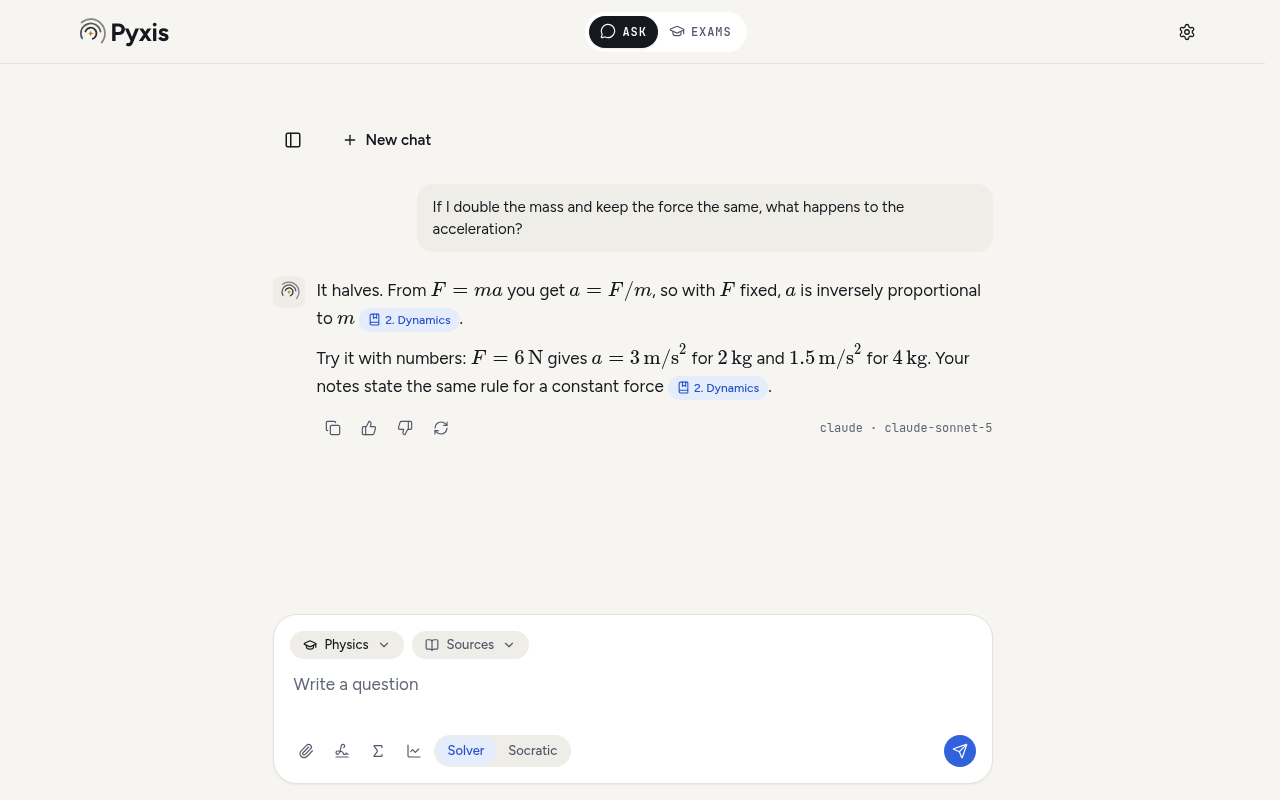
Ask the tutor. The chat cites your library and can attach photos and documents. Solver mode works the problem through with you. Socratic mode holds back the answer and asks one question at a time until you get there. The chat list searches titles and message text, ignoring case and accents, and each chat exports as Markdown or PDF with its sources. The Σ button opens a formula keyboard, which also works in quiz, practice and simulation answers. Pyxis also has a whiteboard, a graphing tool and a local Python sandbox with NumPy, SymPy and Matplotlib.
Keyboard and menus. Every platform has an application menu in your interface language. On Windows and Linux it stays hidden until you press Alt. It holds New exam (Ctrl/Cmd+N), New chat (Ctrl/Cmd+Shift+N), Settings (Ctrl/Cmd+,), Ask, Exams, Library and Flashcards (Ctrl/Cmd+1 to 4), Back, zoom, and Help. Press Ctrl/Cmd+/ to see every shortcut, including the ones in the chat, flashcards, quizzes and whiteboard. Menu commands are ignored, not queued, while you are in setup, answering a quiz, sitting a simulation, in a dialog, or typing text that Pyxis would lose.
Share and back up. Export a plan as a portable file with its lessons, cards and cited excerpts, and include your progress if you want to. Save an exam's date as a calendar file (.ics) from its plan, with a reminder the day before; importing it again updates the event. Back up the whole workspace to one ZIP and restore it on another computer. While Pyxis is open it also backs up once a day on its own, into Pyxis backups in your Documents folder, and keeps the three newest copies.
Pyxis reads PDF, Word (.docx), PowerPoint (.pptx), Markdown, plain text, web pages, photos (JPEG, PNG, WebP, HEIC) and PoliTost smartbooks (.ptsb), which keep their chapters and exercises. Scanned pages go through local OCR or your model's vision support.
|
|
| Citation chips open the passage behind a claim. | The tutor answers from your notes and names the model. |
Install
Download the file for your system from the latest release.
| System | File |
|---|---|
| macOS, Apple Silicon | PoliTost.Pyxis-<version>-arm64.dmg |
| macOS, Intel | PoliTost.Pyxis-<version>.dmg |
| Windows x64 | PoliTost.Pyxis.Setup.<version>.exe |
| Linux x64 | politost-pyxis_<version>_amd64.deb or .AppImage |
The builds aren't signed with a paid certificate, so your OS will warn you the first time. Check the download before you get past the warning:
# in the folder with the download and SHA256SUMS
shasum -a 256 --check --ignore-missing SHA256SUMS      # macOS
sha256sum --check --ignore-missing SHA256SUMS          # Linux
gh attestation verify <file> --repo SuperTost100/politost-pyxis
On Windows, Get-FileHash <file> prints the hash to compare with SHA256SUMS. The gh attestation line checks that GitHub Actions built the file from this repository.
- macOS. Open the DMG and drag Pyxis to Applications. If macOS refuses to open it, go to System Settings → Privacy & Security and choose Open Anyway. Don't turn Gatekeeper off for the whole system.
- Windows. Run the installer. If SmartScreen stops it, choose More info → Run anyway.
- Linux. Install the
.debwith your package manager, orchmod +xthe AppImage and run it (some distributions need FUSE for that). Saving an API key needs a working keyring such as GNOME Keyring or KWallet. Pyxis refuses to store keys in plain text.
Pyxis checks GitHub for a new release at most once a day. Check for updates in Settings → Updates and in the Help menu asks again at once, but never more than once a minute. When one is out, Settings → Updates and a notice offer Download and install. Nothing downloads until you press it. Pyxis then fetches the installer for your system and the release's SHA256SUMS, keeps the file only if the checksum matches, and hands it over:
- macOS. The DMG opens. Quit Pyxis, drag it to Applications and choose Replace.
- Windows. Pyxis closes and the installer runs.
- Linux AppImage. The new AppImage replaces the old file, and Pyxis restarts when you choose. If Pyxis can't write to that folder, it shows you the new file instead.
- Linux
.deb. The package opens in its folder for your software installer. Pyxis never runssudoordpkg.
If a download fails or doesn't match, Pyxis deletes it and offers the release page instead.
First launch
Setup has four steps. Skip, on the first one, jumps past all of them:
- About you. What Pyxis does, then your name, study level, school, course and year. They stay on your computer. At university, grades, goals and preparation are shown out of 30, at other levels out of 100. You can change both in Settings → Profile.
- AI engine. Pyxis asks which AI you already pay for, installs that engine with its maker's official installer and signs you in. Engines already on your computer are offered first, with a note on what leaves your computer. It sends nothing to a model at this step. The crash-report switch sits here too, off until you turn it on. For now it only records your choice.
- The exam. Its name, subject, date and goal on one screen. "No exam for now" saves your profile and opens the exams list, where you can create one later.
- Material. Your files, your library or a free PoliTost book. Pyxis then shows the build steps and the topics it found as it prepares the exam.
Pyxis offers the OCR data for scans (about 7 MB) when you add your first scan, or in Settings → Data.
To go through it again, open Settings → Profile and choose "Run setup again". The first two steps open with your current answers filled in and have no Skip. Your engines stay as they are unless you set one up. At the end you return to Settings → Profile.
| Engine | How it connects |
|---|---|
| Claude Code | Your installed and signed-in claude CLI |
| Codex | Your installed and signed-in codex CLI |
| Cursor Agent | Your installed and signed-in agent CLI |
| Antigravity | Your installed and signed-in agy CLI |
| Anthropic API | API key, encrypted with the OS key store |
| OpenAI API | API key, encrypted with the OS key store |
Pyxis runs the CLIs in text-only mode, so they can't use their shell, file or web tools. It picks an engine and model for each job itself. Chat, maps and flashcards get a fast model, lessons and grading a mid-range one, and plans the strongest. With several CLIs signed in, it spreads the work across them. API keys come into play only when no CLI is ready, because they bill per token. To pin a different choice, open Settings → Engines. Engines lists the defaults for each combination.
Your data
Sources, plans, progress and generated material stay in a local workspace. Settings → Data shows its path and lets you move it. It also controls automatic backups: turn them off, pick another folder (not one inside the workspace or the app's own data), or back up now. It lists the automatic backups that pass their check, each with Restore. Settings → Study reminders turns on one notification a day, at a time you pick, when flashcards are due. It is off until you switch it on and only appears while Pyxis is open.
These actions send data off your computer:
- Generating or grading. The prompt, the source passages it needs and any attachments go to the provider you picked. Its retention and billing rules apply.
- Importing a link. Pyxis fetches the page from that site.
- Installing an engine. Setup downloads the maker's install script from claude.ai, chatgpt.com, cursor.com or antigravity.google and runs it. Signing in happens in your browser with that maker.
- Free PoliTost books. Opening the list asks books.politost.it for its catalog, and adding a book downloads it from there. While the Sources page is open and holds a smartbook, Pyxis reads the catalog too, to offer a newer version, which Update downloads in place. Each book is checked against the catalog's SHA-256.
- Optional downloads. The search model, the Python runtime and the OCR language files are fetched once, after you agree, and checked against pinned SHA-256 hashes.
- Update check. Pyxis asks GitHub for the latest release tag, at most once a day, or again after 15 minutes if the check failed. Check for updates asks again at once, at most once a minute. It sends no workspace content.
- Installing an update. Only after you press Download and install, Pyxis downloads the installer for your system and
SHA256SUMSfrom that GitHub release.
Pyxis has no telemetry and uploads no crash reports. Backups and exported plans can contain your course material, so treat them as private files. API keys are never written to the workspace or to backups. SECURITY.md lists every network request and where each file lives.
Build from source
You need Node.js 26, npm, Python 3 and a C++ toolchain for the native modules: Xcode Command Line Tools on macOS, Visual Studio C++ build tools on Windows, build-essential on Debian and Ubuntu.
git clone https://github.com/SuperTost100/politost-pyxis.git
cd politost-pyxis
npm ci          # installs Electron and builds SQLite for its ABI
npm run dev     # starts the app with hot reload
Checks and packaging:
npm run typecheck
npm test                              # Vitest under Electron's Node
npm run test:e2e                      # native UI tests; on Linux prefix with xvfb-run -a
npm run dist -- --publish never       # installers land in dist/
CONTRIBUTING.md explains the test fixtures, the prompt rules and how pull requests are checked.
Documentation
| Read this | To learn |
|---|---|
| Architecture | How main, core and the renderer split the work |
| Data model | Tables, migrations and what a backup contains |
| Engines | How model calls are routed, validated and repaired |
| Mastery and recommendations | The formulas behind mastery, gaps and the next step |
| Card scheduler | How FSRS is configured |
| Plan file | The portable .pyxis format and its schema |
| Design system | Colours, type, components and the logo |
| Release checks | CI targets, provenance and the manual release loop |
The full list is in docs/README.md.
License
Pyxis is MIT licensed. See LICENSE. Bundled dependencies, fonts, runtimes and models keep their own licenses, listed in third-party notices and in Settings → About inside the app.