
A self-hosted, LAN-only web UI for managing coding-agent sessions - Claude
Code (headless with no terminal by default, or cc-* in tmux), Antigravity
(ag-*, tmux-driven), OpenCode (native ses_*
IDs through its headless server by default, oc-* tmux as a fallback), and
Codex (native thread UUIDs, headless only, no tmux at all), plus local Ollama
models (ollama-headless-*, headless, chat only) - on your own dev
box. See blocked prompts, answer
them, send messages, view transcripts, and kill sessions, all from a phone
or any browser on your network. No accounts, no login - see "Network
binding" below for how access is actually controlled.
Early access: Sessioneer is pre-release software (every GitHub release so far is marked pre-release, and there is no changelog yet). Interfaces, the on-disk state and the host-agent protocol may change between releases.
Note on scope: this project's primary author runs it as a personal tool on their own machine, so day-to-day development is driven by that use case. It's shared here as a working example and a starting point for your own setup, not as a polished, actively-triaged public product - issues and PRs are welcome (see CONTRIBUTING.md), but treat it as "read the code, adapt it" rather than "install and forget."
Screenshots
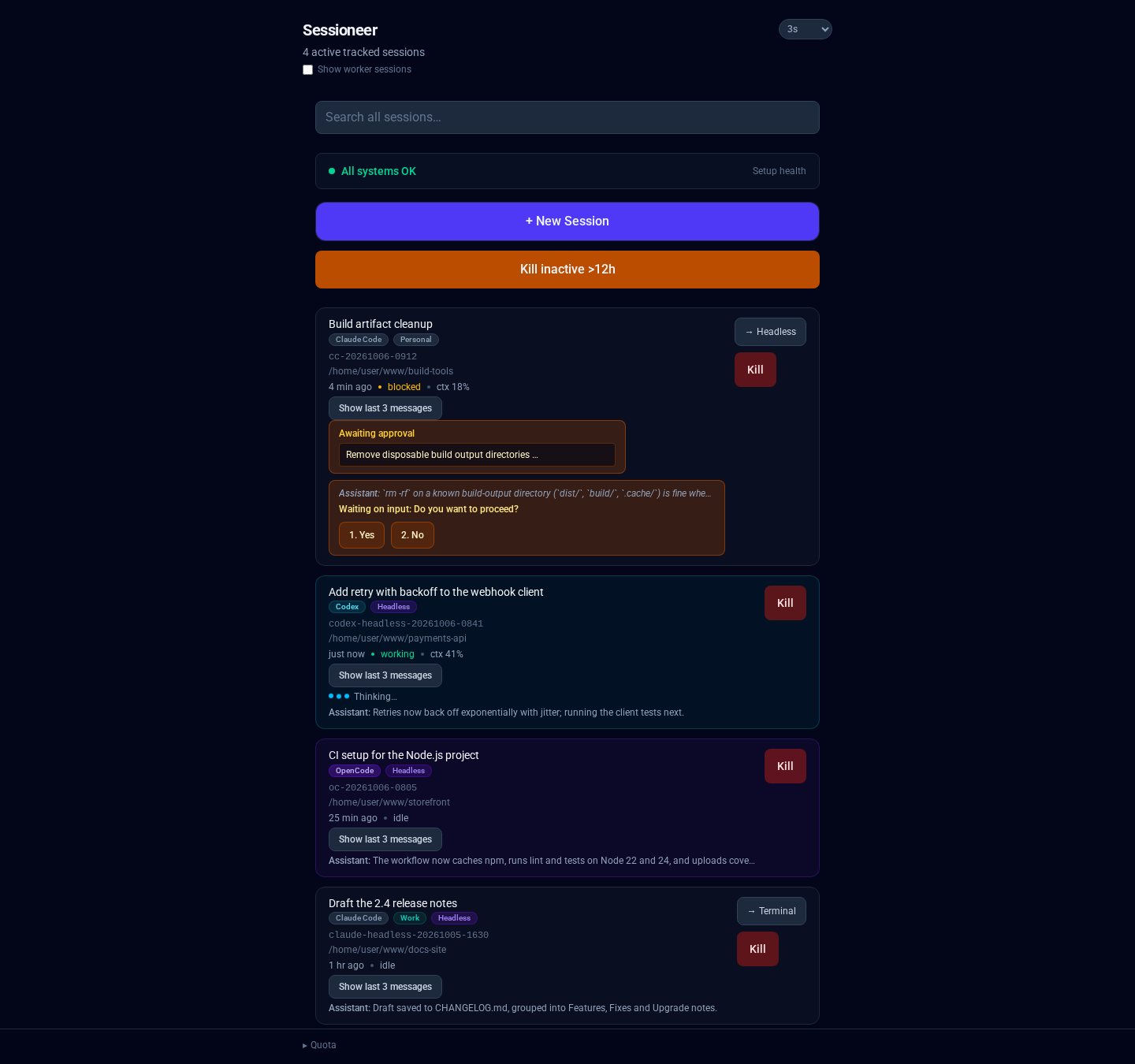
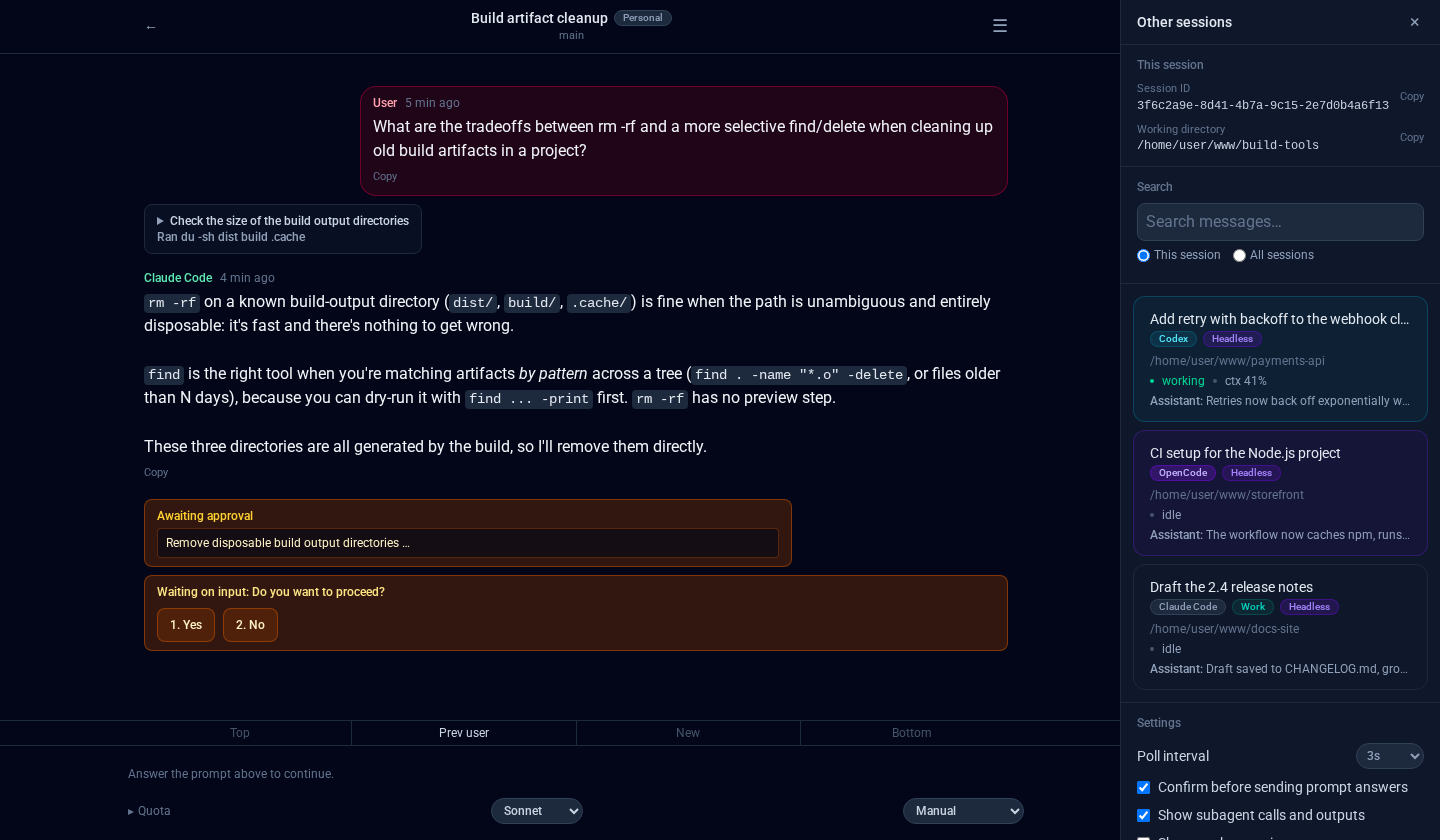
The dashboard lists tracked Claude Code, Codex, OpenCode, and Antigravity sessions currently running on your box, using tmux names or each headless agent's native session ID as appropriate.
A session waiting on a tool-permission approval, with the numbered choices (1. Yes / 2. No) answerable right in the browser:
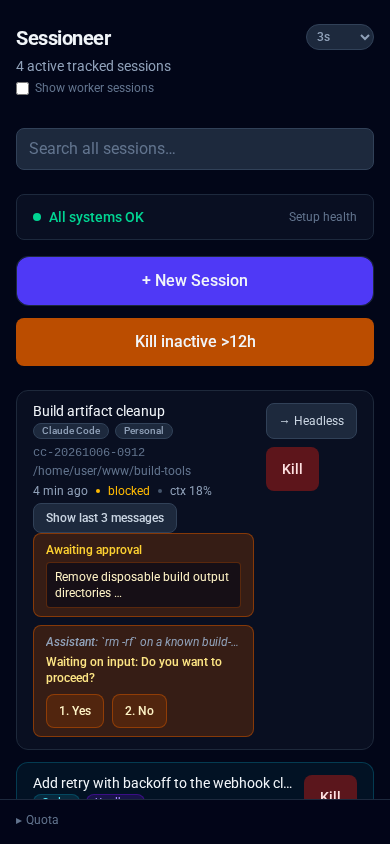
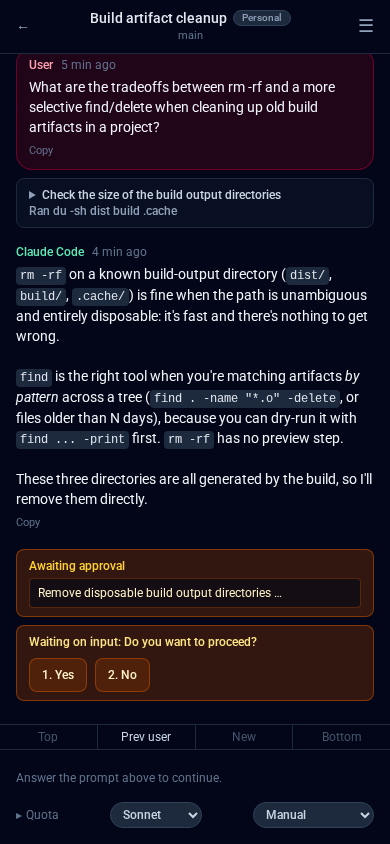
The dashboard and a blocked prompt, on a phone-sized viewport (this app is an installable PWA, meant to be added to an iOS/Android home screen):
What it does
For the exhaustive capability list and the per-agent coverage matrix (which agents support which feature, and where parity is partial), see
docs/features.md.
- Session list: name/title, working directory, relative last-active
time, attached/detached (tmux-backed sessions), live context-usage
percentage, and flow state (
idle/working/blocked). - Blocked-on-input warning: if a session needs a human decision (folder trust on first launch in a new directory, a tool-permission approval, a user input prompt), it shows in the UI with a count and link to jump directly to the blocked session.
- Approve/deny tool permissions: tool-use requires explicit approval in some agents (Claude Code, Antigravity); Sessioneer shows the blocked prompt in full (command, arguments, what's being written) and lets you approve or deny without touching the terminal.
- Answer
AskUserQuestion/UserPromptprompts: some agents ask follow-up questions during a run ("which one: A or B?"); Sessioneer shows them and collects answers. - Launch from the command line:
bin/sessioneerstarts, resumes, reuses, lists or stops headless Claude and Codex sessions (and prints the last known usage stats as JSON with--usage, or blocks until a session is idle and prints its final message with--wait), so scripts and other sessions can spawn a continuation you then follow in the dashboard (seedocs/cli.md). Put it on yourPATHby symlinking it, e.g.ln -s "$PWD/bin/sessioneer" ~/.local/bin/sessioneer. - Quick Prompt (optional): a bearer-token
POST /api/quick-promptstarts a new headless session from a phone shortcut (see "iOS Quick Prompt" below). - Rename sessions: a Rename button on each session card (dashboard, sidebar) and a pencil in the session page header set your own name for any session; leave it empty to go back to the agent's title.
- Kill sessions: stop a running session without killing the whole terminal/tmux.
- View transcripts: read the full conversation history for a session, including all tool calls and results.
- Mobile-first PWA: responsive design, works as an installed home-screen icon on iOS/Android, with Web Push notifications for blocked/stopped sessions (see "Web Push notifications" below).
Network binding (read this)
There is no dashboard login - the network binding is its access control. The optional Quick Prompt endpoint additionally requires its own bearer token. This app is intentionally not meant to be reachable from the public internet - it can create and kill agent sessions on your machine.
docker-compose.ymlpublishes the port as"${BIND_ADDR}:${APP_PORT}:80". SetBIND_ADDRin.envto your machine's actual LAN IP (e.g.192.168.1.50), never0.0.0.0. Leave it at the default127.0.0.1if you only want to reach it from the host itself (e.g. via an SSH tunnel).- If you put a reverse proxy in front of it, make sure that proxy is also LAN-only - it's easy to have this app's own bind address correctly restricted while an existing shared reverse proxy in front of it is bound more broadly, silently exposing this app anyway.
- The app only answers to
localhost,127.0.0.1,::1,BIND_ADDRand the hostnames inALLOWED_HOSTS(otherHostheaders get a 421), so a web page using DNS rebinding can't reach it. If you browse to it by any other name, such as a reverse-proxy hostname, add that name toALLOWED_HOSTS. - Consider a host firewall rule (
iptables/ufw/nftables) restricting inboundAPP_PORTto your LAN subnet as defense in depth.
Requirements
- Linux with systemd user services (
systemd --user) for the host agent. - PHP 8.3+ on the host, with
pdo_sqlite(php -m | grep sqlite) and, for a graceful shutdown of headless Claude sessions,pcntl. CI runs PHP 8.3, the minimum. - Composer, and Docker with Docker Compose.
tmux, if you use Antigravity (always tmux-driven), run Claude Code in a terminal instead of headless, or want OpenCode's tmux fallback.- At least one of the CLIs you plan to manage: Claude
Code, Codex,
OpenCode, or Antigravity's
agy. Sessioneer manages sessions for whichever of these you have installed; it doesn't install them.
Setup
Install and start the host agent before starting the container. Docker bind-mounts a source path that doesn't exist yet as an empty directory, so if the container starts first, the agent socket inside it is a directory instead of the real socket and every request fails with "Cannot reach host agent."
-
Clone the repo and install the host agent (runs natively under
systemd --user, no containers):git clone https://github.com/loki495/sessioneer.git cd sessioneer ./host-agent/install.shIt installs Composer dependencies, creates
host-agent/.envfromhost-agent/.env.example, records theclaudeit finds onPATHasCLAUDE_BIN, and enables the agent socket plus the services for each agent whose binary is set (the Claude headless manager, the Codex bridge, OpenCode serve). SetCODEX_BIN,OPENCODE_BINorANTIGRAVITY_BINinhost-agent/.env(which <cli>) for the agents you use, then re-run the script. It prints the fix if lingering is off, which the socket needs to survive logout and reboot.Check that the socket exists and is a socket (
sinls -la), not a directory:ls -la $XDG_RUNTIME_DIR/sessioneer-agent.sock -
cp .env.example .envand set:APP_GIDto the group the installer set on the agent socket (install.shprints it at the end).SESSIONEER_AGENT_SOCKET_HOSTto the socket from step 1, normally/run/user/<your-uid>/sessioneer-agent.sock.BIND_ADDR/APP_PORT; see "Network binding" above.
-
Build and start the container:
docker compose up -d --buildPHP/JS edits under
src/andpublic/never need a rebuild. -
Open
http://<BIND_ADDR>:<APP_PORT>/(http://127.0.0.1:8091/by default). -
The dashboard's health box checks the prerequisites and each agent's integration. Its Install hooks button merges Sessioneer's Claude Code and Codex hooks into your existing hook files, leaving unrelated hooks in place. The agent sections below cover the remaining per-agent steps.
Deploying behind a real web server instead of php -S: point its
document root at public/, nothing else. Apache: enable mod_rewrite and
use public/.htaccess as-is. nginx: add the equivalent of
location / {
    try_files $uri $uri/ /index.php?$query_string;
}
Intended use
Sessioneer is meant to be run by an individual, on their own machine, driving
agents signed in with their own account, API key or token. It is not built to be
hosted for other people or offered to third parties as a service, and it has no
user accounts to do that with. The Claude headless runtime runs your own
installed claude on your own login (see "Headless runtime" in
docs/features.md); Anthropic's Agent SDK terms do not let
a third party offer claude.ai login or its rate limits in their own product, so
check each provider's current terms before running Sessioneer for anyone but
yourself.
Architecture
For technical details on the container/host-agent split and major implementation decisions, see docs/architecture.md.
Agent-specific setup and behavior
The common install above is enough to run the UI, but each agent obtains identity, status, transcripts, prompts, and writes differently. These details matter when diagnosing an idle-looking session or a prompt that cannot be answered in Sessioneer.
| Agent | Runtime | Status / prompts | Extra setup |
|---|---|---|---|
| Claude Code | headless by default; tmux optional | tmux: Claude hooks, with narrow pane fallbacks for folder trust and AskUserQuestion UI state. Headless: the session process's own event stream, no hooks or pane |
Click Install hooks; host-agent/install.sh installs the headless manager once CLAUDE_BIN is set |
| Antigravity | tmux only | Hooks provide lifecycle and conversation identity; the live pane identifies approval dialogs | Install its global hooks; optionally enable its quota timer |
| OpenCode | opencode serve by default; tmux fallback |
Serve API + SQLite + global permissions plugin; tmux permissions also consult the live pane | Re-run host-agent/install.sh after setting OPENCODE_BIN |
| Codex | headless only | Bridge attached to the managed app-server daemon shared with Codex Remote (private app-server fallback); persistent queue + Codex hooks | Click Install hooks, trust them in Codex, and bootstrap Remote control when sharing with Codex Remote |
For detailed agent version compatibility and known quirks, see docs/agent-compatibility.md.
Claude Code
New Claude sessions run headless by default (below); the tmux runtime
(cc-* sessions) is the alternative. In tmux, five hooks in
~/.claude/settings.json (SessionStart, PreToolUse,
PermissionRequest, UserPromptSubmit, and Stop) maintain transcript
identity, flow state, permission details, mode, and the last response. The
installer merges only Sessioneer's entries and refuses to overwrite malformed
JSON. The health check treats $HOME, ${HOME} and a leading ~ as the home
directory, so a settings file kept in a dotfiles repo with portable paths still
counts as installed (the same goes for the Codex and Antigravity hook checks).
Already-running Claude sessions may need to be resumed or restarted
before newly-installed hooks take effect.
Permission approvals, free-text questions, multi-question
AskUserQuestion, message sending, escape, model/mode switching, and manual
tmux attach remain available. Folder trust and the currently-visible tab of
an AskUserQuestion are the deliberate pane-based exceptions because Claude's
hook payload does not contain enough UI state. Bare-process discovery and
Take over are currently Claude-only.
New Claude sessions run headless, with no terminal, unless you pick
Terminal (tmux) in the New Session form's "Runs in" list; the Headless
button on an archived Claude session, or the switch on a running session's
row, moves an existing conversation (plain Resume and Take over open a terminal
session). For a headless session Sessioneer runs the installed claude binary (claude -p, stream-json)
on your own logged-in claude.ai account, through the
sessioneer-claude-headless-manager.service that host-agent/install.sh
installs. This is not the Claude Agent SDK library, which uses an API key or
Claude Platform account and bills pay-as-you-go: Sessioneer keeps API-key
variables out of the process and stops it if Claude reports an API-key
credential. Details and limits are in docs/features.md;
after editing the manager's code, restart it with
systemctl --user restart sessioneer-claude-headless-manager.service.
Claude quota data is captured when a tmux session renders its configured status line and, for headless sessions, from the rate-limit events the manager sees; it can show unavailable until either has run once.
Multiple accounts: to run sessions under more than one Claude account
(e.g. a separate work login), add named profiles to
host-agent/config/agents.php, each with its own config_dir (the account's
CLAUDE_CONFIG_DIR) and optionally its own bin. Once configured, the New
Session form shows an Account selector; each configured account's hooks and
status-line quota capture need installing into that account's own
CLAUDE_CONFIG_DIR/settings.json the same way as the default account
above. A session's account is shown as a small badge on its row, header, and
archived view, and the quota footer shows one row per configured account.
Antigravity
Sessioneer starts ag-* sessions in tmux. Install the four global hooks
(PreToolUse, PostToolUse, PreInvocation, and Stop) from the repository
root with:
php -r 'require "vendor/autoload.php"; print_r(\HostAgent\Services\AntigravityHookService::install_session_hook());'
They are merged under the sessioneer group in
~/.gemini/config/hooks.json, leaving other groups untouched. Because this is
a global Antigravity configuration, the hooks fire for every agy process;
the scripts use SESSIONEER_SESSION_NAME to make non-Sessioneer sessions a
no-op. Reopen existing sessions after installing or changing them.
The hooks provide working/idle state, tool metadata, and reactive binding to Antigravity's real conversation ID. Antigravity does not expose an authoritative "approval is currently visible" event, so Sessioneer confirms and answers the actual approval dialog through the tmux pane. Model switching changes Antigravity's account-wide default, not only the current session. The optional quota poller is installed but disabled by default:
systemctl --user enable --now sessioneer-antigravity-quota-check.timer
OpenCode
With OPENCODE_BIN configured, host-agent/install.sh installs and enables
opencode-serve.service and sessioneer-opencode-events.service, and copies
host-agent/opencode-plugins/sessioneer-permissions.js to
~/.config/opencode/plugins/. Restart the server and any already-running TUI
sessions after installing or updating the plugin:
systemctl --user restart opencode-serve.service
Headless sessions are the preferred path: Sessioneer talks directly to the
serve API for lifecycle, messages, questions, and permissions. The tmux TUI is
retained as a fallback. OpenCode creates its ses_* ID only after the first
prompt; Sessioneer binds it reactively from opencode.db. The permissions
plugin records permission.asked events because the tested OpenCode version
does not expose reliable persistent permission state through its HTTP API.
The dashboard health section checks both the service and plugin file.
The events service listens to each tracked headless session's exact OpenCode
directory and records question prompts for Sessioneer's existing answer forms.
It reconnects independently of page visits; normal status polling preserves
pending event-fed questions. Question replies use their server request ID,
with a scoped legacy fallback where the v2 reply endpoint is unavailable.
Check the consumer with systemctl --user status sessioneer-opencode-events.service
and journalctl --user -u sessioneer-opencode-events.service.
OpenCode supports model selection but not Sessioneer's Claude-style manual/accept-edits/plan mode vocabulary. Its quota display combines local SQLite usage with the OpenCode Go usage endpoint when configured.
Codex: shared threads and ownership
Sessioneer never puts Codex in tmux. host-agent/install.sh installs and
enables sessioneer-codex-bridge.service, which owns a private, persistent
codex app-server --stdio connection for thread creation, the first turn of
an unmaterialized thread, bridge-owned prompt responses, model/effort settings,
and lifecycle operations.
Check or restart it with:
systemctl --user status sessioneer-codex-bridge.service
systemctl --user restart sessioneer-codex-bridge.service
For a thread that already has a persisted rollout, the compose box sends via
Codex's persistent codex queue --thread ... --message ... path. That makes a
thread writable from Sessioneer even when Codex Remote started it or currently
has it loaded. Queue writes are FIFO and deferred while a turn is active; they
do not steal the active turn or its prompt ownership. The first message of a
brand-new, not-yet-materialized Sessioneer thread is the one exception and is
sent through the bridge that created it.
To share threads with Codex Remote, its managed daemon must be running with remote control enabled:
codex app-server daemon bootstrap --remote-control
codex app-server daemon version
Use the absolute CODEX_BIN path here if codex is not on your shell's
PATH.
Rebootstrapping the managed daemon does not delete persisted Codex sessions, so they remain resumable, but it can interrupt an active turn. Restarting the Sessioneer bridge likewise clears any stale pending prompt because its response ID died with the old connection.
The Install hooks button adds Sessioneer's observer to
~/.codex/hooks.json for SessionStart, UserPromptSubmit,
PreToolUse(request_user_input), PermissionRequest, PostToolUse, Stop,
Interrupt, and SessionEnd. These hooks are intentionally passive: they
only update Sessioneer's status database and always return a neutral response.
Codex requires new or changed non-managed hooks to be reviewed and trusted in
/hooks; changing a hook definition changes its trust hash. Reopen or resume
sessions that were already open when the hook configuration changed. See the
[official Codex hooks documentation](https://devel