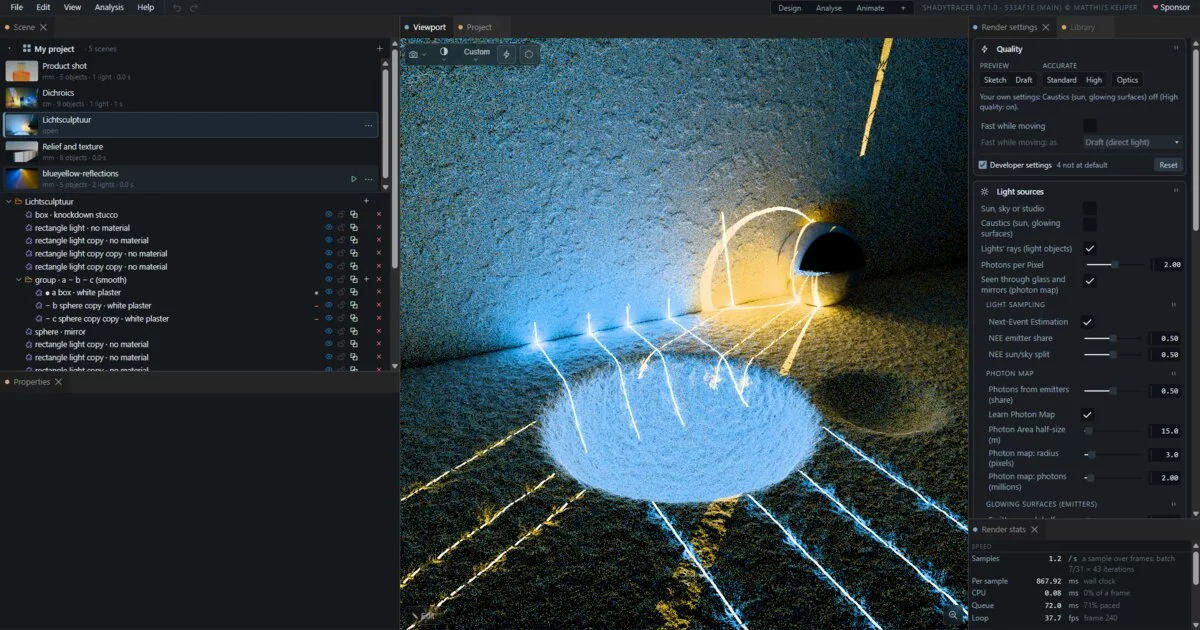

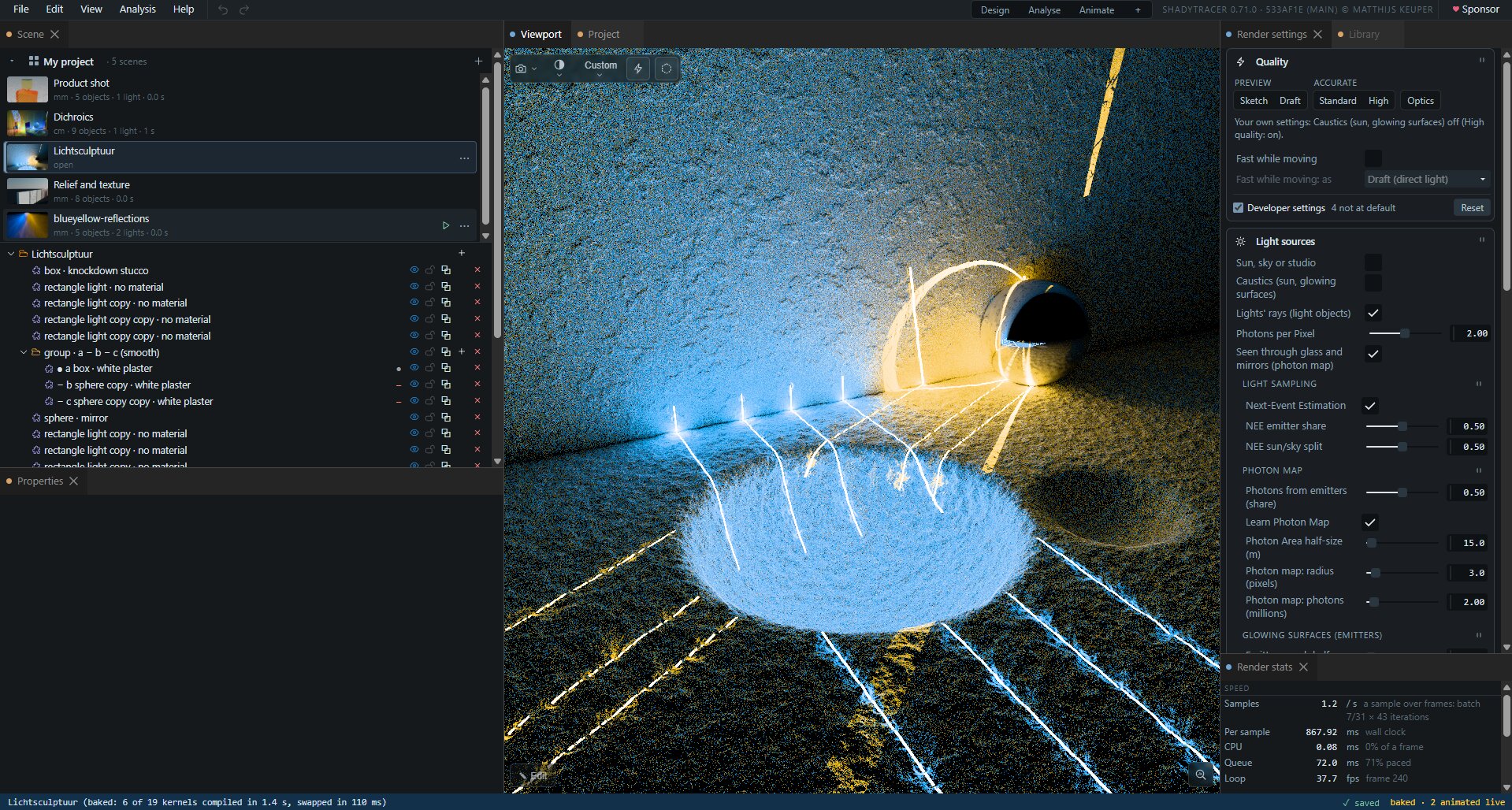
Physically based light in the browser. A WebGPU path tracer that renders in real units, candela per square metre and lux, with a scene builder, a measuring tool, and an optics bench for LED and luminaire design that traces the same scene the picture shows.
Nothing to install and no server. The page runs on your own graphics card.
Run it: https://shadytracer.com · Open source, MIT · ♥ Sponsor.
In development. How far along each feature is: ✓ checked against a closed-form answer on real hardware · preview built and tested without a GPU, not yet confirmed on real hardware · unmarked: in use.
FEATURES.mdis the full ledger, with the evidence for every line.
Contents
- Highlights
- Quick start
- The raytracer
- Checked against known answers
- What it is built on
- File formats
- Not there yet
- Repository layout
- Working on the code
- Licence and credits
Highlights
- Light in physical units. Luminance in cd/m², illuminance in lux, a sun and sky given by the illuminance they deliver. A white floor reads its textbook value to 0.1 % ✓
- Caustics through glass, by tracing photons from the sun and learning where they are worth sending ✓; and what is seen through glass or in a mirror, lit right, by a photon map
- Any glowing surface is a light, with nothing declared: found by the paths that hit it, sampled directly, and sending photons for its own caustics ✓
- Dust in the air: a haze box whose air scatters light in real units, so a beam shows in it; it loses no light, to 0.02 % ✓
- Glass the way glass behaves: dispersion that splits white light in a prism, dichroic and anti-reflection coatings, colour that deepens with thickness; and a camera lens with depth of field
- Lux and luminance as false colour, with an error bar on every pixel, and a measure tool that reads lux, uniformity and colour temperature off any surface
- A scene builder where every shape is code you can edit, with compile errors shown at your own line and column, move handles in the picture, CSG, modifiers and undo
- An optics bench over the same scene: LEDs, lenses, detectors; refraction and Fresnel ✓; far field in candela with beam and field angles, illuminance maps in lux, CCT and Duv
- Zemax ray files as light sources preview
- STEP and STL parts imported as shapes: each solid in the file becomes boxes, cylinders, cones, spheres, tori and rounded prisms joined by union and subtract, exact, with analytic normals; a spherical lens from STEP is its two spheres
- 3MF with colour for multi-colour 3D printing, straight from the scene
- A docking workspace: pop-out windows for a second monitor, a command palette, every setting by name
- Keyframe any setting and render it to MP4 or GIF
- Help inside the program (F1), and a tutorial on how the renderer works
Quick start
Open https://shadytracer.com in a browser with WebGPU and press Open ShadyTracer (the app itself is https://shadytracer.com/app.html). Or run it from a clone:
git clone --recursive https://github.com/lampmaker/ShadyTracer.git
cd ShadyTracer
python3 -m http.server 8000
Then open http://localhost:8000/app.html (http://localhost:8000/ is the site's front page, with a
button to it). --recursive matters: TinyWebGPU and GUISTUFF (the property
table and the tree view) are git submodules, and without them the page does not start
(git submodule update --init mends a clone made without it).
What it needs:
- A browser with WebGPU. TinyWebGPU's README gives Chrome/Edge 113+, Firefox 141+ on Windows, Safari 26+. The benchmark's runs were made in Chrome 154 on Windows and the dichroics run in Chrome 155; the other results do not record a browser.
- A real graphics card. The results here are from NVIDIA cards: Pascal (the benchmark names a GTX 1080 Ti) and Ampere. A software adapter is for tests only.
- The pages served over http: opening the file directly (
file://) does not work, because WebGPU needs a secure context, andlocalhostcounts as one. - No build step, no dependencies, no network once loaded. Every library is in the repository or one of its two submodules.
First steps in the raytracer. A first visit starts on the First steps example; after that, on your own project, as you left it -- it is kept in the browser as it changes. Over the Scene tree a card for each scene of the project: ▶ or a double-click opens one. The project's name there opens the Project panel: your projects, and the examples to add a copy of. Select an object in the picture and drag its handles; change its material in Properties; switch the view to lux on surfaces with the icons in the drawer at the picture's bottom right; press Ctrl K and type what you are looking for, or F1 for the help.
The raytracer
The workspace
- A menu bar, a dock of panels and a status bar. Fourteen panels, and one more for each optics chart you open. Every panel can be dragged, stacked, floated, maximised, closed, or popped out into a window of its own, for a second monitor; the picture stays in the main window.
- Three layouts: Design (the tree and properties on one side of the picture; Render settings, the library and Render stats on the other; the Analysis pane a tab that Analysis › Analysis setup shows and hides), Analyse (the optics charts) and Animate (the timeline). Save your own named layouts; the last one comes back on the next visit.
- Command palette (Ctrl K or Ctrl Shift P). It finds every command and every setting, and
exposure = 2sets one. - Parameters panel: every renderer and scene setting with its value and unit, typed exactly; ⌖ jumps to its control; right-click copies its path for a script.
- Help (F1, or Help › Contents): a welcome, two tracks (modelling and rendering, ten pages; optical design, eight) and five reference pages made from the program's own lists, with an explainer of distance fields whose ray and sliders you can drag. Search; links that open an example, run a command or point at a panel.
- Render stats: samples a second and where a frame's time goes, the samples averaged, the photon map's state, the exposure and the surface tolerance in force.
- The status bar shows progress for compiles, library pictures and video, whether the project is saved, and whether the scene shown is baked (below). Help › Report copies a diagnostic report of the picture's light and the page's files, and files the browser has cached stale are found and reloaded at start-up.
Rendering
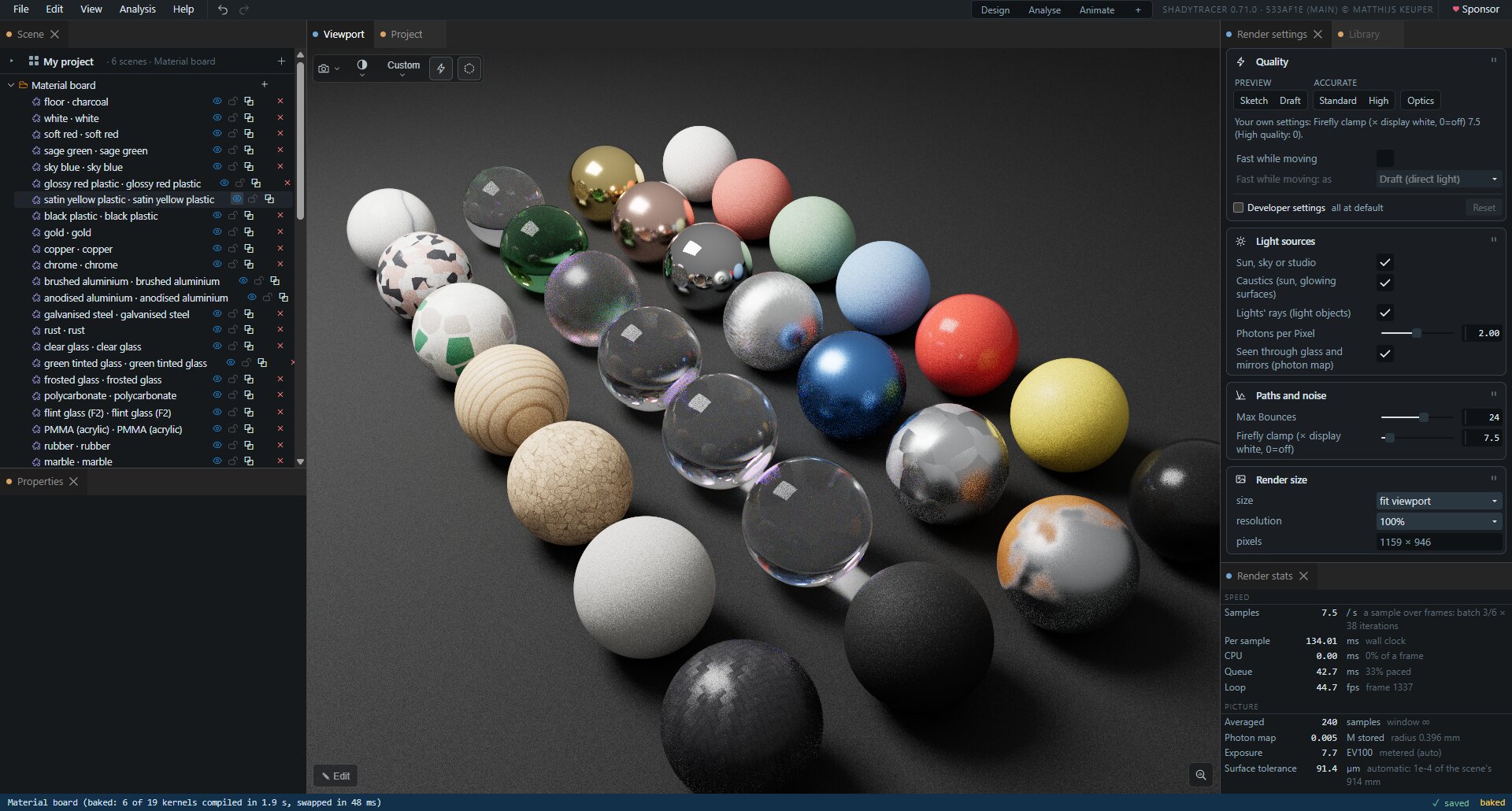
How light is found
- Wavefront path tracing on the GPU. Rays live in GPU buffers; a march kernel advances them, a shade kernel bounces them, and GPU-side counters drive indirect dispatch, so the CPU never waits to learn how many rays are alive.
- Next-event estimation with multiple importance sampling toward the sun and the sky: 3.8× less noise, unbiased ✓
- Light tracing for caustics. Photons from the sun go through glass and off mirrors and connect to the camera where they land. Where photons are worth sending is learned, on a 128 × 128 map. Unbiased to 0.03 %; in the caustic, equal noise about 40× sooner than without it ✓
- Glowing surfaces are lights, with nothing declared. Paths that hit them record where they are; the renderer then samples them directly, with multiple importance sampling, and sends photons from them for their own caustics. Every check within 0.31 % ✓; a light and the same surface made a glowing object give the same picture ✓
- Seen through glass and in mirrors: a photon map. Light tracing joins a photon to the camera with a straight line, which cannot pass through glass or bounce off a mirror. So photons are also stored where they land past glass or off a mirror, and gathered by the camera's own rays that reach that surface the same way, within a radius that shrinks every sample. A floor through a window and a caustic in a mirror are lit as they should be. On by default (Light sources › Seen through glass and mirrors), and idle when nothing in view is seen that way.
- Dust in the air: a haze box. The air inside one box scatters light: a mean free path in metres, a colour, and how far forward it scatters (Henyey–Greenstein g). Beams show in it, lit by light sampling and by photons; glass and water inside the box stay clear. Its values change live. Albedo-1 dust loses no light: within 0.024 % with next-event estimation, 0.002 % without ✓
- Russian roulette, unbiased ✓
- Signed-distance scenes: every surface is exact distance code, so a sphere is a sphere at any zoom, and there are no meshes to tessellate.
Quality and speed
- Five presets, on the Render settings panel and the view's toolbar: Sketch (a flat light, no shadows), Draft (the direct light at the first diffuse surface; glass and mirrors still followed), Standard, High (up to 24 bounces and twice the photons), and Optics, which traces the lights' rays through lenses and mirrors to the first diffuse surface, where its floor reads the closed form to within 0.6 % ✓. Lamps only lights the view by the scene's own lights and glowing objects, the sun and sky off.
- Max Diffuse Bounces, beside Max Bounces: a cap on the bounces off matte and glossy surfaces and dust only, so mirrors and glass are still followed; at 0 the picture is the direct light, through lenses and mirrors too. And a Dispersion switch, for the picture only.
- ⚡ Fast while moving: Draft or Sketch while the camera, a handle or a value moves, the full picture again when it stops.
- The bake: once your edits stand still, the scene is compiled again with its values as constants and swapped in, quicker to render; the status bar says baked. A value flagged animated stays live in it.
- Heavy scenes stay responsive: a slow sample is spread over several frames.
- Renders of any size without tiling: the ray budget is capped by memory, and a larger image simply takes more samples to cover.
- Bounding boxes measured on the GPU, far objects skipped: the heaviest bundled scene takes 3.95× less GPU time per sample with them (measured, Ampere).
- Shader compiles run off the main thread, so a heavy scene does not freeze the page.
Materials
- One layered model for everything: GGX microfacets sampled by their visible normals, exact dielectric Fresnel from the index of refraction, Kulla–Conty energy coupling between the coat and the base, and multiple-scattering metal. Energy is conserved to 0.04 % (the white furnace test) ✓, and sampling agrees with evaluation ✓
- Presets: diffuse, plastic, metal, mirror, glass, glowing.
- Glass in colour, and in colours: a colour depth absorbs through the glass's thickness (Beer–Lambert); an Abbe number disperses it, so a prism splits white light; thin-film coatings (dichroic, beam splitter, anti-reflection) reflect by wavelength and angle, averaged per colour channel.
- Anisotropic surfaces along a grain (brushed, turned, radial) ✓; visible brush streaks.
- Any material field can be code: checkers, stripes and brushed grain ship as examples.
- A noise library for surfaces: value, gradient, fBm and Worley noise, each with its analytic gradient and a proved or measured bound on its slope, so a displaced surface never lets the march step through it.
- Rough (frosted) glass works; its furnace reading (0.944) is still an open question.
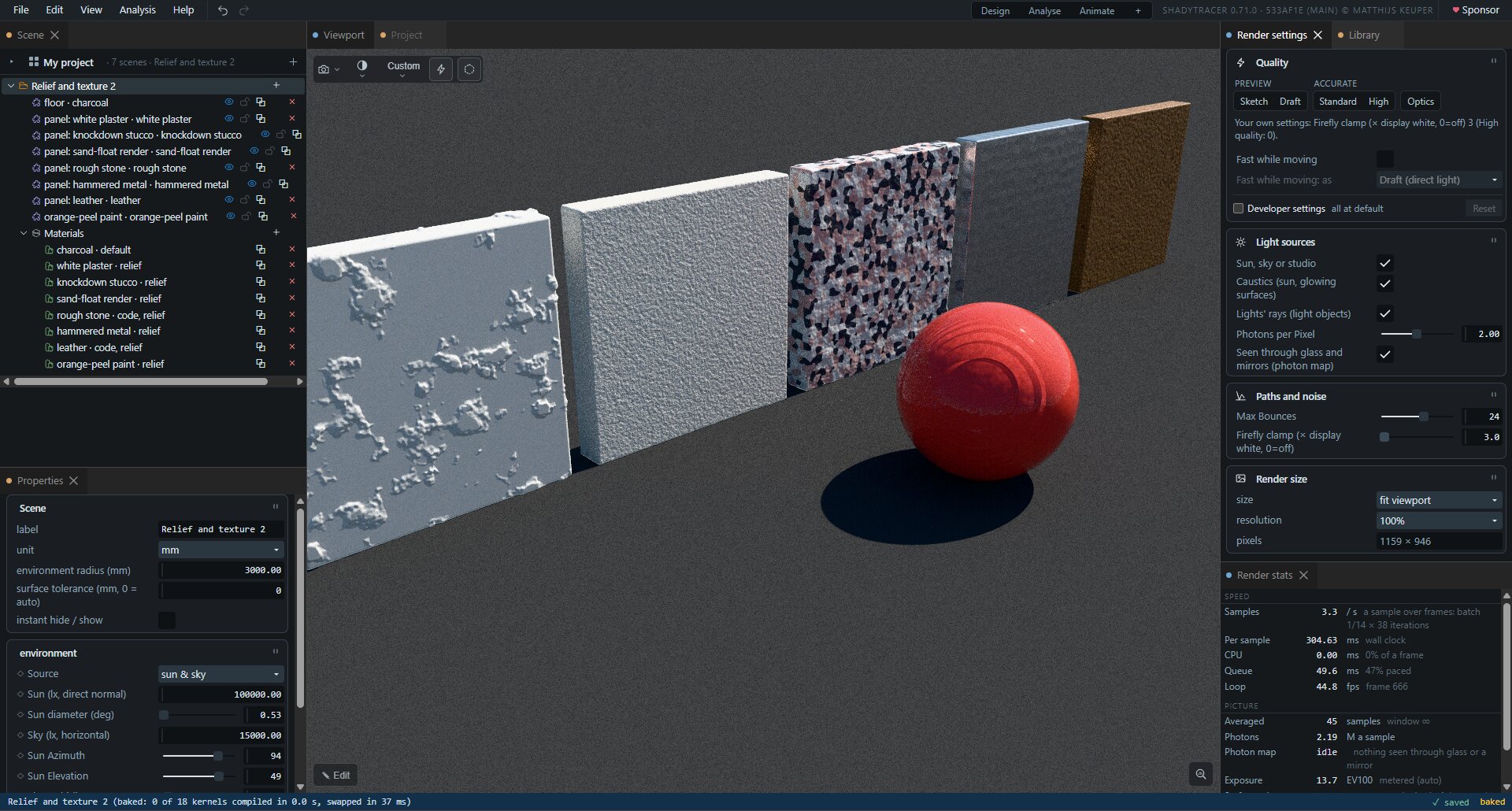
Light in physical units ✓
- Luminance in cd/m², illuminance in lux, everywhere. A white floor under sun and sky reads ρE/π to 0.1 %, under every light and every sampling strategy ✓
- The sun is its direct normal illuminance (default 100 000 lx) at its real angular size (0.53°), so a bigger sun makes softer shadows, not a brighter picture. The sky is the illuminance it puts on the ground (default 15 000 lx), shaped by a Rayleigh and Mie scattering model and normalised on the GPU. Turbidity ✓
- A studio light: a set illuminance, a share from above and a tint.
- Glowing materials in cd/m².
- Scene units m, cm or mm; every numerical tolerance follows the scene's size, so a 5 cm lens and a room both work.
- Colours outside the display's gamut are kept exactly and clipped once, at the display: three LEDs mixed to 4000 K read 3999.9 K ✓
The picture
- Exposure in EV100, metered on the GPU with highlight protection, eased so it does not shimmer; compensation; meter and lock.
- Seven tone curves: clip, PBR Neutral (the default), AgX, AgX punchy, ACES, Reinhard, Hable.
- Save a PNG up to 16 384 px on a side (or what the graphics card allows) with up to 16 384 samples; abortable. The render is kept as light, so its exposure, tone curve and grading are chosen on a preview afterwards, and saved as often as wanted, each file named with the time it was saved.
- Perspective or orthographic camera, orbit or walk, and a lens: an aperture and a focus distance, for depth of field -- or Pick focus, a press on the picture focusing on what is under the mouse preview. Each scene keeps its own camera and exposure.
Light as numbers
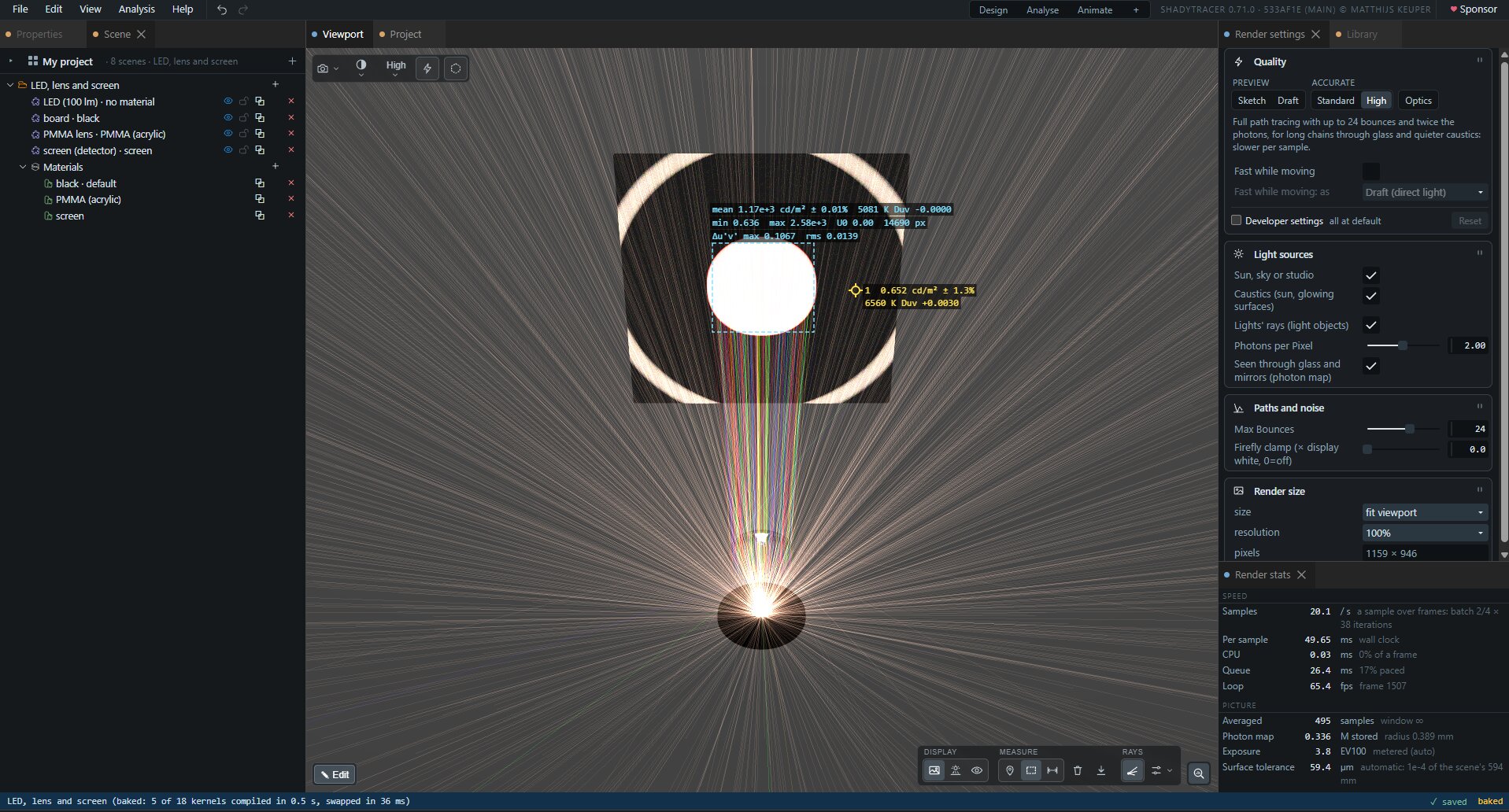
- Three views, one icon each in the drawer at the picture's bottom right: photographic; lux on surfaces, every visible surface's illuminance whatever its material; luminance in cd/m², the picture itself as numbers. Both measuring views draw a logarithmic false colour with bands and a legend.
- An error bar on every pixel. The cursor reads cd/m² or lux ± %, and how many samples' worth that is.
- The measure tool:
- Pins that stick to the surface you click and re-read as the picture converges;
- an area: its mean ± error, minimum, maximum and uniformity U0;
- each reading's colour as CCT + Duv, or CIE xy away from white, and an area's Δu′v′ spread;
- a ruler: points on surfaces with their x, y, z, the distances between them, and each stretch's steps in x, y and z drawn in red, green and blue; a drag moves a point, or turns the view;
- CSV of everything.
The scene builder
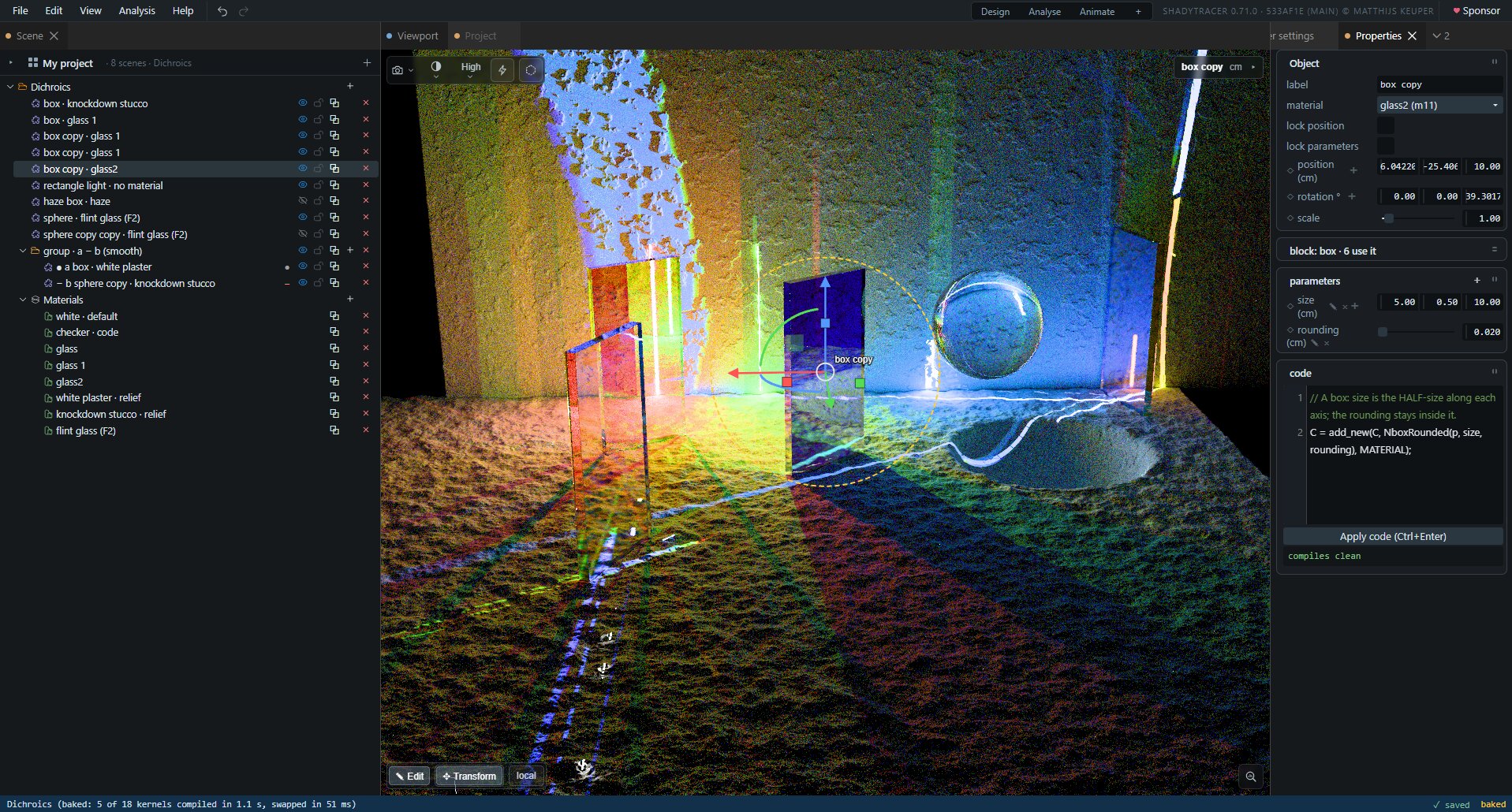
- Projects of several scenes, each with its environment, its objects in groups, its materials, and its own camera, exposure, surface tolerance and timeline. Over the tree, one line for the project and a card per scene, with its last picture and how long it took to open: a click shows it in Properties, ▶ or a double-click opens it (a compile), its ⋯ duplicates, exports or deletes it, a drag reorders, and a tree row dropped on it is copied there (Shift: moved). The tree shows the scene being worked on, its row the root. Undoing a change to the list of scenes stays on the scene being worked on.
- Projects kept in the browser, saved as they change -- there is no Save: a reload comes back to the same scene, camera and settings. The Project panel (the project's name, or File › Projects…) lists them (open, new, rename, duplicate, download, delete), this project's scenes and the examples. File is five rows: New project, Projects…, Import from file…, Export ▸ (a scene, the project, a 3D print), Save picture…. A second tab on a project works on its own copy.
- Import STEP and STL (File › Import from file…, or drop the file on the page): each solid in
the file becomes a group of the builder's own shapes -- boxes, cylinders, cones, spheres, tori and
rounded prisms joined by union, intersect and subtract -- converted exactly from the faces'
surfaces, an STL's fitted back from its facets first; editable like anything built by hand. It
stands on the floor, its axes the file's. A freeform (B-spline)
face, a mesh that is not closed or a scan is refused by name, with why
(
roadmap/IMPORT.mdsection 11) - Twenty-six shapes in three groups, each an editable piece of code from the start:
- Primitives: sphere, box, cylinder, capsule, torus, cone, round cone, pyramid (a rectangular base and top: an apex or a frustum), prism (its number of sides a live slider), octahedron, capped torus, link, tube, dome (standing on its base), plane;
- Optics: lens (diameter, thickness, two signed radii), aspheric lens (a radius, a conic constant and a4 to a10 on each face, typed from a datasheet), Fresnel lens, parabolic reflector (its focus at its origin), rectangle and disc (detectors, limiters);
- From points: extrusion, revolution, bent tube, light guide, twisted bar; or a blank one.
- Lights, a haze box and an export box are nodes in the tree too, placed and stretched with the same handles.
- Shapes from points: a profile parameter is an outline, one point a line --
x, y, and a fillet radius to round that corner -- which a node's code extrudes or revolves; a path parameter is an open line,x, y, zand a fillet a point, which it sweeps a tube or a pro