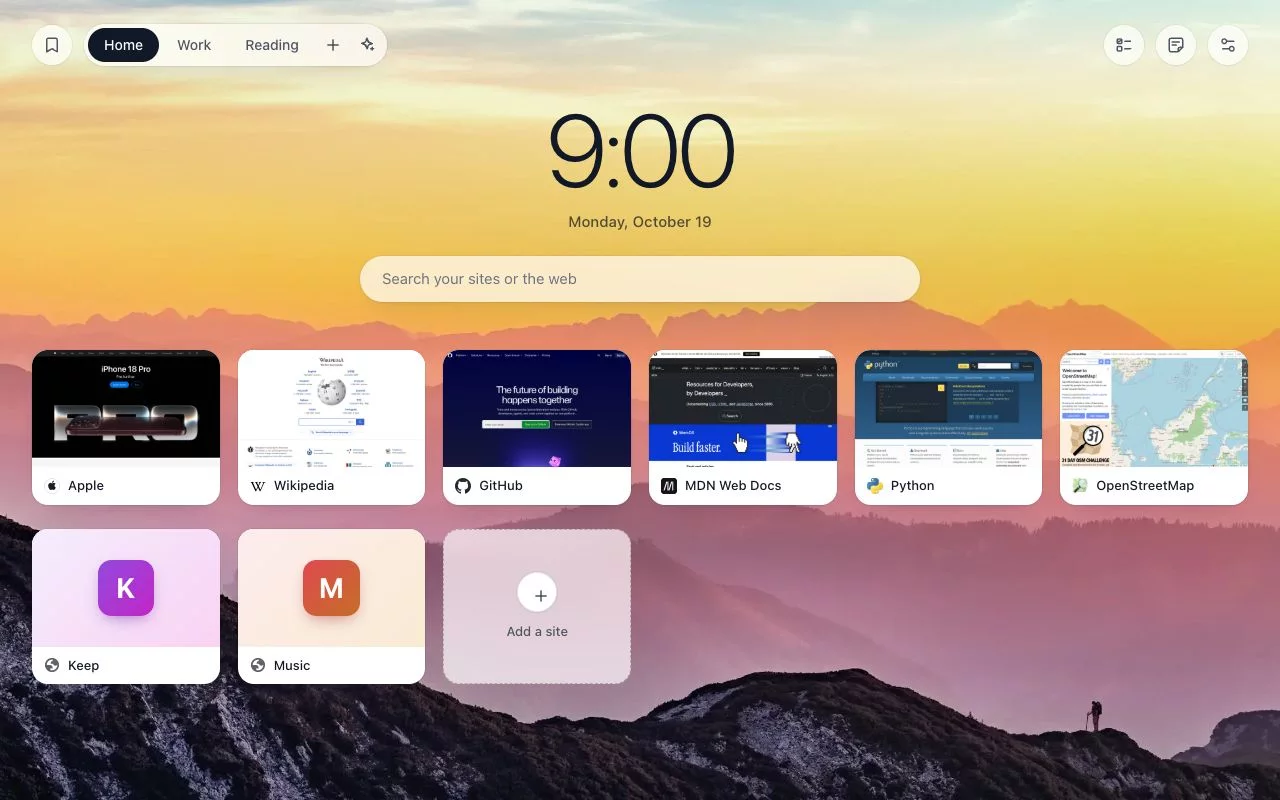
A speed dial for the new tab page of Chrome, Edge and Firefox: your sites as a grid of thumbnails, in groups and folders.
Chrome · Edge · Firefox · Site and guide · Privacy policy · 中文
What is here
src/ is the extension as the stores get it: plain JavaScript, no build step, no minifier, no libraries. Each version sent to the stores has a tag here (v0.4.1), so what changed between two versions is a git diff between two tags.
Checking a store package against this repository
Unpack the package your browser installed and compare it with the tag of the same version.
- Chrome, Edge: the package is
src/. The store adds a_metadata/folder and lines of its own tomanifest.json(Edge:update_url). - Firefox: the package is what
npm run zip:firefoxmakes:src/with a few lines ofmanifest.jsonchanged for Firefox (the script is inpackage.json). Mozilla adds aMETA-INF/folder.
Every other file is the same, byte for byte.
Running it from source
- Chrome, Edge:
chrome://extensions→ Developer mode → Load unpacked →src/. - Firefox:
npm run zip:firefox, thenabout:debugging→ This Firefox → Load Temporary Add-on →build/firefox/manifest.json.
In Chrome and Edge a copy loaded this way has another extension id, so Google refuses its sign-in for the Drive backup.
What leaves the browser
Dials, thumbnails and settings are kept in the browser's own storage (store.js). There are no ads, analytics or tracking. The code talks to nexuscortex.dev, to Google (only for the Drive backup), in Firefox to your dials' own sites for their icons, and to Infinity New Tab's icon servers when you import one of its backups; grep -rn "https://" src/*.js lists every address.
Without you turning anything on:
| What | Where it goes | Code |
|---|---|---|
| Sync (on unless you turn it off) | The dial list (addresses, titles, groups, folders), the settings for how the page looks (not a background you uploaded), your notes (their text; pictures in them stay on the computer) and your to-dos go into the browser's own sync storage for extensions. None of it reaches nexuscortex.dev. | sync.js, notes.js, todos.js |
| Site icons, in Firefox only | Firefox lends extensions no icon cache, so each dial's site is asked for its /favicon.ico. Chrome and Edge use the browser's cache and ask nobody. |
newtab.js |
| Removing Tabdial | The browser opens a feedback page; its address carries the version number and nothing else. | background.js |
Only if you use it:
| What | Where it goes | Code |
|---|---|---|
| Sync code (between browsers) | The dial list, the look, notes (with their pictures), to-dos, thumbnails and site icons go to nexuscortex.dev, encrypted with a key made from the code, which never leaves the browser. | sync.js |
| Teams | A team's groups, their pictures, its name and its members' names go to nexuscortex.dev, encrypted with a key that travels in the invite link's # part, which browsers never send to a site. |
team.js |
| Google Drive backup | One file in your own Google Drive, between the browser and Google. The drive.file scope reaches only files Tabdial made. |
drive.js |
| Sort (comes with the unlock) | When you click Continue: the hostnames and titles of the dials in the group being sorted, and your other groups' names with a few of their hostnames, go to nexuscortex.dev, which passes them to an AI service (TypeSafe). | sort.js |
| The unlock | A random purchase id, a license key or, if you unlock by signing in with Google, a Google ID token goes to nexuscortex.dev. The payment itself is on Stripe. | pay.js |
| Jump with browsing history | Read on your computer; it goes nowhere. | jump.js |
| The bookmarks and history drawer | The browser's bookmarks and the last week's history, once you click Allow there: read on your computer; they go nowhere. | newtab.js |
| Importing an Infinity New Tab backup | Each site's icon is fetched once from Infinity's servers, from the links in the backup file, and kept in the dial. Nothing of yours is sent. | newtab.js (fetchIcons) |
| To-do reminders | A to-do with a due time: at that time the browser shows a notification with its text, once you allowed notifications at "Add a time". Nothing is sent. | background.js, todos.js |
The privacy policy says what the site keeps of each.
Permissions. manifest.json asks at install only for what asks you nothing: storage, unlimitedStorage, favicon (Chrome, Edge), activeTab, alarms, search and fontSettings (Chrome, Edge: the list of installed fonts for Settings > Appearance > Font; Tabdial changes no font setting). topSites, identity, history, bookmarks and notifications are optional: requested when you click the feature that needs them, and given back when you turn it off.
What is not here
The server side of nexuscortex.dev (sync codes, teams, Sort, purchases) is not in this repository. What it receives is what the code here sends.
License
Copyright © 2026 NEXUSCORTEX LLC.
The code is free software under the GNU General Public License, version 3.
Two things are not covered by it:
- The name and icon. "Tabdial" and its icon stand for this project's own releases. A changed version must be published under another name and icon.
- The background photos in
src/photos/come from Unsplash under the Unsplash License: lake by John Lee, sea by Matt Hardy, fog by Paul Pastourmatzis, sunset by simon, forest by Dan Otis, dunes by Mike Iukhtenko, aurora by Vincent Guth, stars by Benjamin Voros.
Questions
Open an issue, or write to support@nexuscortex.dev.
中文
Tabdial 是 Chrome、Edge、Firefox 的新标签页扩展:把常用网站排成带缩略图的网格,可以分组、建文件夹。
这里有什么。 src/ 就是上传到商店的扩展本身:普通的 JavaScript,没有构建步骤,没有压缩混淆,没有第三方库。每个上架的版本在这里有一个标签(如 v0.4.1),两个版本之间改了什么,对比两个标签就能看到。
怎么核对商店里的包。 把浏览器装好的包解开,和同版本的标签对比:
- Chrome、Edge:包就是
src/,商店会加一个_metadata/文件夹,并在manifest.json里加它自己的几行(Edge 是update_url)。 - Firefox:包是
npm run zip:firefox的产物,即src/加上manifest.json里为 Firefox 改的几行(脚本在package.json里);Mozilla 会加一个META-INF/文件夹。
其余文件逐字节相同。
什么会离开浏览器。 网站、缩略图和设置都存在浏览器自己的存储里,没有广告、统计或跟踪。
- 不用你打开就会发生的:
- 同步(默认开,可在设置里关):网站列表、外观设置(你上传的背景图除外)、笔记(文字;里面的图片留在本机)和待办,存进浏览器自带的扩展同步存储,不经过 nexuscortex.dev。
- Firefox 里向每个网站要它的
/favicon.ico(Chrome、Edge 用浏览器的缓存,不发请求)。 - 卸载时浏览器打开一个反馈页,地址里只带版本号。
- 你用了才会发生的:
- 同步码:列表、外观、笔记(含图片)、待办、缩略图和网站图标加密后存到 nexuscortex.dev,密钥由同步码在浏览器里算出,不离开浏览器。
- 团队:团队的分组、图片、名称和成员名加密后存到 nexuscortex.dev,密钥在邀请链接的
#后面,浏览器不会把这部分发给网站。 - Google Drive 备份:存到你自己的 Drive,只在浏览器和 Google 之间。
- Sort(付费解锁):点“继续”时,把要整理的那个分组里网站的域名和标题、其他分组的名称和几个域名,经 nexuscortex.dev 交给一个 AI 服务(TypeSafe)。
- 解锁:一个随机的购买号、许可密钥,或用 Google 登录解锁时的 Google ID token,发给 nexuscortex.dev;付款在 Stripe 上完成。
- Jump 读浏览记录:只在本机读,不发出去。
- 书签和浏览记录抽屉:你在抽屉里点“允许”后,读浏览器的书签和最近一周的浏览记录,只在本机读,不发出去。
- 待办提醒:给待办设了截止时间后,到时间浏览器弹出通知(在“加时间”时允许通知);什么也不发出去。
- 导入 Infinity 新标签页的备份:按备份文件里的链接,从 Infinity 的服务器取一次每个网站的图标,存进网站卡片;不发送你的任何东西。
网站对每一项保留什么,见隐私政策。
权限。 安装时只要不需要你确认的权限:storage、unlimitedStorage、favicon(Chrome、Edge)、activeTab、alarms、search 和 fontSettings(Chrome、Edge:为“设置 > 外观 > 字体”列出电脑上装的字体,不改任何字体设置)。topSites、identity、history、bookmarks、notifications 是可选权限:点到需要它的功能时才申请,关掉功能就交还。
这里没有什么。 nexuscortex.dev 的服务端(同步码、团队、Sort、购买)不在这个仓库里。它能收到的,就是这里的代码发出去的。
许可。 版权归 NEXUSCORTEX LLC 所有,代码以 GPL-3.0 发布。有两样不在其内:“Tabdial”这个名字和图标(改过的版本请换名字和图标再发布);src/photos/ 里的背景照片来自 Unsplash,适用 Unsplash License,作者见上面的英文部分。