
AI-powered log analytics for self-hosted teams.
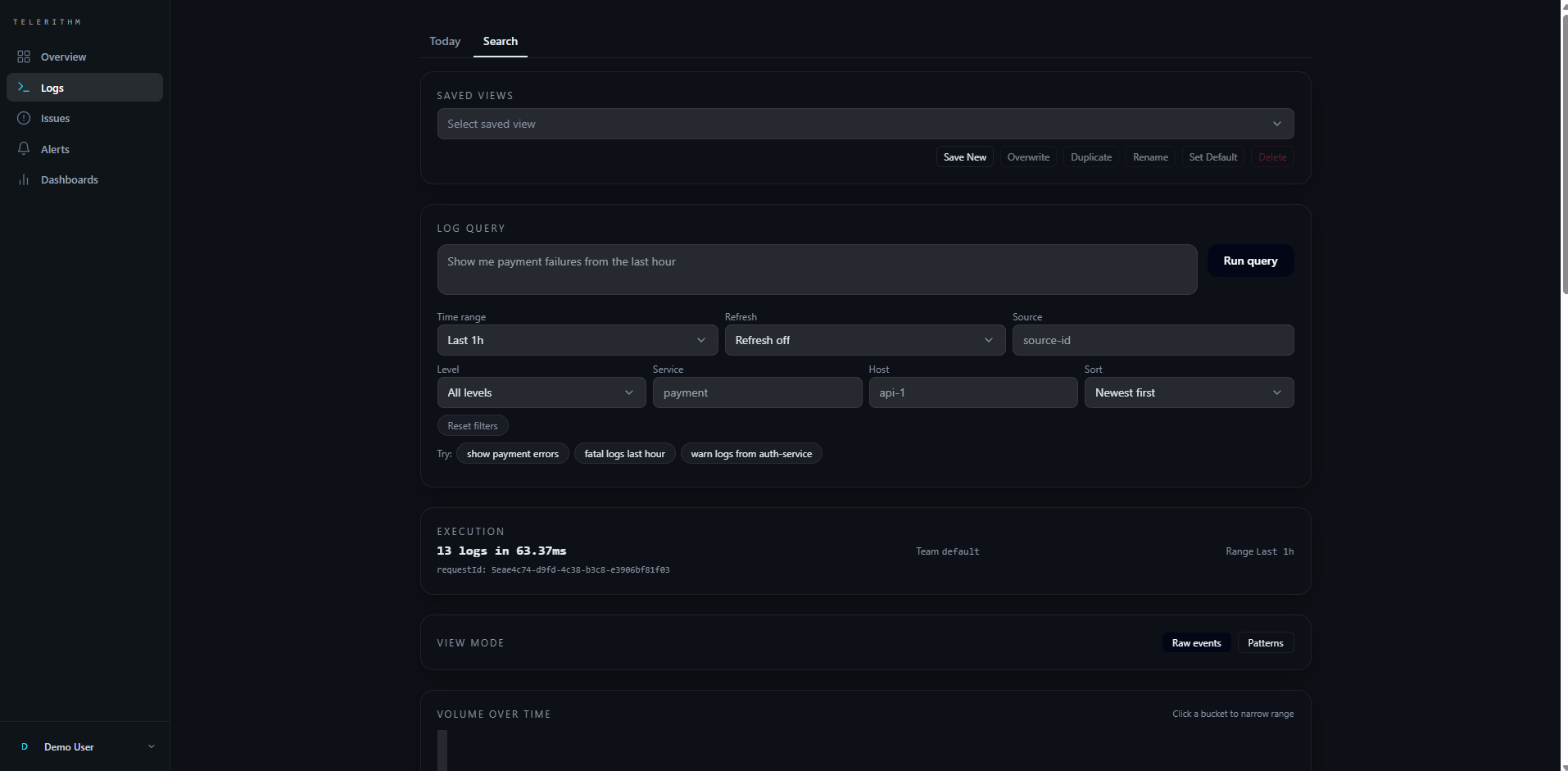
Telerithm turns plain-language questions into structured queries over your logs. Instead of grepping millions of lines or hand-writing SQL, you ask "show me payment errors from the last hour" and the AI translates it into filters, a time range, and a search plan you can review and edit. Self-hosted, single-tenant by default, OpenAI-compatible (cloud or local LLM). Backend is Node.js/Express with Prisma over PostgreSQL and ClickHouse for log storage; frontend is Next.js. See docs/architecture.md for how the pieces fit together.
Key features
- Natural-language search with an editable AI-generated filter plan
- Real-time SSE log streaming, Today view, log detail with surrounding context
- Saved views, faceted search, histograms, automatic pattern clustering
- Log ingestion over HTTP: structured JSON entries or raw JSON, syslog (RFC 5424/3164) and plain-text lines, with reference shippers for Docker container logs
- Alert incidents (acknowledge, resolve, reopen, timeline), alert rules (create, edit, enable or disable, delete, mute and unmute), log source creation in Settings, maintenance windows, and notification channels for Webhook, Slack and Microsoft Teams
- Error grouping with fingerprinting and an assignment workflow
- Team management with RBAC (Owner, Admin, Member, Viewer), invites, and an admin API; single-tenant by default, optional multi-tenant via config flag
- Prometheus metrics endpoint (
/metrics) covering HTTP, ingest, alert, SSE, and NLQ stats
Planned: email delivery (new Email subscriptions are rejected until a mail transport exists), escalation policies (schema exists, evaluation not yet wired), AI root-cause analysis, anomaly detection, custom dashboards, SSO/OIDC, per-source retention (logs currently expire after a fixed 30 days), telerithm CLI.
Quick start
Live demo (no install): demo.telerithm.cloud
Self-host:
Prerequisites: Docker Engine 20.10+, Docker Compose v2, and make. To run the backend or frontend outside Docker (make setup, npm run dev) you also need Node.js 22.9 or newer. The local stack needs no Traefik; DEPLOYMENT.md covers production.
git clone https://github.com/LanNguyenSi/telerithm.git
cd telerithm
make init
That builds the stack and starts everything on Docker:
| Service | URL |
|---|---|
| Frontend | http://localhost:3000 |
| Backend | http://localhost:4000 |
| API docs | http://localhost:4000/docs |
The local stack is for your own machine only: it also publishes Postgres, ClickHouse and Redis on host ports with default or no credentials.
The stack starts empty (no demo data), and sources are created through the API. The steps below use jq.
-
Create an account and keep its session token. The local stack allows open signup, and the address
admin@telerithm.localbecomes the instance admin (signing up at http://localhost:3000/register and then callingPOST /api/v1/auth/loginalso works):TOKEN=$(curl -s -X POST http://localhost:4000/api/v1/auth/register \ -H "Content-Type: application/json" \ -d '{"email":"admin@telerithm.local","password":"<at least 6 characters>","name":"Admin"}' | jq -r .token) -
Look up your team:
TEAM_ID=$(curl -s -H "Authorization: Bearer $TOKEN" http://localhost:4000/api/v1/teams | jq -r '.teams[0].id') -
Create a source. Use
.source.idand.source.apiKeyfrom the response in the next step:curl -s -X POST http://localhost:4000/api/v1/sources \ -H "Authorization: Bearer $TOKEN" -H "Content-Type: application/json" \ -d "{\"teamId\":\"$TEAM_ID\",\"name\":\"demo\",\"type\":\"HTTP\"}" -
Send a log:
curl -X POST http://localhost:4000/api/v1/ingest/<sourceId> \ -H "X-API-Key: <apiKey>" -H "Content-Type: application/json" \ -d '{"logs":[{"level":"error","service":"payment","message":"Payment authorization failed for order 4721","fields":{"status_code":502,"amount":189.50}}]}' -
Ask a question:
curl -s -X POST http://localhost:4000/api/v1/query/natural \
  -H "Authorization: Bearer $TOKEN" -H "Content-Type: application/json" \
  -d "{\"teamId\":\"$TEAM_ID\",\"query\":\"payment errors in the last hour\"}"
Usage
POST /api/v1/query/natural with Authorization: Bearer <token> and {"teamId":"...", "query":"payment errors in the last hour"} returns the AI's structured plan:
{
  "explanation": "Filtered to service=payment and level=error over the last hour.",
  "filtersApplied": [
    { "field": "level",   "operator": "eq",       "value": "error"   },
    { "field": "service", "operator": "contains", "value": "payment" }
  ],
  "inferredTimeRange": {
    "startTime": "2026-04-28T09:14:00Z",
    "endTime":   "2026-04-28T10:14:00Z"
  },
  "textTerms": ["payment", "errors"],
  "warnings": []
}
The frontend renders this as editable filter chips plus a timeline view, so you can refine the AI's interpretation before running the search. If OPENAI_API_KEY is unset, Telerithm falls back to a deterministic heuristic translator (no LLM call, no cloud dependency). All endpoints live under /api/v1; see docs/api.md for the route groups and the routes the OpenAPI spec does not cover yet, and GET /openapi.json for the machine-readable spec of the rest.
Documentation
| If you want to... | Read |
|---|---|
| Read the pitch and roadmap | telerithm.cloud |
| Understand the ingestion + AI pipeline | docs/architecture.md |
| Configure env vars, ingestion sources, LLM provider | docs/configuration.md |
| Write better natural-language queries, see prompt patterns | docs/queries.md |
| See the REST API route groups and rate limits per route group | docs/api.md |
| Run on a VPS with Traefik + SSL | DEPLOYMENT.md |
| Run a local LLM (llama.cpp, Ollama) instead of cloud | LOCAL_LLM.md |
| Use the JavaScript/TypeScript client SDK | packages/sdk-js/README.md |
| Find cross-file invariants (authz, tenant scoping, compose drift, ClickHouse limits) | docs/okf/index.md |
Development and contributing
cd backend && npm test              # vitest unit and integration tests
cd backend && npx tsc --noEmit      # type check
cd backend && npm run lint && npm run format:check
cd frontend && npx tsc --noEmit && npm test
See CONTRIBUTING.md for the full workflow. Release notes live in CHANGELOG.md (app) and packages/sdk-js/CHANGELOG.md (SDK, versioned independently).