tgram-analytics · server
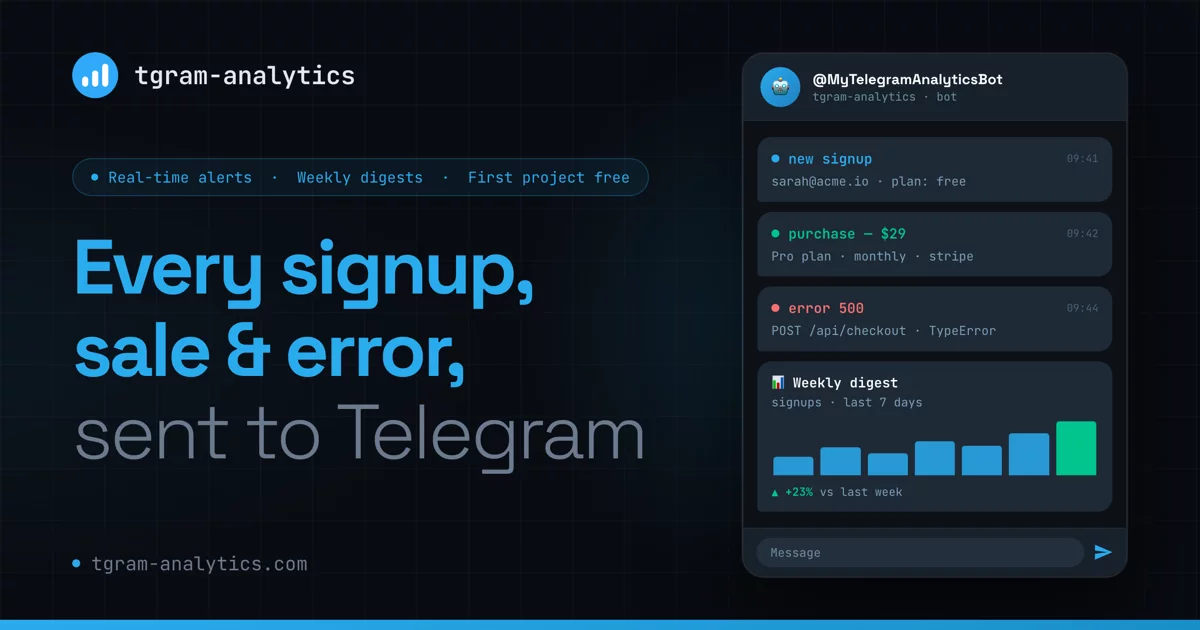
Product analytics that messages you on Telegram. Like Google Analytics for your site or app — without opening a dashboard. Track signups, sales, and page views; get alerts, charts, and weekly reports right in the chat you already check. Self-hosted and privacy-first. Or skip the setup — try the hosted version at @MyTelegramAnalyticsBot.
Why this exists
I ship a lot of small projects, and checking a dashboard for each one doesn't scale — I'd just stop looking. I already live in Telegram all day, so I made the projects report to me there instead.
What that turns into in practice:
- Milestone nudges, not noise. A ping on a new sale, or every 10th / 100th signup — the events that actually tell you something changed.
- Every project in one chat. One bot, one place you already check.
- Charts when you want to dig. Per-event reports, multi-project overview, funnels and breakdowns, a weekly digest with week-over-week deltas.
- Queryable by your AI agent. The built-in MCP endpoint lets Claude Code, Claude Desktop, or Cursor read your analytics — so you can cross-reference them with other data (Search Console, for instance) and ask what to fix next, instead of eyeballing charts yourself.
- Privacy-first by construction. No cookies, no fingerprinting, raw IPs and User-Agents never persisted. See Privacy posture.
No account, no dashboard, no credit card: message the bot, get a project key,
call track().
What it is not
Not a Google Analytics replacement for a large org. It's built for solo devs and small teams shipping several projects at once. Attribution modelling, session replay, and multi-seat team management are out of scope.
Quick start
1 — Prerequisites
- Docker & Docker Compose v2
- A Telegram bot token from @BotFather
- Your Telegram chat ID (message @userinfobot to find it)
2 — Configure
git clone https://github.com/tgram-analytics/server.git
cd server
cp .env.example .env
# Edit .env and fill in TELEGRAM_BOT_TOKEN, ADMIN_CHAT_ID, and SECRET_KEY
Generate a SECRET_KEY:
python -c "import secrets; print(secrets.token_hex(32))"
3 — Run
docker compose up
The server starts on http://localhost:8000.
Verify it's running:
curl http://localhost:8000/health
# {"status":"ok"}
4 — Add your first project
Open Telegram and message your bot:
/add myapp.com
The bot replies with your API key (proj_xxxx) and a ready-to-use JS snippet.
Usage
Track events (REST API)
curl -X POST https://your-server.com/api/v1/track \
  -H "Content-Type: application/json" \
  -d '{
    "api_key": "proj_xxxxxxxxxxxx",
    "event_name": "purchase",
    "session_id": "uuid-here",
    "properties": {"amount": 49, "plan": "pro"}
  }'
Test events
Add "test": true to any /track, /pageview or /taps body to mark it as
test data:
curl -X POST https://your-server.com/api/v1/track \
  -H "Content-Type: application/json" \
  -d '{"api_key": "proj_xxxxxxxxxxxx", "event_name": "purchase", "session_id": "dev", "test": true}'
Test events are stored, but reports, digests, funnels, exports, alerts and the
MCP analytics tools ignore them. Recent activity, /doctor, and the MCP
recent_events and verify_integration tools still show them, marked 🧪, so
you can check an integration. Test taps are not stored.
Events sent from localhost, *.localhost, 127.0.0.0/8, ::1 or 0.0.0.0
(by Origin header or pageview URL) are marked as test automatically. If a
project has an origin allowlist, localhost requests are still rejected unless
the allowlist includes them.
JavaScript SDK
<script src="https://your-server.com/sdk/tga.min.js"></script>
<script>
  TGA.init('proj_xxxxxxxxxxxx', { serverUrl: 'https://your-server.com' });
  TGA.track('purchase', { amount: 49 });
</script>
Flutter SDK
await TgAnalytics.init(
  apiKey: 'proj_xxxxxxxxxxxx',
  serverUrl: 'https://your-server.com',
);
await TgAnalytics.track('purchase', properties: {'amount': 49});
Multi-value properties
Event properties accept arrays of scalars in addition to single
scalars — useful for multi-select inputs, A/B variant memberships, and
any set-style attribute that would otherwise be lossy to flatten:
curl -X POST https://your-server.com/api/v1/track \
  -H "Content-Type: application/json" \
  -d '{
    "api_key": "proj_xxxxxxxxxxxx",
    "event_name": "onboarding_completed",
    "session_id": "uuid-here",
    "properties": {
      "role": "creator",
      "interest": ["vertical_to_horizontal", "unsure"]
    }
  }'
Arrays may only contain scalars (string, number, boolean, null).
Nested objects, nested arrays, and undefined are rejected with 422.
Sort behaviour
The server sorts every array property at write time. There's no
naming convention to remember — interest, tags, flags, anything
goes — so ["a", "b"] and ["b", "a"] collapse to the same JSONB
value and the "most common combos" query is a trivial GROUP BY
without read-time normalisation. Mixed-type arrays (e.g. [1, "a"])
can't be <-compared in Python; those fall back to insertion order
instead of failing the request.
Order-sensitive use cases. Because every array is sorted, a list like
recent_searches: ["pizza", "pasta"]loses its original order on the wire. If insertion order matters, serialize to a string ("pizza,pasta") or use an object shape with positional keys.
Canonical dashboard queries
The JSONB properties column lets the same event power two
complementary dashboards:
-- 1. Per-element count (e.g. a pie chart of how often each
--    interest is selected):
SELECT elem, count(*) AS n
FROM events,
     jsonb_array_elements_text(properties->'interest') AS elem
WHERE event_name = 'onboarding_completed'
GROUP BY elem
ORDER BY n DESC;

-- 2. Most common combinations of selected values:
SELECT properties->'interest' AS combo, count(*) AS n
FROM events
WHERE event_name = 'onboarding_completed'
GROUP BY combo
ORDER BY n DESC
LIMIT 20;
No schema migration is needed — Postgres JSONB stores arrays natively.
Browser vs. server calls
One proj_ API key handles both: embed it in your frontend and use it from
your backend — events land in the same project.
The domain allowlist (set per project via /projects → Settings) is a browser-only guard against
abuse of the public key embedded in your JS bundle. It works like this:
| Caller | Origin header |
Behavior |
|---|---|---|
| Browser on allowed host | https://myapp.com |
✅ accepted |
| Browser on other host | https://evil.com |
❌ 403 |
| Backend SDK (Python/Node/curl) | (absent) | ✅ accepted — API key auth only |
Sandboxed iframe / file:// |
null |
❌ 403 when allowlist is set |
Allowlist entries support bare hosts (myapp.com), full URLs, and wildcards
(*.myapp.com matches any subdomain, but not the apex — add both explicitly
if you need myapp.com and www.myapp.com).
An empty allowlist allows all origins.
Bot commands
| Command | Description |
|---|---|
/start |
Home menu (first run shows a guided welcome) |
/add <name> |
Create a new project and get its API key |
/projects |
List all projects |
/events |
Browse event types for a project |
/report [event] |
Get a chart for an event (with period/granularity controls) |
/digest |
Last-7-days recap: sessions and alerted-event counts with week-over-week deltas, per project |
/overview |
Multi-line visits chart across all projects |
/alerts |
List active alerts across all projects |
/heatmap |
Tap heatmap for a page: top tapped elements, then the page screenshot with the heat layer (needs heatmaps: true in the JS SDK) |
/doctor |
Health check across all projects (silent projects, open allowlists) |
/mcp |
Setup instructions for connecting an AI agent (MCP) |
/mcp_token |
Manage static MCP access tokens (/mcp_token new [label] to create) |
/help |
Show this command reference |
/cancel |
Cancel the current multi-step operation |
Project settings (retention, domain allowlist, API-key rotation) have no
slash command — open /projects, pick a project, and use its Settings
menu.
Connect Claude (MCP)
The server exposes an MCP endpoint at /mcp so Claude Code, Claude
Desktop, Cursor, and other MCP clients can query your analytics and
help you integrate the SDKs.
-
In Telegram, send
/mcp_token new claudeto your bot. Copy themcp_...token — it is shown only once. -
Add the server to Claude Code:
claude mcp add --transport http tgram https://your-server.example.com/mcp \
  --header "Authorization: Bearer mcp_..."
Claude Desktop is supported via Settings → Connectors → Add custom
connector (paste an /mcp_token token in the browser page that opens).
Available tools: whoami, list_projects, get_project,
list_event_names, query_events, compare_periods, top_pages,
recent_events, top_property_values, list_property_keys, top_taps,
verify_integration, get_integration_guide, get_sdk_snippet,
rotate_api_key, create_project, get_project_request_status, and the
alert tools:
list_alerts(project_id)— alerts configured on a project.alert_history(project_id, period="7d", limit=50, event_name=None)— notifications sent, newest first, with delivered/error status.create_alert(project_id, event_name, condition, threshold_n=None)— create an alert (every,every_n,threshold).set_alert_active(project_id, alert_id, is_active)— pause or resume an alert.delete_alert(project_id, alert_id)— delete an alert (audited; history kept).
Revoke tokens anytime with /mcp_token. Set MCP_ENABLED=false to
remove the endpoint entirely. MCP_PUBLIC_URL overrides the base URL
used in metadata and CORS/Host allow-lists (defaults to
WEBHOOK_BASE_URL).
Development
Setup
python -m venv .venv
source .venv/bin/activate
make install
cp .env.example .env   # edit values
Run locally (with Docker DB)
make dev-db          # start postgres in Docker
make migrate         # apply migrations
uvicorn app.main:app --reload
Tests
make test            # run all tests
make test-cov        # with coverage report
Code quality
make lint            # ruff linter
make typecheck       # mypy
make check           # both
Database migrations
# Create a new migration
make migration MSG="add users table"

# Apply migrations
make migrate

# Roll back one step
make downgrade
Database requirements
- PostgreSQL ≥ 15. Required for reliable core
gen_random_uuid()and JSONB features used by newer migrations. - The
pgcryptoextension is enabled automatically by migration0004. On managed Postgres this just works; on self-managed Postgres the role running the first migration needs superuser (or a DBA must pre-enable the extension).
Privacy posture
The server is designed so that self-hosters meet GDPR's data-minimisation expectations out of the box, and so the managed version we operate at @MyTelegramAnalyticsBot inherits the same protections.
- Visitor identification. No cookies, no client-side fingerprinting.
Each event is tagged with a 16-character hash of
sha256(daily_salt || project_id || client_ip || user_agent). The daily salt rotates every UTC midnight, so the same visitor cannot be re-identified across days. Raw IP and raw User-Agent are never persisted. - User-Agent parsing. UA strings are parsed by
ua-parserintobrowser,os, anddevice_type(mobile/tablet/desktop/unknown; rows stored before crawler filtering may also containbot). The raw string is dropped before insertion. - Crawlers are not stored. When the User-Agent parses as a crawler
(Googlebot, Bingbot and the other
Spiderfamiliesua-parserknows), the endpoint answers202and stores nothing. Search engines render JavaScript, so without this a small site's pageviews are mostly Googlebot. - PII tripwire on
properties. A small key denylist (email, phone, ssn, password, token, credit_card, card_number, cvv, iban, tax_id) silently drops matching keys at ingestion time and increments an internal counter — the request still returns202so a hostile caller cannot probe the rule by watching status codes. Properties larger than 4 KB are zeroed out the same way. - Log redaction. A root-logger filter masks
proj_<64hex>,sk_(live|test)_*API keys, and inlineemail=…/password=…patterns in every emitted log line. - Tap heatmaps (opt-in in the SDK). A tap row stores project, page path, viewport bucket (mobile/tablet/desktop), the viewport width in CSS px, the tap position (x as a fraction of the document width, y in CSS px from the page top, or from the viewport top for fixed and sticky elements), an element label (data-tga-label, aria-label, id, or tag + up to 40 characters of visible text; never the value or text of inputs, textareas, selects, or contenteditable elements), and the server receive time. No session id, no visitor hash, no timestamp from the client. Scroll depth is one number per pageview. Retention applies.
- Retention. A nightly APScheduler job (03:00 UTC) deletes events
and taps older than each project's
retention_days. A value of0keeps them forever — the default for self-host. - Audit log. Destructive actions (project create/delete, settings
changes, API-key rotation, suspension) are written to an append-only
audit_eventstable. A Postgres trigger rejects UPDATE and DELETE for every row and every role, including the application role itself.
REDIS_URL (optional)
get_today_salt() falls back to a process-local cache when REDIS_URL
is unset, which is fine for single-replica self-host. For multi-replica
deployments, set REDIS_URL so all replicas share the same daily salt;
otherwise the same visitor will hash to different IDs depending on which
replica handled the request.
Architecture
app/
├── api/          REST endpoints (track, pageview, taps, projects)
├── bot/          Telegram bot handlers and conversation state
├── core/         Config, database engine, security utilities
├── models/       SQLAlchemy ORM models
├── schemas/      Pydantic request/response schemas
└── services/     Analytics, charts, scheduler, alerts
See PROJECT.md for full architecture documentation.
Extension points
The server exposes a small, stable set of hooks in app/extensions.py that downstream packages may use to customize behavior without forking. Six registries are available:
| Hook | Purpose | Cardinality |
|---|---|---|
register_user_resolver(callable) |
Replace the default singleton User resolver | one (raises if registered twice) |
register_project_pre_create(callable) |
Append a pre-flush quota/policy check | many (run in registration order) |
register_bot_filter(filter) |
Append a bot-handler filter, AND-combined with the admin chat gate | many |
register_http_router(prefix, router_or_app, lifespan=None) |
Mount a FastAPI APIRouter (or any ASGI app) at startup, with an optional lifespan composed into the main app's |
many |
register_mcp_token_verifier(verifier) |
Replace the default static MCP bearer-token verifier (backed by the mcp_tokens table) |
one (raises if registered twice) |
register_mcp_whoami_extra(callable) |
Append a hook that contributes extra fields to the whoami MCP tool output (merged last-write-wins) |
many (run in registration order) |
A plugin is any Python module that calls one or more of these from a top-level register() function. Plugins are discovered at server startup via two mechanisms (in this order):
-
Python entry points in the
tgram_analytics.extensionsgroup. In your plugin'spyproject.toml:[project.entry-points."tgram_analytics.extensions"] my-plugin = "my_plugin:register" -
TGA_EXTENSIONSenv var, comma-separated module paths whoseregister()is called:export TGA_EXTENSIONS=my_plugin,another_plugin uvicorn app.main:app
Extending Settings
To add new env vars to Settings, subclass it in your plugin and monkey-patch the class. Pydantic propagates model_config automatically, including the extra="ignore" policy that lets unknown env vars pass through without error.
# my_plugin/__init__.py
from app.core import config as app_config

class ExtendedSettings(app_config.Settings):
    my_extra_var: str = "default"

def register() -> None:
    app_config.Settings = ExtendedSettings  # type: ignore[misc]
A working reference plugin lives at tests/fixtures/resolver_plugin.py. For the loader contract see app/plugins.py; for the registry surface see app/extensions.py.
Deployment
VPS (Docker Compose)
cp .env.example .env
# Fill in all values, especially WEBHOOK_BASE_URL=https://your-domain.com
docker compose up -d
Point your reverse proxy (Nginx/Caddy) at port 8000.
Heatmap screenshots (optional)
Tap heatmaps are drawn over a screenshot of the page. The screenshot comes
from a small separate service in renderer/
(headless Chromium). The API process never starts a browser. Without a
renderer, heatmaps are sent as text only.
With Docker Compose, start it through the heatmaps profile:
docker compose --profile heatmaps up -d
The server service already points at it (SCREENSHOT_URL defaults to
http://renderer:8080 in docker-compose.yml). The renderer is not
published on a host port.
| Variable | Default | Meaning |
|---|---|---|
SCREENSHOT_URL |
empty (off) | Base URL of the renderer, e.g. http://renderer:8080. Empty = text-only heatmaps. |
SCREENSHOT_TOKEN |
empty | Sent as Authorization: Bearer <token>. Must match RENDERER_TOKEN on the renderer. Required when the renderer is reachable from outside a private network. |
SCREENSHOT_TIMEOUT_SECONDS |
45 |
How long the server waits for one screenshot. |
The renderer loads the public page like a first-time visitor: no cookies,
no login. Pages behind a login are detected and not drawn. It refuses URLs
and sub-requests that resolve to private, loopback or link-local addresses.
Plan for a 1 GB memory limit; see renderer/README.md.
Railway

Add the environment variables from .env.example in the Railway dashboard.
Updating
git pull
docker compose up -d --build
Database migrations run automatically when the container starts — no manual
step. Your .env and the pgdata volume are untouched by updates; check the
release notes for any new environment variables before pulling.
On Railway, redeploy from the latest commit in the