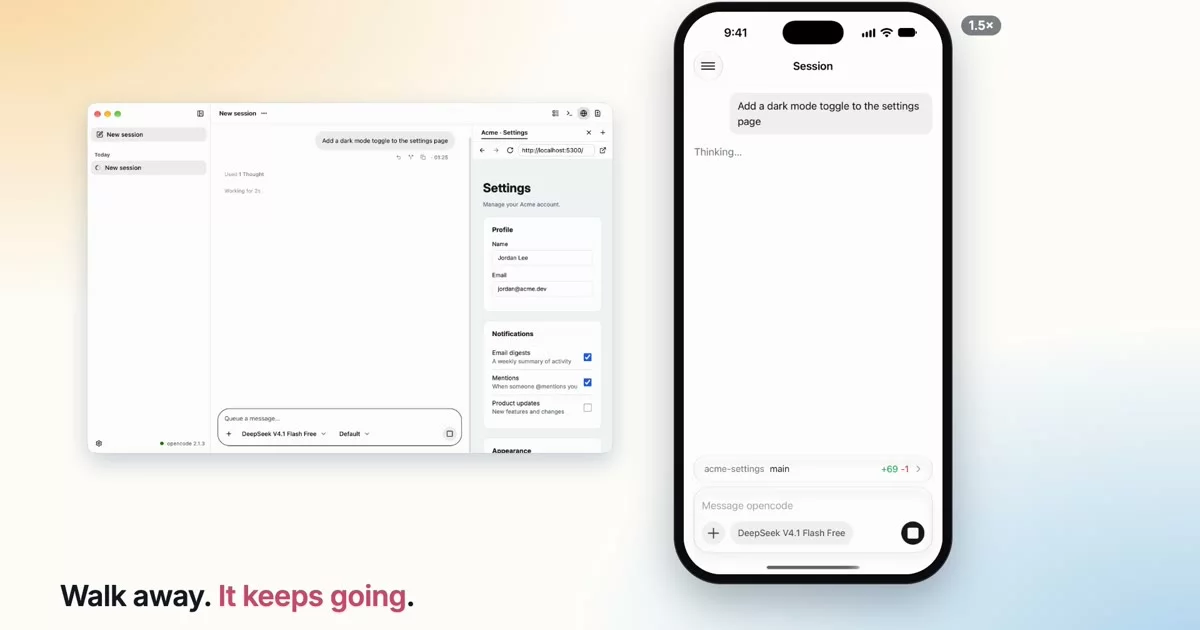
A desktop and mobile client for opencode — drive the agents on your Mac from your phone, peer-to-peer.
https://github.com/user-attachments/assets/c266942d-6346-43e7-a196-557172746b01
Thinkite is a Mac app and an iPhone app for opencode sessions. Work at your desk in the desktop app, then pick the same session up on your phone: start tasks, answer the agent's questions, approve permissions, and steer a running turn. The phone connects to your Mac directly, peer-to-peer over an encrypted iroh QUIC link, so your prompts, code, and diffs travel only between your own devices.
Features
- One session, every client — Thinkite talks to the same local opencode service as OpenCode Desktop and the TUI, so a turn started in any of them streams live in all the others.
- Start and steer from your phone — pick any folder on your Mac, start a session, and send follow-ups while the agent is still working.
- Answer the agent from anywhere — questions and permission requests appear as cards on the phone and the desktop; answer from whichever is closer.
- Preview your Mac's localhost on your phone — when the agent starts a dev server, tap the
localhostlink in its reply and the page opens on your iPhone at the same address, over the same encrypted link, while the app is open. - Peer-to-peer & private — the phone dials your Mac by its public key over end-to-end encrypted QUIC, roaming between Wi-Fi and cellular. A public relay is used only when NAT blocks a direct path, and it only ever forwards encrypted bytes.
- Any model — use any provider opencode supports; add one with an API key in Settings, and pick the model and reasoning effort per session on either device.
- A full desktop workspace — transcript, multiple terminals per session, the branch diff, a built-in browser, session info cards (environment, context, changes, cost including subagents), subagents that open as sessions of their own, and revert / redo / fork for prompts.
- Real mobile rendering — markdown that is both selectable and syntax-highlighted, fast syntax-highlighted diffs, and the images tools return.
- Catches up after a drop — lose the connection mid-reply and the transcript returns to the current state as soon as you reconnect.
How it works
                QR pair (Ed25519 public key = the Mac's QUIC endpoint id)
   ┌──────────────┐ ───────────────────────────────────────────────► ┌──────────────────────────┐
   │   iOS app    │                                                   │  Thinkite for Mac        │
   │  (Expo / RN) │ ◄════════ iroh QUIC (P2P, end-to-end) ══════════► │  daemon ──► opencode     │
   └──────────────┘   HTTP/SSE to opencode + a small RPC for git      │  desktop app (Electron)  │
                      direct paths preferred, relays as fallback      └──────────────────────────┘
                                                                         ▲
                                                 OpenCode Desktop / TUI ─┘  (same opencode service)
opencode runs the agents. On your Mac it runs as a shared local service (opencode serve --service) that every opencode client attaches to, and Thinkite starts it when a task needs it if nothing is running yet.
The daemon inside the Mac app is the phone's way in. It holds the pairing identity, accepts the phone's iroh connection, carries its HTTP and event-stream requests to the opencode service, and answers a small RPC for git status, diffs, and the folder picker. Sessions, prompts, and transcripts are opencode's own.
The desktop app and the iOS app share one client data layer, @thinkite/oc-client, built on opencode's official client.
Under the hood
- Authenticated pairing — the QR code carries the Mac's Ed25519 public key, and that key is its QUIC endpoint identity, so the TLS handshake itself proves the phone reached the Mac it paired with. There is no broker in the middle.
- opencode over iroh — the daemon carries opencode's HTTP API on its own ALPN (
thinkite/http/1), and the phone reaches it throughreact-native-iroh-ffi, our React Native binding for iroh, using opencode's API as if it were local. - One store for two apps —
@thinkite/oc-clientmirrors opencode's own client data layer in TanStack Store atoms: streaming deltas are folded into the transcript and committed once per frame, prompts show instantly and roll back if the send fails, and every reconnect re-reads the sessions and their newest messages. - Native transcript on the phone — prose renders as native, selectable attributed text with native syntax highlighting (
react-native-enriched-markdown), virtualized with Legend List. - Pre-warmed diff view — a resident WebView hosting
@pierre/diffsstays warm behind a native bottom sheet, so tool diffs open in well under a second.
Security & privacy
- End-to-end encryption. Phone traffic rides an iroh QUIC connection (TLS 1.3) between your two devices; each side's Ed25519 key is verified in the handshake.
- The relay can't read your data. When NAT blocks a direct path, iroh's public relays forward already-encrypted QUIC packets, and the connection moves to a direct path as soon as one appears.
- Only paired phones get in. The Mac admits a new device only while its pairing window shows the QR code.
- Your keys stay on your Mac. opencode stores provider API keys on your Mac; the phone never needs them.
Getting started
Prerequisites
- macOS on Apple Silicon
- opencode 2.1 or later, installed where your login shell can find it (or OpenCode Desktop running)
- An iPhone
Install
- Download Thinkite for macOS and drag it to Applications.
- Launch Thinkite. It stays in your menu bar and opens its main window.
- If opencode has no provider set up yet, add one in Settings › Providers with an API key.
- Get the iOS app (TestFlight).
- Choose Pair new device from the menu bar (or Settings › Pairing) and scan the QR code with the app.
- Pick a project folder on either device and start prompting.
Project structure
This is a bun monorepo:
| Package | What it is |
|---|---|
packages/app |
iOS app — Expo / React Native |
packages/desktop |
Mac app — Electron + Vite + React; window, menu bar, terminals, pairing, updates |
packages/daemon |
Runs inside the Mac app — pairing identity, iroh peer server, HTTP tunnel to opencode, git and folder RPC |
packages/oc-client |
opencode 2 client, transcript reducers, and the TanStack Store data layer shared by both apps |
packages/protocol |
Wire protocol between the daemon and its clients — zod schemas, version negotiation, framing |
packages/website |
Landing page (Astro) |
Development
# prerequisites: bun >= 1.3, Node >= 24 (vitest/tsc/eas run on node), opencode >= 2.1
bun install

bun run typecheck
bun run test         # vitest (on node)

# run the desktop app in dev (Vite HMR)
bun run --cwd packages/desktop dev

# run the daemon on its own
bun run --cwd packages/daemon dev

# run the iOS app
cd packages/app && bun run ios
Tech stack
TypeScript · opencode 2 (@opencode/client) · iroh (QUIC P2P) · Electron · React · React Native (Expo) · TanStack Store / Query / Router · Legend List · @pierre/diffs · xterm.js · zod
Status
Thinkite is early and under active development (desktop 0.3.0). Pairing, starting and steering sessions from the phone, question and permission cards, diffs, terminals, and live sync with opencode's own clients work today on macOS (Apple Silicon) and iOS. Expect rough edges; interfaces may change.
FAQ
Which models can I use? Any provider opencode supports. Usage is billed by that provider, the same as using opencode directly.
Do I need OpenCode Desktop? No. Thinkite only needs the opencode CLI (2.1 or later). If OpenCode Desktop or the TUI is already running a service, Thinkite uses that one, and all of them see the same sessions.
Is it macOS-only? The Mac app currently targets macOS on Apple Silicon. The mobile app is iOS.
License
Acknowledgments
Built on opencode. Diff and code rendering is powered by @pierre/diffs.
Disclaimer: Thinkite is an independent, open-source project. It is not affiliated with, endorsed by, or sponsored by the opencode project or any model provider.