
A browser IDE for Uno boards, built for Chromebook classrooms. A student writes a sketch on a
website, the sketch compiles on a small server container running arduino-cli, and the browser
flashes the resulting hex onto the board over USB with the Web Serial API. Nothing is installed on
the student machine — no IDE, no driver, no extension, no account.
It exists because managed Chromebooks cannot run a desktop IDE, and a class of thirty needs the same tool on every desk in under a minute.
- Uno boards, plus ESP32 boards when a teacher switches ESP32 on (then a board picker appears). Each board's FQBN is fixed in its own compile container. ESP32 sketches that use Wi-Fi attack tools (deauth, beacon spam, packet sniffing, Marauder-style firmware) are refused unless a teacher switches that failsafe off for a while.
- Runs on Cloudflare Workers + Containers. About $5/month plus pennies of usage for one classroom.
- Written and maintained by one teacher. The code is kept boring on purpose.
Screenshot
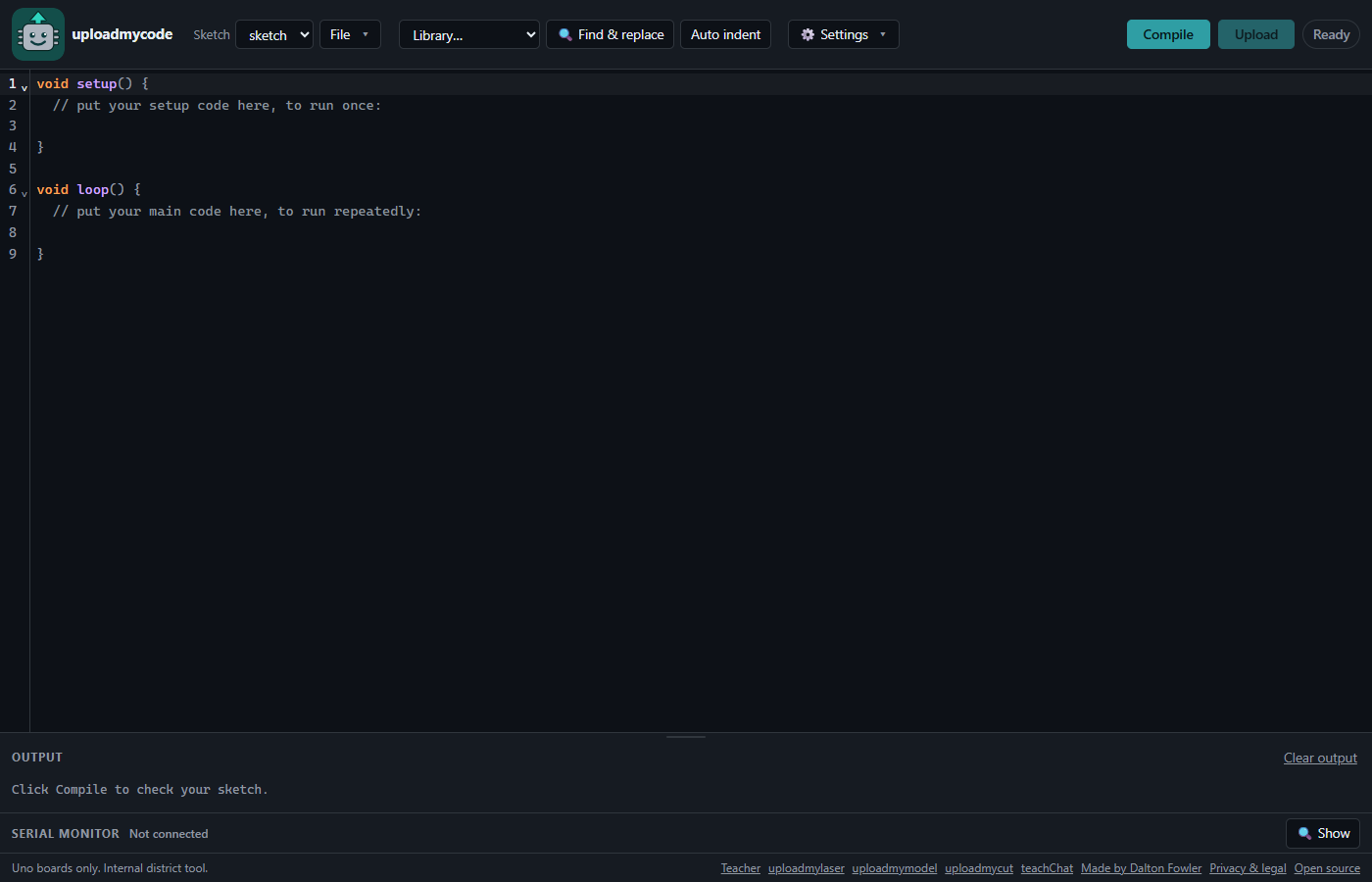
The editor page on the live site (1400x900, dark theme), before any sketch is compiled. Compile and Upload sit top right, the output panel and serial monitor sit below the editor.
What it does
- Editor — CodeMirror 6 with C++ highlighting, autocomplete for the common board API, a
library dropdown that inserts the right
#include, Find and replace, and an Auto indent button that tidies the sketch withclang-formatin the container. Light, dark or system theme. - Compile — one POST to the server. Compiler errors come back parsed: a clickable row that jumps to the line, the offending line highlighted in the editor, and a plain-English hint under the common ones. When the class compiles at once, the output panel says how many sketches are in the line.
- Upload — the browser flashes the board itself over Web Serial (STK500v1 against the Optiboot bootloader, 115200 baud), with a page-by-page progress bar. Upload is only enabled for hex that was built from the exact text on screen.
- Serial monitor — nine baud rates, autoscroll, timestamps, a send box, and a Plot view that graphs the numbers as they arrive. It hands the port to the flasher when an upload starts and takes it back afterwards, so a student never has to disconnect anything.
- Sketches — named, autosaved to
localStorage, downloadable and importable as.ino. No server-side storage, no student accounts, no PII. - A rolling class phrase — the teacher sets today's phrase, with an expiry, from a
/teacherpage guarded by a secret. Generate makes a long random one, or the teacher types any phrase up to 64 characters. Pop out opens a/displaywindow with just the phrase and its countdown, for the projector. Nobody compiles without the phrase. Students type it once per tab and it dies with the tab. - Wrong-guess lockout, per device — five wrong phrases in a row lock that one Chromebook for 5 seconds, doubling to at most 5 minutes. The teacher key has its own counter with the same numbers. It counts per device, never per address, because a whole school shares one address: one student can never lock out the room or the teacher.
- Cost caps — two small container instances (the second wakes only during a burst and sleeps again), scale-to-zero, a per-browser rate limit, a global ceiling, a request-size cap, a cap on how many compiles may wait, and a compile timeout with memory and CPU limits. Each sketch is deleted from the container once it has compiled. All of it so a runaway loop cannot run up a bill overnight, or stall the class.
- Libraries — a fixed allowlist baked into the container image, so a compile never touches the
network. Servo, LiquidCrystal, LiquidCrystal I2C, Stepper and Arduino SensorKit (the Seeed Grove
sensor kit) ship by default. The SensorKit's own dependencies, DHT20 and the LIS3DHTR
accelerometer, are pinned and baked in alongside it. Students can also add their own: Library →
Add your own library takes a library
.zip(or loose.h/.cppfiles), keeps it in that browser, and sends its source with each compile. The container writes it next to the sketch for that one compile, checks every file the way it checks a sketch, and deletes it afterwards (container/user-libraries.js). - Privacy and legal — a
/legalpage, linked from every footer, says what the site keeps, where and for how long, and who made it. Sketches stay in the browser; there are no accounts.
The live site
https://uploadmycode.com is the author's own instance. It is an internal district tool made by Dalton Fowler, a teacher, for use in class. It is not a public service: every compile needs that day's class phrase, so the site will look broken to anyone who is not in the room. It is up here as a working reference, not as something to sign up for.
To use this, run your own copy. docs/SETUP.md walks a stranger through it end to end: the supported Cloudflare path, and how to run just the compile server with Docker.
Commands
npm install
npm run typecheck   # tsc --noEmit for the Worker and for web/
npm test            # node --test over test/ (Worker logic) and web/test/ (frontend)
npm run dev:web     # Vite dev server for the editor (proxies /api/compile to localhost:8080)
npm run build       # vite build web -> public/
npm run types       # regenerate worker-configuration.d.ts after editing wrangler.jsonc
npm run deploy      # npm run build, then wrangler deploy (needs Docker running)
wrangler deploy builds container/Dockerfile, so Docker Desktop must be running.
npm run dev (wrangler dev) also needs it.
Running the compile server without Docker
container/server.js is the same file the image runs, and it runs directly on Windows. Useful for
frontend work: npm run dev:web proxies /api/compile and /api/format to it. Auto indent needs
clang-format on PATH locally; without it only formatting fails, and compiles are unaffected.
Nothing here is committed: tools/ is gitignored, and the versions must match the pins at the top
of container/Dockerfile.
$tools = "$PWD\tools"
New-Item -ItemType Directory -Force $tools | Out-Null

# 1. Pinned arduino-cli (same version as the Dockerfile).
Invoke-WebRequest -Uri 'https://github.com/arduino/arduino-cli/releases/download/v1.5.1/arduino-cli_1.5.1_Windows_64bit.zip' -OutFile "$tools\arduino-cli.zip"
Expand-Archive "$tools\arduino-cli.zip" -DestinationPath "$tools\arduino-cli" -Force

# 2. Keep the toolchain inside tools/ instead of AppData.
$env:PATH = "$tools\arduino-cli;$env:PATH"
$env:ARDUINO_DIRECTORIES_DATA = "$tools\arduino-data"
$env:ARDUINO_DIRECTORIES_USER = "$tools\arduino-user"
$env:ARDUINO_DIRECTORIES_DOWNLOADS = "$tools\arduino-downloads"

# 3. Pinned core and the library allowlist (same versions as the Dockerfile).
arduino-cli core update-index
arduino-cli core install arduino:avr@1.8.8
arduino-cli lib install Servo@1.3.0
arduino-cli lib install LiquidCrystal@1.0.7
arduino-cli lib install "LiquidCrystal I2C@1.1.2"
arduino-cli lib install Stepper@1.1.3
arduino-cli lib install DHT20@0.3.3
arduino-cli lib install "Grove-3-Axis-Digital-Accelerometer-2g-to-16g-LIS3DHTR@1.2.4"
arduino-cli lib install Arduino_Sensorkit@1.4.0

# 4. Serve on http://localhost:8080.
node container/server.js
On any platform, building container/ with Docker gets you the same server and none of that
setup: see docs/SETUP.md, Part B.
Docs
- docs/SETUP.md — run your own copy. Start here if this repo is new to you.
- docs/DEPLOY.md — the operator manual for the author's live instance: the daily
phrase routine, the teacher key, what guards a compile (including the per-device lockout),
adding a library,
ALLOWED_CIDRS, cost caps and billing alerts. Most of it applies to any instance. - PLAN.md — architecture, the locked decisions, and the task list the project was built from. Read it before changing anything structural.
- CREDITS.md — every open-source project this tool is built on, with links, verified licenses, and where to support them.
- docs/CHROMEBOOK-CHECKLIST.md — the Web Serial policy conversation to have with school IT before you rely on any of this, plus a one-Chromebook smoke test.
- docs/T2-TEST.md, docs/T3-TEST.md, docs/T4-TEST.md — manual test scripts for the editor, for flashing a real board, and for the serial monitor. The last two need hardware.
Trademarks and licensing
Arduino® and the Arduino logo are trademarks or registered trademarks of Arduino S.r.l. This project is an independent tool written by a teacher. It is not affiliated with, sponsored by, or endorsed by Arduino S.r.l., and it is not an Arduino product. "Uno" is used here only in the referential sense that Arduino's trademark policy allows, to describe which boards this software is compatible with. The project name, the site and the code do not use the Arduino name or logo.
This repository contains no Arduino software. The container image downloads Arduino's open-source
toolchain from official sources at build time — arduino-cli (GPLv3), and the AVR core and its
compiler toolchain (GPL/LGPL) — and runs it as a separate program, over a command line, exactly as
a user would. Nothing from it is copied into, linked with, or redistributed by this repository. If
you build the image, you obtain those components directly from their publishers under their own
licenses.
The editor is CodeMirror 6, MIT licensed.
This project's own code is MIT licensed — see LICENSE.
Credits
This is a thin shell around other people's work. CREDITS.md lists every open-source project it stands on — the compiler toolchain the container downloads, the classroom libraries, CodeMirror, the build tooling, and the protocol documents the flasher was written from — with a link and a verified license for each, and a support link wherever the project publishes one. None of those projects endorses this one; being credited is not affiliation.