
English · 한국어
VEXPLOR AAS Studio
Author, validate, serve and collect live values for AAS (Asset Administration Shell) — in one web app. Upload one machine's AASX, see exactly which rules it breaks, and fix what can be fixed in one step.
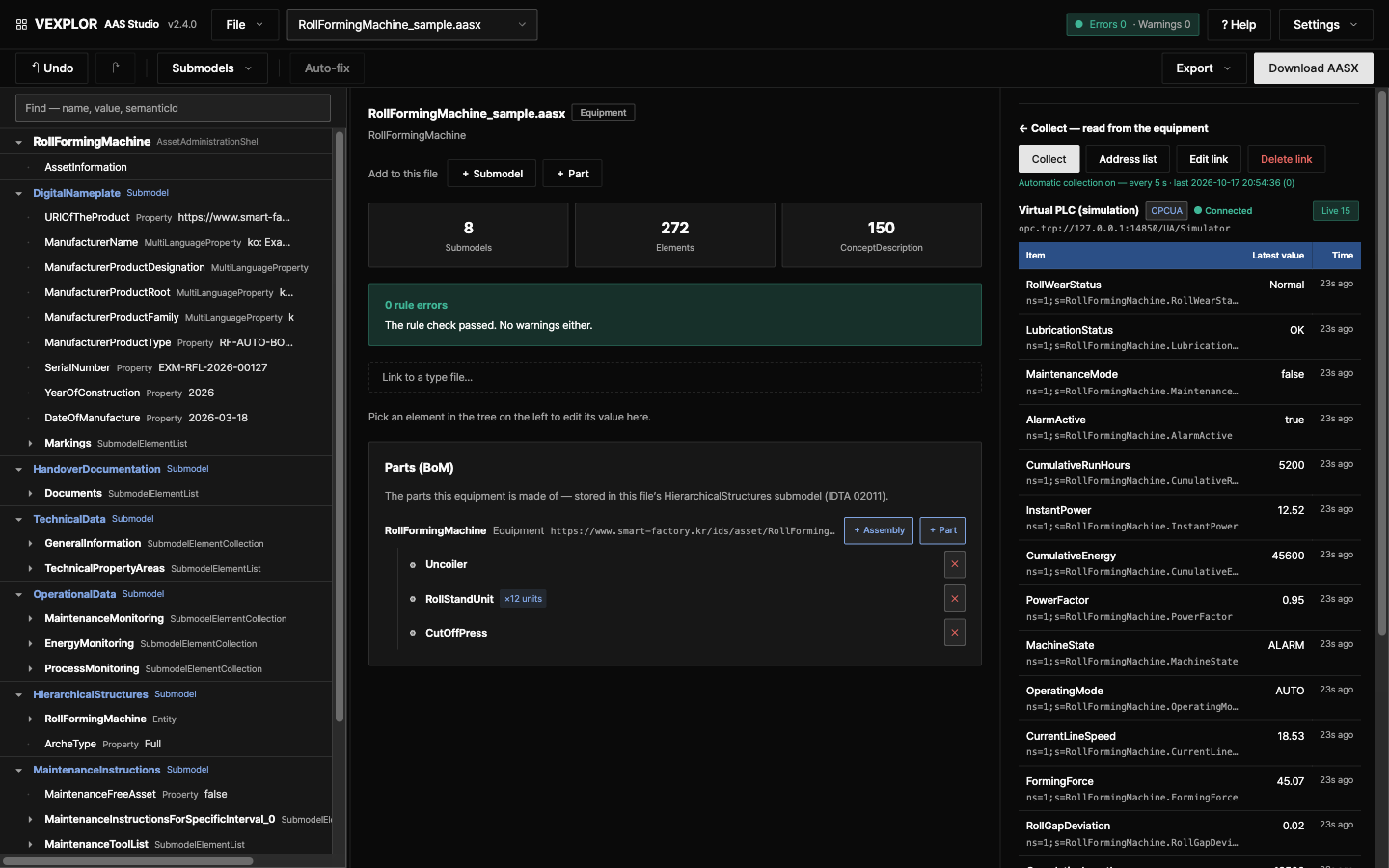
This used to take three tools. VEXPLOR AAS Studio brings the work together and is built so that people new to AAS can follow along.
| Task | Usual tool | Here |
|---|---|---|
| Open · edit · export AASX | AASX Package Explorer (desktop) | In the browser, with findings and auto-fix |
| Serve AAS to other systems (Part 2 REST · registry) | Eclipse BaSyx server | The same server does it |
| Collect machine values · publish them by subscription | Separate OPC UA client/server | Collects per the AID in the AAS and publishes via an OPC UA server |
Not affiliated with, and not derived from, the tools above — it combines the same jobs in one place.
New here? Click "Start with a sample" on the start screen to open a fully filled equipment file and a process structure.
Website: wace.me/en-platform-aas-studio
Docs: Usage · Install · Deployment & hosting · The 52 rules · Using it with Logic Studio — every document is also available in Korean.
Why
AAS is in place as a standard. Putting it into a factory is still work left outside the specification.
A review of ten years of AAS research (IEEE Access, 2025) names integration with existing machines and systems as a key challenge holding back adoption. Several studies point to the effort of building an AAS by hand, and the open tools are split into editors, servers and libraries, so collecting field values means mapping it yourself in configuration files. VEXPLOR AAS Studio lets software take on that work, so an AAS does not end as a document but becomes operating data with live values from the machines on the floor.
| What people hit on the floor | In VEXPLOR AAS Studio |
|---|---|
| Attaching to machines and PLCs that already run | Collects from OPC UA, Modbus TCP and MQTT per the AID in the AAS, and reads S7, MELSEC (MC protocol) and LS ELECTRIC XGT PLCs directly — read only, a VEXPLOR extension binding. The remote collector sends outward only; PLC programs are not changed |
| Building an AAS by hand | Start from a filled sample, fill values at once from tables or CSV; 52 rules point out problems and 19 fix them automatically |
| One tool per job | Open, edit, check, Part 2 REST, field value collection and OPC UA publishing in one screen |
| Passing the standard, failing the receiver | Checks the Korean receiving validator's (KOSMO Validator) business rules — semantic ID allow-list, mandatory submodels, package structure — before submission, and shows conflicts with the standard as a policy the user decides |
There are real line deployments (Bosch Rexroth and others). They adopted AAS to end months of integration work whenever machines change — and they too report that creating the AAS itself is the first hurdle for many users. Evidence and sources: docs/background.md.
The receiving validator remains the only authority on acceptance. This tool is a pre-check.
What it does
| Open & edit | Load AASX (JSON or XML), browse it as a tree, edit values, elements, submodels and concept descriptions. Fill many values at once from a submodel value table or from a CSV equipment list |
| Lint | 52 rules in three layers — package structure (L1), metamodel constraints (L2), submission business rules (L3) |
| Auto-fix | Preview the fixable findings (19 rules), choose, apply at once. Every relocation is recorded |
| Report | A printable HTML validation report |
| What to fill | With the IDTA templates installed, every value row shows required · collected · optional, and "Show only what to fill" hides the rest |
| Undo & history | One-step undo, and restore a submodel to an earlier point |
| Types and units | Split a type file into units; when the type changes, review the differences line by line and pull only the lines you choose — values edited on site are never overwritten |
| Process bundles | Company → line → process → equipment → part. Group machines into a process and export a submission bundle |
| Data collection | Read live values from OPC UA · Modbus TCP · MQTT devices, and directly from S7, MELSEC (MC protocol) and LS ELECTRIC XGT PLCs — read only, a VEXPLOR extension binding not yet checked on real PLCs — addressed by the AID submodel inside the AAS. Each value shows whether it is live, stale or missing, and each machine gets a daily status bar (running · stopped · alarm). Add dozens of tags from one pattern |
| Standard API | IDTA Part 2 REST API, so other systems can read the AAS held here |
| MES · ERP · CMMS integration | A pull feed of every change and runtime event (CloudEvents), signed webhooks and MQTT, equipment / BOM / hierarchy / maintenance / document exports in JSON or CSV, ERP numbers kept next to the AASX, and server-side state, alarm, counter and threshold rules. A secure OPC UA server (accounts + encryption). See docs/integration.md |
| Accounts | Admin / editor / viewer, with an audit trail of who changed what |
| English & Korean, light & dark | The interface and everything the server writes — findings, rule descriptions, the validation report, bundle README, errors — come in English or Korean. If you never choose, the browser language decides (Korean browser → Korean, anything else → English). Light and dark themes |
What's new in 2.3 – 2.12
| Feature | Release | Detail |
|---|---|---|
| Empty list elements in XML read as empty lists | 2.12.1 | A list closed with no items (<qualifiers />, <description />, a collection's <value /> …) was read as the empty string. In KOSMO's 179 public reference models the check then stopped part way in 45 files and a saved copy could not be opened again for 27; both are now 0. The empty list is kept as it was and reported by PKG-EMPTY-ARRAY (auto-fix). scripts/lint.mjs now checks each file by its own metamodel version and looks into subfolders. New guide: using KOSMO reference models with a file-by-file table |
| Range limits in tag hints | 2.12.0 | A Range element with the same semanticId as a tag's value now gives limits too — its min as lsl, its max as usl — so a receiver such as Logic Studio gets lower specification limits from the file. Limits from the KOSMO property pairs come first, ranges after; a tag may carry several of the same bound, each with its source, for a person to choose. No schema change. The KOSMO model files in use today hold no Range, so their hints are unchanged; for a lower limit, add a Range with the value's semanticId and an idShort different from the value's (integration) |
| LS ELECTRIC XGT, read directly | 2.11.0 | XGK · XGI · XGR · XGB PLCs with an FEnet module are read over the XGT dedicated protocol (TCP 2004) without a gateway — read only. Addresses are written as XG5000 shows them (D100, D100.3, P0001A, %MW100, %IX0.0.3). AID 1.1 has no XGT binding, so this is a VEXPLOR extension binding marked by our binding IRI. Built from LS ELECTRIC's published FEnet manual and tested against a test server built from it — not yet checked on a real PLC; please send a PLC field report. The server reads it with COLLECT=on, the remote collector from VEXPLOR Edge 1.3.0 — usage §8 |
| XGT in the edge contract · PLC field report | 2.11.0 | The read list's protocol adds XGT; the contract stays vexplor.edge/1. An older edge reports XGT is not read by this edge yet and keeps reading the others. A new issue form collects real-PLC results for S7, MC and XGT. Webhooks and MQTT subscriptions now also refuse port 2004 unless the allow entry names it |
| S7 and MC protocol, read directly | 2.10.0 | Siemens S7-300 / 400 / 1200 / 1500 (ISO-on-TCP) and MELSEC Q · L · iQ-R · iQ-F (MC protocol 3E binary) are read without a gateway — read only. Addresses are written as the engineering tool shows them (DB10.DBD4:REAL, D100, D10.3). AID 1.1 has no binding for either, so this is a VEXPLOR extension binding, marked by our binding IRI; other AID tools do not read these interfaces. Tested against test servers built from the published formats — not yet checked on real PLCs. The server reads them with COLLECT=on, and the remote collector from VEXPLOR Edge 1.2.0 — usage §8 |
| Remote collector on Windows | 2.10.0 | Settings → Remote collectors → "+ Connect a collector" has a Linux and a Windows tab. The Windows tab gives one line for Command Prompt or PowerShell (run as administrator) that downloads, checks the hash, installs and starts the Windows service — it changes no execution policy. Needs VEXPLOR Edge 1.2.0 or later (Windows x64), whose service install is tested on GitHub's Windows runners; not yet on a factory PC — remote collector install |
| S7 and MC in the edge contract | 2.10.0 | The read list's protocol adds S7 and MC; the contract stays vexplor.edge/1. An edge older than 1.2.0 does not read such an interface, reports why (S7 is not read by this edge yet) and keeps reading the others — contract §4 |
| AAS metamodel V3.0 · V3.1 · V3.2 | 2.9.0 | Opens files of all three versions — an XML file by its namespace, a JSON file (no version marker) by the lowest version that holds its content — and remembers the version each file came in as. Download AASX writes that version unless you pick another; new equipment, samples and passport templates are V3.1, the version KOSMO asks for. Writing a lower version lists every field it leaves out, with its value, and refuses values it cannot express (assetKind Role or Batch, a missing entityType …) unless you tick "download with the values as they are". V3.1 · V3.2 output is checked against the official JSON schemas in the tests — the official validator aas-test-engines 1.0.3 checks V3.0 only. Usage §4-10 |
| Product passport (DPP) templates and checks | 2.9.0 | "Start from a product passport (DPP) template" on the start screen opens one of eight IDTA templates as published (CC BY 4.0): DPP Part 1 metadata (IDTA 02099-1 1.0.2) and the seven parts of the battery passport (IDTA 02035-1 – 7). Rules DPP-1 – DPP-5 check the passport metadata: the seven mandatory items, granularity (Model · Item · Batch), lastUpdate in UTC, content specification ids, and granularity against the shell's assetKind. This supports writing and checking passport data; it is not a verdict on conformity with the EU DPP regulation |
| Checks follow the file's version | 2.9.0 | 52 rules, up from 44. AASd-090 and AASd-120, removed in V3.1, apply to V3.0 files only; PKG-FILE-URI and the idShort pattern follow each version's official schema; new AASd-137 · AASd-138 for V3.2 and PKG-MM-VERSION for content the declared version cannot hold (a V3.2 Batch in a V3.0 file). Below V3.2, AASd-119/129 now also look inside Operation variables |
| Korean and spaced attachment names in V3.1 · V3.2 | 2.9.0 | Those versions accept only URIs as attachment paths. Downloading as V3.1 or V3.2 percent-encodes such names in the model and in the package parts, relationships and content types, so the reference still finds the file; this tool shows the original name. V3.0 output is unchanged |
Part 2 under /api/v3 |
2.9.0 | Clients generated from the V3.1 · V3.2 OpenAPI call /api/v3/…; the same routes answer there as under /api/v3.0. Endpoints new in V3.2 ($recent-changes, $history, $signed, asynchronous packages) answer 404 |
| XML files read as written | 2.9.0 | Comparing the official examples' XML with their JSON found four reading faults, V3.0 files included: Range min and max were read as false (both bounds lost), an empty <administration/> as an empty string, an OperationVariable value as a one-item list, and the V3.2 unit data specification was not recognised. A file uploaded as XML before 2.9.0 keeps what was read then — upload it again |
| Remote collector intake, faster and whole | 2.8.1 | A batch from a remote collector is one write to the database: the values of every file in it and the record that it arrived go in one transaction, so a batch is stored whole or not at all. Before, each value was its own write, which capped a 4-core test server near 11,500 values a second with the database half idle; the same server now takes about 50,000. The remote collector list reads each file once per request instead of once per collector, and approving one collector writes only that collector. PG_POOL_MAX sets the number of database connections (default 10) — install |
| Server status while the database is down | 2.8.1 | With the database stopped or overloaded, "Server status" answered after more than 10 seconds or not at all. It now answers within about 7 seconds and shows the store connection as failed |
| Security and login on collection links | 2.8.0 | "Create collection link" picks the OPC UA security mode (Sign · SignAndEncrypt) and policy, and "Login required" for OPC UA and MQTT. The user name and password never go into the equipment file — they stay in the server's credentials file and the factory PC's credentials.json, keyed by the endpoint. "Load from equipment" connects with the chosen security and login. An old MQTT link with a password in its address is left out of the remote collector list and rule AID-1 says so (MQTT login needs VEXPLOR Edge 1.1.0 or later) |
| Why a read failed is kept | 2.8.0 | Automatic collection and remote collectors store the reason with the value. The row keeps "Read failed — reason" after the screen is opened again, and Modbus and MQTT, which have no quality code, show it too |
| Units, Modbus order, read period | 2.8.0 | A unit on every tag row, byte and word order (ABCD · CDAB · BADC · DCBA) on Modbus rows and a read period per machine, all on the screen. Remote collectors read at that period, and "Edit link" opens filled in with the current link |
| Collector health and server status | 2.8.0 | Each row of the remote collector list carries the server's OK · Warning · Problem badge and its reason in one line (free disk space, failed sending, clock offset, read success rate, queue, silence, no equipment connected). "Show state" opens the factory PC (CPU, memory, disk, uptime, clock offset), the line to the server, response time, success rate and reconnects per equipment, and the last 24 hours (values sent by VEXPLOR Edge 1.1.0 or later). Admins see the server's own state in Settings (store connection, disk, batches of the last hour, version). Usage §8-8 |
| One-click remote collector | 2.7.0 | Settings → Remote collectors → "+ Connect a collector" — check the server address and the read list, press one button, and you get one line to paste on the factory Linux PC. That line downloads, checks the hash, installs, registers and approves; the screen turns to "Receiving" the moment the PC connects. The same screen shows the last batch, values received and machine connections, and pauses, resumes or revokes. Admins turn remote collection on right there (servers with EDGE empty) |
| VEXPLOR Edge, its own open source | 2.7.0 | The remote collector now ships from its own repository waceinc/vexplor-edge (Apache-2.0) with its own version (1.0.0). The canonical contract vexplor.edge/1 lives there; this server receives it as is |
| Collect pane refreshes itself | 2.7.0 | With a file that has a collection link open, values come in every 10 s, and while a remote collector's values arrive the connection shows "Receiving" |
| Equipment reader libraries | 2.7.0 | The release packages add @aas/collector, @aas/fieldbus and @aas/opcua — the remote collector reads OPC UA, Modbus TCP and MQTT with exactly this server's code |
| Remote collector (VEXPLOR Edge) | 2.3.0 | One program on the factory PC reads PLCs and sends signed batches out over HTTPS — read only, outbound only. Linux x64 · arm64 (install); Windows x64 from 2.10.0 · Edge 1.2.0 |
| Send changes only | 2.4.0 | OPC UA subscriptions with a deadband. Measured 6 tags · 1 s · 5 min: 283 KB polling → 88 KB |
| Values from an outage | 2.3.0 | Batches read while the link was down are sent oldest first and kept up to maxQueueDays (default 30) |
| Factory server install | 2.4.0 | One command puts AAS Studio, the database and the remote collector on one Linux server; it comes back after a reboot (site install) |
| Compression · aggregates | 2.4.0 | With TimescaleDB Community Edition: values older than 7 days are compressed, 1-minute and 1-hour aggregates are built. Measured 1,000 tags · 1 s · 1 h: 1,099 MB → 50 MB |
| Logic Studio guide | 2.6.0 | ? Help → Use it in VEXPLOR Logic Studio and docs/logic-studio.md: download the checked AASX, drop it on Logic Studio Cloud's equipment screen, and it becomes the equipment register — nothing to install or convert |
| Tag hints | 2.5.0 | Each read-list tag names its model element's semanticId, a suggested role (state · counter · alarm · meter · condition · quality) and limits from the same file, so a receiver such as Logic Studio pre-fills roles and SPC limits for a person to confirm (contract §4.1) |
| Read list without a server | 2.3.0 | aidReadList in @aas/bundle turns the AID inside an AASX into the tag list a collector reads — no AID parser needed in other products |
Full notes: Releases.
Works with VEXPLOR Logic Studio
AASX files authored and checked here import straight into VEXPLOR Logic Studio (WACE's factory platform — MES · PLM · ERP · QMS) — nothing to install in the factory, no conversion step.
- Author the equipment AASX here and pass the 52-rule chec
