

A SwiftUI + Metal fractal explorer for macOS, iPhone and iPad — Mandelbrot, Julia, Newton, Multibrot, with four classic palettes. The fragment shader computes everything per pixel on the GPU; the CPU just uploads a small uniforms struct (and, for Mandelbrot perturbation, a reference orbit) per frame.
This is a modern reincarnation of xFractal, the 2008 Arizona Software iOS app: same four families, same palettes, redesigned ground-up around SwiftUI and a Metal fragment shader.
Install
xFractal ships through the App Store for Mac, iPhone and iPad, as one universal purchase (search for xFractal); the App Store keeps it up to date.
Version 1.0 of the Mac app was also published as a direct-download DMG (the v1.0 GitHub release). That channel is closed: it gets no further updates, so install the App Store version instead.
Build from source
open xFractal.xcodeproj
XcodeGen owns the project file: xFractal.xcodeproj is generated from project.yml and checked in. After changing project.yml, regenerate it and commit both:
brew install xcodegen      # a recent one: 2.44 does not handle the Icon Composer AppIcon.icon
xcodegen generate
Two app targets share the xFractal/ sources: xFractal-MAS (the Mac app, sandboxed) and xFractal-iOS (iPhone/iPad). Both use the bundle ID of the original 2008 App Store app (ch.arizonasoftware.xfractal), so they ship as updates of that listing, one universal purchase, rather than as a new app. Favorites saved by the 1.x iOS app are not imported.
No Apple Developer account is needed to build and run locally: without a team (see Signing.local.xcconfig.example) Xcode signs the Mac app ad hoc ("Sign to Run Locally"). If signing still gets in the way, pass CODE_SIGNING_ALLOWED=NO to xcodebuild.
The macOS logic tests:
xcodebuild test -project xFractal.xcodeproj -scheme xFractal-MAS -destination 'platform=macOS'
Fractal families
Switch between four families from the HUD type picker. Each family keeps its own sensible default view; switching back preserves your palette/smooth choices.
| Family | Iteration | Per-type controls |
|---|---|---|
| Mandelbrot | z ← z² + c, z₀ = 0 |
iterations, perturbation toggle |
| Julia | z ← z² + c, z₀ = pixel, c fixed |
iterations, c.re/c.im sliders, presets (Dendrite, Spiral, Rabbit, Galaxy, San Marco) |
| Newton | Newton's method for p(z) = 0 |
iterations, choice of polynomial: z³ − 1, z³ − 2z + 2, z⁸ + 15z⁴ − 16 |
| Multibrot | z ← zⁿ + c |
iterations, exponent n (2–8) |
Palettes
Four color palettes ported from the original xFractal: Hot, Cold, Gray, Chromatic. A Smooth toggle enables the standard nu = iter + 1 − log₂(½ log₂|z|) smoothing for the escape-time families (Mandelbrot/Julia/Multibrot); Newton always uses integer iteration counts since it converges rather than escapes.
Controls
| macOS | iOS | |
|---|---|---|
| Pan | drag | drag |
| Zoom | scroll wheel (cursor-anchored) or trackpad pinch | pinch |
| Iteration count | HUD slider | HUD slider |
| Family / palette / per-type knobs | HUD … panel |
HUD … panel |
| Reset to family defaults | HUD button | HUD button |
| Replay journey | HUD button | HUD button |
| Clear journal | HUD trash button | HUD trash button |
Persistence and replay
The full view state (family, center, scale, iterations, palette, smooth, julia c, multibrot n, newton flavor, perturbation toggle) is auto-saved to UserDefaults after every change and restored on launch. Every state change is also recorded into a journal of timestamped snapshots — drag deltas are coalesced (~50 ms throttle) so a long pan becomes a smooth path rather than thousands of stutters. The journal persists too, so Replay reanimates the entire exploration history (capped at 30 s; longer sessions are time-compressed). Scale interpolates logarithmically so zooms look natural during playback. Family/palette transitions snap rather than blend (interpolating across families would just look broken). Reset restores the family's default view but keeps the journal; the trash button clears the journal.
Precision: deep-zoom (Mandelbrot & Julia)
The Mandelbrot set is a precision sink: every order of magnitude of zoom eats roughly one decimal digit out of the coordinate type. With single-precision float, banding appears around scale ≈ 1e-6. Apple's Metal Shading Language does not support double in shaders on any Apple GPU — there is no flag to flip. So deep zoom requires emulation or a different algorithm.
| Tier | Technique | Zoom floor | Status |
|---|---|---|---|
| 1 | Single-precision float |
~1e-6 | superseded |
| 2 | Double-float ("DD") emulation in MSL — pair of floats (hi, lo) per coordinate, ~14 decimal digits |
~1e-13 | shipped (default for Mandelbrot/Julia) |
| 3 | CPU reference orbit + per-pixel float perturbation deltas (K. I. Martin, 2013) |
with Double reference: ~1e-15. With future bignum reference: effectively unlimited |
shipped — Mandelbrot only, toggleable |
| 4 | BLA (Bivariate Linear Approximation) + Pauldelbrot/Zhuoran glitch detection on top of tier 3 | same floor, 10–100× faster | future |
Multibrot/Newton run in single-precision float — the original xFractal used double on CPU and was much slower; for these families typical exploration depth doesn't need DD.
Tier 2: double-float
Represent each coordinate as a pair (hi, lo) of floats where lo carries the rounding error of hi. Implement Dekker/Knuth TwoSum for add and TwoProd (using Metal's built-in fma) for multiply. Cost is ~10–20× slower per iteration but still fully GPU-parallel. CPU-side state (center, scale) moves to Double; the renderer splits each Double into (hi, lo) floats at upload time.
Tier 3: perturbation theory (Mandelbrot only)
Pick one reference pixel, compute its full orbit on the CPU, upload it as an MTLBuffer<float2>, then per-pixel iterate the delta using dz_{n+1} = 2·Z_n·dz_n + dz_n² + dc — dc and dz stay in float because their magnitudes are ~scale. Toggle "Perturb" in the HUD.
Reference selection. Naive perturbation uses the screen center. If the center lands on a fast-escaping region, the reference orbit terminates early and every pixel using it is iteration-capped — detail near the view edges collapses to flat color (the "Type 1 glitch" / reference-escape problem). To avoid this, the renderer probes a 5×5 grid of candidates across the visible region and picks the one with the longest orbit; the shader offsets dc by (center − C0).
Caveats: The reference orbit is computed in Double, so the precision floor stays at ~1e-15 — the same ballpark as DD. Reaching 1e-30+ zooms needs iteration extension (mantissa+exponent / floatexp). No glitch detection yet.
Architecture
Shaders.metal— full-screen triangle vertex shader; fragment shader dispatches onfractalTypeto one of four iteration kernels (Mandelbrot DD / Mandelbrot perturbation / Julia DD / Multibrot float / Newton float) and four palette functions (hot,cold,gray,chromatic).FractalRenderer.swift— Metal pipeline + per-frame uniform upload (MTKViewDelegate). Caches the Mandelbrot reference orbit and recomputes only when center/scale/iterations change.FractalView.swift—MTKViewwrapped for SwiftUI on both platforms viaPlatformRepresentabletypealias. CustomZoomableMTKViewsubclass on macOS handles cursor-anchored scroll-wheel zoom.FractalState.swift—ViewState(Codable), per-type defaults, journal, replay, debounced persistence.ContentView.swift— gestures, HUD, type/palette/per-type controls.xFractalApp.swift—@main, oneWindowGrouphostingContentView.
Releasing (maintainers)
See RELEASING.md. Both apps are archived by Xcode Cloud, go to TestFlight first and then to the App Store; nothing is signed or uploaded from a local Mac.
Origins
This rebuild draws from xFractal, the retired 2008 Arizona Software Objective-C iOS app (Mandelbrot / Julia / Newton / Multibrot families, Hot / Cold / Gray / Chromatic palettes, smooth-iteration coloring). The CPU iteration loops, palette curves, and Newton polynomials are direct ports; everything else is rewritten for SwiftUI + GPU. The Mandelbrot deep-zoom path (double-float arithmetic + K. I. Martin's perturbation method) is new and has no analogue in the original — the 2008 app ran on iOS hardware where any GPU compute was off the table.
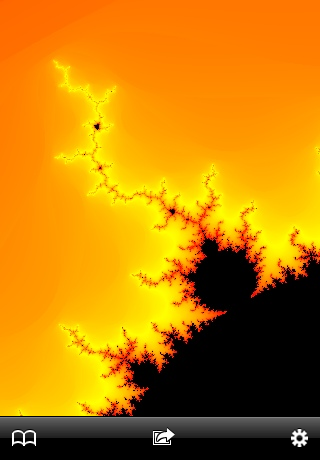
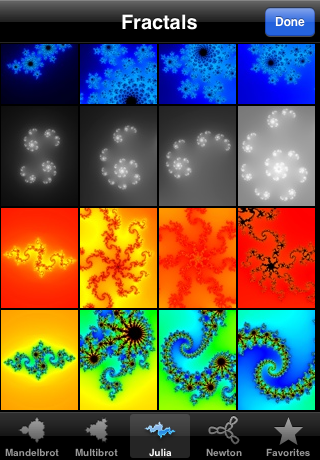
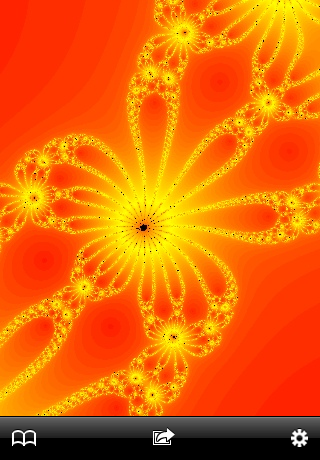
Screenshots from the original 2008 iOS app:
Contributing
Issues and pull requests are welcome. Suggested directions:
- Tier-4 deep zoom: add BLA (Bivariate Linear Approximation) + Pauldelbrot/Zhuoran glitch detection for Mandelbrot perturbation
- Iteration extension (mantissa+exponent / floatexp reference orbit) to push past ~1e-15
- DD arithmetic for the Multibrot path (currently single-precision)
- Bookmarks (the original app had a bookmark gallery — not yet ported)
- More palettes; alternative coloring (orbit-trap, distance-estimator)
When sending a PR, please regenerate .xcodeproj from project.yml rather than committing pbxproj edits directly.
Credits
The fractals themselves are classical mathematics; the rendering techniques beyond plain iteration come from:
- Perturbation for deep zoom — K. I. Martin, SuperFractalThing (2013): iterate one reference orbit at high precision on the CPU, then iterate only each pixel's small delta from it on the GPU. (Pauldelbrot's glitch-detection criterion, the usual companion, is not implemented yet — see Contributing.)
- Double-float arithmetic — T. J. Dekker, A floating-point technique for extending the available precision (1971), and D. E. Knuth, The Art of Computer Programming, vol. 2: the error-free
twoSum/twoProdtransforms behind the shader'sddtype. - Smooth iteration count — the normalized escape count popularized by Linas Vepstas (1997).
- Fractal families — Benoît Mandelbrot (1980) for the Mandelbrot set; Gaston Julia and Pierre Fatou (1918) for Julia sets; Newton's method for the Newton fractals.
The palettes, Newton polynomials and CPU iteration loops are ported from the original 2008 xFractal (see Origins).
The apps contain no third-party code.
License
Released under the MIT License © 2026 Jean Bovet. The original 2008 xFractal iOS app was a closed-source Arizona Software product; only the algorithms (well-known math: Mandelbrot iteration, Newton's method, the four palette curves) are reused here. No code from the retired app is included verbatim.