

Yardsort
Orchestrate any coding agent — on Linux, macOS and Windows.
Open-source desktop for Claude Code, Codex and any CLI agent you already use. Parallel tasks get their own git worktrees; several agents can share one. Hand the work to the next agent with the context Yardsort already recorded — no re-explaining the branch.
yardsort.sh · Download · Quick start · Documentation · Contributing · Contact


What it is
A sorting yard is where rail cars are sorted onto parallel tracks and later joined back into one train. That is the job: fan work out onto parallel branches, then merge it back — and hand a car from one crew to another without retelling the whole journey.
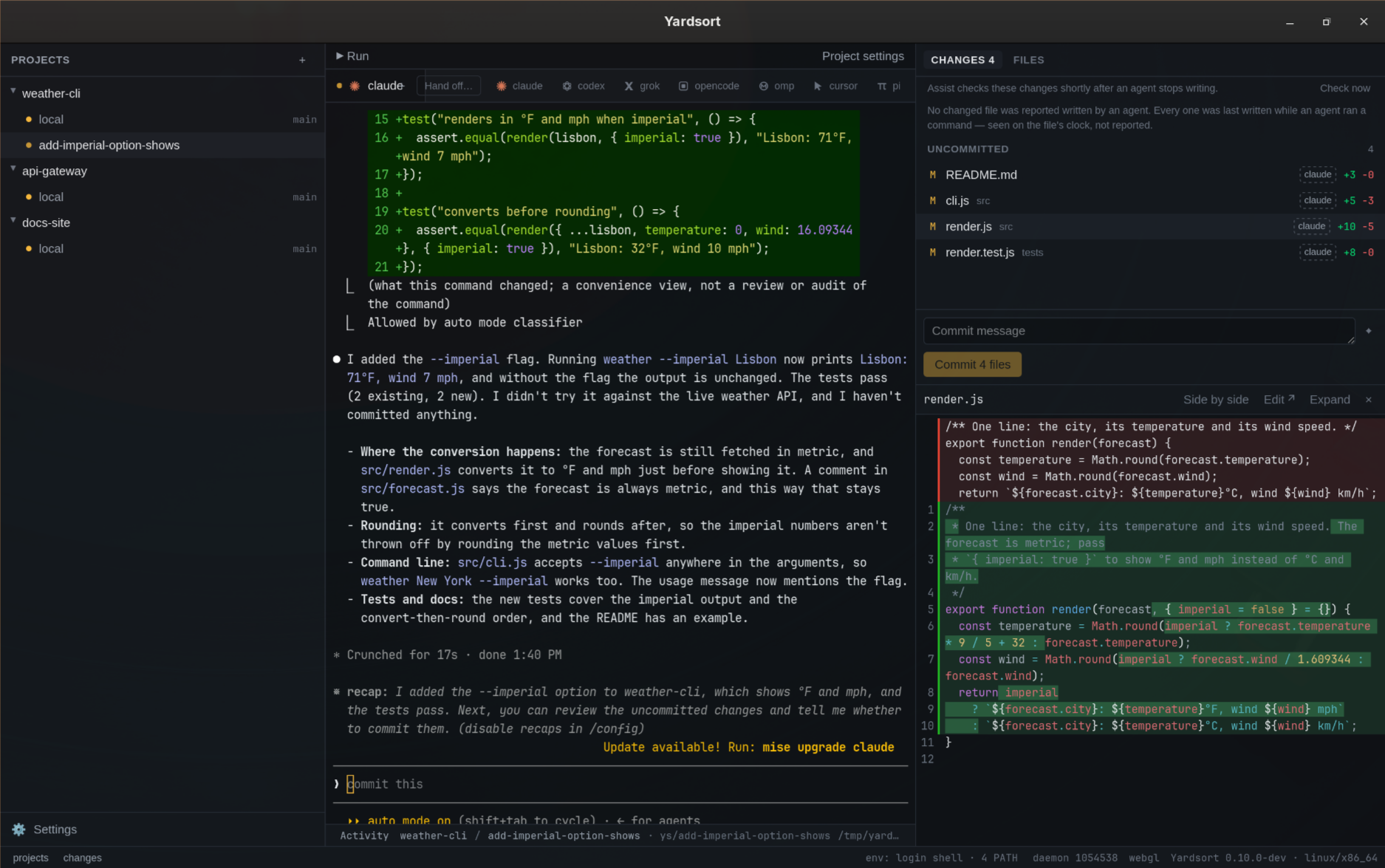
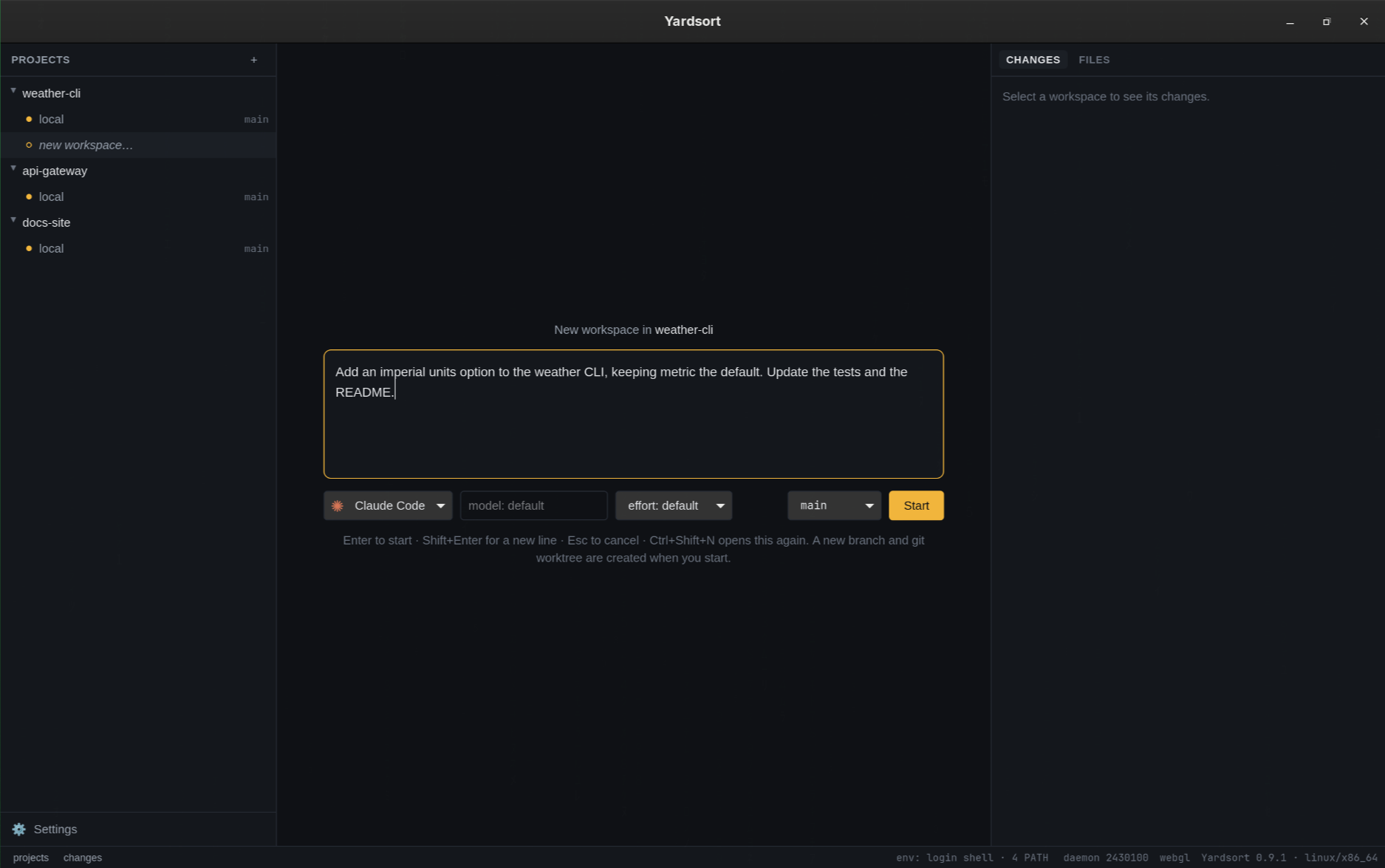
You describe a task, pick an agent, and press Enter. Yardsort creates a branch and a git worktree for it — a separate folder — and starts the agent there in a real terminal. Start another task on another track, or start a second agent in the same worktree. Hand off writes the next agent a first message from what happened here: your task, the branch, who wrote each file, what every run did. Project memory carries the short lessons you approved. On the right you watch the files each one touches, live, with diffs.
It is modeled on tools like Conductor and Superset, with the requirement they do not meet: Linux, macOS and Windows are all first-class, built and tested together on every change.
Highlights
-
Track tokens and machine resources. Open Usage from the sidebar to compare Claude Code, Codex and Grok by day, model and workspace, see estimated API costs and Codex's last reported plan limits, or inspect live CPU and memory for every terminal's process tree. More below.
-
Keyboard navigation you can configure. A command palette, panel focus and workspace/tab switching, with an in-app shortcut cheat sheet and editor.
-
A guided first look. An optional welcome tour explains the main panels; replay it from Help / Tour any time.
-
Any terminal agent. Claude Code, Codex, Grok, OpenCode, OMP, Cursor and Pi out of the box; add any other with a few lines of configuration — no plugin, no release to wait for.
-
The terminal is the truth. Agents run in a real PTY with their own interface. Whatever they can do in your terminal, they can do here — and Yardsort never parses their output.
-
Plain git, no lock-in. Workspaces are ordinary worktrees and branches. Inspect or undo anything with
git. Worktrees made elsewhere can be imported, and never appear uninvited. -
Closing the window doesn't stop them. Terminals live in a small background process, so agents keep working while Yardsort is closed — or after it crashes. Open it again and every screen is repainted where it got to. Closing with work in flight asks first.
-
Pick up where you left off. For conversations that really did end, press Resume — it is intact. Fork one to try a different approach without losing the first.
-
Hand the work to another agent. One click writes the next agent's first message from what Yardsort recorded — your task, where the branch stands, who wrote each file, what every agent run did and what is not known — for you to read and edit before it goes. Codex after Claude, without retyping the story. More below.
-
Workflows: named agent work, in steps. A short YAML file — have a second agent review this pull request, then tell me and the agent that wrote it — run from the sidebar or with
ys workflow run, its steps drawn as a chart, every mistake named at its line. The built-in code review is one click in a workspace's menu. Describe one in your own words and a model writes the file, for you to check and save. More below. -
See what happened. Live list of changed files, character-level diffs, a file tree, and image previews. Edit text files inside Yardsort, with retained drafts and a check before overwriting a file changed on disk, or open them in your editor. With an agent reporting, each changed file says who wrote it: an agent that reported writing it, one that was running a command when it was last written, or nobody the record knows of.
-
Send it on without leaving. Commit what an agent wrote, push it, and open the pull request from the panel you reviewed it in — the title written from the commits. With the GitHub CLI the pull request opens from here and its number and check results appear on the workspace row, with any others the workspace opened beside it; one that conflicts with its base can be handed back to the agent that opened it to resolve. Without
gh, your browser opens the forge's own form, on GitHub, GitLab, Bitbucket or Gitea alike. See Commits & pull requests. -
Every pull request in one place. Pull requests, at the top of the sidebar, lists the pull requests of every project on GitHub — yours, a teammate's, an agent's — with their checks, reviewers and size, filtered by project, author and review status. Open one to read its description, its checks, the conversation and its diff, with every comment beside the lines it is about; reply, or select lines and send a note about them to the agent working on it. Start a workspace on one, merge it, close it or reopen it from there, each confirmed first and naming whose it is. It reads GitHub through
gh; Yardsort still holds no credential. More below. -
Your issues, where the agents are. Tasks, in the sidebar, lists every project's open GitHub issues and counts the ones that need an answer — where the last person to speak was not a maintainer. Open one to read it, then Delegate: the composer opens with the issue as the agent's first message, marked as text other people wrote, and nothing starts until you say so. The workspace remembers the task it came from. Open a new task, answer one, close, label and assign it from the same view.
ys taskdoes all of it from a terminal, so an agent can tell you what is open and file an issue when you ask. Everything goes throughgh. More below. -
Start from a repository or a link. Clone a repository lists the repositories your
ghaccount owns or collaborates on — type to narrow, pick one, clone — or takes a clone URL from GitHub, GitLab, Bitbucket, Gitea, Forgejo or a host of your own. Start from a link… takes an issue's or a pull request's address and opens it, ready to delegate; a repository that is not a project yet is cloned on the way. See Projects. -
Know who needs you. Status dots show which agents are working and which are waiting; a desktop notification tells you when one finishes while you are elsewhere.
-
Careful with your work. Deleting or archiving a workspace always keeps the branch, and never discards uncommitted changes without a second, explicit confirmation.
-
A second pair of eyes, if you want one. Assist asks Jev, TypeSafe's judgment model, small typed questions about each changed diff, and badges the files that look unrelated to the task, or that add a secret, weaken a test or switch a check off. It can also suggest a harness and an effort for the message you are typing. Off unless you bring your own TypeSafe API key — see below.
-
Private by construction. No account, no telemetry, no keys of ours. Agents use their own logins; Yardsort just starts them. It talks to the network to check for new versions, which you can switch off — and, only if you switch Assist on and add your own key, to ask Jev about your diffs.
-
A record of what ran. Yardsort keeps a local note of when each agent started in a workspace and how it ended — even if it ended while the window was closed — without reading a word the agent printed. Turn it on, and every built-in agent — Claude Code, Codex, OpenCode, Grok, OMP, pi and Cursor — reports its own tool calls, file changes and turns to the same record, as metadata, with its own settings untouched. An experimental timeline shows it;
ys activity exportwrites it out. See Activity. -
Project memory, approved by you. Short lessons about a project for its agents — "the tests need
TZ=UTC". You write them; agents propose them withys memory propose, and those wait for you. Only what you approve reaches an agent: after its first message, cited, and in handoffs — unless you turn that off for the project. See Memory. -
Outcomes, in your words. After you archive or delete a workspace, one optional click says how it went; a merged pull request counts as kept until you say otherwise. Each agent's history on your own work sits beside the composer's picker — and says "too few to say" until there is enough of it. See Outcomes.
-
Choose how agents start. Enable Always start in auto mode per harness in Settings. For Claude Code and Codex, with activity capture enabled, a context hint offers Compact when a conversation reaches 80 % of its context window.
-
Keeps itself current. Signed in-app updates on macOS, Windows and the Linux AppImage — one click, and your agents' conversations resume afterwards.
-
Scriptable.
ys, a small command-line client that comes with the app, starts a workspace and an agent without opening the window:ys workspace new <project> "<prompt>". The agent belongs to the background process, so it carries on after the command returns — andys attachputs it back on your terminal,ys logsprints what a session ended up with,ys workspace handoffprints the next agent's first message,ys workspace forkstarts the next feature on a new branch from a workspace's,ys workflow runqueues a workflow for the open app to carry out.ys workspace deleteremoves one when the work is done, keeping the branch. Every command takes--json. -
Light. Built with Tauri and Rust: a few megabytes, not a bundled browser.
 |
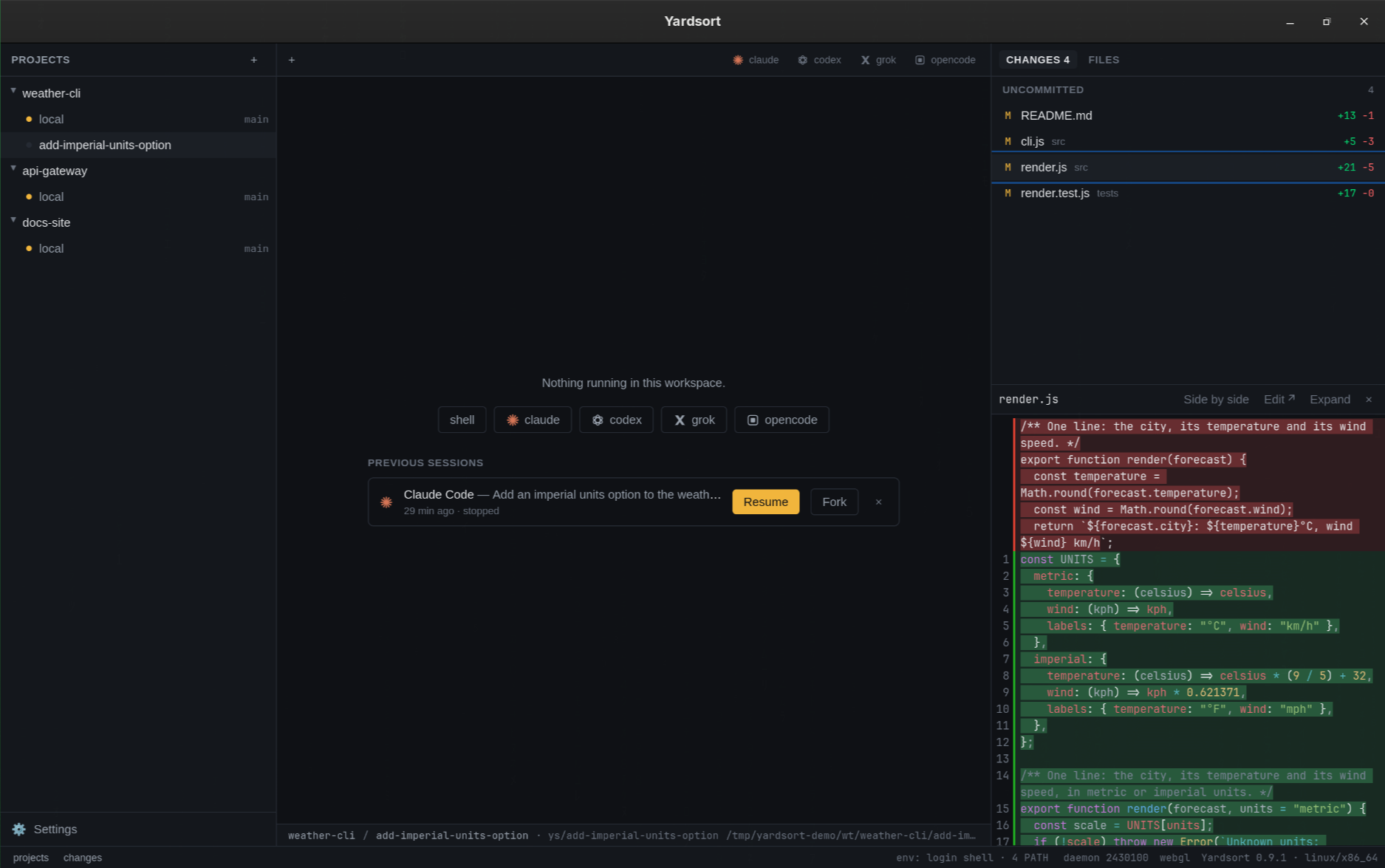 |
| Describe the task, pick the agent, press Enter | Come back later: Resume or Fork any conversation |
Usage: tokens, cost estimates and machine resources
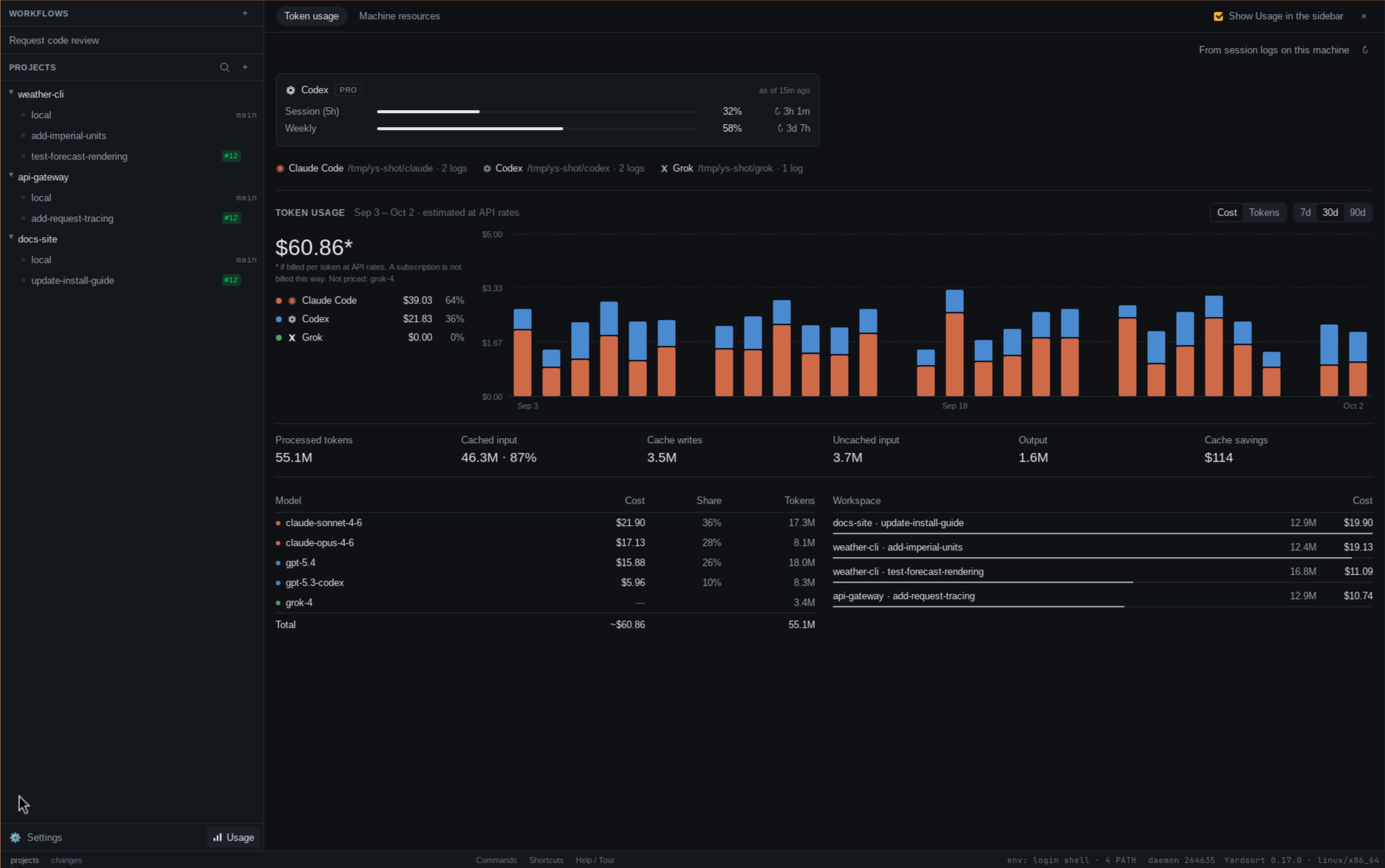
Open Usage beside Settings at the foot of the sidebar, or search for it in the command palette (⌘K on macOS, Ctrl+Shift+K elsewhere).
- Token usage reads Claude Code, Codex and Grok's local session logs, including conversations started outside Yardsort. Compare the last 7d, 30d or 90d by day, agent, model and workspace; inspect cache reads, cache writes, output and cache savings. Codex's plan limits show when they were last reported. No activity capture or extra API key is needed.
- Cost estimates the API price of those tokens in US dollars, rather than your subscription bill. Unknown models, including Grok models, still contribute tokens but no cost.
- Machine resources shows live CPU and memory for Yardsort, its background terminal host, and each project, workspace and terminal, including the programs an agent starts. Sort by memory or CPU to find the busiest workspace and click its name to return to it. Sampling runs every two seconds while this tab is open and the window is visible.
All figures stay on your machine. Token history covers only logs still present there; it does not include other computers. Machine resources covers all agents Yardsort runs, while token totals currently cover Claude Code, Codex and Grok. See the Usage guide for sources, pricing limits and the option to hide the sidebar button.
Every pull request in one place
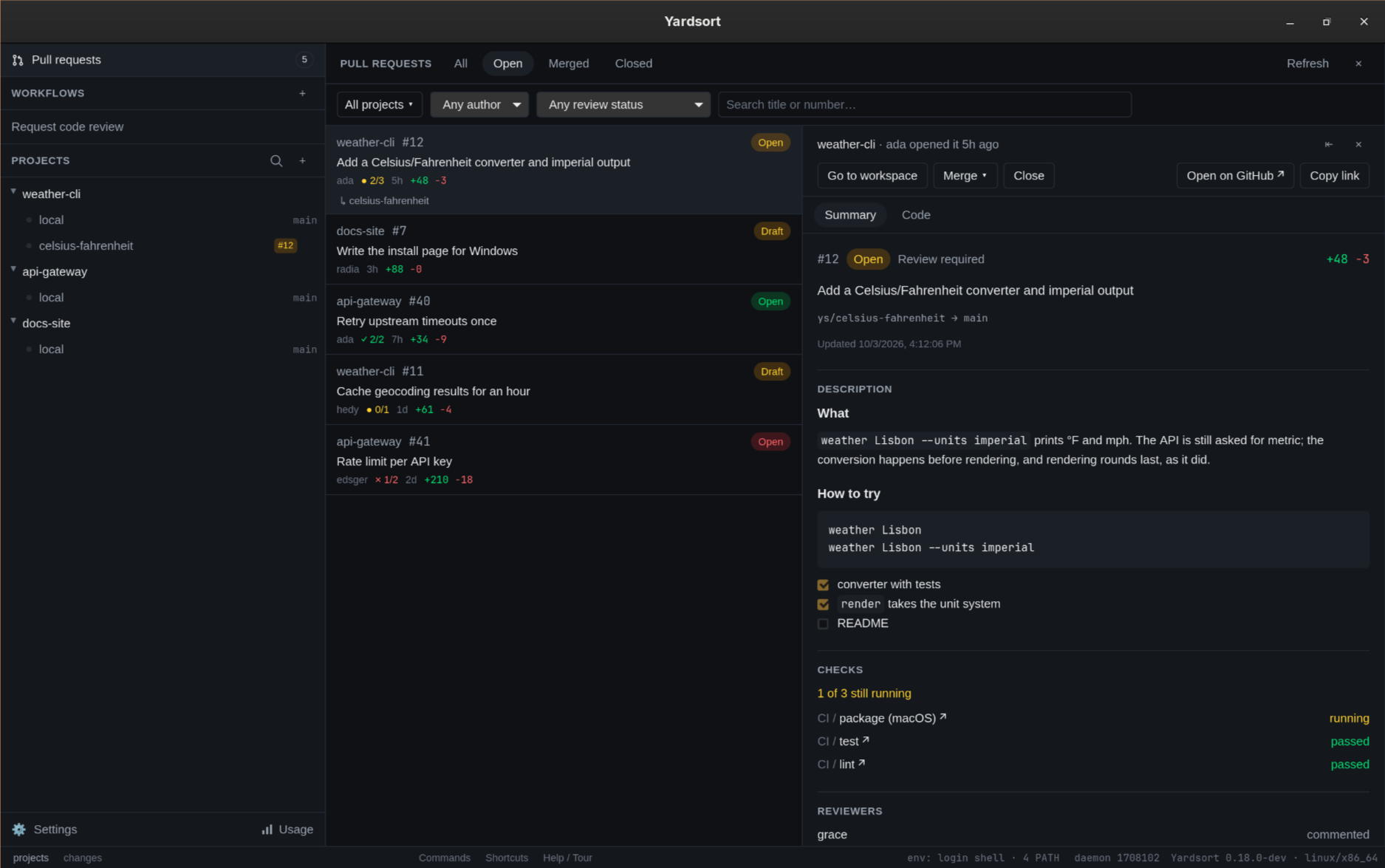
Pull requests, at the very top of the sidebar, is one list of the pull requests of every project on GitHub — the ones agents opened, the ones you opened, the ones a teammate opened last week — most recently updated first. Each row says who opened it, how the checks stand, how big it is, and which workspace holds its branch. Filter by state, project, author and review status, or search a title or a number.
- Summary is the pull request as GitHub has it: the description, every check with a link to its run, who was asked to review and what they said, and the conversation, with a box to reply.
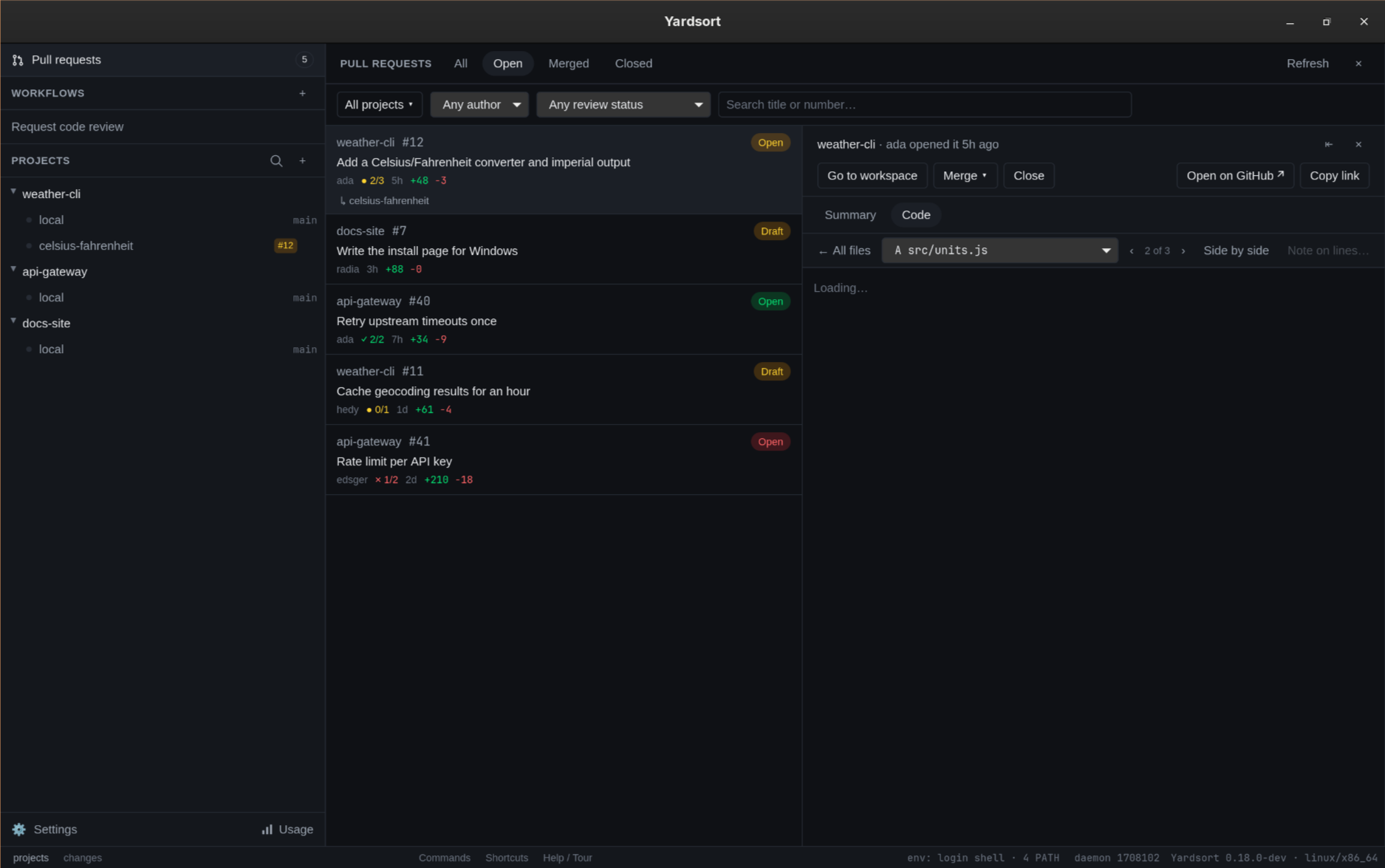
- Code is its diff, read with git into the project's own repository: the files it changes, each with the number of comment threads on it, and the viewer with every thread under the lines it is about. Select lines and Note on lines… sends what you want done to the agent that has the pull request's workspace — typed into it if it is running and quiet, resumed if it has ended, or a new workspace started with the note as its first message — and, if you like, posts the same note on GitHub as a comment on those lines.
- Start workspace, Merge, Close and Reopen act on any pull request from here, each confirmed first and naming whose it is. A fork's pull request gets a workspace too, on a branch Yardsort will not push.
It needs the GitHub CLI, logged in; everything here is gh with the
permissions you already have, and nothing you write reaches gh as a command-line argument.
See Pull requests.
Your issues, where the agents are
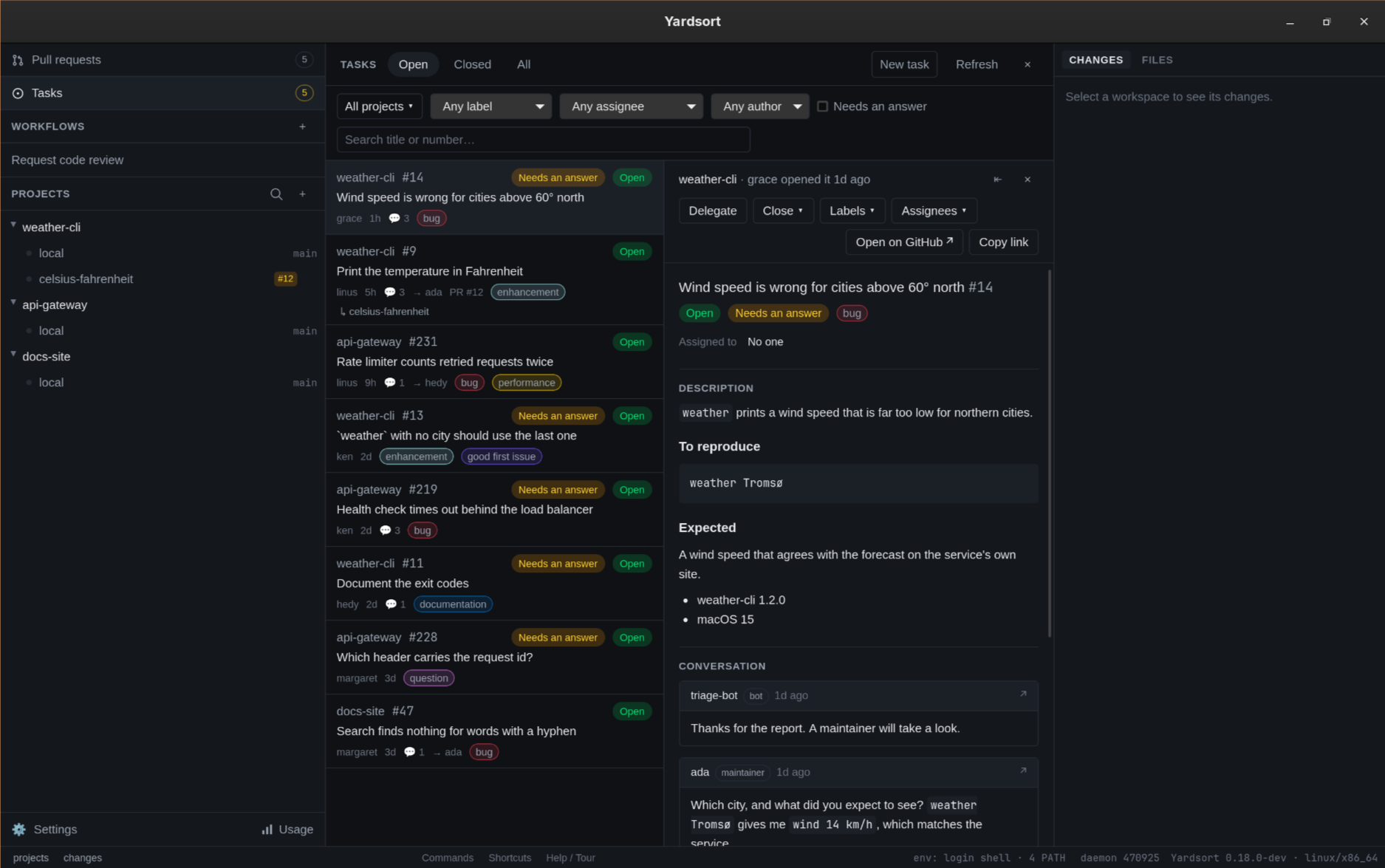
Tasks, under Pull requests in the sidebar, is one list of the open GitHub issues of every project, most recently updated first. The number beside it is not how many are open but how many need an answer: the last person to speak was not an owner, a member or a collaborator, and a bot's comment counts as nobody's. Filter by project, label, assignee, author and Needs an answer, or search a title or a number.
- Delegate opens the composer with the issue as the agent's first message — its title, description and latest comments, between two lines marked as text other people wrote, followed by what the agent should do if that text asks for more than the work. Nothing starts until you press Start. The workspace is named after the task and remembers it, so the task names its workspaces and the workspace's row shows the task.
- New task, a reply box, Close and Reopen, Labels and Assignees manage issues without leaving the app. Closing and reopening ask first, naming who opened the task.
- From a link… takes an issue's address — or
owner/repository#12— and opens it here, selected, cloning its repository first if it is not a project yet. ys taskdoes all of it from a terminal —list --needs-answer,show,start,create,comment,close,reopen,edit, each with--json— so an agent in a workspace can tell you what is open and file an issue when you ask.
It needs the GitHub CLI, logged in; everything here is gh with the
permissions you already have. See Tasks.
Hand the work to another agent
One agent has worked in a workspace and you want another there — Codex after Claude, or the same agent from a clean start. The files and the diff carry over by themselves. What was asked, tried and found does not. Hand off…, in the tab bar, writes the next agent's first message from what Yardsort recorded and opens it in the composer, where you read it, edit it, pick the agent and press Enter.
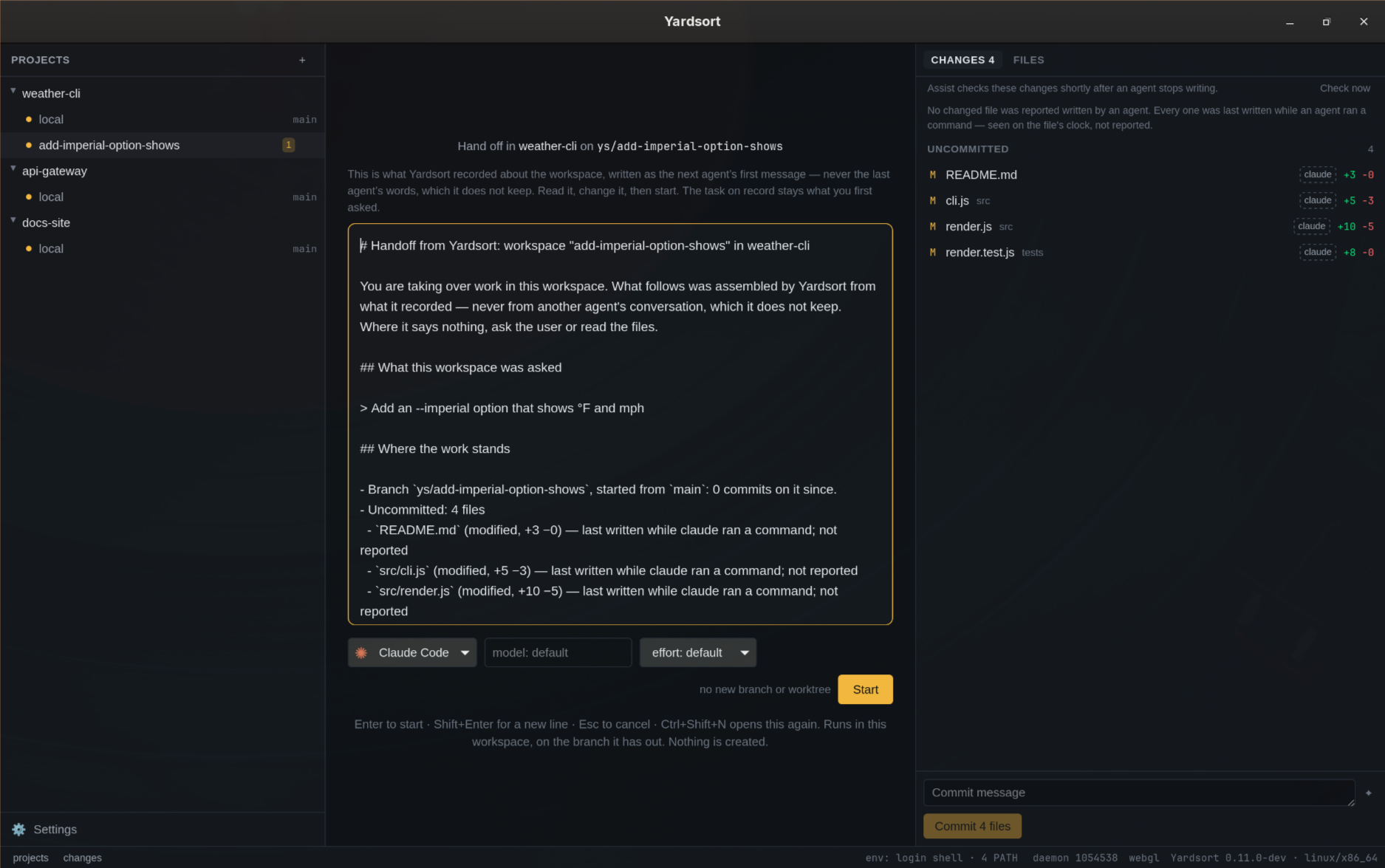
It is written from the record, and no model writes it. Yardsort never keeps a conversation; in a project where you let the agents read each other's, a What was said part adds your messages and each turn's final reply, read from the agents' own transcripts when you press Hand off…. An excerpt of a real one, from a project that does not share them:
## What this workspace was asked

> Add an --imperial option that shows °F and mph

## Where the work stands

- Branch `ys/add-imperial-option-shows`, started from `main`: 0 commits on it since.
- Uncommitted: 4 files
  - `src/render.js` (modified, +10 −5) — last written while claude ran a command; not reported
  - `tests/render.tes