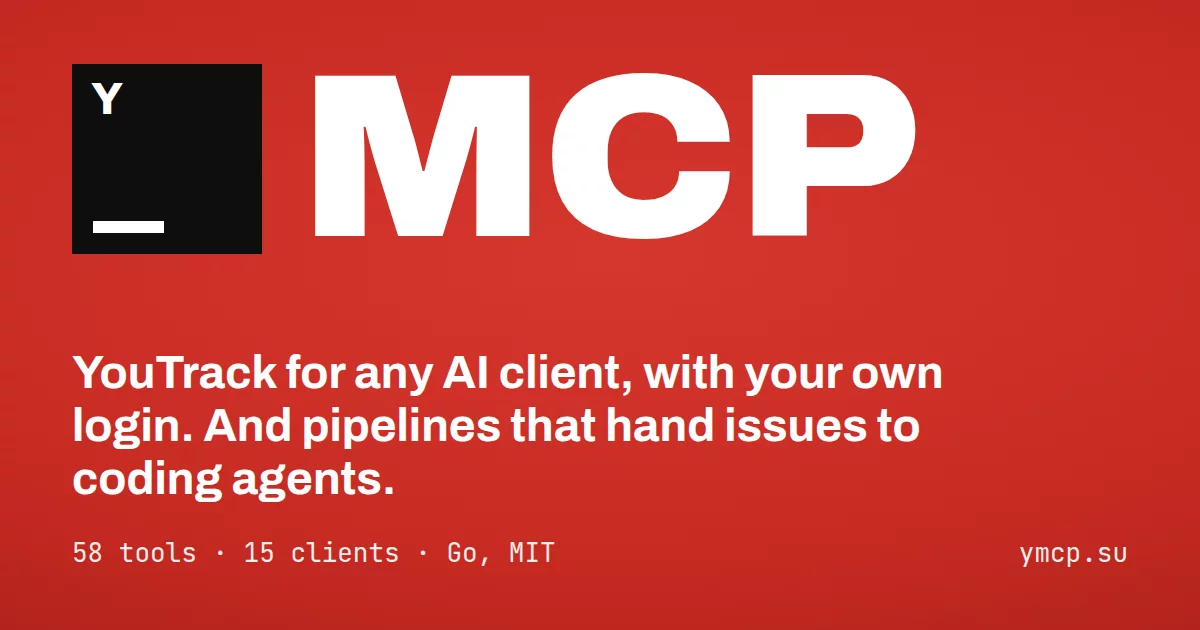


ymcp is a local toolchain for project work in YouTrack, including self-hosted instances behind a VPN. It has two parts: an MCP server for any AI client, and pipelines that hand issues to coding agents.
The MCP server speaks for you with your login and password, ships every tool of YouTrack’s built-in MCP server under the same names, and adds the ones it lacks: deleting things, sprints, attachments, history, time reports, commands and more.
- 58 tools: the 23 built-in ones, same names, arguments and limits, plus 35 extras
- Just a login and password: nothing to set up in YouTrack, no webhooks, OAuth client or API keys; the password lives in your system keychain
- Works without admin rights: field schemas, groups and comments fall back to what a regular user can read
- One-command install that registers itself in Claude, Cursor, VS Code, Zed, Codex, Gemini and 8 more clients
- Single static binary for macOS, Linux and Windows, with
ymcp updatebuilt in
Pipelines take the issues a YouTrack search finds and give each one to a coding agent on its own branch.
- Claude Code, Kimi, opencode or any ACP agent, with the same YouTrack tools as the server
- Branches, GitHub pull requests or GitLab merge requests, and the agent answers review comments
- Needs input when the agent has a question or wants a permission, with a system notification
- A TUI with a board per pipeline, or plain commands for scripts
Install
macOS / Linux:
curl -fsSL https://raw.githubusercontent.com/xlsft/ymcp/main/install.sh | sh
Windows (PowerShell):
irm https://raw.githubusercontent.com/xlsft/ymcp/main/install.ps1 | iex
Or with a package manager, then run ymcp setup:
brew install xlsft/tap/ymcp                                                  # macOS, Linux
scoop bucket add xlsft https://github.com/xlsft/scoop-bucket; scoop install ymcp   # Windows
Package-managed copies update through their manager (brew upgrade ymcp and so on); ymcp update says so.
The installer downloads the latest release and checks its SHA-256. It then runs ymcp setup, which:
- asks for a profile name,
youtrackby default; - asks for your YouTrack URL, login and password, and verifies them before saving anything;
- lists the MCP clients found on your machine, with a checkbox for each;
- registers ymcp as a stdio server in the clients you pick, and removes it from the ones you uncheck.
Run ymcp setup again at any time to edit a profile, add or remove clients, or add another YouTrack.
An agent setting ymcp up for you (Cline and the like) has its own steps in llms-install.md.
Several YouTrack instances
Each YouTrack instance is a profile, and each profile is its own MCP server. The profile's display name gives the
server name: YouTrack (work) becomes youtrack-work, youtrack-acme stays as it is. A repeated ymcp setup
lists your profiles: pick one to edit it, rename it (its client entries move along), or add or remove a profile.
Clients run ymcp --profile <key>, so every instance shows up next to the others with its own tools.
Verify a release
Releases are signed keylessly with Sigstore by this repository's release workflow:
checksums.txt has a checksums.txt.sigstore.json bundle, and each archive an SPDX SBOM (*.sbom.json).
cosign verify-blob checksums.txt --bundle checksums.txt.sigstore.json \
  --certificate-identity-regexp '^https://github.com/xlsft/ymcp/\.github/workflows/' \
  --certificate-oidc-issuer https://token.actions.githubusercontent.com
sha256sum --ignore-missing -c checksums.txt
Each release also has SLSA build provenance for every file in checksums.txt, kept by GitHub and attached as
ymcp.intoto.jsonl:
gh attestation verify ymcp_linux_amd64.tar.gz --repo xlsft/ymcp
The Docker image is signed the same way and carries SBOM and provenance attestations:
cosign verify xlsoftware/ymcp:latest \
  --certificate-identity-regexp '^https://github.com/xlsft/ymcp/\.github/workflows/' \
  --certificate-oidc-issuer https://token.actions.githubusercontent.com
Commands
docs/reference.md has the full reference: every command, every tool and prompt with its inputs and outputs, and every field of the pipeline file.
| Command | |
|---|---|
ymcp / ymcp serve |
Run the MCP server over stdio (what clients launch). --transport http serves Streamable HTTP, see HTTP |
ymcp setup |
Add or edit a profile, sign in, pick its tools and MCP clients. --name, --tools, --clients cursor,zed, --all, --reauth and --remove skip the questions |
ymcp auth |
Set or replace the URL, login and password of a profile. --url, --login, --proxy, --password-stdin for scripts |
ymcp check |
Sign in and print who you are |
ymcp call <tool> '<json>' |
Call one tool, exactly as a client would, e.g. ymcp call count_issues '{"query":"#Unresolved"}' |
ymcp health |
Check that a running HTTP server answers (--url, default http://127.0.0.1:8090) |
ymcp logs |
Show what the server did; -f follows the log live, -n 200 shows more lines |
ymcp pipeline |
Open the pipelines TUI; ymcp pipeline --help lists new, run, check, answer and the rest, see Pipelines |
ymcp update |
Replace the binary with the latest release (--check only reports) |
ymcp version |
Print the version |
Tools
Built-in YouTrack MCP set
| Area | Tools |
|---|---|
| Issues | search_issues, get_issue, create_issue, create_draft_issue, update_issue, change_issue_assignee, get_issue_fields_schema |
| Comments, tags, links, time | add_issue_comment, get_issue_comments, manage_issue_tags, link_issues, log_work, get_saved_issue_searches |
| Knowledge base | search_articles, get_article, create_article, update_article |
| Projects and people | find_projects, get_project, find_user, get_current_user, find_user_groups, get_user_group_members |
Custom fields are set by their display name, e.g. {"State": "In Progress", "Fix versions": ["2.1"]}. ymcp looks up
the field type and checks the value against the project before sending it. That includes the allowed assignees, so a
wrong value comes back with the list of valid ones.
Extras
| Area | Tools |
|---|---|
| Delete and undo | delete_issue, delete_issue_comment, restore_issue_comment, delete_article, delete_work_item, unlink_issues |
| Agile boards and sprints | find_agile_boards, get_agile_board, get_sprint, create_sprint, update_sprint, add_issue_to_sprint, remove_issue_from_sprint, delete_sprint |
| History and reports | get_issue_activities, count_issues, get_time_report, get_issue_work_items |
| Bulk changes | apply_command: any command from the YouTrack command dialog, on issues or a query (up to 100), validated first, with dryRun |
| Attachments | Of issues and knowledge base articles: get_issue_attachments, get_attachment (text inline, images as images, other files saved locally), add_attachment (several files at once), delete_attachment |
| Comments | update_issue_comment |
| Partial text edits | edit_issue_description, edit_article_content: find-and-replace in a description or article, exact or by regular expression with capture groups, so a small change doesn't resend the whole text |
| VCS | get_issue_vcs_changes: commits and pull requests from GitHub, GitLab, Bitbucket, Gitea or TeamCity integrations |
| Tags and saved searches | find_tags, create_tag, update_tag, delete_tag, create_saved_search, update_saved_search, delete_saved_search |
| Escape hatch | call_api: any YouTrack or Hub REST endpoint as you, for whatever the other tools don't cover |
Every command takes --profile <key> (or YMCP_PROFILE) to pick the YouTrack instance, e.g.
ymcp --profile youtrack-acme check. Without it ymcp uses the youtrack profile, or the only one there is.
Tools that delete or bulk-change data are marked with destructiveHint, so clients ask before running them.
Errors tell the model what to do next. ymcp's own checks list what is allowed (value "X" is not allowed; allowed: Critical, Major, …), and errors from YouTrack get a hint by status: which tool finds the right ID after a 404,
that a 403 needs a permission rather than a retry, that a 401 needs ymcp auth. HTML error pages from proxies are
cut down to their title.
Prompts
Clients that support MCP prompts list these as slash commands. Each one tells the model which tools to use and in what order, and they never change YouTrack without asking:
| Prompt | |
|---|---|
standup |
What I did since the last working day (Friday on a Monday), what's next, what blocks me. days looks further back |
triage |
Untriaged issues of a project with proposed type, priority, assignee and duplicates; applies only what you approve |
sprint_report |
A sprint of a board: done and open work, who has what, scope changes, time logged, risks |
issue_brief |
Catch up on an issue: TL;DR, state, decisions, open questions, next steps |
A prompt is offered only when the tools it needs are served (see below).
Choosing tools
All 58 tools take room in the model's context. A profile can serve only some groups of them: pick them in
ymcp setup, or pass --tools (or YMCP_TOOLS) to serve, which wins over the profile.
| Group | Tools |
|---|---|
issues |
search, count, read, create, edit, drafts, delete, commands, links, history, VCS changes |
comments |
read, add, edit, delete, restore |
attachments |
files on issues and articles |
articles |
knowledge base |
time |
work items and time reports |
agile |
boards and sprints |
projects |
find and describe projects |
people |
users and groups |
tags |
tags and tagging issues |
searches |
saved searches |
api |
call_api |
A selection mixes groups and tool names, and - removes one: issues,comments,articles,-delete_issue. Removals
alone start from everything, e.g. -api,-agile. The start-up log shows what is served, e.g.
tools="19 of 58: issues, comments, -delete_issue".
Pipelines
A pipeline watches a YouTrack search and gives each issue it finds to a coding agent. The agent works in its own git
worktree on a new branch. ymcp pushes the branch, opens a pull or merge request and brings the agent the review
comments until the change is merged. Pipelines need a local install: they are not in the Docker image. The agent works
on this machine or on an SSH host (workspace.host, an alias from ~/.ssh/config).
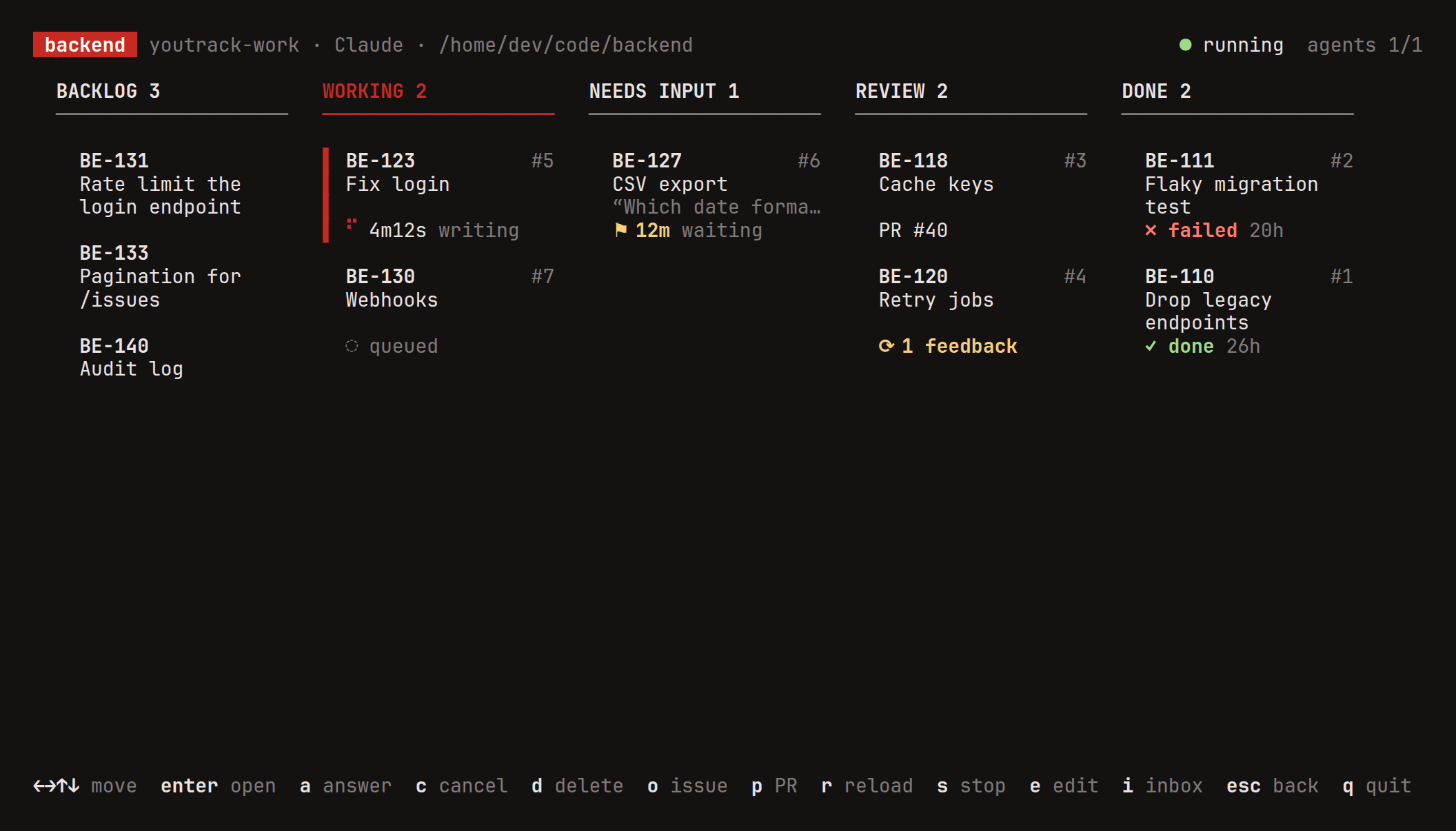
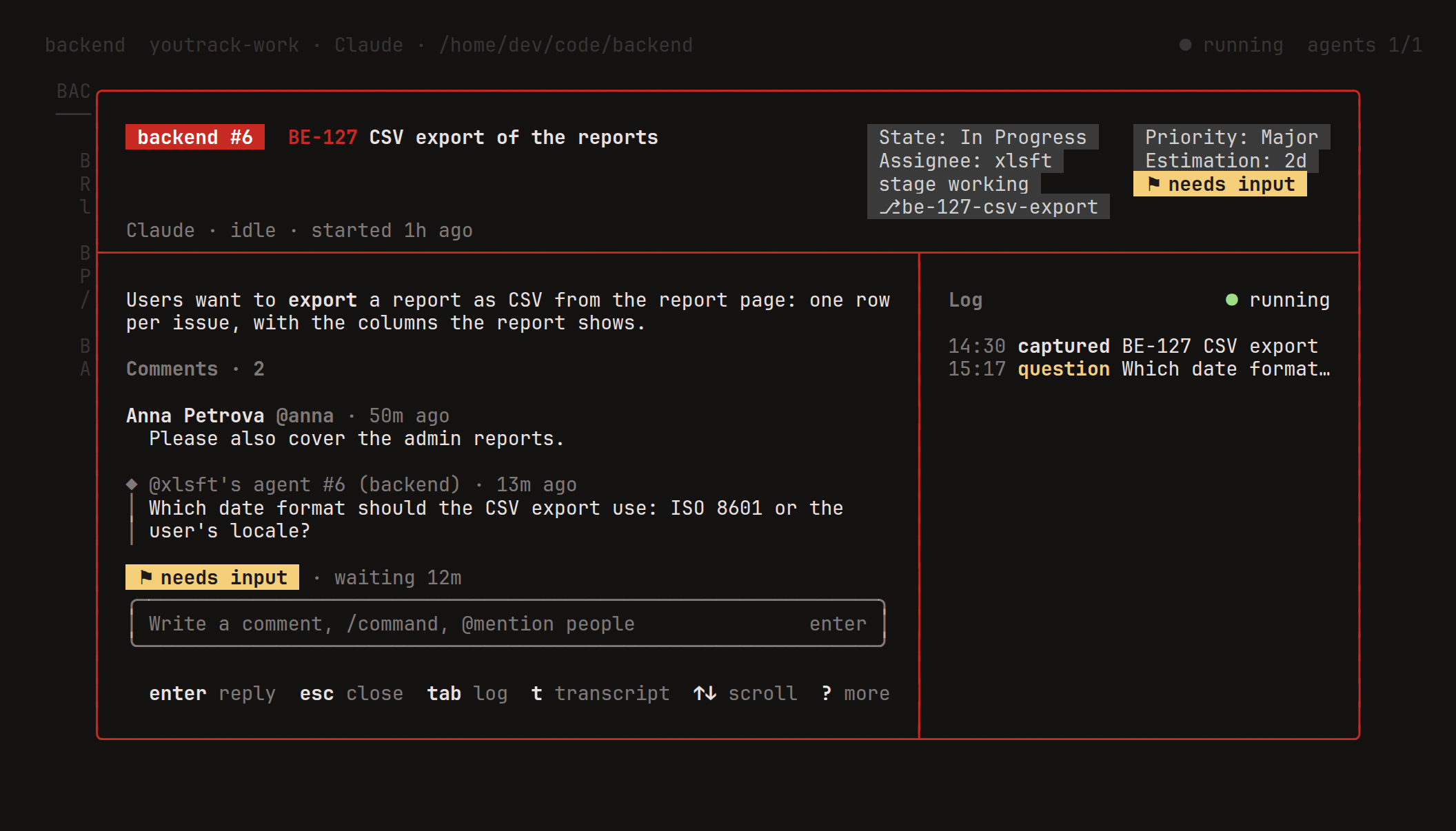
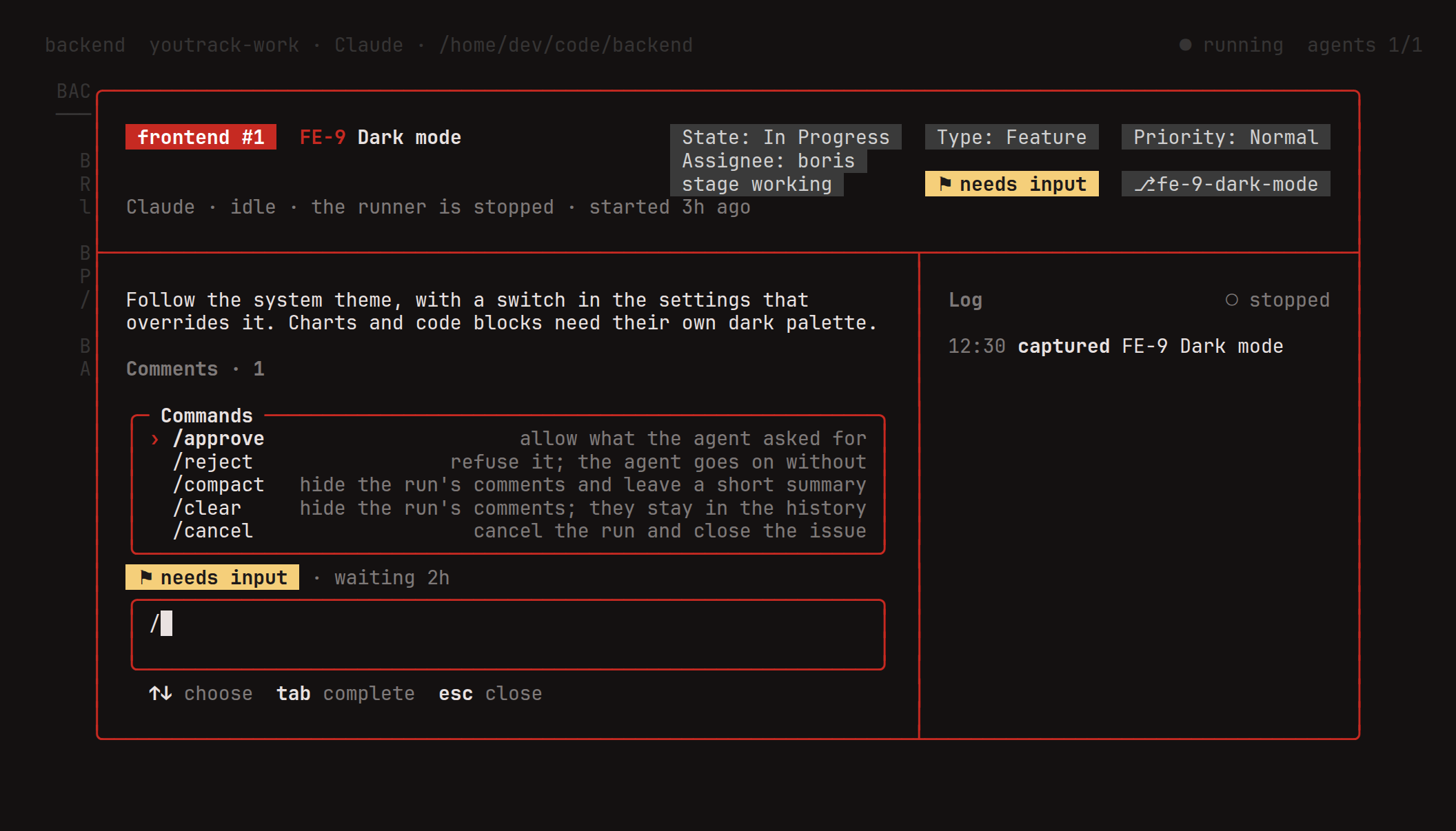
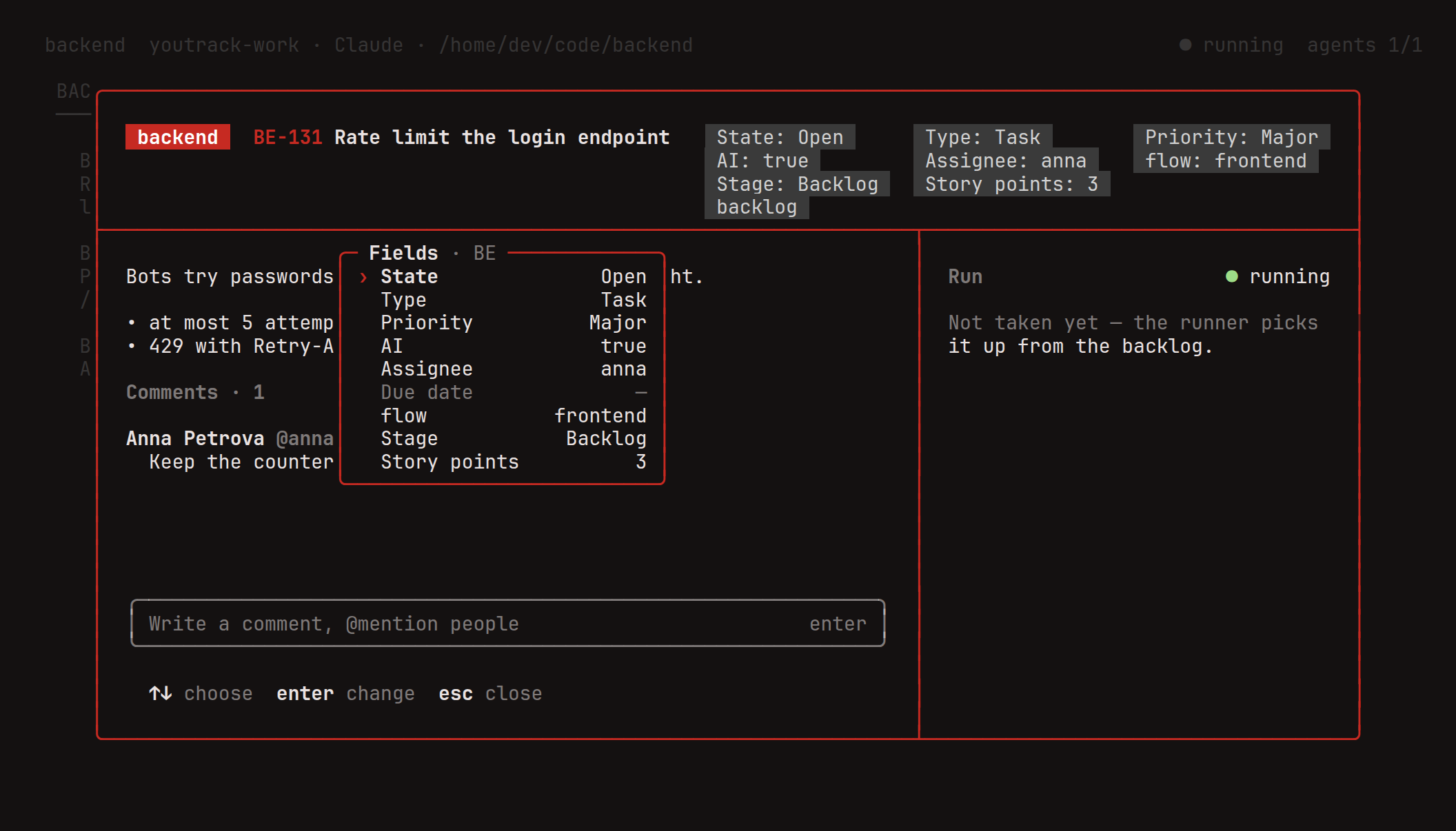
The Site workflow draws these from the TUI's own code on every change to main.
Run ymcp pipeline to open the TUI: your profiles, their pipelines as cards, a board per pipeline and an inbox of
runs that wait for you. Press n to create a pipeline with the wizard. enter on a card of the board, a run or an
issue still in the backlog, opens it like a YouTrack issue: the description and comments, the pull request thread
([ and ]) and the agent's log, with a comment box (enter) whose / completes the commands below; r reloads the
board or the card. t opens the run's transcript over the card: what the agent thinks and says, every tool it runs
with the file, command or pattern it looks at, and the replies it gets, followed live. Every field of the issue that
has a value shows at the top of the card, four to a row, beside the title or under it when it doesn't fit. e lists the project's fields to change one: pick a value,
add or remove one of several, or type a number. A backlog issue the source query no longer finds after the change
leaves the board. Shortcuts work on Cyrillic keyboard layouts too. In kitty and Ghostty the card shows pictures in place, pasted
screenshots and attachments included, and the agent's working loader plays; other terminals, and tmux, get links to
them. YMCP_IMAGES=kitty or YMCP_IMAGES=off overrides the choice. Or from the command line:
ymcp pipeline new backend --profile youtrack --dir ~/src/backend --query 'project: BE #Unresolved tag: ai'
ymcp pipeline backend edit     # adjust the stage commands to your workflow
ymcp pipeline backend check    # profile, query, stages, git and agent
ymcp pipeline backend run -d   # run in the background; `stop` stops it
ymcp pipeline --help lists every command, including status, runs, logs, answer, cancel and delete. Each
pipeline is a JSON file in <config dir>/ymcp/pipelines/, and runs are kept in <config dir>/ymcp/state.db.
Stages
The source query uses the same syntax as a saved search. Each issue it finds moves along the pipeline's board:
| Stage | |
|---|---|
| Backlog | Issues the source query finds and no run has taken yet |
| Working | The agent works on the issue. ymcp applies the stage's YouTrack command, State In Progress by default |
| Needs input | The agent asked a question, wants a permission, timed out or failed. ymcp says why in a comment and applies tag needs-input |
| Review | The agent is done and the branch is pushed. Default command State Fixed |
| Done | Off by default. Reached when the change is merged or the issue matches the stage's query |
| Closed | The change was closed without a merge, or the issue matches the stage's query. Its optional command also runs on a /cancel reply |
Each stage has an enter command, as typed in YouTrack's command dialog, and a match query that recognizes issues
in it. The working command should take the issue out of the source query: moving it back there cancels the run. A
canceled run (also ymcp pipeline NAME cancel N) closes its pull or merge request with a comment, keeps its branch and
removes its worktree unless workspace.keepWorktree is set; a later run of the issue starts on a new branch. An issue
moved back to the backlog to cancel its run is not taken again until it leaves the source; one canceled otherwise is
taken again once it is back in the source. A change closed without a merge ends the run as closed.
workspace.parallel sets how many issues run at once (1).
A run that has ended can be deleted from the local store with d on the board or the run's card, or with
ymcp pipeline NAME delete N: its log goes, the issue, branch and change stay, and an issue the backlog held is taken
again. A canceled run can be deleted once a runner has closed its change and removed its worktree.
The agent commits as the repository's user.name and user.email. With workspace.identity.enabled it gets an author
of its own in each worktree instead, written to the worktree's config only. workspace.identity.name is a template of
the name ({{agent.name}} · {{pipeline.name}} #{{run.number}}) and workspace.identity.tag of what goes after + in
your address (agent_{{pipeline.name}}_{{run.number}}, so dev@example.com becomes
dev+agent_backend_3@example.com). Both take the issue's keys too; the tag keeps lowercase letters, digits and _.
Every commit message starts with workspace.commitPrefix ({{issue.id}}). Set it to "" for none, e.g. when the
repository runs commitlint: the agent then writes its commit messages the repository's way. strategy.title is the
template of the PR/MR title ({{issue.key}} {{issue.summary}}); {{commit.subject}} is the subject of the branch's
first commit, so "title": "{{commit.subject}}" gives a conventional title, which a squash merge keeps.
Agents
agent.provider |
|
|---|---|
claude |
Claude Code through its CLI, claude -p with stream-json, one process per turn and --resume in between |
kimi |
Kimi Code over ACP, kimi acp |
opencode |
opencode over ACP, opencode acp |
acp |
Any other agent that speaks ACP, started by agent.command |
Each run gets its own MCP server on a loopback port with its own token, and the agent gets the YouTrack tools
through it, as the pipeline's profile. The password and the YouTrack token stay in ymcp and never leave your machine.
Two more tools reach the runner: request_input asks you a question, report posts a short status.
What the agent may do is up to the agent's own settings: its mode (agent.mode, e.g. Claude's acceptEdits) and
its arguments (agent.args, e.g. --allowedTools). When it asks for a tool it may not use, the pipeline's
permissions decides: ask (default) puts the run in needs input, allow approves every request, deny refuses
every one and the agent goes on without the tool. New Claude pipelines start with --dangerously-skip-permissions in
agent.args, so Claude runs every tool without asking; replace it with a mode or --allowedTools to restrict it.
New Kimi pipelines start in Kimi's yolo mode for the same reason; auto approves only what Kimi deems safe and
default asks about everything.
Before each turn ymcp fetches origin, so the agent can rebase onto the base branch without fetching itself.
Strategies
strategy.kind |
|
|---|---|
branch |
Push the branch only (default). Feedback comes from YouTrack alone |
github-pr |
A pull request |
github-issue-pr |
A GitHub issue that mirrors the YouTrack issue, and a pull request that closes it |
gitlab-mr |
A merge request on gitlab.com or a self-hosted GitLab, found from the origin URL |
After a push the agent writes the PR/MR's title and description in a short turn of its own: ymcp resumes its session
with prompts.describe and takes what it passes to the set_change tool, so nothing it said while working ends up
there. Put the rules for them (language, format, links) in prompts.describe. An agent that doesn't call the tool is
asked once more, then its answer to that turn is the description. Later pushes update the PR/MR the same way, unless
someone edited it on the host. "strategy": {"describe": false} opens it from strategy.title and the turn's answer
instead. strategy.draft opens them as drafts. For gitlab-mr, strategy.squash and strategy.deleteBranch tick the merge
request's "Squash commits" and "Delete source branch" options. The token comes from gh or glab, whichever you are signed in to for that
host, or from the system keychain (service ymcp, account vcs:<host>).
CI
After each push the runner watches the CI of the pushed commit: GitHub's check runs and commit statuses, or the
GitLab pipeline. That works for every strategy; branch reads the CI of the host origin points at, with the same
token. When the CI fails while the run is in review, the agent ge