
ZizkaDB
The operational database for AI agents: audit, memory and compliance
Every agent decision linked to its cause. Causal agent memory, a tamper-evident audit log and time-travel debugging,
in one open-source database on Postgres. Built for EU AI Act Article 12 record-keeping.
Keyword + vector search · Drift detection · MCP server · Python & TypeScript SDKs · Self-host or cloud
Quickstart · Docs · Integrations · Connect · Cloud · Discussions · Contributing








Every agent team eventually asks: Why did it say that? Why did it call that tool? ZizkaDB links every agent step to the step that caused it, so you get the answer in one call instead of scrolling through traces. That causal record is also the agent's auditable memory for its next run, and a tamper-evident audit log you can prove was never changed: causal observability for AI agents, from debugging to compliance.
- Causal, not just traces. Each event carries a
parent_id.db.why(event_id)walks back to the user message, wrong tool, or bad context that started it. - Time-travel.
db.at(agent, timestamp)rebuilds exactly what the agent knew at any past moment. - Provable history. Every event has a checksum and is hash-chained to the one before it, so
db.verify_chain(agent)proves nothing was edited, removed or reordered. GDPR deletions leave a content-free tombstone. A verifiable record for EU AI Act Article 12. - Causal agent memory for the next run.
db.context_for(agent, task)returns the relevant past as a prompt block, ranked by relevance, importance and recency; a new fact can replace an old one (supersedes). Keyword search works with no OpenAI key, hybrid with embeddings, or embed locally. - Built database. Idempotent and batch writes, retention, export/import, read-only and expiring keys, Prometheus metrics, backup and restore scripts.
- Drift detection. See when an agent's behavior shifts from its baseline.
- Self-host or cloud. Run it on your own Postgres with one Docker command, or use ZizkaDB Cloud. AGPL-3.0, no per-trace billing; self-hosted data never leaves your infrastructure. Self-hosted runs one agent with one API key; multiple agents, agent fleets and agent-to-agent messaging are on Cloud.
In plain words: ZizkaDB is a flight recorder for AI agents. It records every step an agent takes and which step led to it, so when an agent does something unexpected, you can see exactly why.
Start here
| You are… | Go to |
|---|---|
| New to ZizkaDB, or not technical | ZizkaDB Cloud: nothing to install |
| A developer trying it on your laptop | Quickstart: one command, about a minute |
| Adding it to an agent you already have | Connect your agent |
| Running it for your team on a server | Self-host on a server or Deploy on Redu Cloud |
Contents
- Quickstart (60 seconds)
- Integrations: LangChain, LangGraph, CrewAI, LiveKit, MCP
- Connect your agent
- What it does
- Audit trail and EU AI Act Article 12
- How it works
- Use with your AI assistant (MCP)
- ZizkaDB vs Langfuse, LangSmith and Mem0
- Cloud, FAQ and docs
- Contributors
Quickstart (60 seconds)
One command, one container. No repo clone, no Python, no config files.
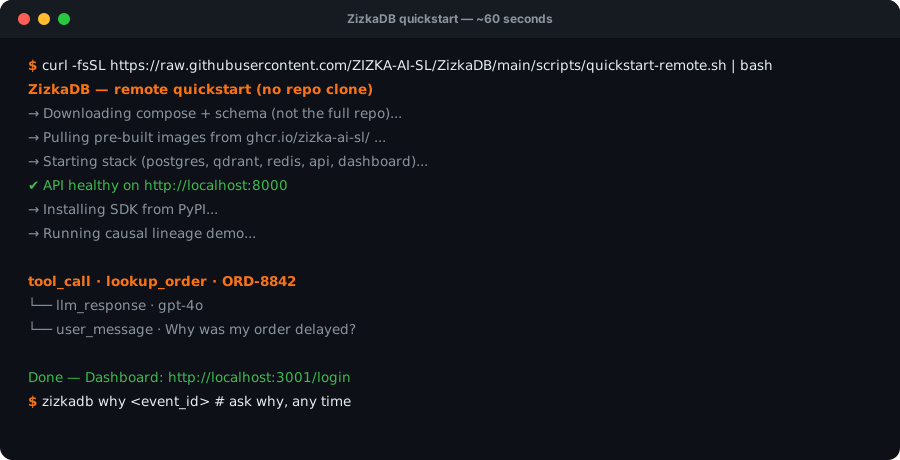
1. Run it. With Docker running:
curl -fsSL https://raw.githubusercontent.com/ZIZKA-AI-SL/ZizkaDB/main/scripts/quickstart-remote.sh | bash
This pulls a single image (Postgres, the API and the dashboard together), starts it, and logs a demo agent run. After the download, startup takes a few seconds.
2. See why. It prints the causal chain behind the demo agent's tool call:
tool_call · lookup_order · ORD-8842
  └── llm_response · gpt-4o
        └── user_message · Why was my order delayed?
3. Explore. The dashboard opens on that agent, already signed in: localhost:3001/dashboard/activity?agent=support-bot. Click any event → Why? (causal) tab.
Now log your own agent: pip install zizkadb-sdk, then see CONNECT.md. The local API is http://localhost:8000 with key zizkadb_dev_local.
Prefer plain docker run? Day-two commands
The script is a wrapper around this:
docker run -d --name zizkadb -e ENV=development \
  -p 127.0.0.1:8000:8000 -p 127.0.0.1:3001:3001 \
  -v zizkadb_data:/data ghcr.io/zizka-ai-sl/zizkadb
| Do this | Command |
|---|---|
| Stop / start | docker stop zizkadb / docker start zizkadb |
| Logs | docker logs -f zizkadb |
| Upgrade (keeps data) | re-run the quickstart command |
| Erase everything | docker rm -f zizkadb && docker volume rm zizkadb_data |
| Dashboard port busy | ZIZKADB_DASHBOARD_PORT=3005 before the quickstart command |
The single container has two modes:
-
On your own machine (
-e ENV=development, what the quickstart uses): one-click sign-in and a well-known API key, with the ports bound to127.0.0.1only. -
On a server (the default, production mode): the container generates its own secrets on first start, and the dashboard and API share port 3001. Sign in with the admin token:
docker run -d --name zizkadb -p 3001:3001 -v zizkadb_data:/data ghcr.io/zizka-ai-sl/zizkadb
docker exec zizkadb sed -n 's/^GEN_SELFHOST_ADMIN_TOKEN=//p' /data/secrets.env   # your admin token
Put it behind HTTPS, and set
ZIZKADB_PUBLIC_URL=https://your-domainso the links it generates are correct. If a reverse proxy on the same host forwards to it, add-e TRUSTED_PROXIES=127.0.0.1,::1,172.16.0.0/12so sign-in rate limits see each visitor.
The single container runs without Qdrant: search and context_for() use keyword search there (no setup, no OpenAI key). For vector search, use the full stack below with embeddings on.
The self-hosted dashboard is just your dashboard: no signup, no email, no account. Accounts and plans exist only on ZizkaDB Cloud.
Self-hosted is single-agent: the first agent name you log with becomes your agent, and a second name is rejected with a message naming it. The support-bot demo agent does not count. For several agents, use ZizkaDB Cloud.
Self-host from a clone
The full stack (Postgres, Qdrant, Redis, API, dashboard as separate containers) — use this for development, vector search, or production. It generates random database, Redis and Qdrant passwords on first setup:
git clone https://github.com/ZIZKA-AI-SL/ZizkaDB.git && cd ZizkaDB
bash scripts/setup-local.sh
| Service | URL |
|---|---|
| API | http://localhost:8000 |
| Dashboard | http://localhost:3001 |
| Swagger | http://localhost:8000/swagger |
Self-host on a server
On a machine other people can reach:
cp .env.example infra/.env
bash scripts/init-secrets.sh        # random Postgres, Redis, Qdrant and JWT secrets
Then set these in infra/.env before starting the stack:
ENV=production                      # turns off the one-click button and dev API keys
DEV_API_KEY=<random>                # must not be the default, or the API refuses to start
DEPLOYMENT_MODE=self_hosted
SELFHOST_ADMIN_TOKEN=<long-random>  # python -c "import secrets; print(secrets.token_urlsafe(32))"
Optional: EVENT_RETENTION_DAYS (delete old events), METRICS_TOKEN (Prometheus /metrics), REDACT_PATTERNS (redact emails, phones, cards before storage). Data ports stay on 127.0.0.1.
The dashboard then asks for the admin token instead of showing the one-click button. Without SELFHOST_ADMIN_TOKEN, dashboard login stays disabled. Everyone who has the token signs in to the same single owner workspace. Check your config with bash scripts/validate-selfhost-config.sh --production. Full steps: wiki/Self-Hosting.
Deploy on Redu Cloud

Redu Cloud is ZizkaDB's recommended cloud for the open-source edition. With the redu MCP added to your coding agent, ask it to "Deploy https://github.com/ZIZKA-AI-SL/ZizkaDB to redu". The agent follows redu.md: the single container on one VM, the dashboard and API on one HTTPS URL, and your data kept in a volume. Then sign in with the admin token, create your API key in Settings, and set ZIZKADB_HOST and ZIZKADB_API_KEY in your agent.
Full guide: DEVELOPMENT.md · Troubleshooting: wiki/Troubleshooting.md · What ZizkaDB sends: docs/telemetry.md
Integrations: LangChain, LangGraph, CrewAI, LiveKit, MCP
Works with the agent framework you already use — add one package and every step is logged with its cause.


| Integration | Install | What you get |
|---|---|---|
| Python |
pip install zizkadb-sdk |
Any Python agent |
| TypeScript |
npm install zizkadb-sdk |
Any JavaScript / TypeScript agent |
| LangChain |
pip install zizkadb-langchain |
Drop-in callback handler |
| LangGraph |
pip install zizkadb-langgraph |
Every graph node logged with its parent |
| CrewAI |
pip install zizkadb-crewai |
Crew logger for your agents |
| LiveKit |
pip install zizkadb-livekit |
Voice agents — one call, one session |
| MCP |
uvx zizkadb-mcp |
Ask Cursor or Claude why |
| REST API |
Swagger docs | Any language |
Click a name for its setup guide. New project? Scaffold one with zizkadb init my-agent --template basic.
Connect your agent
import asyncio
from zizkadb import ZizkaDB

async def main():
    async with ZizkaDB(host="http://localhost:8000") as db:
        user = await db.log(agent="my-bot", event="user_message", data={"text": "Why is my order late?"})
        tool = await db.log(agent="my-bot", event="tool_call", data={"tool": "lookup_order"}, parent_id=user.event_id)
        (await db.why(tool.event_id)).print()

asyncio.run(main())
TypeScript
import { ZizkaDB } from 'zizkadb-sdk'

const db = new ZizkaDB({ host: 'http://localhost:8000' })

const user = await db.log({ agent: 'my-bot', event: 'user_message', data: { text: 'Why is my order late?' } })
const tool = await db.log({ agent: 'my-bot', event: 'tool_call', data: { tool: 'lookup_order' }, parentId: user.eventId })
;(await db.why(tool.eventId)).print()
From the terminal: zizkadb why <event_id>. Full guide: CONNECT.md
What it does
| Function | What you get | |
|---|---|---|
| Debug | db.why(event_id) |
The causal chain behind any event |
db.at(agent, timestamp) |
What the agent knew at a past moment | |
db.baseline(agent) |
Drift detection: alerts when behavior shifts from past sessions | |
| Causal agent memory | db.context_for(agent, task) |
Relevant past events as a prompt block (relevance × importance × recency) |
db.search(query, mode=) |
Keyword search out of the box; hybrid keyword + vector with embeddings | |
db.log(..., supersedes=, importance=) |
Replace an outdated fact; weight what matters | |
| Audit | db.verify_chain(agent) |
Proof that no event was edited, removed or reordered |
db.forget(key, value) |
GDPR erasure, including the search index, leaving a tombstone (no content; its chain link and checksum let someone with database access confirm an exact guessed event) | |
db.export_events(agent) / db.import_events(...) |
Portable NDJSON copy; move between self-host and Cloud | |
| Operate | db.log(..., idempotency_key=) / db.log_batch(events) |
Safe retries; up to 500 events per request |
db.iter_events(agent) |
Every event, cursor-paged | |
| Server settings | Retention, redaction, read-only and expiring keys, /metrics, backup and restore |
Audit trail and EU AI Act Article 12
Article 12 of the EU AI Act requires high-risk AI systems to automatically keep logs of what they did. ZizkaDB gives you that record:
- Checksum-backed decision logs. Every event is stored with a SHA-256 checksum over its content and audit fields (agent, session, parent, timestamp, sequence), and
GET /v1/events/verifyreports any row whose fields no longer match. Events are also hash-chained per agent, soGET /v1/events/chainproves no event was removed, inserted or reordered (GDPR deletions leave a content-free tombstone). - Causally linked history. Each decision points to the event that caused it, so an auditor can follow the full chain.
- Session replay. Step through any past session event by event.
- Time-travel debugging. Rebuild exactly what the agent knew at any moment with
db.at(). - Drift detection.
db.baseline()flags when an agent starts behaving differently from its history.
ZizkaDB supports your record-keeping obligations; it doesn't make a system compliant on its own.