
Take the text apart.
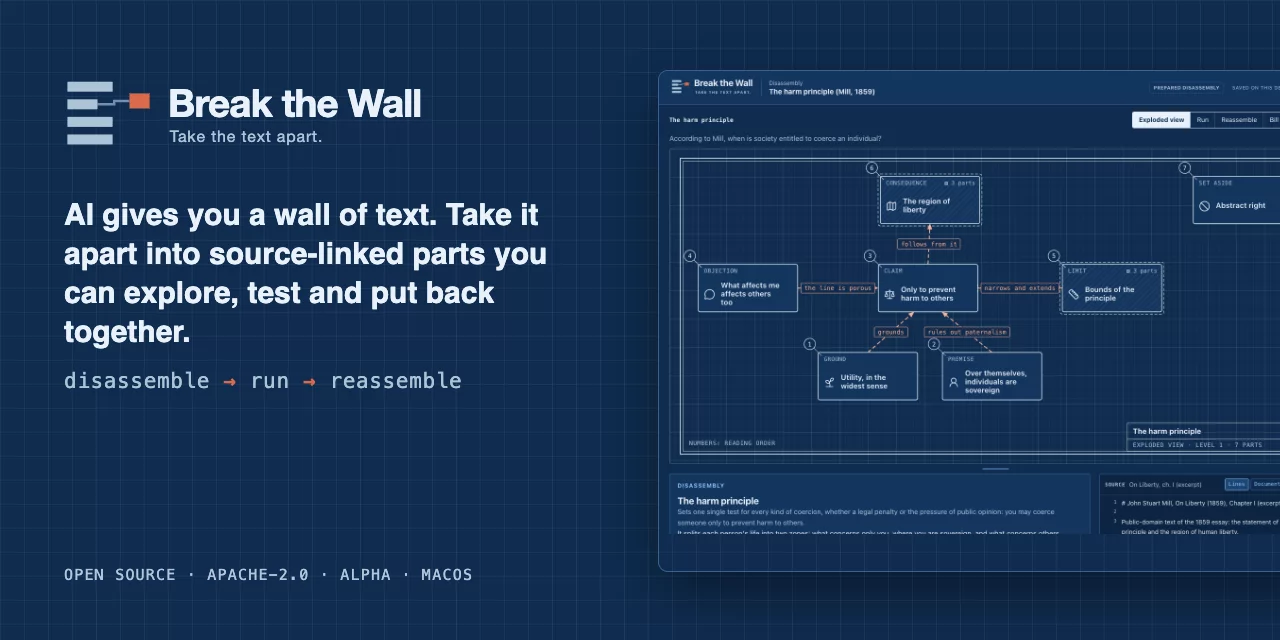
AI gives you a wall of text. Break the Wall turns it into source-linked parts you can explore, test and put back together.
Open-source alpha · macOS · Windows · Works with Claude · English & Italian · Apache-2.0




Try the alpha · How it works · Roadmap · Contribute
1 · Claude writes it, Break the Wall checks it · Use with Claude
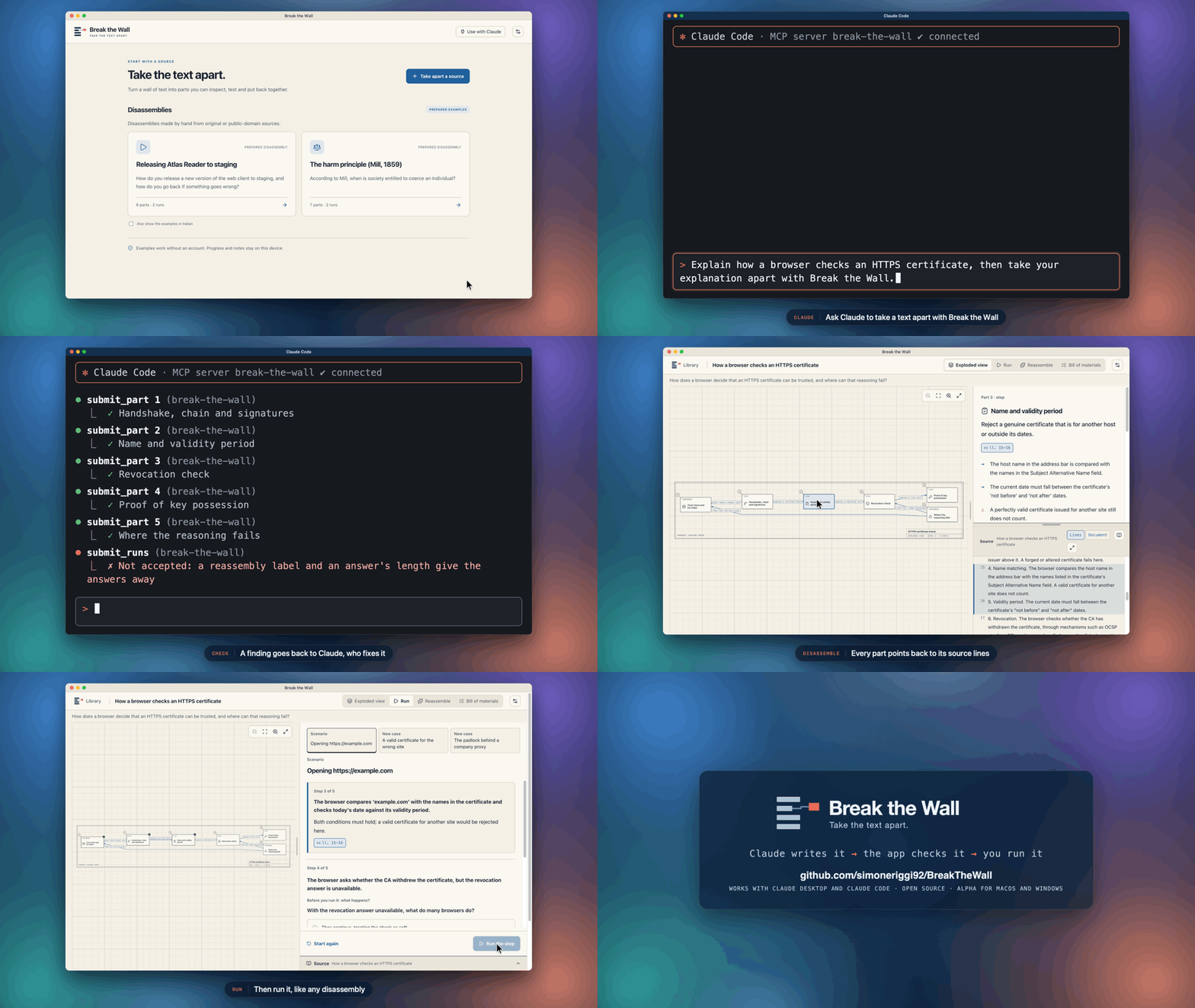
2 · Explore it, run it, put it back together
Note
Alpha. Download the app for Apple Silicon Macs or Windows x64 PCs, or run it from source. The prepared examples work without an account. Taking apart your own text or Markdown uses ChatGPT (experimental), a local model on your computer, or Claude Desktop and Claude Code, which can open a text in Studio or write the disassembly themselves. PDF documents and repositories as sources are on the roadmap.
Table of contents
- Why Break the Wall?
- How it works
- Try the alpha
- Features
- Local models
- Use with Claude
- Tech stack
- Project status
- Roadmap
- Contributing
- Community
- License
Why Break the Wall?
A useful AI explanation can still be a wall of text: correct-sounding, hard to retain and hard to check. Break the Wall makes its structure explorable: open one part, see what it connects to, and return to the source lines behind it. The question is not only "can I read this?" but "can I explain how its parts work together?"
The idea comes from reverse engineering, which takes software apart with evidence for every finding so it can be understood and rebuilt. It is not a course, a summarizer, a chatbot or a flashcard app; review is there only if you want it. See the product definition.
| A chat answer | Break the Wall | |
|---|---|---|
| The whole as an exploded view of 3–7 parts, with sub-assemblies | ❌ | ✅ |
| Joints that say how parts connect: sends to, causes, supports, attacks, leads to… | ❌ | ✅ |
| Every part linked to exact source lines | ❌ | ✅ |
| Predict before each step runs; remove a brick and see if the claim falls | ❌ | ✅ |
| A bill of materials that accounts for every line of the source | ❌ | ✅ |
| Progress, runs and notes that resume after restart | ❌ | ✅ |
Important
Source links are checked; explanations can still be wrong. The app checks that every cited line exists in your source, and that every line is either in a part or excluded with a reason. A wrong explanation can still sit next to a correct citation, so read the highlighted lines.
How it works
| Step | What you do |
|---|---|
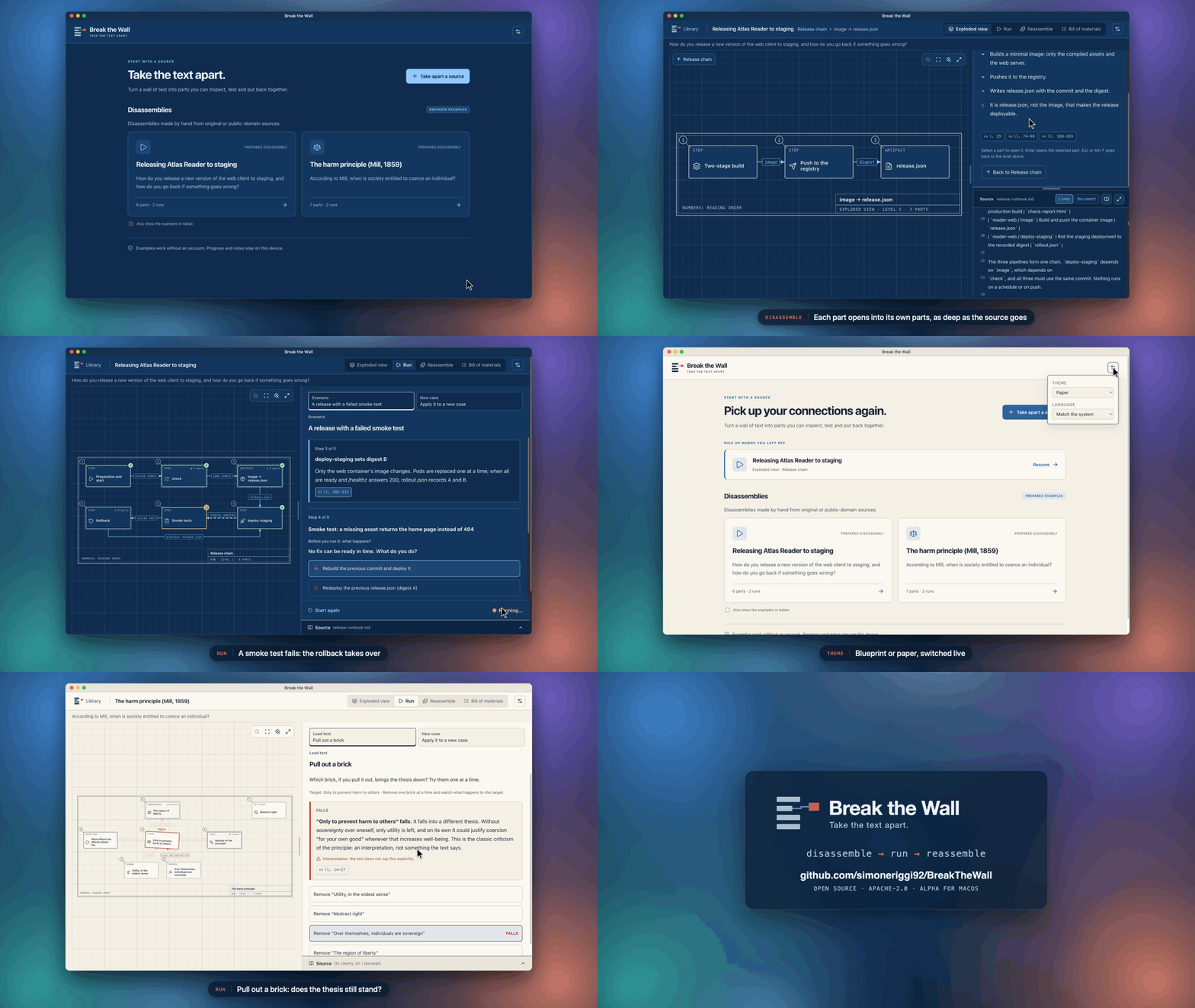
| Disassemble | Explore 3–7 parts per level, with named connections and links to source lines. Open a part to go deeper. |
| Run | Predict a process step before it runs, remove a premise from an argument, or apply the whole to a new case. |
| Reassemble | If you want, rebuild the structure on a drawing whose names are hidden. |
The prepared examples show a release runbook and Mill's harm principle. The same loop works for any subject: only the kind of connection changes (mechanism, argument, story).
Try the alpha
Download for Mac
Requirements: a Mac with Apple Silicon (M1 or later) and macOS 13 Ventura or later.
- Download
Break-the-Wall-<version>-arm64.dmgfrom the latest release. - Open it and drag Break the Wall to Applications.
- Open the app. The first time, macOS shows “Break the Wall” Not Opened: Apple could not verify “Break the Wall” is free of malware that may harm your Mac or compromise your privacy. The alpha is signed ad-hoc and not notarized by Apple, so this is expected. Choose Done. Open System Settings → Privacy & Security, scroll to Security, choose Open Anyway next to Break the Wall, and confirm with Touch ID or your password. Open the app again and choose Open Anyway in the dialog. You do this once for each download.
To check the download, put the .sha256 file from the release next to the DMG and run:
shasum -a 256 -c Break-the-Wall-<version>-arm64.dmg.sha256
The app starts clean: the two prepared examples, no account and nothing saved. What you create stays on your Mac in ~/Library/Application Support/Break the Wall, and ChatGPT credentials stay in your Keychain. There are no automatic updates yet: to update, download the DMG of a newer release and replace the app; your data stays where it is. The ChatGPT sign-in does not carry over from a build run from source, and may not survive an update, because each version is signed ad-hoc: if Studio shows you signed out, sign in again.
Download for Windows
Requirements: a 64-bit (x64) PC with Windows 10 or 11.
- Download
Break-the-Wall-<version>-x64-setup.exefrom the latest release. - Run it. The alpha is not code-signed, so Windows SmartScreen shows Windows protected your PC. Choose More info, then Run anyway. You do this once for each download.
- The setup installs Break the Wall for your user only, without administrator rights, adds it to the Start menu and the desktop, and opens it.
To check the download, put the .sha256 file from the release next to the setup and run in PowerShell (it prints True when they match):
(Get-FileHash .\Break-the-Wall-<version>-x64-setup.exe).Hash -eq (Get-Content .\Break-the-Wall-<version>-x64-setup.exe.sha256).Split(' ')[0]
The app starts clean, as on the Mac. What you create stays in %APPDATA%\Break the Wall, and ChatGPT credentials are encrypted by Windows for your user. To update, run the setup of a newer release; your data stays. To uninstall, open Settings → Apps → Installed apps, find Break the Wall and choose Uninstall: the app and its shortcuts go, your data folder stays until you delete it.
Run from source
For an Intel Mac, or to change the code. Requirements: macOS or Windows, Node.js 22.23.2 and npm 10.9.8 (pinned in package.json).
git clone https://github.com/simoneriggi92/BreakTheWall.git
cd BreakTheWall
npm ci
npm run build
npm start
The first npm start downloads Electron's binary for your Mac. Open either prepared example to try the loop without an account. To take apart your own material, choose Take apart a source and paste text or pick a .txt / .md file; generation needs a ChatGPT sign-in or a local model.
Development
npm run dev       # Vite + Electron with reload
npm run check     # strict TypeScript + Vitest
npm run dev:web   # renderer only, in a browser (no generation)
npm run eval      # measure generation on fixed cases (see Local development)
npm run brand     # render the app icon from docs/images/brand
npm run package   # build the Apple Silicon DMG into release/
Set BTW_USER_DATA_DIR to an absolute path to keep test data separate from your own. More details are in Local development, with links to the product, architecture, plans, status and changelog.
Features
The disassembly
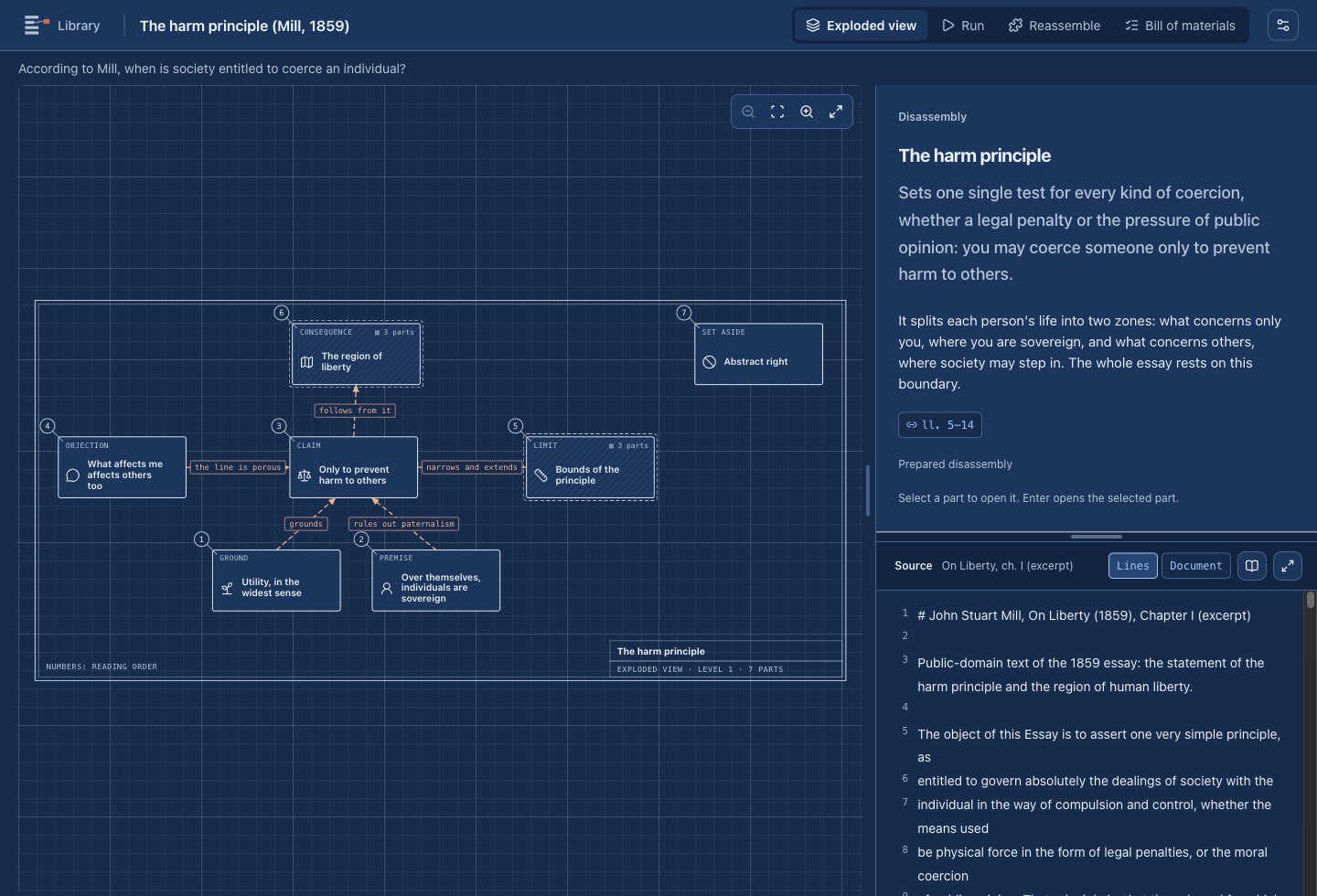
- Exploded view: the parts drawn as plates on a technical sheet, with balloons, a title block and an automatic layout. Mechanisms and stories run left to right; arguments stack, with the claim above its grounds and attacks or limits beside it.
- Numbers in reading order: a part's number follows the arrows: the flow of a mechanism, grounds before the claim they support, the events of a story. The bill of materials numbers parts the same way ("2.1.3").
- Room to read: drag the bar under the drawing to make the plates bigger, and the bar between the card and the source to share the row. Sizes are remembered on this device. Inside a sub-assembly, the ↑ control, Escape or Alt+↑ goes back to the level above.
- Sub-assemblies, as deep as the source goes: a part can open into its own 3–7 parts, and so on, level after level. Every level accounts for its parent's lines. A part with at least 6 lines of its own can be taken apart on request ("Take this part apart", one small request); a smaller one says why it stops there. Parts outside your question stay closed and hatched, but you can still open them.
- Three kinds of joint: mechanism (sends to, causes, depends on), argument (supports, attacks, limits) and story (leads to, because). Each kind has a color, a line style and an end mark, so color is never the only cue.
- Part card: a short lead (what the part is for), then 2–4 points that add the details, marked → (then), = (stays the same) or ⚠ (caution), and an optional lens, metaphor with its limit, and critical note. It also lists the part's joints in words, its citations and your notes.
- Source pane: numbered lines, the cited lines highlighted, page breaks for documents, and a file picker when there are many sources. A markdown or text source can also be read as a document, beside the card or in a full-window reader with an outline: tables and Mermaid diagrams are drawn, and citations highlight their blocks. HTML inside a source is shown as text, links are not followed and images are not fetched.
Run
- Scenario: a setup and instruments (for example
staging: digest A), then one step at a time. Before a step runs you predict what happens. The step's parts then show as running and its effects land: states, instruments and the explanation, with its source lines. - Load test: remove one brick at a time and see whether the target falls, weakens or holds. Interpretations that the text does not state are labelled.
- New case: apply the disassembly to a situation it does not describe, labelled as a constructed case.
Reassemble
Optional. The drawing keeps its shape but loses its names; put the parts back by click or drag. The tray never starts in solution order, and item numbers are hidden. A wrong placement names the part with its hint. Interchangeable parts, such as three independent supports, can go in any of their slots.
Bill of materials
Every source line is in a part, in a joint, or excluded with a reason: context, outside the question, repetition, detail, contains secrets, generated. The view shows the scope (a repository snapshot or a document's pages), a strip per source, the items with their line ranges, and file-level exclusions. It also shows the app's own check, which names any forgotten range.
Two themes, two languages
- Paper (light) and blueprint (dark), following the system or chosen in the header. Every text color reaches WCAG AA in both themes, checked by a test.
- English and Italian interface, following the system or chosen in the header. Content keeps its own language and is never translated by the app. When a disassembly exists in both languages, the player offers the other version, and progress stays separate for each version.
Generation
Studio takes apart pasted text or .txt / .md files around your question, in three phases:
- Structure: the parts, their joints and the bill of materials. The app checks it line by line before going on.
- Parts: one request per top-level part, carrying only that part's lines.
- Runs: scenarios, load tests or cases, and the reassembly hints.
Each phase can be repaired once with the app's findings. When the repair leaves only texts a few characters too long, one small request shortens just those. Nothing is saved as a disassembly unless the whole of it passes.
- Suggested break-downs: on the question step, "Suggest break-downs" sends one request and proposes 3–5 questions, each with its kind (mechanism, argument, story) and the parts it would give. Choosing one fills the question field, which you can still edit. Nothing is sent until you press the button.
- The drawing while it is written: once the structure is accepted, Studio draws the top level, and each plate shows whether its part is waiting, being written, done or failed. A part that is done opens its lead and points.
- Resume: a failed or cancelled generation keeps what was accepted (structure, parts, runs) in one draft file in the app's data folder. Studio says what was kept and offers "Resume", which asks only for what is missing, or "Start over". The draft is deleted on success and when a new generation starts. You choose the content language (by default, your question's), and you can give the structure and the parts different models, for example a cheaper one for the parts. There are two routes:
| Route | Account | Where your source goes | Status |
|---|---|---|---|
| ChatGPT | Sign in with ChatGPT; uses your plan | OpenAI, over the documented Responses API | Experimental. Disassemblies generated live: in the last check, 4 of 4 public cases valid |
| Local model | none | a server on 127.0.0.1 on your Mac |
Witnessed for lessons; disassemblies not yet measured |
| Your Claude assistant | your Claude Desktop or Claude Code | Anthropic, through your Claude app (Use with Claude) | Experimental. Checked with scripted answers; live runs witnessed by the owner |
Lessons created before disassemblies stay readable, with their progress, under "Earlier paths".
Progress and privacy
- Storage: disassemblies, lessons, progress and notes stay on your device, written atomically. Progress that no longer matches its disassembly is kept on disk and the session restarts, with a notice.
- Interrupted generations: at most one draft,
generation-draft.json, with the text generated so far. It never leaves the device and is deleted on success, on "Start over" and when a new generation starts. - Credentials: ChatGPT tokens are encrypted with Electron
safeStorage(the Keychain on macOS, the system's data protection on Windows) and never reach the interface or the logs. - Isolation: the renderer has no Node, filesystem or network access. Every desktop operation goes through narrow, validated IPC calls.
- Local entry point for assistants: only while Connect AI assistants is on, the app listens on a socket in its data folder (readable only by you) or, on Windows, a named pipe. A text arriving there is imported like a paste. A disassembly arriving there is validated like a stored file and accepted only as a new one written by an assistant.
Local models
Start a model server, open Take apart a source → Generation → Local model, and the app finds it. It probes the default ports and identifies each runtime by its own endpoints. Before first use, it sends a tiny probe to check whether the server really enforces the output format.
| Runtime | Default address | How the format is enforced | Observed on Ollama 0.30.8 / llama.cpp b9509 |
|---|---|---|---|
| llama.cpp server | 127.0.0.1:8080 |
/completion with json_schema |
✅ enforced |
| LM Studio | 127.0.0.1:1234 |
response_format JSON Schema |
not yet tested |
| Ollama | 127.0.0.1:11434 |
format |
depends on the model: ✅ Qwen3.6, ⚠️ ignored for LFM2.5 (the app warns) |
| Other OpenAI-compatible server | any loopback port | response_format JSON Schema |
depends on the server |
Measured on an M4 Pro with 48 GB, using Qwen3.6-35B-A3B (Q4_K_M) through llama.cpp: a lesson took about 1–2 minutes. Disassemblies have not been timed yet. Details are in the local inference trial.
llama-server -m Qwen3.6-35B-A3B-Q4_K_M.gguf -c 32768
Tip
Use a model with at least ~30B parameters and a 32k context. Plan for 32 GB of memory or more. Only addresses on this machine are accepted, so your source never leaves the computer on this route.
Use with Claude
Break the Wall works with Claude Desktop and Claude Code through a local MCP server that ships inside the app. You install nothing else.
The first demo at the top of this page comes from a real run in Claude Code, with Sonnet: 13 turns and about $0.38 on the user's plan. The first structure and the first runs were refused, and Claude fixed them. The terminal is redrawn from the run's transcript, with each result summarized. The app fr