Weekly roundup #1 7 apps 11 min read
A planet, a gunship and $62M of lost train time: big builds with honest footnotes
Seven new and overlooked apps aim high, among them a whole-Earth 3D viewer, a Desert Strike-style helicopter game and a weekday tally of NJ Transit rail delays. Most of them say plainly where they fall short.

On Friday, October 30, the tracker at bettertrains.org counted 3,079 hours of NJ Transit commuter rail delays and turned them into an estimate of more than $135,483 in lost time. It does the same every weekday, with a small Claude model reading train alerts and a spreadsheet keeping the receipts, and the running total since April has passed $62 million.
The other apps in this first issue are just as ambitious: a stylized 3D model of the entire Earth, an isometric helicopter game with a nine-weapon arsenal, a Linux-style panel shell for macOS, a public board for every date of the year, an uptime monitor with about forty kinds of checks, and a four-day tuning study of one gaming GPU. Small teams or single makers built them with Claude Code, ChatGPT, Amp and local models.
The second thing most of them share is less common: they write their limits down in public. Those limits include rounding that pushes a number up, private macOS interfaces that an update can break, results that rest on a single run, and features that so far exist only on paper.
01 / 07
Putting a price on late trains
by amescg23
 United States built with Claude, Claude Code
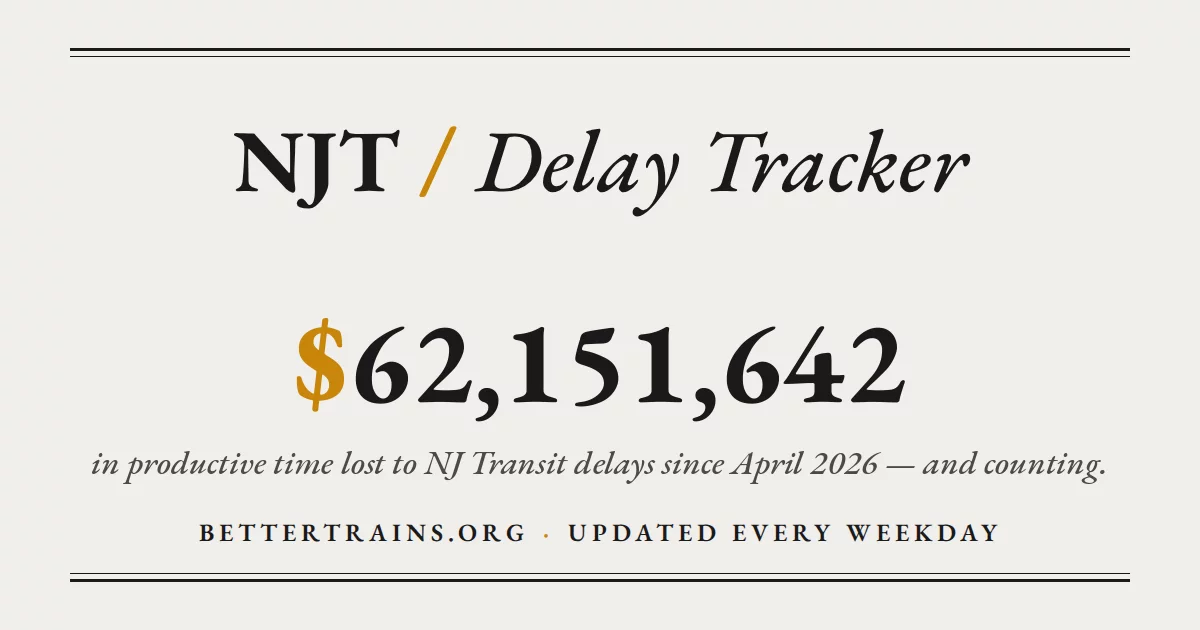
Every weekday, bettertrains.org publishes what the previous day's NJ Transit commuter rail delays cost riders in lost time, along with a running total. On November 1 the total read more than $62,565,059 since April 2026. The project, called the NJT Delay Tracker, also posts a daily summary through a Bluesky bot.
The machinery behind that number is small. Once a day, Tuesday to Saturday, a GitHub Actions job covers the previous day's morning and evening rush hours:
- it collects the NJ Transit service alerts that automated accounts post to Bluesky;
- Claude Haiku reads each alert and extracts the line, the train number and the minutes of delay;
- escalating alerts are merged so each train counts once per rush window;
- riders per train are multiplied by delay time and a dollar value of time;
- the results go to a Google Sheets audit trail and one daily Bluesky post.
Only delays of 10 minutes or more on commuter rail count. Buses and light rail are left out. The README says the whole system runs for under $1 a month.
The methodology page shows the working. Delay time is valued at about $44 an hour. That comes from North Jersey commuter earnings of roughly $138,000 a year, with delayed time treated as a third as useful as working time, following USDOT guidance. Riders per train are modeled line by line, from 800 on the Northeast Corridor down to 100 on Pascack Valley, and rounded up to the nearest 50. The page says that rounding pushes the result upward and calls the salary estimate relatively high. A changelog records when the assumptions changed.
The maker, @amescg23, runs the project anonymously. The GitHub repository describes itself as "Proudly vibe-coded with Claude", and Claude Code was also used to process the GTFS train schedules, which were then checked by hand. The site says the figures estimate opportunity cost, not cash losses, and are not an official accounting. They also depend on the alert accounts catching every delay and on Haiku parsing each alert correctly. The daily numbers are at bettertrains.org.
02 / 07
Desert Strike, rebuilt for a phone screen
 1 / 3

"Remember Desert Strike from the Sega era?" asks @darek-75, a developer in Poland, in his listing for Steel Falcon: Operation Thunderbolt. His answer is a free isometric attack-helicopter game that runs in a browser or on a phone, his own modern take on that style: missions where you succeed by making smart decisions, not only by shooting.
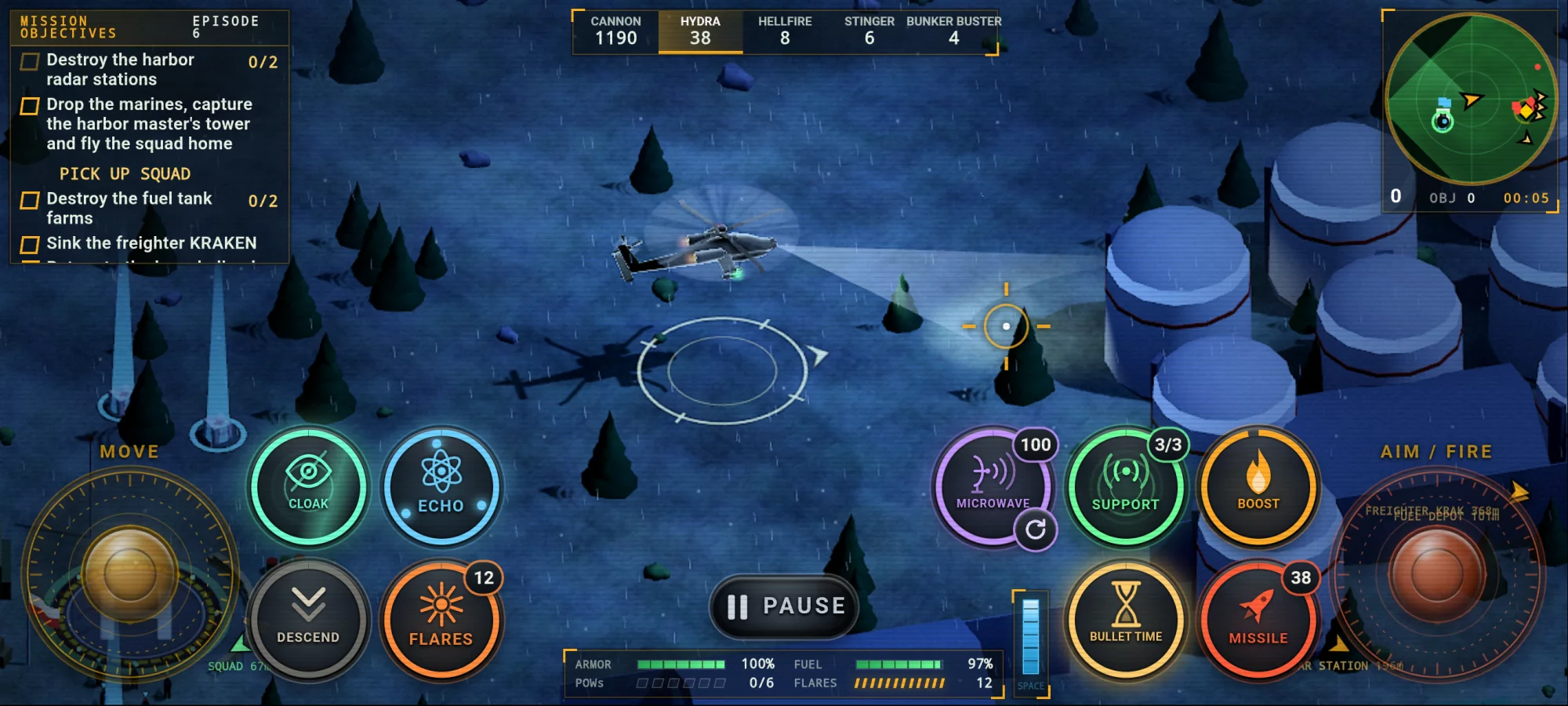
The gameplay screenshot shows what that means. Episode 6 of the campaign has a checklist: destroy the harbor radar stations, drop marines to capture the harbor master's tower and fly the squad home, destroy the fuel tank farms, sink the freighter KRAKEN. The helicopter flies at night with a searchlight, controlled by twin virtual sticks for moving and aiming. Around them sit buttons for cloak, flares, bullet time, boost, a microwave weapon and a call for support, with a weapon bar counting cannon rounds, Hydra rockets, Hellfire and Stinger missiles and bunker busters. Armor, fuel and rescued POWs are tracked along the bottom.
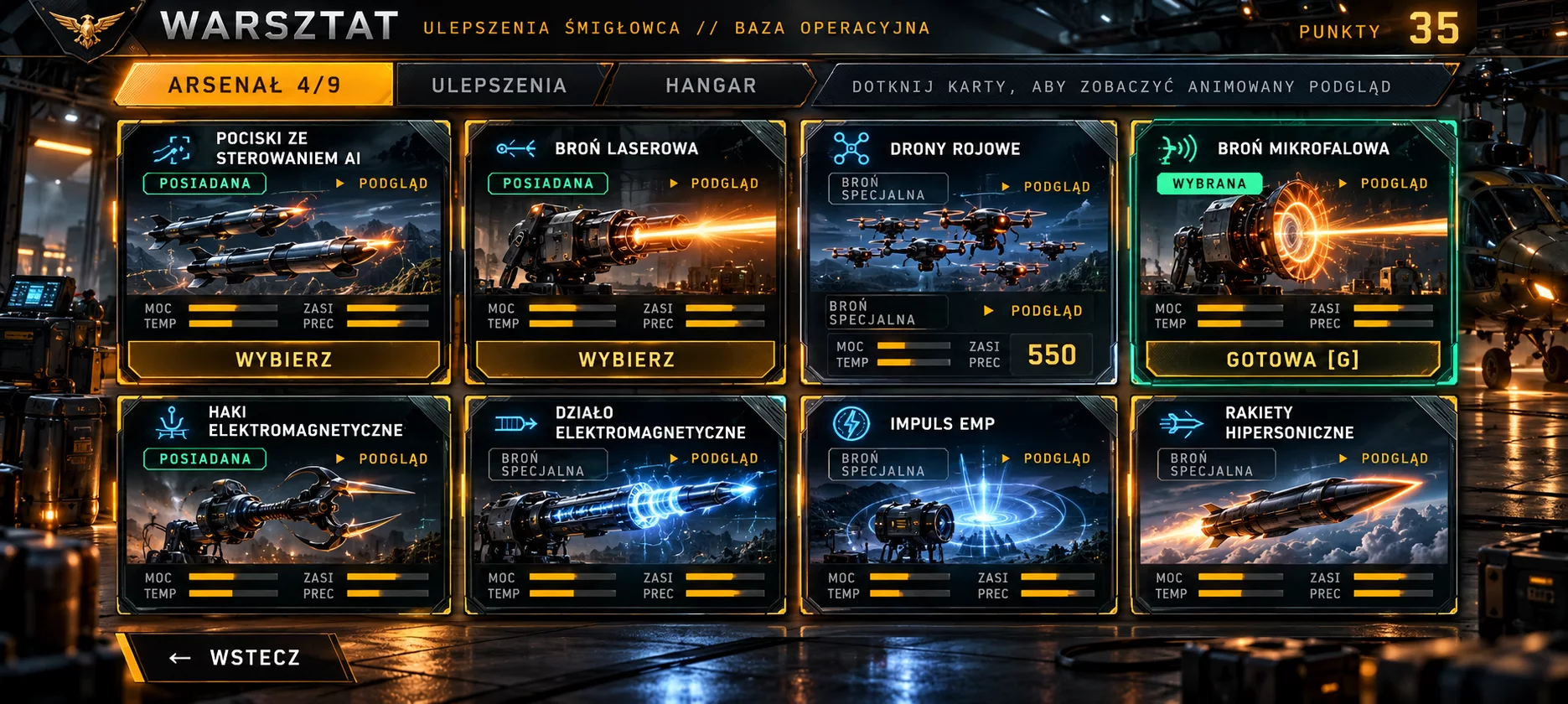
Between missions there is a workshop. The arsenal holds nine weapons, including AI-guided missiles, a laser, swarm drones and an electromagnetic cannon that the listing says triggers a slow-motion effect on impact. Upgrades cost points: composite armor, bigger fuel tanks, ammo magazines, a bullet time that drains slower and recharges faster. Besides the campaign, which crosses deserts, mountains, jungles and ice fields, there is a survival mode with waves of enemies, standalone rescue operations, and daily and weekly challenges that give everyone the same setup. To join the online leaderboard you only enter a nickname, with no login. The weather changes, from rain and hail to snow and, in one episode, a tornado. The game comes in Polish and English, with sound and music.
The maker lists Claude, ChatGPT and Claude Code as his tools. There is no public repository, so the engine is unknown. The game is in beta. Its page renders with JavaScript, and we did not play it for this review. It has a 5 rating from 2 ratings, and @square-rabbits, who made the Benchmarks report later in this issue, commented: "Looks like a good old Sega Desert Strike. Nice one!" Try it at storm-of-steel.netlify.app.
Get My Slop Weekly
One email every Friday: the newest apps people built with AI and the latest news on My Slop. Unsubscribe in one click. 1,484 readers.
Have an account? Sign in and subscribe in one click. Read the news
03 / 07
The whole Earth, streamed one tile at a time
Type a place name into Low Poly Earth, or pick it on a world map, and the camera flies there. The free Mac app renders the entire planet as a stylized 3D world built from open map and elevation data. From orbit you can zoom down to street level, then press P to take off in one of three vehicles: Kestrel, Phase Manta or Sparrow. The site says they are for sightseeing, not realistic flight.
The app is built for taking pictures as much as for exploring. You set the date, time and weather and save the view as a 4K image. The sun, moon, stars and aurora follow the real date, time and location. Clouds, rain, snow and fog are simulated rather than taken from a forecast. The project says 231 landmarks are modelled individually, and the README says every screenshot is an unedited capture, from Rio de Janeiro and the Matterhorn to Monument Valley.
The planet is a cube-sphere: six cube faces, each split into a quadtree that refines wherever the on-screen error is too large. Terrain and building geometry are generated on CPU worker threads, deterministically from each cell's address and its source data, so the same place always comes out the same. Elevation comes from Mapterhorn (Copernicus GLO-30 plus national models), USGS 3DEP and Environment Agency LiDAR for England. Buildings, roads and water come from OpenStreetMap via Protomaps. Downloaded tiles go into SQLite caches, capped at 12 GB by default.
The code is Rust, rendered with wgpu, and the maker, @blueblazin, lists Claude Code as the tool behind it. The download is about 640 MB and needs a Mac with Apple silicon and macOS 13 or later. Full detail needs an internet connection; offline, the app falls back to bundled coarse terrain. The listing went up on October 29 with no likes yet. The download is on the Low Poly Earth site.
04 / 07
A daily board that seals itself at midnight
by jasonepage
United States built with Claude Code

Birthed gives every calendar date a public board it calls a hive. Each board holds the day's news, historical events, people born on that date and what was number one. On the date itself, visitors get three buzzes to spend on what they think will still matter in ten years, and each buzz makes a tile bigger. At midnight Eastern the board seals for good. Next year the same date opens a new hive, and the old one stays readable.
The README says the vote ledger is immutable, enforced by a database trigger that refuses updates and deletes. The one exception is a 30-second window to take a buzz back. The page also has a sting button. Three stings put a story on trial, and the hive can bury it. Tiles are coloured by how well a story is sourced, "not whether it's true". In practice only the lowest tier, Claimed, is in use, a point the README states itself.
That README is blunt about itself. Its "what is not done" list says the feed still reads like an encyclopedia, nobody born before 1600 is in the database yet, an age can come out one year high because the site knows birth years but not birthdays, and the iPhone app's screens compile only in Xcode. The iPhone app is in beta on TestFlight. The website runs no analytics or third-party code, and the only cookie is set after you buzz.
Jason Evan Page built Birthed alone with Claude Code. The repository keeps a CLAUDE.md file as the decision record, and the README says it "wins over the specs where they disagree". The stack is a Node service that bakes all 366 date pages at build time, a TypeScript worker that ticks hourly and adds the news, Supabase for the live hive, and a Python pipeline that pulls from Wikidata and Wikipedia. There is nothing to buy and no funding. Today's hive is at birthed.app.
05 / 07
A Linux-style desktop for the Mac, themed in CSS
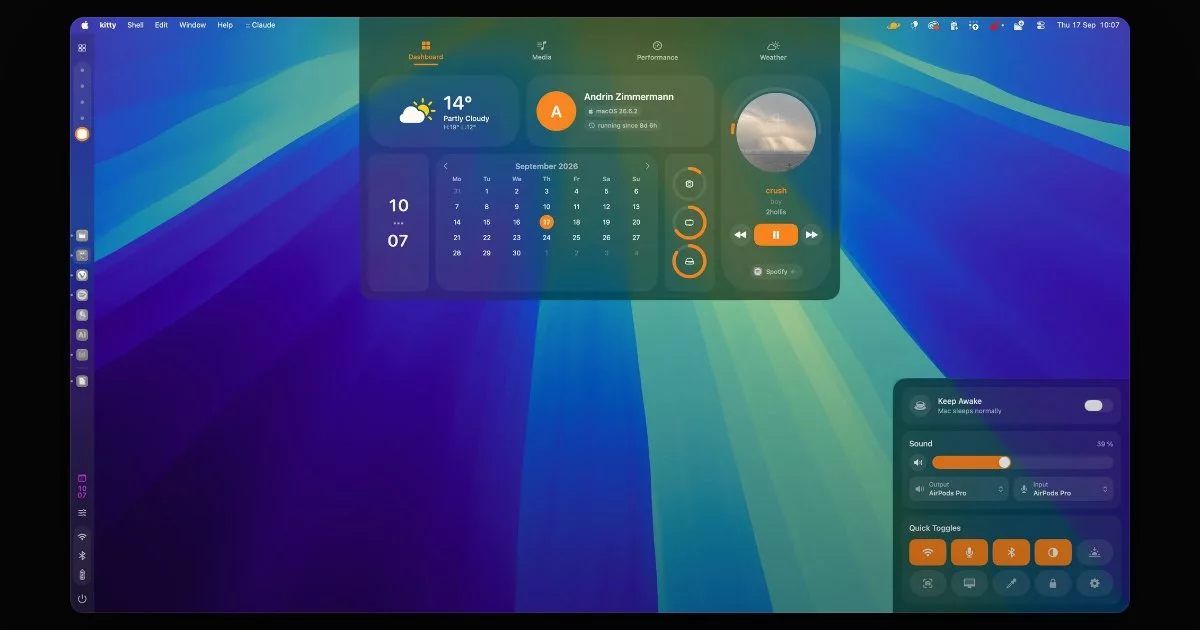
Fans of Caelestia and other Linux shells will recognise the look. ApolloShell brings it to macOS 26 Tahoe without replacing Finder or the window manager. It docks panels to the edges of the screen. A sidebar on the left holds Spaces, a clock, status icons and its own dock. Option-Space opens a launcher that puts your most-used apps first. A dashboard drops from the top edge with weather, a calendar, system stats and what's playing, and a control centre in the bottom-right corner has keep awake, sound, Wi-Fi, dark mode, Night Shift and a colour picker.
A theme is one CSS file of design tokens for colours, gradients, fonts and sizes, plus a dark-mode block. Themes cannot run scripts or use their own selectors. Saving the file applies it immediately, and anything the shell cannot read falls back to the default and is listed in Nexus, the settings app, with a line number. Token names, once published, are never removed. Nexus also rearranges every panel.
The README says how it was made. The maker, Andrin Zimmermann (@netter on My Slop, Silvertree2010 on GitHub), and two friends wrote the core in their free time. Claude now handles new features with them, and does refactors, bug hunts and patch releases. The listing names Claude Code and Amp. It is written in Swift and licensed AGPL-3.0, and you can build it with the Command Line Tools alone, without Xcode. It has 118 stars on GitHub.
The README lists the caveats up front. It needs Tahoe or later. It relies on private macOS interfaces, so an update can break parts of it. It is not notarised, because that needs a paid Apple developer account, so the first launch must be approved in System Settings. Without Accessibility permission, windows can slide under the sidebar. There is no telemetry. Apart from update checks and opt-in crash reports, the README says the only network traffic is the weather lookup. Get it from the ApolloShell site or Homebrew.
06 / 07
Uptime checks for Minecraft servers and Kafka brokers alike
by Florent Clairambault
 France built with Claude Code
 1 / 3
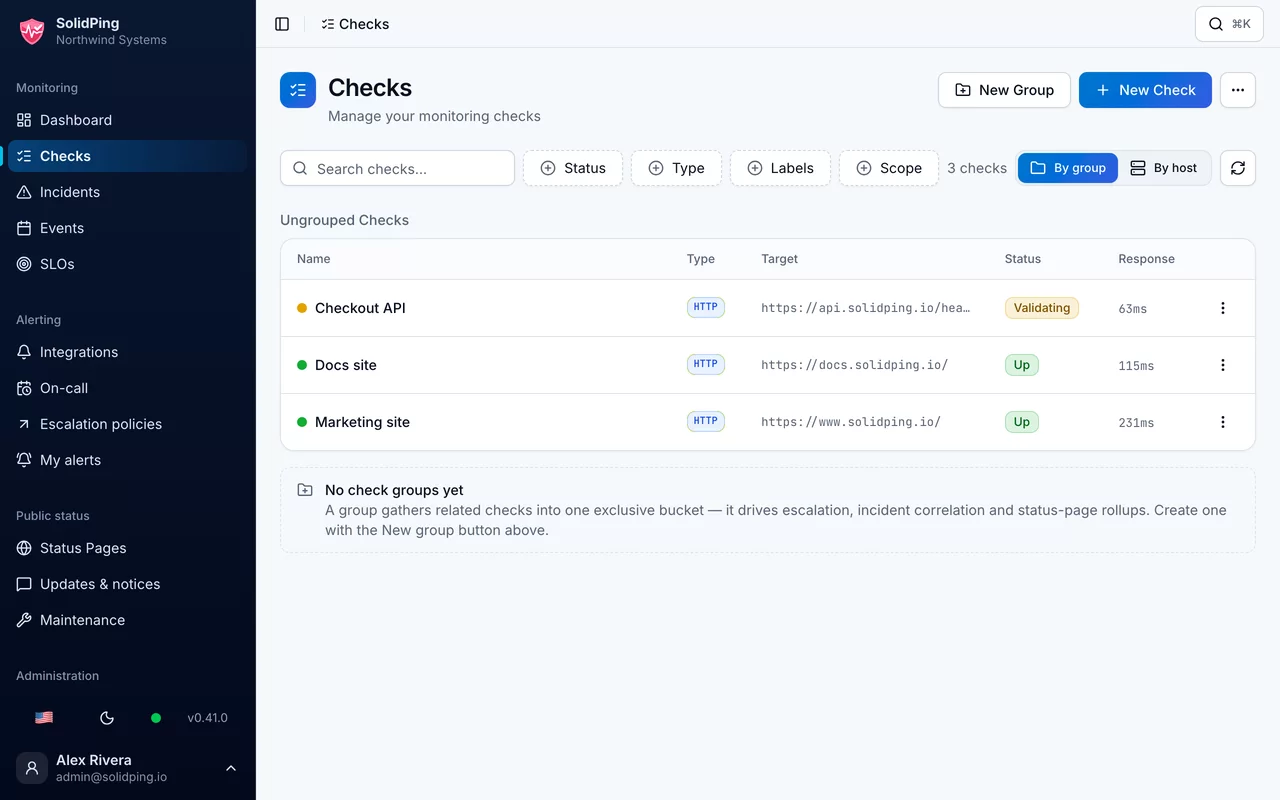
A Minecraft server, a Kafka broker and a French ISP's router can all be monitored from the same dashboard in SolidPing, an open-source uptime monitor that you run yourself or use as a hosted service. A check watches one thing, such as a website, a port, a database or a certificate. When it fails, SolidPing opens an incident, works through an on-call escalation and can post to a public status page. All of that ships as a single Go binary that stores data in SQLite by default or in PostgreSQL for production.
The README counts 44 check types (the homepage says 40). Beyond HTTP, TCP, DNS and TLS expiry, there are checks for Postgres, MongoDB, Oracle and ClickHouse, for Kafka, RabbitMQ and MQTT brokers, and for SIP, SNMP, Docker and Kubernetes. Less common ones include Minecraft Java and Bedrock servers, Source and Steam game servers, the line quality of a Freebox router, and email reception, which confirms that a known message actually reaches an inbox. Sandboxed JavaScript checks cover multi-step API flows and logins, and a headless Chrome check renders full pages. Private agents run inside your own network, and the homepage says they need no inbound port.
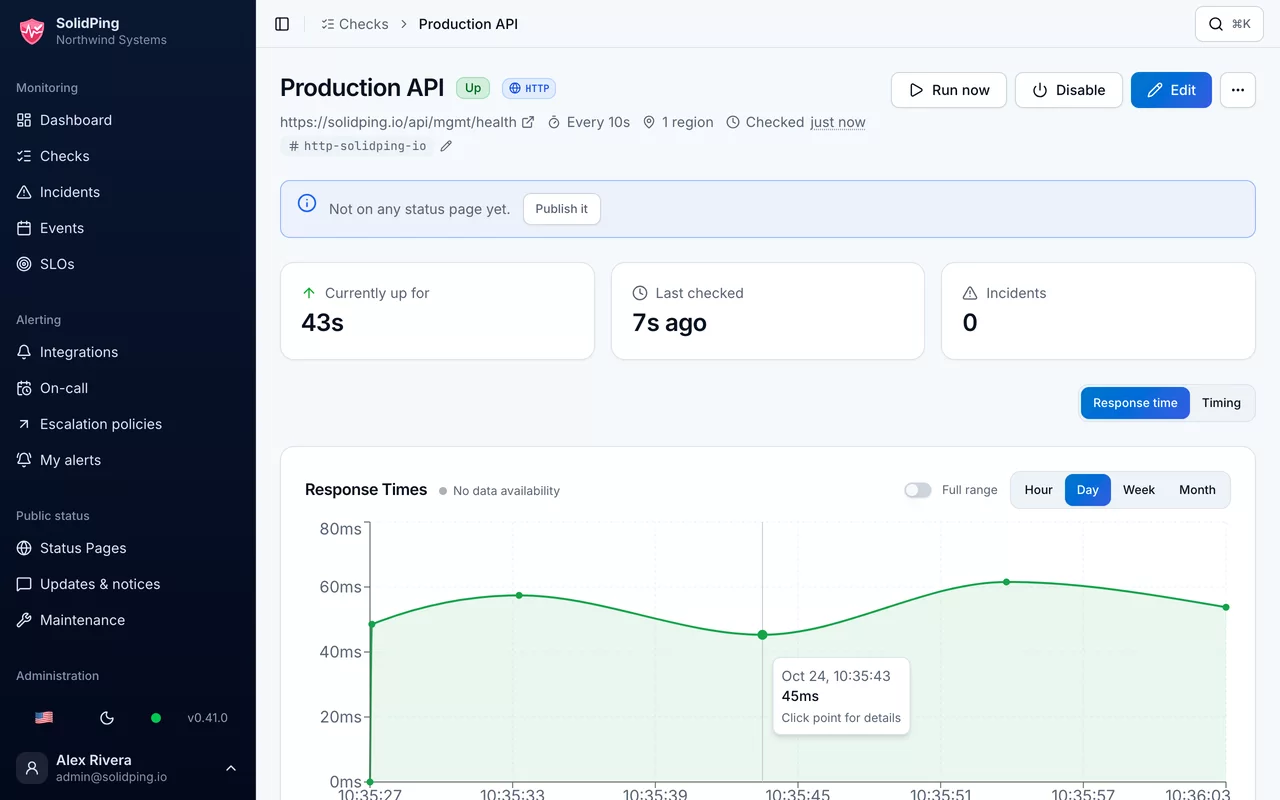
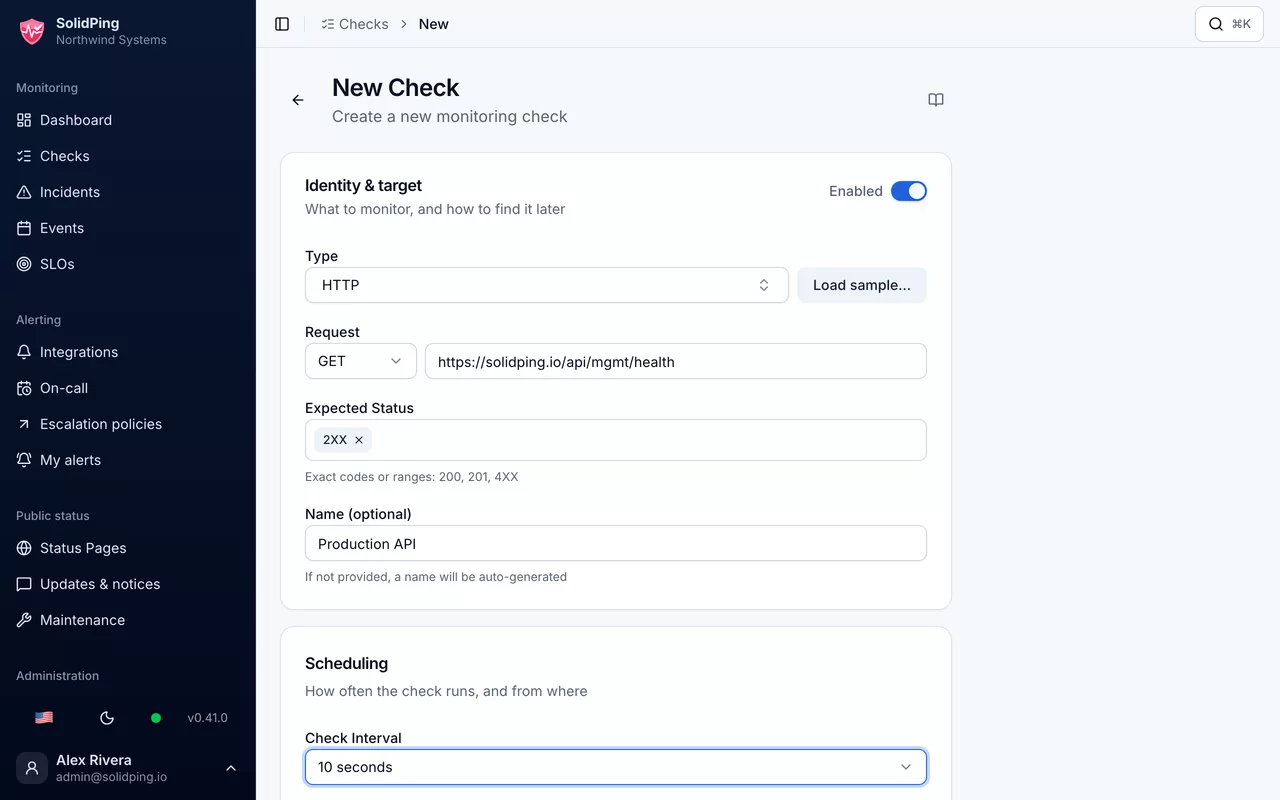
The screenshots show the admin interface. A check list shows status and response time. The new-check form asks for type, request, expected status and interval, here set to 10 seconds. A check's detail page shows a response-time chart and a "Publish it" prompt for the status page. The site offers importers for people coming from Uptime Kuma, UptimeRobot, Better Stack and Gatus.
The maker is Florent Clairambault (@fclairamb) in France, and the listing names Claude Code as the build tool. The license is AGPL-3.0, and self-hosting has no monitor limits. The hosted service has a free tier of 100 monitors and paid plans from EUR 5 a month before VAT, and its data is stored in France. SMS and voice alerts work only when self-hosting with your own provider. It has 28 GitHub stars so far. The repository is on GitHub.
07 / 07
Four days, one RTX 3090, every flag written down
by Square rabbits
 Poland built with ChatGPT, Local models (any)
 1 / 2

Eighty-two gigabytes of model weights on a graphics card with 24 GB of memory is the problem this report from @square-rabbits in Poland works through. Benchmarks is not a tool but an interactive web page and an open data set on running Qwen3.8-Flash-Next locally on one gaming PC: an EVGA RTX 3090, a Ryzen 9 8945HX and 96 GB of RAM, tested from 4 to 7 October 2026. Most of the quantised model sits in system RAM, and the GPU handles the compute path and the cache.
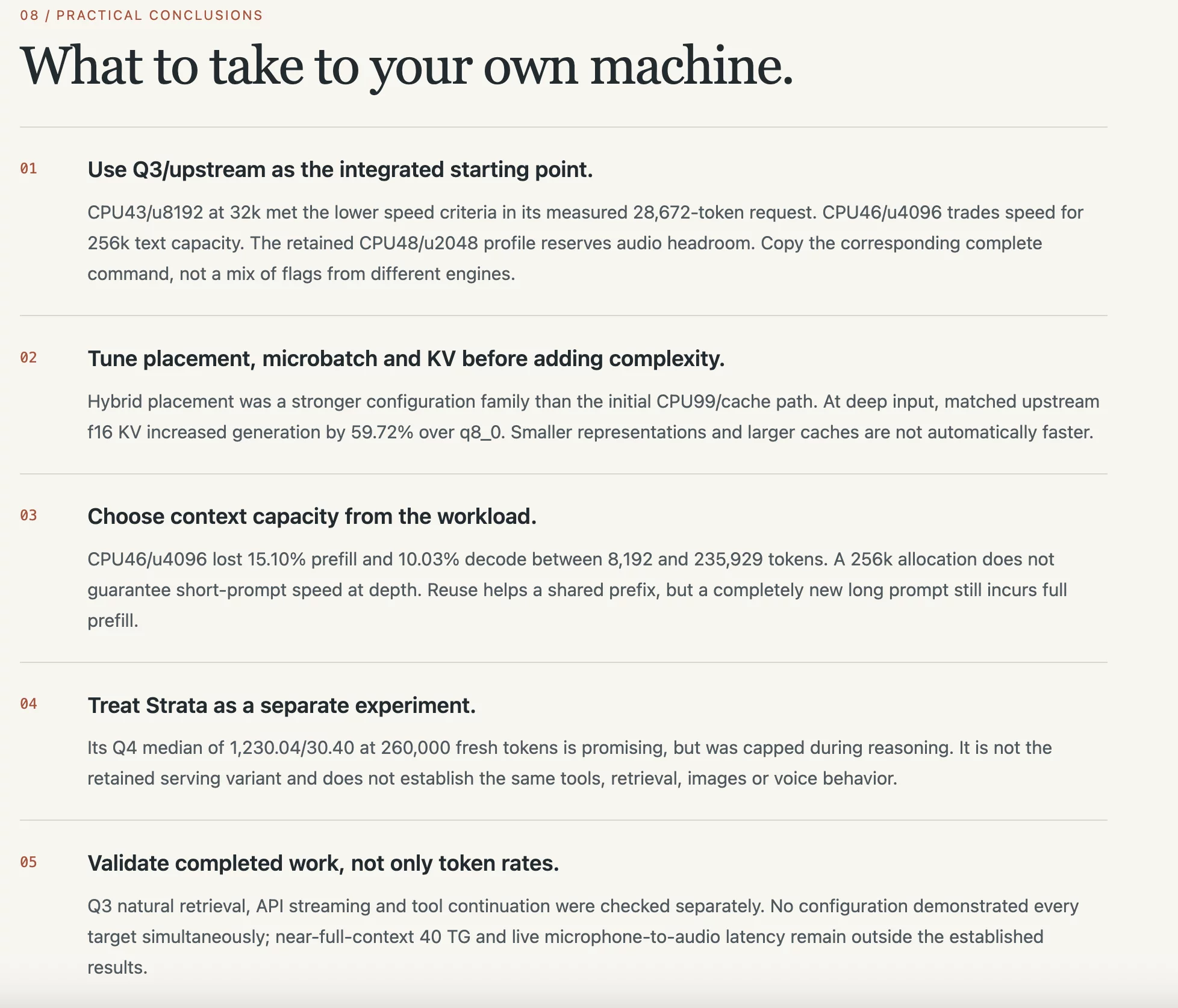
The report is aimed at people with the same kind of hardware. It starts with three tested llama.cpp setups, each with its complete startup command: interactive work at 32k context (about 1,253 tokens a second of prefill and 31.4 of generation), long-context text at 256k, and an integrated 256k serving profile. A tuning ladder shows which settings mattered. Hybrid placement of the expert layers beat the cache-only approaches, and some results go against intuition. At about 236,000 tokens of context, an unquantised f16 KV cache generated 59.72% faster than the smaller q8_0 format. In the report's words: "Smaller representations and larger caches are not automatically faster."
It also lists what it did not prove. Tuning was staged, not randomized. Several stages changed many parameters at once, and many long-context numbers come from a single run. Clocks and thermals were not controlled, and the raw input fixtures are not published. No configuration met every target at once. The final advice is to "validate completed work, not only token rates". A Q4 experiment with the Strata engine is reported separately. Its speed looked promising, but all three runs hit a 512-token cap while the model was still reasoning.
The listing names ChatGPT and local models as the tools. The page is a self-contained HTML file with a measurement explorer, and CSV and JSON downloads come with it. It is small so far, at 38 views. Read it at square-rabbits.github.io/benchmarks.
Seven apps, and most of them put a paragraph of limits next to their big claims: rounding that pushes a number up, a single benchmark run, a board where only one of its source tiers is in use yet. AI tools helped build every one of these apps. Writing down what an app cannot do yet is still the maker's job, and most of these makers did it. If you are building something like this, add it at https://myslop.shop/submit, or post an update on your listing when you ship the next piece.