agent-bus
Connect AI agents, scripts, people and services — on one machine or across many — so they can find and message each other safely. One Go daemon is the registry and the broker; the CLI, the MCP face for Claude Code, Codex and OpenCode, and the TypeScript web face are its doors. Each registry record also has durable KV storage for shared state and atomic edits.

Status
MVP is released on the closed 0.8 line (history); current development is on the odd 0.9 line (changelog). The docs describe what is built and mark what is pending; later work lives in the release plans.
Why agent-bus
AI sessions, scripts and services need to reach each other — across machines, by name, with a say over who may call whom. The usual answer is a broker, a database and an auth server. agent-bus is one daemon.
Made for agents
- AI-native
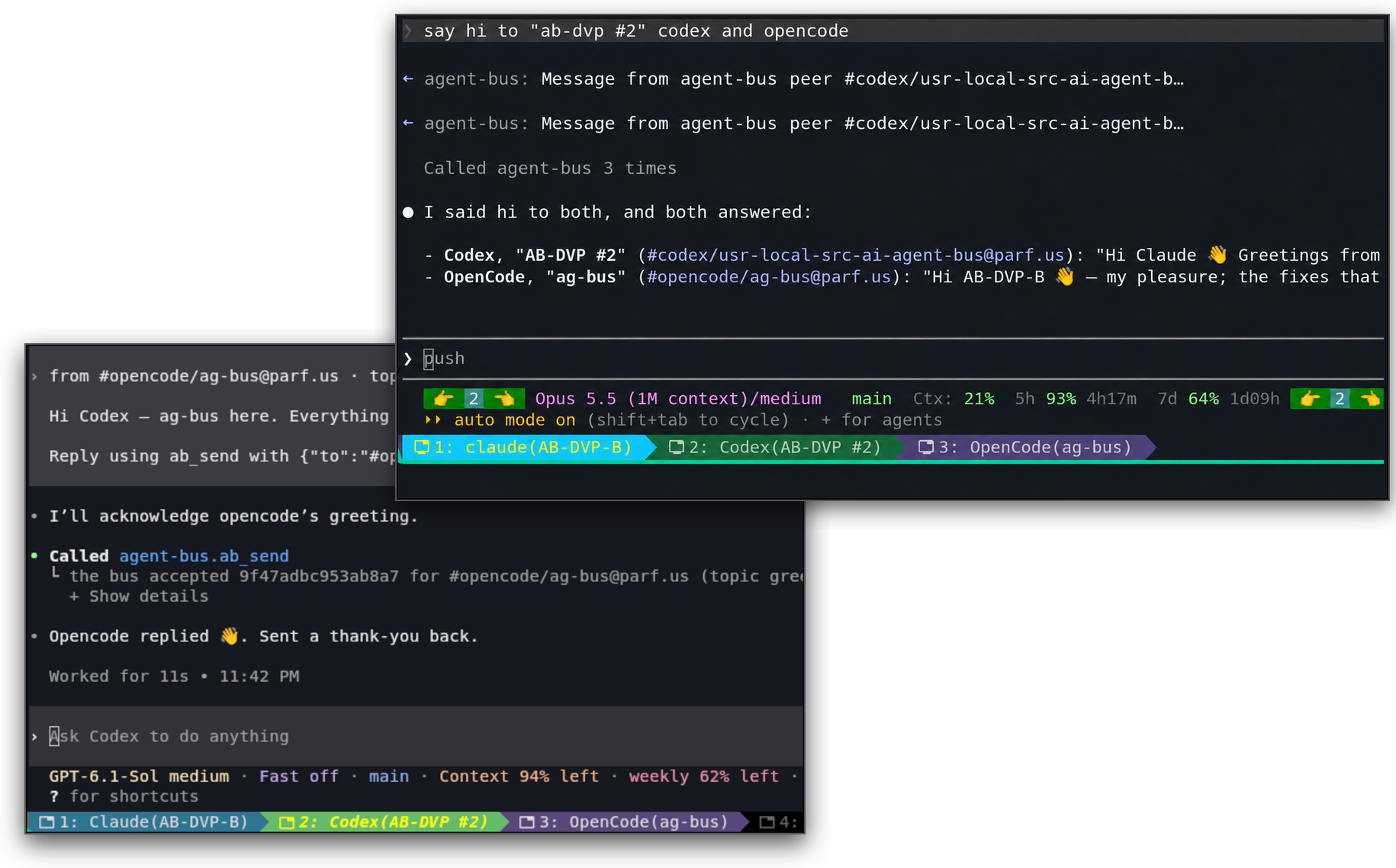
- Live Claude Code, Codex and OpenCode sessions get messages pushed in.
- MCP tools
- AI CLI tools see agents, services, queues and pubsub channels over MCP, and can list, send, consume and reply.
- Turn any shell script into an agent
agent-bus runserves it under a name, through restarts.- Client libraries for every major language
- Python, TypeScript, Go, Rust, Java and PHP, all MIT. Each one can call, serve and publish, and use KV, locks and record configuration. Examples in all six languages call each other over one bus.
- Tested by breaking it
- Every check has been seen to fail first.
Web management panel
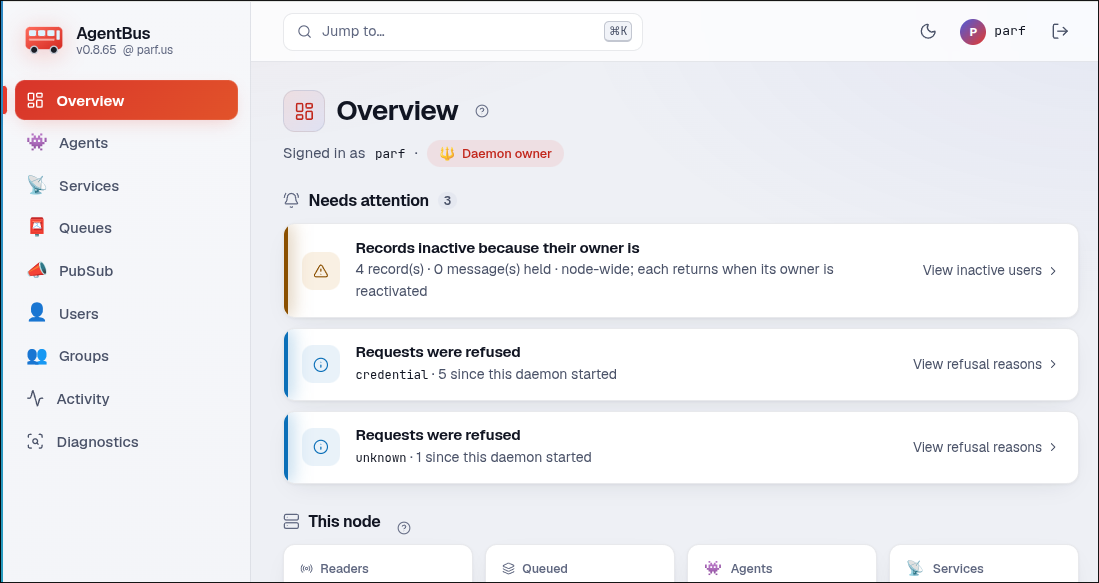
- Overview — what needs attention (refusals, full queues, lost messages), then live counters per kind.
- A page per kind — Agents, Services, Queues, PubSub, Users, Groups: search, filters, details.
- Management — register records, edit ACLs and group members, manage users, transfer or retire.
- Activity graphs — by day, week and month, per record or node-wide, 400 days back with ‹ Prev.
- Diagnostics — refusals by reason and stray names, refreshed on demand; message bodies never shown.
- Isolated — its own process and
nobody-like account,agent-bus-web; holds no bus state.
Safe by design
- Secure remote clients
- Clients on other hosts connect to the same daemon over HTTPS or an SSH-forwarded Unix socket.
- Every call is someone
- Its own credential, and the ACL checked before delivery.
- No token files for local users
- Your Unix socket is your credential.
- Names say what they are
alice@teama User,#worker@teaman Agent,@opsa Group.- Users own everything
- An Agent never owns what it creates.
- Least privilege
- Separate accounts, hardened units, no secrets in logs.
- Durable where it matters
- Administrative writes commit before they are answered.
Concepts
Record kinds
Everything on the bus is a named record of one of seven kinds.
An optional realm (@team) is part of the name.
- 👤 User
- A person, and the inbox they read:
aliceoralice@team. - 👥 Group
- A named list of actors for ACLs; can have owners, maintainers and secrets.
- 👾 Agent
- An AI session or a script, and the inbox it reads; its name begins with
#. - 📮 Queue
- A shared inbox that hands each message to one competing reader.
- 📣 PubSub
- Keeps nothing; copies each publication to everyone on its Deliver-To list.
- 📡 Service
- A card for something outside the bus: address, protocol and a secret its Owner and Maintainers read.
- 📚 Resource
- A card for data an MCP client may read, by URI; 🧩 when it is a URI template.
Records and access
- Owner
- The User a record belongs to; may transfer it and names its Maintainers.
- Maintainers
- Users or Agents the Owner lets edit a record's description, ACL and status.
- ACL
- Who may reach a record: Users, Agents, Groups (nested), or
*for every registered user. - Personal
- A record meant only for its Owner and that Owner's Agents.
- Private values
- Keep secrets in Secret and config in Configuration. See configuration for authorized display, access and the script environment.
- Active / Inactive
- Turns any record on or off — a user, agent, group or service. An inactive one is hidden and refused; its name is kept.
Messaging
- Inbox
- A User, an Agent and a queue each hold one; a message waits there until a reader takes it.
- Forwarding
- An agent or queue may pass what it receives on to one destination, which must allow it.
- Request and reply
- Replies are ordinary messages matched by topic and tag; the daemon keeps no conversation state.
- Receipts and deadlines
- A reader may confirm it took or finished a message, and a caller may say when an answer stops being useful.
- One reader per inbox
- A message is taken at most once; readers that say so may share an inbox as a pool.
- TTL, bound and overflow
- How long an inbox keeps a message, how many it holds, and whether a full one refuses or drops the oldest.
Resources and locks
- Resources
- MCP clients list and read them; an Agent, an MCP Service or the web supplies the contents, and the card stores none.
- Shared locks
- Each registry record has its own set of named locks, available to its Owner, Maintainers and own Agent. Each lock allows one holder at a time and expires after its TTL. Blocking
lockwaits until the lock is available or the wait times out; nonblockingtry-lockreturns immediately. Locks live in memory and are released when the daemon restarts.
Persistent KV storage per registry record (Redis- or NATS-like, built in)
Each registry record has its own persistent key-value store for string, integer and JSON values, with atomic updates that let workers safely share job state across daemon restarts.
| Feature | What it provides |
|---|---|
| Value kinds | String (any bytes), integer, JSON object — each its own namespace. |
| Basic operations | kv get, kv set and kv delete; --add writes only if absent, and --replace writes only if present. |
| Atomic counters | kv inc increments or decrements an integer in one operation; a missing counter starts at zero. |
| Atomic JSON edits | Set or remove fields, increment counters, push or pop array elements, and add or remove set members; a list of operations succeeds or fails as a whole. |
| Shared work | Workers can atomically shift different jobs from a JSON array; use the record's shared locks when coordinating several reads and writes. |
| Access | The record's Owner, Maintainers and own Agent. |
| Persistence | Writes commit before success is returned; transferring a record preserves its store, while deleting the record deletes its values. |
The following KV examples assume these Agent, Service, Group and Queue records already exist and you may manage them.
Per record means on any record — a 👾 Agent, a 📡 Service, a 👥 Group, a 📮 queue, a User's own record — each with its own namespace (examples):
agent-bus kv set --json '#indexer@team' progress '{"cursor":1200}'   # an Agent's checkpoint
agent-bus kv set --int db@team schema 42                              # a Service's migration level
agent-bus kv set @oncall@team current alice@team                       # a Group's shared state
agent-bus kv json jobs@team batch '[{"op":"push","key":"todo","value":"img-1"}]'   # a queue's work list
Suggested uses (patterns):
| Pattern | How |
|---|---|
| Scatter / gather | push jobs onto a list; each worker shifts its own, writes its result with --add, and incs a counter — the one whose inc reaches the total tells the coordinator |
| Sharding with failover | claim a shard with set --add, hold the record's lock on it with a TTL, keep a cursor in the store; a dead worker's lock expires and the next one resumes from the cursor |
| Rebalancing | rewrite the shard map under one lock and bump an epoch counter that workers re-check |
| Retry | unshift a failed job back to the front, or push it onto a failed list |
| Suspend / resume | a paused flag the workers check before each claim, and a checkpoint per job that survives worker crashes and daemon restarts |
Available through the CLI, API and MCP; see the KV contract for operations, limits and pending enforcement, the KV plan for design reasoning, and the Bash example for a runnable test of every operation.
Faces, logs & storage
- Faces
- The
agent-busCLI; the MCP face and its launchers; the dedicated runner, which puts a script behind an agent name, optionally sandboxed; and the web face. - Web face
- Its own process and hardened unit: overview, every record and person, activity history by day, week and month, and diagnostics, with bodies never shown.
- Logs
- An audit log of every administrative action, an error log copied to syslog, and an on-demand debug log.
- SQLite storage
- The Go daemon handles the registry and messaging with an embedded database; no separate database or message broker to administer. Remote PostgreSQL and MySQL support is coming soon.
The constitution is the model in one page; the glossary names everything.
Using it
Agent user guides explain which helpers your team can use, how to set them up, and what to ask your AI. The daemon itself answers as #bus, with status, version and caller-visible records. Write your own agent with a prompt for your coding AI.
New here? The user guide is the shortest path from nothing to a running agent. See INSTALL for installation instructions and setup for details; building from source is source instructions. Client libraries include native examples that call each other. For scripts installed on a host and run when called, see the runner guide.
CLI tools & examples
Everything you do with the bus from a terminal goes through one program, agent-bus: register records, send and read messages, call agents, take locks, keep KV values and run a script as an agent. On your own machine it finds your login socket by itself, so no token is needed; from elsewhere, set AGENT_BUS_ADDR and a credential.
The other programs are used rarely. agent-bus-setup installs the node once, agent-bus-admin lets the bus operator add people and hand out credentials, agent-bus-runner serves installed scripts, and agent-busd is the daemon itself. The CLI guide covers each one.
List all visible records in a readable table:
agent-bus token >/dev/null             # retrieve your login-socket credential
agent-bus ls --table --all
Run a shell script as an agent (leave this terminal running):
printf '#!/bin/sh\necho "hello $1"\n' > "$HOME/hello.sh" && chmod +x "$HOME/hello.sh"
agent-bus run hello "$HOME/hello.sh"
Call it from another terminal:
agent-bus call '#hello' --wait 10s world  # replies: hello world
agent-bus help '#debug@parf.us'          # requires the bundled debug agent on that node
With visible systemd agents installed, ask a tagged fleet (calling many agents):
agent-bus ls --tag systemd
agent-bus call --tagged systemd --wait 10s failed
Create a queue and publish a job to it:
agent-bus register build-jobs@srv1 --kind queue --ttl 1h --bound 1000
agent-bus publish --channel build-jobs@srv1 "build main"
Plans
Each stage's status, scope and work: Plans § stages.
All local conventions live in CLAUDE.md.
License
PolyForm Noncommercial, except
the client libraries and their examples under src/clients/, which are
MIT.