See what your AI coding agents are doing. Right now.
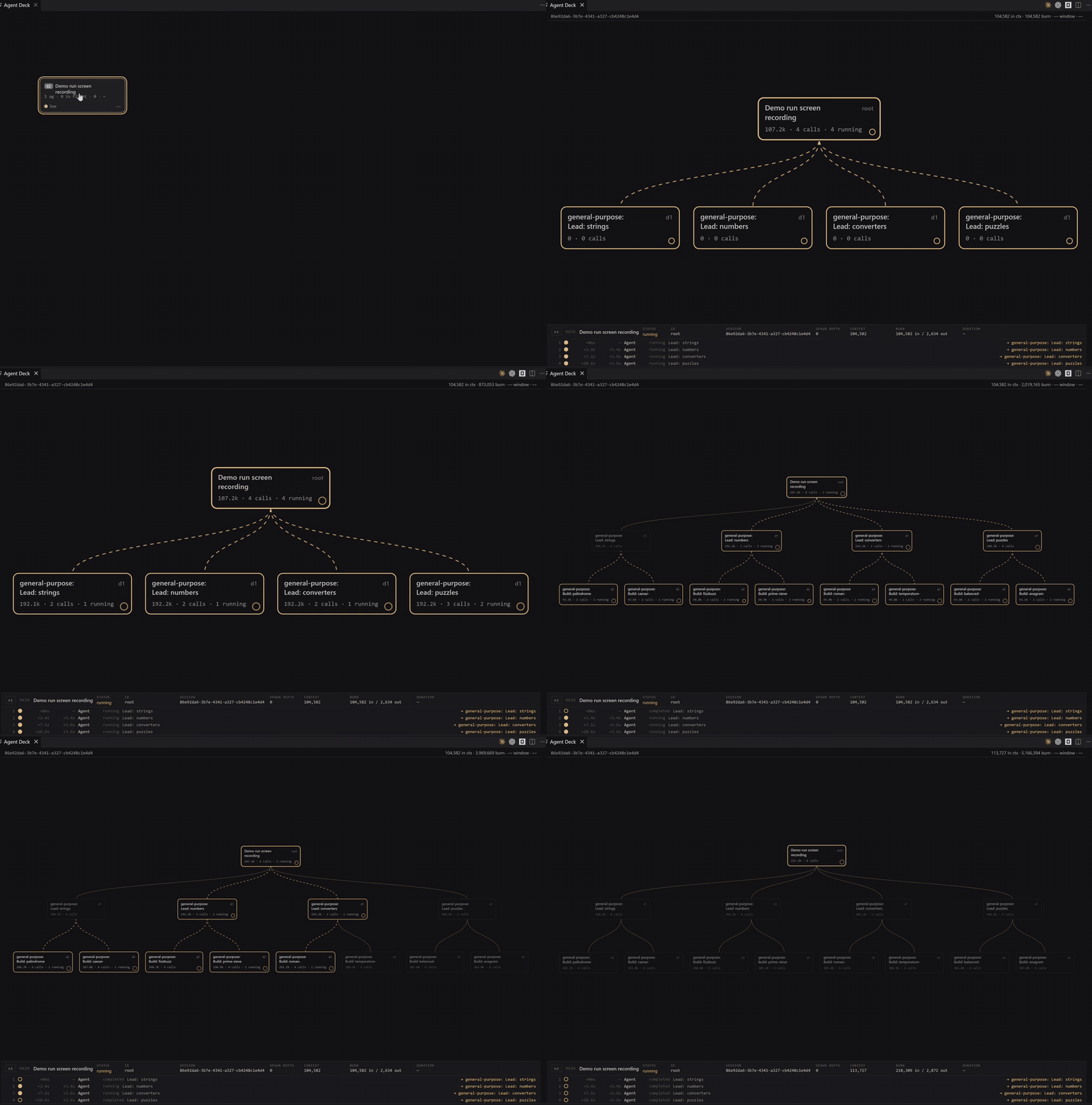
Agent Deck is a free extension for VS Code, Cursor, Devin (Windsurf) and Kiro that draws a live tree of every agent and every tool call, as they work.
What is it?
- Live observability for AI coding agents. In plain words: a live tree of your agents and their tool calls.
- Works with Claude Code, Codex and OpenCode. You run them as usual. Agent Deck only watches.
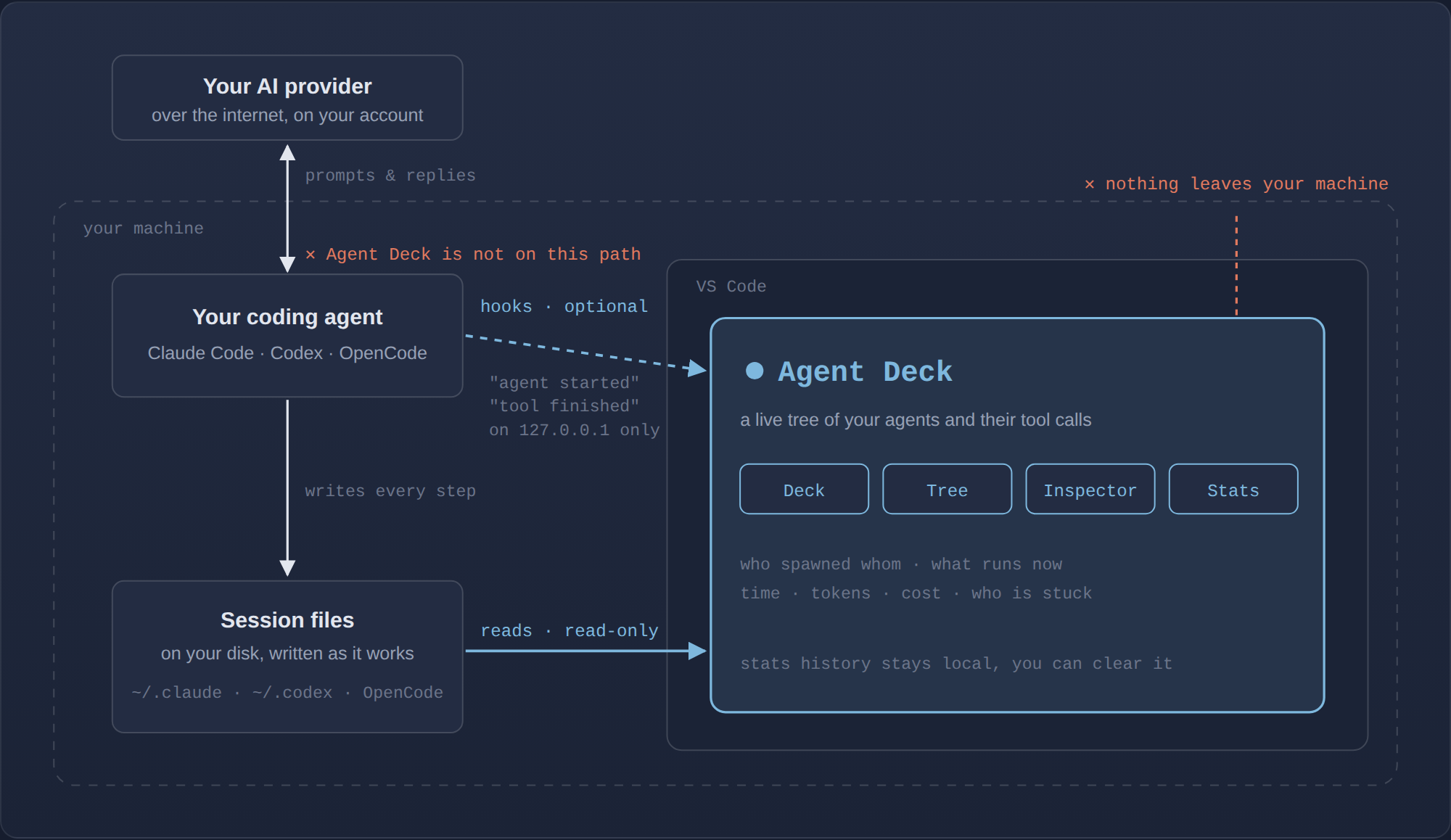
- Reads the files your agents already write to your disk. Optional hooks make it instant.
- Read-only. It never starts, steers or changes your agents or their settings.
- Nothing leaves your machine. No telemetry, no cloud, no account. Free and open source (MIT).
Why I built it
Give Claude Code or Codex a big task and it splits the work across several agents running in parallel. In the terminal you can barely see who's doing what, who's stuck, or why it's taking 10 minutes. I built Agent Deck because I couldn't understand what was running on my own machine.
Where it sits
Who it's for
Developers who hand Claude Code, Codex or OpenCode long tasks with subagents. Seeing what's happening comes first. Tokens and cost are shown too.
Install
- Install Agent Deck from the VS Code Marketplace, or from Open VSX in Cursor, Devin (Windsurf) and Kiro.
- Click the Agent Deck icon in the sidebar.
- Optional: paste the hook block below for second-by-second updates.
More at agent-deck.app. Everything technical is below.
Claude Code compatibility — anchor
2.1.246, accepts2.0.xto2.2.x, refuses on structural change, not on patch number. A session imported from another machine — Claude Code's--teleport— is not supported and rendersunsupported. See Claude Code version window.
OpenCode compatibility — anchor
1.18.22, accepts1.17.xto1.19.x, same rule: the patch number is not compared, and what refuses is the schema. See Also observes OpenCode.
Codex compatibility — anchor
0.151.0-alpha.7.2, accepts0.150.xto0.152.x, same rule: neither the patch component nor the prerelease tag is compared, and what refuses is the structure. See Also observes Codex.
What you see
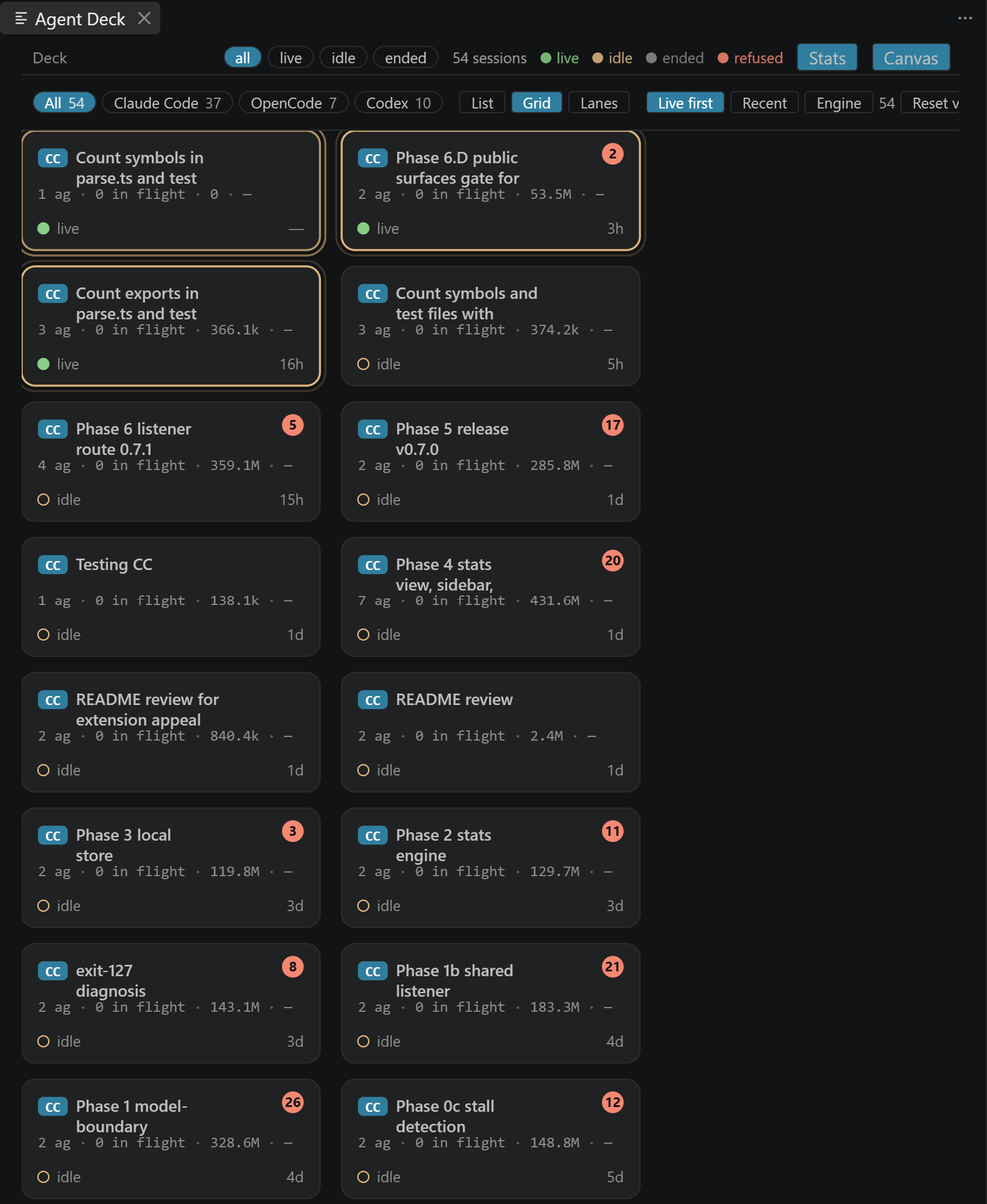
The deck — one cell per session, from any of the three engines,
scoped to the folders this window has open. Cells breathe
while their session is working. Three layouts (List, Grid, Lanes), three sort orders (Live
first, Recent, Engine), and chips to filter by liveness or by engine. Keyboard: A C O X, 1 2 3,
L R E.
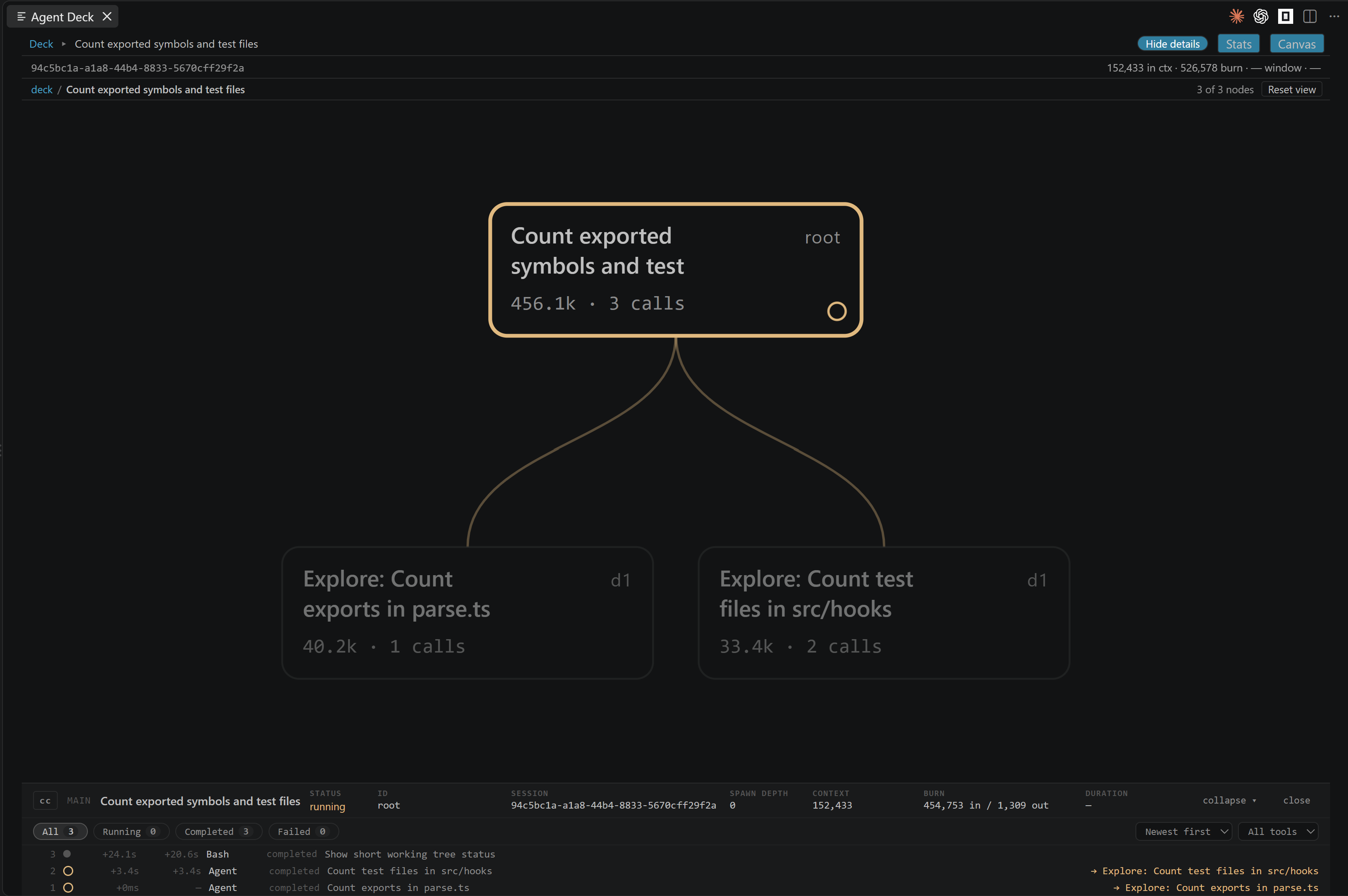
The tree — one session's interior. Every agent is a node; children sit under the parent that spawned them, in spawn order; a filament runs from each parent to every agent it spawned. A node pulses while one of its tool calls is in flight and stops when the call ends, so the picture tells you what is happening now, not only what happened. A parent with many children lays them out in rows rather than one line running off the panel, and nothing is ever cut short with an ellipsis — a long label wraps and carries its full text on hover. Anything that cannot be attached to a parent goes to a parked rail carrying the reason, because unplaced data is shown as unplaced and never guessed into position.
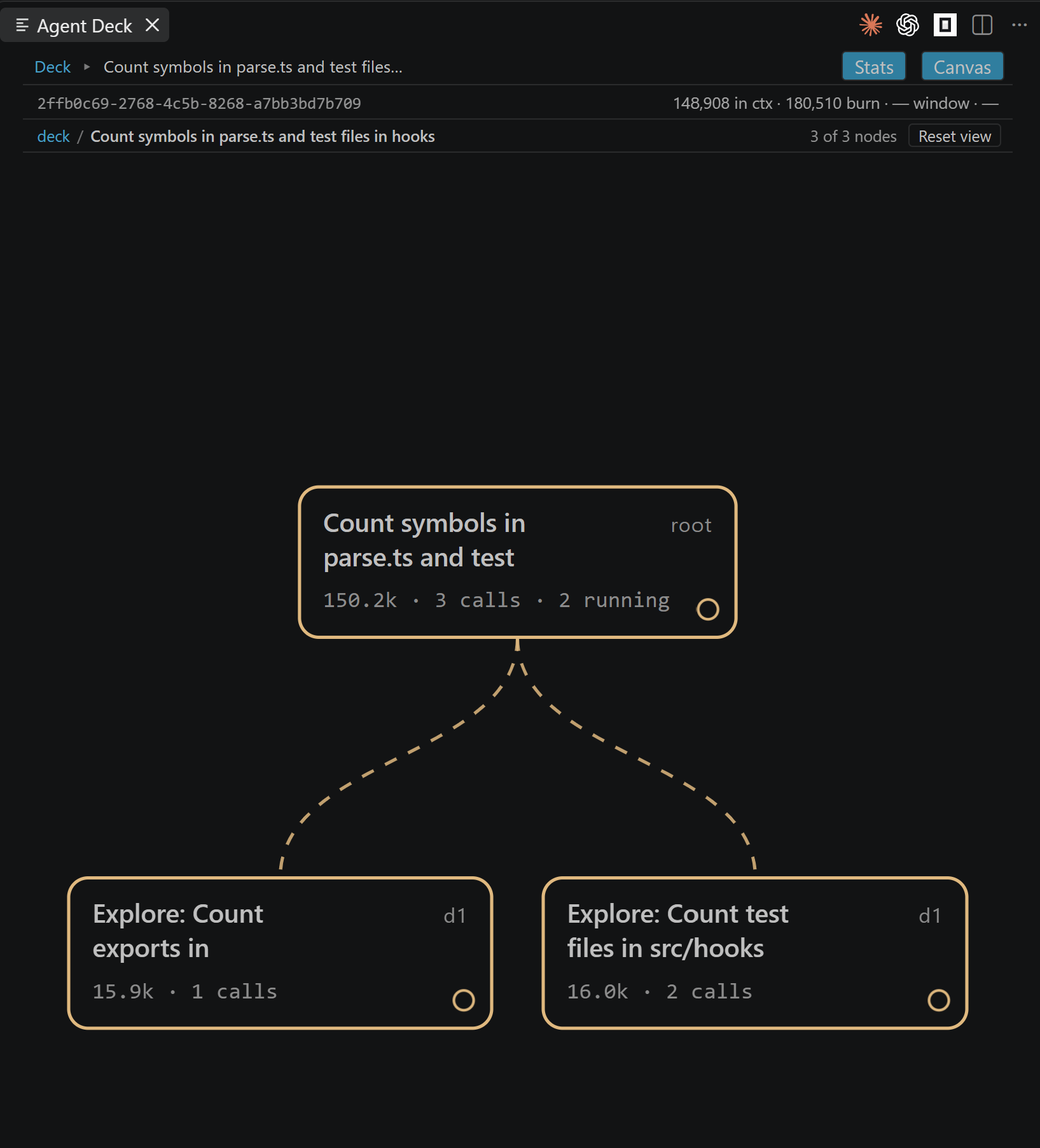
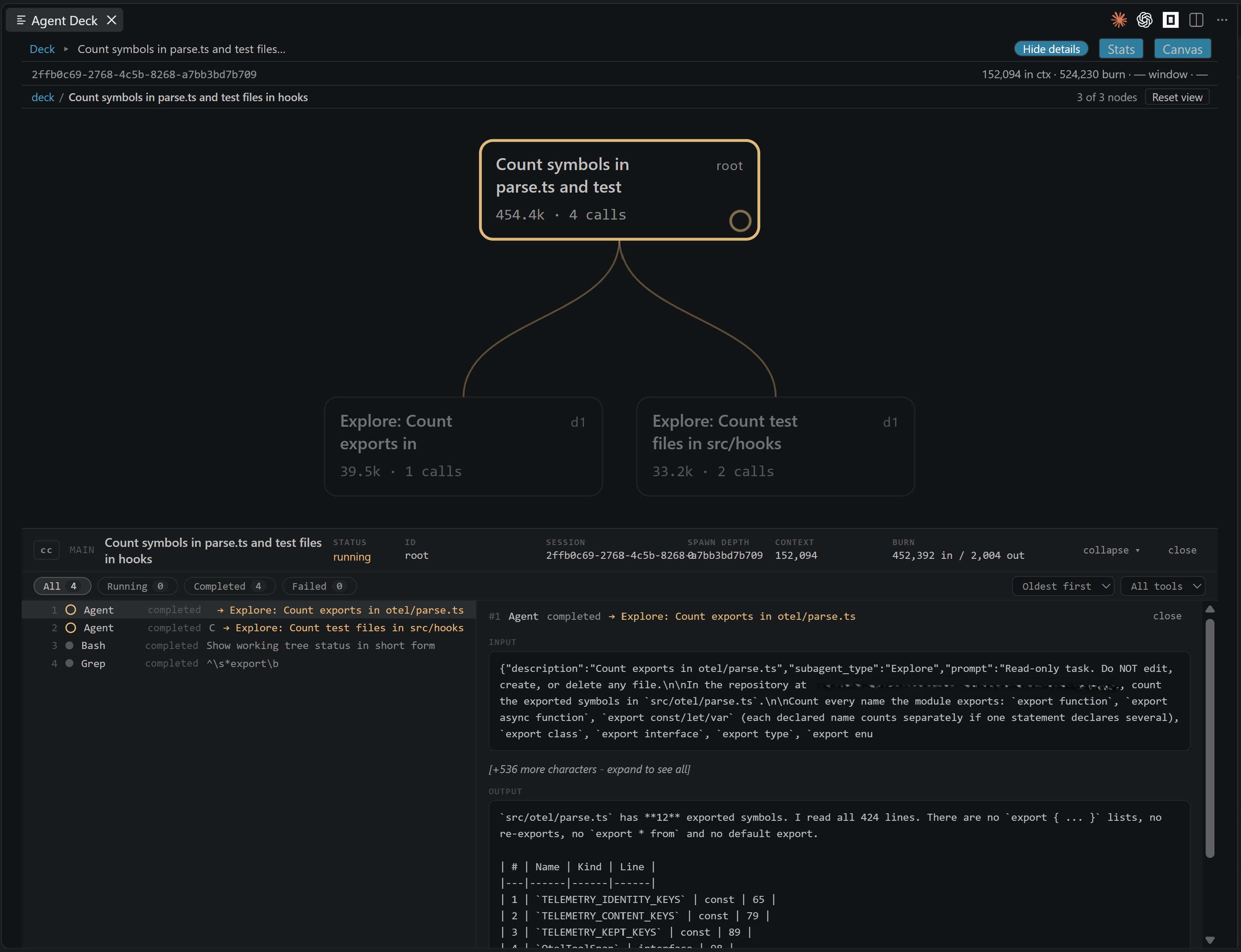
Focus — click any agent to re-root the tree on it and read one branch of a wide run on its own. The breadcrumb walks back out; Reset view returns to the whole session, fitted.
The inspector — a drawer along the bottom, the width of the panel. Its header carries the selected node's status, its numbers and its duration; below, every tool call in that agent is listed with its status, the child it spawned, the time since the agent's first call and the gap between calls, oldest-first or newest-first, filterable by tool. Select a row to read its payload beside the list. Show details / Hide details collapses the payload and close dismisses a row. An oldest-first list follows new calls as they arrive until you open one or scroll away.
Stats — a view mode beside the canvas and the list: files by touch count, identical-call loops and churn chains, tokens per agent, and trends across the sessions stored on this machine. Facts only; what each term means is in Stats.
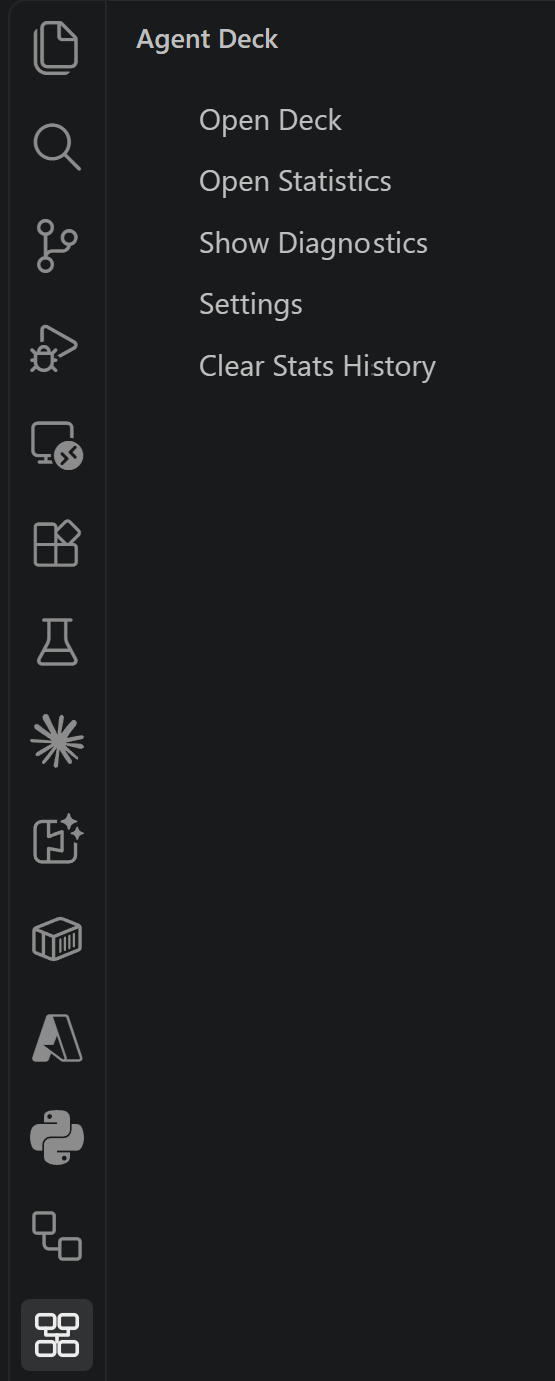
The sidebar carries a strip of three tabs, one open at a time: Menu (Open Deck, Open Statistics, Open Insights, Pick Agent, Show Payload, Clear History, Show Diagnostics, Settings, Clear Stats History, About), where the three after Open Insights appear only while an Insights provider offers them.
Two numbers, and a third where the engine states one. Context is the last message's prompt — a level, what is in the window now, which goes up and down. Burn is the running total across the session — it only goes up. Window sits beside them and is read from the session itself: a Codex transcript states the model's context window, Claude Code's and OpenCode's do not, so for those two it reads as an em dash rather than a guess. There is no percentage anywhere — two of the three engines report no window at all, and deriving one from a model name would be a number we made up. Cost is rendered where it belongs on the tree; there are no cost dashboards.
Trust
Agent Deck observes. It never acts.
- Read-only. It never writes to your agents' settings, your session files, or anything under
~/.claude, OpenCode's data and config directories, or Codex's data root. Installing the hooks is a manual paste block you control, below. Zero write capability is the trust anchor, not a default that could be configured away. - Zero network egress. Agent Deck sends no telemetry of its own, no analytics, and loads
nothing from a CDN. Every asset the panel renders is local, enforced by a strict
Content-Security-Policy. The only socket it listens on is an HTTP listener bound to
127.0.0.1, which is how the hooks reach it — and, if you turn it on, Claude Code's own telemetry (see Claude Code telemetry) — and non-loopback requests are dropped. The only connection it makes is a second VS Code window reaching that same listener on127.0.0.1(see Several windows, one port). The OpenCode side opens no socket at all, and Codex's hooks arrive on that same one listener — there is no second port for a second engine. Every socket it opens is on 127.0.0.1. - Reasoning and thinking content is never displayed. It is dropped where the data is read, before anything reaches the panel, in all three engines — including a Codex spawn's encrypted task description, which is never decoded. Tool payloads are truncated with an explicit marker.
- Secret-bearing storage is never opened. On the OpenCode side this is enumerated by name rather than summarised - see Also observes OpenCode; the Codex side is enumerated the same way, in Also observes Codex.
The single qualification to "read-only" — what a read of OpenCode's store touches beside it — is
measured in SECURITY.md §2.
What it never does
- Write to agent settings, transcripts, or databases.
- Launch, proxy, steer, or configure an agent.
- Keep session content, or ship a price table.
- Send data to a network service.
The live deck lives in memory and is discarded when the window closes. The one thing written to disk is the stats history — derived numbers, never session content — kept in VS Code's own storage for this extension; Stats says exactly what is in it and how to turn it off.
Also observes OpenCode
Since v0.5.0, OpenCode sessions appear in the same deck as Claude Code ones. Each cell carries a
glyph saying which engine wrote it - OC - and the engine chips filter the deck to one engine or
show them all. Nothing is configured: if OpenCode is installed, its sessions are there; if it is
not, the deck says nothing about it, because an absent data directory is not an error and not a
warning.
Four tables are never read, and this is by name rather than by filter: account,
control_account, credential and session_share. Those are the tables whose schema carries
access tokens, refresh tokens and share secrets. They are not queried, and they are stripped from
every test corpus in the project.
One file is read — the session database under OpenCode's data directory — and nothing else beside
it. There is no port, no opencode serve, and no hostname resolved.
Compatibility, same posture as the Claude Code side. The anchor is 1.18.22 — the release whose
captured database proved the schema. Major must match, minor may be one step either way (1.17.x to
1.19.x), and the patch component is not compared at all, so a self-update from 1.18.22 to a
later patch changes nothing. What refuses a session is the schema: if the tables and columns
actually read are not what the corpus pinned, that session renders unsupported rather than a
half-built tree. A database holding sessions written by several versions is normal, and the window
is applied per session, not to the file.
One thing it does not do yet. An OpenCode session's burn is present and counts the whole
prompt, cached tokens included; its context figure reads as an em dash, because that number is
a level rather than a total and Agent Deck does not yet read the per-step rows that carry it — so an
honest absence is shown rather than a wrong one, never a 0.
Also observes Codex
Since v0.6.0, Codex sessions appear in the same deck as Claude Code and OpenCode ones. Each cell
carries a glyph saying which engine wrote it - CX - and the engine chips, labelled Claude Code,
OpenCode and Codex, filter to one or show them all. Nothing is configured: if Codex has
written sessions under its data root, they are there; if it has not, the deck says nothing about it,
because an absent data root is not an error and not a warning.
What is read is the transcripts, and nothing beside them. They live in $CODEX_HOME if you set
that variable and in ~/.codex if you do not, and it is checked each time rather than remembered.
Five things under that root are never opened, and this is by name rather than by filter, the
same treatment the OpenCode tables get: the credential file auth.json, the sandbox-secret
directory .sandbox-secrets/, the two machine identifiers installation_id and cap_sid, the
network-fetched models_cache.json, and every local database Codex keeps there. The name is judged
before any path is joined or opened, so there is no moment at which one of them has been handed to
the filesystem. SECURITY.md enumerates the list.
No App Server, no socket to Codex; secret-bearing files are never opened.
No socket to Codex. No App Server, no app-server proxy, no second port. Codex ships an App
Server; Agent Deck never connects to it, and that is a boundary this product keeps rather than a
feature it has not got round to. Codex hooks POST to the same loopback listener Claude Code's do
— one socket for the whole extension. Neither hooks.json nor config.toml is opened by this
extension either: those are Codex's own files, and yours.
Compatibility, same posture as the other two engines. The anchor is 0.151.0-alpha.7.2 — the
release whose captured transcripts proved the structure, taken from the corpus's own
session_meta.payload.cli_version and never from what a binary reports about itself. Major must
match, minor may be one step either way (0.150.x to 0.152.x), and neither the patch component
nor the prerelease tag is compared at all. What refuses a session is the structure: if the
records actually read are not what the corpus pinned, that session renders unsupported rather
than a half-built tree. The anchor moves one way only — by harvesting a corpus from a new release —
and moving it cannot make a version work, because the parts it names are the parts nothing compares.
Major 0; minor ±1. Patch and prerelease tags are not compared.
One thing Codex gives that the others do not. Its transcripts state the model's context window, so a Codex session's window figure is a real number read from the session. It is stated in two places and one of them can be empty on a turn that ended before any usage was recorded, so the figure comes from whichever of them the session actually carries, and reads as an em dash only when neither does.
One thing it needs that the others do not. Codex's hook block is a separate paste from Claude Code's, in a different file, with a trust step of its own — see Install the Codex hook. Without it a Codex session still renders in full, because the tree, the tool calls and the numbers all come from the transcript; what degrades is liveness, which falls back to file modification times.
Requirements
- VS Code
^1.126.0 - Node
>=22.22.2on yourPATH— the hook block below is anode -eone-liner, so your Node is what runs it - Claude Code on the
2.xline, within one minor of the anchor (see below). Patch releases are read as they come. - OpenCode — optional, and there is nothing to install or configure if you do not use it. The version window is in Also observes OpenCode.
- Codex — optional in the same way, with one difference: liveness needs its own hook block pasted and trusted. The version window is in Also observes Codex and the paste is in Install the Codex hook.
Install
Install from the VS Code Marketplace - open the Extensions view and search for Agent Deck, or run:
code --install-extension nvitlam.agent-deck
Works in VS Code 1.126 or later, Cursor, Devin (Windsurf) and Kiro. In Cursor, Devin (Windsurf) and Kiro, install from Open VSX: https://open-vsx.org/extension/nvitlam/agent-deck
Where to find it: the Agent Deck icon in the activity bar. It opens a sidebar with a strip of three tabs — Menu · View · Tweaks — one open at a time. The same three are on the view's title menu.
One window. Deck, Statistics, Insights and About are four surfaces of the one Agent Deck panel, and the Menu switches between them in place — nothing opens a second panel.
Everything is in that sidebar or that menu. The panel is content only — no bars, no buttons, no chips, with the exceptions noted below: Statistics' tabs, and the tiles on Insights and About. You pan, drag, zoom and select; everything else is a sidebar entry, a menu entry or a keyboard shortcut.
Menu
- Open Deck — the session deck, in the first editor group. It comes back to the deck from wherever you are, and keeps the renderer you chose.
- Open Statistics — the same panel, on its Stats view, always on the Files tab.
- Open Insights — the same panel, on its Insights surface. The sidebar shows beside it which state that surface is in: Facts only, or the name of the Insights provider that is registered, with the provider's status line under it when it states one.
- Pick Agent — under Open Insights, only while the registered provider offers it: asks the provider to let you choose the agent CLI it sends to.
- Show Payload — likewise: asks the provider to show the payload it would send, for review.
- Clear History — likewise: asks the provider to clear its stored reports. Agent Deck asks nothing first; a confirmation, if there is one, is the provider's.
- Show Diagnostics — the Agent Deck output channel.
- Settings — VS Code's settings, filtered to Agent Deck.
- Clear Stats History — removes the local stats history, after a confirmation.
- About — the same panel, on a page with what this is and where to find it.
View — five collapsible groups, each showing what it is set to and folding up again once you choose: Renderer (Canvas or List), Sessions and Engines (the two filters), Layout and Sort. Inspector appears under them while a tool-call drawer is open, with the drawer's status, order and tool filters. Reset view acts on whichever surface you are on.
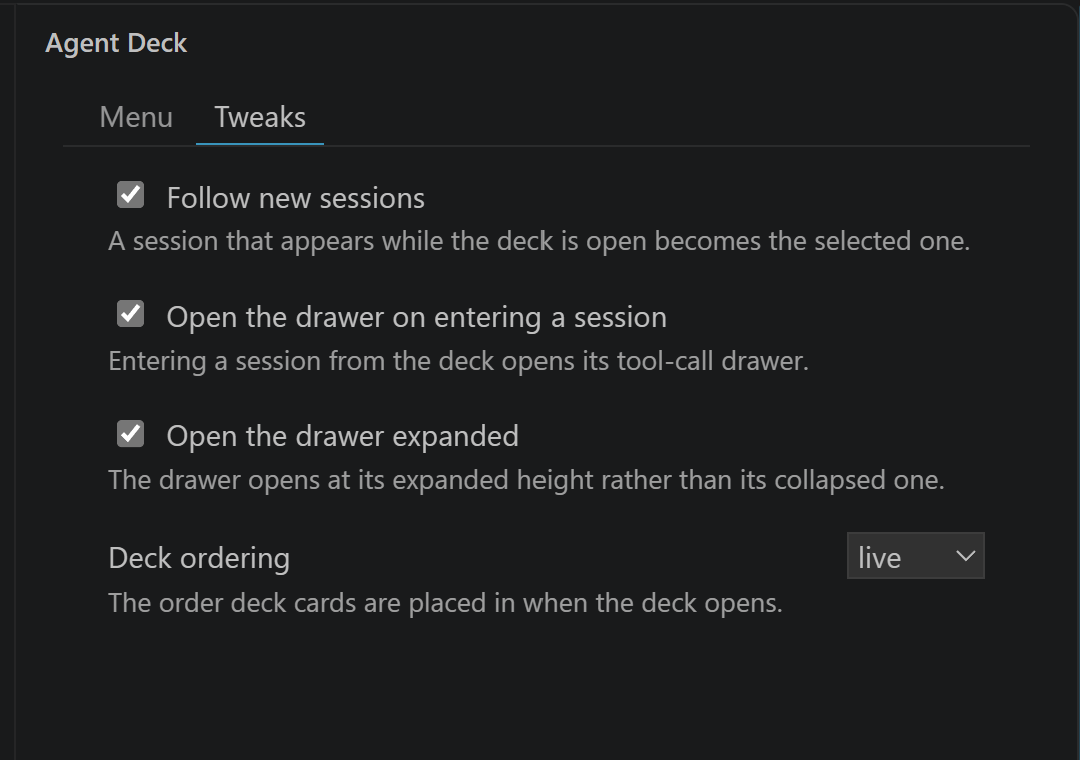
Tweaks — three settings as checkboxes, each with a line saying what it does: follow new
sessions, open the drawer on entering a session, open the drawer expanded. Ticking one writes that
setting; the sidebar keeps no value of its own and shows whatever the settings say. The deck's
opening order is agentDeck.defaultOrdering in Settings — the deck's own order is View ▸ Sort.
Statistics keeps its five tabs — Files, Tools, Loops & churn, Tokens, Trends. Insights and About carry tiles, and a tile that opens a web page asks first. With an Insights provider registered, Insights carries its report list — click a report to preview it, tick reports for a batch — the preview's HTML, Markdown and Copy export actions, and Export ticked. Nothing else on the panel is pressed.
The keyboard shortcuts are unchanged, and they work while the deck panel has focus: a c
o x for the engines, 1 2 3 for the layout, l r e for the sort. Escape walks
back out of a session, and k collapses the tree.
Every entry is also in the Command Palette, under Agent Deck:. Your sessions appear on their own — there is nothing to point it at and nothing to switch on.
Several VS Code windows work as they are. Each window's deck stays live, sharing the one hook listener on the machine, with nothing to configure — see Several windows, one port.
Then install the hook block below. Optional. Without it Agent Deck still shows the tree, but it cannot tell you what is running right now — liveness is inferred from file times and th