
Agent Relay
Hit a usage limit mid-task? Keep going on your next account.
Agent Relay is a local command-line supervisor for Claude Code and the Codex CLI. When one account runs out of quota, it safely hands your conversation to the next account in your priority order — no copy-pasting context, no lost work, no credentials shared.
- Safe handoff — exactly one owner per conversation, verified before it reports success.
- Your accounts stay yours — isolated per-profile logins; Relay never reads or stores a token.
- Local only — no daemon, no Relay server, nothing leaves your machine.
brew install RA1NM4KER/tap/agent-relay
relay setup      # once: log in to your profiles and pick a priority order
relay claude     # or: relay codex — work as usual; Relay watches the quota
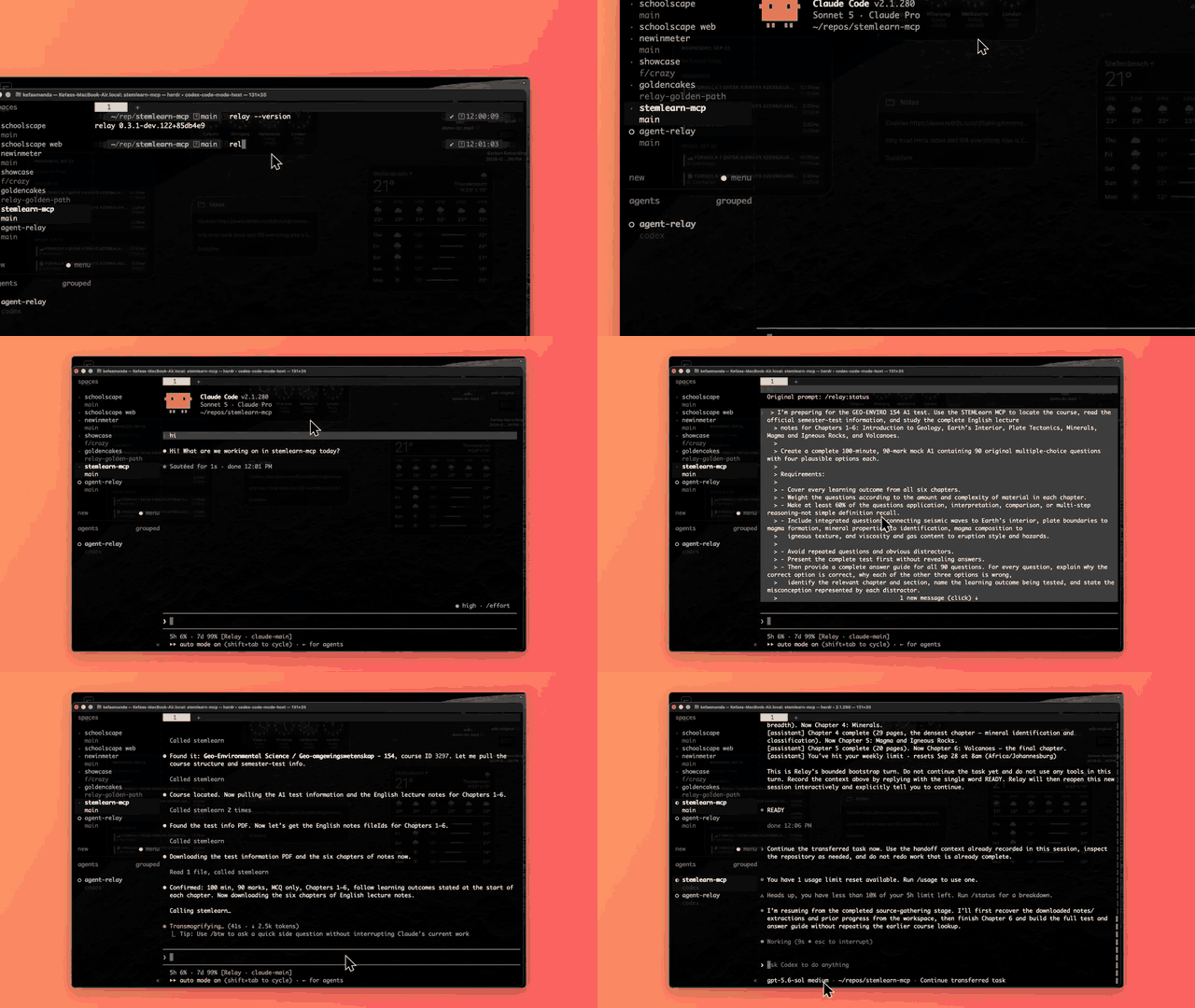
Details, status and limitations follow.
Keep your coding agent moving when one account hits its usage limit. Agent Relay supervises isolated Claude and Codex profiles, keeps exactly one owner per conversation, and moves the work to the next eligible profile in one priority order. Claude → Claude continues the same native Claude session; anything involving Codex continues from a Relay state bundle in a new session — never the same native conversation across the two CLIs.
Status: v0.5.1, macOS-first. The handoff, recovery, and usage-detection paths are validated
live on macOS with Claude Code 2.1.276–2.1.278; Codex support is live-validated against Codex CLI
0.156.0 (structured usage reads, thread verification, Codex → Claude handoff by hand, pre-launch
fallback from an exhausted Codex profile). A full live handoff away from a real Codex
exhaustion, mid-session, to a healthy fallback profile has now been observed end to end: a
genuine usage_limit_exceeded exhaustion, detected and corroborated via Codex's own authoritative
usage check, followed by a completed automatic handoff to a healthy Claude profile — not merely
covered by fake-provider tests.
While Relay's own local observation of a supervised Codex session is healthy, it makes no periodic provider usage reads at all — it watches Codex's own local rollout file for a structured exhaustion signal instead, and only reads Codex's usage API once that signal (or an ordinary recovery/reconnection) actually calls for it. That local signal is never authoritative on its own: Relay still confirms every exhaustion via Codex's own structured usage state before acting. Provider usage polling resumes automatically as a safety fallback if local observation ever becomes untrustworthy, and this whole mechanism is on by default for a live-verified Codex version — no configuration needed. See docs/automatic-handoff.md for the full design.
Linux builds and passes the tests in CI but is not yet live-supported or validated (some process-scan code is macOS-specific). Relay runs entirely standalone — no separate tool required; an optional Herdr integration exists for people already using Herdr (see "Is Herdr required?"), also validated live.
Install
brew install RA1NM4KER/tap/agent-relay
This installs the latest tagged release. To run the bleeding-edge main branch instead, build it
from source (see below), or see
docs/maintainer-dogfood.md for the maintainer's own dogfood-build
workflow.
Use
relay setup                 # once: profiles for the providers you use, one priority order
cd ~/repos/my-project

relay claude                # start a new managed conversation with Claude ...
relay codex                 # ... or with Codex (peer entry points — use whichever you want)

relay claude --resume       # adopt an OLD Claude conversation (pick it in Claude's own picker)
relay resume                # reopen a closed conversation of this project
relay switch                # choose a profile from a list ...
relay switch <profile>      # ... or name it: move a conversation to another profile

relay status                # fast local snapshot: what is going on in this project
relay status --live         # the same, plus a fresh provider auth/usage check (slower)
relay profiles              # your profiles, their order and login state
relay setup is a one-time wizard: it detects the coding-agent CLIs you have (Claude Code and/or
the Codex CLI — either one is enough), walks you through logging in to one or more isolated
profiles (Relay opens each provider's own official login — it never sees your password or token),
and asks for one global priority order: which profile is primary and which are fallbacks.
(If you already use Herdr, setup also offers to wire in that optional
integration — see "Is Herdr required?"; most people don't need it.)
Any provider can be primary; a Codex primary with a Claude
fallback is as natural as the reverse.
The mental model is simple:
relay claude = Claude + Relay supervision     (new managed conversation)
relay codex  = Codex  + Relay supervision     (new managed conversation)
relay claude --resume = bring an existing Claude conversation under Relay (same session, in place)
relay resume = reopen a closed (dormant) conversation of this project
relay switch [<profile>] = explicitly move a conversation (bare: pick from a list)
Start through Relay, or bring an existing conversation under Relay later. Switch accounts and providers without leaving your coding workflow:
relay claude/relay codexstart through Relay.relay claude --resumeadopts an old Claude conversation: Relay opens Claude's own resume picker (or resumes the id you give it), then manages exactly the conversation you chose — no fork, no second conversation. It is not the same asrelay resume, which continues a conversation Relay already manages.- Inside a running Claude session,
/relay status,/relay switch [profile]and/relay adoptare answered by Relay itself (no model turn, nothing typed into the conversation)./relay adoptbrings a live unmanaged Claude conversation under Relay without restarting it;/relay switchmoves the conversation and your terminal follows it. - Inside a Relay-managed Codex session, use
$relay status,$relay doctor,$relay why,$relay history, or$relay switch <profile>. Relay installs a profile-local skill when attaching Codex; Codex executes the CLI through a model/tool turn./relayand/relay:doctorare not Codex slash commands. The skill scopes queries to the supervisor's project and session;$relay switch <profile>asks the supervising Relay process itself, over the same control channel Claude's in-agent switch uses, to safely stop Codex and continue the conversation on the new profile — no copy-pasting a command into another terminal. It falls back to printing that manual command only when no verified Relay supervisor can be reached. Live Codex adoption is not offered — userelay codexto start through Relay.
relay history is a fast, local read-only timeline for the most recent Relay Session in the
current project (or use --session for a dormant session). It shows durable operational evidence
such as handoff phases and selected profiles; it is provider-neutral and not conversation or
transcript history. It never starts a provider or contacts the network.
- Relay supervises conversations, not repositories. A project can hold many Relay sessions — each one a conversation with its own stable id, running on one profile at a time. Two sessions may run on the same profile; one may be Claude and another Codex; some may be closed. Each live session has exactly one owner; a closed one has none (it is remembered, not owned). Relay does not serialize edits to your files: two agents in one working tree can touch the same files, so it is your call when running several at once makes sense.
relay claudealways starts a new Relay session under your highest-priority Claude profile, tracked by Relay from the start; Relay drops you straight into Claude (you type the first message there — Relay never prompts for it). Other sessions of the project, active or not, are none of its business: it never stops, replaces or blocks on them (--newis a deprecated no-op).relay codexis the same thing for Codex: a new Relay session under your highest-priority configured Codex profile.--profile <name>overrides the choice and must name a profile of that provider;--no-attachbehaves as it does forrelay claude.relay resumereopens a closed session of this project on the profile it last ran on. With one it just opens it; with several you choose from a list (or pass--session <id>); one that is active in another terminal is shown as active and never started a second time.- Once a session is running, Relay still does the thing this project exists for: if the account
genuinely runs out of quota, it hands the work to the next eligible profile in your priority order
automatically — Claude profile A → Claude profile B → Codex → back to Claude A once it has reset,
however your order is configured. Claude → Claude keeps the same session; any move to or from
Codex continues from a Relay state bundle in a new session. You never see a config path, a pane id, or a session UUID;
relay statustells you what's going on if you're curious.
Full walkthrough: docs/getting-started.md.
What happens when quota runs out?
If the current writer genuinely, verifiably runs out of quota (not a transient rate-limit blip), Agent Relay safely stops the session, re-checks your whole priority order, and continues on the first eligible profile. Claude → Claude resumes the same native Claude session under the new account. Any move involving Codex starts a new session on the other provider seeded from a Relay state bundle (project state, git checkpoint, recent context) — it is a continuation, not the same native conversation. The writer is sticky: a profile that has reset does not take work back until the current writer blocks. There is no daemon, and an unknown or ambiguous reading never moves anything.
- Claude is event-driven: the usage integration
relay setupinstalls runs a hook the instant Claude reports a rate limit, and for the session Relay manages it starts one short-lived evaluation for that project. - Codex is checked through its structured rate-limit interface before entering the terminal. For a live-verified version, Relay then watches the local rollout for an exhaustion event and confirms it through that same interface. Periodic provider reads are suppressed while local observation is healthy; adaptive polling is the fallback for an unverified version or lost observation coverage.
- If you are attached through
relay claude/relay codex/relay resume, the terminal carries you onto the new owner by itself ("continuing this conversation on '
Security
Authentication remains provider-owned: Relay only launches each provider's official login/logout
inside an isolated config home per profile (CLAUDE_CONFIG_DIR / CODEX_HOME), and never reads,
copies, or stores an OAuth token, cookie, API key, or password. Everything runs locally — no
Relay-operated server, no data leaves your machine except what the Claude and Codex CLIs already send.
Details: docs/security.md.
Requires
- Claude Code 2.1.x for Claude profiles (2.1.276–2.1.278 live-validated; newer 2.1.x patches are treated as unverified, with ambiguous signals refused).
- The Codex CLI for Codex profiles (0.155.0 and 0.156.0 validated — 0.156.0 live-validated end to end against a real natural exhaustion; other versions are treated as unverified).
git— Relay checkpoints a project's git state before a handoff.- Herdr is optional.
- macOS is the live-validated platform. Linux currently builds and passes the tests in CI but is not yet live-supported or validated.
Updating
relay update
For a Homebrew install, this delegates straight to Homebrew (brew update && brew upgrade) and
reports the resulting version — the same as running:
brew update && brew upgrade agent-relay
For any other install, relay update prints where to get the latest release instead of trying to
replace its own binary. relay update --check only reports whether a newer stable release exists,
without installing anything. It refreshes stale or missing release data, and reports an unknown
result if fresh data cannot be obtained. Homebrew ownership is checked against the running
executable; relay-dev update upgrades the separate agent-relay-dev formula.
relay status/relay doctor/relay setup may also show a small "Update available" hint when a
newer stable release exists — based on a cached, at-most-daily check of GitHub's releases, never a
network call on the command's own critical path. Relay never auto-updates itself.
Everyday commands
| Command | What it does |
|---|---|
relay setup |
First-run wizard; safe to re-run any time (detects and reuses what's already there). |
relay claude [message] |
Start a new Relay session (Claude) in the current project and open Claude directly (an optional message is passed to Claude as the opening prompt). Other sessions in the project are left alone. |
relay codex [message] |
Start a new Relay session (Codex) and open Codex directly — the peer of relay claude (--profile, supervised terminal). |
relay resume [profile] [--session ID] |
Reopen a closed Relay session of this project (a picker when there are several; the profile is only a filter). |
relay switch [profile] [--session ID] |
Explicitly hand a conversation to a different profile/provider (state continuation across providers). With several active sessions you choose which; refuses an exhausted or unverifiable Codex target rather than rerouting your choice. |
relay claude -- … / relay codex -- … |
Arguments after -- go straight to that provider's CLI and stay provider-scoped (see below). |
relay status [--live] |
Plain-language summary: the project's active and dormant Relay sessions (provider, profile, ids), primary/fallback order, automatic-handoff status, Herdr. Default reads only local Relay state (fast; provider auth/usage are reported as last-known, not fresh). --live also performs a current provider auth/usage/version check (slower — spawns the provider CLI). |
relay doctor [--project PATH] |
Check authentication, verified Codex usage, integrations, and exact-project trust. Reports ready when a configured profile is eligible; other profiles' problems remain visible as warnings. Exits 1 when no profile is ready or another global blocker remains. |
relay profiles |
List authentication states, priority roles, and profile-specific recovery commands. |
relay login <name> / relay logout <name> |
Friendly wrappers around the provider's own official login/logout (Claude or Codex) for one isolated profile. |
Human terminal reports use restrained color only on a compatible interactive terminal. Status
words and symbols remain meaningful without color. NO_COLOR, TERM=dumb, redirected output,
and --json disable styling. JSON fields remain the stable interface; human layout may evolve.
relay profiles separates the authentication table from diagnostics and recovery commands.
relay status labels configured fallback order separately from live health; use --live or
relay doctor for current checks. Authenticated alone does not establish project readiness.
Status-line badge
Inside a Relay-managed Claude session the status line ends with a small plain-text badge,
[Relay · <profile>], showing who owns the conversation right now (and [Relay · switching → <profile>] for the moment a handoff is in progress). It is read from Relay's own project state on
every refresh, so it changes owner after a handoff without a new terminal, and it never appears in an
ordinary Claude session, or in one whose conversation has since moved to another provider. It rides on
the status line the usage integration already installs, which wraps — never replaces — your own
status line (your command's output is kept byte for byte and the badge is appended to its last
line; relay integration claude uninstall restores your original settings). Isolated profiles
intentionally do not inherit ~/.claude/settings.json; during interactive relay setup, if
your default Claude config has a command status line and an isolated profile has none, Relay
explicitly offers to copy and wrap it. Declining leaves profiles isolated and uses Relay's
compact rate-limit line.
Codex gets the same amber owner badge plus the Relay session id and $relay command hints in
the terminal on each attach, including resume and handoff. This is a launch banner, not a live
footer: Codex's status line accepts built-in items rather than a custom status-line command.
Use $relay status for current ownership. The skill can also be managed explicitly:
relay integration codex install --profile codex-work
relay integration codex status --profile codex-work
relay integration codex uninstall --profile codex-work
Existing or user-edited skills/relay/SKILL.md files are preserved — Relay tracks a hash of
exactly what it last wrote (skills/relay/.relay-managed.json, next to the skill itself), so a
plain relay integration codex install (also run automatically on a new managed Codex attach)
upgrades an older, unmodified Relay-installed skill to the current one on its own; anything else
(no marker, or a hash that no longer matches) is left untouched and reported, never guessed past.
Already-running Codex sessions need a fresh managed attach to discover an upgraded skill and
receive its session context.
Project trust before unattended use
Run relay doctor in the project before relying on unattended handoffs. Doctor, setup's completion
screen, and status share the same readiness checks. At least one configured profile must pass
its own authentication/usage, integration, and exact-project trust checks. Problems in other
profiles remain visible as warnings; if none is eligible, the verdict is not ready.
Doctor reads Claude's hasTrustDialogAccepted or Codex's projects.<path>.trust_level for the exact
canonical project directory. It conservatively requires an explicit record for that directory;
it does not infer inherited trust. Missing, unreadable, or malformed state cannot pass.
Use the command printed beside each blocker to open that exact profile in the project, review
the provider's trust prompt, then rerun doctor. Relay never writes trust acceptance. This is a
readiness preflight, not a change to the handoff transaction or a guarantee against other runtime
approval prompts. /relay:doctor checks the Claude conversation's project; the Codex skill uses
the managed te