agentic-browser
Give any AI agent a real browser and watch everything it does.
Built and maintained by Davarion.
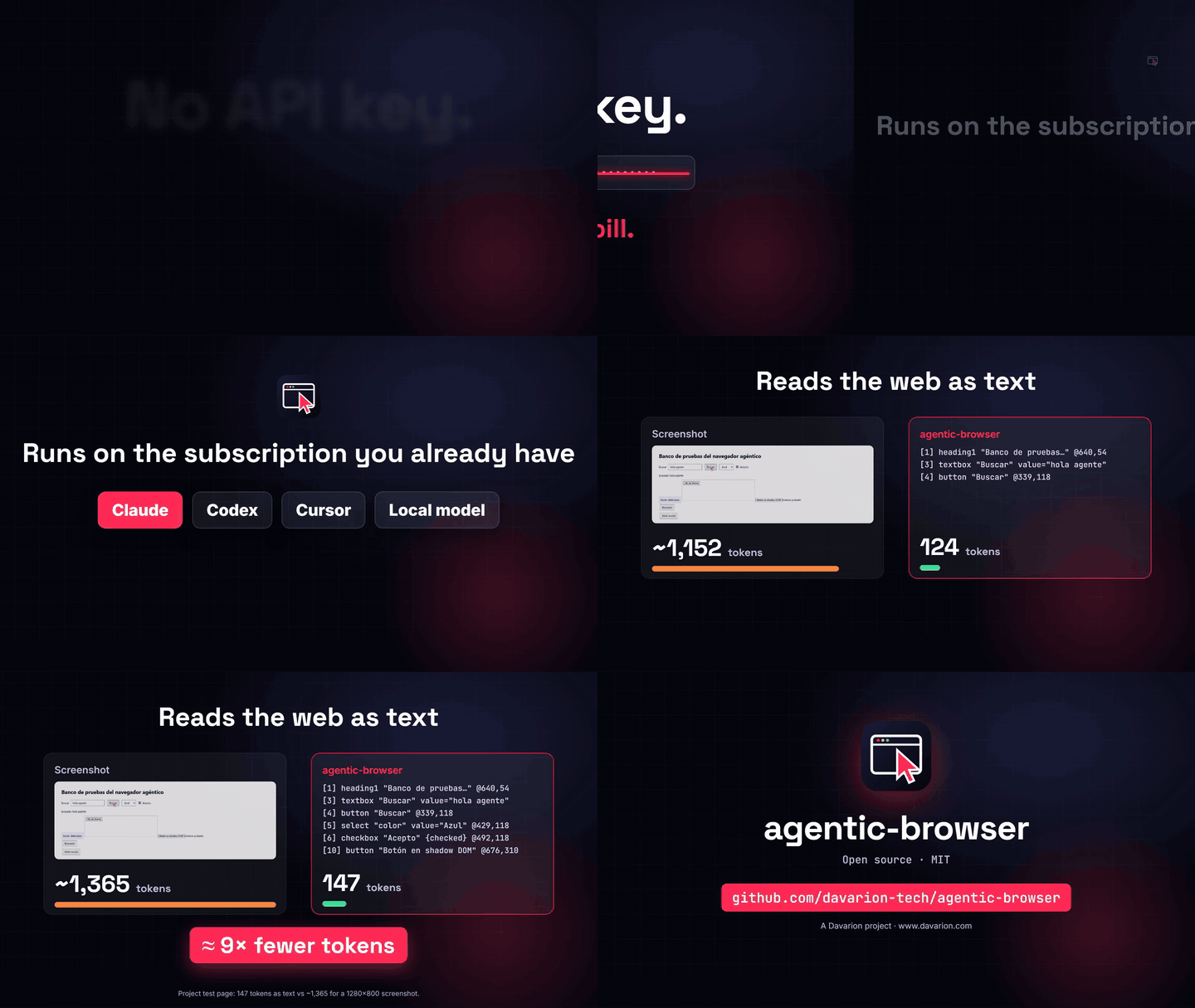
No API key. No extra bill. agentic-browser is a tool, not a model: it runs on your computer and uses whatever brain your agent already has. That can be your Claude Pro/Max plan in Claude Code, your ChatGPT plan in Codex, Cursor, or a local model. Nothing to sign up for and no per-token charges from us.
Humans browse the web with browsers. Agents usually need APIs. agentic-browser lets any agent use your installed Google Chrome the way a person does. It perceives pages as compact text with pixel coordinates instead of screenshots, and a visible cursor shows every move and click.
Español · Use cases · Chat watcher · Architecture · Security · Disclaimer
▶ Watch the 15-second demo · ▶ Watch the full video (1 min)
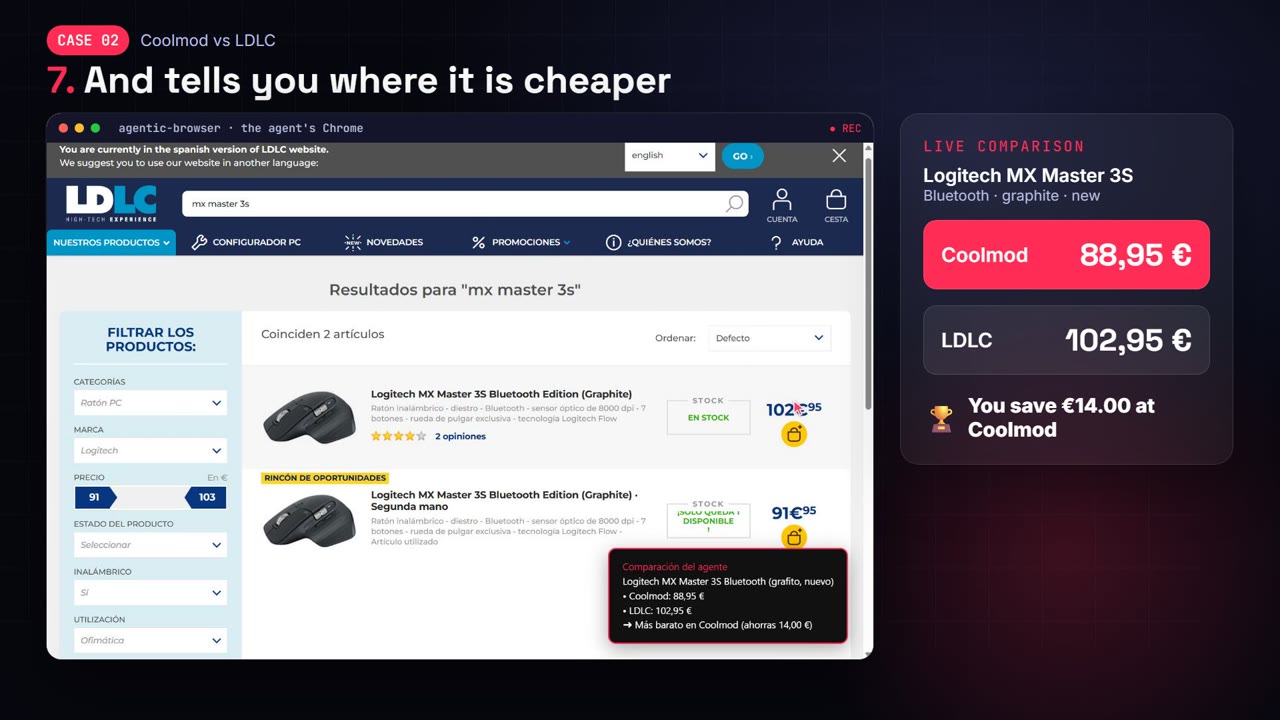
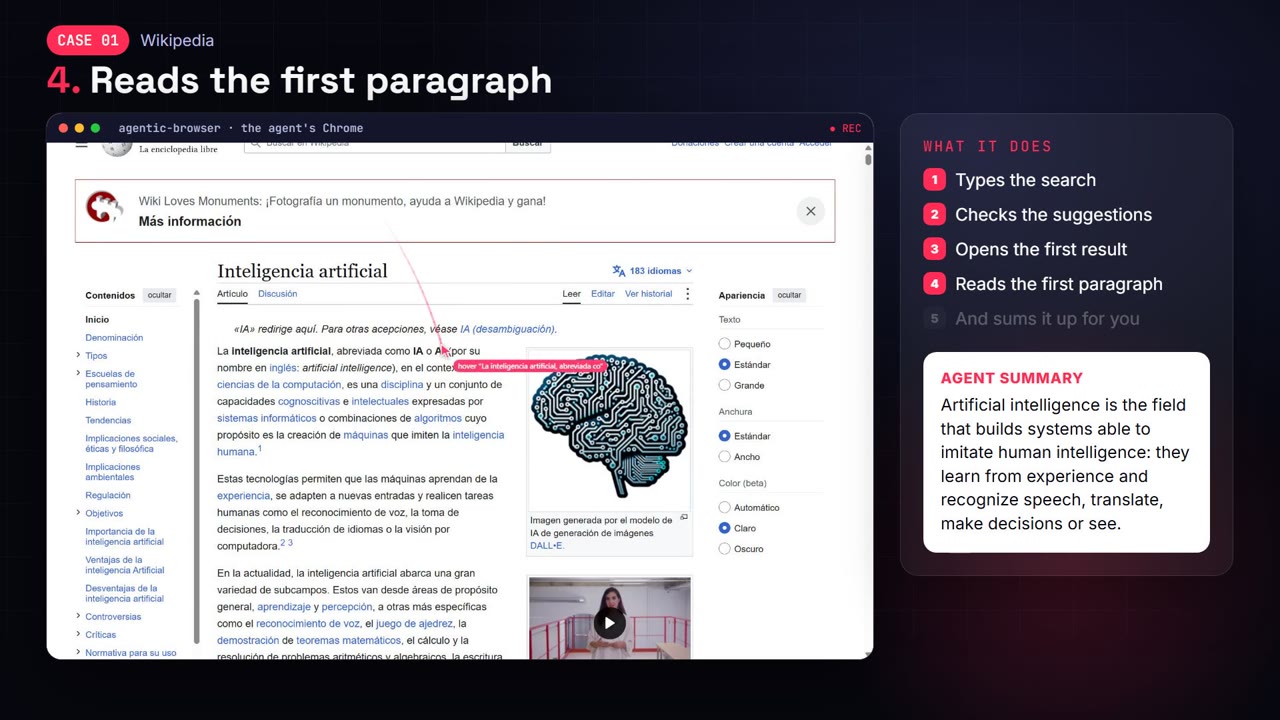
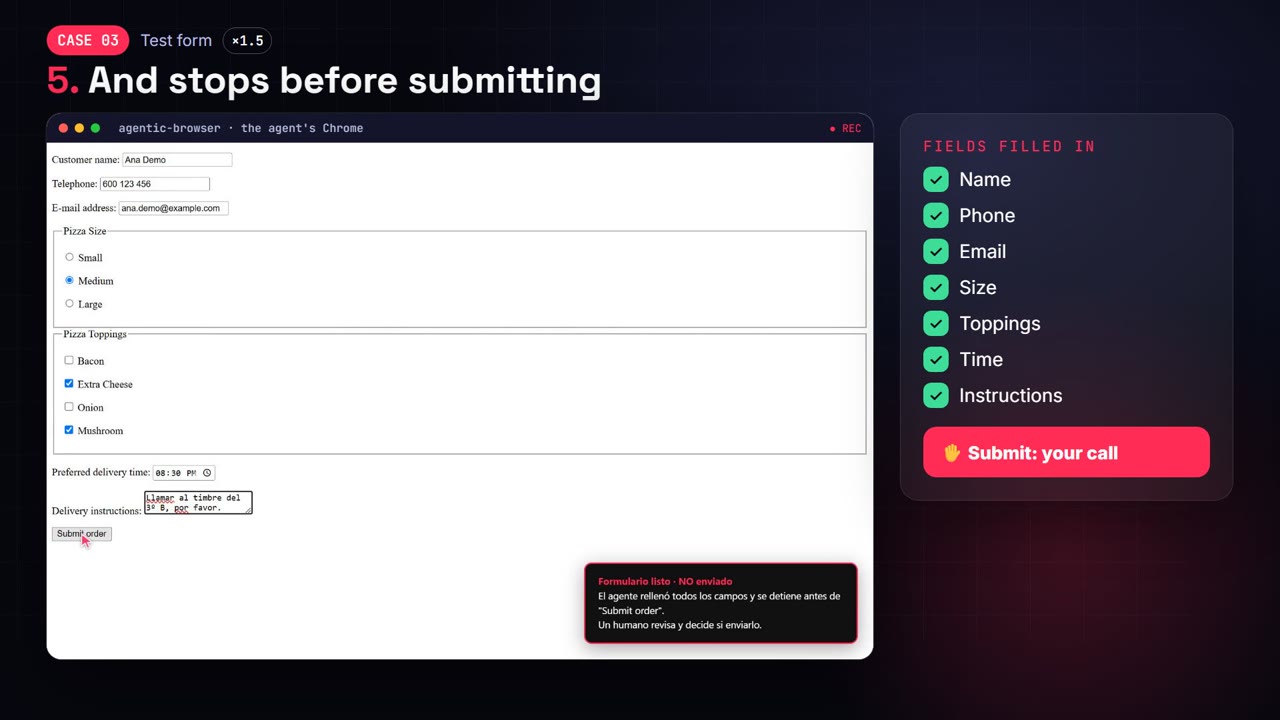
Real runs recorded by the agent itself: compare prices · research the web · fill a form and stop before submitting.
Why
| Problem with today's browser agents | agentic-browser |
|---|---|
| Screenshots cost ~1,000–1,500 tokens per look | Text snapshot: ~15 tokens per element. diff: true returns only what changed |
| Agents guess coordinates from images | Every element comes with its exact center @x,y. browser_element_at(x, y) tells what is at any pixel, with no image |
| You can't see what the agent is doing | A red cursor travels to each target, ripples on click and labels the action |
| Locked into one agent framework | MCP server and a plain HTTP/JSON API: Claude, GPT, Gemini, Hermes, OpenClaw, LangChain, n8n, curl… |
| Stripped-down Chromium builds | Your real Chrome: extensions, codecs, PDF, WebGPU, auto-updates |
| Yet another API key and bill | None. Works with the subscription your agent already uses; even the optional chat watcher can run on your Claude plan |
Quick start
One line (Claude Code):
claude mcp add agentic-browser -- npx -y agentic-browser-mcp
Any other MCP client: use "command": "npx", "args": ["-y", "agentic-browser-mcp"]. Requirements: Node ≥ 18 and Chrome (or Edge).
From source
Requirements: Node ≥ 18 and Google Chrome.
git clone https://github.com/davarion-tech/agentic-browser.git
cd agentic-browser && npm install
npm run doctor
npm test
Use it from an MCP client
Claude Code:
claude mcp add agentic-browser -- node /absolute/path/to/agentic-browser/src/mcp.js
Claude Desktop, Cursor, Codex, Hermes, OpenClaw or any MCP client: see examples/mcp-config.json.
Claude Code slash command (optional): copy skills/agentic-browser into ~/.claude/skills/. Then /agentic-browser <task> always uses this browser instead of any other built-in browser tool.
Then ask your agent something like:
Use only the browser_* tools from agentic-browser. Open es.wikipedia.org, search for "Chrome DevTools Protocol", open the first result and summarize the first paragraph. Don't take screenshots.
Use it from anything else (HTTP)
npm run http
curl -s -X POST http://127.0.0.1:8787/tools/browser_navigate -d "{\"url\":\"example.com\",\"snapshot\":true}"
GET /tools returns the JSON Schema of every tool, ready to pass as function definitions to any LLM API. A dependency-free Python client is in examples/python_client.py.
Optional: chat watcher
Off by default. Installing agentic-browser only lets your agent use the browser when you ask it to. The watcher is a separate process that you turn on.
The watcher keeps the agent's own messaging tabs open (WhatsApp Web, Telegram, Messenger…). Waiting costs zero tokens; when a message arrives, it wakes Claude to read it and propose a reply. A code-enforced policy controls what happens next:
- observe: only notifies you.
- draft (default): writes the reply but never sends it.
- auto: sends, but only to an allowlist. Sensitive keywords, an hourly limit and a domain lock apply in every mode.
npm run setup
npm run watcher
It runs on your Claude subscription (claude setup-token) or an API key. Read docs/WATCHER.md and the Disclaimer first: many platforms forbid unofficial bots.
What the agent sees
# Test bench
url: http://localhost:3000/
viewport 1280x800 scroll=0,0 docH=2090
[3] textbox "Search" ph="type something" @191,124
[4] button "Search" @339,124
[5] select "color" value="Red" opts=[*Red|Green|Blue] @429,124
[6] checkbox "I agree" {checked} @492,124
[10] button "Button in shadow DOM" @652,316
[f1:1] button "Button inside iframe" @214,217
New in 1.4: save anything from a page
browser_article: the main content of any page as clean Markdown (title, author, date, headings, lists, tables, links, images), without menus, ads or footers. The cheapest way for your agent to read or summarize an article.filesaves it as.md.browser_pdf: save the page as PDF (A4/Letter/Legal, backgrounds, lazy images loaded first) or MHTML (one file, exact copy). It uses the agent's session, so it works behind logins.browser_media: every image, video, audio file and document on the page (HTML, CSS backgrounds and what the network loaded), downloaded intoimages/,videos/,audio/,docs/with amanifest.json(source URL, alt text, size, hash). Duplicates and tracking pixels are skipped.browser_video: download the page's video, direct files (MP4/WebM) or HLS/DASH streams joined with ffmpeg. It refuses DRM content (Netflix, Disney+, Spotify…). Only for videos you own or have the right to save: YouTube, TikTok, Instagram and others forbid downloading in their terms.
Files go to ~/.agentic-browser/exports (AGENT_EXPORTS); AGENT_MEDIA_MAX_MB (500) caps each file.
New in 1.3
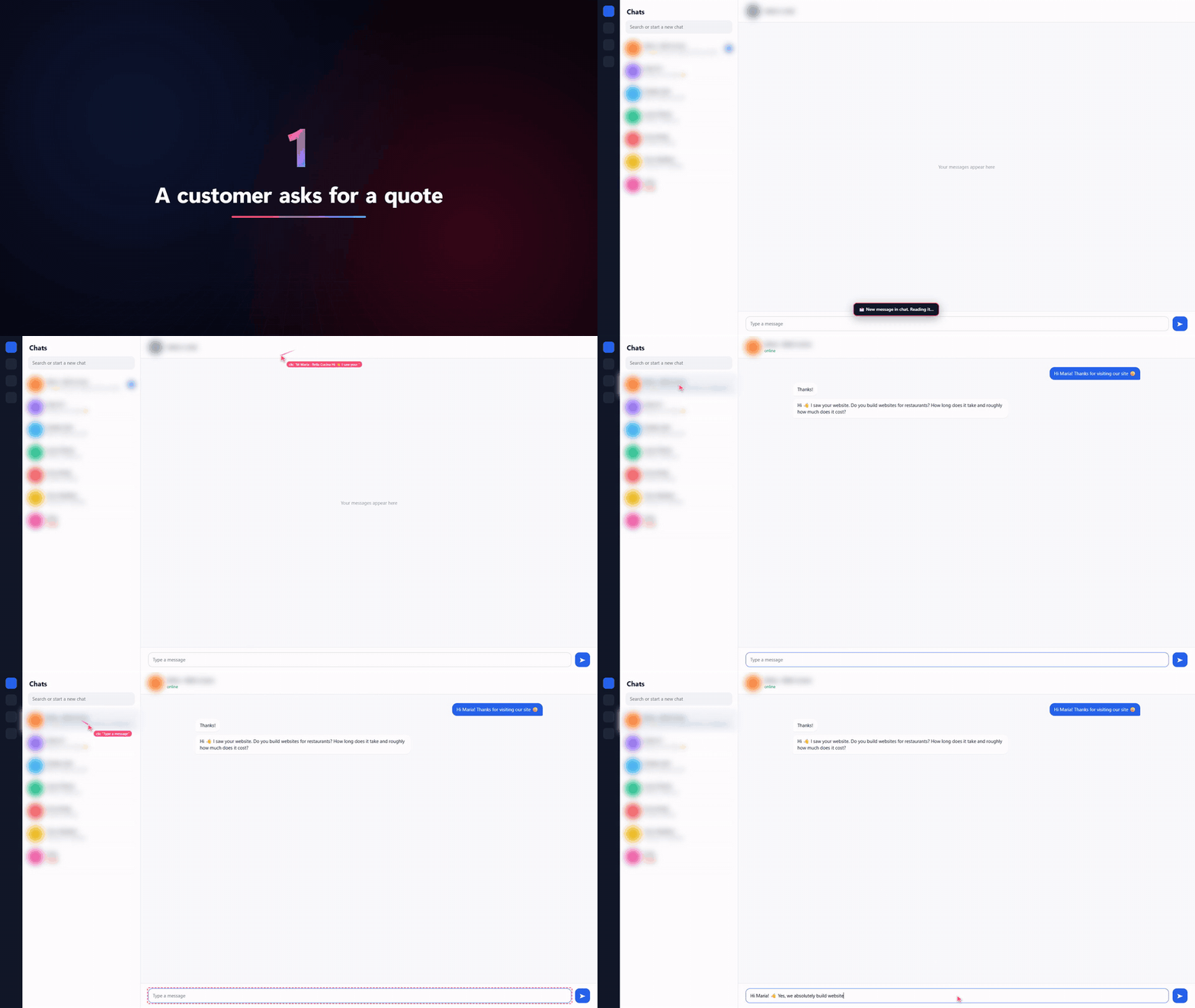
The chat watcher on a demo chat: it drafts a reply for you to send, and hands bank-detail requests and phishing links to you. Full video.
- Privacy mask.
browser_cursor_style({ privacy: "whatsapp" })orAGENT_PRIVACY=whatsappblurs contacts, chat headers and profile photos so you can record or share the agent's screen without exposing anyone. Presets:whatsapp,telegram,gmail, or your own CSS selectors. The agent still reads everything. - Watch only the chats you choose. In the chat watcher,
contacts: ["Cliente demo"]keeps every other chat out: they never wake the model, and before typing the watcher reads the open chat's title from the page, so the agent can't write anywhere else. Safe on an account that also has personal chats. - On-screen notices and a clip per event. The watcher shows a card for each new message, draft ("review it and press Send"), escalation and block (no names while the privacy mask is on), and
record: truesaves each event as its own video.
New in 1.2
- Teach it once, replay forever.
browser_teach_startrecords a task while you do it in the agent's Chrome (clicks, text, selects, Enter). It is saved as a recipe of roles and names, not pixels, so it survives layout changes.browser_replayrepeats it with new values ({"search": "October invoices"}) without perceiving every step. Passwords are never recorded: on replay, the person types them. - An "Enseñar" (teach) button in the browser. A small tab on the left edge of the agent's Chrome starts a recording without asking the agent. Name the recipe in the banner, press Finish, then tell your agent "repeat
- A clean screen. Chrome's translate bar, search-engine choice, restore-pages bubble and permission prompts are off (permissions are denied). After every navigation, website popups (language, newsletter, cookie banners, "Sign in with Google") are closed with visible clicks on their close or reject button, never accept, subscribe or sign in.
browser_dismissdoes it on demand;AGENT_AUTO_DISMISS=0turns the automatic pass off. - Structured data in one call.
browser_extractturns the most relevant table or repeated list (products, search results, contacts) into JSON or CSV rows with title, link, price and image. Merged table headers are resolved. CSV output is safe to open in Excel. - Live token counter.
browser_cursor_style({ hud: true })(orAGENT_HUD=1) shows, in the corner of the page, the tokens used against what screenshots would have cost.browser_statsreturns the same numbers. Formula: tokens ≈ characters / 4; one screenshot ≈ width × height / 750 per perception call.
Tools
| Tool | Purpose |
|---|---|
browser_snapshot |
Main perception. Visible elements with ref, role, name, state and center @x,y. diff: true returns only changes |
browser_find |
Find elements by text anywhere on the page, including off-screen |
browser_element_at |
Pixel → element (role, text, clickable, DOM path), with no image |
browser_cursor |
Where the agent's cursor is and what is under it |
browser_click / browser_move |
Visible click or hover by ref or x,y (buttons, double click, modifiers) |
browser_type / browser_press |
Real keyboard input: clear, submit, shortcuts like Control+L |
browser_scroll / browser_drag |
Mouse wheel; drag and drop |
browser_select / browser_upload |
<select> options; file inputs |
browser_navigate / browser_history / browser_tabs |
Navigation and tabs |
browser_read / browser_eval |
Readable text (wrapped as untrusted content); arbitrary JS (only with AGENT_ALLOW_EVAL=1) |
browser_extract |
Table or repeated list → JSON or CSV rows (title, url, price, image…). file saves it to disk |
browser_article |
Reader mode: the page's main content as clean Markdown, to read or summarize cheaply. file saves a .md |
browser_pdf |
Save the page as PDF or MHTML, with the agent's session |
browser_media |
Download every image, video, audio file and document, organized in folders with a manifest.json. download:false only lists |
browser_video |
Download the page's video: direct files or HLS/DASH via ffmpeg. Refuses DRM. list:true shows candidates |
browser_teach_start / browser_teach_stop |
Record a task the person performs once, as a reusable recipe |
browser_recipes / browser_replay |
List or show recipes; replay one with new params at almost zero tokens |
browser_stats |
Tokens used this session vs. the screenshot equivalent |
browser_dismiss |
Close popups covering the page (close or reject only, never accept). Runs automatically after browser_navigate |
browser_batch |
Several actions in one call, in order, stopping at the first error. Saves one agent turn per action |
browser_wait / browser_watch |
Wait for time, text or selector. browser_watch sleeps at zero tokens until the page changes (new message, title "(3) Inbox"…) |
browser_request_human |
Hand control to the person watching (login, 2FA, CAPTCHA, a decision) through an on-page banner |
browser_console / browser_events / browser_trace |
JS console and errors; dialogs, downloads and new tabs; audit trail of every action |
browser_cursor_style |
Show or hide the cursor, its trail or the live token counter (hud) |
browser_record_start / browser_record_stop |
Record the active tab as a video, red cursor included, for demo clips without OBS. MP4 (H.264) when ffmpeg is on the PATH, otherwise WebM. Returns path, duration and size |
browser_screenshot |
Last resort: JPEG of the page or of a single ref |
Most actions accept snapshot: true and return the new page state in the same response, which saves one agent turn per step.
Reliability features: refs survive re-renders when the element can be uniquely re-identified. Clicks warn when a modal covers the target (occluded). Open shadow DOM and iframes are traversed. New tabs, dialogs and downloads are reported in the action result. Repeating the same call three times triggers a loop warning.
Configuration
| Variable | Default | |
|---|---|---|
AGENT_HEADLESS |
0 |
1 = no window (servers, CI) |
AGENT_CDP_URL |
— | Attach to a running Chrome started with --remote-debugging-port=9222 --user-data-dir=… |
AGENT_PROFILE |
~/.agentic-browser/profile |
Persistent agent profile (cookies and logins survive restarts) |
AGENT_DOWNLOADS |
~/.agentic-browser/downloads |
Download folder |
AGENT_SPEED |
normal |
fast for daily work (cursor moves ≤ 250 ms, no delay between keystrokes), demo for recordings (slower, easy to follow) |
AGENT_CURSOR_SPEED |
from AGENT_SPEED |
ms per 100 px of cursor travel; 0 = instant |
AGENT_VIEWPORT |
window size | With a window, Chrome opens maximized and the page uses the real window size. 1280x800 fixes it (headless always uses 1280×800) |
AGENT_TOOLS |
all |
core (13 essential tools) or a comma-separated list. Fewer tools means fewer prompt tokens |
AGENT_AUTO_DISMISS |
1 |
0 stops closing website popups after each navigation |
AGENT_TEACH_BUTTON |
1 |
0 hides the floating "Enseñar" button |
AGENT_HUD |
0 |
1 shows the live token counter from the start |
AGENT_PRIVACY |
— | Privacy mask from the start: whatsapp, telegram, gmail and/or CSS selectors, comma-separated |
AGENT_RECIPES |
~/.agentic-browser/recipes |
Where taught recipes are saved (JSON) |
AGENT_EXPORTS |
~/.agentic-browser/exports |
Where browser_extract, browser_article, browser_pdf, browser_media and browser_video write files |
AGENT_MEDIA_MAX_MB |
500 |
Size limit per downloaded file (media and video) |
AGENT_READONLY |
0 |
1 disables every tool that changes a page |
AGENT_ALLOWED_ORIGINS |
— | Domain allowlist, e.g. wikipedia.org,localhost (subdomains included) |
AGENT_DIALOGS |
dismiss |
alert/confirm/prompt: dismiss (default since 1.1.0: a confirm("Delete?") is never accepted on its own) or accept. The dialog text reaches the agent as an event |
AGENT_TRACE |
~/.agentic-browser/trace.jsonl |
Audit log of every tool call |
AGENT_CHROME |
auto-detected | Path to the browser. Any Chromium browser works: Chrome, Edge (falls back to it automatically), Brave, Chromium |
AGENT_HTTP_PORT / AGENT_TOKEN |
8787 / generated |
HTTP port and required Bearer token. Without AGENT_TOKEN, one is generated in ~/.agentic-browser/http-token (path configurable with AGENT_TOKEN_FILE). Requests coming from web pages are rejected |
AGENT_NO_SANDBOX |
0 |
1 launches Chrome without its sandbox. Only for Linux as root or containers where the sandbox cannot start; it lowers isolation |
AGENT_ALLOW_EVAL |
0 |
1 enables browser_eval (off by default: it can read cookies and exfiltrate data) |
AGENT_UPLOAD_DIRS |
downloads folder | Folders browser_upload may upload from, separated by ; on Windows and : on macOS/Linux |
AGENT_RECORDINGS |
~/.agentic-browser/recordings |
Where browser_record_stop saves videos |
AGENT_FFMPEG |
ffmpeg |
Path to ffmpeg for MP4 recordings; none forces the WebM fallback |
Limits
- Canvas, WebGL and maps: the DOM doesn't describe what is drawn inside them. Use
browser_screenshotwith arefto pay only for that area. - Closed shadow roots don't expose their children.
- Chrome's own UI (address bar, menus, permission prompts) is not part of the DOM. Use
browser_navigate,browser_tabsand the environment variables instead. - No CAPTCHA solving and no bot-detection evasion. The agent should call
browser_request_human. - Recent Chrome versions block remote debugging on your default personal profile. The agent uses its own profile; log in there once.
Roadmap
Based on the most common complaints about browser agents (stale refs, token bloat, popups, multi-agent conflicts, prompt injection, observability):
- Reference chat watcher for agent-owned accounts: wakes on new messages at zero tokens and replies under a code-enforced policy (draft by default, allowlist, sensitive keywords, rate limit, domain lock). See docs/WATCHER.md.
- Teach mode and recipe replay, structured extraction, a live token counter, popup dismissal and
browser_batch(1.2). - Multi-agent sessions on one profile, with tab ownership and leases.
-
browser_batch: several actions in one call. - Hidden-text detection (instructions hidden with CSS) as a prompt-injection signal.
- Session replay: trace plus a GIF/video of the cursor.
Legal
Released under the MIT License. Provided as is, without warranty. You are solely responsible for how you and your agents use this software. That includes compliance with the law and with the terms of service of the sites you automate. Read the full Disclaimer.
Made by Davarion. Not affiliated with Google. "Google Chrome" is a trademark of Google LLC.