Alert Redux
A replacement alert system for Home Assistant, intended to take over from the
built-in alert integration, which is
effectively deprecated.
The design is in docs/SPEC.md. For worked examples, from a first
alert to escalation and generators, see the
cookbook on the wiki.
Installation
HACS
Alert Redux is in the HACS default store.

-
Open Alert Redux in HACS with the button above, or search HACS for Alert Redux.
-
Download it and restart Home Assistant.
-
Add the integration:

or go to Settings → Devices & Services → Add Integration and add Alert Redux.
Manual
Copy custom_components/alert_redux/ into your Home Assistant config/custom_components/
directory, restart Home Assistant, and add the integration as above.
Requires Home Assistant 2026.6 or later.
Alerts
Each alert is an alert_redux.* entity, with one of these states:
| State | Meaning |
|---|---|
idle |
Not firing. |
active |
Firing, and not acknowledged. |
ack |
Firing, and acknowledged. |
latched |
Stopped firing without being acknowledged, and kept until it is (see Keeping alerts until acknowledged). |
no_data |
Not firing, and its inputs are unavailable, unknown, or won't parse. |
disabled |
Disabled, or suspended until disabled_until: it can't fire. |
Its attributes show its configuration and current condition: priority,
firing_since, fire_count, who last acknowledged it, subject_entity (the entity
it's about), and so on.
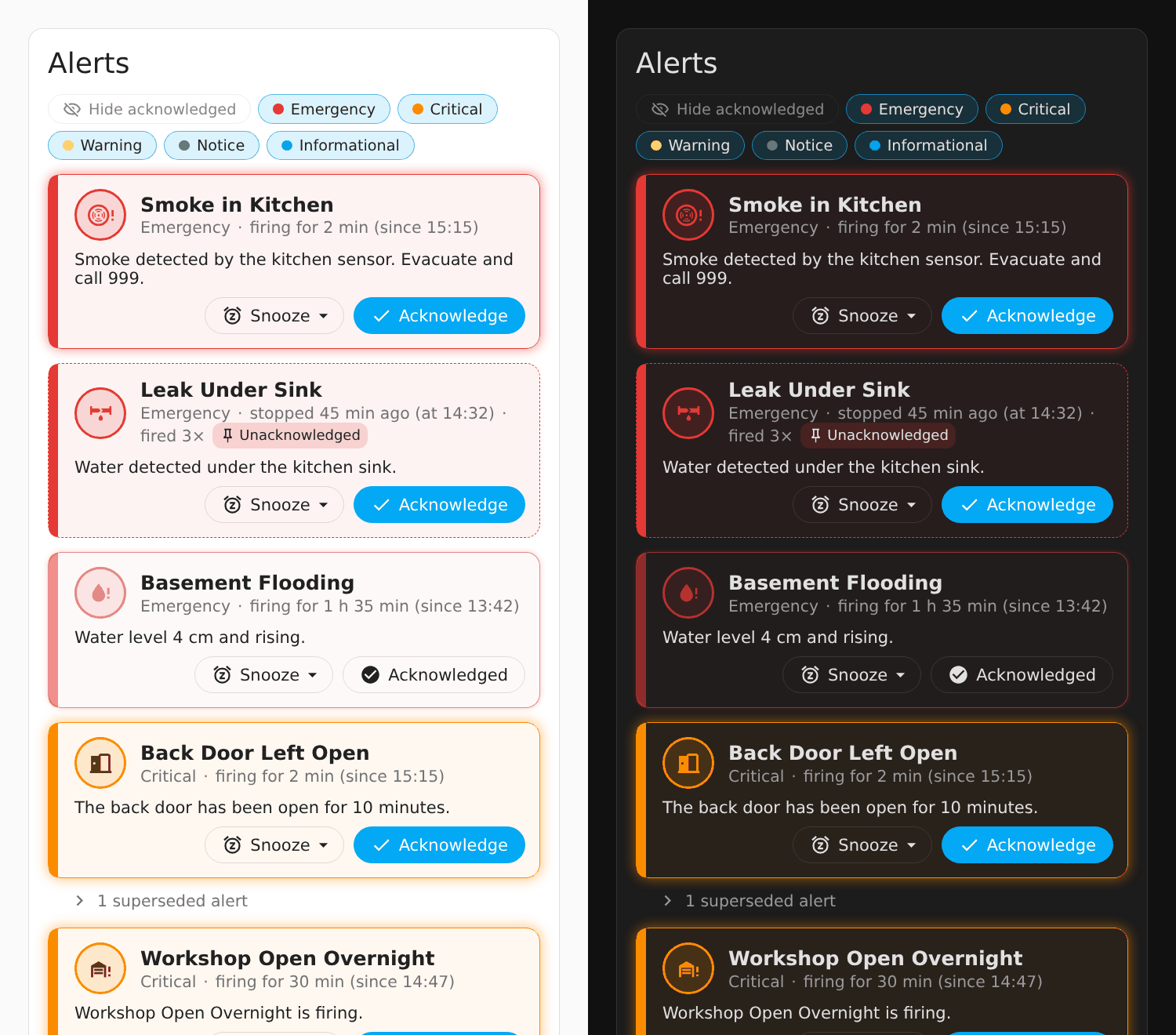
To add an alert, go to Settings → Devices & Services → Alert Redux → Add alert and choose its kind. Every alert has a name (which also sets its entity ID), a priority, and optionally an icon, and can be made unacknowledgeable, or kept until acknowledged.
Every alert can also have an on message and a card message, both templates.
The on message is sent when the alert starts firing (see
Notifications); the card shows the card message if there is one,
and otherwise the on message. Leave both empty for the default, "{{ name }} is
firing." That's deliberately generic, so give real alerts a specific message.
Templates can use name, subject_entity_name (the subject entity's name, or else
the alert's), subject_entity_id, entity_id, priority, fire_count,
fire_data (manual alerts), trigger (trigger and bus event alerts), duration,
and entity states, e.g.
Server room is {{ states('sensor.server_room') }} °C. While an alert is firing,
the rendered messages are in its message and display_message attributes, and
they update as the entities they read change.
Manual alerts
A manual alert is fired and dismissed by actions, e.g. from your automations. You can choose whether the card should offer to dismiss it.
A manual alert can also end by itself after a duration, like an event alert: turn on End by itself after, and optionally set the duration (otherwise it's its priority's default event duration; see Global defaults). Firing it again while it's firing restarts the duration and adds to the fire count, keeping the acknowledgement; the dismiss action still ends it early. The card shows its progress bar, and it only sends reminders if its duration outlasts the first reminder interval.
Condition alerts: state, on/off, threshold, and template
These alerts fire by themselves while their condition holds, and stop when it ends:
- A state alert watches one entity, and fires while it's in a given state, e.g.
binary_sensor.back_doorison. Targetingunavailablegives an "is offline" alert. - An on/off alert turns on and off on separate criteria. Each side is a template, triggers, or both, and counts when it becomes true: "Garage intruder" can turn on when motion is detected and off only when the door is locked. An on side that's still true after the alert stops has to go false before it can fire again.
- A threshold alert fires while a value is above a maximum or below a minimum.
The value is an entity's state, one of its attributes, or a template; each limit
is a number or a template (e.g.
{{ states('input_number.max') }}). The hysteresis is how far back inside the limits the value must come before the alert stops: "Server room hot" with a maximum of 30 and hysteresis 2 fires above 30 °C and ends at 28 °C. The current value is in thevalueattribute. - A template alert fires while a template renders true. The result has to be
clearly true or false: anything else (an error,
unknown,none, …) counts as no data, not as false.
All of them can have:
- an extra condition, a template that must also be true;
- delay before firing (
delay_on): the condition must hold this long first. "Garage door left open" is a state alert with a 10-minute delay; - delay before ending (
delay_off): the condition must stay false this long before the alert stops firing, absorbing brief flickers; - a no-data grace period; see below.
On/off delays need a template on their side, since triggers alone can't stay true for the delay.
Missing data
When an alert's inputs are unavailable or unknown, it has no data. An alert that
isn't firing shows no_data until they return. An alert that is firing stays
active or ack for the grace period (10 minutes by default), with
no_data_since and missing_inputs showing what's wrong. A sensor that drops out
briefly doesn't end the firing or clear its acknowledgement. If the grace period
runs out, the firing ends.
After a restart, alerts wait in no_data for their inputs. Alerts that were firing
stay firing while they wait, and resume quietly if their condition still holds.
Event alerts: trigger and bus event
These fire on a momentary occurrence, and stay firing for a duration:
- A trigger alert fires on any Home Assistant trigger, as in an automation.
- A bus event alert fires on an event type, optionally only when the event's
data matches, e.g.
doorbell_pressedwithbutton: front.
Either can have a condition, a template checked when the trigger fires. If it
can't be judged (an error, unknown), the alert fires anyway and a warning is
logged, so a broken condition never silences it. Messages can use the trigger's
variables as trigger, as automations do: trigger.to_state.state, or
trigger.event.data for a bus event alert.
The duration is the alert's own, or else its priority's default (Emergency 60, Critical 30, Warning 15, Notice 10, Informational 5 minutes; see Global defaults). Firing again while it's still firing restarts the duration and adds to the fire count, but keeps the acknowledgement. An event alert only sends reminders if its duration is longer than the first reminder interval. Triggers start once Home Assistant has started (and after the startup delay), so entities loading at startup don't fire them.
Supersession
An alert can supersede other alerts: while it's firing, they don't send on or reminder notifications, since it says all they would. The classic pair is Back Door Open, a state alert, and Back Door Left Open, the same with a 10-minute delay, which supersedes it: you hear that the door opened, and then that it was left open, without reminders about it merely being open in between. Add the alerts it supersedes in an alert's Supersession section.
- A superseded alert keeps its own state, firing or not; its
superseded_byattribute lists the firing alerts superseding it, and on the card it folds under the alert that supersedes it. Supersession is transitive: if A supersedes B and B supersedes C, A supersedes C. The form refuses cycles. - When an alert that something supersedes starts firing, its on notification waits a moment (the supersession debounce, half a second by default) in case an alert superseding it fires too. Its done notification is dropped only if the two stop firing together (within the done window, 5 seconds by default).
- Propagation: each relationship can pass on acknowledgements. When you
acknowledge the superseded alert, the superseding one can be acknowledged
too, or snoozed for a while, or left alone (the default). If it isn't firing
yet, it's pre-acknowledged: it starts acknowledged (or snoozed) if it fires
while the superseded alert stays acknowledged. Its
pre_acked_byandpre_snoozed_untilattributes show this. With acknowledge, acknowledging Back Door Open also covers Back Door Left Open; with snooze for an hour, Left Open still speaks up if you take that long.
Generators
A generator makes one alert for each entity that matches its targets: the same alert on every door lock, say, or every battery. Add one with Settings → Devices & Services → Alert Redux → Add generator, choose the kind of alert it makes (state, on/off, threshold, template, or alert state), and fill in the alert's form as usual, with the target in place of the entity it watches.
Targets are chosen by labels, areas, domains, device classes, and an entity ID
pattern (lock.*_door): an entity must match every one you set, and any value
within each. Labels and areas count through the entity's device too. You can also
exclude entities. Diagnostic entities, such as battery levels, can be targets;
disabled and configuration entities can't, and nor can generated alerts.
As entities start and stop matching, their alerts are added and removed, e.g. a new lock gets its alert as soon as it's added. When Home Assistant starts, generators don't remove anything until the generator startup grace (5 minutes by default) has passed, so entities from slow integrations don't make alerts come and go.
Each generated alert is about its target: it's the alert's subject_entity, and
every template (the messages included) gets target (its entity ID) and
target_name. The alert's name comes from an optional name template, by
default the target's name followed by the generator's ("Front Door Unlocked"), and
its entity ID from the target and the generator (alert_redux.front_door_unlocked).
If the target is renamed, its alert keeps its state and follows it. Generated
alerts are edited through their generator, and show it in generated_by.
A generator can also supersede: in its Supersession section, choose another generator, and each of its alerts supersedes that generator's alert for the same target (each door's Left Open over its Open), or choose a fixed alert, which each of its alerts supersedes. Propagation works as for alerts. The admin card marks generated alerts "generated".
A generator's Area and labels section gives all its alerts labels, and an area: the area of the entity each is about (the default), or a fixed one. Saving the generator updates the alerts it has made: the labels it adds or removes and the area, but not what you set by hand.
Each generator also has a sensor, sensor.alert_redux_generator_<name>: the number
of alerts it has made, with its targets, those alerts, and any problems.
alert_redux.refresh_generator re-evaluates a generator's targets at once, for
debugging; they normally follow changes by themselves.
Snoozing, disabling, and suspending
Snoozing acknowledges a firing alert for a while. If it's still firing when the
snooze runs out, it's active again (snoozed_until shows when), and a reminder is
sent straight away, unless its next scheduled reminder is less than 5 minutes off
(the snooze-end window; see Global defaults). Reminders then
carry on from the original schedule. Snoozing an acknowledged alert gives it a new
end, sooner or later; acknowledging a snoozed alert keeps it acknowledged until it
stops firing. Unacknowledgeable alerts can't be snoozed.
Disabling turns an alert off, e.g. for maintenance: its state is disabled, and
it ignores its inputs until it's enabled again. A firing alert stops firing, and its
done message says it was disabled rather than resolved. Enabling it starts from
scratch: a condition alert waits for data, then evaluates as usual, delay_on and
all, so a condition that still holds fires anew. Suspending disables an alert
for a while, or until a time (disabled_until), and then enables it by itself.
Disabling, enabling, and suspending are for admins only.
Keeping alerts until acknowledged
Some alerts matter even if they stop before anyone sees them: the freezer that was
warm for twelve minutes at 3 a.m., or a leak sensor that tripped three times
overnight and is dry now. Turn on Keep until acknowledged for those. When such
an alert stops firing without having been acknowledged, it doesn't go back to
idle: it's latched. It stays on the card, still reminding you, until someone
acknowledges it, by any of the usual routes.
- A firing that was acknowledged (or snoozed) before it ended ends as usual.
- If it fires again while latched, it's the same item: it's
activeagain, with its on notification, and its fire count carries on, so the card can say "fired 3×". - Its reminders follow its schedule from when it first fired, and say how long ago it stopped. Snoozing a latched alert puts them off; it stays latched.
- A manual alert dismissed by a person isn't latched: they've seen it. One dismissed by an automation is.
- Disabling it, or turning the setting off, clears it.
- It counts as unacknowledged in the summary sensors, so a signal light stays on
until it's acknowledged, and
sensor.alert_redux_latchedlists them. An alert state alert watching forlatchedcan escalate one that's been left.
Snoozes and suspensions survive a restart; one that ran out while Home Assistant was down ends as soon as it's back.
Actions
| Action | Effect |
|---|---|
alert_redux.fire |
Fires a manual alert. Optional data is kept as fire_data. Firing an alert that's already firing adds to its fire count, and keeps its acknowledgement. |
alert_redux.dismiss |
Ends a manual alert's firing. (Other kinds end by themselves.) |
alert_redux.ack |
Acknowledges a firing alert. |
alert_redux.unack |
Removes the acknowledgement (and any snooze). |
alert_redux.snooze |
Acknowledges a firing alert for a duration. |
alert_redux.disable |
Disables an alert until it's enabled. Admin only. |
alert_redux.enable |
Enables a disabled or suspended alert. Admin only. |
alert_redux.suspend |
Disables an alert for a duration, or until a time (local time if it has no time zone). Admin only. |
alert_redux.press_button |
Runs one of an alert's custom buttons by its label, as the card does: only that button's action, as the user who calls it. |
alert_redux.refresh_generator |
Re-evaluates the targets of the generators whose sensors are given as entity_id. |
alert_redux.export |
Returns alert and generator definitions as response data (optionally only those of the entity_ids given). See Exporting and importing. |
alert_redux.import |
Creates or replaces alerts and generators from definitions: definitions, overwrite (default off), dry_run (default off). Admin only. |
An action that doesn't apply to an alert's current state (such as acknowledging an idle alert) does nothing.
action: alert_redux.fire
target:
  entity_id: alert_redux.back_door_open
data:
  data:
    opened_by: keypad
Exporting and importing
There is no YAML configuration, so alert_redux.export and alert_redux.import are
how alerts are copied between instances, kept under version control, or created by
a script. export returns the definitions of every alert and generator (or those
of the entity_ids you give; a generated alert gives its generator), and import
takes them back. The admin card has Export and Import buttons for the same
(YAML to copy or download; YAML or JSON in).
format: alert_redux
version: 1
alerts:
  - id: 01M3D2A71TKEQW9ECF1G30J4TZ
    name: Garage Door Left Open
    kind: state
    priority: warning
    entity_id: cover.garage_door
    target_state: open
    delay_on: {hours: 0, minutes: 10, seconds: 0}
    notifier_groups: [Phone]
generators: []
- A definition is the alert's settings as stored, flattened (no form sections; anything left at its default is left out). Notifier groups, and generators named by other generators, are written by name, and turned back into this instance's groups on import; groups themselves aren't exported, so create them first.
idis kept on import, so importing a file again, here or elsewhere, finds the same alerts. Without one (a file you wrote by hand), a definition matches the existing alert or generator of that name.- Nothing is half-imported. Every definition is checked first, with the same
checks as the forms, and if any is wrong, or would replace an existing alert
without
overwrite, nothing is imported and the error lists every problem.dry_rundoes the checks and says what would happen. A definition identical to the existing one is left as it is, so importing twice does no harm. An existing alert's kind can't be changed by an import. - An alert's area and labels live in the entity registry and aren't exported.
Converting from the built-in alert or Alert2
tools/ has two scripts, convert_alert.py and convert_alert2.py,
that turn an alert: section, or Alert2 alerts (an alert2: block, or one alert's
YAML as the Alert Manager card shows it), into a file for alert_redux.import. They
report what has no equivalent. They aren't part of the integration: run them from a
checkout of this repository.
Events
Every change fires an event. Each carries entity_id, name, priority, kind,
old_state, new_state, and user_id (for changes made by a user), and some carry
more:
| Event | Also carries |
|---|---|
alert_redux_fired |
fire_count; fire_data (manual) or trigger_data (trigger and bus event) |
alert_redux_ended |
fire_count, duration_seconds, reason (resolved, dismissed, no_data, or disabled) |
alert_redux_acked |
pre_acked_by, when acknowledged by supersession |
alert_redux_unacked |
|
alert_redux_snoozed |
snoozed_until |
alert_redux_snooze_expired |
|
alert_redux_disabled |
disabled_until (null when disabled indefinitely) |
alert_redux_enabled |
|
alert_redux_no_data |
missing_inputs |
alert_redux_data_restored |
missing_inputs (the inputs that were missing) |
alert_redux_superseded |
superseded_by |
alert_redux_created |
|
alert_redux_deleted |
Home Assistant's event triggers don't take wildcards, but they do take a list. To listen for all of them:
triggers:
  - tr