

ApexCV
Write a CV you're proud to send.
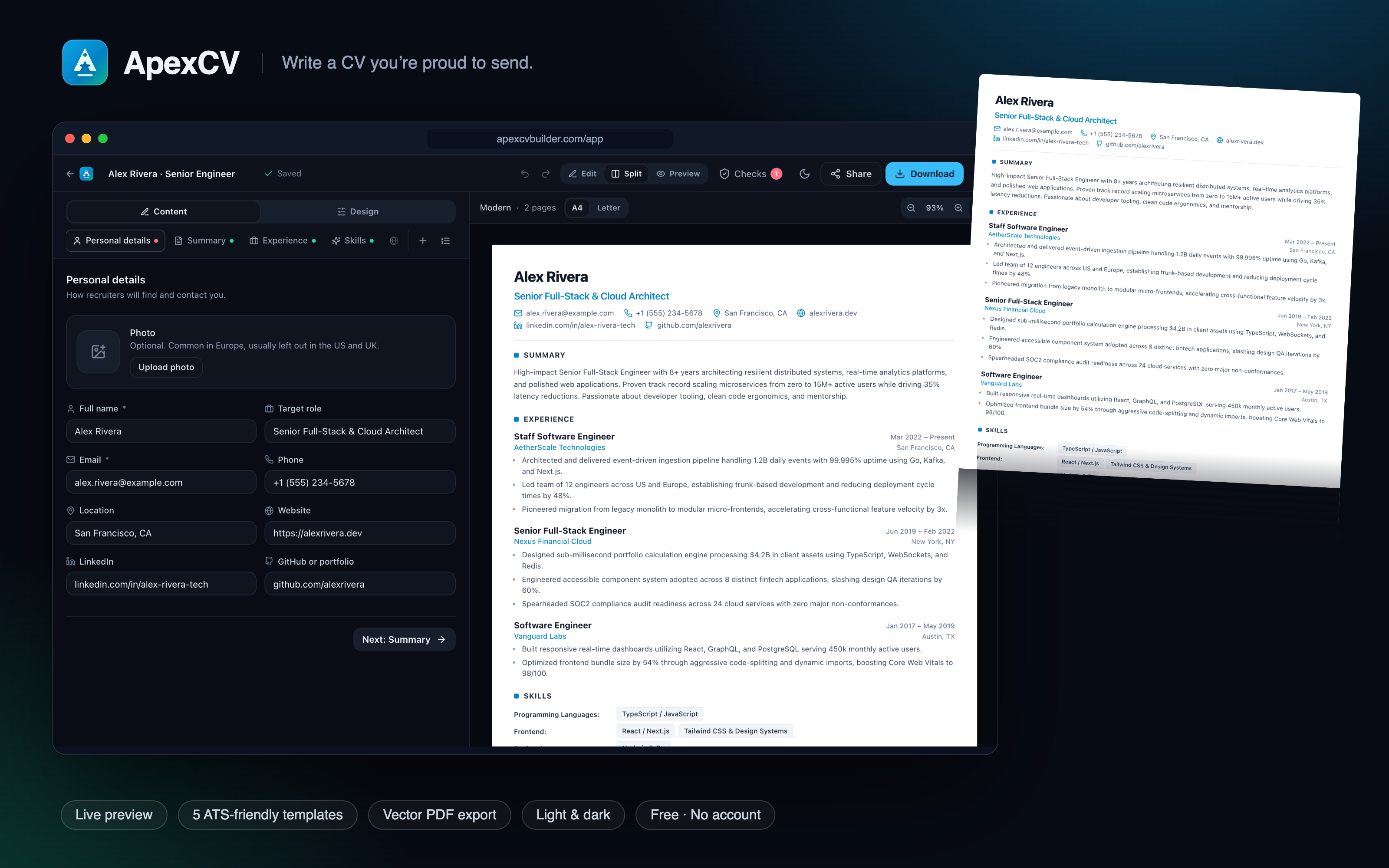
ApexCV is a modern resume and CV authoring platform built with Next.js 14 (App Router), TypeScript, Tailwind CSS, and Node 22 node:sqlite. It features split-screen live editing, five ATS-optimized templates, drag-and-drop section reordering, PDF importing, and vector PDF exporting.
Features
- Live Split-Screen Editing: Real-time preview updates alongside the editor.
- 5 ATS-Optimized Templates: Includes Modern Tech, Executive, Creative, Sidebar, and ATS Classic.
- Layout Controls: Dynamically adjust Font Size (Small, Base, Large) and Page Margins (Compact, Standard, Spacious).
- Rich Text Support: Native markdown support (
**bold**,*italic*,[links](https://github.com/pawiromitchel/apexcv/blob/HEAD/url)) within bullet points. - Section Visibility: Temporarily hide specific jobs or projects to tailor a CV to a specific role without deleting data.
- A4 Page Boundaries: Visual dashed-line indicators in the editor to prevent unexpected PDF page-breaks.
- Public Share Links: Opt-in, read-only
/view/[id]links with an optional expiry, to send directly to employers. - Light & Dark Theme: Follows the system setting, with a manual toggle.
- PDF Resume Import: Extract contact info, work experience, education, and technical skills from existing PDF resumes.
- Vector PDF Export: High-quality, text-selectable PDF export via native browser print.
- Debounced SQLite Autosave: Built with Node 22 native
node:sqlite. - Dynamic Section Reordering: Drag and drop sections to rearrange.
Tech Stack
- Framework: Next.js 14.2 (App Router)
- UI & Styling: React 18, Tailwind CSS 3.4, Lucide React
- Database: Node 22
node:sqlite(DatabaseSync) - PDF Parsing:
pdf-parse - Testing:
puppeteer-corefor headless E2E verification
Getting Started
Prerequisites
- Node.js 22.x or later (required for built-in
node:sqlitesupport) - npm (v10+)
1. Installation
git clone git@github.com:pawiromitchel/ApexCV.git
cd ApexCV
npm install
2. Run the Development Server
The application runs on port 3001 by default:
npm run dev
Open http://localhost:3001 in your browser.
- Landing page:
http://localhost:3001/ - Dashboard:
http://localhost:3001/app - Live Editor:
http://localhost:3001/app/<resume-id>
Production & Docker
Set NEXT_PUBLIC_SITE_URL to your public origin so link previews (Open Graph) use absolute URLs. The optional cloudflared service in docker-compose.yml reads CLOUDFLARE_TUNNEL_TOKEN from your environment; remove it if you don't use a tunnel.
Local Build & Start
npm run build
npm run start
Docker Deployment
ApexCV is containerized using a multi-stage Node 22 Alpine image.
Quick Start with Docker Compose
To build the image and start ApexCV in detached mode:
docker compose up -d --build
docker compose ps
Data Persistence & SQLite Volume
The embedded SQLite database (cv_builder.db) is stored inside /usr/src/app/data within the container, which is mounted to a named Docker volume apexcv_data:
- Named Volume:
apexcv_data - Container Path:
/usr/src/app/data/cv_builder.db
Optional: self-hosted analytics (Umami)
Analytics are off by default. The compose file includes an Umami service (cookieless, privacy-friendly) with its own Postgres.
- Set
UMAMI_DB_PASSWORDandUMAMI_APP_SECRETin.env, thendocker compose up -d umami. - Open the dashboard at
http://localhost:3100(default loginadmin/umami; change it immediately) and add a website. - Set
NEXT_PUBLIC_UMAMI_SRC=/stats/script.jsandNEXT_PUBLIC_UMAMI_WEBSITE_IDin.env, then rebuild:docker compose build apexcv && docker compose up -d apexcv.
The dashboard stays bound to localhost; the app proxies only /stats/script.js and /stats/api/send to Umami, so nothing else about it is public. Page views report /app/:id and /view/:id instead of real ids, Do Not Track is honoured, and events (resume_created, pdf_imported, pdf_printed, share_updated, template_changed) never include resume content. See lib/analytics.ts.
Project Structure
ApexCV/
├── app/                  # Next.js app router pages and API
├── components/           # UI components, forms, and preview templates
├── lib/                  # Database, types, and utilities
├── scripts/              # Testing and automation scripts
├── package.json          # Dependencies and scripts
└── cv_builder.db         # Local SQLite database (created on first run)
API Reference
Every /api/resumes/** route is scoped to the requesting browser: the anonymous device ID is sent as a bearer credential, and a resume can only be read or changed by the device that owns it.
| Method | Endpoint | Description |
|---|---|---|
GET |
/api/resumes |
List your resumes |
POST |
/api/resumes |
Create a new resume |
GET |
/api/resumes/:id |
Fetch one of your resumes |
PUT |
/api/resumes/:id |
Update one of your resumes |
DELETE |
/api/resumes/:id |
Delete one of your resumes |
POST |
/api/resumes/:id/duplicate |
Duplicate a resume |
PUT |
/api/resumes/:id/share |
Turn sharing on/off and set the link expiry |
POST |
/api/resumes/parse-pdf |
Extract data from a PDF |
GET |
/api/view/:identifier |
Public read of a shared resume (sharing must be enabled) |
Sharing is opt-in: a resume is private until its owner enables a share link.
Automated Testing
# Start server in one terminal
npm run dev

# Run E2E test suite
node scripts/test-e2e.mjs

# Run PDF parsing test suite
node scripts/test-pdf-import.mjs