Aster is a build orchestrator for polyglot monorepos. It discovers projects across languages, connects their dependencies into one graph, and runs work in the correct order while independent targets execute in parallel.
aster test --all
aster build //services/api
aster affected test --base=main
Go tests with shell setup
When setup exports build flags or starts fixtures with an EXIT cleanup trap, use the explicit external-Go boundary:
[targets.test]
command = "bash -ec 'source setup.sh; aster exec-go-test -- -count=1 ./...'"
affected --related records a deferred selection in the dry-run command; it
never executes setup during planning. At runtime the owning shell performs
setup, then Aster checks buildability with go list and runs external go test
in that shell's exported environment and current directory. The shell waits
and retains its cleanup trap. Do not use exec if the shell must run an EXIT
trap. This boundary deliberately bypasses shell functions and aliases named
go; unmarked shell commands retain their existing behavior and conservative
full-suite fallback. Without a related selection the helper runs the supplied
Go test arguments unchanged. Unknown buildability falls back to the full
invocation, and failure to start Go remains an error. Deferred rewriting requires
static arguments and a resolvable running Aster executable. Shell-active argument
forms (including variables and package globs) retain the original command rather
than being converted to literal arguments. Ordinary Aster commands do not expand
shell syntax; expansion requires an explicit shell such as bash -ec above.
New to Aster? Follow the end-to-end getting started tutorial to create a workspace, connect project dependencies, build, test, cache, watch, and run only affected projects.
Install · Quick start · Configuration · Contributing · Support · Security
Why Aster
- One graph across languages. Rust, Node.js, Go, Python, Elixir, Java, Kotlin, and Ruby projects can depend on one another while each ecosystem keeps using its native tools.
- Correct work, maximum concurrency. Prerequisites run first; unrelated targets run together; failures stop the work that depends on them.
- Fast local feedback. Content-aware caching, affected-project selection, and watch mode avoid repeating work that cannot change the result.
- A single development cockpit.
aster services upsupervises long-lived services with focused logs, restarts, search, and collision-free ports. - A graph you can inspect.
aster list,aster graph, andaster whyexplain what Aster found and why a target will run.
Why the name?
Aster comes from Ancient Greek astḗr (ἀστήρ), meaning “star.” The flower took the same name from its radiating, star-shaped head. The metaphor fits a monorepo: each project is a point in a larger constellation, dependencies draw the lines between them, and Aster turns that graph into one coordinated build. The word history is documented by the Online Etymology Dictionary and the flower form by the Chicago Botanic Garden.
Aster at work
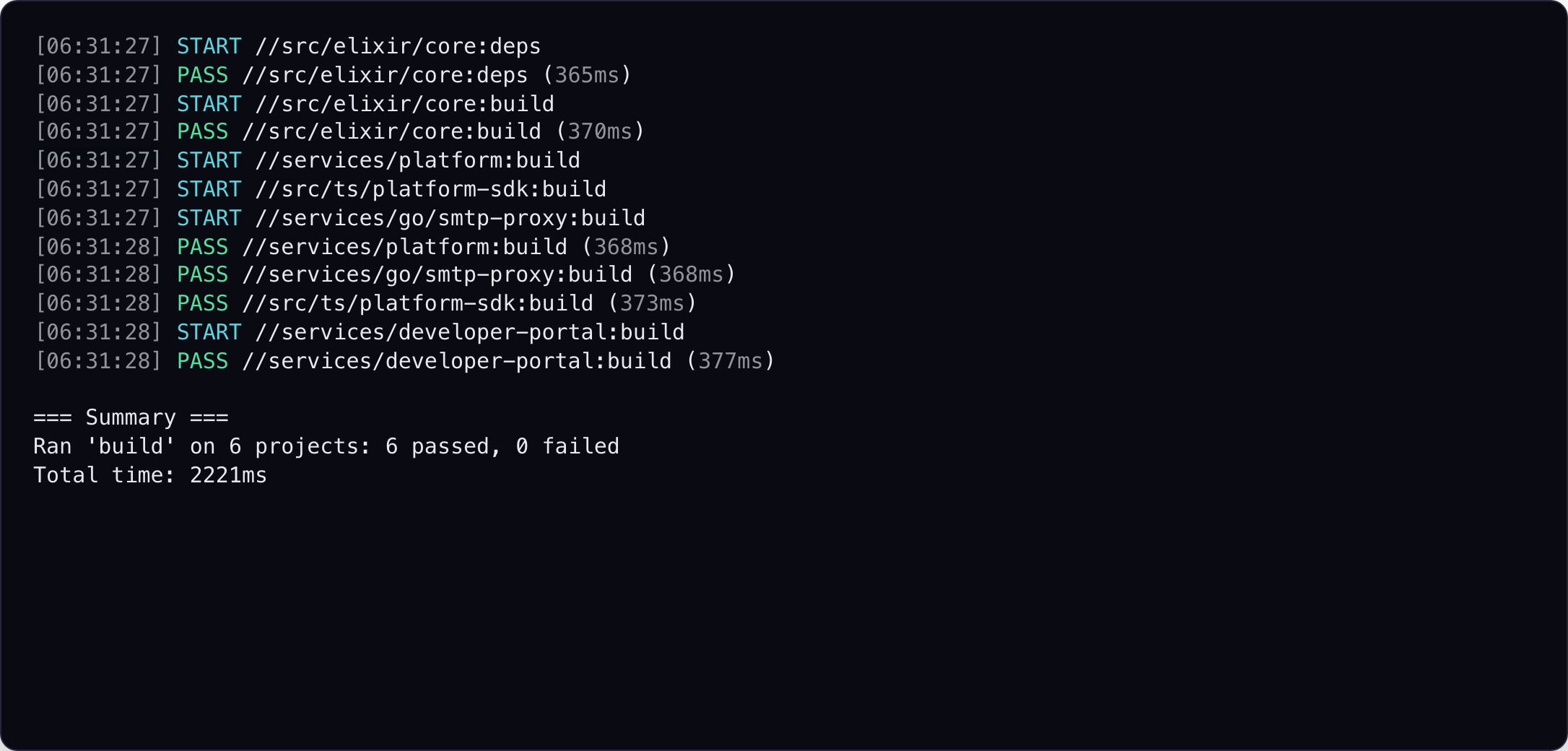
A single command builds FirstLanding's Elixir, TypeScript, and Go projects in dependency order while independent work runs in parallel:
For local development, aster services up keeps the platform and web services
in one dashboard with focused logs, service switching, search, restart, and
mouse controls:
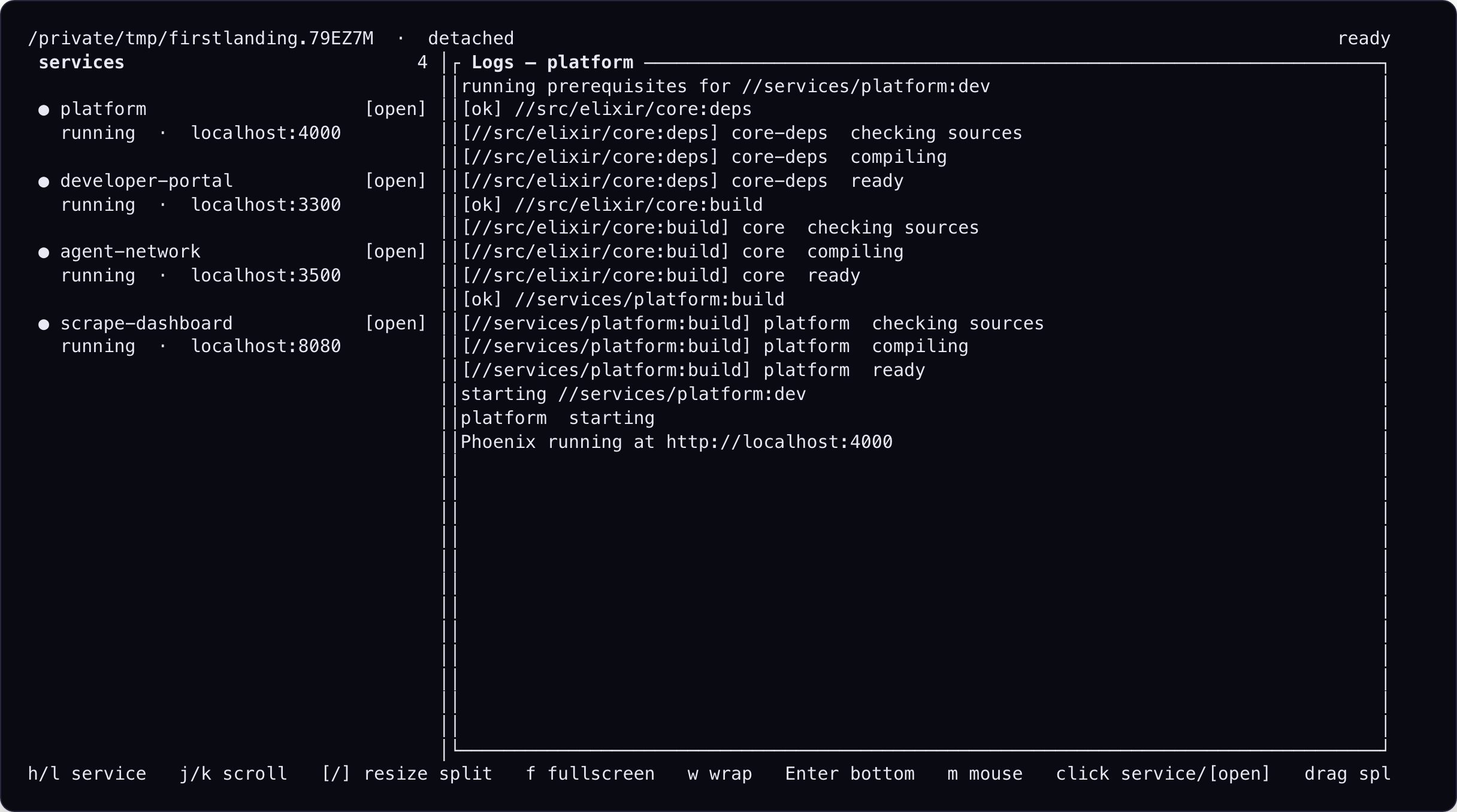
The screenshot fixtures use the real Aster binary against a synthetic, FirstLanding-shaped workspace, so these images can be regenerated without private source code or credentials.
Installation
Homebrew
brew install ArchAstro/tools/aster
From source
Aster requires Rust 1.88 or newer.
cargo install --git https://github.com/ArchAstro/aster.git --locked
Prebuilt archives are available from GitHub Releases for Linux x86-64, macOS x86-64, and macOS Apple Silicon. Windows is not currently built or tested by the project.
Native Linux packages
Tagged releases also include native x86-64 packages for Debian/Ubuntu, RPM-based distributions, and Arch Linux.
For Debian and Ubuntu, add the signed Aster repository and install by package name:
sudo install -d -m 0755 /usr/share/keyrings
sudo curl -fsSL https://archastro.github.io/aster/aster-archive-keyring.gpg -o /usr/share/keyrings/aster-archive-keyring.gpg
sudo curl -fsSL https://archastro.github.io/aster/apt/aster.sources -o /etc/apt/sources.list.d/aster.sources
sudo apt update
sudo apt install aster-archive-keyring aster
For Fedora and other RPM-based distributions:
sudo curl -fsSL https://archastro.github.io/aster/rpm/aster.repo -o /etc/yum.repos.d/aster.repo
sudo dnf install aster
You can also download a native package directly from the GitHub release:
sudo apt install ./aster_VERSION_amd64.deb
sudo dnf install ./aster-VERSION-1.x86_64.rpm
sudo pacman -U ./aster-VERSION-1-x86_64.pkg.tar.zst
These packages currently target x86-64 Linux systems with glibc 2.35 or newer.
Quick start
Run the same target across a workspace:
aster test --all
aster build --all
aster lint --all
Select projects by address, directory, or the current directory:
aster test //services/api
aster build //libs/core //libs/utils
aster test .
aster test 'services/*'
Dependencies run by default. Use --no-deps to omit them or --dependents to
include reverse dependencies.
Run different targets in one dependency-aware invocation:
aster run //services/api:test //libs/core:build //tools/cli:lint
Explore what Aster discovered:
aster list
aster graph
aster graph //services/api:build
aster why //services/api:test //libs/core:build
Use aster --help and aster <command> --help for the complete CLI reference.
aster --skills prints a workspace-independent Markdown usage guide covering
project selection, common targets, affected runs, watching, services, logs,
caching, and configuration. It is suitable for supplying directly to an LLM.
Supported languages
| Language | Marker | Common detected targets |
|---|---|---|
| Rust | Cargo.toml |
deps, build, test, lint, format, clean |
| Node.js | package.json |
deps, build, test, lint, format, clean |
| Go | go.mod |
deps, build, test, lint, clean |
| Python | pyproject.toml |
deps, build, test, lint, format, clean |
| Elixir | mix.exs |
deps, build, test, lint, format, clean |
| Java | Gradle/Maven plus .java |
deps, build, test, lint, format, clean |
| Kotlin | Gradle/Maven plus .kt |
deps, build, test, lint, format, clean |
| Ruby | Gemfile, *.gemspec |
deps, build, test, lint, format, dev, clean |
Detected targets depend on the tools and scripts present in each project.
Node.js projects use the packageManager field or lockfile to choose npm or
pnpm. Workspace members inherit their workspace root's package manager.
Java and Kotlin are detected independently from their build system, so one
Gradle or Maven project may report either or both languages. Kotlin DSL files
such as build.gradle.kts configure the build and do not by themselves make a
project Kotlin. Use --lang java or --lang kotlin across either build system.
Gradle and Maven projects prefer their checked-in wrappers and scope module
targets to the native multi-project build or reactor, which remains responsible
for ordering dependencies within that build. Pure aggregator roots and embedded
Maven integration-test fixtures are not exposed as standalone projects. In a
directory containing both Gradle and Maven configuration, Maven takes precedence
so the project has one unambiguous Aster address. A colocated package.json
similarly keeps the existing Node.js project rather than creating a conflicting
Gradle address.
Ruby projects use Bundler when a Gemfile is present and detect conventional gem
builds, Rake/Minitest, RSpec, Rails tests and servers, and RuboCop. A colocated
gemspec is the canonical marker for a packaged gem, while Rails and gem projects
take precedence over colocated JavaScript asset packages at the same
directory-based Aster address. Ruby config is parsed statically and is never
evaluated during discovery.
Project configuration
Place aster.toml beside a project's language marker:
name = "api"
depends_on = ["//libs/core:build"]

[targets]
lint = "npm run lint"
check = { alias = "test" }

[targets.test]
command = "npm test -- {files}"
depends_on = ["//self:build"]
capabilities = ["files_list"]
files_glob = "**/*.test.ts"
exclusive_resources = ["database"]

[targets.test.cache]
enabled = true
include = ["config/**/*.json"]
exclude = ["**/*.generated.ts"]
env = ["CI"]
outputs = ["coverage/summary.json"]
Run aster project init to generate a starter file.
Target commands are parsed like a shell command line for quoting, escaping, and
leading NAME=value environment assignments, but they are executed directly.
Shell operators such as pipes, redirects, &&, substitutions, and glob
expansion are not interpreted.
Because a && b would run a with &&, b and b's arguments as extra
arguments, Aster refuses to load a target command that contains an unquoted
|, &, ;, < or > (for example &&, ||, |, ;, &, >, >>,
<, 2>, 2>&1, 2>/dev/null), an unquoted $(…) or backtick
substitution, or an unquoted line break between two words in a multi-line
command (a shell would start a second command there; Aster would pass the next
line as arguments). Leading and trailing line breaks and \ line
continuations are fine. The error names the target, its aster.toml, and the word.
Every command that reads configuration fails, including aster list and
aster graph. Operators inside quotes or escaped with a backslash are literal
arguments and are accepted, so grep '|' notes.txt is fine.
To run several steps, either split them into targets joined with depends_on,
which gives each step its own log and cache entry, or invoke a shell
explicitly:
[targets.generate]
command = "sh -c 'generator | formatter > src/generated.rs'"
cache = { enabled = false }

[targets.e2e]
command = "mix test test/e2e_test.exs"
depends_on = ["//self:format-check"]

[targets.format-check]
command = "mix format --check-formatted test/e2e_test.exs"
Captured targets receive a closed stdin, so tools that prompt on a TTY fail
instead of hanging behind Aster's progress UI. Streaming targets
(stream = true, or aster <target> --stream) inherit the caller's terminal.
Only the files_list capability is supported. When present, {files} is
required to be a standalone command argument and is safely expanded into
individual path arguments. It cannot be embedded in a quoted shell script or
combined argument, used as the executable, or passed directly through a command
interpreter. Use a fixed wrapper executable for more complex handling.
Affected paths are filtered by files_glob.
Unknown fields, capabilities, dependencies, and invalid globs are configuration
errors.
Cache behavior
Aster's local cache stores successful target executions as content-addressed
artifacts and restores declared outputs on a hit. The default cacheable target
names are deps, build, test,
lint, format, typecheck, and check. Other targets must opt in with
cache.enabled = true. Set enabled = false to opt out.
GitHub Actions can warm native tool caches (Cargo registry, npm, and the
rest) with aster ci cache-plan, and share the artifact cache through
ArchAstro/aster/action. See
GitHub Actions.
Every cache key includes platform:<os>-<arch> (for example platform:linux-x86_64), so an artifact built on one OS and CPU architecture is never restored on another.
include, exclude, and env extend a target's detected cache inputs.
An env name ending in * matches every variable that starts with the name
without that *, sorted by name. FOO_* hashes FOO_A and FOO_B and
ignores BAR. A name without a trailing * is exact. Plugins use the same
syntax; Gradle tracks ORG_GRADLE_PROJECT_*.
workspace_include extends the inputs with files outside the project, relative to
the workspace root, so a member can name a root Cargo.lock or
tsconfig.base.json that include cannot see. Those paths are hashed with a
ws: prefix and do not collide with a file of the same name in the project.
aster affected also selects the target when one of these files changes
(Inputs outside the project directory).
Declare any file a target reads from another project here, such as an
include_str! of a sibling's generated JSON: the cache key then covers it, and
aster graph --json reports it under workspace_inputs, so tools that build
sparse checkouts from the graph include it.
In a Git sparse checkout (core.sparseCheckout), discovery drops a
depends_on whose project directory is not checked out. A dependency whose
directory is present but does not define the target is still an error.
A Cargo workspace member also hashes the workspace-root Cargo.toml and
Cargo.lock, plus rust-toolchain.toml and .cargo/config.toml for targets
other than deps. A nested Node project hashes a root package-lock.json,
pnpm-lock.yaml, or yarn.lock when that file exists, and tsconfig.base.json
for targets other than deps.
When ASTER_SRV_URL points at an aster-srv, a laptop or devbox reads that
cache after one aster srv login: it opens your browser, you sign in with
your company account and confirm, and Aster stores a read-only token under
$XDG_CONFIG_HOME/aster (else ~/.config/aster) until it expires. Signed
out, Aster prints one line (not signed in; run aster srv login) and
continues with the local cache. Over SSH or on a devbox, where the browser
cannot reach the CLI, it prints a URL and you paste back a one-time code;
aster srv logout signs out everywhere. See
Reading the cache from a laptop.
The same sign-in reads the flaky, broken, cluster and quarantine data the
dashboard shows: aster results flaky, aster results clusters, aster srv get <path>
print JSON; aster srv whoami shows who you are signed in as (details).
A hit restores declared outputs from the artifact cache and skips execution.
aster cache status reads that store's per-project index. --json prints
{"cache_dir","targets":[{"address","key","created_at","outputs","output_bytes","exit_code"}]};
human output prints the same fields as a table. aster cache clear //proj
drops that project's index (ArtifactCache::invalidate_project);
aster cache clear //proj:target drops one address. Blobs stay until
aster cache prune. .aster/cache/cache.json is obsolete and unused. Clean
targets invalidate the project's cache after succeeding.
A target that passed only on a retry (see below) is not cached, so the next run sees the flake again.
Retrying failed tests
aster --retry-failed test //api          # one retry
aster --retry-failed=2 --test-results=results.ndjson test //api
ASTER_RETRY_FAILED=1 aster test //api
When a test target fails and its captured results name the failing tests,
--retry-failed[=N] (default 1; ASTER_RETRY_FAILED=N) reruns only those
tests, up to N times, with the runner's own selection flags, and records every
attempt (attempt 1 is the original run, 2 the first retry). The target passes
when every failing test passes on a retry, nothing else fails and the retry
commands exit 0; it then reports PASS //api:test (12.3s) — flaky: 2 tests passed on retry, --json lists them under tests.flaky, and GitHub Actions
gets a ::warning annotation per flaky test. Otherwise the target fails with
the last attempt's failures.
Retries capture results even without --test-results; that flag alone decides
whether a results file is written.
retry_setup is a shell command run in the target's working directory before
each retry, such as a database reset. If it fails the retry is skipped and the
original failure stands.
[targets.test]
command = "mix test"
retry_setup = "mix ecto.reset"
| Runner | Retry selects |
|---|---|
mix test |
the failing test files (the report has no line), without --partitions or MIX_TEST_PARTITION |
go test |
-run per failing package, subtests anchored level by level (^TestA$/^sub$) |
Vitest, Jest, bun test |
the failing files and an escaped -t pattern |
pytest |
node ids, file::Class::test |
cargo test |
-- --exact name; needs --no-fail-fast in the command |
cargo nextest run |
-E 'test(=name)'; needs --no-fail-fast, plain Rust names |
node --test |
--test-name-pattern per test and the failing files, for a direct node --test or tsx --test command only |
| Gradle, Maven | not retried |
Nothing is retried when the report has no failing test (a crash, a compile
error), when the command was killed by a signal, when the command stops at its
first failure (pytest -x, --bail, mix test --max-failures, go test -failfast), when a target runs several commands, or when the runner cannot
select single tests.
Quarantining flaky tests
With test results captured (--test-results or --retry-failed), a failed
target reports passed (quarantined: N) when, after retries, its only
failures are quarantined tests, its results are complete and it exited with
its runner's "tests failed" code. Its dependents run, and each such failure
gets a ::warning annotation. The list comes from aster-srv (tests proven
flaky in 2 runs within 7 days) and from aster-quarantine.toml at the
workspace root, whose entries need a reason and an expiry date:
[[test]]
name = "test creates an agent"
file = "test/platform/agents_test.exs"
reason = "DBConnection.OwnershipError under load; tracked in #4812"
expires = 2026-11-30
ASTER_QUARANTINE=off turns it off. Test tracking
covers capture per runner, uploading to aster-srv, the labels in the step
summary, and the quarantine rules in full.
Affected projects
aster affected test --base=main
aster affected test --base=main --dependents
aster affected test --base=main --related
aster affected test --dry-run
Aster compares HEAD with the merge base of HEAD and --base, then includes
uncommitted changes. CI must fetch enough history for the merge base to exist.
Running only the affected files