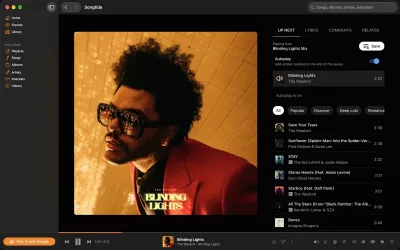
Open an audio file, select the part you want, export it.
A free, open-source audio editor for macOS. Built with Claude Code.
If it helps you - great! I will add more features in the future, you don't have to credit anybody.
Install
Requires macOS 14 or later on Apple Silicon.
Download the .dmg from Releases, open it, drag Audio Cutter to Applications.
First launch
The app is not notarized by Apple, so macOS blocks the first launch.
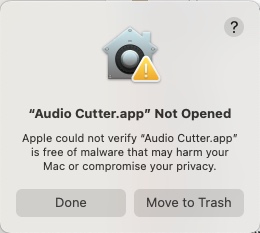
- Click Done.
- Open System Settings > Privacy & Security, scroll to Security, click Open Anyway.
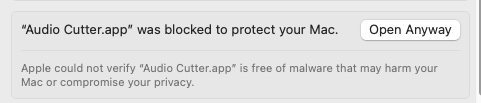
- Click Open Anyway again.
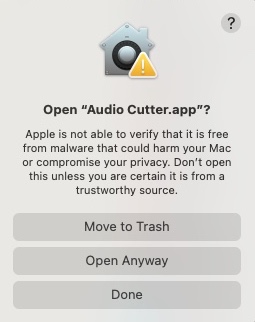
- Enter your administrator password, click OK.
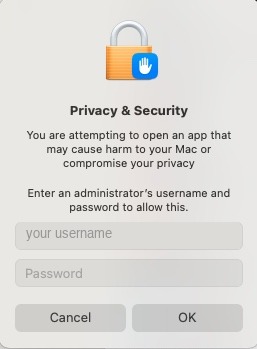
This is only needed once. The Open Anyway button disappears about an hour after the warning; if it is missing, open the app again. On macOS 15 and later, right-click > Open no longer works.
To skip the warning, build from source (below), or run:
xattr -dr com.apple.quarantine "/Applications/Audio Cutter.app"
MP3 support (optional)
brew install ffmpeg
Needed for MP3 export and lossless MP3 cutting. Everything else works without it.
Features
- Opens MP3, WAV, FLAC, AIFF, M4A/AAC, CAF
- Drag to select, with audio scrubbing while you drag. Double-click selects all
- Keep (⌘K) removes everything outside the selection. Delete removes the selection
- Mark multiple regions (⌘M), then delete them all or export each as a separate file
- Export WAV, AIFF (24-bit), FLAC, M4A, MP3
- Lossless cutting for MP3/M4A when the audio is unedited. Cuts land on the nearest frame (about 26 ms)
- Normalize, fade in/out, silence, reverse, trim silence from both ends
- Playback from 0.25x to 4x (pitch changes with speed)
- Cuts snap to zero crossings (max 8 ms) with a 4 ms fade, to prevent clicks
- Stereo shown as separate L and R lanes
- Scroll wheel zooms at the pointer; the view follows the playhead
Keyboard
| Key | Action |
|---|---|
| Space | play / pause |
| J / K / L | play backwards / pause / play forwards (press J or L again for 2x, 4x) |
| Delete | delete selection |
| ← → | move playhead 0.1 s (1 s with Shift) |
| Return | back to start |
| Esc | clear selection |
| ⌘O | open |
| ⌘K | keep selection |
| ⌘E | export |
| ⌘M | mark region |
| ⌘A | select all |
| ⌘Z | undo |
| ⌘0 | fit to window |
Build from source
Requires macOS 14+ and Xcode or the Command Line Tools.
git clone https://github.com/sergiulupse/audio-cutter.git
cd audio-cutter && ./build.sh
Options: debug, --no-run, --icon, --dmg.
Tests:
./Tests/HeadlessCheck/run.sh
./Tests/TransportCheck/run.sh
Known limits
- Undo history is capped at 1.5 GB, so long files get fewer undo steps
- Edits apply to both channels
- No auto-split on silence
- No noise reduction
- One file at a time
- macOS only
Details in DESIGN-NOTES.md.
License
MIT. See LICENSE. Bug reports welcome, see CONTRIBUTING.md.