
Audiout
Your speakers, synced at last.
Send every sound your Mac makes to all your speakers at once — with a volume fader for each room, saved groups, and a phone remote.
About · Get Audiout · Build from source · iPhone remote · Docs


What it does
Unless you want to spend time fiddling with static aggregate devices, macOS will only let you send audio to a single device.
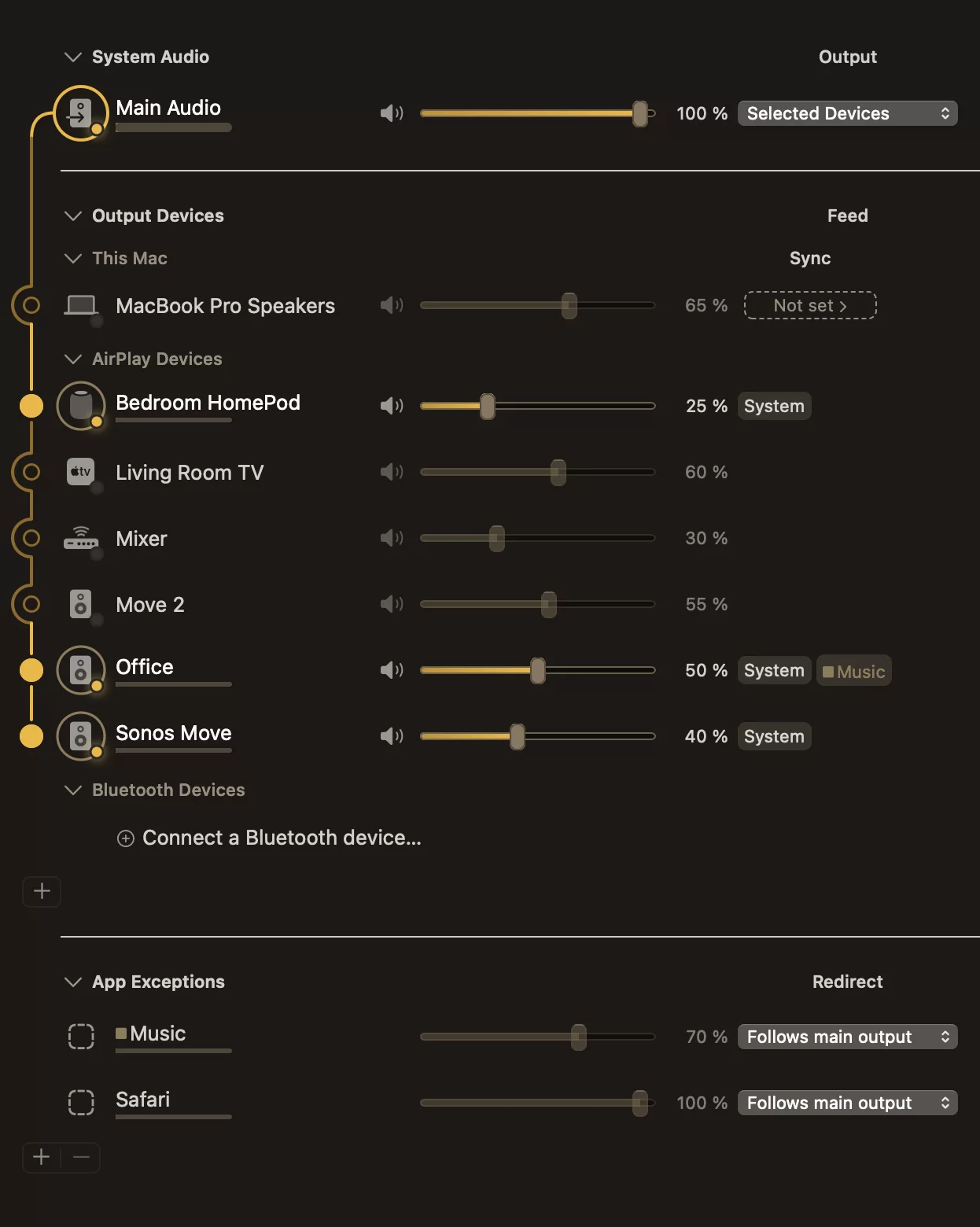
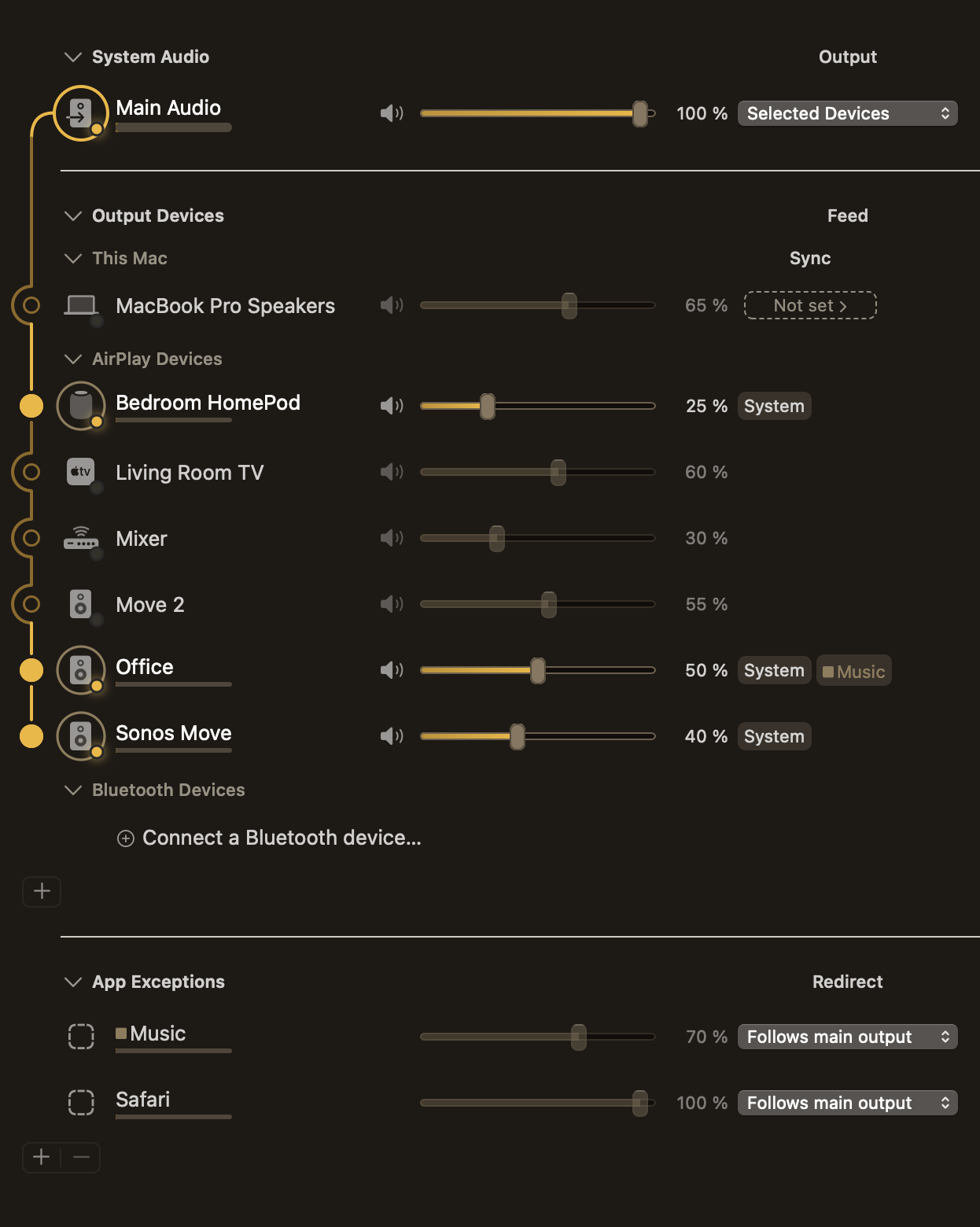
Audiout takes the sound leaving your Mac and sends it to as many AirPlay, Bluetooth, or Cast speakers as you own, playing together in sync. Each speaker gets its own fader and its own mute. You can save a set of speaker as a scene and switch to it in two clicks, and you can redirect audio per app: Spotify in the kitchen while the call stays on your laptop.
It runs in the menu bar. Nothing about it touches the internet — discovery, routing, volume and playback all stay on your own network, and it keeps working with the machine offline (with Bluetooth devices)
Get Audiout
€24.99, one-time. Covers the current major version and every update until the next major release. No subscription.
You get a signed, notarised .app that runs the moment you drag it to
Applications — no Homebrew, no toolchain, no build step, every library it needs
already inside the bundle. Updates arrive in the app. The purchase also pays for
the work of packaging, signing, notarising and supporting it, which is the part
that a compiler cannot do for you.
Or build it yourself
Audiout is GPL-2.0-or-later, and that is not a technicality — if you would rather compile it than buy it, the source here is the whole app, and it is free. No feature is held back, no key is required, nothing is crippled. See docs/BUILDING.md for the toolchain and the handful of Homebrew libraries the source build expects.
What the paid download adds is convenience, not capability: notarisation, bundled libraries, and in-app updates. If that is worth €24.99 to you, buy it. If it isn't, build it — that path is supported and it always will be.
Features
Sound
- Multi-room AirPlay 2 playback, in sync, from any app on the Mac
- Auto delay detection wizard to sync Bluetooth speaker playback with the reset of the house
- Per-device EQ
Control
- A volume fader and a mute for every speaker, live while audio plays
- Main Audio sits over everything as a ceiling — sent level is Main × Group × Device
- Groups: save a set of speakers, switch to it in two clicks
- Per-app routing — send one app to one room, leave the rest alone
- Menu-bar popover you can pin open, plus a full window for groups and settings
The rest
- Native AppKit, Apple Silicon, light and dark
- No cloud in the audio or control path
- VoiceOver support, Reduce Motion honoured, measured contrast in both themes
Audiout Remote for iPhone
Audiout Remote is a free iPhone app that mirrors the Mac fader for fader — per-speaker volume, per-app routing, and mute one room or all of them, from wherever you're standing.
There's no account and no sign-in. The phone finds your Mac on your own Wi-Fi, and the Mac asks you once whether to allow that phone; after that it stays allowed. There's no per-seat limit: put it on every phone in the house.
Free on the App Store, included with Audiout for Mac. → audiout.app/remote
Note
Audiout Remote is a separate app and is not part of this repository. It has no audio path of its own — it is a remote control for a Mac running Audiout.
Requirements
| Mac | Apple Silicon, macOS 14.4 or later |
| Speakers | Any AirPlay 2 speaker — HomePod, Sonos, Apple TV, AV receivers, smart TVs. AirPlay 1, Bluetooth and Chromecast work too. Chromecast plays the whole mix only: it can't be a per-app destination. |
| Network | Everything on the same Wi-Fi. Audiout asks for Local Network and system-audio recording permission on first run, and explains why. |
Documentation
- docs/BUILDING.md — build it from source
- docs/SPEC.md — the product spec
- PRODUCT.md — who it's for, what it promises, and what it collects
- CONTRIBUTING.md — how to file a bug or send a patch
- SECURITY.md — reporting a vulnerability
Privacy
Audio never leaves your network. Two things do, and both are described in full in PRODUCT.md: anonymous usage statistics, and a licence check-in that counts how many machines a key is used on. Neither ever carries what you're playing, your speaker names, or anything you type.
Usage statistics are on by default during the trial and switched off at any time
in Settings › General. A paid copy asks once before it sends anything. A copy you
build from this repository reports too, tagged as a source build: the PostHog
project token is committed in scripts/make-app.sh because it is a write-only
public key. Delete those two lines to build a copy that never reports.
License
GPL-2.0-or-later. The AirPlay 2 sender is derived in part from OwnTone and bundles third-party code under GPL, BSD and MIT terms — see NOTICE for the full accounting.