
Sandboxed macOS VMs with full Xcode for AI coding agents — plus a lightweight Linux container mode.
augur runs Claude Code inside an isolated guest where it can build, run, and test Apple-platform code, while your host stays out of reach. Only the current directory is exposed; network egress is limited to an allowlist enforced on the host.
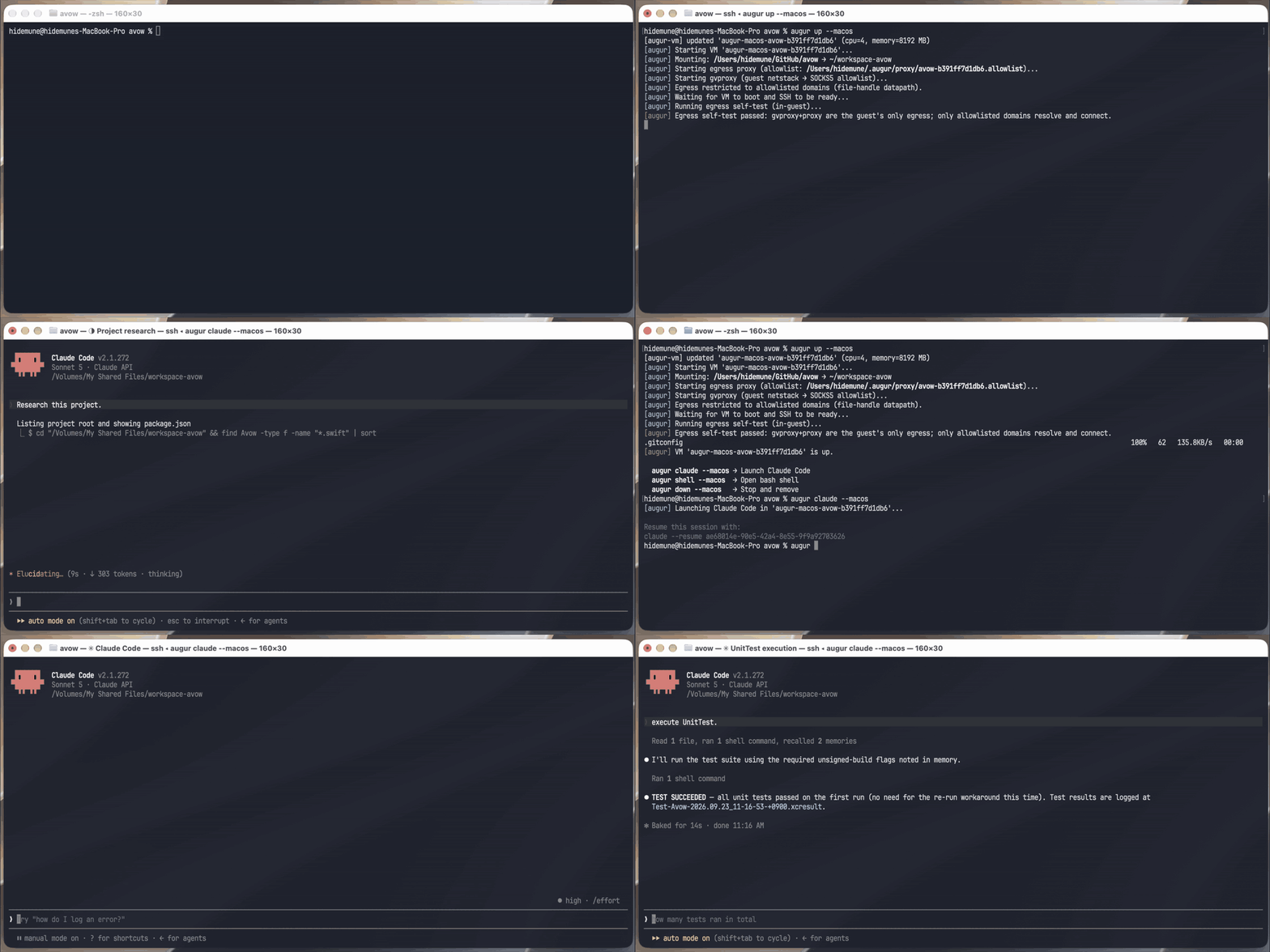
augur up --macos → augur claude --macos → the agent runs xcodebuild test inside the VM (5× speed)
Why augur
- Xcode inside the sandbox — not just Linux. macOS VM mode boots a real macOS guest on Apple's
Virtualization.framework, with Xcode,
xcodebuild, and the iOS Simulator preinstalled. Most agent sandboxes stop at Linux containers; augur gives the agent the full Apple toolchain without giving it your Mac. xcodebuild testworks headless, over SSH. Tests that needtestmanagerdnormally require a GUI login session. The base VM is built with auto-login and a virtual display, so the agent can run every test type unattended. See Runningxcodebuild test.- One command, no GUI on macOS 27. On a macOS 27+ host and guest,
augur build --macosprovisions the VM's account through macOS 27'sVZMacGuestProvisioningOptions. There is no Setup Assistant to click through, and the admin password is randomized per build. Older pairs fall back to a short manual step. See ADR-0018. - Built only from Apple-signed assets. The base VM comes from an Apple IPSW plus an Xcode XIP,
with no third-party VM images or automation scripts. The VM backend (
augur-vm) is a small Swift CLI that ships in this repo. - Egress allowlist, on by default, no
sudo. A host-side proxy lets the guest reach only the domains you allow, DNS included. Project-supplied domains need your approval on first sight. See Egress allowlist. - Per-project isolation. Each project gets its own thin clone of the base VM or its own container. It sees its workspace and only its own Claude history, not the rest of your home directory. Claude auth is injected through the environment, and the host's credential store is never mounted.
- Honest about its limits. Design decisions and accepted risks, such as the
.git/hookshost execution risk and the exfiltration ceiling, are written down indocs/decisions/anddocs/security-reviews/. Releases are gated on a full macOS-VM E2E run.
Quick start (macOS VM + Xcode)
git clone -b release https://github.com/h1d3mun3/augur.git && cd augur
brew install go                          # needed for macOS VM egress filtering (augur-gvproxy)
bash install && source ~/.zshrc          # installs augur + builds augur-vm / augur-proxy

# one-time base VM build from Apple-signed assets (~75 min, unattended on macOS 27+)
augur build --macos --ipsw ~/Downloads/macOS.ipsw --xcode-xip ~/Downloads/Xcode.xip

cd ~/projects/my-ios-app
augur claude --macos                     # Claude Code in an isolated, egress-filtered macOS VM
Don't need Xcode? augur build && augur claude gives you the lightweight
Container mode instead.
Two modes
| Container mode | macOS VM mode | |
|---|---|---|
| Best for | Web, backend, scripting, anything Linux | iOS / macOS / Apple-platform apps |
| Isolation | Linux container (Apple Container) | Full macOS VM (Apple Virtualization.framework) |
Xcode / xcodebuild / xcodebuild test |
✗ | ✓ |
| iOS Simulator | ✗ | ✓ (other platforms via --platforms) |
| Egress allowlist | ✓ | ✓ |
| One-time setup | ~5 min (image build) | ~75 min (base VM build; unattended on macOS 27+) |
| Per-project start | fast (container kept on down) |
thin clone of the base VM, kept on down |
| Disk usage | ~2 GB | ~70 GB+ |
| Requires | Apple Container 1.0.0+ (macOS 26+) | augur-vm (bundled), IPSW, Xcode XIP |
Workspace rule. augur works in any directory except one that contains augur itself.
augur up/claude/shellrefuse to run in$HOME, in~/.augur, or in any parent of either, because the workspace is shared read-write and those directories hold the binaries your host runs (see ADR-0014). Use a subdirectory instead.
Install
Both modes share one install. bash install always installs the release branch, the gated
stable channel, whichever branch your clone is on:
git clone https://github.com/h1d3mun3/augur.git
cd augur
brew install go     # macOS VM mode only: needed for egress filtering (augur-gvproxy)
bash install
source ~/.zshrc     # or source ~/.bashrc
The install script first fetches origin/release and builds from a copy it keeps in ~/.augur/src;
your clone is left untouched. If the fetch fails, the install fails — it never falls back to an old
copy or to your checked-out branch. It then copies augur and Dockerfile to ~/.augur/, refreshes the managed egress
baseline (~/.augur/augur.conf.default), builds the host egress proxy augur-proxy (needs Swift)
and, on macOS, the VM backend augur-vm (needs Swift) and augur-gvproxy (needs Go), and
configures PATH. Safe to re-run.
Stable vs. bleeding-edge.
bash installinstalls the latest release that passed the full macOS-VM E2E gate —augur versionthen reports a bareX.Y.Z. To install your checkout as it is (for examplemainwhile developing augur), runbash install --here;augur versionthen reportsX.Y.Z-dev+<sha>so you can always tell the two apart. Pin an exact version withgit clone --branch vX.Y.Zfollowed bybash install --here. See Cutting a release.
Operator profile
augur never mirrors your host ~/.claude — that tree is executable config (hooks, skills,
commands), it is full of host-absolute paths that break in a Linux guest, and its permission set was
written for a world with no sandbox. The full reasoning is in
ADR-0013.
What you get instead is a directory you populate on purpose:
~/.augur/claude-profile/
├── settings.json      → copied     (Claude rewrites it at user scope)
├── CLAUDE.md          → copied     (/memory can edit it)
├── keybindings.json   → copied     (the TUI owns it)
├── commands/          → symlinked  (host edits live in Container mode — see the macOS caveat)
├── skills/            → symlinked
├── rules/             → symlinked
├── output-styles/     → symlinked
├── workflows/         → symlinked
└── themes/            → symlinked
-
Opt-in and inert by default. No directory, or an empty one, and augur wires nothing. Only names that actually exist in the profile are ever written into the guest — ship no
settings.jsonand augur never touches yours. -
Host-global, read-only. One profile for every project on the machine: personal tooling is not project-scoped. Read-only because it is shared — a guest able to write there would plant a hook or command for every project.
-
In Container mode the directories are live, in two senses. Editing a file inside an already-wired directory (adding a command to
commands/that's already there) needs no augur action at all — you're editing the live mount, and the nextaugur claudesees it. Adding/removing/replacing a whole entry (populatingcommands/for the first time, or deleting it) needs augur to re-run the wiring, which happens on everyaugur claude/shell/up, not just when the container happens to restart. (Claude Code itself only scans a top-levelskills//commands/directory that existed when its session started, so the very first time you populate one, exit and relaunchclaudeonce — that part isn't augur's to fix.) -
The three JSON/markdown files are copies, refreshed on that same every-
claude/shell/upcadence, because Claude Code writes user-scopesettings.jsonand a read-only symlink would make that an error. The profile is their source of truth: if you ship one, guest-side edits to it do not survive the next wiring. -
Your own files are never deleted. If the guest already had a real
~/.claude/commandsor~/.claude/skillswhen you first populate the profile, augur moves it aside to<name>.pre-profilerather than replacing it (an empty one is simply dropped). -
macOS VM mode reaches the profile over a virtiofs share. The profile works there (it is shared read-only into the VM and wired the same way), but through a virtiofs share rather than a bind mount, on every macOS version.
-
macOS VM mode caveat on macOS 26.x — host-side edits need a VM restart. When the host or the guest runs macOS 26.x, a file the guest has already read keeps returning the content from that read after the host edits it: the guest's virtiofs client holds on to the cached copy and never re-fetches it. The stale copy comes from the guest's own earlier read, not from anything cached up front at boot — but profile files are read as soon as the guest is wired and Claude Code starts, so in practice a profile edit made while the VM is running is not seen. Run
augur down --macos && augur up --macosto pick it up. Container mode is unaffected.On macOS 27.0+ (host and guest) the defect no longer reproduces, and host-side edits show up in a running guest within about a second. That was confirmed on one machine (M1 Max, build 26A428), not across hardware or 27.x point releases. See ADR-0019 for what was tested and what it does not establish.
On macOS 26.x, three things are worth knowing, because each is the opposite of what seems reasonable:
- It is not specific to read-only shares. The read-write workspace share behaves identically, so this is not only about the profile — edit a source file on the host and a running guest may keep reading the old bytes.
- There is no timeout to wait out. One measured case stayed stale for 904.9 s with zero natural refreshes; every share then went fresh together 10.3 s after a guest vnode reclaim was forced. Waiting is the one remedy that does not work.
down && upworks because the guest reboots with an empty vnode cache, not because a freshvm runrebuilds the share device — Virtualization.framework cannot rebuild a share device on a live VM in any case.
On macOS 26.x this is a platform defect, and augur accepts it rather than working around it — see ADR-0017 for the measurements, why the mitigation was removed, and what would bring it back. Issues #124 and #135 (closed by ADR-0019).
Your repository's own .claude/settings.json, CLAUDE.md, .claude/commands/,
.claude/skills/ and .mcp.json already work with no setup — they arrive inside the workspace
mount. The profile is for what a repo cannot supply because it is yours, not the project's.
Security notes
These apply to both modes.
The read/write workspace mount includes
.git— treat it as attacker-controlled. A prompt-injected agent running inside the container or VM can write.git/hooks/pre-commit(orpost-checkout,post-merge, …) into the mounted repo. Git runs repo-local hooks with no trust prompt, so the nextgitcommand you run on the host in that repo executes guest-authored code at your full host-user privilege — a complete escape of both the container/VM boundary and the egress allowlist. This isn't a bug augur can close in software: it's inherent to mounting a repo read-write so an agent can edit it. Review diffs before trusting them, and treat.git/hooks(and anything else the host later runs unreviewed, e.g. aMakefileor.envrc) in an augur-touched repo as attacker-controlled until inspected. Seedocs/security-reviews/2026-07-10-egress.md§6 item 12.
Claude Code's
--worktreeisn't specially supported (augur claude --worktree ...won't forward the flag). If you want it anyway: runaugur shell(oraugur shell --macos), then typeclaude --worktree <name>yourself at the prompt — the worktree's files/git state persist fine, and its conversation history survivesaugur down && up(oraugur down --macos && augur up --macos) too. Both modes mount the guest's whole~/.claude/projectsparent to a per-project host dir —~/.augur/claude-projects/<project>-<path hash>in Container mode,~/.augur/claude-projects/<vm>in macOS VM mode — so every cwd-keyed leaf under this project (the main checkout and any worktree) is stored host-side and persists (onlyaugur destroy/augur destroy --macosplus deleting the host history dir removes it). Seedocs/decisions/0004-no-special-worktree-support.mdfor the full trade-offs.
macOS VM mode (--macos)
Full macOS VM built from an Apple-signed IPSW. Supports Xcode, xcodebuild, and iOS Simulator. The VM is isolated per project — each directory gets its own thin clone of the base VM.
Setup
1. Build the VM backend
augur ships its own VM backend (augur-vm), a small Swift CLI built directly on
Apple's Virtualization.framework — no third-party tools required. Install builds it
and installs it into ~/.augur (on the macOS host; needs the Xcode / Swift toolchain, plus Go for
augur-gvproxy, the macOS VM egress datapath).
2. Download Apple-signed assets
- IPSW — macOS restore image: https://developer.apple.com/download/
- Xcode XIP — Xcode installer: https://developer.apple.com/download/all/
3. Build the base VM (one-time, ~75 min)
augur build --macos --ipsw ~/Downloads/macOS.ipsw --xcode-xip ~/Downloads/Xcode.xip
This will:
- Create a macOS VM from your IPSW (
augur-vm create --from-ipsw) - Provision the account — automatically, with no GUI window, when both this host and the
IPSW's guest OS are macOS 27+ (a randomly generated password is kept at
~/.augur/macos-admin-password, mode 600); otherwise open the VM window for manual Setup Assistant completion (credentials:admin/admin, Remote Login enabled). Pass--manual-setupto take the manual flow even on a macOS 27+ pair. See ADR-0018. - Install Xcode, Homebrew, GitHub CLI, and Claude Code
- Download the iOS Simulator runtime (Xcode installed from a XIP does not bundle it)
- Save the result as a reusable base VM (
augur-macos-base)
By default only the iOS Simulator runtime is baked in. Use --platforms to bake in others —
baking them into the base VM means every project clone gets them without re-downloading:
# iOS + watchOS
augur build --macos --ipsw ... --xcode-xip ... --platforms iOS,watchOS

# every platform Xcode offers (watchOS, tvOS, visionOS, …) — many extra GB
augur build --macos --ipsw ... --xcode-xip ... --platforms all
Supply chain note: The base VM is built entirely from Apple-signed assets (IPSW + Xcode XIP). No third-party automation scripts are used.
Usage
cd ~/projects/my-app

augur up --macos        # clone base VM and start (first run clones automatically)
augur up --macos --gui  # same, but also open a VM window (display + keyboard + pointer)
augur claude --macos    # launch Claude Code  (starts VM if not running)
augur shell --macos     # open a bash shell   (starts VM if not running)
augur setup-token --macos  # get a Claude subscription token (runs in the VM, saves on the host)
augur down --macos      # stop the VM (keeps the clone — next up is fast)
augur destroy --macos   # stop and remove the project VM clone
augur status --macos    # show VM status, toolchain, and auth info
augur list --macos      # list all VMs and their state
augur update --macos    # update CLI tools in the base VM
augur version --macos   # show augur version (macOS mode)
Concurrent VM limit
At most two macOS VMs can run at once. Apple's macOS license permits up to two virtualized macOS instances per Mac, and Virtualization.framework enforces that limit: starting a third running macOS guest fails. That covers every macOS guest on the host, not just augur's. Each project clone counts while it is running, and so does the build VM during
augur build --macos/augur update --macos. Stopped clones don't count, so you can keep as many as your disk allows. Runaugur down --macosin a project you're not using (or checkaugur list --macos) to free a slot. Container mode runs Linux guests and isn't affected.
Authentication
On macOS, Claude Code stores its OAuth login in the Keychain, which is unreadable over SSH and
absent from a freshly cloned VM. So macOS mode injects a credential through the environment on
every up (the same way it does for the GitHub token):
CLAUDE_CODE_OAUTH_TOKEN— subscription token; either set the env var / save it to~/.claude_code_oauth_token, or runaugur setup-token --macos: it runsclaude setup-tokeninside the guest (so you don't install Claude Code on the host), then you paste the token back once and augur saves it to~/.claude_code_oauth_token.ANTHROPIC_API_KEY— Console API key (env or~/.anthropic_api_key). Takes priority if both are set.
Guest clock
A cloned macOS guest boots with its wall clock a fixed amount behind the host's (measured at ~95
minutes on one host — a constant inherited from the base VM's saved state, not
drift), and it cannot fix itself: NTP is UDP/123 and macOS VM egress drops UDP by design. So augur
sets the guest's clock from the host's over SSH — on up --macos (both a fresh boot and a
reconcile of an already-running VM) and on claude/shell --macos, which attach without going
through up. It runs before the token is injected, because a token minted on the host seconds ago
looks not yet valid to a guest sitting in the past. Best-effort: if it cannot be set you get a
warning, not a failed up. See
docs/decisions/0015-guest-clock-from-host.md.
File access
| Path | Description |
|---|---|
| Current directory | exposed at ~/workspace-<project> in the VM (read/write, virtiofs auto-mount) |
~/.gitconfig |
copied on VM start (unlike container mode, which mounts it read-only). augur then rewrites credential.https://github.com.helper in the guest's copy so HTTPS git push works off GH_TOKEN; any helper the host set for github.com is replaced, including the pair gh auth setup-git writes, because those need a host path or the host Keychain the guest does not have. Your host file is never modified. |
~/.config/gh/ |
not shared, as in Container mode. gh works off |