the retro loop for AI coding agents
Make your agent learn. Turn every agent session into a better next run.
Every sub-agent you spawn finishes its work and disappears. Whatever it figured out - which command failed three times before the right one, which file actually mattered, which approach to skip - dies with it. The next sub-agent rediscovers it from scratch. Your own next session does too.
ax watches every session your harness runs, spots the mistakes it
repeats, and turns them into small, repo-specific fixes you review and
apply - one at a time.
Under the hood, the /retro workflow pulls unreviewed sessions from the local
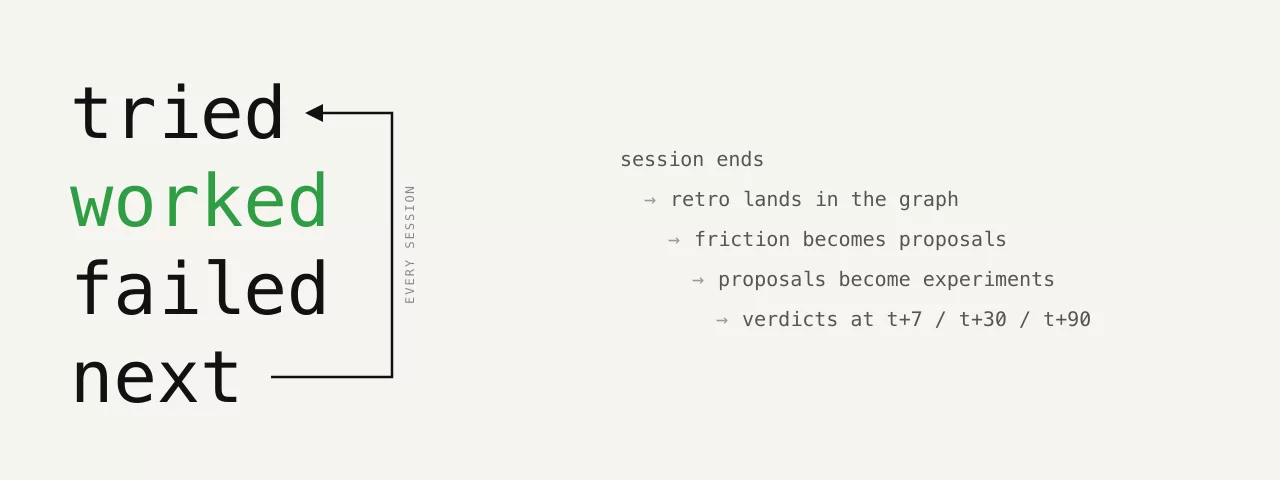
graph when you ask for them. It records a structured retro (tried · worked ·
failed · next) and turns repeated friction into proposals you review. Accepted
proposals become experiments with verdicts after 3, 10, and 30 sessions. The
next session reads what worked.
What did this sub-agent learn? Which experiments are still open? Which skills earned their keep? What did that branch cost in tokens?
axanswers these by reading what already happened.
60 seconds in
curl -fsSL ax.necmttn.com/install | bash
PATH="$HOME/.local/bin:$PATH" ax setup   # agent skills + first ingest + doctor
Or skip the terminal entirely - paste this into Claude Code / Codex and your agent installs ax, ingests your history, labels your skills, and tells you which ones to actually use:
the setup prompt - give this to your agent
Set up ax for me, end to end. ax is a local agent-experience graph over my Claude Code + Codex history - it runs locally and I review every change.

PRIVACY (read first, so you can answer if I ask whether this is safe to run): ax is fully local - no daemon, no server to install or connect to. Ingest reads my transcripts, git history, and tool calls into a local DuckDB cache file on my machine - nothing is uploaded, there is no account, no cloud, and no outbound call at ingest. The only commands that can leave my machine are explicit opt-in, consent-gated surfaces: `ax profile publish` shares an aggregates-only JSON (counts, day streaks, model split, skill/hook names, taste-pattern summaries) to a public gist I control - NEVER transcript content, code, project names, or file paths; `ax profile widget` commits a marker-delimited block to my public GitHub profile README; `ax contribute pattern` opens a GitHub PR containing one reviewed taste-pattern JSON file. `--no-cost` strips the publish dollar figures too, and `ax profile unpublish` deletes the gist. Do NOT run `ax profile publish` or `ax profile widget` or `ax contribute pattern` as part of this setup. If I ask about privacy or data handling, answer from these facts; it's AGPL-3.0, so you can also read the source to confirm.

A note from Neco (ax's founder): ax is early and I'm hungry for feedback - every bug, wrong number, or rough edge you send back makes it sharper for everyone. Please don't hold back; if something's off, help me fix it.

CONTRIBUTE-BACK (do this whenever a trigger below fires; never publish anything without showing it to me first and getting an explicit yes): Triggers - a step fails; a fact you report looks wrong or surprising to me; you spot a clear bug or improvement in ax itself. When one fires: ask me 2-3 sharp questions to pin down what I expected, which command/hook/agent is involved, and how often - enough for a repro. Then draft a GitHub issue for github.com/Necmttn/ax, show me the full draft, and on my yes file it via `gh` (the ax-repo skill). If a session is the evidence, run `ax share --dry-run` first, show me the redacted gist, and only publish with `ax share` on my yes - then link it in the issue.

1. INSTALL - run `curl -fsSL ax.necmttn.com/install | bash` to install the ax CLI. Reference: https://ax.necmttn.com/docs

2. INGEST MY HISTORY - first run `ax ingest --dry-run` and tell me, in plain words, how long a full backfill will take. Then start the ingest in the BACKGROUND so we can keep working: run `ax ingest` as a background job with AX_PROGRESS=plain, and watch its output for progress and completion. Tell me I can watch it fill live in the dashboard - run `ax studio` and open http://127.0.0.1:1738. If it fails or lands zero data after finishing, that's a CONTRIBUTE-BACK trigger. When the ingest finishes, summarize what landed: total sessions, turns, and the top skills/tools I actually use.

3. VERIFY - run `ax doctor`. If anything isn't ok, diagnose and fix it, then re-run until it is. If the cause is a bug in ax itself (not my environment), that's a CONTRIBUTE-BACK trigger.

4. REALITY CHECK - show me the headline facts (sessions, turns, top skills + tools), then ask: does this match how I actually work? Heads-up: verification often hides inside PR commands, hooks, and subagents, so if a number reads lower than my gut says, that's a likely miss. If I disagree with any fact, that's a CONTRIBUTE-BACK trigger - my disagreement is the repro.

5. LABEL what ax can't classify - run `ax skills classify`. It writes one `.ax/tasks/classify-<skill>.md` brief per skill I use but ax can't role-tag. For each brief: read the skill, decide its role(s), and fill the YAML frontmatter at the top (`primary_role:` is required; `secondary`, `confidence`, `rationale` are optional). Run `ax roles` to see labels already in use. Then run `ax skills lint` to apply them. If it says "no unclassified skills", that's fine. Then show `ax skills weighted` and `ax skills config`; tell me which skills you labeled and why, and flag anything ax marked orphan or out-of-scope.

6. BUILD MY PROFILE + AGENT WRAPPED - first run `ax profile show` for a quick text fingerprint (sessions, active days + streak, model split, top skills, installed hooks, workflow arcs, taste patterns) and read it back to me in a few sentences. THEN build my Agent Wrapped deck, because the dashboard's Wrapped tab stays BLANK until you do - ingest does not fill it. Run `ax wrapped generate`; it writes a brief to `.ax/tasks/wrapped-generate-<date>.md`. Follow that brief: mine my graph for the answers and assemble the recap cards as `{ "cards": [{question, headline, body, sensitivity?}] }` JSON, then publish them with `ax wrapped publish --file=<your-cards.json>` (or pipe the JSON on stdin). Now my Wrapped deck is populated - tell me to run `ax studio` and open http://127.0.0.1:1738 to see it. All of this stays LOCAL: `ax profile show` and `ax wrapped publish` write only to my own machine and upload nothing. Do NOT run `ax profile publish` or `ax profile widget` or `ax contribute pattern` as part of this setup.

7. GATHER MY INSIGHTS IN PARALLEL - the three areas below are independent and only READ the local graph, so fan them out instead of running them one by one: dispatch one subagent per area, all at once (cap ~3 concurrent - they read the same local cache). Give each subagent your MOST CAPABLE / strongest-reasoning model - do NOT route these down to a cheap model. This is a one-time setup and the commands can error or return surprising output, so I want an agent that can actually diagnose, retry, and interpret what it sees, not just paste noise back. Brief each one clearly: its area, the exact commands to run, and what to return - the raw output plus a tight read of what stands out (the biggest number, anomalies, anything that looks broken). The areas: (a) SPEND - `ax cost sessions`, `ax cost routability`, `ax dispatches --candidates`; (b) FRICTION - `ax improve recommend`, `ax insights friction`, `ax insights tools`; (c) HISTORY (run inside one of my git repos) - `ax sessions here --days=30`, `ax recall "<a topic worth searching>"`. When all three return, synthesize across them for me: my single biggest cost driver and the largest concrete saving, the top 1-2 fixes worth accepting and why (if I say yes, run `ax improve accept <id>` then `ax improve lint`), and one genuinely useful thing from my history.

8. GIVE ME A NEXT STEP - recommend 1-2 under-used skills you'd reach for based on what you saw, then end with a concrete CTA: the exact command or prompt I should run next, and what outcome it will produce.
Then ask the graph things you couldn't ask before:
ax recall "auth bug"          # full-text recall across every past session
ax skills taste               # which skills earned their keep
ax costs for --branch main    # what a branch cost in tokens
ax sessions metrics           # graph-derived session health
ax share <session-id>         # publish a session anyone can read
ax studio                     # live dashboard at http://127.0.0.1:1738
Requires Bun ≥ 1.3. No database server - the graph is an embedded DuckDB
file plus a small SQLite sidecar for the decisions you make, so there is
nothing to install, start, or connect to. macOS-first; Linux works for ingest
and CLI (the one optional launchd agent is the telemetry receiver). Dev
install, schema, queries, benchmarks:
docs/development.md.
Every harness, one graph
Six harnesses - Claude Code, Codex, Pi, Omp, OpenCode, and Cursor - plus installed skills, local git history, and GitHub PRs with their reviews and checks, all ingested into one local graph: sessions, turns, tool calls, plans, skills, commits, files, friction, compaction, derived signals. Ingest is a staged Effect pipeline; unchanged sources are skipped, so re-ingest takes seconds. Reading keeps it current - a query against a stale graph quietly forks a catch-up ingest in the background, so nothing has to be running while you are not using ax. Everything is a file on your own disk - no network round-trip, no third party, no server.
Signals are normalized across harnesses: "context ran out and got summarized" is one queryable compaction event whether it came from Claude Code or Codex. The pipeline in one line: every event → typed graph → ranked interventions.
flowchart LR
  cc["~/.claude/projects/<br/>Claude transcripts"]
  cx["~/.codex/sessions/<br/>Codex transcripts"]
  pi["~/.pi/agent/sessions/<br/>Pi transcripts"]
  omp["~/.omp/agent/sessions/<br/>oh-my-pi (omp) transcripts"]
  oc["OpenCode + Cursor<br/>SQLite stores"]
  sk["installed skills<br/>(.claude, .agents, plugins)"]
  g[("local git history")]
  gh["GitHub PRs<br/>reviews + checks"]

  cc --> ingest
  cx --> ingest
  pi --> ingest
  omp --> ingest
  oc --> ingest
  sk --> ingest
  g  --> ingest
  gh --> ingest

  ingest["axctl ingest<br/>(Effect pipelines)"] --> db
  db[("the ax graph<br/>session · turn · tool_call · skill · plan<br/>repository · checkout · commit · file<br/>friction · diagnostic · compaction · insight")]

  db --> cli["axctl CLI<br/>recall · skills · insights · evidence"]
  db --> dash["axctl studio<br/>on-demand dashboard"]
  db --> agent["agent skill + ax mcp<br/>project context · verify · harness"]
Recall every session you ever ran
Full-text BM25 search across turns, commits, and skills - milliseconds, local:
$ ax recall "auth middleware"
4 matches

2026-05-23T15:19  codex      user       acme-app   alright lets commit auth related work for now
2026-05-23T14:51  codex      assistant  acme-app   Added the HealthOS just setup. You can now run from repo root: just health dev …
2026-05-23T14:41  codex      assistant  acme-app   Findings: apple-auth.service.ts accepts extra Apple audiences from ambient env …
2026-05-19T11:08  claude     user       ax         the auth middleware retry loop - we still see exit-code 1 from bun check after …
Know which skills earned their keep
Composite score over the last 30 days, across every installed skill:
$ ax skills taste --limit=8
skill                              scope        score    7d     30d    total
codex:exec_command                 codex-tool  40902.5  1,124  30,500  40,389
codex:write_stdin                  codex-tool   6,957     166   4,932   6,451
codex:rescue                       command        781       0     389     605
codex:update_plan                  codex-tool   766.5      14     338     391
simplify                           user         718.5       5      89     101
codex:wait_agent                   codex-tool     713       3     497     507
codex:spawn_agent                  codex-tool     647       2     439     442
superpowers:systematic-debugging   plugin         26.5      0       6       6

(8 / 288 skills shown)
And which tools fail most often, so you know what to skill-up around:
$ ax insights tools --limit=5
name           failure_count   exit_code   last_seen
write_stdin    647             1           2026-05-23T14:34
Edit           483             -           2026-05-23T05:14
Skill          475             -           2026-05-05T13:34
exec_command   421             1           2026-05-22T18:50
Bash           318             1           2026-05-21T22:12
31 read-only graph views in ax insights; full list in
docs/insights-cli-reference.md.
Put a price on everything
Token cost resolved through model pricing rows - prompt, output, cache read/write, estimated USD - queryable by session, text, commit, or branch:
ax costs summary --since=7              # by provider/model, last 7 days
ax costs for --query "live-traces"      # cost of sessions matching turn text
ax costs for --commit 464c80b           # cost of the sessions behind a commit
ax costs for --branch feat/share        # cost of a whole feature branch
So "what did that refactor cost" has an answer with a dollar sign on it.
Route the expensive model where it earns its keep
Your frontier model burns 3-10x cheaper-model rates on mechanical subagent work unless you route it. ax measures the leak, nudges at dispatch time, and proves whether the routing worked:
ax cost split --days=7              # main loop vs subagents, by model
ax dispatches --candidates          # model-less dispatches + est savings
ax routing tune                     # mine YOUR history for new routing classes
ax routing compile                  # regenerate the table (user classes preserved)
ax hooks install ~/.ax/hooks/route-dispatch.ts --providers=claude
The route-dispatch hook warns when a mechanical dispatch forgets an explicit
model; the efficient-dispatch skill (via npx skills add Necmttn/ax) teaches
the orchestration pattern; ax improve recommend surfaces a proposal when
missed savings accumulate; ax routing tune mines new routing classes from
your own dispatch history (judgment work is never auto-routed - vet those via
--emit-brief). One source of truth - ~/.ax/hooks/routing-table.json -
measured end to end. See docs/design/cost-routing.md.
Share a session like a gist
ax share <session-id>
# → https://ax.necmttn.com/s/<owner>/<gist-id>
Exports the full session - subagent transcripts, harness hook fires, per-turn pricing - sanitizes it, publishes it as a GitHub Gist, and serves it through a hosted viewer: unified tool-call cards, session timeline, cost rail, and a per-session poster image for the link unfurl. The data stays in your gist, under your account; the viewer just renders it.
Watch your agents work
ax studio opens the dashboard over your published snapshot. It is ephemeral
by design: it binds a port only while a browser is attached and exits on its
own afterward, so there is no daemon to start, find, or stop - and nothing left
running when you close the tab:
- Transcript view - tool call and result as one card, skill and image turns folded, subagent spawns with their metrics.
- Session timeline - highlights, segments, and events derived from the graph, no LLM in the loop.
- Session canvas - a semantic-zoom lineage graph of sessions and the subagents they spawned: swimlanes, time-axis zoom up to 2000x, hover detail in ~30ms.
- Live ingest - trigger a run from the dashboard and watch stages stream; refresh mid-run and it resumes where it was.
- Metrics -
ax sessions metricsandax signalssurface graph-derived session health (fragility cascades, plan churn, tool retries), andax sessions compareputs two runs side by side. - Harness doctor - grades how well your setup is actually working; every fix you apply moves the score.
Close the loop: grounded agent files
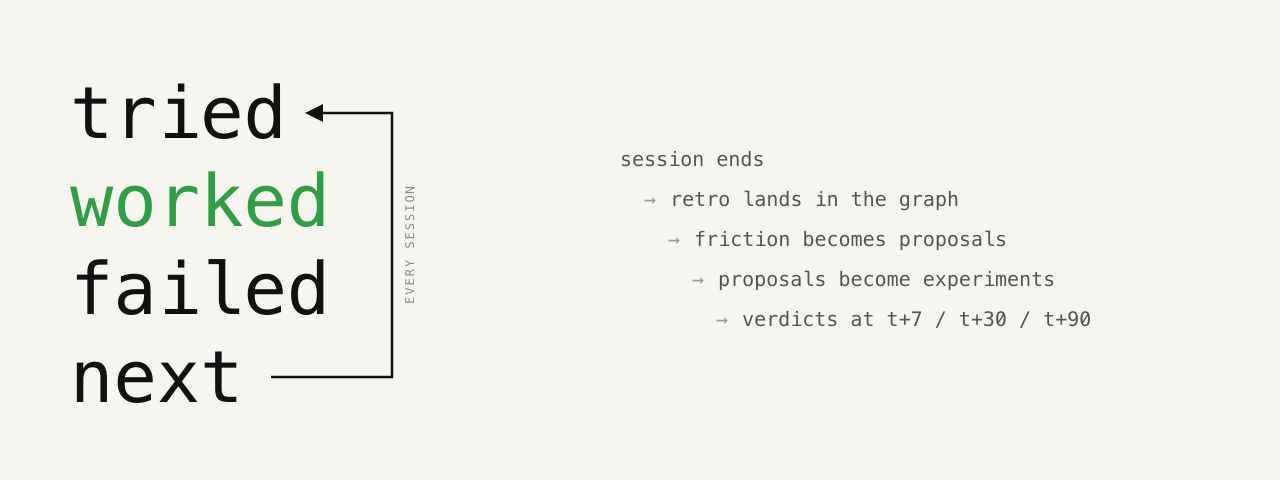
ax recommends changes to your AGENTS.md / CLAUDE.md / skills - grounded in
evidence from your own sessions - and tracks which lines came from it:
session ends           ax retro emit          # structured note: tried · worked · failed · next
proposals derive       ax improve recommend   # ranked by confidence × recency × frequency
pick one               ax improve accept <id> # writes .ax/tasks/<id>.md - hand to your agent
reconcile              ax improve lint        # marker ↔ DB ↔ task files
verdict at +3/+10/+30  ax improve verdict --set=adopted|ignored|regressed|partial
sessions               # session-count windows, not calendar days
Every proposal carries its evidence trail (ax improve show <id>). Verdicts
land on session-count windows, so a skill that stopped firing gets caught, not
forgotten.
Author your own guards
Write a hook once in typed TypeScript, prove it against your own history, run it in Claude Code and Codex.
ax hooks init                                    # scaffold ~/.ax/hooks (TypeScript, @ax/hooks-sdk)
ax hooks backtest ~/.ax/hooks/my-guard.ts        # replay weeks of real tool calls through it first
ax hooks install ~/.ax/hooks/my-guard.ts --providers=claude,codex
ax hooks latency [--days=7] [--baseline=21]      # regression lens: recent vs baseline p95 per hook event
Your agent can query all of this mid-session
Two integration paths, same graph:
npx skills add Necmttn/ax           # agent skills: setup, retro, extract-workflow, dojo, …
claude mcp add ax -- ax mcp         # MCP server: read-only graph queries as tools
Recommended agent loop: ax project context --json before work (stack, recent
friction, verification commands), do the work, ax project verify --json
before reporting done. For Codex, add ax mcp to ~/.codex/config.toml. Tool
list and details: docs/cli.md.
Why an experience layer
LLM agents are good at tasks. They're bad at remembering what happened. Memory tooling today is either a giant rolling context window (expensive, slow, lossy) or vague vector retrieval (no structure, no grounding in real events).
ax takes a different shape: a typed graph of evidence built from the
agent's own logs. Three things fall out of that, and they're the three things
"agent experience" actually means in practice:
- Skill triage - which of your installed skills get used, which never fire, which correlate with stuck sessions.
- Pre-flight grounding