Bastra Recall
🇬🇧 English
Less repeating yourself. One shared memory for your AI tools.
We’re building with the ambition to create the best personal memory for everyday work with AI—open, transparent, and under your control.
Keep your preferences, decisions and hard-won fixes available beyond a single chat. Bastra Recall stores them as readable Markdown files on your computer and makes them available to your connected AI assistants.
What you can use Recall for gives practical examples for conversations, rules, tasks, documents and shared work.
Proactive tasks remain an opt-in preview, off by default until v1.2.0. To try them, set BASTRA_TASKS=1 in daemon and clients/hooks, then restart them. Preview instructions and limits.
Supported integrations help assistants save useful lessons and retrieve relevant memories before starting work. You can inspect and edit the files yourself, with Obsidian or any text editor. Automatic recall depends on the client integration and the assistant; it does not guarantee that every instruction will be followed.
Why not just CLAUDE.md?
A CLAUDE.md or AGENTS.md works well while it is small. Every month of project work makes it longer, and the assistant gets all of it in every session, needed or not. Eventually nobody maintains it, and conventions start drifting again.
Bastra Recall picks up there:
- Targeted, not everything: Each decision and lesson is stored as its own file. Supported integrations surface the relevant entries before work instead of sending everything every time.
- Grows as you work: The assistant can record new decisions and solved problems while it works. You review and correct them as needed instead of adding everything by hand.
- One memory for several tools: Claude Code, Codex and other MCP-capable tools share the same vault, so you don't have to keep separate rule files in sync.
Keep your CLAUDE.md. Recall adds the knowledge that doesn't belong in every session.
Version 1.1.1 is available. Find published downloads in the latest release, changes in the changelog, and tested integrations in the support matrix.
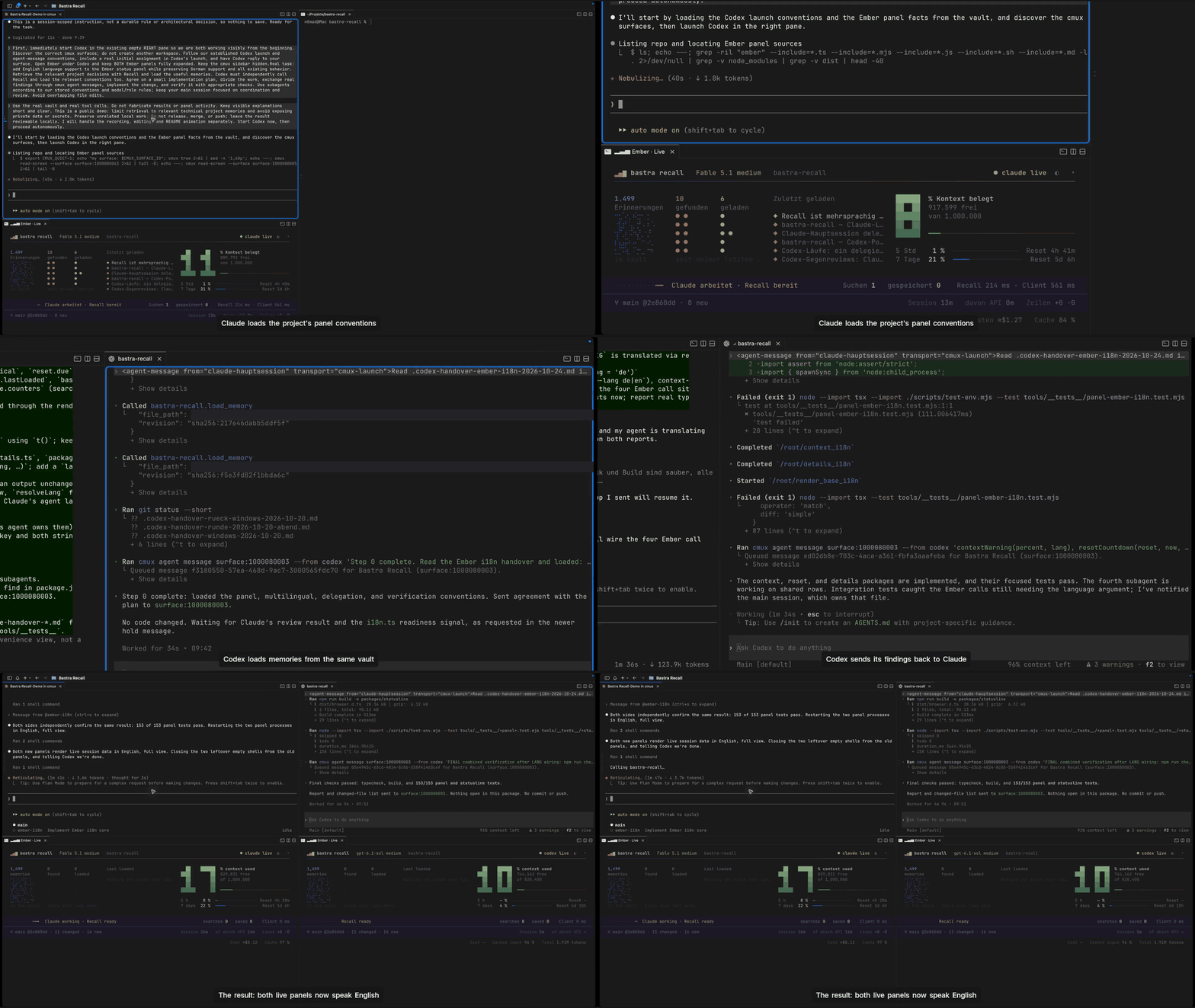
A real Claude Code + Codex session in cmux: both agents use Recall and exchange findings, with live Ember panels. Edited highlights.
Watch the demo in 1080p
https://github.com/user-attachments/assets/58e68703-8b0d-46c3-b468-33063e8ebf83
1.1.1 fixes successor ranking, reflex word forms, concurrent saves and locks, code-graph refresh costs, Linux watches, statusline updates and hint-block boundaries. Node 22–26 are supported. Changelog · statusline.
Install
macOS — guided setup:
curl -fsSL https://bastra.io/install | bash
The script installs Homebrew if needed, installs Bastra Recall and starts setup. Choose a folder for your memories and the AI clients you want to connect. Read the installer before running it if you prefer.
macOS or Linux — with Node 22–26:
npx bastra-recall install
No prior global npm installation is needed. Alternatively: npm install -g bastra-recall, then bastra install.
Restart your AI client after setup. Claude Desktop needs its one-time memory setup; Codex users should review and trust the installed hooks as described in the Codex guide.
Run bastra doctor to check the setup; bastra doctor --fix repairs registrations. Its features section lists which Recall features are on or off for you — memory language, onboarding, semantic recall, hooks and skill per client, and the opt-in extras — each off item with the command that turns it on. Other installation methods cover the macOS download, source builds and manual configuration.
Try your first memory
- Tell your assistant: “Remember: for this project, explain your changes briefly and include how you checked them.”
- Ask it to show the saved memory so you can check the wording.
- Start a new session and ask: “What are my preferences for explaining changes in this project?”
You can repeat the lookup in another connected client using the same vault. This is a simple way to check that your tools share the memory; supported hooks also help surface relevant context during normal work.
Supported surfaces
| AI client | Status | Setup and behavior |
|---|---|---|
| Claude Code | Tested — in daily use | MCP, Skill, ten hook registrations (eight without Stop/SessionEnd), save notices and statusline. Hooks |
| Claude Desktop | Tested | MCP and memory guidance; session context on the first tool call. Setup, including the macOS .mcpb extension |
| Codex CLI | Verified for the v1.0 integration | MCP, Skill and native hooks. Setup |
| Codex IDE + ChatGPT Desktop | Implemented; not yet field-tested | Share the local Codex configuration. Setup and limitations |
| Cursor | Implemented; not yet field-tested | MCP registration; add project rules with bastra rules cursor |
| ChatGPT Custom GPT Actions | Planned | REST API and starter schema exist; the packaged integration is not yet ready. Track progress |
Other MCP clients can connect through the forwarder, but are untested. Scripts and other integrations can use the REST API. MCP is the protocol that lets an AI assistant use external tools such as this memory service.
Supported platforms
| Platform | Status | Availability |
|---|---|---|
| macOS (Apple Silicon and Intel) | Supported | Homebrew and npm installation, bastra autostart, Claude Desktop .mcpb extension (release builds carry the verified compiled hook client manifest, like npm; the client itself is downloaded only after you opt in), open_document and compiled hook client |
| Linux (x86_64 and arm64) | Daemon, CLI, MCP and hooks | Install with npm; compiled hook client available. No Homebrew install path, macOS LaunchAgent (bastra autostart), .mcpb extension installation or open_document. The forwarder starts the daemon on demand. |
| Windows (x64) | Experimental preparation only | Hook-client cross-build and .exe registration configured; executable production and real Windows use not validated. Acceptance pending (#348). |
Why
A project decision made on Monday should still be available on Thursday, even if you switch AI tools. Bastra Recall gives those tools a shared place to look:
- Keep useful context: preferences, decisions, project facts and lessons from solved problems.
- Recall before work: supported hooks surface context at session start and before actions; the shared Skill guides the assistant's own searches and saves.
- Own the files: memories are plain Markdown with structured metadata, readable and editable outside Bastra.
- See what is remembered:
bastra mapopens the local vault map for browsing, search and memory care.
Examples from a working week show how these fit together.
Code awareness (experimental)
Experimental, optional, off until you switch it on per repository with bastra code enable. Recall then tells your assistant, before it edits a file, which other files import or call into it — and adds a find_code lookup so a symbol can be found by name instead of grepped for. The code map is built locally by Graphify, reads only code, is never committed, and no language model ever sees your source. It can help an agent find its way into an unfamiliar or large repository; for “what breaks if I change this” it measurably did not beat plain search on repositories like ours, and it costs context and background CPU. How to use it. macOS and Linux for now.
Privacy and control
Storage and keyword search are local. When your assistant retrieves a memory, it receives that content as context; a cloud-based assistant may process it with its provider. Local storage does not make the whole AI session offline.
Semantic search is optional. bastra embeddings on sets up local Ollama embeddings; bastra embeddings off returns to keyword search. With Ollama embeddings on, background paraphrasing (doc2query) starts too: a local generation model rewrites every memory's triggers, which takes hours of CPU on a machine without a GPU. BASTRA_TRIGGER_EXPAND=0 in the daemon's environment leaves it off; embeddings on and bastra doctor say which model it uses. Choosing OpenAI embeddings explicitly sends queries and indexed memory text to OpenAI. Privacy and network use explains these paths, file sync and optional network features.
A vault in iCloud, Google Drive or Dropbox uses that service's synchronization. Concurrent edits on multiple computers can conflict, including with Bastra's automatic metadata updates. Bastra does not provide managed multi-device synchronization. Keep backups and check conflicting copies before replacing a file.
If a vault root recorded in ~/.bastra/vault-roots.json later disappears (for example, its drive is not mounted), /health and recall report vault_missing, and writers refuse to recreate it as an empty folder on your disk. A brand-new path is still created by the first save, but only one level deep: its parent folder must already exist. If the parent is missing too (typical for an unmounted drive), the save stops with an error naming that parent; mount the drive or create the parent folder first. bastra install --vault <path> and the setup wizard are the exception: you name the path there, so they create the missing parent folders themselves. On a machine that has never seen a path, Bastra cannot fully distinguish a new vault from an unmounted drive whose parent folder exists, so check the mount before the first save. If ~/.bastra/vault-roots.json is empty or corrupt, or ~/.bastra is not writable, every vault write stops with an error that names the file: if the vault is mounted, delete the file (it is rewritten on the next save); otherwise fix the permissions of ~/.bastra. If you moved or deleted the vault on purpose, create the folder again or point Bastra at the new path.
Guides
-
Doctor — setup, missing save notices and daemon config warnings.
-
Telemetry — delivered context, candidates and measurable costs.
-
Release checks — verify the complete published set.
-
Import existing memories — lists, chat exports, rules and memory folders. Folder imports go directly into a separate intake area; the other paths stage candidates for review.
-
Vault map — explore, search and flag memories for care.
-
Updates — update with
bastra update, or opt into automatic updates. -
Model recommendations — a release can suggest a better local text model; you are asked, never switched automatically.
-
Reviewed-miss harvester — an offline repository tool for reviewing missed recall opportunities; it applies nothing automatically.
-
Statusline and terminal panels — setup, views and data limits for Claude Code and Codex.
-
Product docs — let the assistant maintain user guides for your projects.
-
Bastra Commons — optional community recipes with verification records.
-
Usage and troubleshooting · Memory format · Architecture · Hooks · Archiving
rmand git snapshots · Save and recall triggers · Taxonomy · Valence and reflex
Roadmap
The 1.x release line focuses on measured recall quality, relevant session context and clearer control over memory use. The cumulative session context budget is being measured in shadow mode; it does not yet enforce a live session-wide limit. Roadmap and release boundaries.
A native Bastra Mac app is in development. The open-source package already includes the local browser-based vault map and works independently of that app.
License and contact
MIT — see LICENSE. The statusline includes owloops/claude-powerline under its retained MIT license. The optional code awareness uses Graphify (Apache-2.0), a separate project that Recall does not bundle; it is installed from PyPI only if you enable the feature.
Ask a question · Report a bug · Contribute · Support the project. Report vulnerabilities privately via SECURITY.md.
Built by Daniel / @n0mad-ai.
🇩🇪 Deutsch
Weniger wiederholen. Ein gemeinsames Gedächtnis für deine KI-Tools.
Wir bauen mit dem Anspruch, das beste persönliche Gedächtnis für die tägliche Arbeit mit KI zu schaffen – offen, nachvollziehbar und unter deiner Kontrolle.
Bewahre deine Vorlieben, Entscheidungen und erarbeiteten Lösungen über einzelne Chats hinweg. Bastra Recall speichert sie als lesbare Markdown-Dateien auf deinem Rechner und macht sie deinen verbundenen KI-Assistenten zugänglich.
Wofür du Recall nutzen kannst zeigt Beispiele für Gespräche, Regeln, Aufgaben, Dokumente und gemeinsame Arbeit.
Proaktive Aufgaben bleiben eine Opt-in-Vorschau, bis v1.2.0 standardmäßig aus. Zum Ausprobieren BASTRA_TASKS=1 bei Daemon und Clients/Hooks setzen und diese neu starten. Vorschau-Anleitung und Grenzen.
Unterstützte Integrationen helfen Assistenten, wichtige Erkenntnisse zu speichern und relevante Erinnerungen vor neuen Aufgaben abzurufen. Du kannst die Dateien selbst prüfen und bearbeiten – mit Obsidian oder jedem Texteditor. Automatischer Abruf hängt von der Integration und dem Assistenten ab; er garantiert nicht, dass jede Anweisung befolgt wird.
Warum nicht einfach CLAUDE.md?
Eine CLAUDE.md oder AGENTS.md funktioniert gut, solange sie klein ist. Mit jedem Monat Projektarbeit wird sie länger, und der Assistent bekommt in jeder Sitzung alles vorgelegt, ob er es braucht oder nicht. Irgendwann pflegt sie niemand mehr, und die Konventionen driften wieder auseinander.
Bastra Recall setzt dort an:
- Gezielt statt alles: Jede Entscheidung und jede Lektion liegt als eigene Datei. Unterstützte Integrationen blenden vor der Arbeit die passenden Einträge ein, statt jedes Mal alles mitzuschicken.
- Wächst mit: Der Assistent kann neue Entscheidungen und gelöste Probleme während der Arbeit selbst festhalten. Du prüfst und korrigierst sie bei Bedarf, statt alles von Hand nachzutragen.
- Ein Gedächtnis für mehrere Tools: Claude Code, Codex und andere MCP-fähige Tools greifen auf denselben Vault zu, ohne dass du getrennte Regeldateien abgleichen musst.
Deine CLAUDE.md kann bleiben. Recall ergänzt sie um das Wissen, das nicht in jede Sitzung gehört.
Version 1.1.1 ist verfügbar. Veröffentlichte Downloads findest du im aktuellen Release, Änderungen im Changelog und getestete Integrationen in der Support-Matrix.
Echte gemeinsame Arbeit von Claude Code und Codex in cmux: Beide nutzen Recall und tauschen Befunde aus, Ember zeigt Live-Daten. Gekürzte Aufnahme.
Demo in 1080p ansehen
https://github.com/user-attachments/assets/58e68703-8b0d-46c3-b468-33063e8ebf83
1.1.1 korrigiert die Suchreihenfolge abgelöster Notizen, Wortformen im Reflex, gleichzeitiges Speichern und Sperren, Code-Graph-Kosten, Linux-Watches, Statusline und Hinweisblock-Grenzen. Node 22–26 werden unterstützt. Changelog · [Statusline](https://github.com/n0mad-a