Best Email Builder
A drag-and-drop email builder for React.
Emails that render in Outlook, Gmail, Apple Mail and on phones. Your server, your database, MIT-licensed.

Live demo · Documentation · npm
Why
Every product that talks to its users ends up needing an email editor. The usual choice is a paid widget you cannot own, or a canvas you wire to MJML, storage, validation and sending yourself. This is the second option, done once and given away.
- Free and yours. MIT, no account, no vendor. A React component and a server handler that run in your app, against your database.
- Emails that hold up. Every block compiles through MJML to table-based HTML, checked against what Outlook, Gmail and Apple Mail need.
- The server compiles. The browser never sends HTML. The server validates the template, compiles it and stores its own HTML.
- Only what you use. The library, the editor and the AI are separate entry points, and one never pulls in the other's code.
Features
Editor
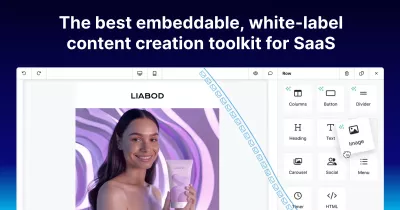
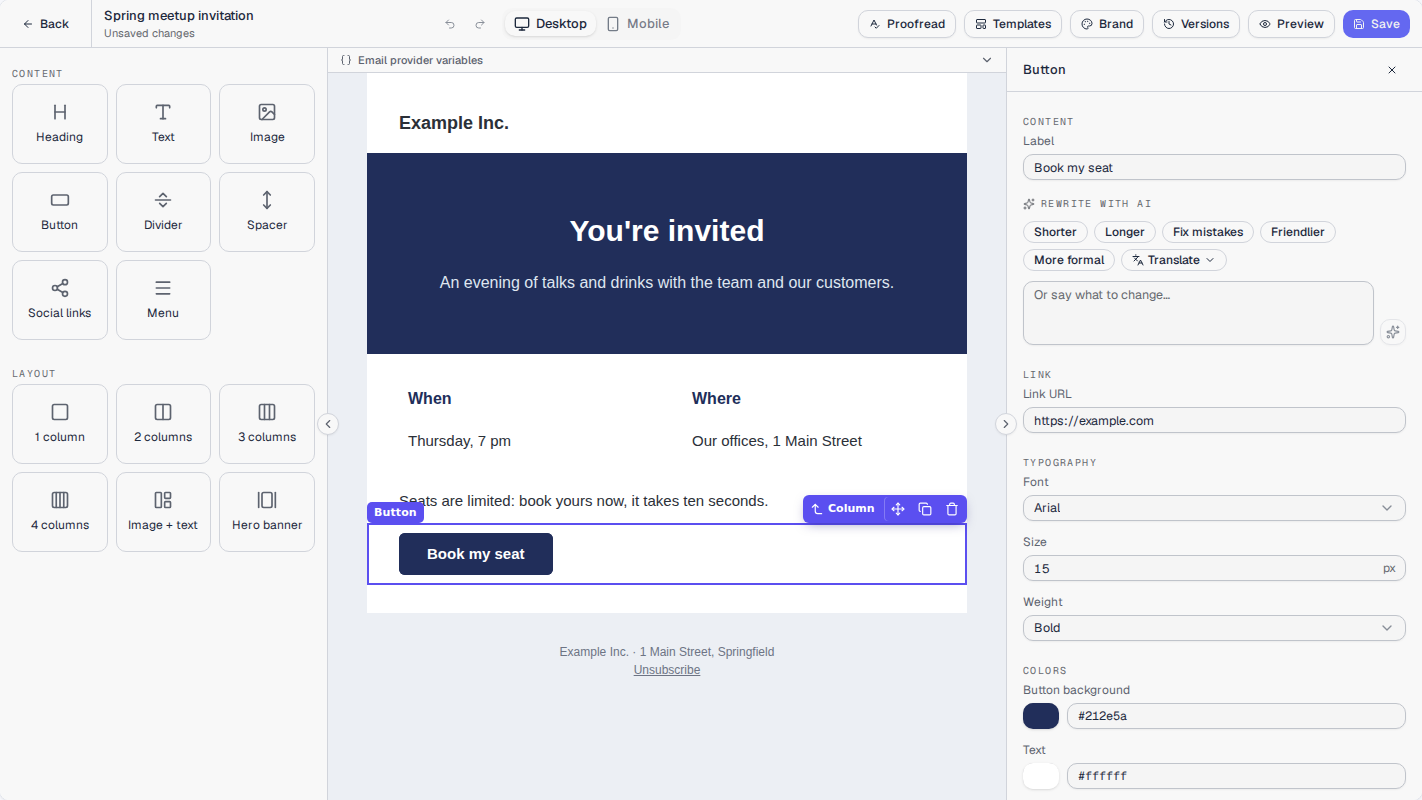
- Content blocks (heading, text, image, button, divider, spacer, social links, menu) and layouts (1 to 4 columns, image + text, hero banner).
- Columns from 1/4 to 3/4 of the row, background images on sections, full-width images on phones.
- Drag with a drop line, type in place, a toolbar and shortcuts on every element.
- A "+" under the selected element adds a block after it; a "+" after the last social icon or menu link adds one more.
- A ribbon above the canvas, as in a word processor: bold, italic, underline, strikethrough, link, size, line height and alignment, each tool named in a tooltip. At its end, panels beside the canvas for the emojis (searchable, named in seven languages) and the variables.
- Desktop and mobile canvas, showing the real compiled email.
- Undo and redo, autosave, local drafts, versions, and conflict detection between two editors.
Email output
- MJML under the hood: MSO tables and VML backgrounds for Outlook, the 102 KB clipping limit for Gmail.
- A preview with quality checks (alt text, unsubscribe link, unknown variables, Gmail clipping) and a dark-mode view.
- Test sends, and a gallery of ready-made emails with a footer and an unsubscribe link.
AI, optional
- Proofread the whole email: spelling, grammar and punctuation in every text, each correction shown word by word, applied in one step. By the AI, or without AI by LanguageTool, on your own server.
- Write with AI, in one field: a text on a topic, or a change in your own words, to fit the rest of the email; or in one click: shorter, longer, fixed, friendlier, more formal, translated into 13 languages. The answer comes in word by word.
- Suggest three subject lines drawn from the email.
- OpenRouter, Gemini, Groq, Mistral, OpenAI, DeepSeek, Cerebras, Ollama, any OpenAI-compatible API, Claude or your own agent. The model runs on your server, or in the page with each user's own key.
Your app
- A template library: search, favorites, up to three colored tags per template that also filter the list, and Edit, Duplicate, Copy HTML, Download, Delete.
- Merge-tag variables, including ones your users create, sorted into groups by drag and drop.
- Your brand read from your website: logo, colors and font.
- One Fetch-API handler for Next.js, Hono, Bun, Deno, Cloudflare Workers and Express.
- Seven interface languages, and any other through a dictionary.
Quick start
npm install best-email-builder
The component: the template library and the editor, wired together.
import { EmailStudio, createHttpStorage } from 'best-email-builder';
import 'best-email-builder/styles.css';

export default function Emails() {
  return (
    <div style={{ height: '100vh' }}>
      <EmailStudio storage={createHttpStorage()} />
    </div>
  );
}
The server: every route it calls, in one handler.
// app/api/email-builder/[...path]/route.js (Next.js App Router)
import {
  createEmailBuilderHandler,
  createMemoryTemplateRepository,
  createMemoryAssetRepository,
} from 'best-email-builder/server';

const handler = createEmailBuilderHandler({
  templates: createMemoryTemplateRepository(), // replace with your database
  assets: createMemoryAssetRepository(),
  authorize: async (request) => getUserFromSession(request), // your auth; null → 401
});

export { handler as GET, handler as POST, handler as PUT, handler as DELETE };
That is a working builder. Getting started covers the layout, Next.js, Express and image hosting.
Pick what you need
| You want | Import |
|---|---|
| The library and the editor, wired together | EmailStudio from best-email-builder |
| The editor only | EmailBuilder from best-email-builder/builder |
| The library only | TemplateLibrary from best-email-builder/library |
| The server routes | createEmailBuilderHandler from best-email-builder/server |
| The AI | createAi from best-email-builder/ai, createEmailGenerator from best-email-builder/ai/server |
Documentation
| Page | What it covers |
|---|---|
| Getting started | Install, the component, the server routes. |
| Editor and library | The three ways to mount them, every prop, theming. |
| Server | Routes, handler options, the storage contract, your database. |
| Variables and sending | Merge tags, custom variables, personalizing at send time. |
| AI | Proofread, Write with AI, Subjects. Where the model runs, and the providers. |
| Your own AI agent | The agent@1 protocol. |
| Brand | Logo, colors and font, read from a website. |
| Languages | Seven built in, your own strings, adding one. |
| Security model | What the server accepts and refuses. |
| Architecture | The source tree and the rules of the code. |
Languages
English, French, German, Spanish, Portuguese (Brazil), Russian and Chinese
are built in: <EmailStudio locale="de" />. Any other language works through
messages. See Languages.
Contributing
This project is built for and with the developer community. Good first contributions:
- a new block: one folder in
src/blocks/and one line in its registry; - a new interface language: two dictionaries (see Languages);
- a storage recipe: the memory repositories are the reference shape for PostgreSQL, MongoDB, S3 and so on;
- a rendering report: a template that looks wrong in a given mail client, with a screenshot and the client's version.
Read CONTRIBUTING.md before opening a pull request, and open an issue to discuss a larger change first. Security problems go through the private channel described in SECURITY.md.
License
MIT. MJML and mjml-browser are MIT too. The emoji names come from emojibase-data (MIT), see THIRD-PARTY-NOTICES.md.
Author
Built and maintained by Sergiy Miro. More open-source work and case studies on smiro.dev.