
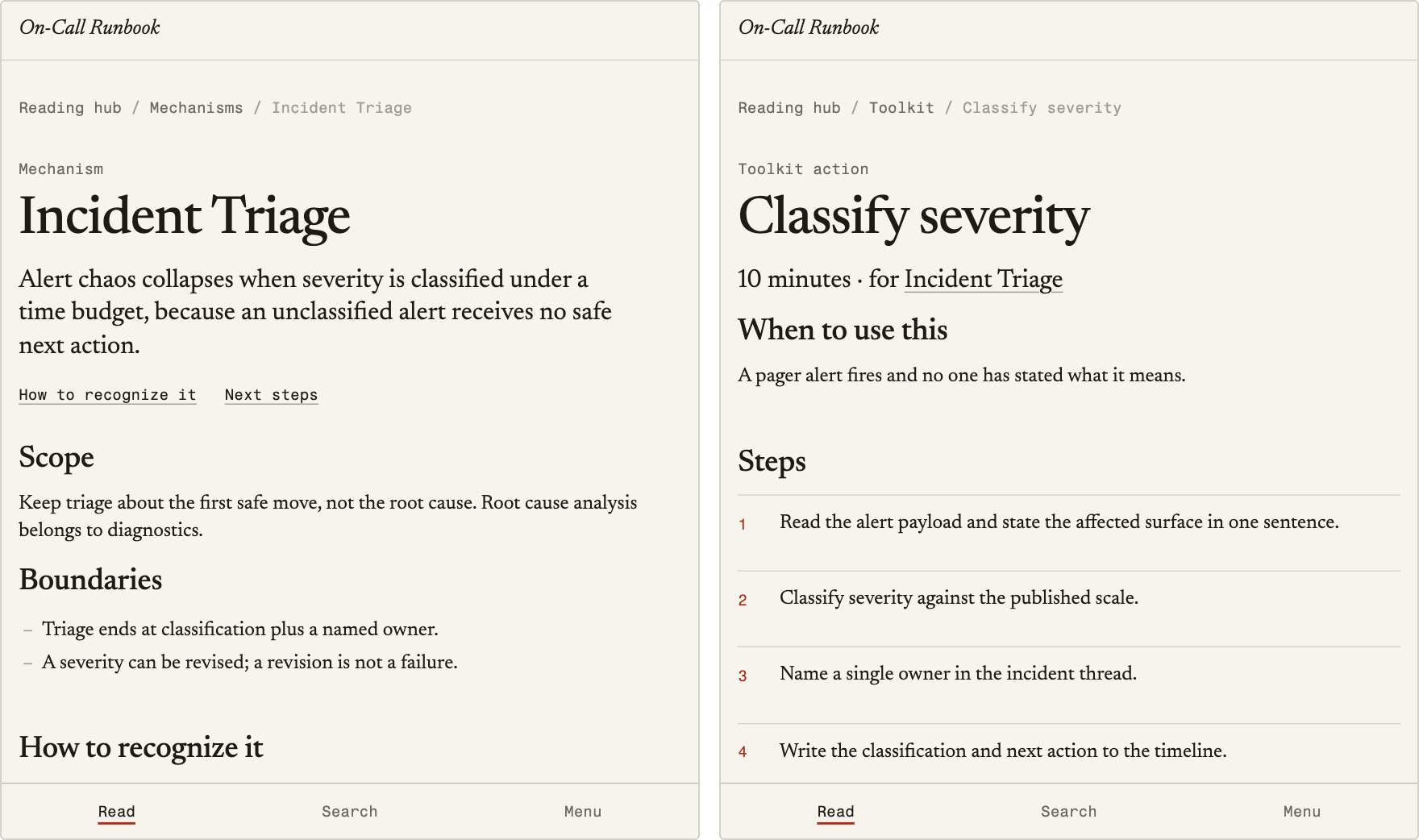
Two pages of the On-Call Runbook as Bookkit builds it: the Incident Triage mechanism, and the 10-minute tool that applies it.
Bookkit compiles a nonfiction book, written as MDX files, into a website with search, a PDF, an EPUB, and an MCP endpoint for AI agents. Each file is a typed record (a chapter, a mechanism, an action, an example, or a glossary entry), and Bookkit checks every record against its contract before it builds or publishes the book.
It is a set of command-line tools in a Bun workspace, built on Astro. There is no editor and no CMS: you edit files, run bun run bookkit, and commit with git.
AI may propose; the compiler decides.
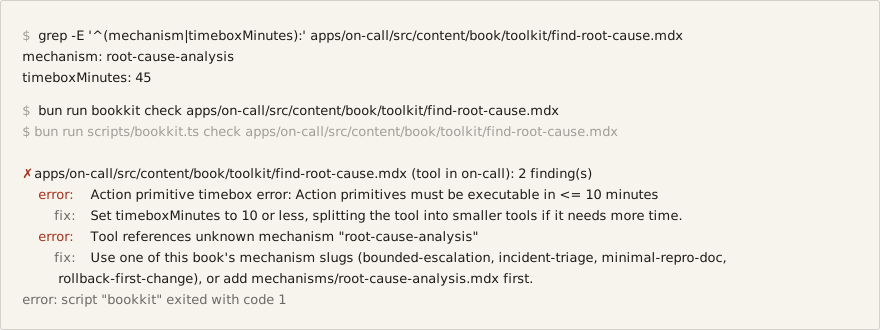
Real output of bun run bookkit check on a toolkit action broken on purpose: a 45-minute timebox, and a mechanism the On-Call Runbook doesn't define. bun run verify, which CI runs, fails on the same two errors.
Who it is for
Bookkit fits a book that names the causes behind a problem and gives the reader an action for each one: an incident runbook, an operating procedure, a field guide, or an argument for change that ends in concrete remedies. Its contracts are built for that shape:
- every action takes 10 minutes or less (
timeboxMinutesover 10 is an error, and the limit is not configurable); - every action applies a mechanism the book defines;
- the book declares a frame, and its overview chapter is checked for a heading per frame step.
It is the wrong tool for fiction, memoir, essays, or narrative history, and it is not a documentation-site generator or a blog engine: the site is built from typed records, not free-form pages. Using it requires a terminal, git, and Markdown.
How a book compiles
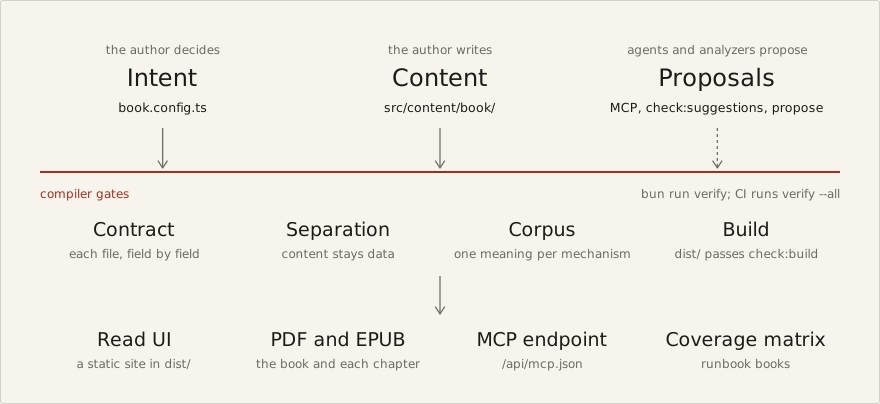
- The author decides intent in
book.config.ts: the objectives, the frame, and the book's causal claim. - Content binds to that intent in
src/content/book/. A chapter names the mechanisms it uses; an action names its mechanism. - The checks gate every change: each file against its contract, content kept free of code (
check:separation), one meaning per mechanism across books (check:corpus), and a build whosedist/passescheck:build.bun run verifyruns the checks a change needs. - Analyzers, agents, and judges propose; the author accepts. Nothing they write skips a check (Proposals, AI, and MCP).
- The build emits the reader site, the PDF and EPUB, the MCP endpoint, and, for a runbook book, the coverage matrix.
A book is made of five kinds of record, each a folder of MDX files under apps/<book>/src/content/book/:
| Record | What it is |
|---|---|
| Chapter | Prose, in reading order, listing the mechanisms it uses and the chapters to read first. |
| Mechanism | A named cause the book argues for: a definition, what it is and is not, predictions, and tests. Its slug is a durable identifier. |
| Toolkit action | Steps a reader can carry out in 10 minutes or less to act on one mechanism. |
| Example | A case that shows one mechanism in one setting; replacing it must not change what the mechanism means. |
| Glossary entry | A term readers meet. |
The frame (intervention, explainer, field-guide, or runbook) sets the steps the overview chapter must cover, and the book's status (draft to published) decides how strict the checks are. Concepts and configuration has the full contracts, frames, statuses, and book.config.ts fields.
Prerequisites
- Bun 1.4.3, the version
package.jsonpins. With mise,bun run setup(mise trust && bun install) installs it frommise.toml. Bun runs Astro and wrangler too, so Node.js is not needed. - git.
bookkit deploypublishes from a commit, so a project needsgit initand a first commit before its first deploy. Every other command,verify -- --allincluded, works in a folder that is not a repository yet. - To publish: a Cloudflare account, and
bunx wrangler loginonce (orCLOUDFLARE_API_TOKENin the environment). - Optional: Playwright's Chromium for the accessibility and browser checks (
bunx playwright install chromium), and about 550 MB of disk for the embedding model that compares mechanisms by meaning. Bookkit asks before it downloads the model.
Start a book
Pick one of three ways. Each ends with a book that builds; the starter text in it is yours to replace.
A project of your own
create-bookkit makes a standalone project with one book, a copy of the engine, and the CLI. Neither is published to npm, so it runs from a clone:
git clone https://github.com/zz-plant/bookkit.git
cd bookkit && bun install
bun run create-bookkit ../my-book --title "My Book"    # the folder must be outside the clone
cd ../my-book && bun install
bun run dev                                             # preview at http://localhost:4321
bun run verify -- --all                                 # types, content, shared pages, and a checked build
git init && git add -A && git commit -m "First draft"   # deploy publishes from a commit
bun run deploy -- --dry-run                             # every check, then wrangler's dry run
--book <slug> sets the slug and --dir <folder> imports a folder of notes as the first chapters. To take a newer engine later, pull the clone and run bun run create-bookkit ../my-book --upgrade; it replaces only what the engine owns and never writes content or book.config.ts. packages/create-bookkit/README.md covers the project layout and upgrades.
A book in this repository
In a clone, after bun install:
bun run bookkit new book my-book --title "My Book"     # --frame runbook|explainer|field-guide
bun run bookkit dev my-book
The book starts from the engine's starter: one placeholder of each record, all drafts, in a draft book. new book runs bun install and makes the book the current one; commit the bun.lock change with it. bun run remove:book -- --book <slug> deletes a book app after asking you to type its name.
From a folder of notes
bun run bookkit try ~/notes                              # what the folder would become; writes nothing
bun run bookkit new book my-book --from ~/notes          # a new book whose chapters are the notes
bun run bookkit import my-book --dir ~/notes --dry-run   # or into an existing book: the plan first
bun run bookkit import my-book --dir ~/notes
try shows what the folder would become and writes nothing. Import writes chapters only; bun run bookkit propose my-book drafts mechanisms and actions from the ideas that recur. Import and exports says what import does to each note.
Then replace the starter text
The checks name every placeholder still in book.config.ts: the three objectives, frame.intent, and causalStance. Each is a warning in a draft and an error once the book is published. Set site.url to the address the book will have, write the chapters, and run bun run bookkit publish when the book should be found: it checks the book with release rules, then sets status: "published".
Daily commands
bun run bookkit with no command lists your books and the commands for the current one; bun run bookkit help lists every command, and --help after any command or package script (bun run bookkit dev --help, bun run check:corpus --help) prints its arguments and examples without running it. Commands run from any folder in the workspace; a command missing an argument asks for it, and a mistyped name gets the closest match.
Write
bun run bookkit use my-book                             # later commands default to this book
bun run bookkit new                                     # asks what to start, then anything it needs
bun run bookkit new chapter "Repair has a clock"        # the next chapter, as a draft
bun run bookkit new chapter "Who holds the lever" --after <chapter-slug or number>
bun run bookkit new mechanism "Waiting as leverage" --definition "<one sentence>"
bun run bookkit new tool waiting-as-leverage "Name the deadline"
bun run bookkit new example waiting-as-leverage Housing "The repair queue"
bun run bookkit new release "Second draft"              # releases/<date>-second-draft.mdx, next minor version
bun run bookkit new glossary "Pager queue" --definition "<one sentence>"
bun run bookkit rename chapter <slug> <new-slug>        # slug, file, other chapters' prerequisites, and links
bun run bookkit rename mechanism <slug> <new-slug>      # in every book that shares it, with what names it
bun run bookkit remove chapter|mechanism|tool <slug>    # the record, and the lists that name it
bun run bookkit move tool <tool> --to <mechanism>       # bind an action to another mechanism
bun run bookkit contract mechanism                      # the fields a section needs (also: contract release)
new mechanism first lists any mechanism in another book that covers the same idea, and asks before creating a duplicate.
Check
bun run bookkit check                    # the current book: errors, overlap with other books, suggestions
bun run bookkit check --all              # every book
bun run bookkit check <file.mdx>         # one file, each finding with its field and a fix
bun run bookkit check ./runbooks --frame runbook   # any Markdown folder, without making it a book
bun run bookkit check apps/my-book/src/content/book/chapters   # a folder of a book, with the book's rules
bun run verify                           # the checks your change needs, chosen from the files it touches
Errors exit 1; warnings and suggestions do not. CI runs bun run verify -- --all. What the checks enforce lists the rules.
Preview, build, and publish
bun run bookkit dev                        # the current book at http://localhost:4321, with live reload
bun run bookkit dev status                 # find (or `stop`, or tail the `logs` of) a dev server in another terminal
bun run bookkit build                      # apps/<book>/dist: the site, exports/book.pdf, exports/book.epub
bun run bookkit export                     # a GitBook folder in apps/<book>/exports/gitbook
bun run bookkit publish my-book            # draft to published, once release rules pass
bun run bookkit deploy my-book --dry-run   # content checks, build, and wrangler's dry run; publishes nothing
bun run bookkit deploy my-book             # every check, build, and publish to Cloudflare
bookkit build builds a book with content errors too, and ends with any export warnings (an image the PDF shows as alt text); bookkit deploy is the command that refuses errors. preview, serve, and start are other names for dev, and init for new book. With one book in the workspace, commands take it without its name. Publishing covers deploy, CI, and the server runtime.
Example books in this repository
| Book | Frame | Status |
|---|---|---|
apps/on-call |
runbook | published |
apps/bad-people |
intervention | draft |
apps/running-hot |
intervention | draft |
apps/crumple-zone |
intervention | draft |
apps/match-to-july |
field-guide | draft |
The On-Call Runbook is the one to read first: four mechanisms, each with one action of 10 minutes, a drill, and an escalation. check:runbooks prints its compliance matrix:
$ bun run check:runbooks
REVIEW DATES on-call: judged as of 2026-02-10 (reviewsAsOf in book.config.ts), not today
COMPLIANCE on-call: 4/4 controls with tool coverage
  DIAG-REPRO-01 → minimal-repro-doc [capture-repro] ✓drilled ·review due 2026-03-12
  ESC-RAMP-01 → bounded-escalation [ramp-escalation] ✓drilled ·review due 2026-03-12
  INC-TRIAGE-01 → incident-triage [classify-alert-severity] ✓drilled ·review due 2026-03-12
  REL-ROLLBACK-01 → rollback-first-change [identify-rollback-candidate] ✓drilled ·review due 2026-02-24
Bad People, Running Hot and Crumple Zone are drafts by one author, held to one vocabulary through corpus.json (Several books). Match Day to July 1 is a draft field guide for new residents, outside that corpus.
Documentation
Using Bookkit — the guide in docs/guide/:
| Page | Read it for |
|---|---|
| Concepts and configuration | Record types, frames, book status, every book.config.ts field, and the files Bookkit writes. |
| What the checks enforce | Content rules, link and HTML safety, build checks, runbook coverage, accessibility. |
| Import and exports | Importing notes; what the PDF, EPUB, and GitBook export contain. |
| What readers get | The reader site: wayfinding, search, releases, the Ask panel. |
| Publishing | Deploy, deploy from CI, static and server builds, server environment. |
| Proposals, AI, and MCP | propose, the embedding model, and the MCP endpoint for agents. |
| Several books | Holding mechanisms to one meaning across books: judges, rulings, merges. |
| Troubleshooting | Common errors and what to do about them. |
Working on Bookkit — engine code is in packages/astro-bookkit/, the CLI and checks in scripts/, the books in apps/:
| Document | Covers |
|---|---|
CONTRIBUTING.md |
Lanes, the checks each change needs, tests, and CI. Start here. |
AGENTS.md |
The invariants every change must keep. |
docs/architecture.md |
Layers, pipelines, the engine module map, and import tiers. |
docs/design-notes.md |
Why the invariants exist. |
docs/authorship-model.md |
The "book as software" model behind the three layers. |
docs/bets.md |
What the maintainers work on next. |
docs/tech-debt-register.md |
Known cross-cutting debt. |
CHANGELOG.md |
Dated behavior changes and migration notes. |
License
Dedicated to the public domain under CC0 1.0 Universal.