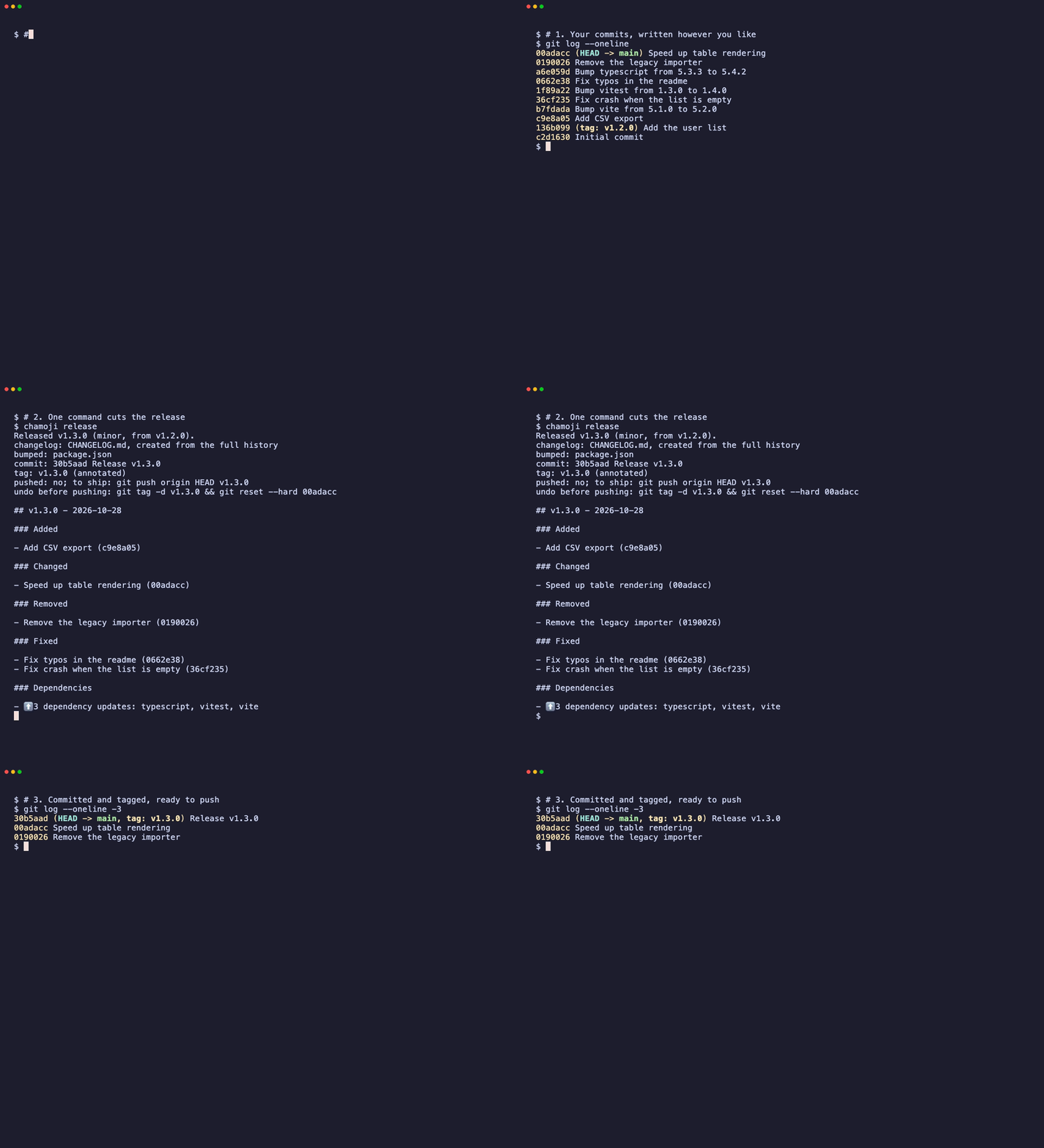


Every commit explains itself.
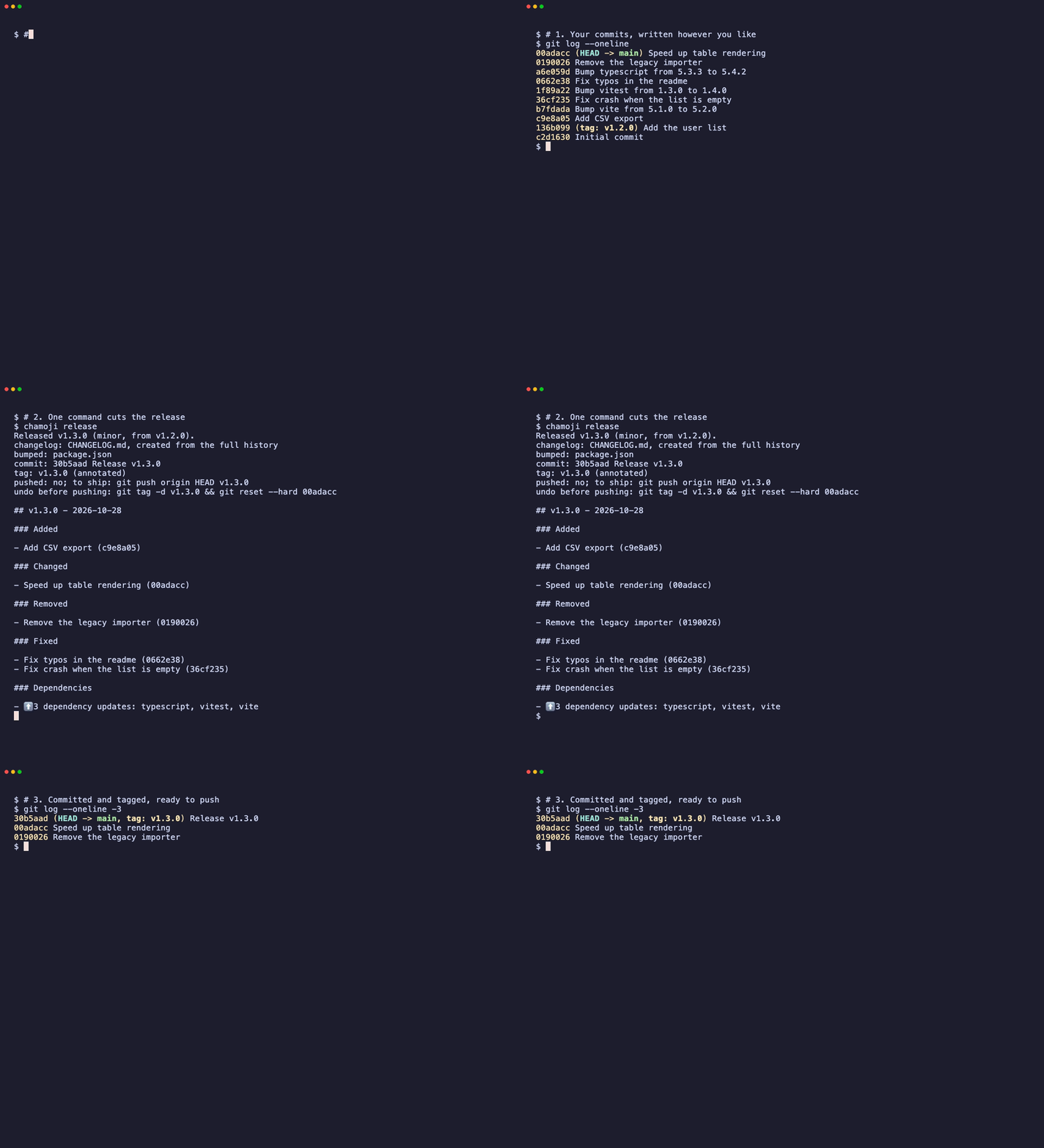
chamoji
Changelogs from your git history, however your team writes commits:
- emoji commits in the gitmoji convention (
✨ Add login) - Conventional Commits (
feat: add login) - plain messages (
Add login)
Chamoji groups them into readable sections, collapses dependency noise into one line, can sort vague commits with AI, and suggests the next semver version. It's its own engine, not a wrapper around gitmoji tools; gitmoji is one of the commit styles it understands.
Install
npm i -g @chamoji/cli
Or run it without installing: npx @chamoji/cli changelog.
Requires Node.js 22 or newer and git.
Usage
chamoji changelog                          # Markdown to stdout
chamoji changelog --output CHANGELOG.md    # write a file
chamoji changelog --format html --output changelog.html
chamoji changelog --format json            # machine-readable
chamoji next-version                       # e.g. 1.3.0
chamoji release                            # cut a release (see below)
chamoji commit                             # write a commit (see below)
chamoji ws                                 # list workstreams (see below)
chamoji why src/auth.ts:42                 # why is this line here? (see Project memory)
next-version exits with code 3 and prints nothing to stdout when no commit since the last tag implies a version bump (only docs, tests or refactors, say).
| Option | Meaning |
|---|---|
--format |
markdown (default), md, json or html |
--output, -o |
Write to a file instead of stdout |
--from <tag> |
Leave out this release and everything older |
--to <ref> |
Ref to treat as the head of history (default HEAD) |
--release <version> |
Name and date the unreleased section, e.g. when cutting a release. Its compare link targets the tag it will get (v<version> when your tags use a v) |
--since <ref> |
Only the commits after this ref, as one Unreleased section, to preview a branch: --since origin/main |
--config <file> |
Config file (default chamoji.config.json when present) |
--ai |
Sort the commits no rule can place with Jev (see below) |
Writing commits
The changelog is only as good as the commits. The composer helps write commits that sort themselves.
chamoji commit           # compose a commit
chamoji commit -a        # and include every tracked change
chamoji hook install     # offer the composer on a plain `git commit`
chamoji hook uninstall
The composer asks for:
- A gitmoji, from a search list. Type
bug,fixor a few letters such asspk, and pick with the arrow keys. - The scope
- The title
- A body
- Why? This is kept as a
Why:trailer. - Whether it breaks anything. If it does, it adds a
BREAKING CHANGE:trailer.
Enter moves on, Esc goes back and Ctrl-C cancels. It writes ✨ (auth): Add login, or :sparkles: (auth): Add login with emojiFormat: "code".
The hook opens the same composer when you run git commit with no message. It stays out of the way:
- It never runs for
git commit -mor-F, merges, squashes, amends or rebases. - It never runs when the message already has a gitmoji.
- It never runs in CI, or without a terminal, as with an editor's commit button.
- Ctrl-C keeps git's own message, so the hook never blocks a commit.
Hook managers:
-
husky:
chamoji hook installprints the line to add to.husky/prepare-commit-msg:chamoji hook run "$@". -
lefthook: add this to
lefthook.yml:prepare-commit-msg: commands: chamoji: run: chamoji hook run {1} {2} {3} interactive: true
Switching from gitmoji-cli: run chamoji hook install. It replaces gitmoji-cli's hook, and leaves any other hook alone. Your settings carry over. chamoji reads .gitmojirc.json, or the gitmoji key in package.json, for these keys:
emojiFormatscopePromptmessagePromptcapitalizeTitleautoAdd, which stages everything first
Without a config, chamoji writes the emoji character and asks for a scope.
Suggestions from Jev
With your opt-in, the composer asks Jev about the staged changes as it opens. It takes about 100 ms, and the composer never waits more than 2 seconds for it.
git config --global chamoji.composer true   # or without --global, for one repository
git config --global chamoji.sendDiffs true  # optional: send the diff too
- The gitmoji: Jev's three likeliest gitmojis appear as a hint above the list. When it's very sure (90% or more), they move to the top instead, and the first is selected. Typing a search, or any key pressed before the answer arrives, keeps the list as it was.
- Breaking: when Jev thinks the change may break something (70% or more), the last step says so. The default is still No; only you declare a breaking change.
- Split: when the staged changes look like unrelated pieces of work, the title step suggests committing them separately.
What is sent: the staged files' paths, with each one's status and the lines added and deleted, and the message's first line when git commit already has one. With chamoji.sendDiffs, the staged diff goes too: at most 200 lines per file and 2,000 in all, with private keys and common token formats replaced by <redacted>.
What is never sent: secrets files and lockfiles, not even their names. That covers .env*, .envrc, .npmrc, .netrc, credentials*, id_* keys, *.pem, *.key, *.p12, *.tfvars and similar, any path containing "secret", and lockfiles. The request says only how many files were left out.
The opt-in lives in git config, not in a file in the repository, so a repository you clone can't switch it on for you. The key comes from TYPESAFE_API_KEY, or that line in an untracked .env.local or .env.
Workstreams
A workstream is a piece of work that takes more than one commit, such as "Auth revamp". Mark its commits, and the changelog shows it as one Highlight with those commits folded underneath, instead of a flat list.
chamoji hook install               # once: the hook is what stamps commits
chamoji ws start "Auth revamp" 🔐  # a new workstream, now active here
git commit -m "✨ Add login"       # gets the line "Workstream: auth-revamp"
chamoji ws                         # workstreams and their unreleased commits (* is active)
chamoji ws switch <slug>           # make another one active (--none clears it)
chamoji ws ship                    # mark the active one shipped (or: chamoji ws drop)
ws start, ws ship and ws drop stage .chamoji/workstreams.yml and don't commit it. Your next commit records the change.
ws start and ws switch tell you if git commit won't stamp your commits, which is the case in a fresh clone until you run chamoji hook install, because git doesn't clone hooks. They read the hook git would run, including one set up through husky or lefthook, and never install one for you. If another tool's hook doesn't show whether it runs chamoji, they say so. chamoji hook install shows the line to add.
- Committed or local:
.chamoji/workstreams.ymlis committed, so the team shares each workstream's title, emoji, description, status and links. Which workstream is active is local:.git/chamoji/active, one per worktree. - What gets stamped: commits made with
git commit -m(an amend with-mtoo, since the hook can't tell them apart),chamoji commit, and messages written by the composer. Merges, squashes, amends without-m, rebases, cherry-picks and reverts are left alone. A-msubject startingRevert "orReapply "isn't stamped either, because a cleangit revertlooks the same to the hook. - Editor commits aren't stamped. The hook runs before the editor opens, and stamping an empty message would stop git from aborting when you quit. So for a plain
git commitwhose message you write in the editor, the hook prints a notice naming the workstream. Add theWorkstream:line yourself, or use-morchamoji commit. A message written in the editor from acommit.templateworks the same way. - When it becomes a Highlight: once the workstream is
shippedin the file as of that release. Earlier releases don't change, and a workstream's commits in an earlier release stay loose. Commits of a workstream that is still active or dropped are listed as usual, and breaking commits stay under Breaking changes. The changelog reads the committed file, so commit the ship before previewing the changelog. - Squash merges: chamoji reads
Workstream:lines anywhere in a commit's body. A squash that mixes workstreams gets the first one found. On GitHub, the line survives with the "Default message" and "Pull request title and commit details" settings. "Pull request title and description" and "Pull request title" drop it, so those commits land outside their Highlight. With "title and description", add theWorkstream:line to the PR description. With "title" alone, add it in the merge box.
Project memory
Git keeps what changed. Project memory keeps why: the reasoning behind a commit, still there after the branch is deleted, and one command away for you or your AI agent. It is built from three things, all in git: intent cards in commit messages, workstream summaries on their own ref, and a search index you can rebuild at any time.
Intent cards
An intent card is up to four lines in a commit message. The keys are matched ignoring case:
Why:the reason for the changeConstraint:a limit the change had to live withinGotcha:something that will trip up the next personFollow-up:work this change leaves for later
Write them at the end of the message, use the composer's Why? field, or add them from the command line with git's own flag:
git commit -m "✨ Retry idle connections" \
  --trailer "Why: the API drops idle connections after 30 seconds" \
  --trailer "Gotcha: the retry must not repeat a POST"
A line can run on over the lines that follow it, until a blank line or the next Key: value line, and a key can repeat. Jev never writes or changes a card.
Squash merges: chamoji reads card lines anywhere in a commit's body, so a squash keeps them as long as the body survives. On GitHub that is the same table as for Workstream: lines: "Default message" and "Pull request title and commit details" keep the cards. "Pull request title and description" keeps only what is in the PR description, and "Pull request title" drops the whole body, cards included. If you run chamoji ws ship on the branch before the squash, the summary saved on the memory ref keeps the cards even then (see below).
Asking why
chamoji why src/auth.ts:42
It blames the line in your working copy and prints the commit that wrote it, with its date, author and card. A commit with no card shows its workstream instead, when one is known. A line you haven't committed yet says so and exits 0. A file or line that doesn't exist gives a plain message and exits 1. --json prints the same result for scripts. It only reads git; nothing is changed or sent anywhere.
The memory ref
When you mark a workstream shipped or dropped (chamoji ws ship, chamoji ws drop), chamoji saves a summary of it on refs/chamoji/memory: its title, emoji, status, and its commits with their cards. The summary comes from the commits on HEAD that name the workstream, so run the command on the branch that holds the work. The ref is written with git plumbing, so your working tree and index are never touched. The summary survives deleting the branch and a squash merge. Both commands say how many commits they saved (Saved 2 commits to memory.) and warn when it is none, which means this branch has no commits for that workstream: run the command again on the branch that has them.
chamoji memory                          # list what is remembered
chamoji memory list --archived          # list the archived entries too
chamoji memory show <slug>              # one entry with its commits and cards
chamoji memory search <query>           # find commits and workstreams by what they say
chamoji memory reindex                  # rebuild the search index
chamoji memory archive <slug>           # hide an entry from the list, and keep it
chamoji memory archive <slug> --purge   # delete it for good
chamoji memory sync                     # merge with origin and push
- Archive, never delete:
archivehides an entry from the list and from search, andmemory showstill finds it.memory list --archivedlists the archived entries with the live ones. Only--purgeremoves one.memory listalso says when an entry is there but can't be read, instead of calling memory empty. - Purge is local until you sync: it removes the entry from your ref, deletes this worktree's search index, which held the entry's text, and leaves a marker so that a later sync can't bring it back. Other worktrees keep their own index file until their next search, which sees that the memory ref moved and rebuilds it. Purge doesn't reach origin. Run
chamoji memory syncnext: it merges origin's memory into yours first, and if origin still holds the entry it prints the command that removes it there. That command is a force-push, and it replaces origin's memory history with yours, so run it only after amemory synchas merged. Chamoji never force-pushes itself. Any other clone that has already fetched the entry still holds the text. - A purge keeps the name: the marker is the slug, and the commit message
Purge <slug>names it too. Purging removes the content, not the name, and a purged slug can't be saved to memory again, so start that workstream again under a new name. - Search is keyword search (BM25) over every commit on
HEAD, with its subject, body and card, and over the live workstream entries, not the archived ones. The index is a cache at.git/chamoji/memory-index.json. It rebuilds itself whenHEADor memory changes, andmemory reindexforces it. It needs no network and no key. With--ai, Jev reorders the ten best matches (see below).
Sharing memory
chamoji init              # once per clone
chamoji memory sync       # merge with origin, then push
chamoji init adds a fetch line for refs/chamoji/* to origin and takes in whatever memory origin has, so a fresh clone needs only init. Git doesn't clone these refs, so every clone runs init once. chamoji memory sync merges both sides and pushes the result; two clones that remembered different workstreams keep both. The push runs your pre-push hook like any other, and a hook that refuses it is reported as an error. It tries again only when the push lost a race to another clone. chamoji release --push also syncs memory, but only in a clone that ran init.
init leaves git push alone. The roadmap planned to set remote.origin.push so that a plain git push would carry memory. Tested, that setting made a plain git push push only the memory ref and leave the branch behind, and an explicit git push origin main ignored it anyway. So memory goes out through memory sync and release --push, and init sets only the fetch line. Plain git fetch and git pull keep working before origin has any memory.
Plain git fetch and git pull don't change what chamoji memory shows. They download origin's memory into refs/chamoji/remotes/origin/memory, and nothing reads it from there. chamoji memory sync brings it in, and chamoji init says so when it runs.
Who can change it: a memory ref is shared with everyone who can push to the repo. Entries that come from origin are data. A pusher can add an entry or change a title or a card, and chamoji never verifies a card. Read them as you would a teammate's commit message. Chamoji prints them with control characters removed, and chamoji mcp tells the model they are data, not instructions.
For AI agents
chamoji init --agents
This does what init does, and sets up Claude Code in this repo by merging into two files that are meant to be committed, so everyone who uses Claude Code here gets the same setup. Existing entries are kept, and a file chamoji can't safely read is left alone.
.mcp.jsongets achamojiserver that runschamoji mcp, ornpx --yes @chamoji/cli mcpwhen chamoji isn't on your PATH..claude/settings.jsongets the commit hook, below.
Approve the server. Claude Code won't run a server from a project's .mcp.json until you approve it, and until then claude mcp list shows it as Pending approval. Approve it when Claude Code asks.
chamoji mcp is a small MCP server over stdio with three tools, all read-only. None changes your history, refs or files; search_memory may refresh the index cache in .git.
| Tool | What it does |
|---|---|
search_memory |
Search commits and remembered workstreams by what they say, cards included |
why |
The commit behind a file and line, with its message and card |
workstream |
A workstream's title, status and, once remembered, its commits and cards |
Everything the tools return is commit text that other people wrote, and each tool says so to the model. Replies are cut to a fixed size, and a cut reply says truncated: true. The server makes no network calls, except under chamoji mcp --ai, which asks Jev to reorder search_memory results with the same limits as memory search --ai.
The commit hook is a PreToolUse hook on Claude Code's Bash tool. When the agent runs a git commit whose message has no card line, the hook denies it and says what to add:
Add why this change was made: put a "Why: <reason>" line at the end of the commit message, after a blank line. Constraint:, Gotcha: and Follow-up: lines are welcome too. Only if the user told you to skip this, prefix the command with CHAMOJI_NO_CARD=1.
The agent retries with a Why: line. Any one of the four lines counts, as long as chamoji would read it: below the subject paragraph, so -m "Why: because" is a subject, not a card. `C