Turns a BibTeX bibliography into grounded survey papers, thesis chapters, undergraduate textbook chapters and hands-on tutorials, with every citation traceable back to a paper the bibliography actually holds.
Named for the Hindu god who keeps the ledger of every deed and audits souls against it -- which is what this does to citations. See more.
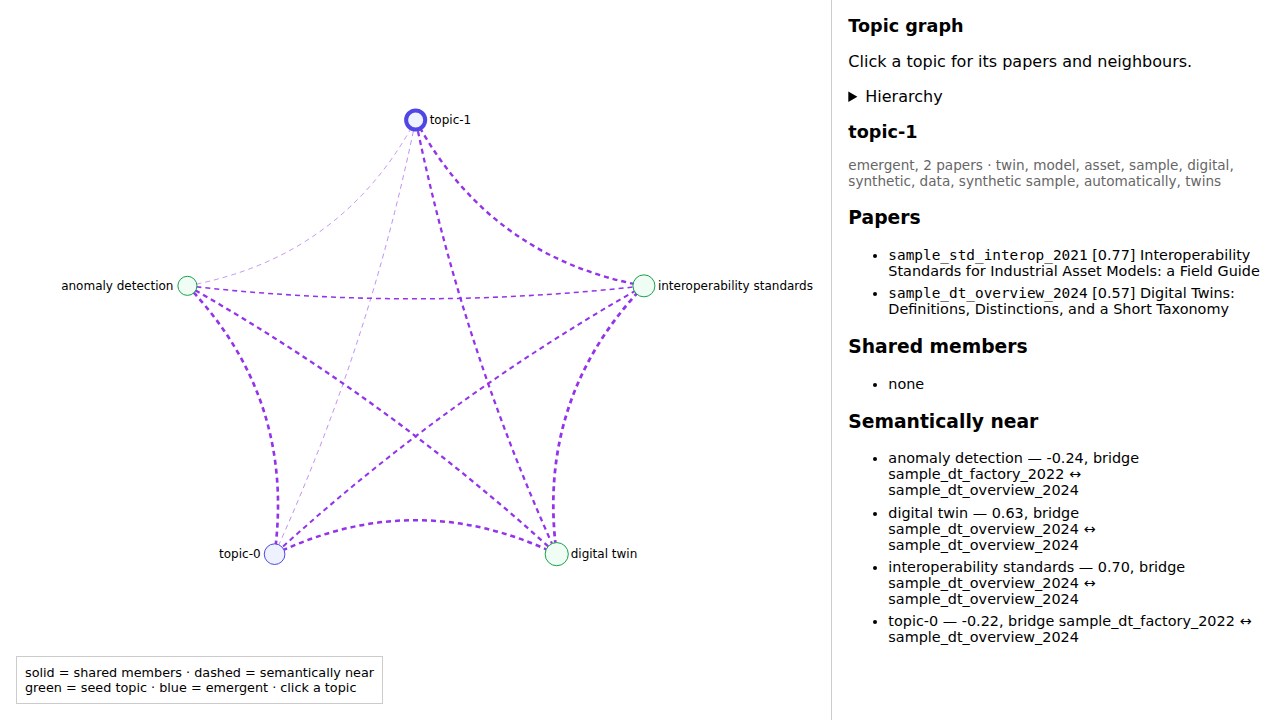
The recording above is the terminal half only; docs/DEMO.md has the full recording -- including
the browser segment pictured here -- as video and GIF.
🔑 The one rule
Asked to write a literature review, language models fabricate citations at rates measured in the double digits, and fabricated placeholder references have reached real published papers. Most tools answer this with retrieval, which makes fabrication unlikely. Unlikely is a different property from impossible: in a conventional retrieval-augmented pipeline the model is asked not to invent a reference, and nothing stands between a generated citekey and the rendered document. Chitragupta puts something there:
A citekey may only be used if it appears in your own
.bibexport and was picked up into the ledger by a real parse of a real PDF.
That sentence is enforced by architecture, not by prompt: the bibliography you export is the only way a source gets in, and one blocking check, the citation gate, is the only way a draft gets out. A gate failure loops back to drafting, not to you.
- What it is
- How it works
- Quickstart
- The enrichment layer
- Hardware requirements
- Documentation
- Acknowledgements
✍ What it is
Chitragupta is a local-first system for co-authoring scholarly prose over a corpus you curated: a human and a language model write the same document by turns, each contributing where it is stronger. You curate the library, decide the scope, steer, and edit; the pipeline retrieves, drafts grounded sections, verifies every citation mechanically, and remembers the judgment behind the draft so that changing it months later is an edit, not a re-run.
You contribute in three ways, and each has a mechanical effect rather than a rhetorical one:
- Declare structure before drafting. An optional outline carries, per section, a brief the draft must obey but never show, your own prose as claims to be grounded, and the exact retrieval queries to run verbatim instead of letting the model invent sub-themes.
- Write prose directly. A section written by hand is a first-class input: the pipeline grounds it against the corpus, and any sentence it cannot ground is dropped and named back to you. That is deliberately the opposite of a tool that edits your draft.
- Edit what the model produced. A text fingerprint notices the draft moved, surfaces what went stale, and offers (never applies) one further retrieval round in which your own new wording is the query.
The design has a cost: the pipeline cannot cite a paper you have not catalogued, and "the corpus does not contain this" is a frequent and deliberate answer. You supply the argument and the corpus supplies the warrant; where it cannot, the sentence does not ship.
🏗 How it works
Five phases along the spine, and two layers beside it. You own phase 1; nothing reaches phase 5 without passing phase 4.

Two properties of the spine alone make the guarantee hold, and both are structural rather than procedural:
- Phase 1 is the only entrance. Citekeys come from your reference manager's BibTeX export, synced into a small local ledger by a deterministic run: no LLM, no judgement calls, and the same bibliography in yields the same citekeys out. The pipeline never fetches a paper, never invents a citekey, and never renames one.
- Phase 4 is the only exit.
chitragupta draft gatesits on the single path between a draft and a rendered document. There is no arrow around it, and aFAILis treated like a failing test rather than a lint warning. What the gate proves is that every citekey is real; whether each cited paper actually supports its sentence is the review layer's business, below.
The two layers beside the spine hold the draft's working memory and its advisory checks:
- The dossier is the draft's externalised working memory, written as the draft is written: scope, who the reader is, the evidence kept, the candidates rejected and why, and what you steered in chat that the prose does not show. It makes the next revision scoped instead of a re-run, and is why "shorten section 3" three weeks later costs an edit instead of a rebuild (docs/DOSSIER.md).
- The review layer is ten advisory aids for a finished draft: does the cited paper say this (provenance), how much wording came from the sources (verbatim), what did retrieval surface that you never cited (coverage), and seven more, merged into one ranked worklist (agenda). None of them is a gate, and none may be promoted to one. Each is measured against something that can itself be imperfect (a parse, a retrieval ranking), and a check like that must inform you instead of blocking you (docs/REVIEW.md).
Eleven skills sit behind phase 3, all obeying the same grounding rules:
six that write a draft (survey, thesis chapter, undergraduate textbook
chapter, hands-on tutorial, a heavier multi-perspective deep-research
mode, and a verbatim digest in the papers' own words), three that
change a draft that already exists, one that assembles accepted units
into a book, and one that draws the figures the others hand it
(docs/GENRE.md). Before any draft exists,
chitragupta corpus discover maps what your corpus is about: its
topics, their papers, and the links between them
(docs/TOPIC-DISCOVERY.md; worked tours in
docs/EXPLORE-CLI.md and
docs/EXPLORE-WEB.md).
docs/DIAGRAMS.md draws this workflow thirteen ways (by depth, by genre, and in time order) and is where the figure above comes from. docs/GLOSSARY.md defines the working vocabulary in one page.
🚫 One thing the corpus layer does not promise
The corpus layer is deterministic in the sense that matters most (no
LLM, no judgement calls, same bibliography in, same citekeys out), but
it is not bit-reproducible with every parser. With the default
pdftotext backend it is: parsed text comes back byte-identical, every
ledger column stable except the last_synced timestamp.
With the opt-in docling backend and a worker pool, it isn't, and
the instability reaches the quotable passage, so the exact span
quoted from a source can change between runs. A snippet is the evidence
a judgement is recorded against, so an irreproducible snippet means an
irreproducible rejection; that is why this README states it openly. The
cause is Docling's behaviour under load, not anything this pipeline adds;
serial parsing ([parser].workers = 1, the default) has not been
observed to vary. The artifact-by-artifact contract and the measured
rates are in
docs/ARCHITECTURE.md.
Every artefact this README describes exists, committed, as pipeline output over a five-paper sample corpus: see examples.
🚀 Quickstart
Two ways to get a project directory, and everything from step 2 onward is identical either way. Pick whichever matches what you're doing:
# pip install: for using the pipeline. The venv is what avoids Debian/
# Ubuntu's PEP 668 error and keeps Claude Code's hooks able to import
# chitragupta -- docs/CLI.md's Installing says why the name matters.
mkdir my-project && cd my-project
python3 -m venv .venv-full && source .venv-full/bin/activate
pip install chitragupta-cli
chitragupta init                      # config.toml, .claude/, papers/, content/, prose docs
                                      # add --agent codex / --agent opencode for those agents
chitragupta install os-deps           # TeX Live, Pandoc, poppler. Debian/Ubuntu, needs root
pip install 'chitragupta-cli[enrich]'   # optional, several GB -- only step 4 uses it
# git checkout: for working on the pipeline itself -- see DEVELOPER-AGENTS.md.
# Same .venv-full; the script creates it if absent, reuses it if not.
git clone https://github.com/prasadtalasila/chitragupta && cd chitragupta
cp config.toml.example config.toml   # git checkout only
pipx install poetry
bash scripts/install_full_pipeline.sh all
source .venv-full/bin/activate
# 1. Export Zotero's library: format BibTeX, tick "Export Files", save it
#    as `bibliography` inside papers/. Each entry's file field is relative
#    to the .bib, so don't rename or move the companion folder afterwards
#    -- see docs/ZOTERO.md.
#      papers/bibliography.bib
#      papers/bibliography/files/<id>/<name>.pdf
mkdir -p papers && cp -r /path/to/your/export/. papers/

# ...only if your field has its own acronyms (DT, FMU, ...) beyond the
#    PDF/CPU/URL/API/HTML every draft already gets. assets/style/README.md.
# cp assets/style/acronyms.toml.example content/acronyms.toml
# # then point [style].acronyms in config.toml at it

# 2. Sync the corpus layer from papers/bibliography.bib. A citekey that
#    later drops out of the bib file is only *reported*; --remove-stale
#    deletes the row once you've read that list. docs/ZOTERO.md has why
#    the default is report rather than delete.
chitragupta corpus sync            # or: python -m chitragupta.corpus sync
# chitragupta corpus sync --remove-stale

# 3. Inspect what it found. Read-only, takes no lock.
chitragupta corpus ledger

# 4. Optional: the enrichment layer -- layout-aware parsing, semantic
#    search, topic clustering. No skill builds it for you, so skip it on a
#    first run. Needs the enrich extra above; chitragupta doctor says
#    whether you have it. "The enrichment layer" below, then
#    docs/RETRIEVAL.md, say which stage is worth the cost.

# 5. In your coding agent (Claude Code, Codex or OpenCode), ask for a draft, e.g.:
#    "write a survey section on digital twin composability"
#    "draft a thesis chapter on runtime verification for autonomous robots"
#    "write a textbook chapter introducing digital twin asset reuse"
#    "write a tutorial that builds a minimal digital twin asset from scratch"
#    "do deep research on fault injection for digital twin testbeds"
# The matching skill in that agent's skills folder picks this up automatically,
# including its own gate -> references -> render chain (chitragupta draft <verb>).
# docs/LLM-AGENTS.md has each agent's setup and skill names.
Every command that chain runs, every way to re-run one by hand, and all eleven review-layer commands for checking a finished draft against its sources are in docs/CLI.md. Its section The full first run, step by step walks the whole sequence above and everything that follows it, in order.
🧠 The enrichment layer
Everything above works without it. The enrichment layer is a second,
optional pass over the same corpus that buys four things: layout-aware
parsing that yields quotable passages, semantic search that finds a
paper arguing your point in different words, topic modelling over the
whole corpus, and the topic graph that corpus discover and the
offline topic map read.
chitragupta enrich --stages docling,embed      # or: python -m chitragupta.enrich --stages docling,embed
chitragupta enrich                             # all seven stages
It costs real time and disk (a first full-corpus parse is measured in
tens of minutes, and the enrich dependency group is several gigabytes),
so you build it deliberately. No genre skill builds it for you.
The skills read what is already there and fall back to the lightweight
default when it isn't. Inside the layer, every stage probes its own
prerequisites and reports ok, partial, skipped or error rather
than assuming. No stage needs an LLM API key; this repository
intentionally has none.
Which stage is worth the cost is docs/RETRIEVAL.md's question; what the topic stages produce and how to explore it is docs/TOPIC-DISCOVERY.md's.
💻 Hardware requirements
What the pipeline needs, not what it was developed on. The split that
matters is between layers: the corpus layer (sync, the citation
gate, keyword retrieval) is light enough for any laptop, and the
optional enrichment layer is what costs real disk and real time.
| Resource | Minimum (corpus layer only) | Recommended (enrichment layer in regular use) |
|---|---|---|
| Disk | ~1GB | 10-20GB+. The full venv alone is 6.0GB (torch pulled in twice over via sentence-transformers/docling, plus docling's own layout/OCR models); TeX Live adds several GB more |
| RAM | ~1-2GB | 8GB minimum, 16GB+ better. At ~3GB free, Docling on a 17-page PDF pushed the process to 3.6GB RSS and the host swapped 6.3GB; it finished, just slowly |
| CPU | 1-2 cores | 4+ cores. Without a GPU, Docling's layout inference and BERTopic's UMAP/HDBSCAN are CPU-bound, and more cores directly cut wall-clock time |
| GPU | none needed | none required. If one is present the installer detects it and torch is set up to use it automatically, worth ~4.7x on the parse |
| Network | once, for poetry install |
also for first-run model downloads (the embedding model, Docling's layout/OCR models) |
For a sense of scale at the top end, this project's own bibliography
(501 PDFs, 13,400 pages, 1.54GB) parses in about 4 minutes on a
96-core machine with four A40s, against 1h 56m serially on that same
host. On ordinary hardware a first full Docling parse is measured in tens
of minutes. A second run over an unchanged corpus costs close to
nothing either way, because every stage skips what hasn't changed. That
is what makes it safe to put sync on a schedule.
Every measured figure in this project comes from one of two reference
machines: the small machine (4 cores, 9.7GB RAM, no GPU) and the
multi-GPU machine (96 cores, 251GB RAM, 4x NVIDIA A40; the one in the
paragraph above). Treat each figure as that machine's, and expect yours
to differ. docs/PERFORMANCE.md has their full
specifications, what each setting costs, and the two install-time traps
worth knowing before you start (a CPU-only host pulling several GB of
unused CUDA packages, and a GPU host where torch.cuda.is_available()
comes back False).
📖 Research Citation
When Chitragupta is used in academic work, the following reference may be used:
@software{talasila2026chitragupta,
author = {Prasad Talasila},
title = {Chitragupta: An automated research pipeline for literature review and thesis drafting},
year = {2026},
url = {https://github.com/prasadtalasila/chitragupta},
publisher = {GitHub}
}
🗂 Documentation
This file is the overview: what the pipeline is, how to get it running, and what it needs. Everything else lives in one document per question, split by what you are doing: using the pipeline, or working on it. Which of those you are doing can change within a session, and the split follows the task rather than the person; CLAUDE.md is the one-screen router for that.
▶ Using it
🚀 Getting started
| Document | Answers |
|---|---|
| SOUL.md | One page: why this exists, the one invariant, and what it refuses to become |
| docs/FEATURES.md | What can it do for me? The whole capability surface in one place, written for someone deciding whether it fits: from getting a library in, through topic discovery, drafting and review, to what it deliberately does not do |
| docs/DEMO.md | What does running it look like? A short recorded pass through the spine, as video and GIF, made against the committed sample project |
| docs/GLOSSARY.md | The working vocabulary (citekey, ledger, dossier, gate, topic, review aid), each defined by what it is to you, grouped by when you first meet it. Read it once and every other document gets easier |
| [docs/MIGRATION.md](ht |