




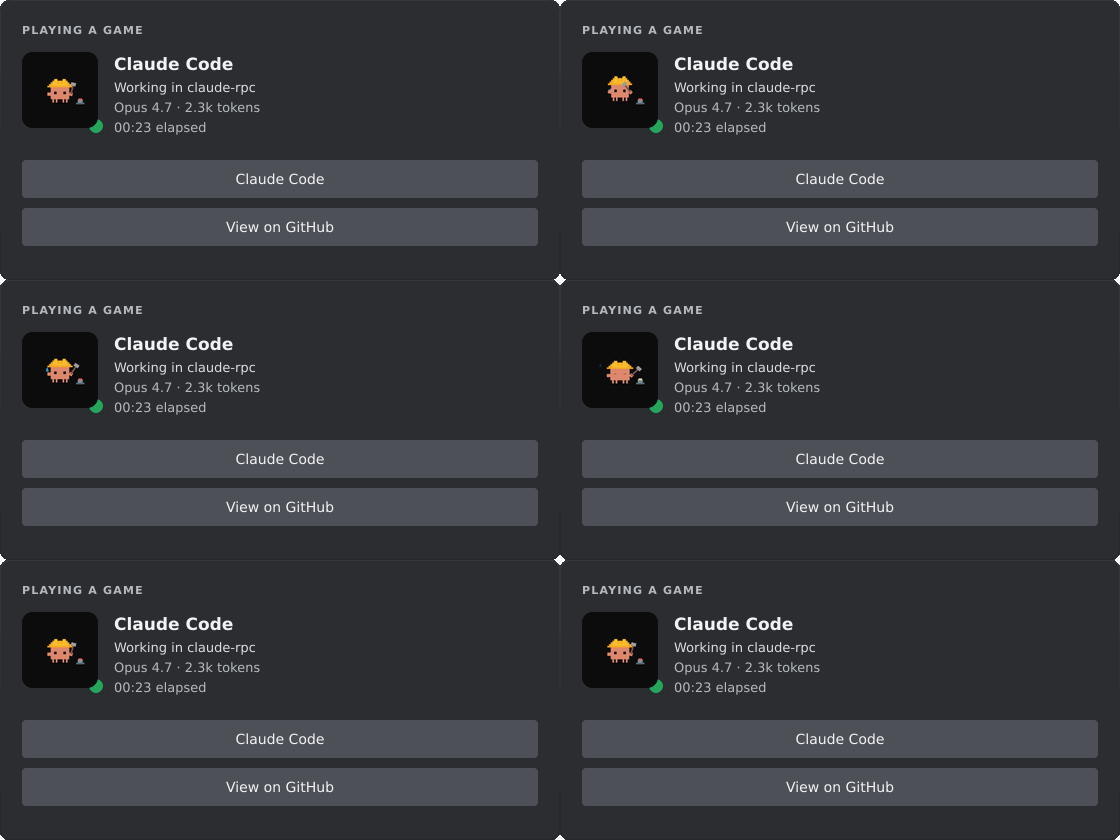
the card's live states — working · thinking · waiting · idle
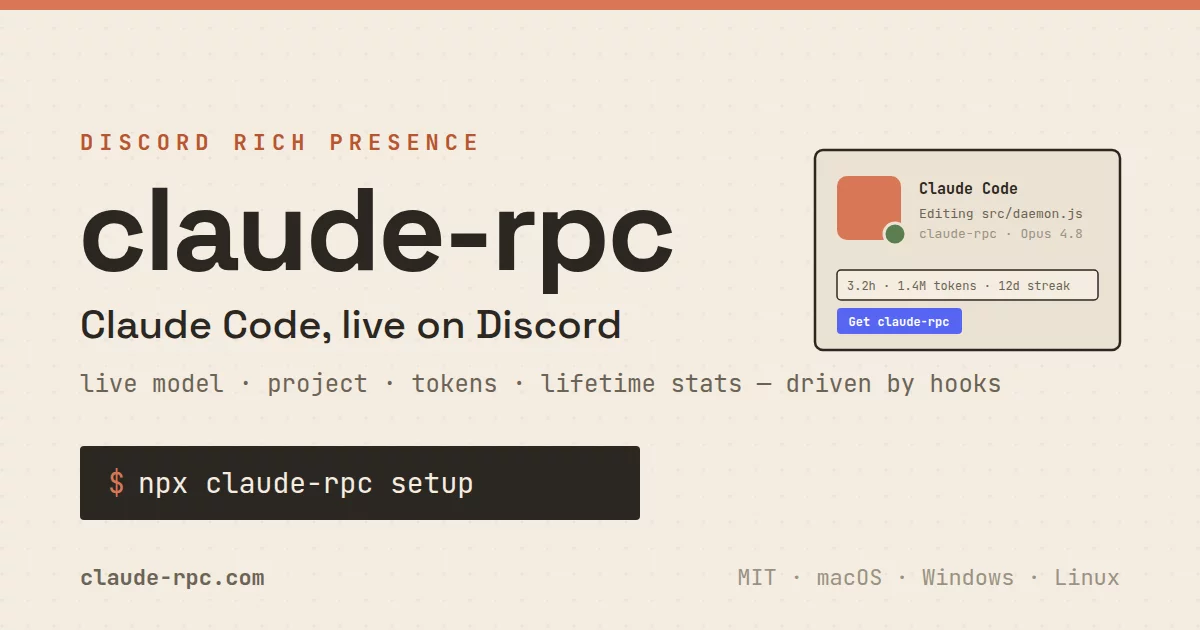
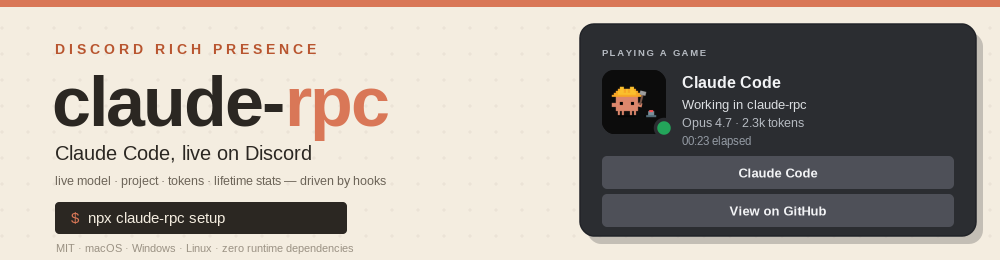
Discord Rich Presence for Claude Code — your live model, project, tokens, and lifetime stats, driven by the hooks Claude Code already fires.
claude-rpc.com → — see it in one page. · Discord → — help, ideas, show your card.


live — on by default for fresh installs, opt out any time. see community totals





A small Node daemon that takes the lifecycle events Claude Code already fires and pipes them into the Discord rich-presence card on your profile. Your friends see what you're building; your future self gets lifetime stats. Built solo, on weekends.
install
macOS / Linux / any Node 18+ — one command:
npx claude-rpc@latest setup
(The @latest matters — bare npx claude-rpc will happily reuse a stale cached copy.)
That installs claude-rpc globally, wires the hooks into Claude Code, and starts the daemon — no separate start step. Open Claude Code in any project and the card appears within a second. Something looks wrong? claude-rpc doctor (or claude-rpc doctor --fix to auto-repair).
Prefer a one-liner that figures it out for you?
curl -fsSL https://claude-rpc.com/install | sh
Detects Node (installs the npm package) or falls back to the prebuilt Apple-Silicon binary, then runs setup for you.
Homebrew (macOS / Linux):
brew install rar-file/claude-rpc/claude-rpc && claude-rpc setup
Windows (no Node required) — grab claude-rpc.exe from the latest release (the standalone CLI — no installer), then run it from the folder you saved it to:
.\claude-rpc.exe setup
setup copies the exe to a fixed per-user location (so the download can go afterwards) and adds that folder to your user PATH, so claude-rpc <command> works in any new terminal. Prefer a GUI? The release's claude-rpc-<version>-x64-setup.exe (installer, auto-updates) and claude-rpc-<version>-x64-portable.exe (no install) are the desktop dashboard app, which runs the same setup for you on first launch.
That's the whole pitch.
setupregisters a per-user login-autostart entry (a LaunchAgent on macOS, asystemd --userunit on Linux, anHKCU\…\Runvalue on Windows) and wires hooks into Claude Code'ssettings.json, and the daemon reports anonymous totals by default. It ends with one optional y/N — connect GitHub? — which publishes a verified public leaderboard profile only if you say yes (asked once; Enter skips). All of it is reversible (claude-rpc uninstall,community off,profile off) and fully documented inSECURITY.md— read it first if you want to know exactly what runs.
The Discord desktop app must be running. The browser client doesn't expose the local IPC bridge that Rich Presence uses.
other platforms / from source
git clone https://github.com/rar-file/claude-rpc.git
cd claude-rpc
npm install
node ./src/cli.js setup     # wires hooks + starts the daemon
Or npm install -g claude-rpc && claude-rpc setup for the global bin. setup starts the daemon for you; manage it afterward with claude-rpc start | stop | status. Every mode survives npm update without losing your clientId — user config lives under the per-OS config dir, not inside node_modules.
use your own Discord app
A working public Discord application is bundled into the default config — you don't need to register your own to get started. If you want a different app name on the card, create one in the Discord Developer Portal, copy the Application ID, and drop it into your config:
# Linux
echo '{ "clientId": "YOUR_ID" }' > ~/.config/claude-rpc/config.json
# macOS
echo '{ "clientId": "YOUR_ID" }' > ~/Library/Application\ Support/claude-rpc/config.json
# Windows (PowerShell)
'{ "clientId": "YOUR_ID" }' | Set-Content $env:APPDATA\claude-rpc\config.json
claude-rpc upgrade-config if you're carrying forward a v0.3-era file.
what claude-rpc does
on discord
A card that updates as you work. The large image swaps between five states (working / thinking / idle / stale / notification — those gifs at the top of this README). The two lines of text rotate through frames you template — current file, today's hours, lifetime totals, top hotspot, code churn, cost — and the daemon skips frames whose required template variables are empty. The SessionEnd hook clears the card instantly when you close Claude Code; no "is it still running?" timeout.
A View on GitHub → button appears automatically when your cwd is a git repo with a github origin. The daemon checks .git/config directly — no shell-out, no surprise GH API call.
A rotation frame can show your subscription usage — Usage · 34% weekly — the exact numbers Claude Code's own /usage screen shows. The daemon asks Anthropic's usage endpoint with the OAuth token Claude Code already stores locally; the token goes only to its issuer, the percentages go only where you template them, and usage.enabled: false turns the whole thing off (SECURITY.md §3d). claude-rpc usage prints the same data as heat-graded bars in your terminal.
on your machine
Three local surfaces, all reading the same ~/.claude-rpc/aggregate.json:
web dashboardclaude-rpc serve · port 47474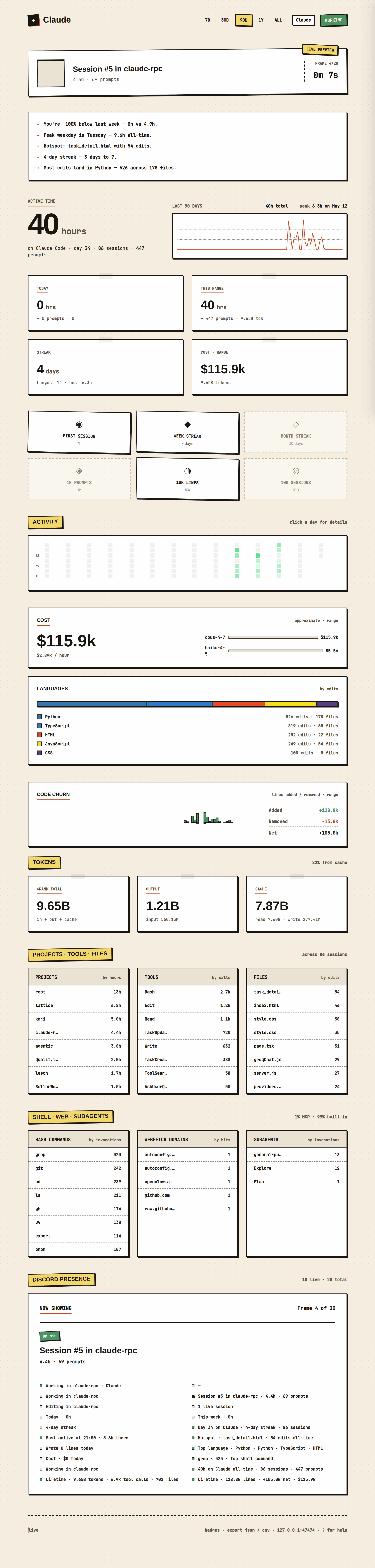 |
settings guinpm run dashboard · Electron |
claude-rpc status                 (TUI — heatmap, hour histogram, leaderboards)
claude-rpc today                  (today's stats, focused)
claude-rpc week                   (weekday breakdown)
claude-rpc preview                (every rotation frame rendered with real data)
claude-rpc insights               (3–5 auto-generated lines: trend, peak, hotspot)
claude-rpc recap --md             (standup-ready: yesterday's projects, ships, churn)
The web dashboard pushes updates via SSE; the TUI refreshes on a 3-second tick.
beyond your machine
Stat cards and badges for a README, a site or a Discord message, all from one command. Run it bare for a menu: pick a card, then a live link (paste once, it refreshes itself), a PNG or an SVG:
claude-rpc share                                  # poster PNG + a ready caption on your clipboard
claude-rpc statcards                              # menu: card → link / PNG / SVG
claude-rpc statcards stats --link --md | pbcopy   # README markdown, straight to the clipboard
claude-rpc statcards poster --png                 # ./claude-poster.png, 2× for Discord / X
claude-rpc statcards badge --metric streak --svg  # ./claude-badge-streak.svg
claude-rpc statcards list                         # every card and where it can go
Cards: stats (totals + year heatmap), profile, badge, heatmap, poster, session, wrapped. PNGs are drawn by whatever the machine already has (rsvg-convert, or Chrome / Edge / Brave / Chromium headless; Edge ships with Windows), so there is still nothing to install. The link option prints the URL, Markdown and an <img> tag, and copies the Markdown.
Live stats + year heatmap, paste once. With a public profile (claude-rpc profile set --handle <you> && claude-rpc profile on), the community worker serves an always-current stats card with your last 12 months as a heatmap. You don't need gh or a gist, and there's nothing to re-run:
[](https://claude-rpc.com/u/<you)
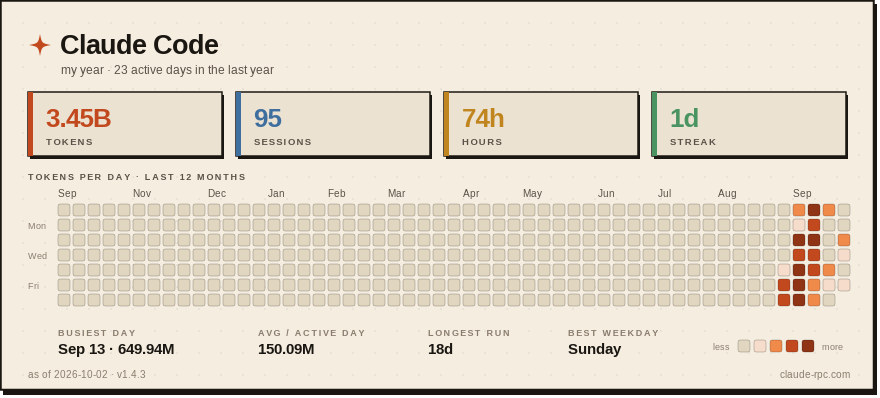
?metric=hours shades the grid by time instead of tokens. /heatmap/<you>.svg is the grid on its own. If you link several machines, their days are added together. Shading is relative to your own year, so light and heavy users both get a readable map. To publish lifetime totals only, set "profile": { "heatmap": false } in config.json; the next flush also clears the stored days.
The smaller card and badges are still there:
[](https://claude-rpc.com/u/<you)
[](https://claude-rpc.com/?ref=badge)
The card shows tokens, sessions, active hours and streak; badge metric= is one of tokens · sessions · hours · streak (optional &label= to retitle). Both refresh themselves as the daemon flushes your profile (~every 30 min). Your profile page at /u/<you> has a one-click "copy" for the whole block.
No public profile? Every card except wrapped also renders offline from your local stats, as PNG or SVG (statcards <card> --png / --svg). The older one-card commands (badge, card, calendar, github-stat, session-card, readme) still work, including --gist.
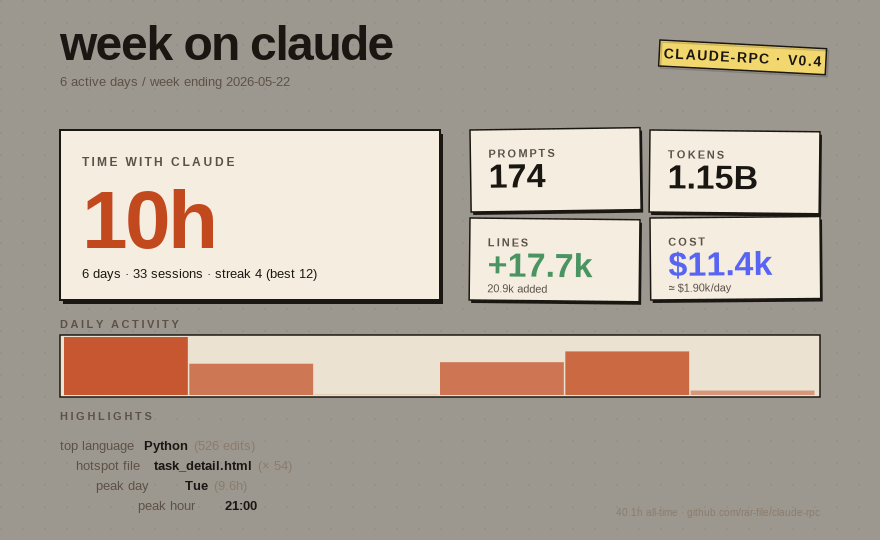
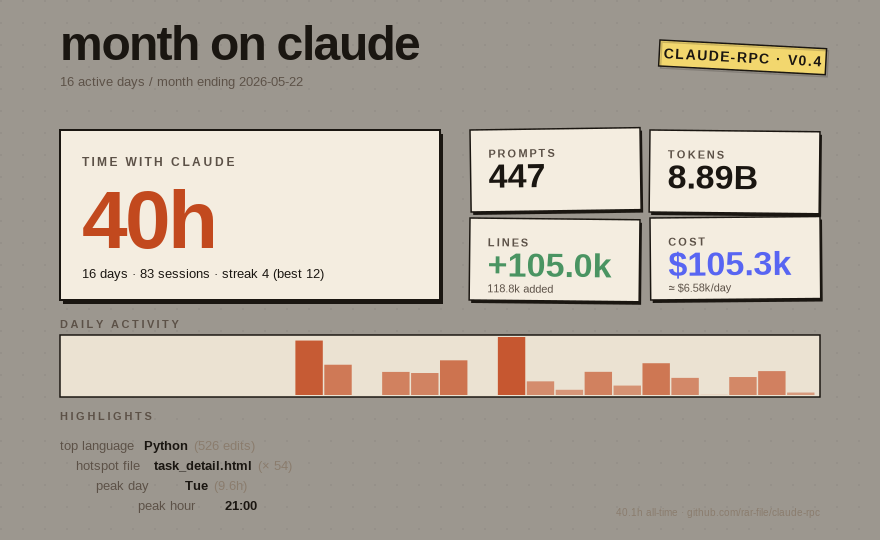
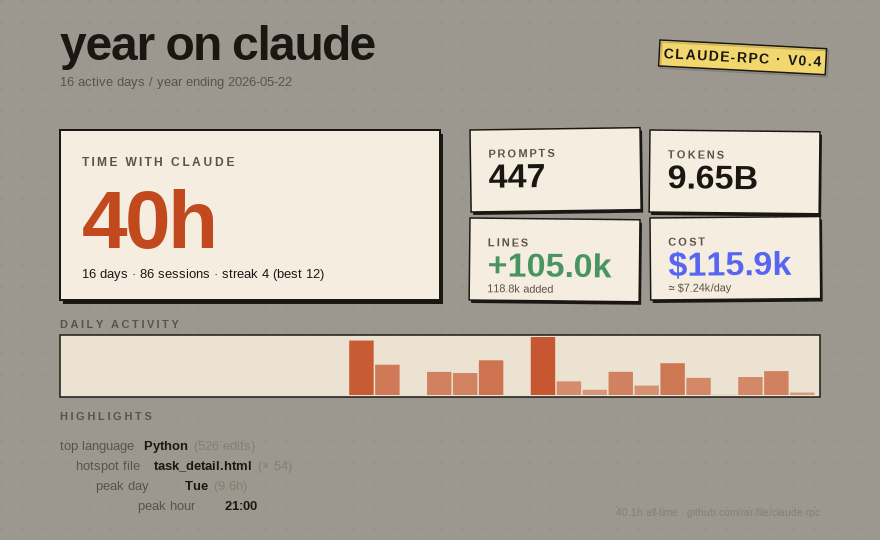
statcards poster --range week · month · year (also all) — live at /api/card.svg while claude-rpc serve is running
Live equivalents while claude-rpc serve is running (the local dashboard server — the daemon itself serves no HTTP):
http://127.0.0.1:47474/api/badge.svg?metric=hours&range=7dhttp://127.0.0.1:47474/api/card.svg?range=year
Cost numbers come from src/pricing.js, seeded with approximate public list prices. Your actual Claude Code subscription bill is unrelated.
community totals
The badges at the top of this README are live, served by a small Cloudflare Worker (worker/) that holds running totals of sessions and tokens across every install that's reporting. As of v0.7 fresh installs are on by default — setup mints an anonymous UUID v4 and the daemon starts flushing deltas every 30 minutes. Existing users upgrading from a pre-v0.7 config stay off until they explicitly run community on (the consent flow prints the exact payload first).
claude-rpc community              # show state + instanceId (last 8 chars)
claude-rpc community off          # opt out; instanceId retained for re-enable continuity
claude-rpc community on           # explicit consent flow (upgraders / re-enable)
claude-rpc community report       # one-shot manual flush (testing)
Each report sends only: a sessionsDelta, a tokensDelta, the claude-rpc version, OS family (linux/darwin/win32), and the anonymous UUID v4. No prompts, paths, models, repos, costs, usernames, or hostnames — the Worker's validateReport is the schema of record. The full Worker source is in this repo so the privacy claim is auditable. Every worker route — path, params, response — is documented in docs/WORKER-API.md.
For a complete account of the sensitive things claude-rpc does — startup persistence, hook injection, every outbound request, and the exact telemetry payload — see SECURITY.md. It's also the reference for supply-chain scanner findings (Socket.dev et al.): the flagged persistence and hook-injection behaviors are inherent to the tool and documented there.
three pieces, glued by json files
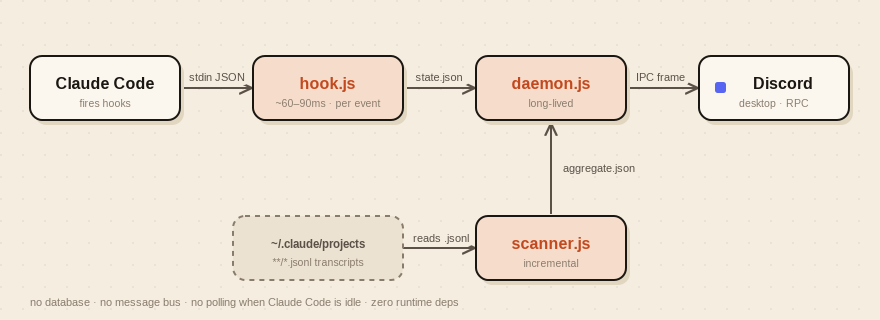
No database, no message bus, no background polling when Claude Code isn't running. State on disk you can cat and jq. Zero runtime dependencies — even the Discord Rich Presence IPC client is hand-rolled (src/discord-ipc.js).
- hook (
src/hook.js) — Claude Code spawns it on every lifecycle event. Parses the JSON from stdin and mutates the shared state file. The per-tool-call hooks (PreToolUse/PostToolUse) are wiredasync, so Claude Code never waits on them; the once-per-turn ones cost one node start-up each (~60–90ms wall, Node's own boot included). - daemon (
src/daemon.js) — long-running. Connects to Discord's local IPC, watches the state file, pushes presence frames every few seconds. Idles at ~55MB. Exponential backoff with jitter on reconnect;daemon.logrotates at 5 MB. - scanner (
src/scanner.js) — walks~/.claude/projects/**/*.jsonlfor all-time aggregates (active time, prompts, tools, tokens, streaks, hotspots, lines, languages, cost, bash, web, subagents). Incremental — re-parses only changed files, and runs in a short-lived child process so the daemon never holds the parse memory.
Persistent state, all human-readable JSON:
| Path | What |
|---|---|
$TMPDIR/claude-rpc/state-<session>.json |
Live per-session state, volatile (state.json for events with no session id) |
~/.claude-rpc/aggregate.json |
All-time aggregates |
~/.claude-rpc/events.jsonl |
Notification / compaction events the hook logs (rotated at 5 MB) |
~/.claude-rpc/scan-cache.json |
Per-transcript scan cache |
~/.claude-rpc/private-list.json |
Runtime privacy toggles |
~/.claude/settings.json |
Hook registrations (managed by setup) |
User config lives at %APPDATA%\claude-rpc\config.json (Windows), ~/Library/Application Support/claude-rpc/config.json (macOS), or $XDG_CONFIG_HOME/claude-rpc/config.json (Linux). It only needs to hold overrides — every key has a baked default. { "clientId": "..." } is a complete config file. Defaults live in src/default-config.js; the loader deep-merges over them.
privacy
Per-project, runtime, or auto-detected — whichever fits how you work.
// drop at your project root: <project>/.claude-rpc.json
{ "private": true }                                  // shortcut for visibility: "hidden"
{ "visibility": "name-only" }                        // project name only, no file/tool detail
{ "projectName": "redacted" }                        // show this name on Discord instead
Or from the command line, in any project:
claude-rpc private          # hide this folder (adds it to ~/.claude-rpc/private-list.json)
claude-rpc private off      # show it again
claude-rpc private status   # what Discord sees for this folder, and why
Or globally, in config.json:
{ "privacy": { "patterns": ["client-*", "secret-stuff"], "mode": "hidden" } }
If gh is installed and authenticated, GitHub-private repos auto-hide (privacy.githubPrivateMode, default hidden — opt out with privacy.autoDetectGithubPrivate: false). 5-minute cache, 1.5s timeout, silent skip when gh isn't there.
Aggregates and local dashboards are never affected. Privacy is a one-way valve between local state and Discord.
customizing the card
claude-rpc preview        # render every rotation frame with your real data
claude-rpc vars           # dump the full template-variable list as JSON
Frames have a requires field; the daemon skips a frame when any of its required vars resolve empty / zero. Write seven frames knowing only the relevant ones render.
"idle": {
  "details": "Idle in {project}",
  "state":   "{modelPretty} · {todayHours} today",
  "rotation": [
    { "details": "This week · {weekHours}",      "state": "{weekPromptsLabel} · {weekTokensFmt} tokens",
      "requires": ["weekActiveMs"] },
    { "details": "Code churn · {linesAddedFmt} added",
      "state":   "{linesNetFmt} net · {topLanguage}",
      "requires": ["topLanguage"] }
  ]
}
The full default config is in src/default-config.js — that's the canonical list of ev