🚀 Claude Starter
Your homepage for Claude Code. All your sessions, at a glance.
Claude Code 的主页。你的所有会话,一目了然。
Built for AI-native developer workflows: local-first, searchable, resumable, and fast — so the next session starts faster than the last one ended.
npm install -g claude-starter → claude-starter
English
The Problem
Claude Code's /resume gives you a wall of UUIDs:
If you use Claude Code as part of a real development loop, session history stops being archive data and becomes working context. You need to find old agent work by repo, topic, and intent — not by opaque IDs.
? Select a conversation
  3ee0f33a-b882-424f-9ba4-260342e4dd5b - 4/3/2026, 10:53:41 AM
  87570bab-ee92-4681-9591-54abf2fcb486 - 4/3/2026, 10:18:55 AM
  ...200 more UUIDs...
Good luck finding that session where Claude fixed your auth bug last Tuesday.
The Solution
claude-starter
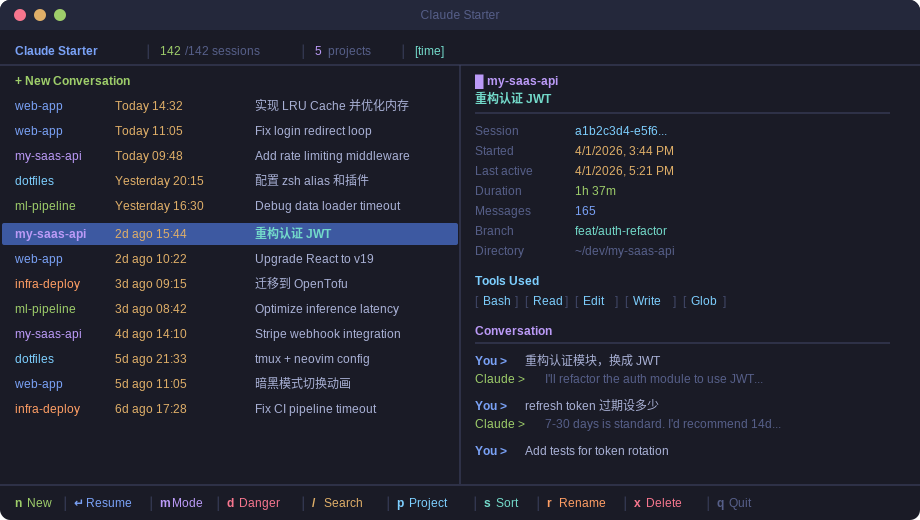
Beautiful split-pane UI with Tokyo Night colors. The left panel shows every session with project, time, and topic. The right panel previews the full conversation. Not UUIDs — your actual words.
claude-starter is built for developers treating coding agents as part of a daily workflow: keep everything local, cut resume friction, and make past conversations actually reusable.
🔍 Search — The Killer Feature
Press / and start typing. That's it. No Enter needed.
Searches session and renamed titles, project names, Git branches, your prompts, and Claude's final responses. Tool calls and results, thinking, edit payloads, and other internal records are intentionally excluded. Results update as you type; use ↑↓ to navigate instantly.
The TUI opens immediately and builds the conversation index in the background. While the header shows indexing search…, matching results appear incrementally as sessions are indexed.
auth→ all auth-related sessionsrefactor→ that cleanup from last weekweb-app fix→ bug fixes in a specific project
No modes. No confirmation. Just type and go.
Features
| Feature | Description | |
|---|---|---|
| 🎨 | Beautiful TUI | Tokyo Night color scheme, split-pane layout, feels native in your terminal |
| ✨ | New Session | Launch a fresh conversation in one keystroke |
| 🔍 | Instant Search | Fuzzy search across everything |
| 📂 | Project Filter | Press p to filter by project |
| ⚡ | One-Key Resume | Arrow, Enter, you're back in the conversation |
| 📋 | Session Preview | Full metadata + conversation history in the right panel |
| 🔀 | Sort Modes | Sort by time, size, messages, or project |
| 📎 | Copy ID | Press c to copy session ID |
| 🔒 | Permission Modes | Press m to configure, d for quick danger-mode resume |
| ✏️ | Rename Sessions | Press r to rename, supports CJK input |
| 🗑️ | Delete Sessions | Press x to remove unwanted sessions |
| ⌨️ | Vim Keybindings | j/k navigate, g/G jump to top/bottom |
| 🧠 | Smart CLI | Auto-detects mai-claude vs claude |
| ⌨️ | ABC Input Source | Automatically switches macOS to ABC on startup and focus |
| 🔐 | 100% Local | No network, no telemetry, no data leaves your machine |
Install
npm install -g claude-starter
Or install from source:
git clone https://github.com/Bojun-Vvibe/claude-starter.git
cd claude-starter
npm install
npm link
Then run:
claude-starter
CLI Options
claude-starter              # Launch interactive TUI
claude-starter --list [N]   # Print latest N sessions (default: 30)
claude-starter --version    # Show version
claude-starter --update     # Update to the latest version
claude-starter --help       # Show help
Keyboard Shortcuts
| Key | Action |
|---|---|
↑ ↓ / j k |
Navigate sessions |
Enter |
Start new / resume selected session |
n |
New session |
d |
Resume with bypassPermissions (danger mode) |
m |
Permission mode picker |
r |
Rename session |
/ |
Search |
Backspace |
Edit search, auto-exit when empty |
Esc |
Clear filter |
p |
Filter by project |
s |
Cycle sort mode (time/size/messages/project) |
c |
Copy session ID |
x / Delete |
Delete session |
g / G |
Jump to top / bottom |
Ctrl-F / Ctrl-B |
Page down / up |
Ctrl-D / Ctrl-U |
Half-page down / up |
q / Ctrl-C |
Quit |
How It Works
Reads the JSONL session files from ~/.claude/projects/. Lightweight metadata is loaded first so the TUI can open immediately, then searchable conversation text is indexed one session at a time in the background. Everything stays local. No API calls, no telemetry.
Requirements
- Node.js >= 18
- Claude Code (
claudein PATH)
Related Projects
- codex-starter — the Codex counterpart with the same local-first workflow philosophy
- Bojun-Vvibe — more terminal UX and AI-native workflow experiments
License
MIT
中文
痛点
用过 Claude Code 的 /resume 吗?它给你的是这样一坨东西:
? Select a conversation
  3ee0f33a-b882-424f-9ba4-260342e4dd5b - 4/3/2026, 10:53:41 AM
  87570bab-ee92-4681-9591-54abf2fcb486 - 4/3/2026, 10:18:55 AM
  ...200 个 UUID...
一堆 UUID,没有上下文,无法搜索。想找到上周帮你调过 bug 的那个 session?祝你好运。
解决方案
Claude Starter 是一个精美的终端可视化工具,让你能像浏览网页一样浏览所有 Claude 历史会话。它是你的 Claude 主页 —— 每次打开终端,claude-starter 一敲,所有 session 一目了然。
claude-starter
精美的分屏 UI,Tokyo Night 配色。左侧列表一目了然,右侧实时预览对话详情。不是 UUID,是你真正说过的话。
🔍 搜索 — 杀手级功能
按 / 开始输入,就这么简单。无需按回车。
支持搜索会话标题(包括重命名后的标题)、项目名、Git 分支、用户输入和 Claude 的最终回复。工具调用与结果、思考过程、编辑内容及其他内部记录不会进入索引。输入即过滤,↑↓ 直接导航结果。
TUI 会立即显示,并在后台逐个会话建立全文索引。标题栏显示 indexing search… 时,已完成索引的匹配结果会持续加入列表。
auth→ 所有认证相关的对话refactor→ 上周的代码重构web-app fix→ 某个项目的 bug 修复
不需要管理模式,不需要确认。输入即搜,方向键即走。
核心能力
| 功能 | 说明 | |
|---|---|---|
| 🎨 | 精美 TUI | Tokyo Night 配色,分屏布局,终端里的 App |
| ✨ | 一键新建 | 列表顶部直接新建对话 |
| 🔍 | 即时搜索 | / 全文搜索,无需回车 |
| 📂 | 项目过滤 | p 按项目筛选 |
| ⚡ | 秒级恢复 | 选中 → Enter → 回到对话 |
| 📋 | 对话预览 | 右侧面板展示完整元数据和对话历史 |
| 🔀 | 多种排序 | 时间 / 大小 / 消息数 / 项目 |
| 📎 | 复制 ID | c 一键复制到剪贴板 |
| 🔒 | 权限模式 | m 设置权限模式,d 一键 danger 模式恢复 |
| ✏️ | 重命名会话 | r 直接重命名,支持中文输入 |
| 🗑️ | 删除会话 | x 删除不需要的会话 |
| ⌨️ | Vim 快捷键 | j/k 上下,g/G 跳顶/底 |
| 🧠 | 智能 CLI | 自动检测 mai-claude / claude |
| 🔐 | 完全本地 | 不联网,不上传,不追踪 |
安装
npm install -g claude-starter
或者从源码安装:
git clone https://github.com/Bojun-Vvibe/claude-starter.git
cd claude-starter
npm install
npm link
然后运行 claude-starter,就这么简单。
CLI 参数
claude-starter              # 启动交互式 TUI
claude-starter --list [N]   # 打印最近 N 个会话(默认 30)
claude-starter --version    # 显示版本号
claude-starter --update     # 检查并更新到最新版本
claude-starter --help       # 显示帮助信息
快捷键
| 按键 | 功能 |
|---|---|
↑ ↓ / j k |
上下导航 |
Enter |
新建 / 恢复对话 |
n |
直接新建 |
d |
Danger 模式恢复(bypassPermissions) |
m |
权限模式选择器 |
r |
重命名会话 |
/ |
搜索 |
Backspace |
删除搜索字符,删空自动退出 |
Esc |
清空搜索 |
p |
按项目过滤 |
s |
切换排序(时间/大小/消息数/项目) |
c |
复制 Session ID |
x / Delete |
删除会话 |
g / G |
跳到顶 / 底 |
Ctrl-F / Ctrl-B |
向下 / 向上翻整页 |
Ctrl-D / Ctrl-U |
向下 / 向上翻半页 |
q / Ctrl-C |
退出 |
原理
读取 ~/.claude/projects/ 下的 JSONL 会话文件。程序先加载轻量元数据并显示 TUI,再在后台逐个会话建立可搜索文本索引。所有数据留在本地,不联网。
Built with 💜 by Bojun — powered by Claude Code itself