
ClaudePulse for Windows
繁體中文 | English
A Windows system tray monitor for Claude Code sessions — inspired by ClaudePulse (macOS).
The original ClaudePulse is a beautiful macOS menu bar app. This project brings the same concept to Windows, with additional features not found in the original.
Features
System Tray Icon
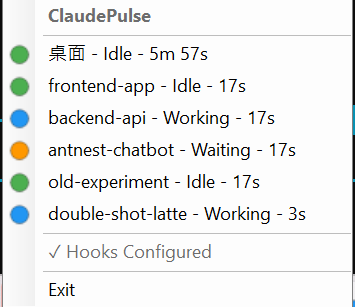
One icon represents all sessions at once, showing the most urgent state:
| Color | State | Meaning | Priority |
|---|---|---|---|
| 🔵 Blue | Working | Claude is running (editing, executing, reading) | Highest |
| 🟠 Orange | Waiting | Claude needs your permission | ↑ |
| 🟢 Green | Idle | Claude is done, waiting for your input | ↓ |
| ⚪ Gray | Stale | No activity for 10+ minutes | Lowest |
If you have 3 sessions and one is Working, the icon is blue. All must be Idle for it to turn green.
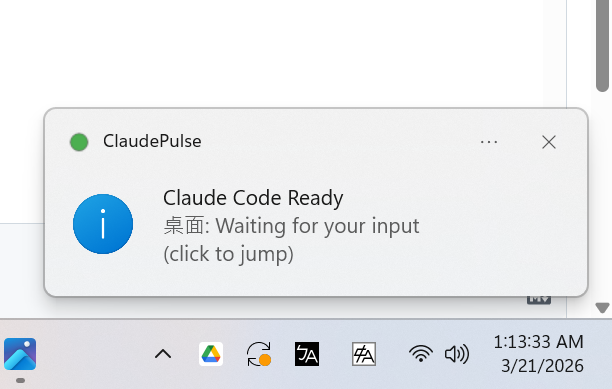
Toast Notifications
Notifications only fire when Claude truly stops and waits for you (3-second debounce filters out intermediate stops). Click the notification to jump directly to that terminal window.
Core
- Multi-Session Tracking — Monitor multiple Claude Code sessions simultaneously, each with colored status indicator
- Auto-Configure Hooks — Automatically sets up Claude Code HTTP hooks on first launch
Beyond the Original
Features that the macOS version doesn't have:
| Feature | Description |
|---|---|
| Click-to-Jump | Click a notification to instantly jump to the Claude Code terminal window, even from another app |
| Smart Debounce | Only notifies when Claude is truly idle (3s debounce), not on every intermediate stop |
| Permission Alerts | Immediate notification when Claude needs your approval — no more missed permission prompts |
| Plugin Noise Filter | Filters out noisy plugin notifications, only surfaces what matters |
| Non-Destructive Hook Merge | Safely adds hooks to your settings.json without overwriting your existing hooks |
| Tool & Model Tracking | Tracks which tools and models each session is using |
Screenshots
Installation
Requirements
- Windows 10/11
- .NET 10.0 Runtime (check with
dotnet --version)
Option A: Build from Source
git clone https://github.com/stantheman0128/claudepulse-win.git
cd claudepulse-win/ClaudePulse
dotnet publish -c Release -r win-x64 --self-contained false -p:PublishSingleFile=true -o ../publish-lite
The exe will be at publish-lite/ClaudePulse.exe (~176KB).
Option B: Download Release
Check Releases for pre-built executables.
Usage
- Run
ClaudePulse.exe— it appears as a colored circle in your system tray - First launch — automatically configures Claude Code hooks in
~/.claude/settings.json - Open Claude Code — ClaudePulse will start tracking your sessions
- Click notifications — jump directly to the Claude Code terminal window
Auto-Start on Boot
Copy ClaudePulse.exe to your Windows Startup folder:
%APPDATA%\Microsoft\Windows\Start Menu\Programs\Startup
Development Workflow
# During development
cd ClaudePulse && dotnet run

# Deploy new version (build → kill old → copy to Startup → restart)
bash deploy.sh
How It Works
Claude Code ──(HTTP hooks)──► ClaudePulse (localhost:19280)
                                    │
                                    ├── Update tray icon color
                                    ├── Track session state
                                    ├── Show Toast notification (debounced)
                                    └── Click → Jump to terminal window
ClaudePulse runs a lightweight HTTP server on localhost:19280 that receives webhook events from Claude Code. Events include SessionStart, Stop, PreToolUse, PostToolUse, Notification, and more.
When ClaudePulse is not running, the HTTP hooks simply timeout — Claude Code continues to work normally.
Architecture
ClaudePulse/
├── Program.cs                  # Entry point, single-instance check
├── Models/
│   ├── HookEvent.cs            # JSON model for Claude Code hook events
│   ├── SessionInfo.cs          # Per-session state machine
│   └── SessionState.cs         # Idle / Working / WaitingForUser / Stale
├── Server/
│   └── HookHttpServer.cs       # HttpListener on port 19280-19289
├── Services/
│   ├── SessionManager.cs       # Multi-session tracking + staleness cleanup
│   └── HookConfigurator.cs     # Non-destructive settings.json merge
└── UI/
    ├── TrayApplicationContext.cs  # NotifyIcon + debounced notifications
    ├── IconGenerator.cs           # Programmatic colored circle icons
    └── WindowActivator.cs         # Win32 API force-activate terminal window
Zero external dependencies — built entirely with .NET 10 built-in APIs.
Roadmap
- Floating Window UI — WPF-based Dynamic Island-style overlay with animations and blur effects
- Auto-Update — Check GitHub releases on startup, download and install new versions
- Settings UI — Configure notification preferences, debounce timing, hook events
- Session History — Log and browse past sessions
- Global Hotkey — Keyboard shortcut to show/hide session panel
- GitHub Actions CI — Automated builds and releases on push (
.github/workflows/release.yml)
Acknowledgments
- ClaudePulse by @tzangms — the original macOS inspiration
- Built with Claude Code using Slice-Based Iterative Development
Maintainer
Windows version maintained by Stan Shih (施博瀚 / Po-Han Shih).
License
MIT