Cockpit for Claude Code
by KODIKAS
Install: Visual Studio Marketplace · Open VSX (code-server, VSCodium, Cursor) · JetBrains Rider (plugin zip, see Docs/jetbrains.md)
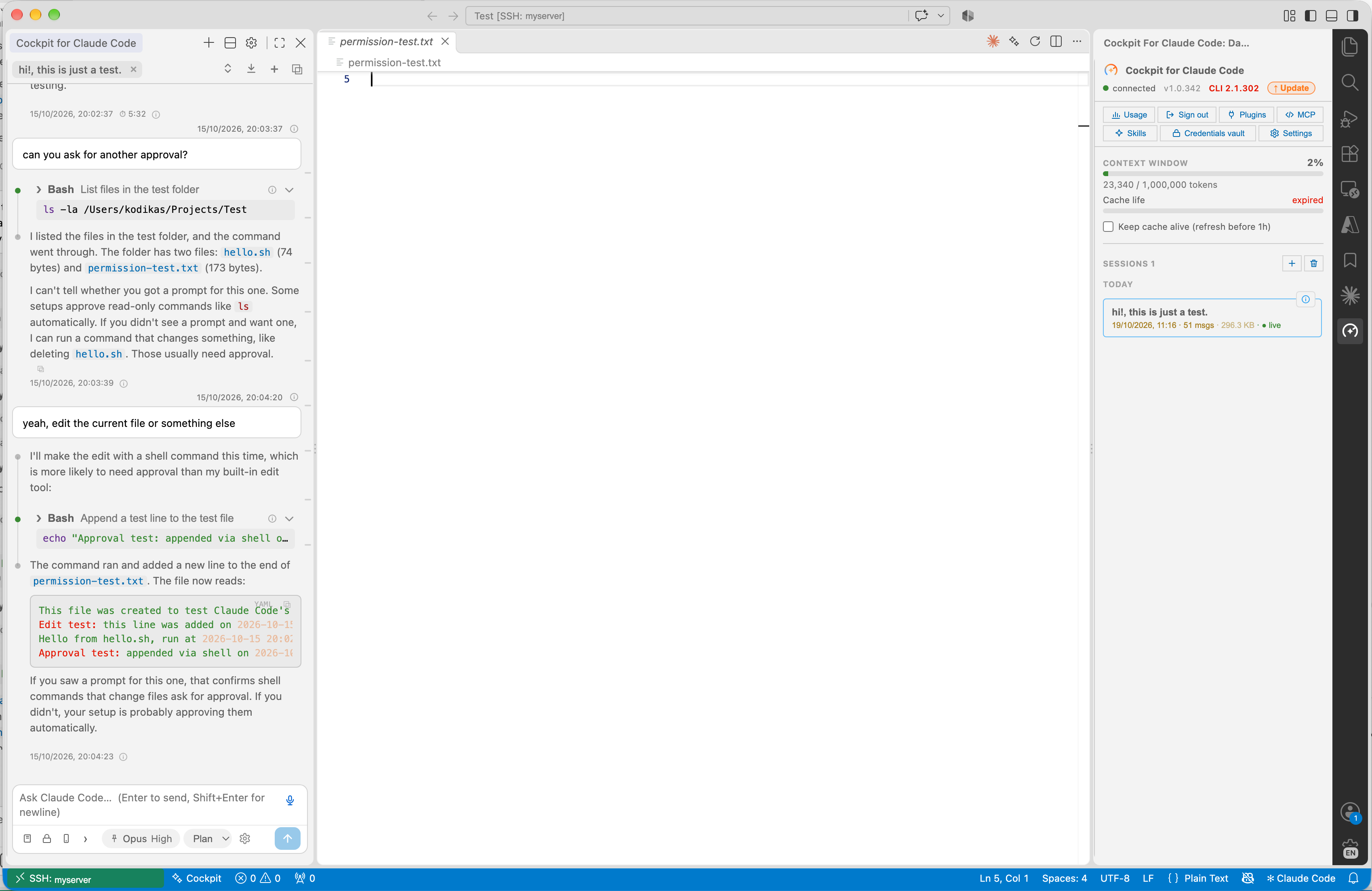
Cockpit keeps your Claude Code conversations running when your window goes away. A small background
service, the daemon, owns the claude process, so you can start a task on one device, continue it on
another, and follow it from your phone. On top of that it is a VS Code extension with a graphical
interface that shows what the tool is doing: the conversation, the tool calls, diffs, permission
prompts, and how much context, cache and budget you have used. A scratchpad tied to each
conversation lets you annotate a screenshot or sketch an idea and hand it to Claude as an image.
You do not need a second device. On a single machine you still get conversations that survive closing or reloading the window, the scratchpad, the usage and limit figures, and model, effort and mode switches without a restart. The setup is the same as for several devices: the daemon runs in the background either way, so start it in step 3 of Install.
It is a fork of Tootega Cockpit for Claude Code by Tootega Pesquisa e Inovação (HermesSilva). Almost everything good in it starts with their work: a thorough GUI for Claude Code that keeps its figures honest and gives you fine control. Thank you for building it in the open under the MIT license, which is what makes this fork possible.
Features
| Conversations that outlive the window | Claude runs in a background daemon, so closing the lid, dropping the connection or reloading VS Code does not stop it. Any window attaches to a running conversation, and the phone joins it through Remote Control. |
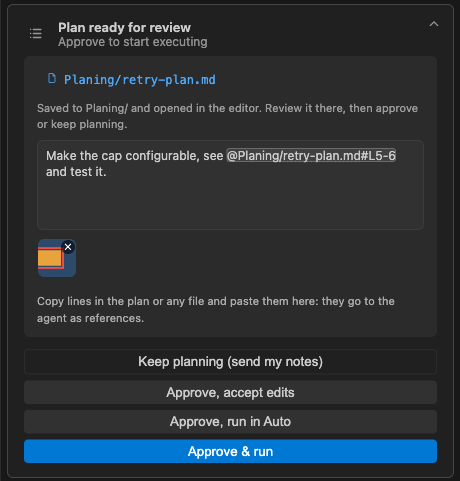
| Plan feedback with references and images | Copy lines from the plan or any file and paste them into the notes: they become an inline reference pill (as in the prompt box) and go to Claude as quoted lines. Paste a screenshot too. The same notes box exists on every question. |
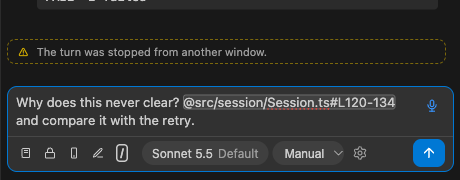
| Code references in the prompt | Copy code in the editor and paste it in the prompt: it becomes an inline @file#L12-30 pill that Backspace removes in one go, and shows as a chip in the timeline. |
| Drop or paste any file | Drag a file onto the prompt box, or paste it, from another device or a browser too (code-server, the iPad). It is saved on the machine that holds the code and shows as a pill; the ✕ on the pill deletes the saved copy. |
| A scratchpad per conversation | Annotate a screenshot or sketch, then send the board to Claude as an image. |
| A model and effort per mode | Opus on high effort to plan, Sonnet to build, switched live when you approve the plan. |
| The numbers | Context, prompt cache with a keep-alive, cost per turn and session, and subscription limits with pacing. |
| Chat in the side bar | Next to the code, with conversation tabs, and live controls in the prompt box. |
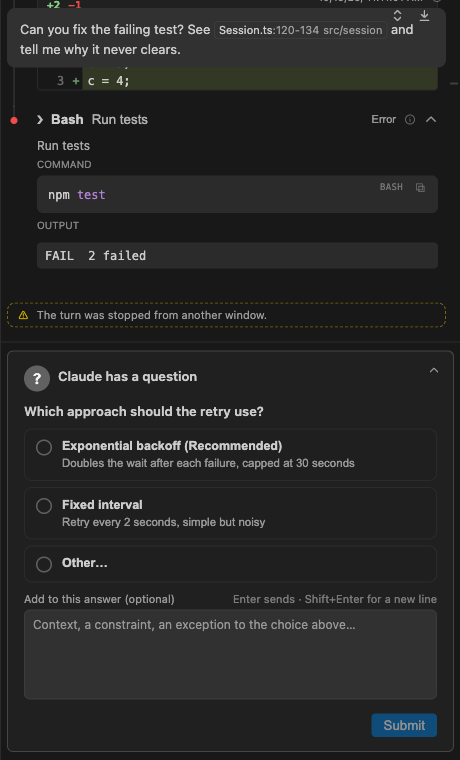
| A question docked above the prompt box | A plan for review, with notes and references |
|---|---|
 |
 |
Code references work the same in the prompt box, in plan feedback and in question notes:
Docs/comparison.md has the full row-by-row comparison.
What it is for
The case it was built for: you keep your code, and Claude Code, on one machine that is always on, such as a Mac mini or a home server, and you reach it from other devices with Remote-SSH or code-server. A conversation should not die when you close the laptop lid or the connection drops. You start a task on one device, come back an hour later on another, and the conversation is still running, with its output and any permission prompt waiting for you.
That is what the fork adds to the original:
- Daemon mode. Claude runs in
cockpit-daemon, a small background service on the machine that holds the code, instead of as a child of the VS Code window. Any window on that machine can attach to a running conversation. The first answer to a permission prompt wins and closes it everywhere. On a Mac you can run the daemon from the menu bar app, a signed and notarized download from the GitHub releases. See Docs/daemon-mode.md. - A scratchpad per conversation. A whiteboard (Excalidraw) in its own editor tab: paste a
screenshot, mark it up with arrows, boxes and text, or sketch from scratch, with a mouse, a
trackpad or an Apple Pencil on the iPad. Send to chat attaches the board to your prompt as an
image. Boards are saved with the conversation in
~/.cockpit/scratchpads/, shared by every VS Code server on the machine, and an open board updates when another window saves it. Open it from the pencil button in the prompt box, or from Annotate on any image. - Chat in the side bar, next to the code, with a strip of conversation tabs. A conversation is in the side bar or in an editor tab, one place at a time.
- Controls that belong to a chat stay with the chat. Model, effort and permission mode are chips in the prompt box. A menu there holds agents and workflows, the engine, a custom model id and an auto-compact setting per conversation. The dashboard keeps what is global.
- A model per mode. Pin a model and effort to a permission mode, for example Opus on high effort
in plan mode and Sonnet in auto mode. Changing mode, including when Claude leaves plan mode after
you approve a plan, switches the model live with no restart. Claude Code's own
opusplanalias covers one pairing (Opus to plan, Sonnet to build); pins work for any model and effort in any mode. Pin from the model popup, or seemodePinsin Docs/settings.md. - Its own copy of the Claude Code CLI, if you do not have one. The extension offers to download it from Anthropic's release server, verifies the checksum, and keeps it up to date.
- Code references and docked cards. Paste copied code into the prompt, a plan note or an answer and it becomes a reference pill; questions and plans dock above the prompt box.
- A quieter interface, closer to the official extension.
The scratchpad adds about 4 MB to the extension and loads only when you open a board. The extension can be installed next to the original. Its commands and settings are under
cockpitDaemon.* (the original's are tootega.*), so rename any settings you carry over.
What it does
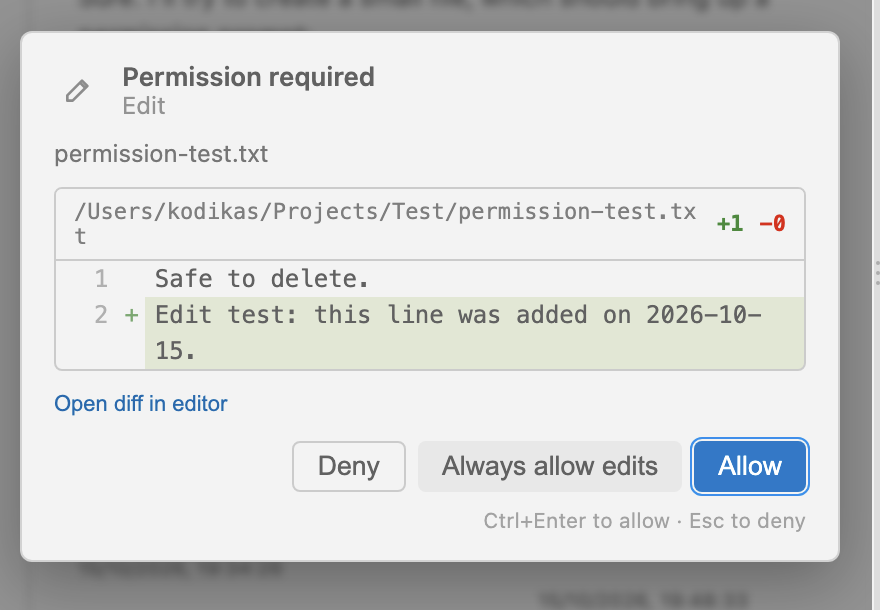
- Chat. Streaming answers, thinking blocks, a timeline of tool calls with expandable input and output, rendered diffs, permission prompts, plan mode with an editable plan, and multiple-choice questions from the agent.
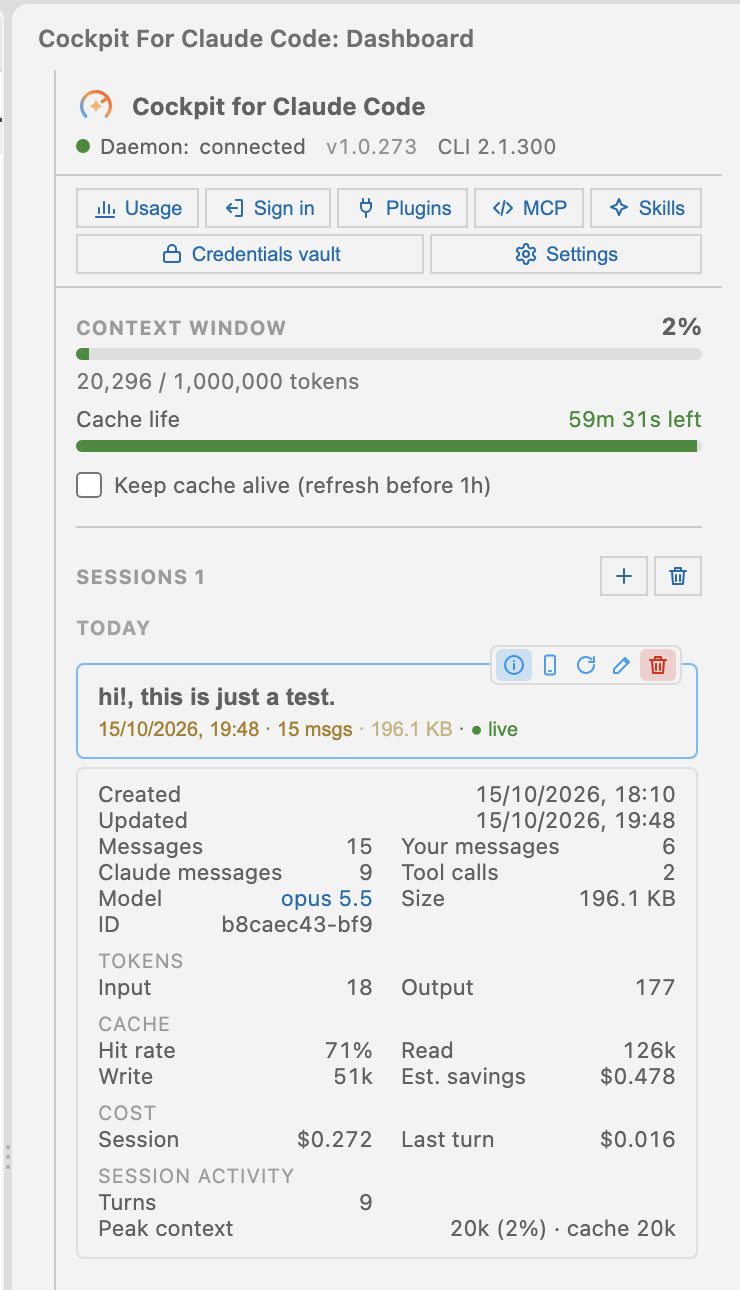
- The numbers. Context window, prompt cache (hit rate, a keep-alive that stops the one-hour cache from lapsing, estimated savings), cost per turn and session, and your subscription limits. The dashboard shows the context window; the rest sits under the (i) icon on the active session.
- Sessions. A list per folder with resume, rename, delete, rewind to an earlier prompt, and remote control from your phone.
- Input.
@file mentions, images (pasted, or drawn and annotated in the scratchpad), files (dropped or pasted, from any device), slash commands, voice dictation and an inline spell-checker for Portuguese and English. - Languages. The interface is in Brazilian Portuguese and English, switchable without a reload.
| A permission prompt with the diff | The details of a session |
|---|---|
 |
 |
The full list is in Docs/features.md, and Docs/comparison.md compares it with the official extension.
Install
| Requirement | Version | Note |
|---|---|---|
| VS Code | 1.90 or newer | |
| Claude Code CLI | recent (2.1.162 or newer) | claude on the PATH and signed in, or let the extension download it |
| Node.js | 20 or newer | only to build from source |
- Install the extension:
- VS Code: from the Visual Studio Marketplace, or search for "Cockpit for Claude Code" in the Extensions view.
- code-server, VSCodium, Cursor: from Open VSX.
- From source: build a
.vsix(see Docs/development.md) and install it withcode --install-extension cockpit-claude-code-daemon-<version>.vsix, or in the Extensions view, the ⋯ menu, Install from VSIX.
- Install and sign in to Claude Code if you have not: follow Anthropic's instructions, then run
claudeonce and log in. Ifclaudeis not on thePATH, setcockpitDaemon.claudePath. - Start the daemon. Run Cockpit Daemon: Install daemon from the command palette (a launchd agent
on macOS, a background process elsewhere). On a Mac you can use the menu bar app instead: download the signed and notarized
CockpitDaemon-<version>.zipfrom the GitHub releases, unzip it and move it to Applications (or build it yourself, see mac/CockpitDaemon). - Open a project folder and open Cockpit with Ctrl+Alt+C (Cmd+Alt+C on a Mac), or from the status bar. Pick a model, effort and permission mode, or keep the defaults, type a message and press Enter. Shift+Enter inserts a line break.
With cockpitDaemon.autoResumeLastSession on (the default), opening a folder resumes its most recent
session.
JetBrains Rider
The same Cockpit also runs as a plugin for JetBrains Rider 2026.2, locally or through Remote
Development (JetBrains Client on a laptop, Rider backend on the machine that holds the code and the
daemon). Download cockpit-<version>.zip from the
GitHub releases (tags rider-v…) and install it
with Settings, Plugins, Install Plugin from Disk. It needs Node.js 20 or newer on the machine that
holds the code. Install, SSH keys, connecting and troubleshooting: Docs/jetbrains.md.
Using it from other devices
Docs/remote-setup.md walks through the setup: the host Mac, a laptop with Remote-SSH, and a tablet with code-server behind HTTPS.
Documentation
- Features: what each part does.
- Comparison with the official extension
- Settings, commands and shortcuts
- Rider plugin: install, Remote Development, building.
- Daemon mode and Using it from other devices
- Development: architecture, building, the event protocol, contributing.
- FAQ, implementation status and the execution plan.
Troubleshooting
| Symptom | Likely cause | What to do |
|---|---|---|
| "CLI not found" on startup | claude is not on the PATH |
Set cockpitDaemon.claudePath, and check claude --version |
| Chat does not answer, or an auth error | The CLI is not signed in | Use Sign in, or run claude in a terminal and log in |
| "Daemon: disconnected" | The daemon is not running, or runs as another user | Run Cockpit Daemon: Install daemon, or start the menu bar app. Every VS Code server must run as the same user |
| Model selector shows only aliases | Subscription account without an API key | Expected. Use an alias, the active model, or Custom… |
| Limit meters are empty | No real usage source yet | Turn on Real usage tracking and run a claude session |
| Stop does nothing | CLI older than 2.1.162 | Run claude update |
| The extension looks old after an update | The new .vsix went into one server only |
Install it in every VS Code server you use, then reload the window |
| New events do not render | The CLI changed its event format | The parser ignores unknown events. Open an issue with the CLI version |
Host logs are in Output, Cockpit for Claude Code, and the daemon's in ~/.cockpit/daemon.log.
Known limitations
- Rewind restores the conversation, not the files on disk. File checkpoints through Git, and the
context breakdown from
/context, are not built. - Cost is an estimate: the equivalent API price, which a subscription does not charge you. Usage attribution is estimated from local transcripts, at about four characters per token.
- Everything derived from transcripts covers one machine. Voice capture needs
ffmpegon the host. - The statusline wrapper for real usage works on Windows only. The usage meters themselves work everywhere.
- A conversation that another Claude Code process has open (the official extension, a terminal) is not attached: the window warns and starts nothing, because two processes on one conversation drift apart. Following that process's turn live is not built.
- The daemon serves the Claude engine only, and the daemon and the windows must be on the same machine.
- The event format of the CLI is not frozen. A new CLI version can change how parts render.
More detail is in Docs/implementation-status.md.
Privacy and security
- Credentials are never logged. The CLI's permission model is honored, and the interface does not bypass approvals.
- The optional API key is kept encrypted in the OS keychain and is used only to list models.
- The local Claude login (
~/.claude/.credentials.json) is read, never written or logged, for a few small isolated calls: your real usage, voice dictation and dictation correction. They carry no agent context. - Session data stays on your machine, in
~/.claude/.
Contributing
English only in the repository. Follow the neighboring file's style, do not reimplement what the CLI
already does, and run npm run typecheck && npm test && npm run build before a pull request. More in
Docs/development.md and CLAUDE.md.
License
MIT, see LICENSE. Original work © Tootega Pesquisa e Inovação; this fork © KODIKAS (Jeroen Versteege). Third-party notices are in THIRD-PARTY-NOTICES.md.
Support
Cockpit is free and open source. If it saves you time, you can buy me a coffee.
Disclaimer
Unofficial. Not affiliated with, endorsed by, or sponsored by Anthropic. "Claude", "Claude Code" and "Anthropic" are trademarks of Anthropic, PBC, used here only to describe interoperability. This project talks to the official Claude Code CLI; it does not bundle or redistribute it.