Sovereign AI Workstation
The open-source AI workstation for macOS, powered by CODEC
Your voice. Your computer. Your rules.
avadigital.ai · opencodec.org · Get Started · Support · Enterprise
CODEC turns a Mac into a voice-controlled AI workstation that runs 100% on your machine.
Speak. See the screen. Click anywhere by voice. Run agent crews. Plug into Claude, Cursor, or VS Code as an MCP server — and let them drive your Mac back.
Open source · MIT · no cloud required.






Watch the full demo
What This Is
Sovereign AI Workstation turns a Mac into a voice-controlled AI workstation that you fully own. Give it a brain (any LLM — local or cloud), ears (Whisper), a voice (Kokoro), and eyes (a vision model). The rest is Python.
It listens, sees the screen, speaks back, controls apps, writes code, drafts messages, manages Google Workspace — and when it doesn't know how to do something, it writes its own plugin and learns.
No cloud dependency. No data leaving the machine unless you choose. No subscription on the open-source build. MIT licensed.
Sovereign AI Workstation is the product brand. CODEC (v3.5) is the open-source engine that powers it — the codename you'll see in code paths, skill registries, the
codec_*PM2 services, and the~/.codec/config directory. Sovereign AI Workstation is what you ship; CODEC is what you ship with. Same way iPhone runs on Darwin, or Tesla Model S runs on Roadster components — one is the product, the other is the engine.
Why CODEC, not the alternatives
CODEC's moat is the combination — local-first and voice and MCP-as-a-server and self-writing skills and a zero-dependency agent runtime. No single competitor has all five.
- Open Interpreter / Aider write code in a terminal. CODEC controls the whole Mac by voice — including your IDE, your browser, your apps. The terminal is one surface; CODEC drives all of them.
- Cursor and Claude Desktop talk to LLMs. CODEC turns your Mac into a tool the LLM can use — over MCP. Claude (or Cursor, or VS Code) gets your screen, your apps, your 76 skills, and your memory. CODEC is both an MCP client and an MCP server, so two CODECs can even peer — agent-to-agent — on the open protocol Anthropic standardized.
- CrewAI / LangChain orchestrate. CODEC orchestrates and executes on your hardware — with a ~795-line multi-agent runtime that has zero dependency on either framework.
And all of it runs on your machine: no data leaves unless you explicitly route a request through a cloud model.
7 Products. One System.
| # | Product | What It Does |
|---|---|---|
| 1 | CODEC Core | Voice command layer + vision mouse control — 89 skills, screen clicks by voice |
| 2 | CODEC Dictate | Hold, speak, paste — hands-free F5 live typing at cursor, draft refinement, floating overlays |
| 3 | CODEC Instant | Right-click → 8 AI services system-wide — proofread, translate, reply, explain |
| 4 | CODEC Chat | 250K-context conversational AI + 12 autonomous agent crews |
| 5 | CODEC Vibe | Browser IDE with Monaco editor + live preview — new skills land through a human-review approval flow |
| 6 | CODEC Voice | Real-time voice calls with interrupt detection, screen analysis mid-call |
| 7 | CODEC Overview | Dashboard + Cortex nerve center + full audit trail — accessible from any device |
1. CODEC Core — The Command Layer
Always-on voice assistant. Say "Hey CODEC" or press F13 to activate. F18 for voice commands. F16 for text input.
89 skills fire instantly: Google Calendar, Gmail, Drive, Docs, Sheets, Tasks, Keep, Chrome automation, web search, Hue lights, timers, Spotify, clipboard, terminal commands, PM2 control, and more. Most skills bypass the LLM entirely — direct action, zero latency. Skills are matched by trigger specificity — longer, more specific triggers always win over generic ones.
Vision Mouse Control — See & Click
No other open-source voice assistant does this. Say "Hey CODEC, click the Submit button" — CODEC screenshots the screen, sends it to a local UI-specialist vision model (UI-TARS), gets back pixel coordinates, and moves the mouse to click. Fully voice-controlled. Works on any app. No accessibility API required — pure vision.
| Step | What happens | Speed |
|---|---|---|
| 1 | Whisper transcribes voice command | ~2s |
| 2 | Target extracted from natural speech | instant |
| 3 | Screenshot captured and downscaled | instant |
| 4 | UI-TARS locates the element by pixel coordinates | ~4s |
| 5 | pyautogui moves cursor and clicks | instant |
"I'm on Cloudflare and can't find the SSL button — click it for me." That works. CODEC strips the conversational noise, extracts "SSL button", and finds it on screen.
2. CODEC Dictate — Hold, Speak, Paste
Hold Cmd+R. Say what you mean. Release. Text appears wherever the cursor is. Tap F5 for hands-free live typing — words appear at the cursor in real-time as you speak, continuously, with a visible LIVE · press F5 to stop pill top-center. Tap F5 again to stop.
If CODEC detects a message draft, it refines through the LLM — grammar fixed, tone polished, meaning preserved. Works in every app on macOS. A free, open-source SuperWhisper replacement that runs entirely local.
Native floating overlays: orange-bordered recording panel with pulsing red dot, blue processing indicator, red live-typing pill. Pipelined producer/consumer recording ensures zero audio is dropped between chunks. Paste via CGEventPost keeps focus in your clicked field (no URL-bar hijack). English-pinned Whisper prevents auto-translation. Built-in hallucination filter blocks Whisper noise artifacts. atexit + SIGTERM cleanup prevents orphaned subprocesses.
3. CODEC Instant — One Right-Click
Select any text, anywhere. Right-click. Eight AI services system-wide: Proofread, Elevate, Explain, Translate, Reply (with :tone syntax), Prompt, Read Aloud, Save. Powered by the local LLM.
4. CODEC Chat — 250K Context + 12 Agent Crews + Drop-a-Project Autonomy
Full conversational AI. Long context. File uploads (drag-and-drop). Image analysis via vision model. Web search. Persistent conversation history with sidebar. Edit and re-send messages. Regenerate responses.
Voice input via continuous microphone with stop button. Streaming responses with typing and thinking indicators.
Four modes in the chat composer: Chat / Think / Agents / Project. The first three live here — Project mode is documented within §4 CODEC Chat since it runs autonomously on a dedicated daemon for hours rather than turn-by-turn in the chat thread.
Plus 12 autonomous agent crews — not single prompts, full multi-step workflows. Say "research the latest AI agent frameworks and write a report." Minutes later there's a formatted Google Doc in Drive with sources, images, and recommendations.
| Crew | Output |
|---|---|
| Deep Research | 10,000-word illustrated report → Google Docs |
| Daily Briefing | Morning news + calendar → Google Docs |
| Competitor Analysis | SWOT + positioning → Google Docs |
| Trip Planner | Full itinerary → Google Docs |
| Email Handler | Triage inbox, draft replies |
| Social Media | Posts for Twitter, LinkedIn, Instagram |
| Code Review | Bugs + security + clean code |
| Data Analysis | Trends + insights report |
| Content Writer | Blog posts, articles, copy |
| Meeting Summarizer | Action items from transcripts |
| Invoice Generator | Professional invoices |
| Custom Agent | Define your own role, tools, task |
Schedule any crew: "Run competitor analysis every Monday at 9am"
The multi-agent framework is under 800 lines. Zero dependencies. No CrewAI. No LangChain. 7 built-in tools including web search, file operations, Google Docs, image generation, and vision.
Phase 3 substrate (autonomous agents) reuses Phase 1+2 components: unified audit envelope (Step 1), plugin lifecycle hooks (Step 2), AskUser + strict-consent + step budget (Step 3), continuous observation loop (Step 5), trigger system (Step 6), end-of-day shift report (Step 7). Per-agent state at ~/.codec/agents/<id>/. Global allowlist tier at ~/.codec/agent_global_grants.json. 17 new audit events. See docs/PHASE3-COMPLETE.md for the full sign-off.
5. CODEC Vibe — AI Coding IDE
Split-screen in the browser. Monaco editor on the left (same engine as VS Code, v0.45.0). AI chat on the right. Describe what's needed — CODEC writes it, click Apply, run it, live preview in browser.
New skills land through the human-review approval flow (/api/skill/review → /api/skill/approve) — staged, previewed, then written to disk only after explicit operator approval. Defense in depth pairs with the load-time AST gate in SkillRegistry.load. DOMPurify sanitization on all rendered content.
6. CODEC Voice — Live Voice Calls
Real-time voice-to-voice conversations with the AI. WebSocket pipeline with auto-reconnect (exponential backoff), heartbeat keepalive, and interrupt detection — no Pipecat, no external dependencies.
Call CODEC from a phone, talk naturally, and mid-call say "check my screen" — it takes a screenshot, analyzes it, and speaks the result back. Interrupt-safe: if you speak while vision is processing, it stops immediately instead of playing stale results. Voice Replies toggle (ON/OFF) persists across all pages. TTS dedup guard prevents duplicate audio playback.
Full transcript saved to memory. Every conversation becomes searchable context for future sessions. VAD thresholds (silence, duration, echo cooldown) fully configurable via config.json.
7. CODEC Overview — Dashboard, Cortex & Audit
Private dashboard accessible from any device, anywhere. Cloudflare Tunnel or Tailscale VPN — no port forwarding, no third-party relay. 135+ API endpoints. Send commands, view the screen, launch voice calls, manage agents — all from a browser. Installable as a PWA on mobile and desktop.
Cortex — System Nerve Center Visual command center showing all 7 CODEC products in an interactive grid. Neural network SVG map, real-time activity feed, searchable skills panel, and detailed event log viewer. The single-pane-of-glass view of the entire system.
Audit — Full Event Trail Every action CODEC takes is logged across 16 categories: command, skill, llm, auth, error, scheduled, voice, vision, tts, stt, system, security, hotkey, screenshot, config, draft. Filterable by category pills, searchable, with colored timeline dots and expandable event details. JSON-line storage with 50MB rotation. Default 24h time range with 1h/6h/24h/7d quick filters.
Project mode (part of CODEC Overview) — Drop-a-Project Autonomy
Where Chat answers, Project builds. Type a project description like "Build me a Telegram bot that monitors Marbella property listings under €500k" or "Watch EUR/USD intraday vol and ping me when 30-min realized vol crosses 0.4%", hit send, and a dedicated PM2 daemon (codec-agent-runner) executes for hours without supervision — writing files, running commands, calling skills, hitting APIs, until the project is done or it asks you a question.
This isn't "an LLM with bash access." It's the full Phase-3 autonomous-agent substrate: planning, permission gating, persistence, observation, multi-agent concurrency, and a structured intervention protocol. It went through 10 numbered steps and 5 numbered architectural reviews to ship.
How it works:
- Draft phase. You type the project description in Chat → Project mode. Local Qwen-3.6 reads it and drafts a structured plan as JSON:
goal,success_criteria,phases, plus an explicit permission manifest declaring which skills it will use, which file paths it will write to, which network domains it will hit, and which destructive operations (delete, force-push) it intends to perform. You see the full plan + manifest before anything runs. - Approval phase. You approve once. The plan is hashed and pinned — any tampering after approval is detected and refuses to execute (
plan_hashmismatch). - Execution phase.
codec-agent-runner(PM2 daemon, autorestart) picks up the approved plan and runs it autonomously: Qwen ↔ skill loops, permission-gated at every step, withAskUserQuestionavailable for the rare moments the agent genuinely needs you. Long-running agents resume cleanly after machine restart — state persists to~/.codec/agents/<id>/. - Intervention phase (optional). Status pills above the chat input show every running agent live —
running / paused / blocked_on_permission / blocked_on_question / done / failed. Inline Approve / Pause / Resume / Abort buttons. Updates post back into the chat thread as the agent reports progress. You can have up to 3 agents running concurrently.
Phase-3 substrate components (all live, all wired together):
| Component | What it does |
|---|---|
| Unified audit envelope (Step 1) | 17 new event types — every plan-draft, approval, action, permission grant, intervention is JSON-logged |
| Plugin lifecycle hooks (Step 2) | Skills can register pre-action/post-action hooks; the runner respects them |
| AskUserQuestion + strict-consent + step budget (Step 3) | Agents can pause to ask multiple-choice questions with strict consent gates on destructive ops |
| Plan persistence (Step 4) | Every draft, approval, and revision saved — replay history, audit trail |
| Continuous observation loop (Step 5) | Agent watches its own progress, detects stuck states, escalates |
| Trigger system (Step 6) | External signals (file changes, schedule fires, etc.) can wake agents |
| End-of-day shift report (Step 7) | Daily summary of what every agent did, surfaced in the dashboard |
Agent planner (Step 8, codec_agent_plan.py) |
Qwen-driven plan drafting with permission manifest extraction |
Agent runner (Step 9, codec_agent_runner.py) |
The PM2 daemon — execution loop, permission enforcement, plan-hash check, multi-agent concurrency |
Agent messaging (Step 9, codec_agent_messaging.py) |
Reply-queue plumbing — feeds approvals/answers/aborts back into the agent's next turn |
Permission tiers — two levels of trust:
- Per-agent grants. Each agent has its own permission manifest — only the skills, paths, and domains it explicitly listed at draft time. Anything else triggers a
blocked_on_permissionpause for user approval. - Global allowlist at
~/.codec/agent_global_grants.json— anything in here is auto-approved for every agent. Default ships with read-only access to~/codec-repo/**only; you opt in to more.
Where the state lives:
~/.codec/agents/<agent_id>/
├── plan.json              — the approved plan + manifest + plan_hash
├── state.json             — current phase, step index, in-flight action
├── messages.jsonl         — full conversation history
├── audit.jsonl            — per-agent audit trail (subset of global audit)
└── workspace/             — sandbox the agent writes into
~/.codec/agent_global_grants.json   — global allowlist
~/.codec/audit.log                  — global audit with agent_runner events
Try: "Spec out a new sales tool for tracking Marbella forex prop firms, draft the schema, scaffold a FastAPI service, write 5 example records into a SQLite DB, expose /leads and /leads/{id} endpoints, then write a README." CODEC drafts a 4-phase plan with file-write paths, you approve, and an hour later you have a working service.
iMessage & Telegram
CODEC is already accessible from any device via its dashboard (Cloudflare Tunnel or Tailscale). iMessage and Telegram are additional interfaces for users who prefer messaging.
iMessage reads the macOS Messages DB, watches for "Hey CODEC" or "Good morning", and replies via AppleScript. Telegram uses Bot API long polling — no trigger needed in DMs. Both share the same LLM, skills, and conversation memory as the desktop.
Daily Briefing — say "Good morning" and receive a full morning report: Google Calendar events, weather, crypto markets, Top 10 ranked news from 9 RSS sources, inbox count, pending tasks, and a quote. On Telegram, this also includes an 80-second voice note. For deeper analysis, say "full report" to trigger the multi-agent Deep Research crew (same as CODEC Chat) — outputs to Google Docs.
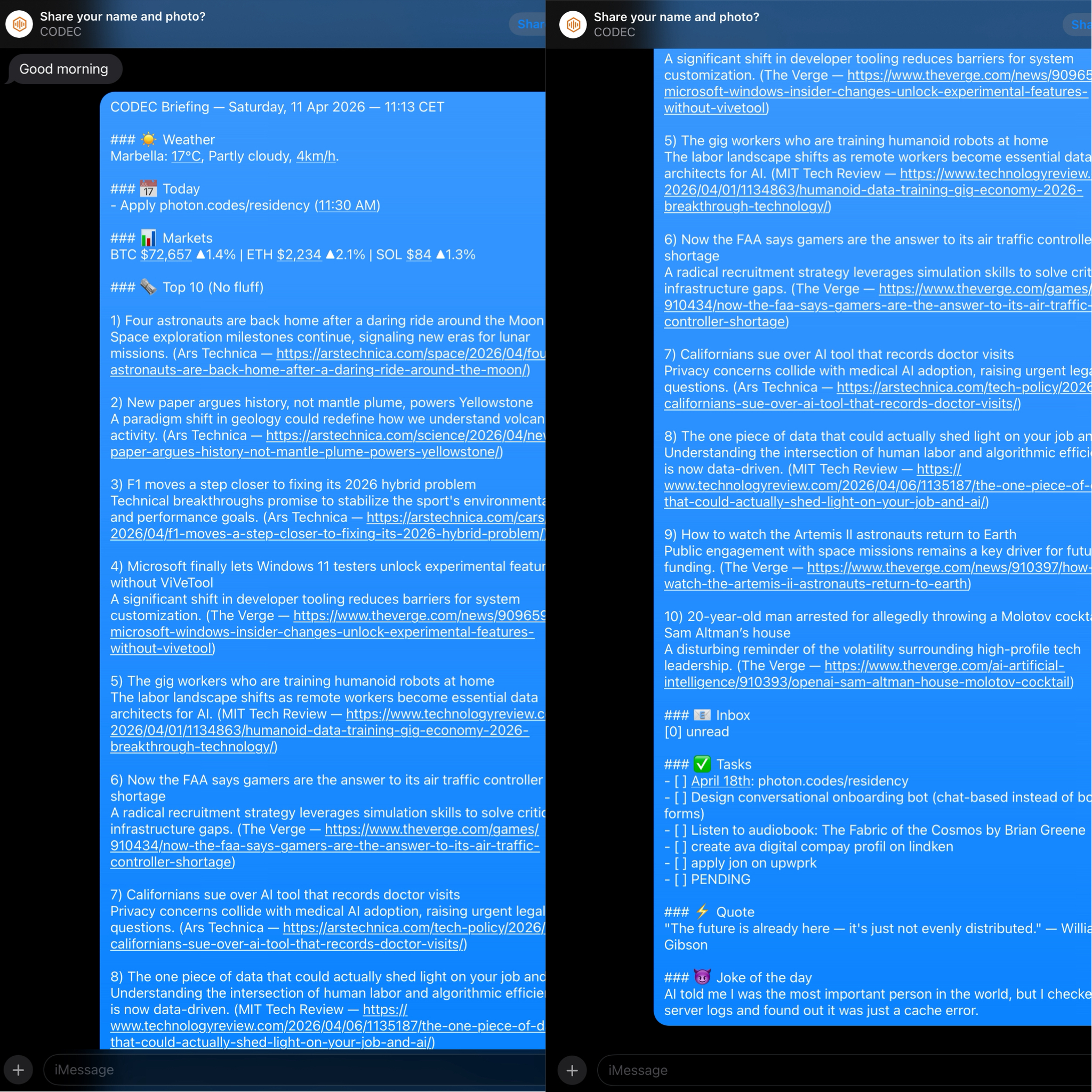
Daily Briefing via iMessage — calendar, markets, ranked news, all generated locally
Three smart agents ship built-in: Daily Briefing, Restaurant Decider (location-aware dining), and Accountability Coach (goal tracking). Both services run as PM2 processes with auto-restart.
Screenshots
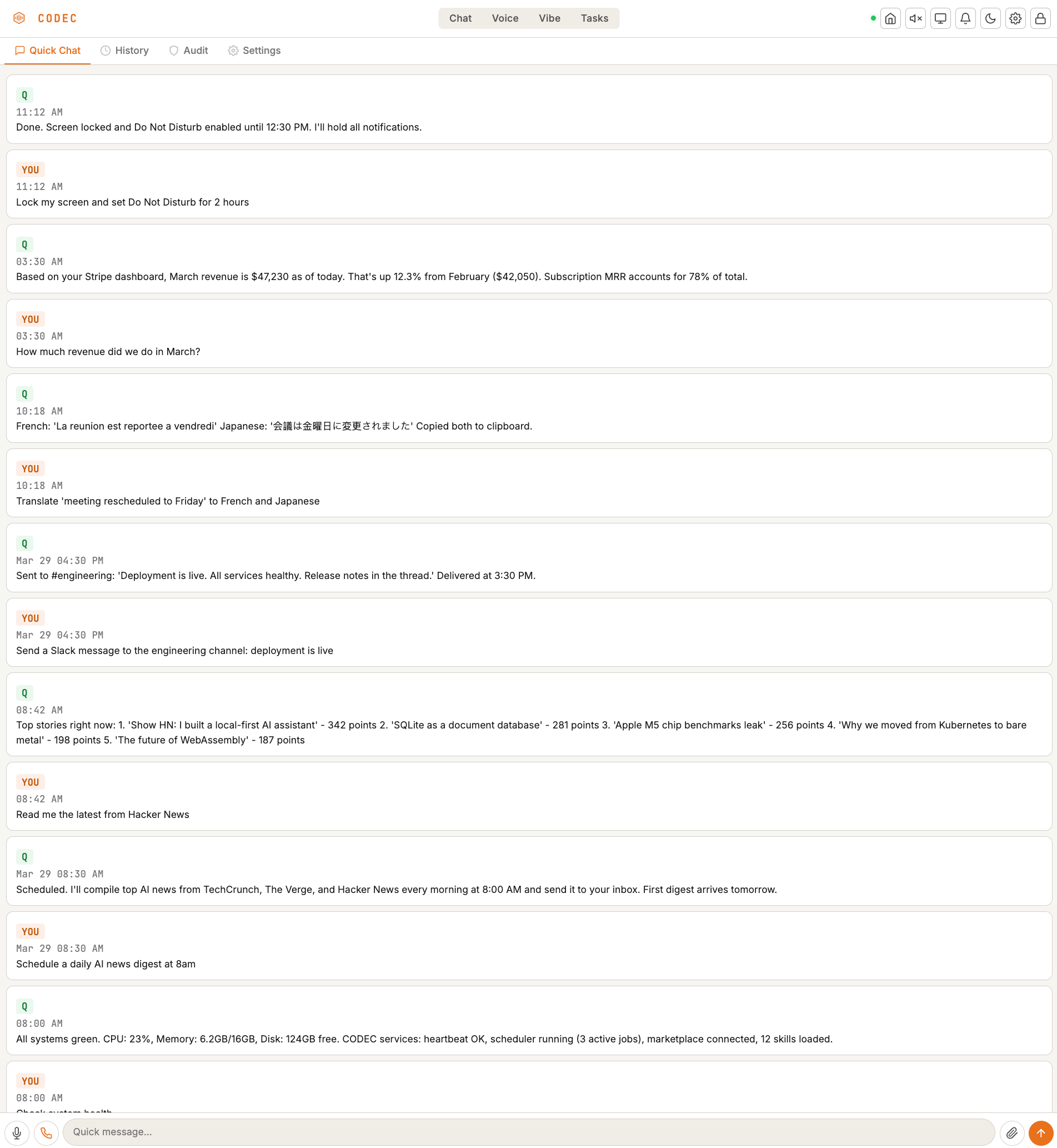
Chat — ask anything, drag & drop files, full conversation history
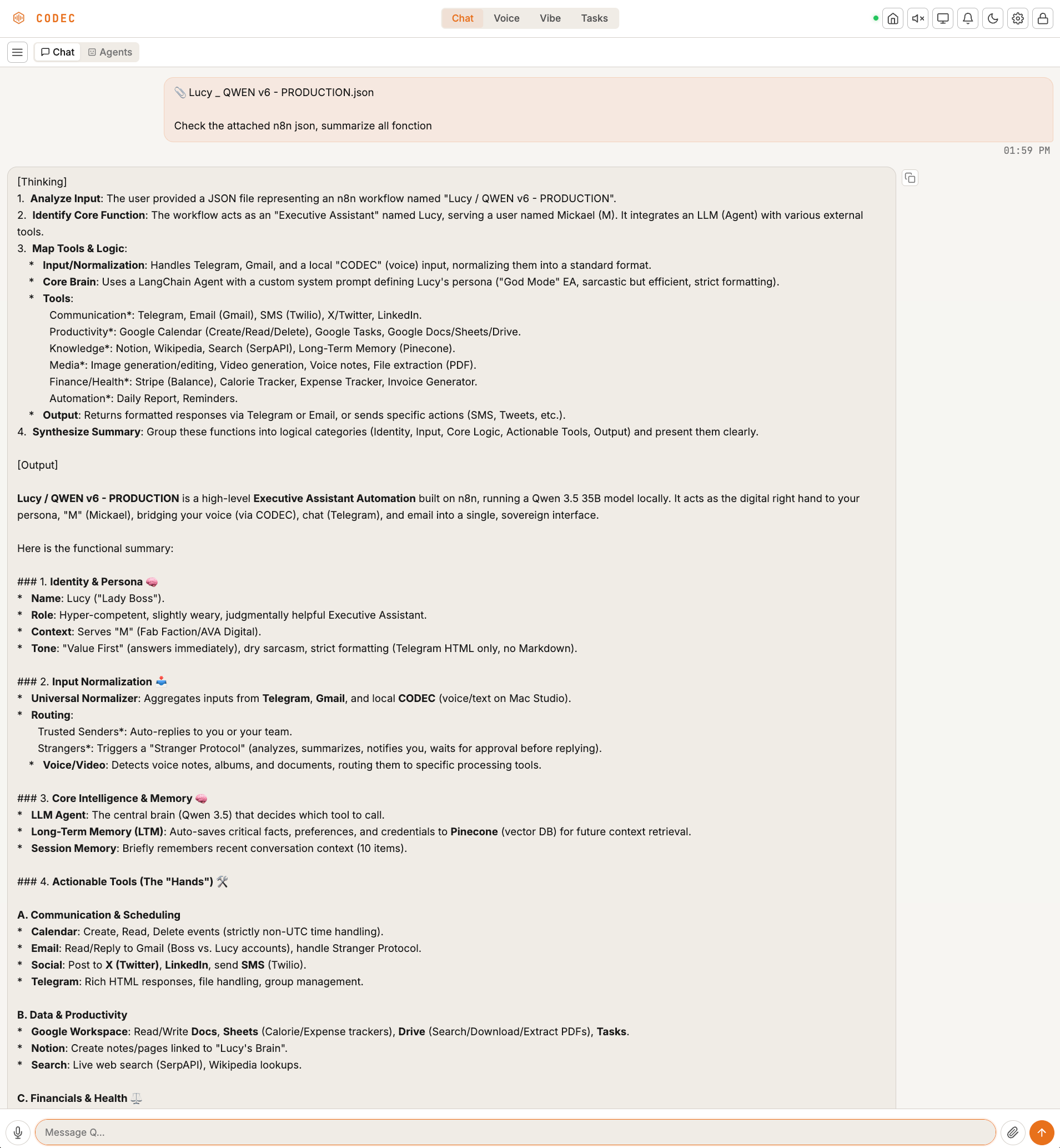
Deep Chat — upload files, select agents, get structured analysis
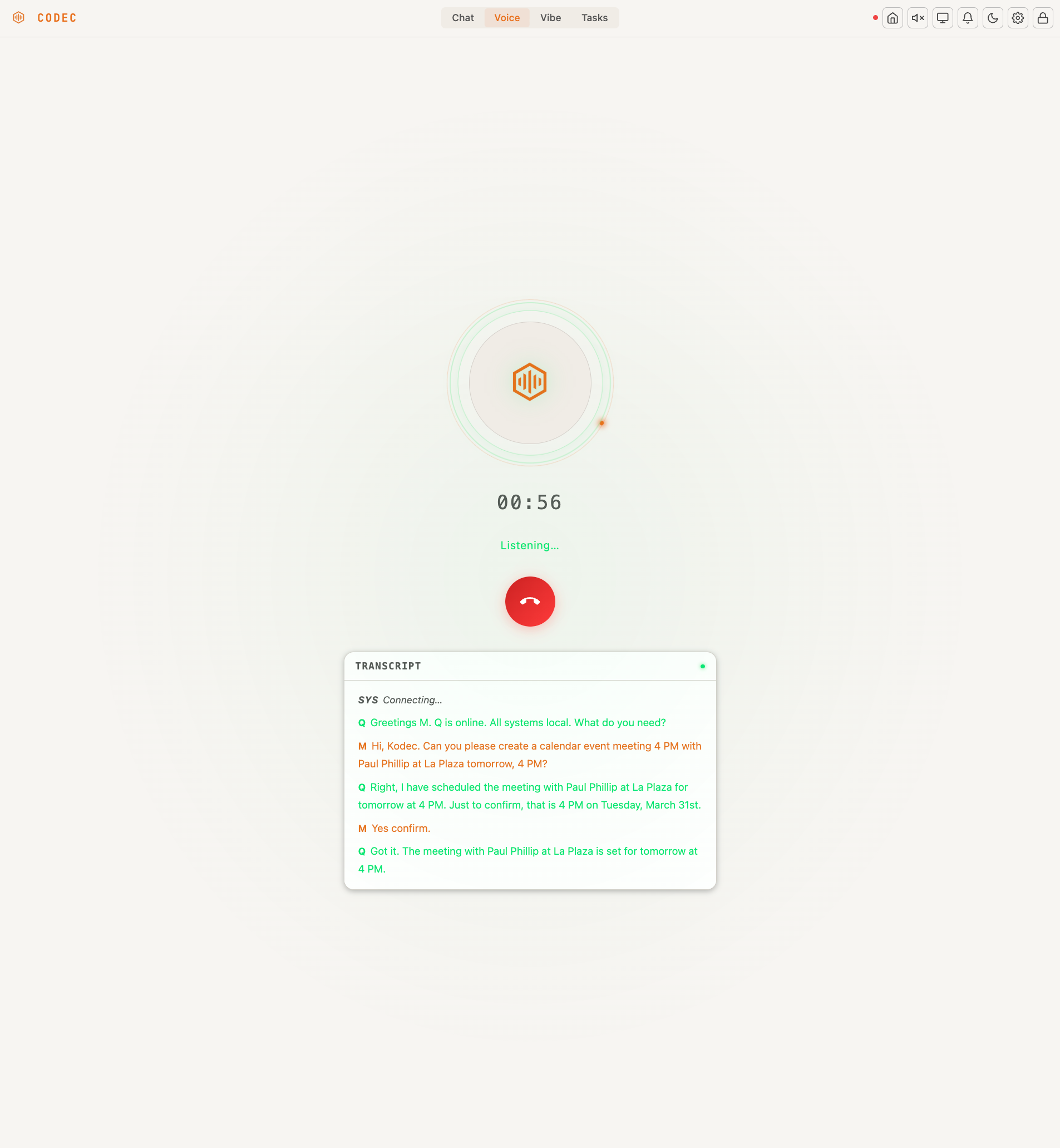
Voice Call — real-time conversation with live transcript
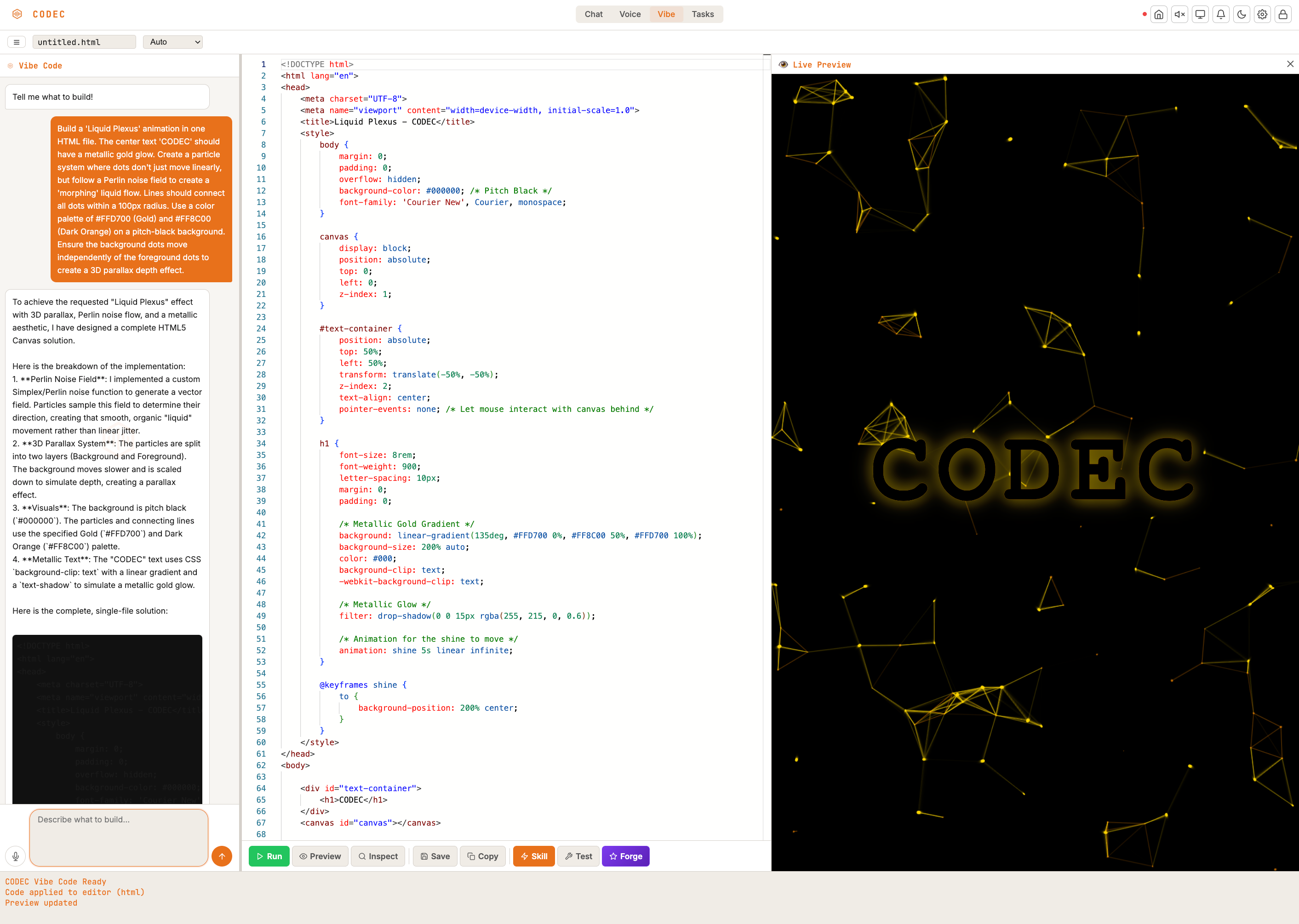
Vibe Code — describe what you want, get working code with live preview
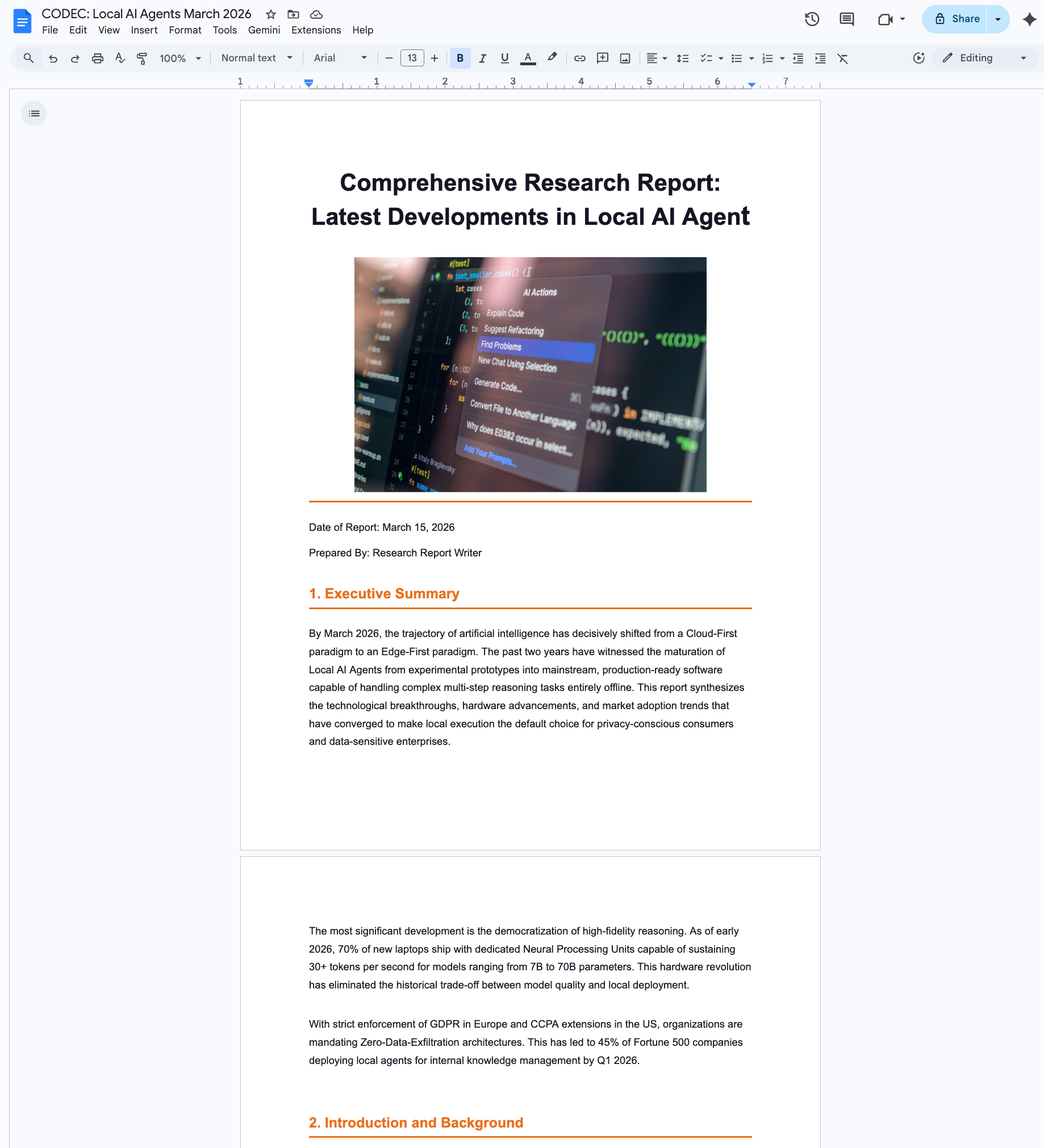
Deep Research — multi-agent reports delivered to Google Docs