Repository: https://git.nexlab.net/nexlab/coderai
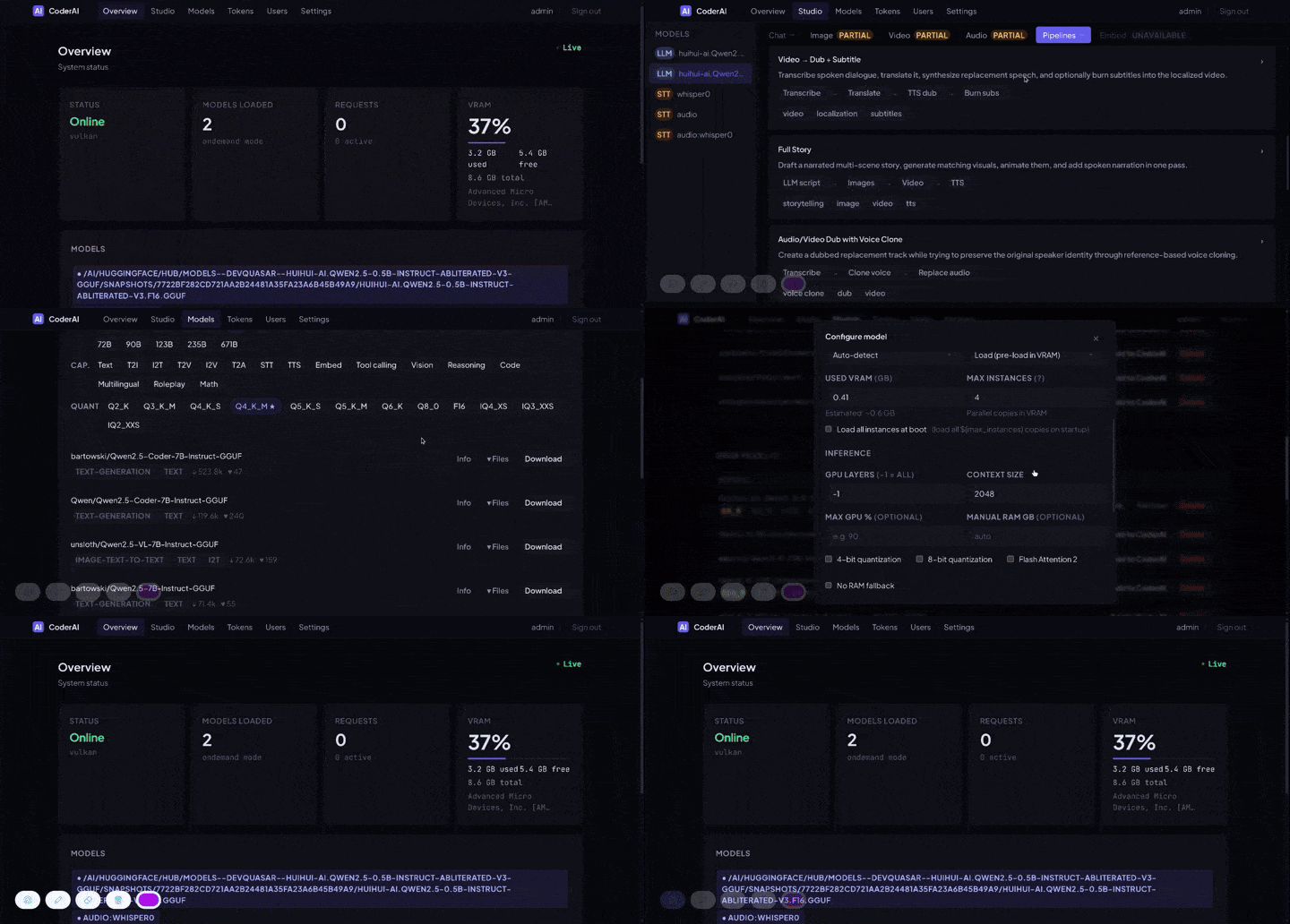
CoderAI — complete orchestration, distribution and escalation of remotizable advanced inference.
A multimodal and multi-backend local model orchestrator with an OpenAI-compatible API server to run models on local GPUs, supporting multiple GPU backends: NVIDIA (CUDA), AMD (Vulkan), and Intel (Vulkan). Configuration-driven architecture with per-model settings and full multi-modal support.
Text, images, video, speech, embeddings, OCR and LoRA training behind one API — served by whichever runtime each model actually needs, from PyTorch to native C MoE engines that stream a multi-terabyte model off disk, to a GPU rented by the second when the local one isn't enough.
Features
Core Capabilities
- OpenAI-Compatible API: Drop-in replacement for OpenAI's API endpoints
- Orchestration: one front routes every request to the right runtime, card, machine or cloud — engines per GPU here, other coderai installs as cluster nodes, pools of hosts and remotes, RunPod pods — by capability, load and per-model pins
- Distribution: one model over several machines' cards — a GGUF over llama.cpp RPC, an HF model over vLLM on Ray or SGLang multi-node, a video pipeline's text encoder / experts / VAE on different nodes — and the work of one request over every machine that has the model: images, videos, embeddings, rerank, speech, transcriptions, OCR batches split and merged; LoRA/QLoRA training data-parallel across nodes
- Escalation: when the local cards are not enough, the same model runs on a machine you
own, then on a GPU rented by the second, with budgets and a reaper; remote or bursting,
chosen per model. See
docs/cluster.md,docs/remote-execution.md,docs/runpod.md - Configuration-Based: JSON config files for all settings — no complex CLI arguments
- Multi-Modal: Text, image, video, audio, TTS, STT, embeddings
- Per-Model Configuration: Individual settings for each model (GPU layers, quantization, context size)
- On-Demand Loading: Models load automatically when requested, unload when idle
- Memory Management: Smart VRAM → RAM → Disk offloading for efficient resource usage
- Parallel Execution: Run multiple models simultaneously (VRAM permitting)
- Auto-Swap: Automatic model switching on request — load what's needed, unload what's idle
- Request Queue: Concurrent requests are queued and processed in order per model
- Prompt Caching: Reuse KV cache across requests to reduce latency and computation
- Prompt Aggregation: Batch concurrent requests into a single inference pass for higher throughput
- Custom Pipelines: Create and save multi-step workflows combining any generation tasks
- Pre-Built Pipelines: Ready-to-use pipelines for common workflows (image-to-video, dubbing, story generation)
Interfaces
- Web Studio: a UI for every generation task — chat, image, video, audio, pipelines
- Admin dashboard: models, engines, tasks, cluster, RunPod, tokens and settings, served by the torch-free front so it stays live while an engine is busy
GPU Backend Support
- NVIDIA (CUDA): PyTorch + Transformers for HuggingFace models
- AMD GPUs: llama-cpp-python + Vulkan for GGUF models
- Intel GPUs: iGPU/Arc support via Vulkan
- Auto-Detection: Automatically selects best available backend
- Multi-GPU: Automatic distribution across multiple devices
- Front / Engine Split: A torch-free front proxy supervises one engine subprocess per GPU, so the UI stays responsive while an engine is loading or generating
Inference Engines
Beyond the built-in transformers and gguf paths, CoderAI can drive external native
engines — each selected per model with a backend pin in models.json. They exist so a
frontier-size MoE model can run on hardware that "shouldn't" be able to hold it, or so a
model can be served with far higher concurrency.
backend |
Engine | What it's for |
|---|---|---|
transformers |
PyTorch + HF Transformers | safetensors models on CUDA |
gguf |
llama.cpp | GGUF models on CUDA or Vulkan |
ds4 |
ds4 / DwarfStar | DeepSeek-V4, native C/CUDA engine with its own OpenAI server |
colibri |
colibri | GLM-5.2 / DeepSeek-V4 / Kimi-K3 — pure-C MoE engine streaming experts from disk; driven directly over its stdin/stdout mux protocol |
k3 |
kimi-k3-in-c | Kimi-K3 (2.78T params) on CPU, streaming trunk + experts from disk in as little as ~8 GB RAM |
kt |
ktransformers via SGLang | CPU+GPU heterogeneous MoE (DeepSeek / Kimi / Qwen / GLM / MiniMax) |
vllm |
vLLM | continuous batching + paged KV for high aggregate throughput; runs in an isolated venv |
runpod |
RunPod | a remote rented GPU — see below |
host |
a machine you have | a capability image on your own box — always-on, or started by command |
CoderAI owns the full lifecycle of each: build, weight download, process supervision,
health, VRAM co-tenancy and teardown. ds4, kt, vllm, runpod and host are
HTTP-proxy backends; colibri and k3 are driven over a native wire protocol. vllm also appears as
a first-class engine node on the engines/tasks pages, alongside nvidia and radeon.
See docs/ for a per-engine guide.
Remote GPUs (RunPod)
A model can be served on a rented cloud GPU instead of local hardware — same
/v1/models entry, same /v1/chat/completions, same Tasks page, but the weights never
touch your disk. Two per-model modes:
- Pods — CoderAI provisions, health-checks, load-balances, scales and destroys the GPU containers itself, with GPU/price/VRAM selection, spot support, capacity fallback and stuck-boot retry.
- Serverless — CoderAI proxies to a RunPod serverless endpoint you already created.
Plus:
- Cost controls: per-model and global
$/hrrate caps, and cumulative spend budgets over a trailinghour/day/week/monthwindow, on a persistent ledger - Cold start & idle teardown: pods serve many requests, then self-destruct a configurable time after the last one
- Stale-pod reaper: a maintenance loop identifies pods this deployment created and terminates any that shouldn't exist, so a crash can never leave a GPU billing
- Spillover: a local model can burst to RunPod only when the local GPU is full or absent
- No local model required: an instance with no GPU and no local weights can run purely as a RunPod orchestrator
- Test run, per model:
POST /v1/models/test(or the Test run button) sends the smallest real request for the model's kind through the front, so it exercises the same routing, auth and pod provisioning a user would.tools/runpod_model_test.pyplaces one model on a pod without moving the rest of its capability - A pod that says what it is doing: each pod logs timestamped boot phases from the first
instant the container exists and serves the record at
/boot— RunPod publishes no pod-log API, so the pod reports on itself - Nineteen capability images, every model type served: ten ordinary ones, five for
stacks that cannot share a venv (pyannote, coqui XTTS, NeMo, CrisperWhisper, PaddleOCR),
each carrying its own torch on a torch-free core, and four more for the LLM servers and
native engines (below). Sixteen have completed a real inference on a rented GPU on the
current build;
faceswapneeds real faces to test and the engine images need 100 GB+ weights on a volume - The LLM servers as coderai pods:
coderai-llama(llama-cpp-python compiled with CUDA for every pod GPU generation, 5.3 GB) andcoderai-vllm(vLLM in its own venv, 12.4 GB) serve a GGUF or an HF repo with everything a coderai pod gives — TLS,/boot, seeding, local LoRAs, the Tasks page — while the upstreamvllm/llamacppimages stay selectable - No Cloudflare in the way: a coderai pod is reached at its public ip:port over TLS it brings itself (a per-install CA signs a certificate per pod), so there is no 100 s proxy cutoff — a voice clone that died at 524 through the proxy passes direct. The proxy remains the default for upstream images, which cannot take a certificate
- The native MoE engines on rented GPUs: an
enginesimage (2.4 GB) compiles ds4, colibri and kimi-k3-in-c for every pod GPU generation (Ampere → Blackwell) rather than copying this machine's builds, andengines-ktcarries ktransformers (SGLang + kt-kernel) in its own venv; a model names its engine on its runpod block and the pod arrives with it enabled and configured. ⚠ Their weights are 100 GB–1.5 TB: put them on a network volume (volume_path) or every cold pod downloads them — the UI warns, loudly - Multi-GPU pods:
gpu_countrents one machine with N cards, priced and VRAM-checked as a whole; vLLM and llama.cpp are told to shard across them - Or a machine you already have:
"backend": "host"points a model at a capability image running anywhere — always-on, or started by a command and stopped after idle — with none of the renting machinery. Both are one choice on the model page: Runs on → this machine / RunPod only / a machine of yours - Visible while it runs: every request sent to a pod or host is a row on the Tasks page
naming the machine it landed on, and
/admin/runpodlists the live pods
Full guide: docs/runpod.md ·
remote placement of every model type, the capability images and the host backend:
docs/remote-execution.md.
Several machines as one (cluster)
- Cluster nodes: other coderai installs on your network become engines of this one — polled, assigned models, pinned by name from the model page (Engine / card), routed by capability and load; the node's own front picks the card. A node needs only an API token. Load/Unload from the head reach the node; the Cluster page shows every node's engines, VRAM, reachability and log tail
- Zero-config on a LAN: one cluster token typed on every box, mDNS discovery
(
_coderai._tcp) and auto-join — members find each other and become nodes with no URL and no per-node token; a node that restarts gets its models pushed again - Prefix-cache-aware routing: a conversation's next turn goes back to the engine or node that served it (warm KV cache) when the model is loaded in several places
- One GGUF over several machines: llama.cpp RPC — this machine runs
rpc-serverprocesses (Settings → Cluster) that lend its cards; a model names them under Cards on other machines and its layer split — or row split, llama.cpp's tensor parallelism, for a fast fabric — spreads over local and remote cards alike. Built from the same llama.cpp as the bundled llama-cpp-python (packaging/build-rpc-server.sh) - One HF model over several machines: vLLM on Ray (pipeline parallel across nodes on
Ethernet; tensor parallel may span them on 10 GbE/RDMA) and SGLang
--nnodes— coderai starts the peers by their configured commands, waits for their GPUs, launches, tears down; per model or as defaults - Distributed generation and training: a model's Distribute switch fans
nimages, embedding/rerank lists, TTS sentences, transcription windows and OCR batches over every engine and node holding it; Pipeline parts on other machines relays a Wan video through the text encoder, the low-noise expert and the VAE wherever they live; LoRA training nodes train one adapter on several machines at once - Pools: several URLs for one capability, several machines for one
hostmodel — healthy + least busy wins, a dead one is skipped and the request moves on - No impossible pairs: the model form greys out engines that cannot run the chosen backend and backends the pinned engine cannot run, and refuses to save a wrong pair
- Operable:
GET /metricsfor Prometheus (requests per API key / model / engine, engines and nodes up, VRAM, RunPod spend), usage tables on the Cluster page, node logs from the head; every published image is cosign-signed (packaging/cosign.pub)
Full guide: docs/cluster.md.
Image Generation
- Text-to-Image: Stable Diffusion, SDXL, Flux, and GGUF image models (via stable-diffusion.cpp)
- Image-to-Image: Style transfer and image editing
- Inpainting: Fill masked regions with AI-generated content
- Upscaling: Real-ESRGAN super-resolution (2×/4×/8×)
- Deblur: Wiener deconvolution + unsharp masking
- Unpixelate: Real-ESRGAN restoration of pixelated/compressed images
- Outfit Change: Auto-generated clothing mask + inpainting for wardrobe changes
- Face Swap: InsightFace INSwapper — swap faces in images and videos
- Depth Estimation: Monocular depth maps
- Segmentation: SAM-based object segmentation
- Character Profiles: Apply up to 6 named character profiles (IP-Adapter) to anchor appearance across generations
- Environment Profiles: Apply up to 6 named environment profiles to condition scene/background style
- Generation Progress: Real-time per-step progress tracking via
GET /v1/images/progress
Video Generation
- Text-to-Video: Generate video from text prompts
- Image-to-Video: Animate a still image
- Video-to-Video: Transform existing video
- Ti2V: Text + image → video with camera motion control
- Frame Interpolation: Increase FPS via RIFE or ffmpeg minterpolate
- Upscaling: Real-ESRGAN video upscaling
- Subtitles: Whisper transcription + optional translation + burn-in
- Dubbing: Transcribe → translate → TTS → replace audio track
- Character Profiles: Apply up to 6 saved character profiles for visual consistency. Pipelines with IP-Adapter (AnimateDiff and other SD-based video models) are conditioned directly. For the rest — Wan, CogVideoX, LTX, SVD, i.e. most video models — CoderAI renders an identity keyframe on the image endpoint (which does have real IP-Adapter) and runs the video as
ti2vfrom that frame, socharacter_profileslocks a face on every model. Controlled bykeyframe_identity(auto/always/never) with optionalkeyframe_modelandkeyframe_steps; combine with a per-character LoRA for the strongest consistency - Environment Profiles: Apply up to 6 saved environment profiles to condition the scene
- Multi-Character Dialog: Assign spoken lines to individual characters — each line picks a character profile, voice profile or TTS voice ID, and text; lines are voice-cloned with F5-TTS from the named profile, mixed with correct timing (sequential or manual), and lip-synced via Wav2Lip
- Talking presenter: a scene can be a character talking to camera, lip-synced to that
scene's narration — full screen, a bubble over the B-roll (captions move above it), or a
split screen; the face comes from a character profile, the motion from a short
identity-locked clip, a still or footage you supply.
POST /v1/video/talking-headrenders one line for a preview. Any installed lip-sync engine (wav2lip, sadtalker, …) can be named - Composition (reels):
POST /v1/video/composeturns a list of scenes — narration plus visuals — into one finished, uploadable video: the scene's length comes from its narration, visuals are Ken-Burns'd or trimmed to fit, music is looped and ducked under the voice, captions are burned in with word timings (karaoke presets) inside the platforms' safe area, and a thumbnail, SRT/VTT and the narration track come back with it. Async jobs with stage/progress/cancel; a visual that fails to download becomes a gradient and a warning instead of a failed render. Seedocs/video-compose.md - Lip Sync: Wav2Lip and SadTalker. The Docker/OCI image ships both (launcher shims plus a dedicated lip-sync venv; checkpoints download on first use). A from-source install has no shims, so CoderAI falls back to a self-managed Wav2Lip that fetches and patches itself on first use. Either way, if lip sync can't run the response carries a
warningsentry saying the audio was muxed without mouth sync — rather than passing off an unsynced video as a success
Audio
- Text-to-Speech: Kokoro TTS with voice selection and speed control
- Music/SFX Generation: MusicGen, AudioGen, AudioLDM2
- Voice Cloning: F5-TTS zero-shot voice cloning from a reference audio clip
- Voice Conversion (SVC): Seed-VC — converts timbre while preserving pitch, melody and expression; singing mode for music
- Voice Profiles: Save named voice profiles (reference audio + transcript) for reuse; voice profiles can be extracted directly from video files and updated via PATCH
- Stem Separation: Demucs vocals/instrumental or 4-stem split (
/v1/audio/stems) - Restoration: DeepFilterNet denoise, normalise, de-hum, de-click (
/v1/audio/cleanup)
Speech-to-Text and Speaker Recognition
/v1/audio/transcriptions is not tied to one Whisper implementation. The STT backend is
chosen per model with the model entry's backend key:
backend |
Engine | Notes |
|---|---|---|
| (unset) | whisper.cpp server → faster-whisper → whispercpp | the default fallback chain |
whisper-server |
whisper.cpp GGUF | per-model runner; counts as a model load and is VRAM-evictable |
whisper-hf |
CrisperWhisper (HF) | verbatim transcription with word timestamps; isolated venv |
crisperwhisper |
CrisperWhisper worker | isolated venv, long-form overlap windowing |
wav2vec2 |
Wav2Vec2 (HF) | FP16 on GPU |
vosk |
Vosk | CPU, per-language model directory |
nemo |
NVIDIA NeMo (Canary / Parakeet) | isolated venv; the translation-capable family |
- Per-model languages: a model entry can declare a
languageslist; a request for an unlisted language is rejected with the allowed list, and/v1/modelssurfaces it - Translation:
target_languageon a model withsupports_translation: true - Word timestamps:
timestamp_granularities=word→ a top-levelwords[] - Diarization:
diarize=truetags every segment with aspeaker, or call/v1/audio/diarizationdirectly (pyannote in an isolated venv, ungated-first with anHF_TOKENfallback) - Speaker recognition: enrol named voiceprints and then identify or verify a
voice (
ecapa/pyannote/wespeakerbackends). Diarization withidentify=truerelabels the turns with the enrolled names instead ofSPEAKER_00 - VRAM-aware: every STT backend participates in VRAM eviction;
keep_resident: truekeeps a small model co-resident
Embeddings and Reranking
/v1/embeddings covers far more than text. The backend is inferred from the model itself:
| Family | Serves |
|---|---|
| sentence-transformers / transformers | general text embeddings |
| BGE-M3 | native multi-vector: dense, sparse (lexical weights) and colbert (per-token) in one pass |
| CLIP / vision (DINOv2, ViT) | image embeddings |
| GME-Qwen2-VL | text and image in one shared space (native loader, no trust_remote_code) |
| GGUF via llama.cpp | llama and llama-vl (with an mmproj) |
| dinov2.cpp | GGUF DI |