
Language · English | Português (Brasil) | 简体中文 | 繁體中文 | 日本語 | 한국어 | Türkçe | Русский | Tiếng Việt | ไทย | Deutsch | Español
Codex HUD
A workspace HUD for the OpenAI Codex CLI — compact single-line footer status for patched mode, plus standalone workspace snapshots for local inspection.



Features · Quick Start · Configuration · Patched Codex Footer · Roadmap
Codex HUD is a local Codex plugin with two surfaces: standalone commands can print an expanded workspace snapshot for local inspection, and the experimental patched Codex TUI can render the compact --line output as a single-line footer.
By default it is a companion to Codex's native [tui].status_line, because stock Codex cannot render arbitrary plugin output under the input area — it exposes a configurable built-in status item array but not a plugin-owned renderer. This repo also ships a maintained patch path for users who want the compact status line to render directly in the real Codex footer.
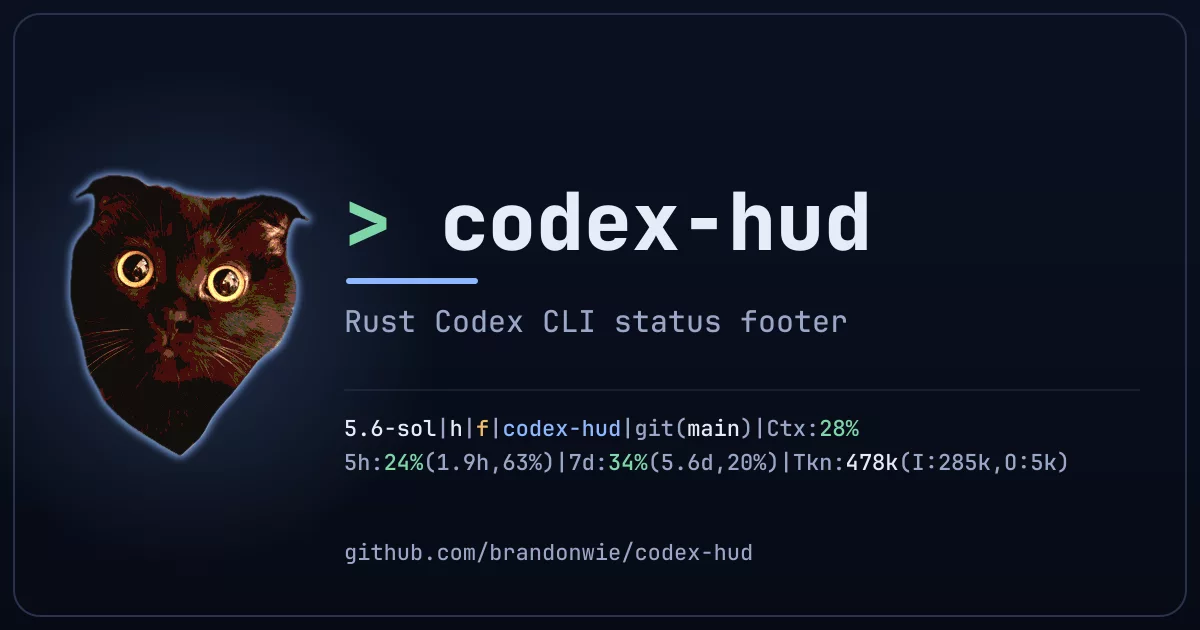
The compact status line, printed by --line (rendered as an in-TUI footer only in patched mode):
5.6-sol|h|f|codex-hud|git(main*)|Ctx:█░░░░ 21%|5h:█░░░░ 17%(5h,🐢100%)|7d:█░░░░ 16%(5.1d,👾27%)
The segments, labels, colors, thresholds, and compact/full identity format in that line are configurable — see Configuration. Model, reasoning effort, and non-standard service tiers are separate atoms. Standard/default service is hidden; compact mode shortens visible tiers such as
fast→fandpriority→p.
The
5hand7dsegments use the newest eligible account-wide rate-limit snapshot in Codex rollout events. Eligible snapshots belong to thecodexlimit bucket or use the legacy format without a limit ID; the newest event timestamp wins, and other named buckets are ignored. Both windows come from that one snapshot and are matched by length (300 and 10080 minutes); a missing window is omitted. Values refresh only when a matching rollout event is available.
The default status-line renderer is codex-hud, a small native Rust binary (edition 2021, MIT): a single self-contained executable with no interpreter on the rendering path, a minimal dependency footprint (just serde_json and toml), zero unsafe code, and a size-optimized release build that comes in around 574 KB. For clarity, two different "Rust"s appear in this README: the upstream Codex CLI is itself a Rust program (the build target of the experimental patch below), while codex-hud is the separate in-repo status-line renderer.
Features
- Codex version, model, reasoning effort, sandbox, and approval mode
- Native Codex status-line item count and color setting
- Compact usage parsed from Codex rollout logs — the compact line above (an in-TUI footer in patched mode)
- Current working directory, git branch, dirty counts, and repo root
- Project hints such as package name, nearby
AGENTS.md, and 3BACTIVE-STATUS.mdpriority when present - Codex hook event counts from
hooks.json - A clear note that Codex's native status line remains authoritative for live token and rate-limit values
Quick Start
Install
The fastest path. It builds from source, so it needs git, node, and a Rust toolchain (cargo) on your PATH, plus a working codex:
curl -fsSL https://raw.githubusercontent.com/brandonwie/codex-hud/main/install.sh | bash
Run the same command again to update an existing install. The website presents Install and Update as separate copy blocks while keeping one auditable script path.
This clones a pinned release, builds the codex-hud renderer, installs the stock-delegation launcher, and registers the plugin — it does not touch your existing codex command. To also make codex resolve to the HUD launcher, pass the flag to the shell that runs the script: curl -fsSL https://raw.githubusercontent.com/brandonwie/codex-hud/main/install.sh | CODEX_HUD_MAKE_DEFAULT=1 bash. To preview without changing anything, run bash install.sh --dry-run (or set CODEX_HUD_DRY_RUN=1). To audit before running, download with curl -fsSLO https://raw.githubusercontent.com/brandonwie/codex-hud/main/install.sh, read it, then run bash install.sh.
No Rust toolchain, or prefer manual control? Use the step-by-step setup below.
Clone the repo, then install it as a local Codex plugin:
git clone https://github.com/brandonwie/codex-hud.git
cd codex-hud

# Register this repo as a local plugin marketplace, then add the plugin:
codex plugin marketplace add "$(pwd)"
codex plugin add brandonwie@codex-hud
Start a new Codex thread after installing or reinstalling so the skill list is refreshed.
Tip:
codex plugin marketplace add "$(pwd)"reads the current directory, so run it from the repo root. You can also pass an explicit path instead of"$(pwd)".
Then install the HUD launcher (recommended). The default mode delegates to your real Codex install, so Homebrew/npm Codex updates are picked up automatically — no rebuilds, no patched binaries. To be clear: the stock-delegation launcher does not render an in-TUI footer — it provides safe delegation plus the managed codex shim; an in-TUI footer exists only in the experimental patched mode below.
npm run install:launcher                    # installs ~/.local/bin/codex-hud-tui
npm run install:launcher -- --make-default  # optional: make `codex` resolve to the launcher
rehash
Build the Rust status-line renderer before using standalone codex-hud, --print-config, or the experimental patched footer. This changes nothing visible in a stock-launched TUI, but it provides the command used by --watch and by hand-wired status_line_command integrations. Once built, the installer picks it up automatically (--renderer auto) for patched mode and --print-config:
npm run build:rust # optional: builds rust/target/release/codex-hud
See HUD Launcher for details and npm run doctor for diagnostics.
Usage
Run the Rust renderer directly during development:
npm run build:rust
./rust/target/release/codex-hud           # standalone expanded snapshot
./rust/target/release/codex-hud --line     # single compact line
./rust/target/release/codex-hud --line --color
./rust/target/release/codex-hud --json      # machine-readable
./rust/target/release/codex-hud --watch 5   # refresh every 5s
npm test
Terminal capture of the compact status line (--line):
$ ./rust/target/release/codex-hud --line
5.6-sol|h|f|codex-hud|git(main)|Ctx:███░░ 50%|5h:░░░░░ 4%(4.0h,🐢21%)|7d:█░░░░ 20%(4.9d,👾30%)
Run ./rust/target/release/codex-hud --line --color locally to see the same line with ANSI color styling.
codex-hud exposes the full flag surface after npm run build:rust — --line / --status-line / --color / --json / --watch / --init-config / --print-config / --config-path:
./rust/target/release/codex-hud --line --color
Configuration
Both the standalone workspace snapshot and the compact status line are configurable through an optional codex-hud.toml. With no config file you get the defaults shown above; every key is optional and anything you omit inherits the built-in default.
The canonical schema lives in spec/config-schema.md. This README shows the common options; use the schema when changing parser behavior or validating every supported field.
codex-hud --init-config     # scaffold ~/.codex/codex-hud.toml (--force to overwrite)
codex-hud --print-config    # print the resolved, merged config as JSON
codex-hud --config-path     # show which config files are in effect
Search order
Later sources override earlier ones (per key — arrays replace, scalars override):
- built-in defaults
$CODEX_HOME/codex-hud.toml(per-user;$CODEX_HOMEdefaults to~/.codex)./.codex/codex-hud.toml(per-project; walks up to the git root)$CODEX_HUD_CONFIG(explicit file path via env var)
A missing file is fine. A malformed or invalid file is ignored — the HUD falls back to defaults and prints a one-line note on stderr, so the status line never breaks. codex-hud keeps its own file instead of a table inside Codex's config.toml, so a bad HUD config can never stop Codex from launching.
Options
# Compact by default. Set true for " | " segment spacing and ": " labels.
space = false

# Text placed between segments. The space flag controls padding around this text.
separator = "|"

# Which segments to show, in order. Ids:
#   model, project, branch, runtime, ctx, 5h, 7d, tkn
# Aliases: workspace = project + branch + runtime; context = ctx; tokens = tkn.
# (runtime / "node vX" and tkn / "Tkn:904k(...)" are off by default — add them
# to opt in.)
segments = ["model", "project", "branch", "ctx", "5h", "7d"]

# Rename a segment's label (keys are segment ids).
[labels]
ctx = "Ctx"

# Colors: a palette name, a 256-color code (0-255), or "#rrggbb" (mapped to the
# nearest 256 color). Names: dim, coral, mint, amber, cyan, violet, neonViolet.
# ok / warn / crit are the threshold colors shared by ctx / 5h / 7d.
[colors]
model = "neonViolet"
branch = "#5fafff"
ok = "mint"
warn = "amber"
crit = "coral"

# Percent thresholds (0-100) that switch ctx/5h/7d between ok/warn/crit.
[thresholds.percent]
warn = 70
crit = 90

# Formatting toggles.
[format]
percentRound = true # false -> one decimal place
bar = true          # false -> hide the ctx/5h/7d bargraph, keep the %
barWidth = 5        # bargraph width in cells (0 disables it, max 40)
barFilled = "█"     # glyph for the used part of the bargraph
barEmpty = "░"      # glyph for the remaining part of the bargraph
tokenUnits = true   # false -> raw integers (no k/M)
tokenUsage = true   # false -> total only, hide (I:.. O:.. C:..)
pace = true         # false -> hide the pace % in 5h/7d
pacePrefix = true   # false -> hide the pace icon (🐢/👾/🔥), keep the %
identityShort = true # false -> gpt-5.6-sol|high|fast instead of 5.6-sol|h|f
fastMode = false # false -> resolved tier (standard hidden); true -> force fast/f
paceSlowPrefix = "🐢"
paceNormalPrefix = "👾"
paceFastPrefix = "🔥"
Model, reasoning effort, and visible service tiers use the normal segment separator. Standard/default service is hidden. Compact mode maps known reasoning names such as high to h and shortens visible tiers to their first character (fast → f, priority → p); full mode keeps values such as gpt-5.6-sol|high|fast. A service tier that is genuinely unavailable is also omitted. Older modelShort and effortShort keys remain accepted as compatibility overrides, but new configs should use identityShort.
Pace markers compare usage against even burn rate: slow is more than thresholds.pace.crit behind pace, fast is more than thresholds.pace.crit ahead, and the middle band is normal. Run codex-hud --print-config to see the full resolved option set.
Platform Support
The supported launcher flow targets macOS and Linux shells. WSL can work when paths resolve through the Linux filesystem, but native Windows shells are not supported because the managed launchers are Bash scripts.
| Capability | Intel macOS (x86_64) |
Apple Silicon macOS (arm64) |
Linux |
|---|---|---|---|
| Rust renderer and stock-delegating launcher | Supported | Supported | Supported |
| Experimental patched TUI footer | Not published (retired 2026-09-26); use the stock-delegating launcher, or --source-build (unsupported) |
Downloads an existing, checksummed aarch64-apple-darwin runtime for your Codex version when available; automatic builds are retired; compiles only with --source-build |
No published runtime; --source-build only |
No platform silently starts a long local Codex build. Automated patched-runtime builds have been retired, including Apple Silicon builds. Existing published runtimes remain available, but new Codex releases and patch sets no longer get automatic builds. Intel macOS patched runtimes were retired on 2026-09-26: their cold builds ran past 90 minutes on the Intel runner and no one outside the maintainer downloaded them. On an Intel Mac, patch:codex and codex:sync exit with that explanation and leave your codex untouched. npm run patch:codex -- --make-default downloads and verifies the runtime for your exact Codex version. If no matching runtime is available, the installer exits with the expected asset name and leaves the existing codex command untouched. Use npm run install:launcher for stock delegation; local compilation happens only when you explicitly add --source-build.
HUD Launcher (Stock Delegation — Default)
npm run install:launcher writes ~/.local/bin/codex-hud-tui, a small launcher that finds your real (stock) Codex install and executes it with exec -a codex, so terminal integrations such as Herdr still recognize the pane as a Codex session. The stock binary's path is baked in at install time, with a runtime fallback that re-discovers Codex on PATH (skipping all HUD-managed entries, so the launcher can never recurse into itself).
Because the launcher delegates to stock Codex:
- Homebrew/npm Codex updates are picked up automatically — no rebuilds.
- Your Homebrew/stock Codex files are never modified or replaced.
npm run install:launcher -- --make-defaultinstalls the managed~/.local/bin/codexshim; the installer refuses to replace a non-managedcodexunless you pass--force-shim.
Remove only the managed shim with:
node scripts/install-patched-codex.js --uninstall-shim
rehash
which codex
Doctor
npm run doctor prints the full launch-chain state — shim, launcher mode (stock/patched/legacy), stock Codex path + version, renderer state, patched payload versions, staleness, and leftover artifacts:
prefix: /Users/you/.local/bin
codex shim: managed -> /Users/you/.local/bin/codex-hud-tui (/Users/you/.local/bin/codex)
launcher: v2 mode=stock (/Users/you/.local/bin/codex-hud-tui)
launcher metadata: stock_path=/opt/homebrew/bin/codex stock_realpath=/opt/homebrew/Cellar/codex/0.139.0/bin/codex stock_version=0.139.0 renderer=rust built_at=2026-06-10T12:00:00.000Z
stock codex: /opt/homebrew/bin/codex (0.139.0, realpath /opt/homebrew/Cellar/codex/0.139.0/bin/codex)
renderer: rust (/Users/you/.local/bin/codex-hud, v0.2.0; used by --print-config/patched mode only — stock launcher does not invoke it)
patched payload dir: /Users/you/.local/bin/codex-hud-codex.d
patched versions: (none)
patched command: (none)
status: healthy
It exits non-zero only when the active entrypoint chain is broken — renderer degradation never flips a healthy status. One config check counts as broken: a stock-mode launcher while $CODEX_HOME/config.toml declares [tui].status_line_command, because stock Codex ignores that key and the footer silently disappears (npm run patch:codex restores it, or remove the key). The renderer rebuild recommendation is release-granularity: it compares the compile-time codex-hud version against package.json, so it fires when a release moves the version, not on every commit.
For patched-mode maintenance, npm run codex:check compares the stock version, patch-set id, Code Mode helper, and deployed payload SHA-256 without changing anything. npm run codex:sync performs the same check and then no-ops, refreshes launcher metadata, or installs the published runtime through the staged npm run patch:codex path when either Codex or codex-hud's patch set changed. When no matching runtime is published, it reports pending, keeps the current runtime, and exits 0; automated builds are retired, so it may stay pending. It never compiles Codex unless you pass --source-build.
Troubleshooting
Start with npm run doctor; it prints the active shim, launcher, stock Codex, renderer, and patched payload state.
| Symptom | Doctor signal | Fix |
|---|---|---|
codex does not start after enabling the shim |
codex shim missing, unmanaged, or points somewhere unexpected |
Run npm run install:launcher -- --make-default, then rehash. If a non-managed shim exists, inspect it before using --force-shim. |
| Exit 127 or "no stock codex found" | stock codex: not found or launcher metadata has no usable stock path |
Install or repair the stock Codex CLI, then rerun npm run install:launcher so the launcher records the real path. |
| A Codex update starts compiling Codex | An older codex-hud installer is running Cargo instead of downloading the published runtime | Update codex-hud and rerun npm run codex:sync. The current installer downloads the published runtime or reports pending; use --source-build only when you intentionally want a local build. |
| Patched footer disappeared after a Codex update | patched command exists but doctor reports stale versions |
Run npm run codex:sync, or switch back to stock delegation with npm run install:launcher. |
codex:sync reports pending |
No runtime is published for the new Codex version (automated builds are retired), or your codex-hud checkout is behind the latest release | The current patched runtime stays active. Update codex-hud if it is behind, switch to stock delegation with npm run install:launcher, or pass --source-build to compile locally. |
| Config changes are ignored | codex-hud --config-path does not list the file you edited, or --print-config shows defaults |
Move the config to $CODEX_HOME/codex-hud.toml, ./.codex/codex-hud.toml, or set $CODEX_HUD_CONFIG to the exact file. |
| Rust renderer is not used | renderer reports a missing binary or failed health check |
Run npm run build:rust, then reinstall the launcher or rerun the patched flow that should use the Rust renderer. |
Migrating from an older codex-hud install
If you previously ran npm run patch:codex (the old default flow), run npm run install:launcher once: it rewrites codex-hud-tui to stock delegation and keeps your existing codex shim working. A healthy legacy codex-hud-codex command is left in place (with a staleness note); a broken one is quarantined as codex-hud-codex.broken-<timestamp> so it fails fast instead of dying mid-launch. The next `npm run patc