
mcp-name: io.github.ashlesh-t/cognirepo
Persistent memory and context for any AI tool. Not a chatbot — infrastructure.
lookup_symbol returns file:line very quickly — grep takes 2–8 seconds. On Python repos ≥ 15K LOC, CogniRepo cuts AI coding agent token usage by ~30–78% vs. a targeted grep+read baseline (up to 96–99% vs. reading every matching file naively) — benchmarked on Flask, FastAPI, Celery, and Ansible (5,900+ files). Works with Claude Code, Cursor, and Gemini CLI. Fully offline. No API keys required for indexing or any of the 36 MCP tools.
What it does
Every AI conversation starts from zero. Claude, Cursor, Gemini — none of them remember what you fixed yesterday, which files relate to which features, or what decisions were made last sprint. CogniRepo fixes that.
It sits between your codebase and any AI tool, providing:
- Semantic memory — FAISS vector store with sentence-transformer embeddings. Store decisions, docs, architecture notes. Retrieve them with natural language.
- Episodic log — append-only event journal. Know what happened before that error.
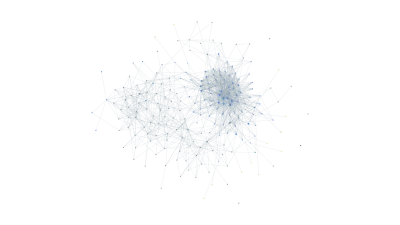
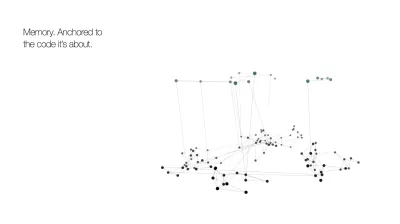
- Knowledge graph — NetworkX DiGraph linking functions, classes, files, imports, inheritance chains, call relationships, and concepts. All queryable.
- AST reverse index — O(1) symbol lookup across your entire codebase in any supported language.
- User behavior profiling — tracks how you prompt so Claude adapts its response style without you having to re-explain preferences every session.
- Error tracking — records errors with prevention hints so Claude avoids repeating the same mistake across sessions.
- Session history — persists conversation exchanges so any session can resume where the last one ended.
- Architectural summaries — auto-generated on first init; built entirely from the local AST index (no API key needed). File → directory → repo summary tree, embedded into FAISS for semantic search.
- Multi-model orchestration — classify query complexity → build context → route to the right model. Claude for deep reasoning, Gemini Flash for quick lookups. All automatic.
Every AI tool that connects gets the same accumulated project knowledge. Memory persists across sessions, across tools, across time.
When to use CogniRepo
Most effective on codebases ≥ 15K LOC. On small repos (< 10K LOC), native file reads are fast enough that the MCP tool schema overhead (~3,700 tokens for 36 tools) takes more than you save. Break-even is roughly 4 tool calls on a medium-sized repo.
CogniRepo vs. claude-context / similar tools:
| Feature | CogniRepo | claude-context / similar |
|---|---|---|
| Pure code retrieval | ✓ (FAISS + graph + AST) | ✓ Often faster on first use |
| Episodic memory (what happened last sprint) | ✓ Persistent BM25 + vector | ✗ |
| Cross-agent handoff (Claude → Gemini → Cursor) | ✓ last_context.json shared |
✗ |
| User behaviour profile (adapts depth/style) | ✓ get_user_profile() |
✗ |
| Error pattern avoidance (learns from past fails) | ✓ record_error() |
✗ |
| Architectural decision records | ✓ record_decision() |
✗ |
| Multi-repo org graph (microservices) | ✓ CHILD_OF / CALLS_API edges |
✗ |
Conclusion: prefer CogniRepo when you value institutional memory across sessions. Use simpler tools when you just need one-shot code retrieval on a small codebase.
Why it helps — measured numbers
Benchmarked across 6 real open-source repos (FastAPI, Flask, Celery, Ansible, Moby/Docker, Kubernetes) using 30 structured prompts tested against Claude, Gemini, and Cursor/Codex.
| Metric | Value | Notes |
|---|---|---|
| Token reduction — Python repos | 50–84% | FastAPI FA-2: 12 000 → 2 500 · FA-4: 2 000 → 450 · FL-4: 8 000 → 1 250 |
| Token reduction — average (all tested) | ~60% | Across FA/FL/CE/AN where both baselines were captured |
| Token reduction — complex dynamic codebases | 20–35% | Celery CE-4/CE-5; deep async/dynamic-dispatch patterns reduce gains |
| Symbol lookup latency | < 1 ms | vs. grep at 2–8 s on large repos |
| Accuracy vs. baseline | equal or better in 100% of tests | No regression observed; FA-2 accuracy improved Moderate → High |
| Cross-agent context handoff | ✅ validated | CE-4: Claude primed index, Gemini CLI consumed it — 35% token saving, same accuracy |
| Dynamic dispatch coverage | honest gap | CE-3 (APScheduler beat dispatch) returned NA for both; CogniRepo does not fabricate call chains |
| Go/multi-language coverage | grammar now ships | Moby MO-2 showed 67% savings; MO-3-5 / K8-* not yet re-run since Go tree-sitter grammar landed (COGNIREPO-500, 2026-09) |
Honest limits: CogniRepo adds the most value on Python repos with clear static structure. Dynamic dispatch patterns (Celery beat, plugin registries), deep Go codebases, and Ansible's 22-level variable precedence chains reduce retrieval confidence. The tool reports uncertainty rather than hallucinating call chains.
Measured: lookup latency and token reduction (4 external repos)
Indexed 4 real repos, measured with cognirepo index-repo + cognirepo benchmark --json on
v2.4.0+ (2026-09-17). CPU-only, no GPU.
| Repo | Files | Lookup latency | Token reduction (naive) | Token reduction (targeted) | context_relevance |
|---|---|---|---|---|---|
| flask | 92 | 0.002 ms | 97.3% | 29.5% | 80.5% |
| fastapi | 1,178 | 0.003 ms | 97.6% | 63.5% | 97.1% |
| celery | 444 | 0.003 ms | 99.7% | 77.7% | 100.0% |
| ansible | 4,196 | 0.008 ms | 96.1% | 28.6% | 56.6% |
Measured 2026-09-17. Lookup latency < 0.1 ms on all repos. "Targeted" is the realistic baseline (grep + read top-2 matching files, approximating what an agent would actually do); "naive" reads every matching file in full and is an upper bound, not a realistic comparison. moby and kubernetes are indexable (Go support confirmed, COGNIREPO-500) but not yet in this table — hours of indexing, scheduled separately. Full numbers and methodology, including precision@k, symbol hit rate, and memory recall: docs/METRICS.md.
Run cognirepo benchmark on your own codebase to reproduce. See docs/METRICS.md.
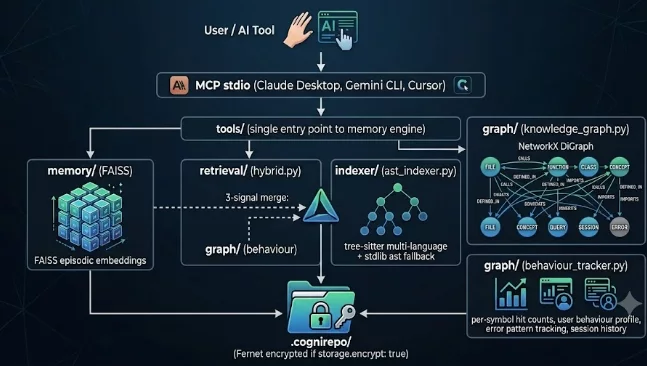
How it works
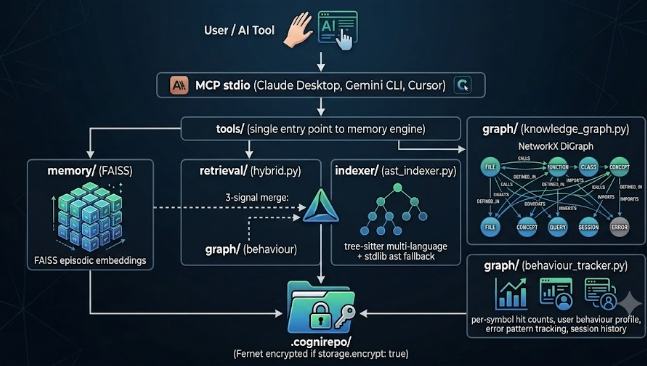
Quick start
Requirements
- Python 3.11+
- API key (optional — only needed for
cognirepo ask):ANTHROPIC_API_KEY,GEMINI_API_KEY,OPENAI_API_KEY, orGROK_API_KEY. Indexing, memory, summarization, and all MCP tools work fully offline.
Install
Recommended — pipx (global, one command, works on all distros)
pipx install cognirepo
That's it. cognirepo setup handles the rest — it installs optional extras (languages,
security, providers) via pipx inject automatically when you enable them in the wizard.
Why pipx? It creates an isolated venv for cognirepo automatically so
fastembedand all deps install cleanly. Thecognirepocommand is then globally available in every directory — no per-repo venv needed.Arch Linux / Debian 12+ / Ubuntu 24.04+: Do NOT
pip installinto system Python. These distros enforce PEP 668 and block system-wide pip installs. Use pipx.
Install pipx first (if needed)
# Arch Linux
sudo pacman -S python-pipx

# Debian / Ubuntu
sudo apt install pipx

# macOS
brew install pipx

# Any platform (fallback)
pip install pipx --user
Inside a virtual environment (alternative)
python -m venv .venv && source .venv/bin/activate
pip install cognirepo
# extras are installed by the setup wizard automatically
Development install (from source)
pipx install -e '.[dev,security,languages]'
# or inside a venv: pip install -e '.[dev,security,languages]'
Note: CPU-only embeddings are the default (fastembed/ONNX, no PyTorch/CUDA required). For GPU:
pipx inject cognirepo 'cognirepo[gpu]'then install torch separately.
Run
# One-command onboarding (init + index + auto-configure MCP for Claude/Cursor/VS Code):
cognirepo setup

# Or step by step:
cognirepo init --no-index     # scaffold .cognirepo/
cognirepo index-repo .        # index your codebase (required before MCP tools work)
cognirepo index-repo . --daemon  # index and run watcher in background

# Keep the index fresh after every commit (indexes just the changed files, in the background):
cognirepo install-hooks

# Check everything is working:
cognirepo status                        # shows symbol count, graph nodes, signal warmth
cognirepo doctor                        # full health check (exit 0 healthy / 1 warnings / 2 errors)
cognirepo doctor --resources            # where memory and disk go: processes, store sizes, leftovers

# Query through multi-model orchestrator:
cognirepo ask "why is auth slow?"

# Manage background watchers (one per repo, however many sessions run):
cognirepo watch --ensure-running        # start it if it is not running
cognirepo list                          # show all running watcher daemons
cognirepo list -n <PID> --view          # tail the log of a specific watcher
cognirepo list -n <PID> --stop          # stop a watcher
First-time setup:
cognirepo init+cognirepo index-repo .must complete before MCP tools (context_pack,lookup_symbol,who_calls, etc.) return data.
Connect your AI tools
Claude Code / Claude Desktop (recommended — project-scoped)
Run cognirepo init inside your project — it asks if you want to configure Claude and
automatically writes .claude/CLAUDE.md and .claude/settings.json with the correct
project-locked connector.
Each project gets its own isolated connector named cognirepo-<project>:
{
  "mcpServers": {
    "cognirepo-myproject": {
      "command": "cognirepo",
      "args": ["serve", "--project-dir", "/abs/path/to/myproject"],
      "env": {}
    }
  }
}
The --project-dir flag locks the MCP server to that project's .cognirepo/ directory.
When Claude has multiple projects open simultaneously, each connector reads only its own
memories — never mixing data across projects or teams.
Cursor / Copilot
cognirepo export-spec
cp adapters/cursor_mcp_config.json .cursor/mcp.json
# Restart Cursor — CogniRepo tools appear in the tool selector
Docker
cp .env.example .env          # add your API keys
docker compose up mcp         # MCP stdio server
MCP Tools — complete reference
All 36 tools are available to Claude, Cursor, and any MCP-compatible client.
Core retrieval
| Tool | Description | When to use |
|---|---|---|
context_pack(query, max_tokens=2000) |
Token-budget code + memory context | Every session — FIRST call before any file read |
lookup_symbol(name) |
O(1) symbol lookup → file + line | Before grepping for a function |
who_calls(function_name) |
Trace callers + dynamic dispatch fallback | Impact analysis, refactoring |
search_token(word) |
Word-level reverse index across names, docs, comments | Finding where a concept lives |
retrieve_memory(query, top_k=5) |
Semantic similarity search over stored memories | Before answering — pull past context |
search_docs(query) |
Full-text search in all .md files |
Documentation lookups |
semantic_search_code(query, language=None) |
Vector search over code symbols only | Code-specific semantic queries |
subgraph(entity, depth=2) |
Local knowledge graph neighbourhood | Understand symbol relationships |
graph_stats() |
Node/edge count and graph health | Check if graph has data |
episodic_search(query, limit=10) |
BM25 keyword search in event history | Find past decisions or incidents |
dependency_graph(module, direction="both") |
Import/dependency relationships | Module coupling analysis |
explain_change(target, since="7d") |
What changed in a file/function + git cross-ref | Understanding recent changes |
architecture_overview(scope="root") |
Pre-computed LLM architectural summaries | Big-picture questions |
User & session intelligence
| Tool | Description | When to use |
|---|---|---|
get_user_profile() |
User's interaction style: depth pref, question types, vocabulary | Call at session start — calibrates Claude's response style |
get_session_history(limit=10) |
Recent conversation exchanges across sessions | Resuming context from prior sessions |
record_user_preference(key, value, context="") |
Store a style or format preference | When user corrects interpretation or states a preference |
Error tracking & prevention
| Tool | Description | When to use |
|---|---|---|
get_error_patterns(min_count=1) |
Recurring errors with prevention hints | Before proposing a fix — check if it has failed before |
record_error(error_type, message, file_path, query_context) |
Log an error for future avoidance | After any error Claude or user encounters |
Session start
| Tool | Description | When to use |
|---|---|---|
get_agent_bootstrap() |
Single-call session start: brief + last context + profile + errors (~300 tokens vs ~900) | Preferred first call — replaces the 4-call sequence |
get_session_brief() |
Architecture + hot symbols + index health | First call when you need granular parts separately |
get_last_context() |
Most recent context_pack snapshot from prior session | Resume where previous agent left off |
Memory & storage
| Tool | Description | When to use |
|---|---|---|
store_memory(text, source="") |
Persist a memory to the FAISS index | After solving bugs, recording decisions |
log_episode(event, metadata={}) |
Append event to episodic journal | Track milestones, incidents, deployments |
record_decision(summary, rationale="") |
Record architectural decision to episodic memory | When making non-obvious design choices |
supersede_learning(old_memory_id, new_text) |
Deprecate and replace an outdated memory in one call | When a past decision or fact has changed |
Reporting
| Tool | What it returns | When to use |
|---|---|---|
generate_insights(since="90d", repo_path=None) |
Self-contained HTML repo-history report (timeline, decisions, challenges, activity, index health), sourced only from real stored records | "What happened in this repo" / repo-history requests — see Repo insights below |
Grounded pushback
| Tool | What it returns | When to use |
|---|---|---|
check_precedent(instruction) |
{conflicts: [...], advisory: true} — flags an instruction that contradicts a recorded decision or a CLAUDE.md invariant, with a citation and a concrete alternative. Never blocks; always advisory. Empty conflicts on an ordinary request — no false positives |
Before implementing a non-trivial instruction, to check it against recorded precedent first |
Cross-repo (organization)
| Tool | Description | When to use |
|---|---|---|
org_search(query) |
Search memories across all org repos | Multi-repo context queries |
org_wide_search(query) |
Search across every project in the org | Broadest cross-repo sweep |
org_dependencies(depth=2) |
Bidirectional inter-repo dependency graph | "What does this service depend on?" |
cross_repo_search(query, scope="project") |
Project-scoped or org-scoped search | Finding shared components |
cross_repo_traverse(symbol, direction="both") |
Traverse org graph from a repo or symbol | Tracing bugs across service boundaries |
find_symbol_path(from_symbol, to_symbol) |
Shortest call-graph path between two symbols, across services | Tracing a request flow end-to-end |
get_service_endpoints(repo_path) |
HTTP endpoint registry for a service | Listing a microservice's API surface |
list_org_context() |
Org metadata + sibling repos | Understanding repo relationships |
link_repos(src_repo, dst_repo, relationship) |
Record cross-repo dependency | When you discover one repo imports another |
Knowledge graph — what gets indexed
The knowledge graph is significantly richer than a simple call graph.
Node types
| Type | Description |
|---|---|
FILE |
Every indexed source file |
FUNCTION |
Function and method definitions with docstrings |
CLASS |
Class definitions with base classes |
CONCEPT |
Semantic concepts extracted from docstrings and identifiers |
QUERY |
Recorded query nodes (for retrieval scoring) |
SESSION |
Conversation session nodes |
ERROR |
Recurring error pattern nodes |
MEMORY |
Cross-agent memory nodes (synced from Claude/Gemini) |
Edge types
| Type | Direction | Description |
|---|---|---|
DEFINED_IN |
symbol → file | Symbol lives in this file |
CALLS / CALLED_BY |
bidirectional | Function call relationships with purpose labels |
IMPORTS |
file → file | Python import dependencies |
INHERITS |
class → parent | Inheritance hierarchy |
CO_OCCURS |
file ↔ file | Files edited together (behavioural co-edit signal) |
RELATES_TO |
concept → symbol | Semantic concept linkage |
QUERIED_WITH |
query → symbol | Retrieval tracking for scoring |
IMPORTS and INHERITS edges are built automatically during index-repo from Python AST.
Use subgraph("MyClass", depth=2) or dependency_graph("mymodule") to query them.
User behavior profiling
CogniRepo tracks how you interact across sessions and builds a profile that Claude uses to calibrate its responses — without you having to repeat preferences every session.
What gets tracked
- Depth preference — inferred from average query length:
concise/medium/detailed - Question types — distribution across:
why,what,how,fix,explain,where,refactor,add - Domain vocabulary — top terms that appear frequently in your queries
- Code focus — percentage of queries referencing code identifiers (symbols, functions)
- Sample queries — last 3 queries for Claude to infer framing style
Accessing your profile
# MCP tool (Claude calls automatically at session start):
get_user_profile()

# CLI:
cognirepo user-prefs
Example profile output
{
  "depth_preference": "detailed",
  "top_question_type": "how",
  "question_type_distribution": {"how": 12, "why": 8, "fix": 5},
  "top_terminology": ["auth", "token", "session", "middleware", "validate"],
  "code_focus_percent": 73,
  "framing_hints": "prefers detailed responses; often asks 'how' questions; domain vocabulary: auth, token, session",
  "total_queries_tracked": 47
}
Claude receives framing_hints at session start and adjusts response length, code density,
and terminology accordingly. The profile accumulates over time — more accurate the more you use it.
Error tracking & prevention
CogniRepo logs every error that occurs during sessions — whether it's a Python exception, a failed build step, or a tool call that went wrong. Errors are stored with:
- Dedup signature — prevents the same error from inflating the count
- Prevention hint — a targeted suggestion to avoid the same error class
- Occurrence context — last 5 occurrences with file path and error message
- Query context — the query or action that triggered the error
Logging errors
# MCP tool (Claude calls after errors):
record_error("TypeError", "expected str got int", "config/parser.py", "fix config loading"