
comfyui-mcp — drive ComfyUI with ANY LLM
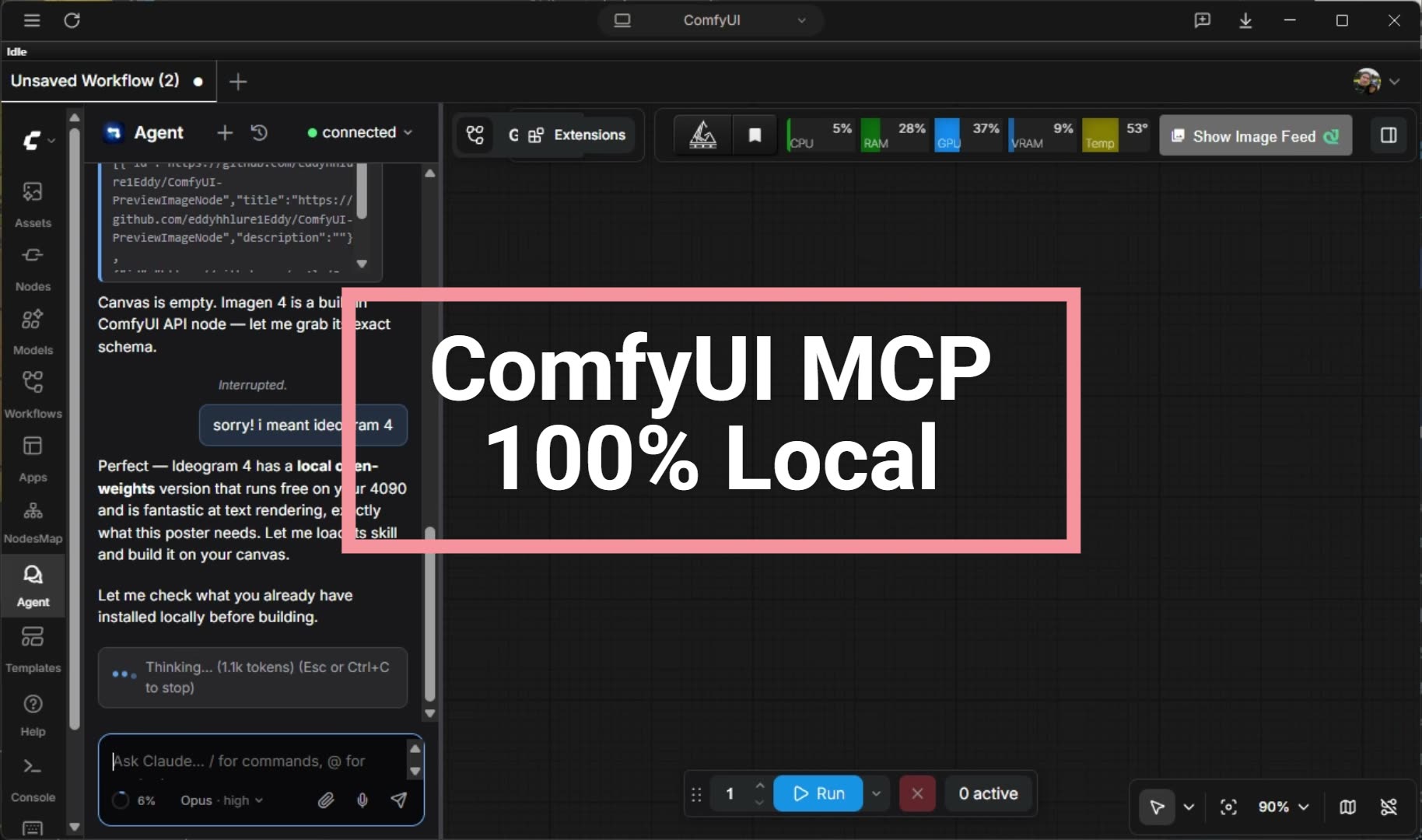
The Agent panel driving ComfyUI end to end. It reads what is installed locally,
wires the graph, frees VRAM, and runs the render.
Watch the 76s demo →
The local-first, agent-native control plane for ComfyUI. An MCP server plus a live sidebar agent that generates images, video and audio, authors and runs workflows, manages models and custom nodes, and edits your live ComfyUI graph in natural language. Bring whatever model you have: Claude or ChatGPT on your subscription, Gemini on your Google login, a free local model via Ollama (fully offline), or any hosted model over one API key (DeepSeek, GLM, MiMo, Kimi, GPT, Claude via OpenRouter). The tools and the panel are the same on every tier, and the built-in LLM Arena scores each model on real ComfyUI tasks so you know what yours can do. One config targets local installs, LAN, VPS, or Comfy Cloud.







Works on macOS, Linux, and Windows. Auto-detects your ComfyUI installation and port.
Stuck or have a question? Join the Discord for help, model tips, and release announcements.
38 MCP tools | 42 AI skills (Flux · WAN · LTX 2.3 video · MiniMax H3 · Qwen · Z-Image · Ideogram 4 · ERNIE · ANIMA · model registry · Civitai · node authoring · launch/perf flags) | 56 installer packs | 11 slash commands | 4 autonomous agents | 3 hooks
The plugin ships skills that grow with every release: model-specific generation guides with curated download URLs, workflow recipes, troubleshooting, and custom-node authoring. With them, Claude knows the right sampler, CFG, resolution, and model files for each architecture without trial and error.
Now available: the ComfyUI Agent Panel on ComfyUI-Manager & the Comfy Registry
An autonomous AI agent in your ComfyUI sidebar, running on Claude, ChatGPT, Gemini, or ANY local/hosted LLM (Ollama and every OpenAI-compatible endpoint). Subscriptions work with no API key; local models work with no account at all. Pick a provider and it drives your live graph: edits, spatial layout, one-shot workflow/pack loads, rewind/rollback, a pending-message tray, activity cards, multi-tab. It asks before spending paid API credits. Search
comfyui-agent-panelin ComfyUI-Manager to install. Read more →
Full documentation: comfyui-mcp.artokun.io/docs
Quick Start
1. Install ComfyUI (if you haven't already): ComfyUI Desktop or from source
2. Add the MCP server to your Claude Code config (~/.claude/settings.json):
{
  "mcpServers": {
    "comfyui": {
      "command": "npx",
      "args": ["-y", "comfyui-mcp"],
      "env": {
        "CIVITAI_API_TOKEN": ""
      }
    }
  }
}
3. Start using it. With ComfyUI running, ask Claude to generate an image:
> Generate an image of a sunset over mountains
Claude will find (or download) a checkpoint, build a workflow, execute it, and return the image.
Note: This runs as a standalone MCP server, so there is no need to clone this repo.
npxdownloads and runs it.
Scope: local, remote, or Comfy Cloud
comfyui-mcp is local-first. A self-hosted ComfyUI on Mac/Linux/Windows is the primary target, and the same agent reaches remote installs (RunPod, VPS, LAN, reverse-proxied) from one config. Local-first, not local-only.
More than a bridge. Most ComfyUI MCP servers are thin connectors. They forward a prompt and hand back an image. comfyui-mcp is a full control plane. It authors and edits the graph node by node, runs and iterates on workflows, manages models and custom nodes, and ships model-specific expertise (samplers, CFG, resolutions, curated model URLs) so the agent gets it right without trial and error. If you want a minimal local relay, a lightweight server is fine. If you want an agent that operates ComfyUI, that's this project.
For Comfy Cloud users, Comfy-Org ships its own agent tooling: Comfy Cloud MCP (public beta, hosted on Comfy Cloud GPUs), the Comfy In-App Agent (private alpha, inside Comfy Cloud), and a first-party Comfy Local MCP (private test, not publicly available yet), all maintained by the Comfy team. If you don't have a GPU or you want zero setup, that's the better path; go use it.
Where this project differs is that it runs on your install and your choice of model, including a free local one via Ollama with no account and no network at all. comfyui-mcp also includes a community cloud mode (set COMFYUI_API_KEY, see Deployment modes) so a single MCP can target all three deployment shapes from one config.
Local vs. Comfy Cloud agent is a side-by-side comparison, including when Comfy Cloud is the right answer. (Statuses above are as of July 2026. Comfy-Org ships fast, so check their docs for the current state.)
Remote / hosted connector (one command)
To use comfyui-mcp from Claude Desktop's Custom Connectors or any remote
client, like Comfy's own cloud.comfy.org/mcp connector, run it as an
authenticated, publicly reachable Streamable-HTTP server with one flag:
npx -y comfyui-mcp@latest --tunnel
This forces the HTTP transport, generates an auth token, opens a
cloudflared quick tunnel, and prints
a ready-to-paste https://…/mcp URL + token + Claude Desktop connector snippet.
Auth accepts Authorization: Bearer <token> or X-API-Key: <token> (matching
Comfy Cloud's convention). See the
Remote / hosted connector guide
for the full walkthrough and headless usage.
Auth is opt-in. With no
COMFYUI_MCP_HTTP_TOKENset and no--tunnel, the default stdio (and plain--httpon loopback) behavior is unchanged. It stays open and local. OAuth (Comfy's browser sign-in flow) is a planned follow-up.
Claude Code Plugin
This package also ships as a Claude Code plugin that adds slash commands, skills, agents, and hooks on top of the MCP tools.
Install as a plugin
# In Claude Code
/plugin marketplace add artokun/comfyui-mcp
/plugin install comfy
Slash commands
| Command | Description |
|---|---|
/comfy:gen <prompt> |
Generate an image from a text description — auto-selects checkpoint, builds workflow, returns image |
/comfy:viz <workflow> |
Visualize a workflow as a Mermaid diagram with nodes grouped by category |
/comfy:node-skill <pack> |
Generate a Claude skill for a custom node pack from Registry ID or GitHub URL |
/comfy:debug [prompt_id] |
Diagnose why a workflow failed — reads history, logs, traces root cause, suggests fixes |
/comfy:batch <prompt, params> |
Parameter sweep generation across cfg, sampler, steps, seed, etc. |
/comfy:convert <file> |
Convert between UI format and API format workflows |
/comfy:install <pack> |
Install a custom node pack — git clone, pip install, optional restart |
/comfy:gallery [filter] |
Browse generated outputs with metadata — filter by date, count, or filename |
/comfy:compare <a vs b> |
Diff two workflows side by side — shows added/removed nodes and changed parameters |
/comfy:recipe <name> <prompt> |
Multi-step recipes: portrait, hires-fix, style-transfer, product-shot |
Built-in skills
42 skills total: model-family guides (Flux, WAN, LTX 2.3, MiniMax H3, Qwen, Z-Image, Ideogram 4, ERNIE, ANIMA + anime / WAN / Z-Image LoRA training), the model-registry (curated download URLs), the civitai pairing skill, node authoring, the launch/performance-flags matrix, and the core four below. Full list on the plugin docs page.
Installer packs.
packs/bundles 13 one-command ComfyUI setups: ANIMA, Ideogram 4, LTX-2.3, ERNIE, WAN (animate / longer-videos / transparent), Qwen (image / image-edit), Z-Image (turbo / base / xy-plot) and artokun-flow (WAN Animate: replace / animate). Each is a manifest of custom nodes + model URLs + workflow that drives bothapply_manifestand generatedinstall-windows.bat/install-runpod.sh, with CI that validates every model link + payload size. Seepacks/README.md.
| Skill | Description |
|---|---|
| comfyui-core | Workflow format, node types, data flow patterns, pipeline architecture, MCP tool usage guide |
| prompt-engineering | CLIP weight syntax (word:1.3), BREAK tokens, embeddings, model-specific prompting for SD1.5/SDXL/Flux/SD3 |
| troubleshooting | Common error catalog — OOM, dtype mismatches, missing nodes, NaN tensors, black images, CUDA errors, with VRAM estimates per model |
| model-compatibility | Compatibility matrix — loaders, resolutions, CFG, samplers, ControlNets, LoRAs, and VAEs per model family (SD1.5/SDXL/Turbo/Lightning/Flux/SD3/LTXV) |
Agents
| Agent | Model | Description |
|---|---|---|
| comfy-explorer | Sonnet | Researches custom node packs — reads docs, queries /object_info, generates skill files |
| comfy-debugger | Sonnet | Autonomously diagnoses workflow failures — gathers logs + history, identifies failing node, checks models + custom nodes, proposes and optionally applies fixes |
| comfy-optimizer | Sonnet | Analyzes workflows for performance — detects redundant nodes, VRAM waste, wrong CFG/steps for model family, precision issues, suggests optimizations |
| comfy-researcher | Sonnet | Discovers and ranks ComfyUI custom node packs for a stated image-generation problem |
Hooks
| Event | Trigger | Action |
|---|---|---|
| PreToolUse | enqueue_workflow |
VRAM watchdog — checks GPU memory via /system_stats and warns if < 1GB free before execution |
| PreToolUse | restart_comfyui (actions stop/restart) |
Save warning — prompts user to save unsaved workflow changes before stopping ComfyUI |
| PostToolUse | Any comfyui tool | Job completion notify — checks for completed jobs and injects completion summaries into the conversation |
Background Scripts
| Script | Description |
|---|---|
monitor-progress.mjs |
Progress monitor — connects to ComfyUI's WebSocket for real-time step progress (e.g., step 5/14 (36%)). Run as a background Bash task after enqueuing workflows. Reports completion with output filenames, errors with node details. Replaces polling queue (action:"status") in a loop. |
Panel agent (Claude · ChatGPT · Gemini · any local/hosted LLM)
Beyond the headless MCP server, this package ships the panel orchestrator that powers the ComfyUI Agent Panel, an autonomous agent embedded in ComfyUI's sidebar that drives the live canvas. It runs in the background on your own subscription (Claude or ChatGPT), started on demand by the panel's Connect button:
npx -y comfyui-mcp@latest connect
Drive a REMOTE ComfyUI from your own machine (connect)
When ComfyUI runs somewhere with no Node or agent (a RunPod pod, a cloud box) you can still run the agent on your machine and drive that remote ComfyUI. There is no agent login on the box and nothing to install or configure remotely:
npx -y comfyui-mcp@latest connect https://abcd1234-3000.proxy.runpod.net
This is sugar for --panel-orchestrator with COMFYUI_URL set from the URL. The
orchestrator runs locally on your Claude/ChatGPT login and reaches the remote
ComfyUI over its public proxy URL. For a remote HTTPS pod, connect
opens a token-gated wss:// tunnel (via Cloudflare) to
the local agent bridge and hands the pod's panel that URL, so the pod's HTTPS page
reaches your machine with no browser prompt, in any browser. A secure page
can't open a plain ws:// socket to your box because of mixed-content and Private Network
Access rules. A local ComfyUI uses the plain ws://127.0.0.1:9199 loopback bridge.
Add --insecure-bridge to force that loopback for a remote pod, then arrange
your own path to it, e.g. an SSH port-forward. Either way the panel JS runs in
your local browser, and the agent and your login run only on your
machine, so nothing is installed remotely.
To finish, with connect still running on your machine, open the remote ComfyUI in
your browser and click Connect in the Agent panel. The panel is a pure-frontend
extension. It links to the bridge your connect process is already serving, rather
than asking the ComfyUI host to spawn an orchestrator it cannot run.
Multi-provider, full parity. The orchestrator depends on a provider-neutral
AgentBackend port (dependency injection), with two adapters:
ClaudeBackendwraps the Claude Agent SDK (@anthropic-ai/claude-agent-sdk), a persistent streaming session over the claude.ai subscription (OAuth, no key).CodexBackendwraps OpenAI Codex over thecodex app-serverJSON-RPC protocol (@openai/codex), on the ChatGPT subscription (codex login, no key).
Further adapters follow the same port: Gemini CLI (ACP), Antigravity
(agy, the Google AI Pro/Ultra subscription path; install from
antigravity.google and run agy once to sign
in), Grok, Kimi, GLM, Ollama/LM Studio/llama.cpp (local), OpenRouter, and
any OpenAI-compatible endpoint. See
docs/backends for the full
matrix.
Both are optional dependencies, and the panel picks a provider, not a port. Each backend runs its own orchestrator on its own loopback bridge port. A capability matrix tells the panel which features each backend supports (e.g. conversation-rollback is Claude-only today, since the Codex app-server resumes whole threads only).
The live-canvas tools and model knowledge are identical across providers. The
panel_* tool definitions live in one shared list, registered onto both the
in-process Claude SDK MCP server and a @modelcontextprotocol/sdk server over a
loopback streamable-HTTP MCP that the orchestrator hosts for Codex (which can
only host config-declared MCP servers). The headless comfyui MCP is likewise
injected into both, in-process for Claude and declared via codex app-server -c mcp_servers for ChatGPT, so generation, models, and workflow tools are the same
everywhere.
New tools that give every backend the same expertise and a cost guardrail:
| Tool | Description |
|---|---|
list_packs (action: "skill_list" / "skill_read") |
Discover and read bundled model-family + workflow skills — the knowledge Claude loads natively, exposed to any MCP client (e.g. the Codex backend) |
list_packs (action: "list" / "read_workflow") |
List one-command installer packs (custom nodes + weights + ready workflow; all local-GPU / free) and read a pack's graph |
list_packs (action: "list_templates") |
List the connected ComfyUI's custom-node-contributed workflow templates |
list_packs (action: "check_runtime") |
Classify a workflow as local (your GPU, free) or api / mixed / unknown (hosted API nodes = paid credits) so the agent asks before spending paid API credits |
list_packs (action: "extract_deps" / "install_deps") |
Work out which custom node packs a workflow needs, and install the missing ones through ComfyUI-Manager |
panel_load_workflow |
(panel tool) Load a full workflow onto the live canvas in one shot — by bundled pack name (read server-side, never shuttled through chat) or by graph JSON |
panel_strip_workflow / panel_slice_workflow |
(panel tools) De-virtualize a tangled graph (Get/Set buses, Reroutes, subgraphs, bypass → real connections) or carve one rgthree-toggled pipeline out of a monolith — by pack, server-side path, or inline graph; for understanding/rebuilding expert workflows without hand-tracing |
MCP Tools
38 tools across workflow execution, generation, iteration, composition, models, and more:
Image Generation (high-level)
| Tool | Description |
|---|---|
generate_image action: "image" |
Generate from a text prompt — builds a txt2img workflow, fills unspecified params from your defaults, auto-selects a checkpoint |
generate_image action: "controlnet" |
Generate conditioned by a ControlNet image (pose/depth/canny/normal) + prompt |
generate_image action: "ip_adapter" |
Generate guided by a reference image's style/subject via IP-Adapter (needs ComfyUI_IPAdapter_plus) |
generate_image action: "video" / "3d" |
Generate a short video clip (LTX-2.3, local GPU) or a 3D model (hosted partner API nodes) from the same one-line entry point |
generate_image action: "upscale" |
Post-process an uploaded or staged image with ESRGAN super-resolution |
| generate_image (action:"remove_background") | Post-process an uploaded or staged image into a transparent BiRefNet cutout |
Audio Generation (high-level)
| Tool | Description |
|---|---|
generate_image action: "audio" |
Generate audio from a text prompt — supports ACE Step 1.5 (music with lyrics/structure) and Stable Audio 3 (music, instruments, SFX); auto-selects local models |
Assets & Iteration
| Tool | Description |
|---|---|
get_image (action:"view") |
Return a generated asset's bytes as an inline image so the agent can see the result |
get_image (action:"analyze_color") |
Palette / contrast / color statistics for a generated image (dominant colors, average + luminance stats, contrast checks) so the agent can reason about color without a vision round-trip |
| generate_image (action:"regenerate") | Re-run the workflow that produced an asset_id, with optional parameter overrides |
get_image (action:"list_assets") |
Browse |