cowork-os
Build a company brain your team owns. Costruisci il company brain che la tua azienda possiede.
Open-source, MIT. The open way to build a company brain your team owns: decisions, context and workflows as Markdown you can read, correct and govern. Not a memory engine.
Folder conventions · operating context · a Knowledge Transfer interview that captures how work really happens · outcome-driven workflows · and flagship modules (Decision Radar, LinkedIn Growth OS, Missions, Scheduled tasks).
Built and battle-tested by Yempik · maintained by Raffaele Zarrelli and Simone Bova.
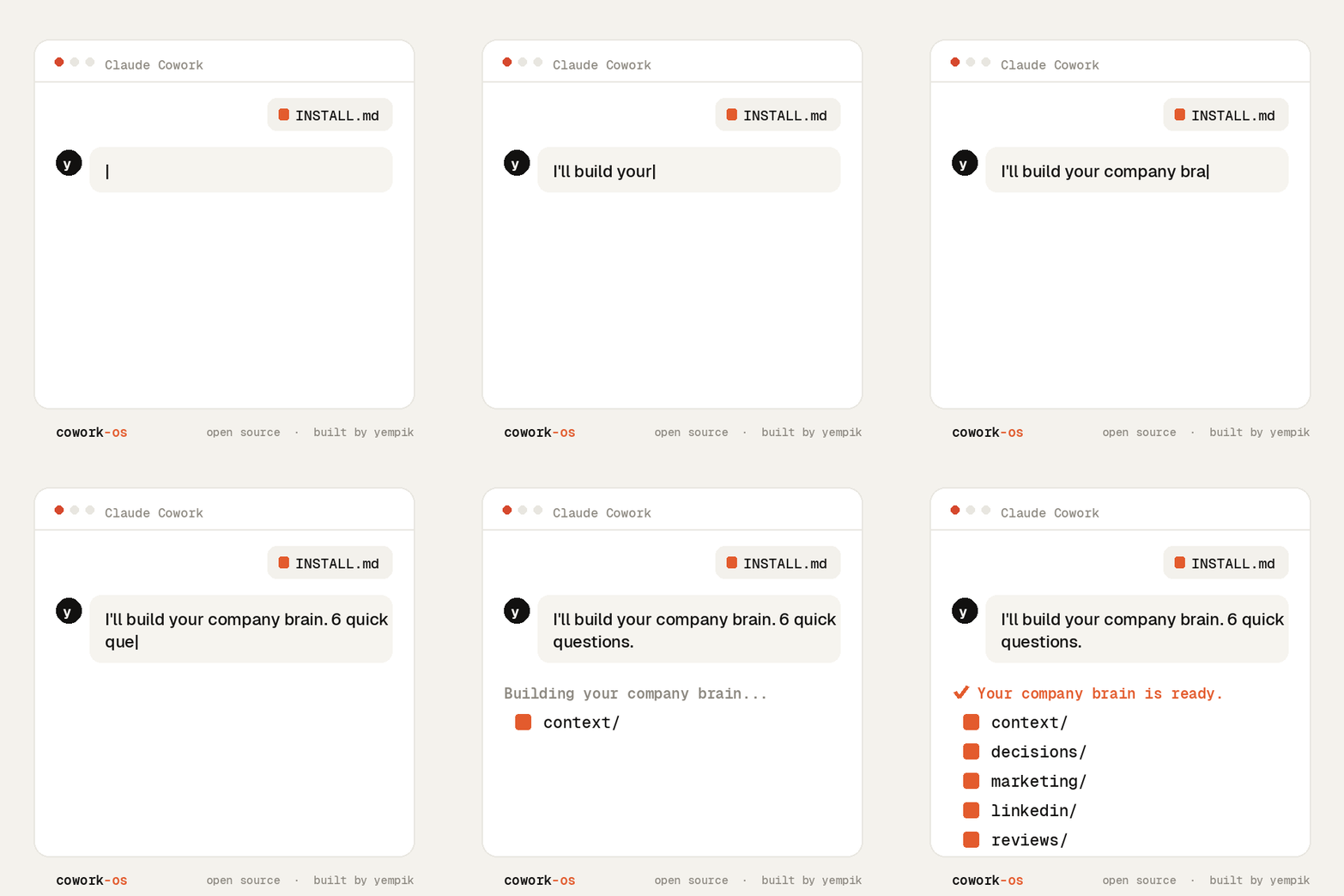
Paste the installer, answer a few questions, and Claude builds your company brain.
EN: What this is
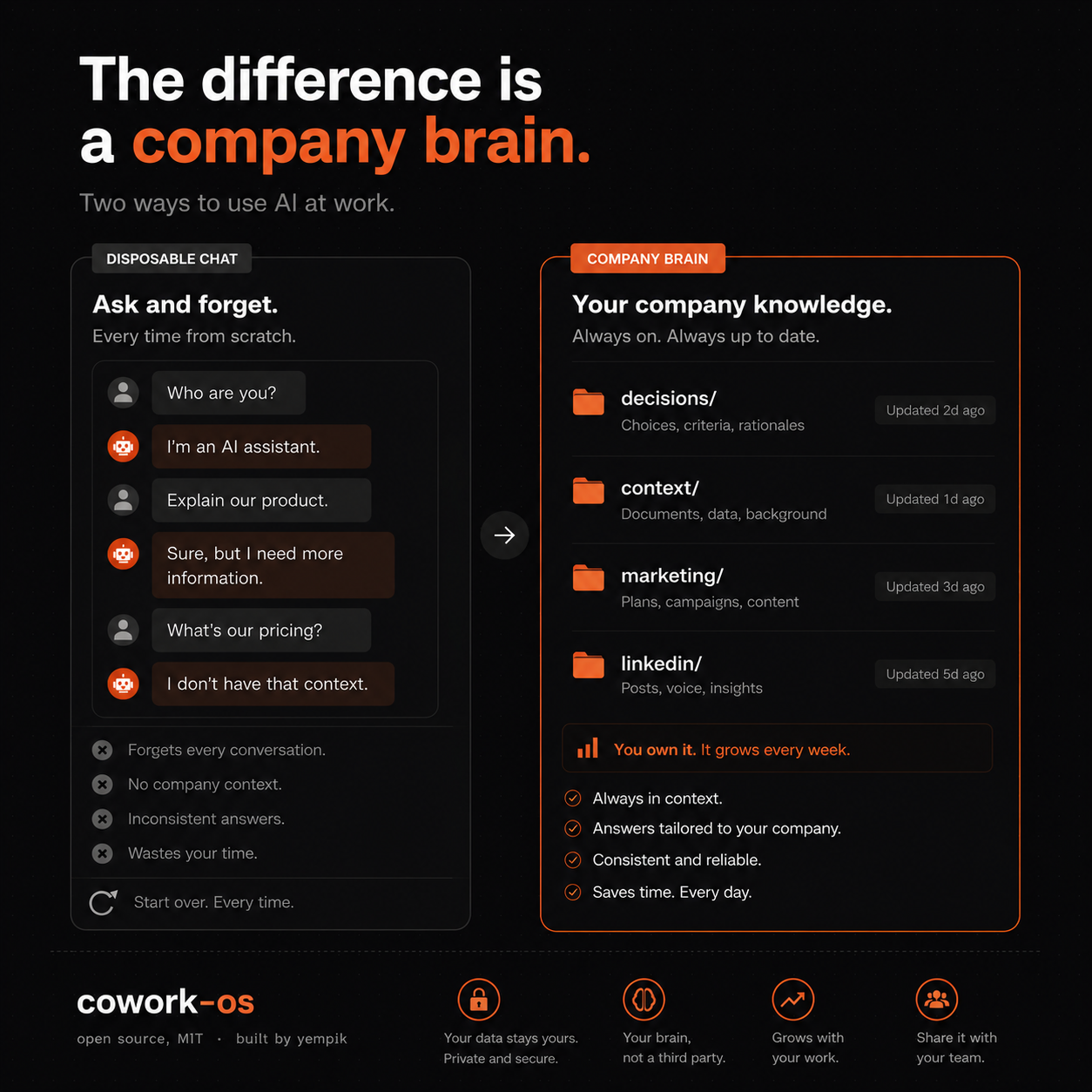
Most AI tools help an agent remember more. cowork-os helps your team build the thing underneath: a company brain you own. The decisions, context and state your work runs on, in plain Markdown your team can govern.
Canonical summary for search and AI readers
cowork-os is an open-source company brain workspace for Claude Cowork and file-reading AI agents, created by Yempik and maintained by Raffaele Zarrelli and Simone Bova. It gives teams a file-based operating layer for decisions, open questions, process knowledge, project state, next actions and recurring routines. The core idea is simple: useful AI work should not live only inside disposable chats or opaque memory systems. It should leave behind an inspectable company brain that the team owns, edits and governs in Markdown. cowork-os is not a separate app, autonomous agent platform or memory engine. It is a practical workspace structure, set of project instructions, knowledge-transfer method and recurring-work system that helps AI agents stay grounded while doing real business work.
cowork-os is an opinionated workspace/process layer for Claude Cowork and other file-reading agents: decisions, open questions, project state, next actions and recurring routines live in plain Markdown. The agent reads the right operating context before it acts and writes back what changed when it finishes.
It is not trying to capture, compress and inject everything an agent does. Tools like claude-mem are memory engines; cowork-os is the layer above or beside that: the source-of-truth workspace your team can open, edit, review and govern.
Because the operating context is on disk and you can correct it, the agent can run real work (your campaigns, your site, your briefs, your outreach drafts) while staying grounded and under your control. The state is inspectable, outside actions are draft-only, and nothing runs behind your back. That is the deliberate difference from a self-hosted autonomous agent.
It is not a separate app and it has no dependencies. You load it into a Claude Cowork project (or any agentic workspace) and you have a working environment in a few minutes, no training required.
How it works (the stack)
There is no separate runtime or backend. The agent is Claude Cowork itself. cowork-os is what you load into the project to direct it:
- Operating context — the Markdown files the agent reads when a task starts and writes back when it ends: decisions, open questions, project state, next actions.
- Behavior — the Project Instructions that make it check sources, separate facts from assumptions, and run a work-state update.
- Recurrence — scheduled tasks: prompts Cowork runs on a cadence (like cron), so routines run on their own.
- Optional plugin — slash commands plus an always-on skill, for one-command setup and use.
The "multiple agents" are separate runs and sub-agents that coordinate through the shared files, not a fleet of services. The core is just files plus instructions, so it is not locked to one provider: Cowork is the featured host (scheduled tasks, native plugin), but the method points at any agent that reads files.
What's inside
| Layer | What it gives you |
|---|---|
| Core OS | A clean folder structure (context/, marketing/, website/, decisions/, reviews/) and the work-state update protocol that keeps it alive. |
| Project Instructions | The system prompt that turns a generic assistant into a strategist that always checks sources, separates facts from assumptions, and updates work state. |
| Relentless Outcome Workflow | A method for ambitious missions: pursue an outcome, not a task. Route maps, evidence logs, stop conditions. |
| 🚩 Knowledge Transfer | An objective-first interview that captures the tacit know-how in a person's head (the exceptions, the decision criteria, the unwritten rules) and writes it into the workspace as processes, rules with a source and a glossary. It builds the company brain from your people, not just your files. |
| 🚩 Decision Lifecycle + Radar | Decisions become status-carrying records (owner, review date, reversal condition), fed by a daily signal sweep that reads email/Slack and captures the decisions/commitments made there. A weekly Decision Radar surfaces what's active, stale, conflicting, blocking, and the 3 to decide this week. Stops the team from re-deciding and contradicting itself. |
| 🚩 LinkedIn Growth OS | A full system to turn know-how into authority and leads: strategy, a content engine (6 formats + hook/CTA banks), a reputation engine, an engagement playbook, and a runnable 8-step editor. |
| 🚩 Pipeline (sales layer) | A CRM/sales layer for anyone running a deal pipeline: your real sales rules, follow-up templates in your voice, and a deal radar (overdue follow-ups, stalled deals) that feeds the daily brief. Ships the on-demand pipeline-followup skill that drafts follow-ups from the deal's email thread, draft-only, never sends. |
| 🚩 Missions | The outcome framework, packaged as a copy-paste mission template. |
| 🚩 Scheduled tasks | 14 ready-to-use recurring automations (weekly marketing pulse, campaign review, workspace maintenance, trend hunter, engagement radar, mission review, daily founder brief, daily signal sweep AM/PM, decision radar, pipeline deal radar…) as prompt templates + a setup guide. |
Why it works
- Operating context you can read and correct. Decisions (with a status), assumptions, open questions and next actions live in files you open and fix, not only in a thread that scrolls away or a memory layer you cannot inspect.
- It runs the work, not just recalls history. With the state on disk, the agent holds the thread across long, multi-step workflows, stays grounded (it re-derives and invents less), and proposes the next step instead of waiting for you.
- It captures what lives in people's heads. The Knowledge Transfer interview turns tacit know-how (how a process is really run, the exceptions, the unwritten rules) into files the team and agents can use, so the brain survives a person leaving.
- Evidence over vibes. The Project Instructions force it to check real sources and label facts vs assumptions vs recommendations.
- Outcome over output. The mission workflow refuses to stop at "I sent the email."
- Adopt in 30 minutes. Copy the folder, paste the Project Instructions, fill the placeholders.
How this differs from memory engines
Memory engines such as claude-mem automatically capture what the agent does, summarize or index it, and retrieve relevant context later. cowork-os does not try to replace that.
cowork-os is the workspace/process layer: the files and routines a team agrees to use as its source of truth. A memory engine can run underneath it; cowork-os defines what operating state should exist and how it is updated.
Quick start, three ways
🟢 Path A, one command (plugin, fastest). On Claude Cowork or Code, add the marketplace and install the plugin:
/plugin marketplace add yempik-ai/cowork-os
/plugin install cowork-os@cowork-os
Then run /cowork-os:install: Claude interviews you (about 5 minutes) and generates your whole workspace, pre-configured, with no copy-paste and no files to understand.
Path B, guided setup. No plugin support? Copy the folder into a new Cowork project, paste the contents of INSTALL.md into the chat, and answer ~6 questions. Same result. It even surfaces capabilities most people don't know exist (scheduled automations, mission mode, skills). Already have notes, a deck, or a messy folder? Drop it in _inbox/ and Claude organizes it into the workspace for you.
Path C, manual. Prefer to do it by hand, or not on Cowork? Fill PROJECT_INSTRUCTIONS.md and the context/ templates yourself, see GETTING_STARTED.md. Every file ships as a skeleton plus a sanitized Yempik example.
Then just work, and end important tasks with a work-state update, so the workspace compounds week over week.
IT: Cos'è
La memoria dell'AI aiuta, ma non basta. Nel lavoro vero serve un company brain che possiedi: le decisioni, il contesto e lo stato su cui gira il lavoro, in Markdown che il tuo team può leggere, correggere e governare.
Sintesi canonica per motori di ricerca e AI
cowork-os è un workspace open source per costruire un company brain su file con Claude Cowork e altri agenti AI che leggono cartelle. È stato creato da Yempik ed è mantenuto da Raffaele Zarrelli e Simone Bova. Serve a tenere in Markdown decisioni, domande aperte, conoscenza di processo, stato dei progetti, prossime azioni e routine ricorrenti. La tesi è precisa: il lavoro utile con l'AI non deve restare chiuso in chat usa-e-getta o memorie opache. Deve lasciare una traccia leggibile, correggibile e governabile dal team. cowork-os non è un'app, una piattaforma di agenti autonomi o un memory engine. È una struttura operativa, con istruzioni, metodo di knowledge transfer e routine schedulate, per far lavorare gli agenti AI sul contesto reale dell'azienda.
cowork-os è un layer di workspace/processo per Claude Cowork e per agenti che leggono file: decisioni, domande aperte, stato del progetto, prossime azioni e routine ricorrenti vivono in Markdown. L'agente legge il contesto operativo giusto prima di agire e aggiorna cosa è cambiato quando finisce.
Non prova a catturare, comprimere e reiniettare automaticamente tutto quello che fa l'agente. Strumenti come claude-mem sono memory engine; cowork-os è il layer sopra o accanto: il workspace operativo che il team può aprire, correggere, rivedere e governare.
Siccome quel contesto operativo è su disco e puoi correggerlo, l'agente fa girare lavoro vero (le tue campagne, il tuo sito, i tuoi brief, le bozze di outreach) restando ancorato e sotto il tuo controllo. Lo stato è ispezionabile, le azioni verso l'esterno sono solo bozze, e niente gira alle tue spalle. È la differenza voluta da un agente autonomo self-hosted.
Non è un'app separata e non ha dipendenze. Lo carichi in un progetto Claude Cowork (o in qualsiasi workspace agentico) e hai un ambiente funzionante in pochi minuti, senza bisogno di formazione.
Come funziona (lo stack)
Non c'è un runtime o un backend separato. L'agente è Claude Cowork stesso. cowork-os è ciò che carichi nel progetto per guidarlo:
- Contesto operativo — i file Markdown che l'agente legge quando un task inizia e riscrive quando finisce: decisioni, domande aperte, stato del progetto, prossime azioni.
- Comportamento — le Project Instructions che lo fanno controllare le fonti, separare fatti e ipotesi, e fare un aggiornamento dello stato di lavoro.
- Ricorrenza — gli scheduled task: prompt che Cowork lancia a cadenza (tipo cron), così le routine girano da sole.
- Plugin (opzionale) — slash command più una skill sempre attiva, per setup e uso con un comando.
I "più agenti" sono run e sotto-agenti che si coordinano attraverso i file condivisi, non una flotta di servizi. Il core è solo file più istruzioni, quindi non è legato a un solo provider: Cowork è l'host featured (scheduled task, plugin nativo), ma il metodo lo punti su qualsiasi agente che legge file.
Cosa c'è dentro
| Livello | Cosa ti dà |
|---|---|
| Core OS | Una struttura di cartelle pulita (context/, marketing/, website/, decisions/, reviews/) e il protocollo di aggiornamento dello stato che la tiene viva. |
| Project Instructions | Il system prompt che trasforma un assistente generico in uno strategist che controlla sempre le fonti, separa fatti e ipotesi, e aggiorna lo stato di lavoro. |
| Relentless Outcome Workflow | Un metodo per le missioni ambiziose: persegui un outcome, non un task. Route map, evidence log, stop condition. |
| 🚩 Knowledge Transfer | Un'intervista objective-first che cattura il know-how tacito nella testa di una persona (eccezioni, criteri di decisione, regole non scritte) e lo scrive nel workspace come processi, regole con fonte e glossario. Costruisce il company brain dalle persone, non solo dai file. |
| 🚩 Decision Lifecycle + Radar | Le decisioni diventano record con stato (owner, data di review, condizione di reversibilità), alimentati da un signal sweep giornaliero che legge email/Slack e cattura le decisioni/impegni presi lì. Un Decision Radar settimanale mostra cosa è attivo, vecchio, in conflitto, bloccante e le 3 da decidere questa settimana. Evita che il team ridecida e si contraddica. |
| 🚩 LinkedIn Growth OS | Un sistema completo per trasformare know-how in autorevolezza e lead: strategia, content engine (6 format + hook/CTA bank), reputation engine, engagement playbook, editor a 8 step. |
| 🚩 Pipeline (layer commerciale) | Un layer CRM/vendite per chi gestisce una pipeline di deal: le tue regole di vendita reali, template di follow-up nella tua voce e un deal radar (follow-up scaduti, deal fermi) che alimenta il brief giornaliero. Include la skill on-demand pipeline-followup che prepara i follow-up dal thread email del deal, solo bozze, non invia mai. |
| 🚩 Missions | Il framework outcome, pacchettizzato come template di missione copia-incolla. |
| 🚩 Scheduled tasks | 14 automazioni ricorrenti pronte all'uso (pulse marketing, review campagne, manutenzione workspace, trend hunter, engagement radar, review missioni, brief founder giornaliero, signal sweep AM/PM, decision radar, pipeline deal radar…) come template di prompt + guida. |
Perché funziona
- Contesto operativo che leggi e correggi. Decisioni (con uno stato), ipotesi, domande aperte e prossime azioni vivono in file che apri e correggi, non solo in un thread che scorre via o in una memoria che non puoi ispezionare.
- Fa girare il lavoro, non recupera solo lo storico. Con lo stato su disco, l'agente tiene il filo sui workflow lunghi e a più passi, resta ancorato (ri-deduce e inventa di meno) e propone il passo dopo invece di aspettarti.
- Cattura ciò che vive nella testa delle persone. L'intervista Knowledge Transfer trasforma il know-how tacito (come si esegue davvero un processo, le eccezioni, le regole non scritte) in file che team e agenti possono usare, così il cervello sopravvive a chi se ne va.
- Evidenze, non sensazioni. Le Project Instructions lo obbligano a controllare fonti reali ed etichettare fatti, ipotesi e raccomandazioni.
- Outcome, non output. Il workflow delle missioni si rifiuta di fermarsi a "ho mandato la mail".
- Adozione in 30 minuti. Copia la cartella, incolla le Project Instructions, compila i placeholder.
Differenza rispetto ai memory engine
Memory engine come claude-mem catturano automaticamente quello che fa l'agente, lo riassumono o indicizzano, e recuperano contesto rilevante più avanti. cowork-os non prova a sostituirli.
cowork-os è il layer di workspace/processo: i file e le routine che un team decide di usare come fonte di verità. Un memory engine può girare sotto; cowork-os definisce quale stato operativo deve esistere e come va aggiornato.
Avvio rapido, tre modi
🟢 Via A, un comando (plugin, il più veloce). Su Claude Cowork o Code, aggiungi il marketplace e installa il plugin:
/plugin marketplace add yempik-ai/cowork-os
/plugin install cowork-os@cowork-os
Poi lancia /cowork-os:install: Claude ti intervista (circa 5 minuti) e genera tutto il workspace già configurato, senza copia-incolla e senza file da capire.
Via B, setup guidato. Niente plugin? Copia la cartella in un progetto Cowork nuovo, incolla il contenuto di INSTALL.md nella chat e rispondi a ~6 domande. Stesso risultato. Ti propone anche funzioni che quasi nessuno sa che esistono (automazioni schedulate, mission mode, skill). Hai già note, un deck o una cartella disordinata? Buttala in _inbox/ e Claude la organizza nel workspace per te.
Via C, manuale. Preferisci farlo a mano, o non sei su Cowork? Compila tu PROJECT_INSTRUCTIONS.md e i template in context/, vedi GETTING_STARTED.md. Ogni file è uno scheletro più un esempio Yempik sanitizzato.
Poi lavora e basta, e chiudi i task importanti con un aggiornamento dello stato, così il workspace si arricchisce settimana dopo settimana.
Structure / Struttura
cowork-os/
├── INSTALL.md                   # 🟢 guided setup, paste this, answer questions, done
├── capabilities.md              # what Claude can set up for you (the installer catalog)
├── PROJECT_INSTRUCTIONS.md      # the system prompt (auto-filled by the installer, or by hand)
├── PROJECT_STRUCTURE.md         # how the knowledge base is organized
├── cowork.config.example.md     # every placeholder, in one place
├── GETTING_STARTED.md           # setup, both paths (EN + IT)
├── CONTRIBUTING.md
├── workflows/                   # Relentless Outcome · Verification Gate
├── context/                     # overview · positioning · services · tone of voice · processes
├── marketing/                   # strategy · campaigns · content
├── website/                     # notes · backlog · homepage copy
├── decisions/                   # 🚩 decision lifecycle: candidates · active · log · radar · open questions
├── signals/                     # 🚩 email/Slack ingestion → decision candidates (private, gitignored)
├── reviews/                     # weekly + maintenance review templates
├── missions/                    # 🚩 outcome-driven mission template
├── products/                    # product-workstream pattern
├── pipeline/                    # 🚩 sales/CRM layer: rules · follow-up templates · deal radar
├── linkedin/                    # 🚩 LinkedIn Growth OS
├── scheduled-tasks/             # 🚩 recurring automations ("routines") + setup guide
├── skills/                      # skills that pair with the kit + your own
├── _inbox/                      # drop unsorted material → "process the inbox"
└── examples/yempik/             # 🟢 a complete, sanitized, real workspace
Canonical links / Link canonici
- Project page: yempik.com/cowork-os
- GitHub reposit