
⬇ Download for Windows — free, no account, nothing leaves your computer.
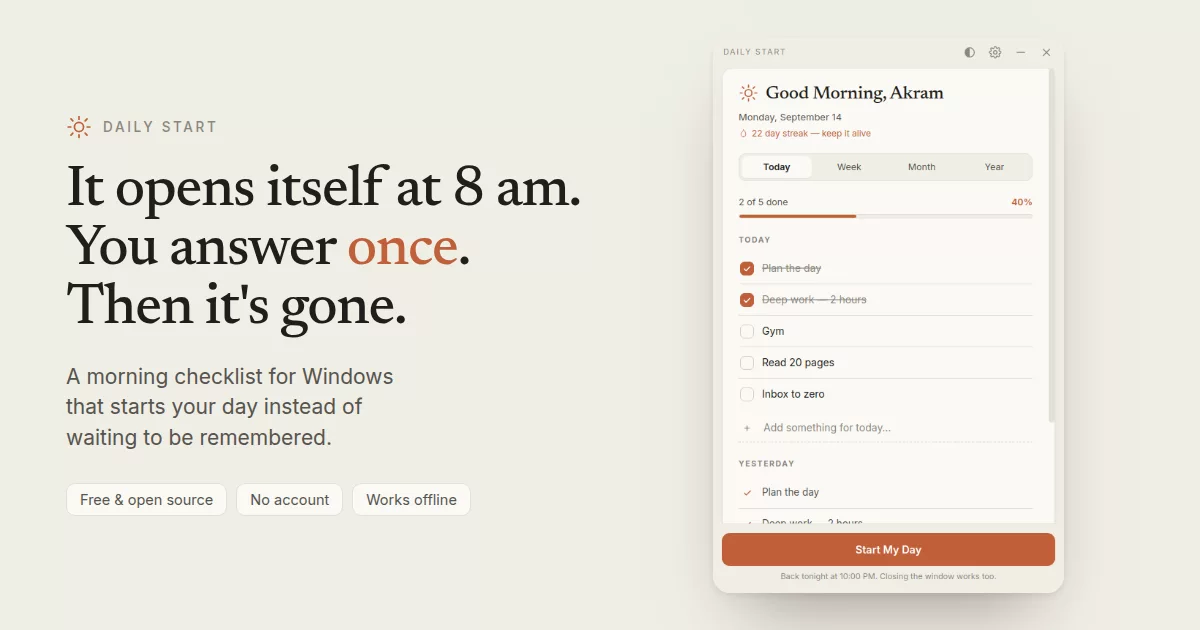
A tiny Electron desktop app: your morning checklist opens once when the PC starts, pushes you into the day, then gets out of the way. No database — one local JSON file.
PC starts → launched with --autostart
          → before your morning time?          → wait quietly in the tray
          → at or after it, still owed?        → show it, once
          → "Start My Day", or just close it   → settled for the day
          → reboot ten times, it stays shut    → tomorrow it opens again

optional  → evening check-in at your own time (say 22:00)
          → opens once more that night, to tick off what happened
          → "Wrap Up My Day" closes it until tomorrow
Launching it yourself (desktop icon / Start menu / tray) always opens the window, so you can come back to it any time during the day.
What it looks like
 |
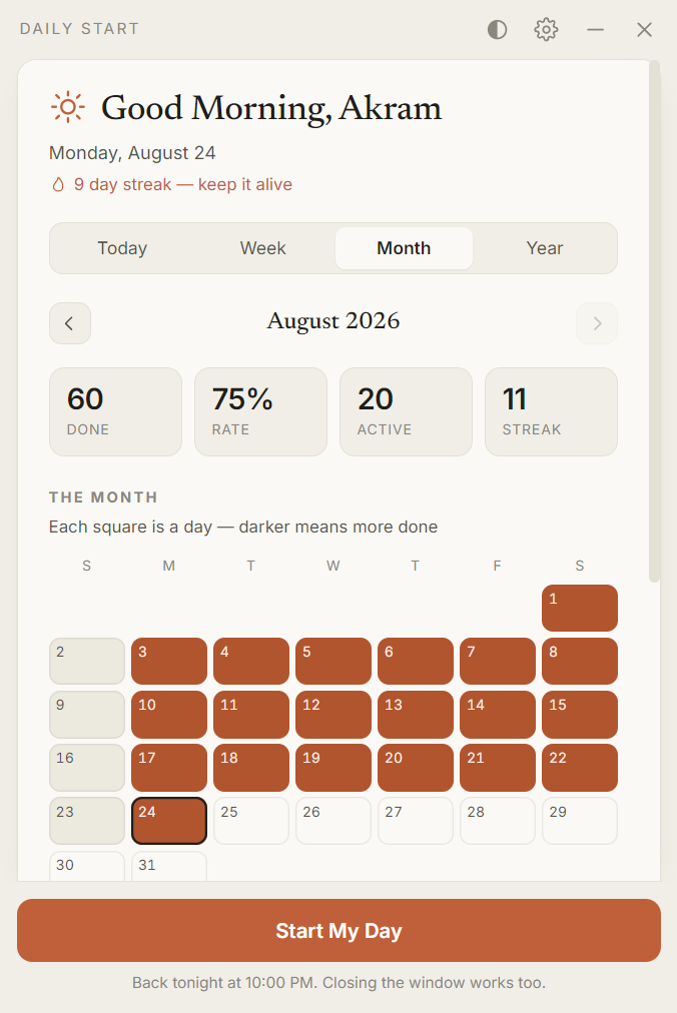 |
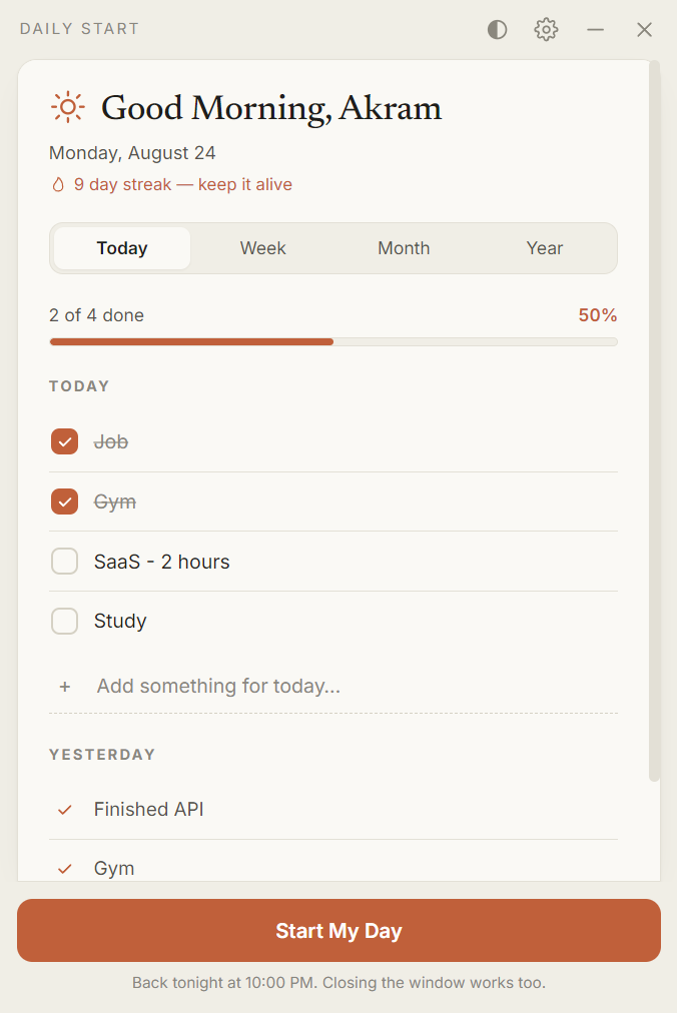
| Today — the list, and how yesterday went | Month — a square per day, darker means more done |
 |
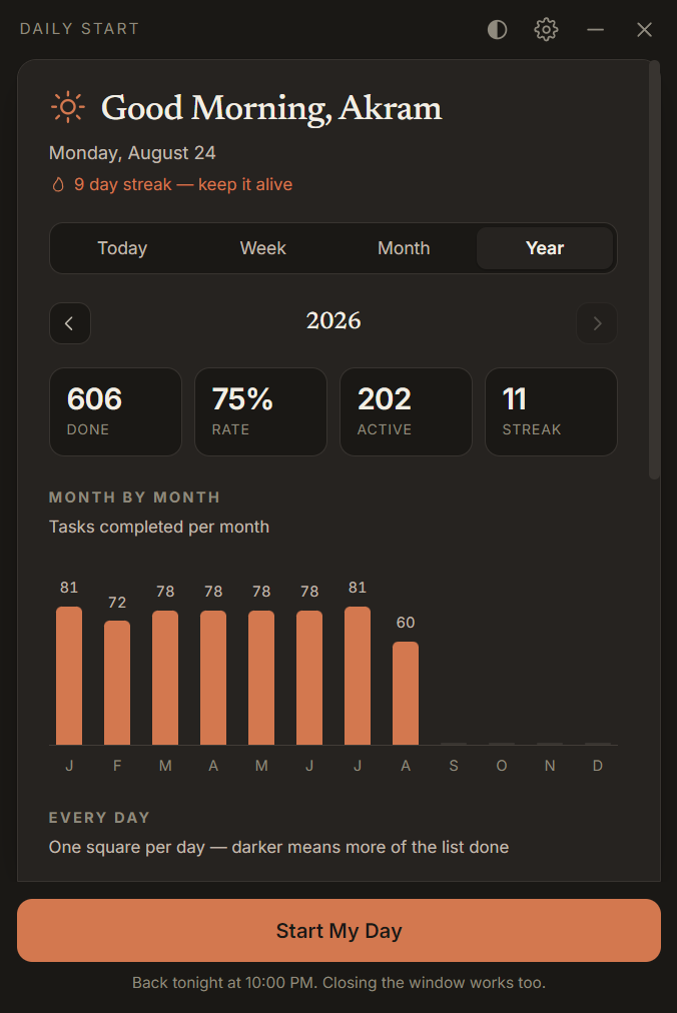 |
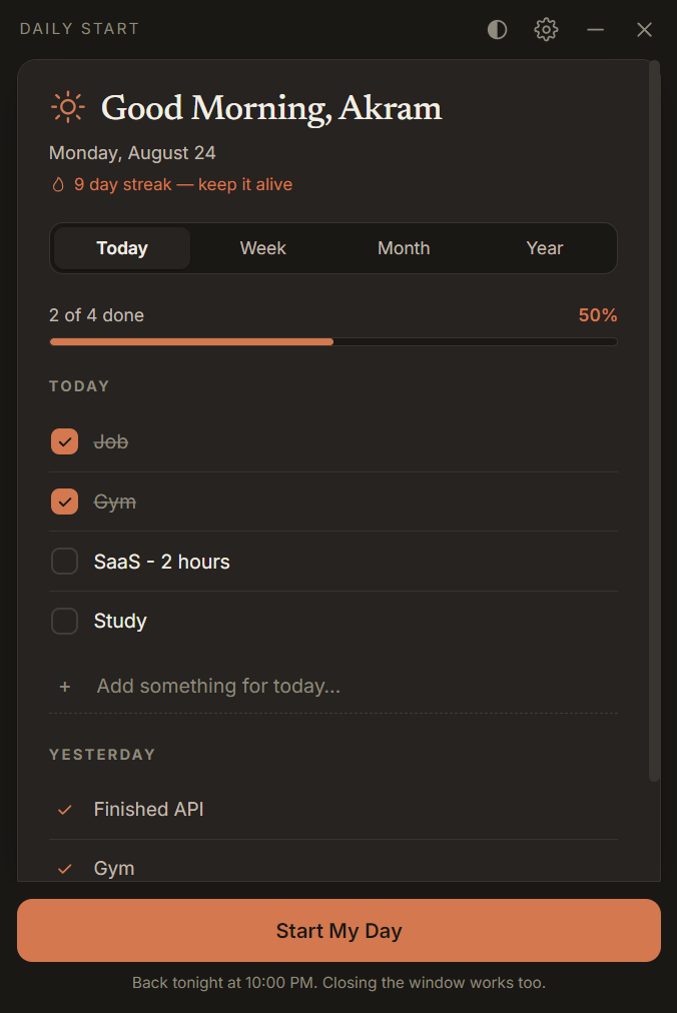
| Ink theme — one click from the titlebar | Year — month by month, and every day below |
Sample data, not a real week. Your own numbers stay on your own machine.
Run it
npm install
npm start
Windows PowerShell, from the project folder. Node 18+ required.
Using pnpm
pnpm works, but pnpm 9+ blocks dependency install scripts by default — and Electron downloads its actual binary in a postinstall script. Without it you get:
Error: Electron failed to install correctly, please delete node_modules/electron
package.json already allows it via pnpm.onlyBuiltDependencies, so a plain
pnpm install is enough. If you hit the error on an install made before that
field existed:
rmdir /s /q node_modules
pnpm install          # or: pnpm rebuild electron
pnpm start
pnpm approve-builds does the same thing interactively. Behind a proxy or a
blocked CDN, point Electron at a mirror first:
$env:ELECTRON_MIRROR="https://npmmirror.com/mirrors/electron/".
.npmrc also sets node-linker=hoisted, which gives pnpm a flat
node_modules like npm's. electron-builder trips over pnpm's symlinked layout
when packaging, and this avoids it. If you change that file, delete
node_modules and install again.
To test the startup path without rebooting:
npm run start:autostart      # first run shows the window
npm run start:autostart      # second run quits instantly — already opened today
Releasing
Three different things, easy to confuse:
| What it is | Can a user use it? | |
|---|---|---|
| Tag | a git label on a commit | No. A bare tag only gets GitHub's auto "Source code (zip)". |
| Release | a page attached to that tag | Yes — this is where people land. |
| Release asset | the .exe you attach to it |
Yes. This is the actual download. |
Pushing a tag alone gives you a tag, not a release. The workflow in
.github/workflows/release.yml turns the tag into a draft release with the
installer attached — and a draft is invisible to everyone but you until you open
it and press Publish release.
Every release also carries GitHub's automatic "Source code (zip / tar.gz)"
entries. You can't remove them and they're harmless; just never point people at
them, because source needs Node installed to run. Point at the .exe.
What to attach
Only the installer. dist/ also holds build by-products that are not for
users:
In dist/ |
Upload it? |
|---|---|
DailyStart-Setup-1.0.0.exe |
Yes — this is the release. |
win-unpacked/ |
No. The app unpacked, ~200 MB, and it's a folder. |
builder-effective-config.yaml, builder-debug.yml |
No. Build debug output. |
latest.yml, *.exe.blockmap |
Not yet — these are the auto-update feed. Attach them the day electron-updater is wired up, and not before. |
The workflow uploads dist/*.exe, which matches the installer and nothing
else: the glob doesn't descend into win-unpacked/.
Writing the notes
Written for someone who has never seen the app, not for you. Four things, in this order: what it is, the download and what Windows it needs, what it does, and where the data lives. Then the SmartScreen warning — say it plainly, or every first-time download turns into a scare. GitHub's Generate release notes button lists commits; that belongs at the bottom, if at all, never as the body.
Doing it by hand, when you'd rather not wait for CI:
pnpm dist
gh release create v1.0.0 "dist\DailyStart-Setup-1.0.0.exe" ^
  --title "Daily Start 1.0.0" --notes "First release."
Build the .exe
The repo ships source only — there is no .exe until you build one, and it has
to be built on Windows (electron-builder needs Windows tooling for the
installer). From the project folder:
pnpm dist
First run downloads ~150 MB of Electron/NSIS bits, so give it a few minutes.
When it finishes, look in dist\:
dist\Daily Start Setup 1.0.0.exe    <- the installer, double-click this
dist\win-unpacked\Daily Start.exe   <- runs directly, no install
The installer is per-user (no admin prompt), lets you pick the folder, and makes a desktop shortcut. Just want to see it run without an installer?
pnpm pack
That skips NSIS and only produces dist\win-unpacked\Daily Start.exe.
Windows SmartScreen will warn on first launch ("unknown publisher") because the build isn't code-signed — More info → Run anyway. Signing needs a paid certificate; for a personal app it isn't worth it.
Windows startup
Settings (⚙ in the titlebar) → Open when Windows starts. That writes a
per-user login item pointing at the app with --autostart, so the once-a-day
gate applies. Turning it off removes the entry.
It works in dev mode too (it registers electron.exe with the project path),
but for daily use install the packaged build — the registry entry then points
at a stable path.
When it opens
Two times, both yours, both in Settings.
Not before a set time — off by default, in which case the checklist appears on any launch, whatever the hour. Switch it on and pick a time (say 08:00) and nothing appears before then. Boot at 06:30 and the app waits in the tray until 08:00, then opens once. That waiting is why it needs to be resident: at 06:30 nothing else is around to wake it at 08:00.
Evening check-in — off by default. See below.
Whichever one opens, it opens once. Answer it and the day is closed: reboot as many times as you like, nothing reappears until tomorrow.
If the first launch of a day happens after both times have passed — say you only turn the PC on at 23:00 — you get one window, framed as the evening check-in, and answering it closes both slots. Being asked twice in the same minute would be silly.
The two buttons
Each day has two slots the app can surface — the morning checklist and the optional evening check-in — and each one ends in exactly one of three states:
| State | How you get there | Does it come back? |
|---|---|---|
| done | Start My Day / Wrap Up My Day |
No. It also records the time you started. |
| dismissed | the ✕, Esc, or Alt+F4 |
No. Seen and acknowledged, nothing recorded. |
| owed | minimise, or you haven't answered yet | Yes — once, and only once. |
So closing the window and pressing the button both end the day's prompt. The only difference is that the button records that you actually started. Minimising is deliberately not an answer: the slot stays owed, but a minimised window is left alone rather than being popped back up.
Two independent things stop it from ever becoming a popup you can't escape: the
dismissed flag, which survives a restart, and an in-memory guard that surfaces
each slot at most once per day whatever the stored flags say.
Evening check-in
Off by default. Turn it on in Settings and pick any time — 22:00, 23:30, whatever suits you — and change it whenever you like; the next check that runs uses the new time, nothing to restart.
With it off the app quits as soon as you're done, and the Windows login item
brings it back next morning. With it on the app stays in the system tray
after the morning run and opens once more at your time so you can tick off what
actually happened. Wrap Up My Day closes it until tomorrow.
Because it's resident in that mode, it no longer depends on a reboot: a 30-second
ticker notices the date rolling over and opens the fresh checklist by itself. The
tray icon gives you Open dashboard and Quit any time.
Every launch path is covered:
| Launch | Morning done? | Evening | What happens |
|---|---|---|---|
--autostart |
no | — | window opens (morning) |
--autostart |
yes | on, time still ahead | no window, waits in the tray |
--autostart |
yes | on, time passed | window opens (evening) |
--autostart |
yes | already wrapped up | quits |
--autostart |
yes | off | quits |
| by hand | anything | anything | window opens |
What's in the app
Today — greeting, date, streak, progress bar, the checklist (rebuilt each morning from your routine list), free-form additions, and yesterday's recap.
Week / Month / Year — three real calendar periods, not rolling windows, and
each one steps backwards with ← → (or the arrow keys) for as far as your
history goes. History is kept for years, so once you've filled a week, a month
and a year, the next year just keeps going.
- Week — done, rate, perfect days; one bar per day
- Month — done, rate, active days, best streak; the month as a calendar, each square shaded by how much got done
- Year — the same tiles for the whole year; one bar per month plus a
proper contribution graph: 7 weekday rows, one column per week, month
labels across the top, Mon/Wed/Fri down the left, legend bottom-right.
A full 53-column year needs ~690px at GitHub's own square size and this
window has ~400, so it wraps into two half-year bands (Jan–Jun, Jul–Dec)
at ~11px squares rather than being shrunk to dots or cut off the edge.
Columns are
1fr, so a band always ends flush with the right edge
Hover anything for exact numbers, and every period has a Show as table view
with the same figures as text.
Yesterday's recap on the Today tab is editable — hover a line and hit ✕ to drop something you never actually did. That is the only way anything leaves the history; there is no bulk wipe, on purpose.
Type is Newsreader (the greeting) over Inter (everything else) — both variable
fonts, bundled in src/renderer/fonts/, so nothing is fetched at runtime and it
looks identical on any machine. Chart labels and numbers stay in the sans.
Two themes (◐ in the titlebar): warm paper and warm ink. Each sets
color-scheme, so the native bits Chromium draws itself — checkboxes,
scrollbars, focus rings — follow the theme. The time picker's clock glyph is
a bitmap Chromium paints and color-scheme does not reliably lighten it (it
stays dark on Windows), so that one is forced with a filter instead:
brightness(0) flattens it, plus invert(1) in the ink theme. Both use one terracotta
sequential ramp for the analytics — empty plus four steps, the same count a
contribution graph uses — validated for monotone lightness and visible steps. Colour is tokenised per theme, shadows included: on paper they are
warm-tinted rather than neutral grey, and in ink they read as depth instead of a
drop, and heatmap rings sit only on empty cells, where the fill is closest to
the surface — a filled step is bounded by its own colour and the gap. Nothing
renders in a colour the other theme cannot swap.
Keyboard
| Key | Action |
|---|---|
Ctrl + N |
jump to Today and focus the add field |
Enter |
add the task |
Esc |
close settings, or close the window |
← → |
step to the previous / next period (Week, Month, Year) |
Where your data lives
C:\Users\<you>\AppData\Roaming\Daily Start\daily-start.json
Plain JSON — edit it, back it up, sync it, whatever. History is kept for about
six years before the oldest days fall off (a year of checklists is only a couple
hundred KB). If the file ever gets corrupted it's renamed to
.broken-<timestamp> and a fresh one starts.
{
  "name": "Akram",
  "routines": ["Job", "Gym", "SaaS - 2 hours", "Study"],
  "autoLaunch": true,
  "theme": "paper",
  "evening": { "enabled": true, "time": "22:00" },
  "days": {
    "2026-08-23": {
      "tasks": [{ "id": "…", "title": "Gym", "done": true, "routine": true }],
      "morning": { "done": true, "dismissed": false, "at": "2026-08-23T03:12:44.101Z" },
      "evening": { "done": false, "dismissed": false, "at": null }
    }
  }
}
Repo layout
src/                     the app
assets/                  app + tray icons, README screenshots
.github/workflows/       builds the installer when you push a version tag
.github/ISSUE_TEMPLATE/  the bug form
.github/PULL_REQUEST_TEMPLATE.md
package.json .npmrc      build config
LICENSE NOTICE           the paperwork
CONTRIBUTING.md SECURITY.md CODE_OF_CONDUCT.md
README.md                this file
Not in the repo, on purpose: node_modules/, dist/, and the installer
itself. The .exe is a release asset, not a repo file — pushing a tag
builds it on a clean Windows runner and attaches it to the release.
Files
src/main.js              window, tray, single-instance lock, the two daily
                         slots (morning / evening), the ticker, IPC
src/preload.js           the only bridge to the renderer (contextIsolation on)
src/store.js             JSON store: daily reset, week/month/year analytics,
                         streaks, which slot is due
src/renderer/fonts/      bundled Inter + Newsreader (variable woff2) + licences
src/renderer/index.html  markup
src/renderer/styles.css  paper/ink themes, charts, notebook details
src/renderer/renderer.js UI + analytics
src/renderer/index.html also opens straight in a browser — it falls back to
demo data, which is handy for tweaking the design without launching Electron.
Notes
- The date key is local time, not UTC, so the day rolls over at your midnight. If the machine stays on past midnight with the window open, the dashboard rebuilds itself within a minute.
- The window is frameless; drag it by the titlebar strip.
- With the evening check-in on, closing the window only hides it — quit for real from the tray menu.
nodeIntegrationis off,contextIsolationis on, and the renderer has a strict CSP — it only ever touches the local file through IPC.
Contributing
Bugs and small fixes are welcome — see CONTRIBUTING.md for the scope, the house style, and how to get it running. Ideas and feature requests belong in Discussions rather than issues.
Found a security problem? Please don't open a public issue — SECURITY.md explains where to send it.
Licence
Copyright 2026 Md Akram Hossain (Akram Sakib).
Licensed under the Apache Licence, Version 2.0. You may use, modify and redistribute this software, including commercially, provided you keep the copyright notice, state your changes, and pass along the NOTICE file.
Version 1.0.0 was released under the MIT Licence and that release stays MIT. Version 1.0.1 and later are Apache-2.0.
Trademarks
"Daily Start", the Daily Start logo and icon are marks of Md Akram Hossain (Akram Sakib). The licence covers the code, not the name — Apache-2.0 section 6 grants no trademark rights.
So: fork it, build on it, ship it. But ship it under your own name. Do not publish a rebuild as "Daily Start" on the Microsoft Store or anywhere else, and do not imply the original author endorses your version.
Bundled typefaces
Inter and Newsreader are under the SIL Open Font License 1.1 — their licences
sit beside the font files in src/renderer/fonts/.