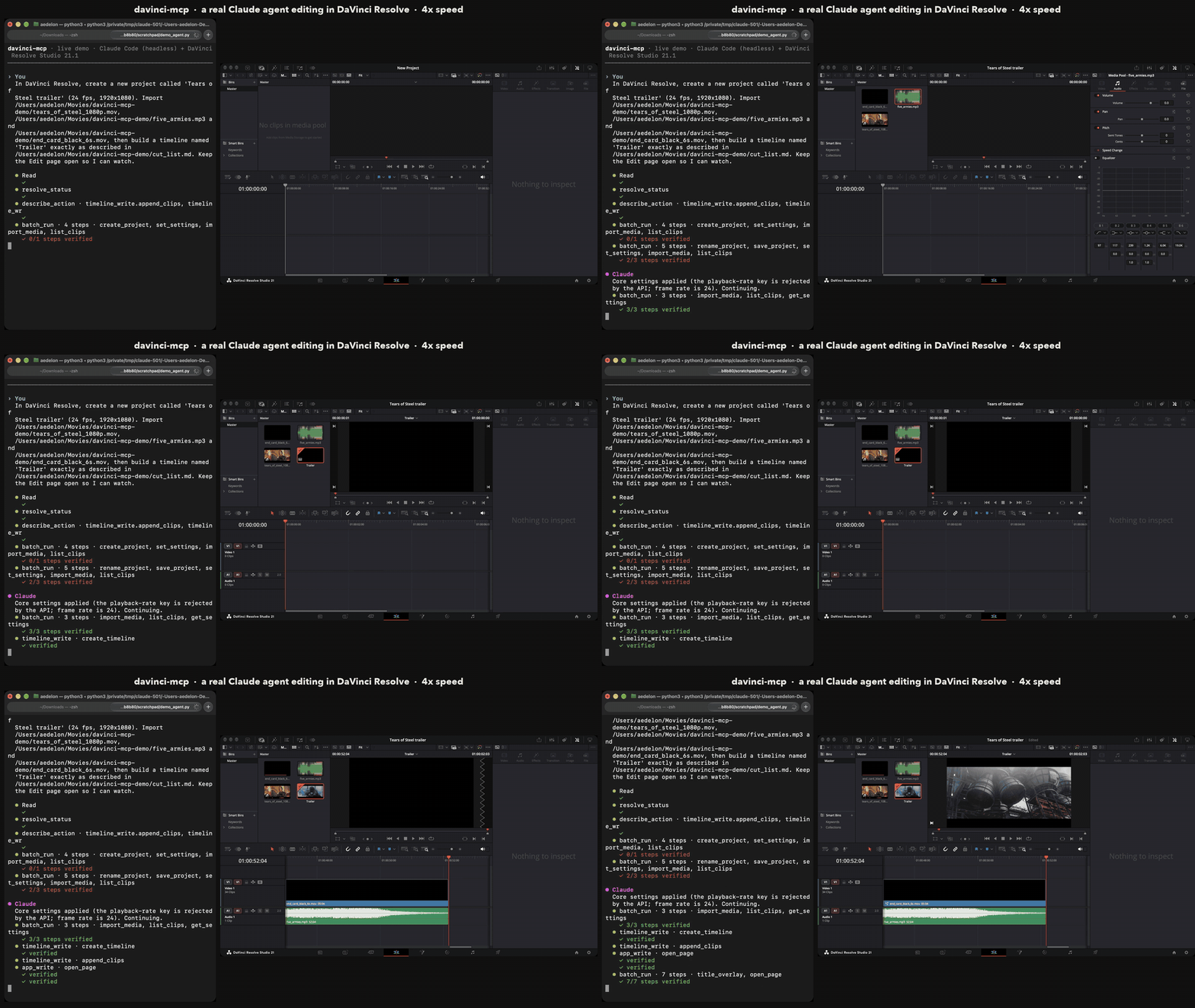
DaVinci Resolve MCP Server
English | 简体中文
-blue.svg) -18%20tools-blueviolet.svg)
A Model Context Protocol (MCP) server that lets AI assistants control DaVinci Resolve Studio through the official Scripting API. It provides full API coverage plus guarded workflow helpers for editing, media pool organization, render setup, review markers, grading, Fusion, Fairlight, project lifecycle tasks, extension authoring, and source-safe media analysis.
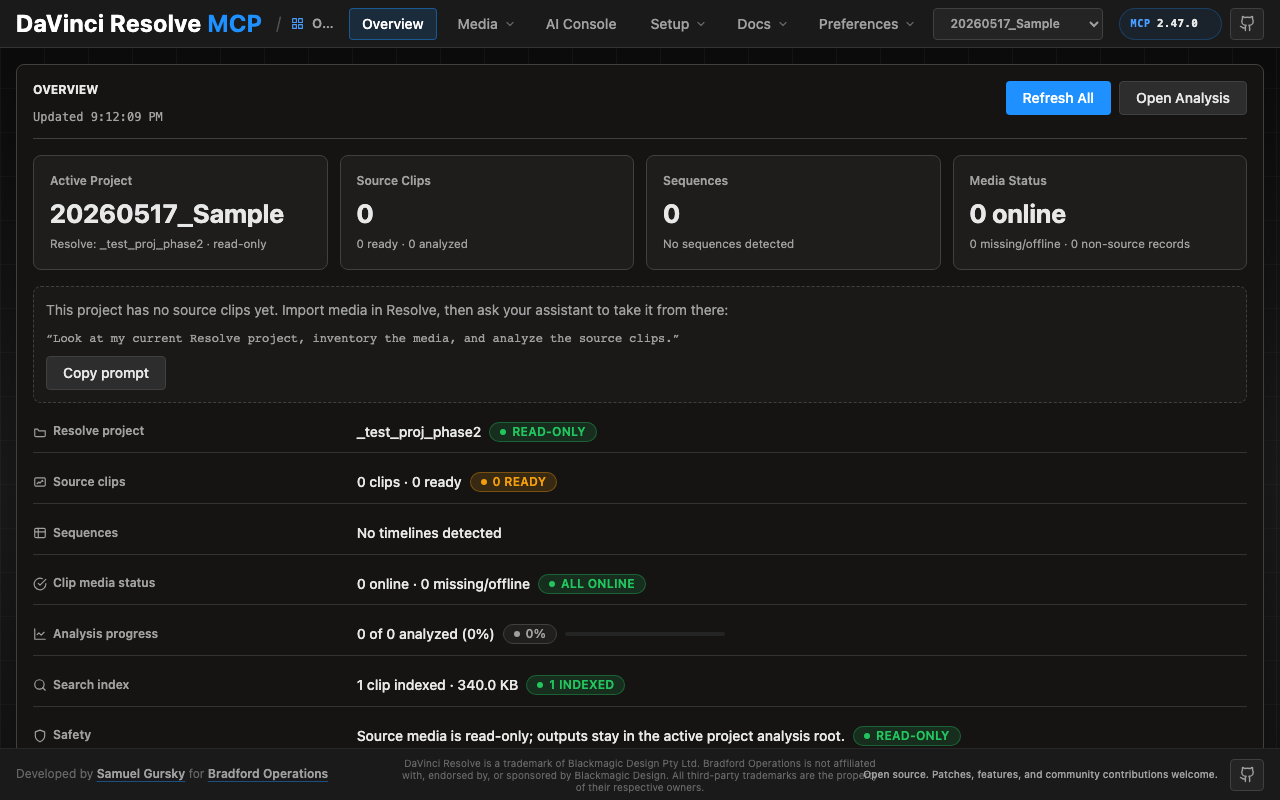
A local browser control panel ships with the server for inspecting Resolve state, running source-safe analysis, drilling into analyzed clips and shots, and editing analysis output inline. See the Control Panel Guide for the full tour.
Quick Start
npx davinci-resolve-mcp setup
Before connecting, open DaVinci Resolve Studio and set Preferences > General > External scripting using to Local. (On the free edition that preference does not help — see Free edition below.) The npm launcher installs a managed copy under your user application-data directory, then runs the universal Python installer. The installer creates a virtual environment, detects Resolve paths, and can configure Claude Desktop, Claude Code, Cursor, VS Code, Windsurf, Zed, Continue, Cline, Roo Code, OpenCode, Codex CLI, and JetBrains IDEs.
For source installs:
git clone https://github.com/samuelgursky/davinci-resolve-mcp.git
cd davinci-resolve-mcp
python install.py
For platform paths, client-specific config, and manual setup, see Installation and Configuration.
The installer and server check the latest GitHub release for MCP updates. Checks are best-effort and throttled; the server never blocks MCP startup for a prompt. The installer can prompt, snooze, ignore a release, disable checks, or apply an opt-in safe auto-update for clean git checkouts.
Free edition (in-app bridge)
Blackmagic gates external scripting to Studio: on the free edition
scriptapp("Resolve") refuses a foreign process, whatever the preference says.
Through Resolve 21.0.x the Workspace ▸ Scripts menu was not gated — a script
launched from it is handed the live resolve object (measured on free 21.0.3.7) —
so the server can reach the free edition through a small script that runs inside
Resolve and re-exports it over an authenticated loopback listener. Resolve 21.1
moved Python scripting to Studio. On free 21.1 the Scripts menu no longer lists
.py files at all (reported on Fedora 44 in #203; a Lua script in the same folder
lists normally). Whether the Console still runs Python there is unconfirmed, so
treat the bridge as a 21.0.x path until that is measured.
python scripts/install_resolve_bridge.py
# restart Resolve, open a project, then: Workspace > Scripts > resolve_bridge
The installer and MCP client use ~/.config/davinci-resolve-mcp/bridge.json
by default. To keep the authenticated bridge config elsewhere, set
DAVINCI_RESOLVE_BRIDGE_CONFIG while running the installer and in the MCP
client environment; both sides will use that path.
Once that listener is running it is used automatically whenever external
scripting is unavailable — no environment variable required. Setting
DAVINCI_RESOLVE_BRIDGE=1 forces the bridge instead: it becomes the only
transport tried, so a bridge that stops answering reports its own fault rather
than quietly falling back to another transport. Use it when the bridge is the
path you intend to depend on.
On macOS, Resolve looks for Python 3 in exactly two places: the
PYTHON3HOME environment variable, then /usr/local/bin/python3. Homebrew,
pyenv, uv and conda land in neither, so the script silently never appears in the
menu. A python.org install works because its installer creates
/usr/local/bin/python3 — but you do not need one: point Resolve at the
interpreter you already have, no sudo required.
launchctl setenv PYTHON3HOME "$(python3 -c 'import sys; print(sys.prefix)')"
Use launchctl setenv, not export — Resolve is launched from the Dock and
never sees your shell's environment. Restart Resolve afterwards. A Lua canary is
installed alongside so you can tell "Python not detected" apart from a wrong
folder.
Two things that bite (#182). The prefix must contain both
lib/libpython3.X.dylib and bin/python3 under that exact unversioned
name — Homebrew's framework builds often ship only bin/python3.13, which is
half a Python as far as Resolve is concerned, and the installer's preflight now
says so instead of reporting a usable prefix. And launchctl setenv does not
survive a reboot; if scripts stop listing weeks later with no error, that is
why. For something persistent, put an interpreter where Resolve already looks
(this one needs sudo, and check that /usr/local/bin does not precede your
normal Python on PATH):
sudo ln -s "$(command -v python3)" /usr/local/bin/python3
Validated on free 21.0.3.7 and Studio 19.1.3.7, both macOS. The Windows paths
added in v2.70.1 (issue #106) shipped unverified; reports on free 21.0.1.11
(issue #109) and free 21.0.3.7 (issue #112) have since shown the bridge
installing, listing and serving from both %PROGRAMDATA% and %APPDATA% on
Windows 11, so those paths are now confirmed rather than assumed. Linux is
confirmed as well: a report on free 20.3.2.9 (issue #129, Fedora 43) shows the
bridge installing to ~/.local/share/DaVinciResolve/Fusion/Scripts/Utility,
listing against the system Python — Linux has none of this discovery problem —
and serving end-to-end. No platform now rests on an assumption: macOS was
validated directly, Windows and Linux on user reports.
Note that the bridge holds its port for as long as it serves. Before v2.70.3 a
Windows bridge could outlive Resolve and block the next session's listener; if
you are on an older build and a bridge stops answering, check for a stale
fuscript.exe still holding the port.
This is the documented in-app path, not a licence circumvention, but Blackmagic could close it — treat it as a supported-until-it-is-not tier. Loopback only, HMAC-signed requests, one-use nonces.
Local Control Panel
Launch the single-user local control panel from the repository root:
venv/bin/python -m src.control_panel
The command starts a loopback-only server and opens the control panel in your browser at a URL that carries a per-launch access token (http://127.0.0.1:8765/#token=…) — use that exact URL; the panel refuses requests without it. To have an AI coding agent do this, ask: "Open the Resolve MCP control panel for this repo." Agents should use venv/bin/python -m src.control_panel unless your Python environment is already active. Persisted analysis jobs refresh the local search index automatically after successful slices; the manual Build Index action is for rebuilding from existing reports.
Server Modes
| Mode | Entry point | Tools | Best for |
|---|---|---|---|
| Compound | src/server.py |
37 | Default mode for most assistants. Related Resolve operations are grouped behind action parameters to keep context usage low. |
| Full / granular | src/server.py --full or src/resolve_mcp_server.py |
390 | Power users who want one MCP tool per Resolve API method. |
The compound server is recommended unless you specifically need the granular one-tool-per-method surface.
Advanced server — beyond the scripting API (optional, Node)
The same package ships a second, optional MCP server: davinci-resolve-advanced-mcp (bin
bin/davinci-resolve-advanced-mcp.mjs). Where the Python server drives a live Resolve over the
sanctioned scripting API, the advanced server does what the API can't — it reads and edits Resolve
files (.drp / .drt / .drx) and applies DB/XML-level changes with no Resolve running, so it
runs cloud or local. 18 tools: drp, drt, drx (per-clip grade codec plus a deterministic,
offline grading/QC catalog — within-camera + cross-camera skin (v2 skin-line metric) + b-roll +
neutral-patch WB matching, match-to-reference, saturation/black-balance, contrast-normalize, ASC CDL
import, lossless grade-transfer + season-look authoring, named-LUT attach, scope reads + intent tags,
verify-grade, display-referred frame extraction, broadcast-legal QC), offline_ref,
conform (frame-oracle conform/relink QC + lineage), color_trace (carry grades across a re-conform),
fusion, audio_plan, fairlight (bus routing), audio, project_read, project_db, pipeline
(a DB-as-truth pipeline: compile YAML project specs into a canonical SQLite DB, then run stages with
gates, provenance, and intent↔actual drift detection), capabilities, deliverable (deliverable QC /
compliance), media (media front-end / AE ingest), editorial (editorial integrity / changelist),
provenance (provenance / audit / episode report). It can also be consumed as a
library (importable engine API), not just spawned as a server.
DRX grade writes are live-calibrated against Resolve Studio: grade params take Resolve's
on-screen panel units by default (space: 'ui' | 'drx'), and the structural writes (power windows,
qualifiers, HDR zones, HSL curves, ColorSlice, blur/key/motion-effects) are panel-readback-verified —
per-control status in resolve-advanced/vendor/drx-parameters/CALIBRATION-STATUS.md. It also closes
a UI-only gap: programmatic "Cleanup Node Graph" (drx relayout for one clip, project_db
relayout_node_graphs for a whole project) — node layout tidied, grade content byte-preserved.
Add it alongside the live server (both ship in one npm install):
{
  "mcpServers": {
    "davinci-resolve": { "command": "<python>", "args": ["<path>/src/server.py"] },
    "davinci-resolve-advanced": { "command": "node", "args": ["<path>/bin/davinci-resolve-advanced-mcp.mjs"] }
  }
}
install.py prints both entries. The core is pure-JS/MIT with no required native modules; a few features
need user-installed tools (ffmpeg for audio, sharp/better-sqlite3 for some paths) — call the
capabilities tool for live status and install hints.
Unlike the Python server, this one has Node dependencies. npx davinci-resolve-mcp setup installs them
into the managed install (npm install --omit=dev --omit=optional under resolve-advanced/) and only
then registers the bin. If that install could not run — offline, or npm unavailable — setup registers
an npx command for the advanced server instead, so the entry it writes always boots. To repair an
existing install without re-running setup: npx davinci-resolve-mcp sync.
Bradford Post Assistant — managed application (closed beta)
The maintainers also build Bradford Post Assistant, a desktop application on top of this open foundation. Where the MCP servers give an agent hands, Post Assistant is the working copilot around them — an on-device AI assistant for post-production where client material never leaves the workstation:
- A post-production copilot — a desktop app that sits alongside DaVinci Resolve and watches the session live (timeline, grades, and frames — not just API calls), with an embedded AI assistant and agent runtime, local media analysis (transcription, frame analysis, editorial intelligence), and in-app conform QC.
- Memory — persistent, encrypted on-device assistant memory plus cross-episode learning mined from your pipeline's decoded facts (season-look drift, per-camera correction priors, hero-frame libraries, conform path-map reuse), with accumulation managed for you and a reviewed-insight workflow.
- Self-contained by design — Post Assistant wires everything itself: this MCP for Resolve control, the Bradford API for its extended services, and your choice of LLM provider. Nothing to configure by hand, no separate clients to manage, and the app keeps itself (and its bundled MCP) current with signed auto-updates.
- An extended professional toolset — grade surgery on live projects, 22+ adaptive grade families, a curated looks library, delivery-spec validation, editorial pacing/cleanup analysis, natural-language color direction, and Fusion composition authoring — delivered through the managed Bradford API.
- Production workflows — the raw tools composed into finished, real-world flows (turnover → conform → QC → delivery, season-look carry, episode reporting) with the guardrails and approvals a client-facing shop expects.
It is currently in closed beta — you can request access at bradfordoperations.com/software/post-assistant. The open-source servers are complete and fully functional on their own.
What You Can Do
"List all projects and open the one called 'My Film'"
"Create a timeline called 'Assembly Cut' from all clips in the current bin"
"Build a multicam prep timeline from selected camera angles and preserve source media"
"Detect 2-pops or slate claps and suggest record offsets for sync prep"
"Publish analysis summaries, keywords, people, and slate hints into Resolve clip metadata"
"Probe this timeline for gaps, overlaps, missing media, and source frame ranges"
"Safely import this image sequence, organize it into bins, and normalize clip metadata"
"Build a ProRes 422 HQ render plan, validate the settings, and queue the job"
"Copy review markers from the timeline to the selected clip and export a review report"
"Snapshot this clip's grade, validate a CDL update, and export a temp LUT"
"Create a Fusion TextPlus overlay on the selected clip and verify graph connections"
"Report audio channel mappings, voice isolation availability, and subtitle support"
"Install this MCP-marked DCTL or script, classify refresh/restart needs, then remove it"
Core Capabilities
| Area | What the compound server supports |
|---|---|
| App and project control | Launch/reconnect, page switching, project CRUD, project folders, databases, cloud project wrappers, settings, presets, archives |
| Media pool and ingest | Safe import, image sequences, multicam prep timelines, bin organization, metadata normalization, metadata field inventory, marks, annotations, relink/proxy/full-resolution guards |
| Media analysis | Source-safe file/clip/bin/project analysis, 2-pop/slate-clap sync-event detection, default Resolve metadata and Media Pool marker writeback, persisted analysis artifacts, existing-report reuse, host_chat_paths visual analysis (finalized per clip with commit_vision, works with any vision-capable MCP client) with opt-out, transcription with opt-out |
| Timeline editing and conform | Track/item probing, title text key scans/writes, copy/move/duplicate helpers, ripple insert, range operations, gaps/overlaps, source ranges, checked interchange exports/imports |
| Review annotations | Timeline/item/clip markers, custom data, flags, clip color, copy/move/sync cleanup, review reports, marker thumbnail review |
| Color and grading | Node graph probing, CDL validation, grade copy, DRX/LUT helpers, versions, Gallery stills, color groups |
| Fusion | Timeline-item comps, safe tool creation, input writes, port inspection, validated connections, scoped bulk writes |
| Audio and Fairlight | Track/item probes, source mapping, guarded audio property writes, voice isolation, auto-sync planning, transcription/subtitle probes |
| Render and deliver | Format/codec matrix probing, render settings validation, queued job lifecycle checks, guarded Quick Export |
| Extension authoring | Fuse, DCTL, ACES DCTL, and Resolve-page Lua/Python script lifecycle helpers with safe MCP-marked install/remove |
| Craft guidance | The bundled editorial, colour, audio, and workflow guidance served as prose over MCP — indexed, searchable, and readable by any client, not just ones with this repository on disk |
Operation envelope
Every compound tool return carries an _operation block beside its payload, so
an agent reads one shape instead of a different key per tool: status
(success / partial / blocked / failed), verification (with
contradiction kept distinct — Resolve reported success and the readback
disagreed), changes (the semantic delta), warnings, and an execution_id.
Two absences are meaningful and deliberate. verification.status: "unverified"
means no evidence was reported, not "checked and clean". A missing changes
means the action did not report a delta, not that nothing changed — an empty
{} there would be a confident, wrong answer about an edit that simply never
declared one.
The envelope is namespaced rather than merged into the top level because
status, operation, warnings, result and changes are all already domain
keys here; flattening would rewrite a background job's status: "done" and a
confirm gate's status: "confirmation_required". setup(action="set_defaults", params={"result_envelope": "pure" | "legacy"}) changes the shape, per call via
params={"envelope": ...}, per process via RESOLVE_MCP_RESULT_ENVELOPE.
Agent execution traces ("Why did the editor do this?")
Multi-step AI operations correlate across tool calls into unified execution
traces. Each trace aggregates tool durations (duration_ms), call counts, cumulative
semantic deltas (items_deleted, items_added), and readback verifications.
Agents and editors can inspect workflows via resolve_control:
get_execution_trace(execution_id?), list_recent_executions(), or open a
scoped execution with begin_execution(request="...") / end_execution().
export_execution_report(execution_id?, format="markdown"|"json") writes a
reviewable audit artifact with the same summary, defaulting to
logs/execution-reports/<execution_id>.md. path writes it anywhere you want
it instead — alongside a conform in a dated TransferFiles folder, say — and
creates the directories to get there, so check the path before you send it.
An existing file is never replaced without overwrite: true.
inspect_operation(tool?, target_action?, target_params?) evaluates pre-flight
risk level (low, medium, high, critical), destructive potential, and blast
radius (item, track, timeline, project, system) before taking action, while
list_lifecycle_hooks() inspects active execution interceptors.
It is a heuristic over action names, not a simulation — it never touches the
project and does not validate your parameters, so recognised: false means the
levels are defaults rather than a finding, and snapshot_available: null means
rollback availability was not determined rather than absent. Every shipped hook
observes; none replaces a tool's result, so dry_run always reaches the real
handler and nothing synthesises a preview for an action that has none.
A report for a run where nothing was verified says "not established — no checks recorded", not "passed". Absence of evidence is a question still open, and an audit document is the last place to let a reader read it as an all-clear.
Traces live in a 100-entry in-memory ring and are appended to
logs/execution-traces.jsonl beside server.log — RESOLVE_MCP_TRACE_FILE
moves it, and RESOLVE_MCP_LOG_FILE moves server.log itself (a path, or empty
for no file; the offline test suite points it at a temporary file so it never
writes into the operator's log). list_recent_executions reports that pa