
AI code review for GitHub pull requests with your existing Claude Code or OpenAI Codex agent. Diff City is a desktop workspace for guided diffs, inline AI conversations, and local review drafts. Consequential changes come first; assessed routine changes fold into summaries you can expand.
Status: public macOS alpha. Owner: Christopher Smothers. License: MIT.
Download for Mac · Website · Installation · Contributing
Apple silicon (M1 or newer), macOS 14+. Download the DMG from Releases and drag Diff City into Applications. Early unsigned alphas are not notarized and require macOS approval on first launch; the release notes state the signing status. Bring your GitHub CLI login and a local Codex or Claude Code installation. No Diff City account is required. Updates are manual for now.
See the review workflow
These are full-window captures of the real macOS app reviewing the mixed-edit demo PR: 20 files and more than 16,000 changed lines covering migrations, access policies, API contracts, localization, and renames. The guide and replies were generated with Claude Code · Fable 5 · High. The sample deliberately contains review issues and is not intended to be merged. Other account avatars are hidden for privacy. The guide surfaces its coverage limits for oversized or omitted changes.
Ask your coding agent, right in the diff. Select lines, click +, type a question, and read Claude’s response inline. Continue the same conversation in PR chat with the code context attached.
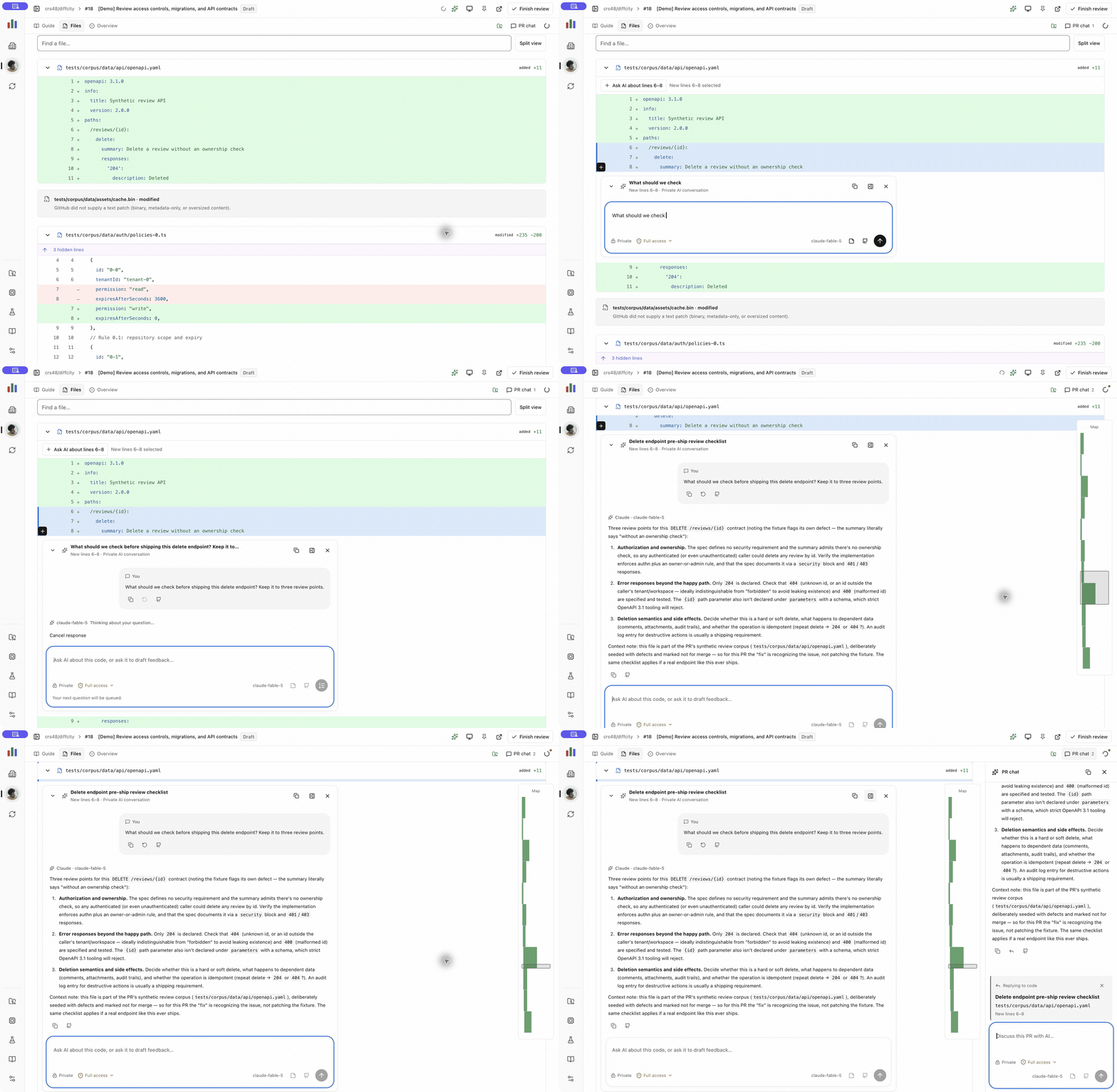
18-second recording of the real app, with AI waiting time shortened. No zoom or cropping; only the Diff City repository and personal account are shown. Watch with playback controls (choose Ask in place) or download the video.
Follow the code. Deeper code notes sit beside the diff, and the narrow guide index links to review locations and shows green blocks for reviewed chapters.
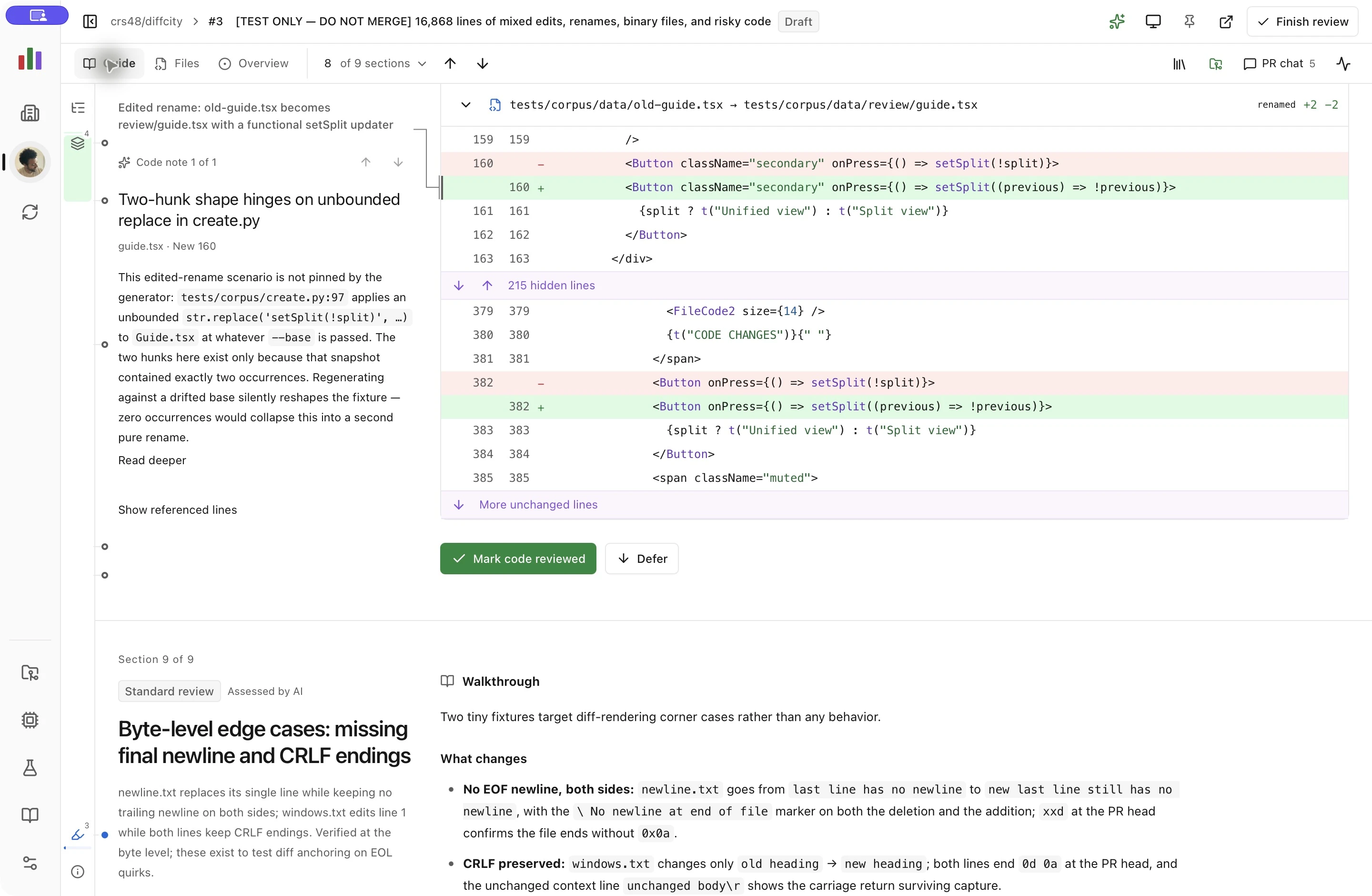
See the overview, inline conversation, and PR chat
Start with the overview. Understand the change and its review priorities before scrolling into the code.
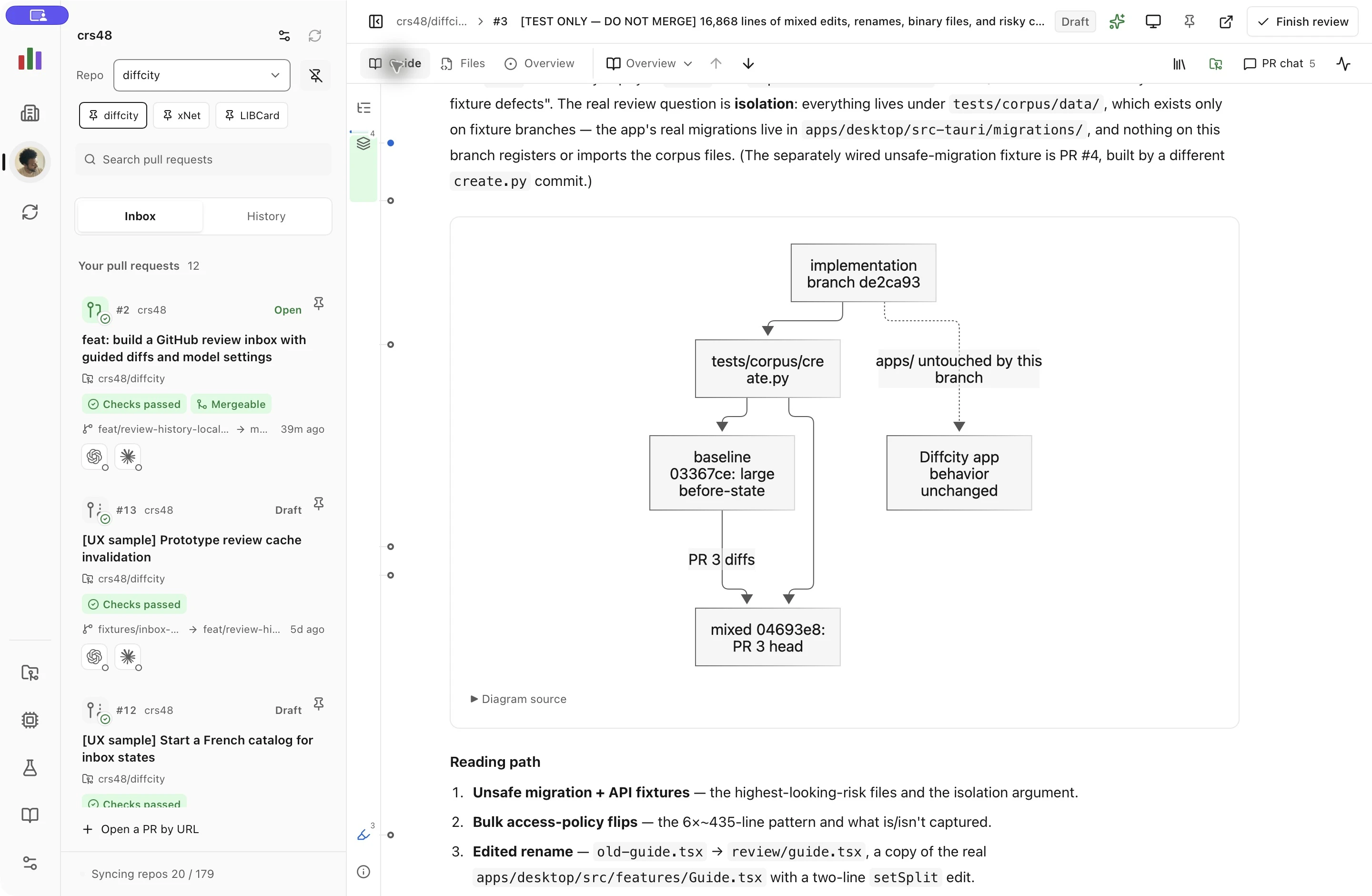
Ask in place. Questions and answers stay anchored to their code. Private notes and unpublished GitHub drafts have separate actions.
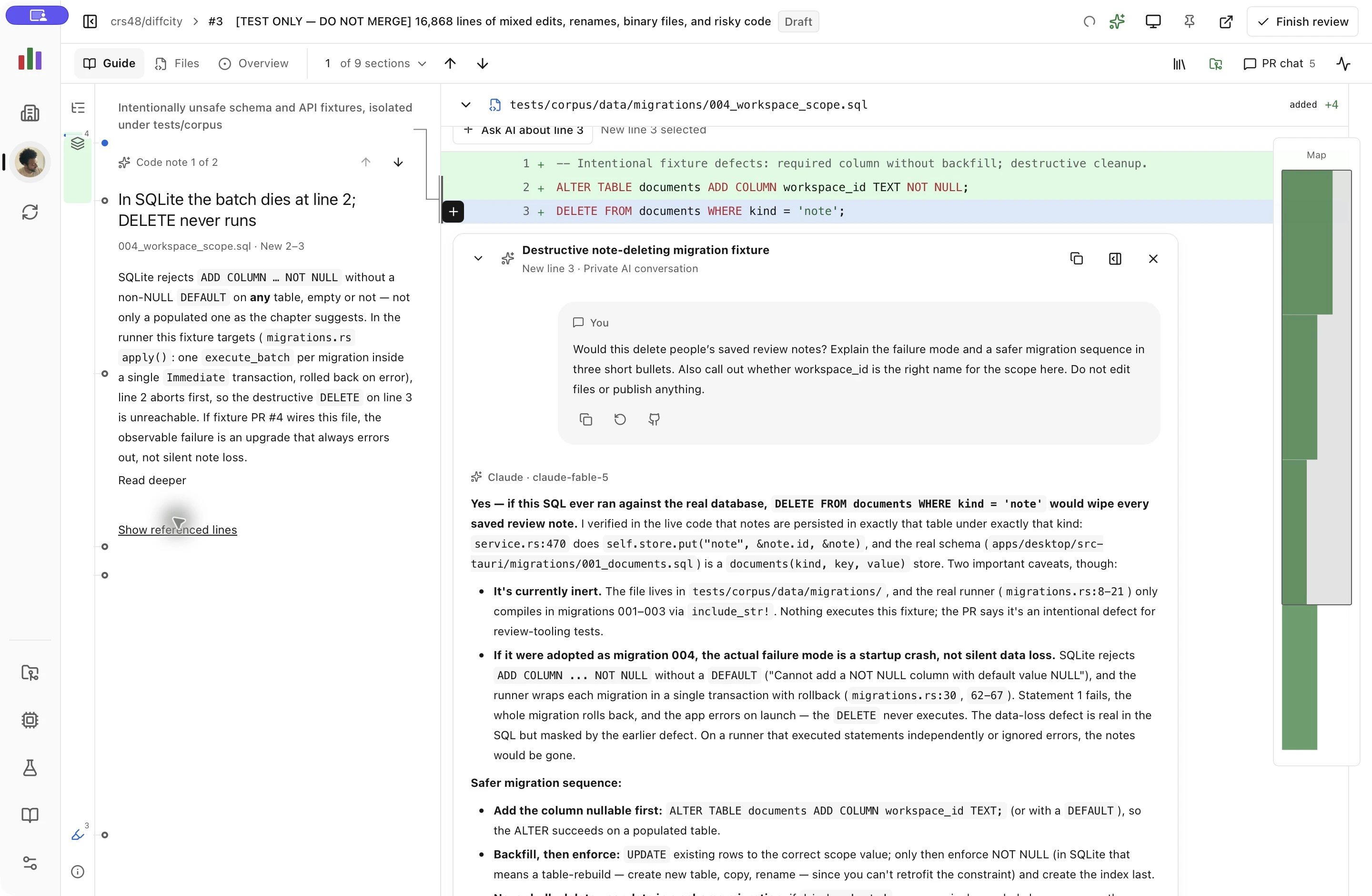
Keep the context. Continue the same conversation in PR chat, or copy a response or the entire thread with its context.
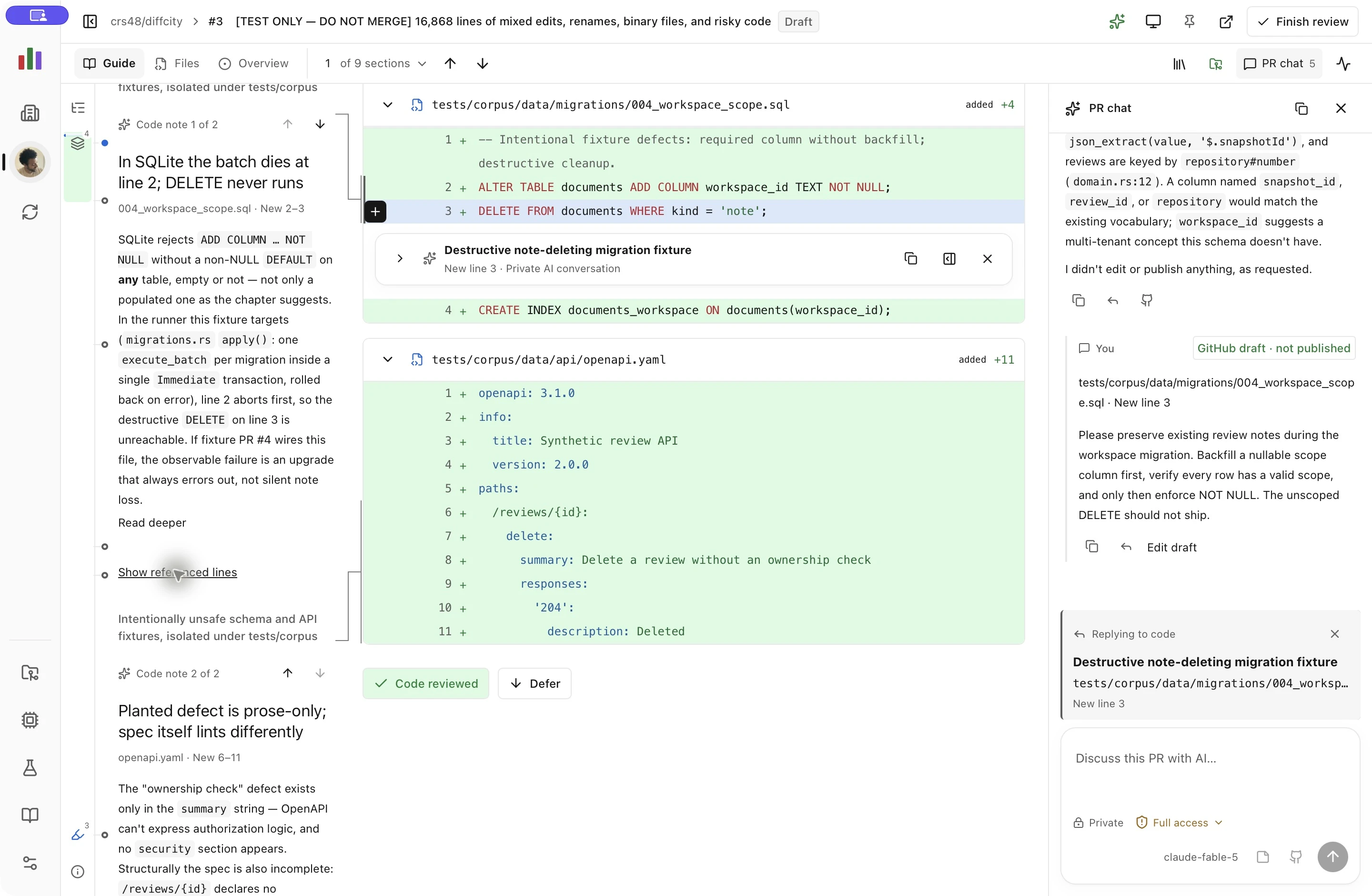
Run locally
Install Node.js 24, pnpm 10.11.1, Rust (the repository pins its toolchain), and Xcode command-line tools. Connect GitHub with gh auth login. Use a current OpenAI Codex CLI with a supported app-server and an existing Codex login. For Claude, install a current Claude Code CLI and sign in with claude auth login; the integration has been verified with Claude Code 2.1.304.
pnpm install --frozen-lockfile
pnpm dev
Or build the standalone macOS application:
pnpm desktop:build
open target/aarch64-apple-darwin/release/bundle/macos/diffcity.app
Development and production app builds explicitly target Apple silicon (aarch64-apple-darwin), even if the selected Rust compiler has an Intel host. pnpm desktop:build checks every packaged Mach-O executable/library for an arm64 slice and fails on Intel-only components. pnpm desktop:verify repeats that check, or pass a different .app path to check an installed bundle. The app uses macOS WebKit and does not bundle Node.js, GitHub CLI, Codex, or Claude Code. External CLI installations need their own native builds.
If rustc -vV reports host: x86_64-apple-darwin on an ARM Mac, use the native compiler for this checkout with rustup toolchain install 1.97.1-aarch64-apple-darwin --component rustfmt --component clippy followed by rustup override set 1.97.1-aarch64-apple-darwin. This leaves other repositories' toolchains unchanged. The explicit app target and bundle check are still required; a successful build alone does not establish its architecture.
Local builds use ad-hoc code signing, and pnpm desktop:verify also verifies the complete bundle signature. Tagged releases run the full validation and packaging pipeline, producing a DMG, ZIP, source manifest, checksums, and dependency notices. The pipeline supports Developer ID signing and notarization; explicitly labeled unsigned alphas remain available while distribution credentials are configured. See the release guide. Intel-only and universal packages and automatic updates are not currently provided.
If Connections reports a network timeout while gh api user succeeds, inspect any per-application network-filter prompt for the installed app. A CLI login succeeding does not establish that a newly built executable has network access. The full error appears in Connections; private drafts remain local.
Review a PR
- Open Connections to confirm the local GitHub and Codex accounts. Executable paths can be changed there. Use Model near the bottom of the left sidebar to choose your default model and reasoning level.
- Your organizations and accessible repos appear automatically. Your personal account stays first; other accounts sort by their latest PR or repo activity. Accounts with no known updates in the last 30 days fold behind an expandable count; your selected account stays visible. Use the account rail and Repo filter to narrow the inbox, or open a GitHub PR URL directly. Your open PRs (including drafts) appear first, followed by requested reviews, assigned work, and other open PRs. History shows closed and merged PRs.
- Click New guide, choose Codex or Claude Code, then choose a model and reasoning level. Generate guide creates a separate saved run without changing your default model or the guide you are reading. Open it when ready, or use Saved guide above the walkthrough to switch between models and earlier runs. Each entry shows its model, reasoning level, and generation time. Comments and hunk review decisions are shared; guide navigation and expanded sections restore independently. Guides belong to the captured PR revision, so a new code revision has its own history.
- Scroll through the entire guide, with each section’s explanation pinned beside its code. Use the outline or up/down arrows to jump between sections. The agent groups substantial reviews into roughly 5–12 broad sections (at most 20), with fewer for small changes. Migration, authorization, API-contract, and localization-contract signals set attention floors. Findings have separate severity labels. Expand routine groups whenever you want; acknowledged summaries and deferred code are counted separately from reviewed code.
- Drag across line numbers, click then Shift-click, or use Shift + Up/Down from a focused line number to select a range. Click the + in the left gutter beside the last selected line, or choose Ask AI about lines, to start an inline conversation. Enter sends to AI; Shift+Enter inserts a newline. Use Save private note to keep a note without asking AI, or Save GitHub draft to queue feedback for the author. Ask AI to draft feedback and it can prepare a local GitHub draft on that same range, which you can edit before publishing. Comments and streamed replies appear beneath the selected code. PR chat mirrors the conversation and links back to the code; Continue in PR chat retains the thread’s context. Selection stays within one diff hunk and side, and drafts survive navigation.
- GitHub drafts remain local and unpublished, including drafts prepared by AI. Finish review shows coverage and the exact selected drafts. Publish a comment, approval, or change request as supported by GitHub; your own PR only permits a comment.
- New code appears as an update banner. Loading it preserves review marks only for uniquely matching unchanged hunks. Earlier notes stay attached to their original code and can be reopened with Open previous revision.
Ask about selected text: Select a variable, function, or code fragment to open a focused question field beside it. Type a question and press Enter, or leave it blank for an explanation of the selected code. Alt+Enter also opens the question action. Continue the conversation inline or in PR chat. These threads are labeled AI only and cannot be prepared or published as GitHub comments. Text selection works in captured surrounding context and the “Since your last review” diff. Select up to 200 consecutive lines / 16,000 characters in one file and one side; use split view to select from a particular version when old and new lines are interleaved.
Informative guides: The guide opens with the change's purpose and before/after behavior. Each chapter has a short sticky takeaway and a full Markdown walkthrough, shown above its code, explaining the flow across files, important design choices, and test evidence or gaps. Why it matters and What to verify make the review concerns concrete. You can collapse explanations independently of code. Provisional groups are clearly labeled; use New guide to regenerate older brief guides. The prompt follows the intent-first approach in Diffity's guide instructions, adapted for risk-first PR review and validated hunk coverage.
Faster large reviews: Reviews with at least 3,000 captured diff lines render nearby code in measured blocks, keeping selected code, focused controls, and inline discussions mounted. Smaller reviews stay fully rendered. Find in code (Cmd/Ctrl+F) searches all captured diff lines, including offscreen and folded code; Enter and Shift+Enter move between matching lines. Render all code enables full-document assistive reading and text selection and saves your preference. In the 19,890-line production WebKit fixture, adaptive rendering reduced opening time from 7.6 seconds to 249 ms and median scripted scroll-frame time to 17 ms, with about 4,200 DOM elements instead of 200,000. These are local fixture measurements. The guide toolbar stays above the scrolling viewport without covering line controls.
Diff presentation: Unified and split views share syntax colors, subtle red/green changes, blue range selection, and a single + action at the end of a selected range. Split view pairs removed and added lines, marks unmatched cells with hatching, and keeps inline conversations on their selected side. Highlighting is limited to rendered lines, with a bounded cache and plain-text fallback for oversized lines.
Discussion headers: Each inline discussion keeps its title, line range, collapse button, and chat shortcut beneath the sticky file header until that discussion leaves the viewport. Collapsing a long discussion keeps its header in view. The first AI reply supplies a short title based on the opening exchange, saved separately from the message and mirrored in PR chat. Follow-ups keep that title. Older conversations show an opening-message preview until their next AI reply supplies a title; generic text-selection prompts show the selected code instead.
More room for code: Two compact header rows keep the PR identity, review modes, chapter navigation, and actions available. Full summaries scroll with the document; saved guides and background activity open in small popovers. The guide index links to chapters, code notes, naming decisions, findings, and conversations. Fully reviewed chapters appear as soft green blocks in the rail.
Stay oriented inside long files: File titles stick at the top of the code viewport until their file scrolls away. Collapse a file from its header at any point; consecutive hunks share one header without changing the guide's reading order. A small canvas minimap overlays the right side of the editor for the active file when it is taller than the viewport. It keeps the code's width and wrapping unchanged; horizontal scrolling has extra space to move covered text clear of the map. Click or drag to navigate, or focus it and use arrows, Page Up/Down, Home, and End. Its viewport marker tracks wrapped rows, expanded context, and inline discussions. The map represents displayed code and diff colors, not unloaded portions of the source file; it disappears for short files.
Markdown comments: GitHub comments, private notes, Codex replies, and draft previews share GitHub-flavored Markdown rendering: tables, task lists, strikethrough, lists, quotes, fenced code, links, and footnotes. The overview renders PR descriptions the same way. Code and table cells wrap within the review; task checkboxes display their saved state. Web links open in your browser. Active HTML and automatic remote image loading remain disabled.
Independent PR chat: Chat has its own message scrollbar beside the review, with its header and composer always available. The active reply context sits directly above the message box, showing the conversation title, selected file and line range, and any selected text. Remove code context to switch the next message back to the whole PR. Scrolling code and inline comments does not move the conversation. New replies follow when you are at the bottom and preserve your position when you are reading older messages. In narrow windows, chat occupies a separate panel; Escape or the close button returns to the review, and code references return directly to their inline thread.
Fast review switching: Your open PRs (including drafts), requested reviews, and assigned PRs prepare in the background across all repos, independent of the inbox filter. Saved code and guides open from local storage immediately; comments, checks, and PR metadata refresh in the background. Downloads run one at a time, yield to interactive opens, reuse unchanged revisions, and back off after failures. Prefetching does not run Codex. New code stays behind Load new revision while you review, and inherits your latest progress when opened.
Choose a model: The default is Claude Code · Fable 5 · High. The icon-only Model control in the left rail opens a popover with models and reasoning levels available through your local Codex or Claude Code login. Save a choice for new guides and conversations. Existing conversations retain their model for follow-ups; changing the default leaves active requests unchanged. Existing explicit choices from Connections are retained; unavailable selections are shown with an explanation instead of silently falling back.
Scan PR status: Cards use green open, gray draft, purple merged, and red closed icons. Status overlays and labeled badges distinguish reviews, approvals, changes requested, checks, conflicts, blocked merges, and branches behind their base. Repo, author, source/target branch, and update age stay visible; diff counts appear when available. The sample inbox includes varied status combinations.
Pin repos and PRs: Select a repo and use its pin button to add a shortcut and move it to the top of the repo selector. Each PR card and the review toolbar also has a pin button. Pinned PRs appear above the usual priority groups and remain in the inbox after closing or merging until unpinned. Account, repo, and search filters still apply. Pins save locally and survive restarts.
Explore a sample works without a GitHub PR and demonstrates migrations, authorization, tests, documentation, and localization. It contains deliberate issues and cannot publish feedback.
New AI guides become readable before a bounded background Priority pass inspects the files flagged for high attention. It processes up to six files sequentially, with at most two new line-anchored code notes per file, six per chapter, and 24 per guide. Each request contains at most 24 KB of complete diff hunks plus bounded guide context, and stops after three minutes. These are workload limits, not an exact token or spending cap. A file can finish without notes when there is nothing useful to add. Oversized or omitted code remains unassessed.
The pass saves and displays each file’s notes as they arrive, using that guide’s model. Stop enrichment keeps completed notes. After the batch, remaining priority files require Resume priority pass; once those finish, Explore further offers the assessed implementation and tests. Not now dismisses the offer. Routine and unassessed files are excluded. Failures stop the batch, and reopening or switching guides never restarts work automatically. Existing guides can opt in with Start priority pass. Only one background pass runs at a time, leaving the other three AI slots available for questions and guide generation.
As you scroll, code notes replace the section summary in the left margin, connect to their line ranges, and give way to the next note. Arrow controls jump between notes, including code that is not currently rendered. Narrow windows show each concise note directly above its code; Read deeper and Read all code notes expose optional Markdown explanations, validation checks, tables, and Mermaid diagrams without expanding them automatically. Notes are explanatory guide content, separate from findings, private conversations, and GitHub comments.
Appearance and accessibility
Use the appearance menu in the toolbar to choose Light, Dark, or System. The interface uses neutral black, white, and gray surfaces with GitHub Primer accents: green for open PRs and additions, red for deletions and closed PRs, purple for merges, blue for focus and information, and amber for attention. The app and website share the brand palette, including light/dark theme values and accessible primary buttons. Appearance saves immediately without reconnecting accounts.
For screen sharing or screenshots, Display settings → Hide other account avatars keeps only the selected account (or your personal account in All accounts) in the rail. Filter the inbox separately to control which repositories and PRs are visible.
Tailwind CSS supplies the styling foundation, and React Aria supplies buttons, tabs, menus, and dialog behavior. Keyboard users can skip to the review, switch tabs with arrow keys, navigate the guide outline, and dismiss dialogs with Escape. Outline jumps focus the destination heading; ordinary scrolling preserves keyboard focus. Explanations stack above code in narrow windows. Read full context opens longer explanations and review questions in the document. Focus returns to dialog openers.