
Digitakt + Digitone MCP
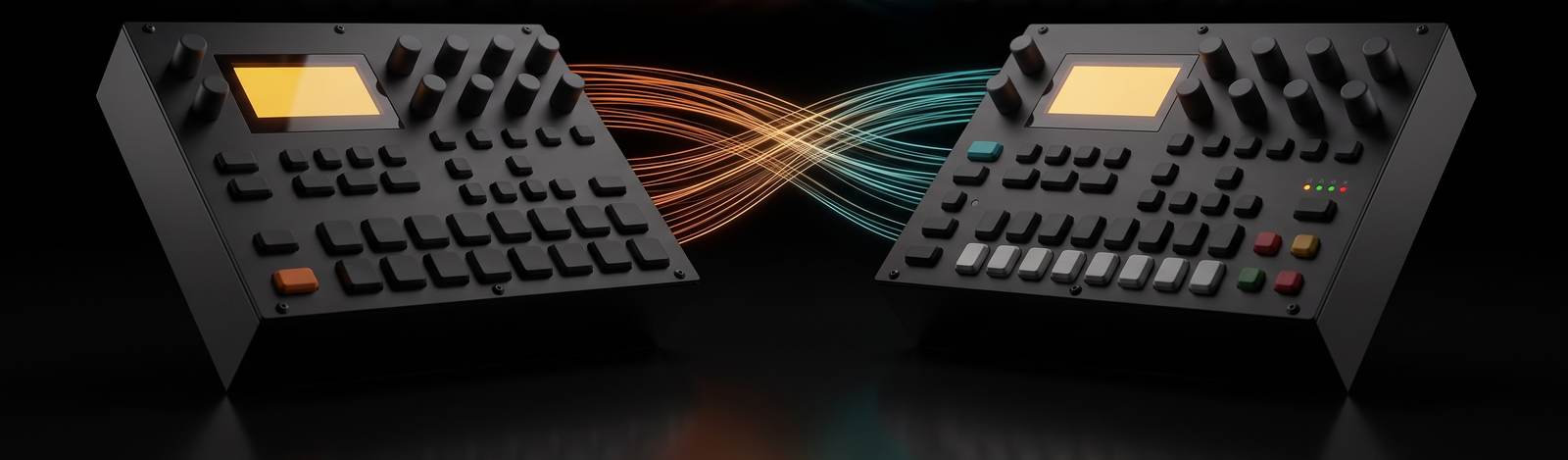
MCP servers that let an LLM play your Elektron hardware over MIDI — trigger tracks, tweak
parameters, run clock-synced patterns, and export what it made to .mid.
jamiew.github.io/digitakt-digitone-mcp
Two servers ship today, and you install and run them independently:
| Server | Device | Tools | ~Token cost |
|---|---|---|---|
digitakt-mcp |
Elektron Digitakt (original) | 44 | ~5.2k |
digitone-mcp |
Elektron Digitone (original) | 43 | ~5.1k |
They share one implementation internally — a device is a DeviceSpec (port name, track
count, parameter table) over a common core — but each is its own MCP server with its own
storage and its own tool list. Installing only the Digitakt costs you nothing for the Digitone.
Which hardware? This targets the original Digitakt and Digitone, not the Digitakt II or Digitone II. The mk2 machines have different track counts, more LFOs, and different parameter maps — see Other Elektron devices.
Install
Requires Python 3.11+ and uv.
curl -LsSf https://astral.sh/uv/install.sh | sh   # if you don't have uv

git clone https://github.com/jamiew/digitakt-digitone-mcp
cd digitakt-digitone-mcp
uv sync
Connect the device over USB first. Ports are matched by name, so there's nothing to configure as long as it appears as "Elektron Digitakt" / "Elektron Digitone" — on macOS you can confirm in Audio MIDI Setup. If you use Overbridge, the Overbridge Engine needs to be running.
Working inside this repo? Claude Code reads the checked-in .mcp.json and offers both
servers when you open it. Turn off the one you aren't using in /mcp; each costs about
6k tokens of tool schema.
Digitakt
Original Digitakt: 8 audio tracks, 8 separate MIDI tracks, one LFO per track, no chorus.
Setup
uv run digitakt-mcp
Claude Code:
claude mcp add digitakt -- uv --directory /path/to/digitakt-digitone-mcp run digitakt-mcp
Claude Desktop (~/Library/Application Support/Claude/claude_desktop_config.json) or any
other MCP client:
{
  "mcpServers": {
    "digitakt": {
      "command": "uv",
      "args": ["--directory", "/path/to/digitakt-digitone-mcp", "run", "digitakt-mcp"]
    }
  }
}
On the device
Per-track MIDI channels. The server addresses tracks on their own channels, so track triggers and per-track parameter changes need this. Without it only the currently selected track responds, and parameter changes silently hit the wrong track.
- Press [FUNC] + [SETTINGS]
- MIDI → CONFIG → CHANNELS
- Set each track's MIDI IN channel to match its number (TRK 1 → ch 1 … TRK 8 → ch 8)
The alternative is leaving everything on Auto Channel, which is simpler but means you cannot trigger multiple tracks at once.
Transport and clock, needed for every play_* tool:
- Press [FUNC] + [SETTINGS]
- MIDI → SYNC
- CLOCK RECEIVE → ON, TRANSPORT RECEIVE → ON
NRPN output, under MIDI → CONFIG → PORT CONFIG, if you want the device's own knob moves to come back as NRPN — several parameters have no CC at all and are NRPN-only.
Quirks
- Notes 0–7 trigger tracks 1–8. Notes 12–84 play the active track chromatically.
trigger_trackwraps this so you don't have to do the arithmetic. - Volume is CC 7 and Pan is CC 10, and Delay/Reverb sends live in the AMP page. The Digitakt II moved these; parameter maps from mk2 sources will not work here.
- One LFO. Anything referencing
lfo2/lfo3is a Digitakt II parameter. - Trig editing is NRPN-only (
set_trig_note,set_trig_velocity,set_trig_length). MSB 3/4/5 select note/velocity/length; the LSB is the zero-based step index.
Tips
play_pattern_with_trackssends real MIDI clock, so the Digitakt's own sequencer stays locked to whatever the model is playing.play_pattern_with_multi_channel_midiis the one to reach for when driving Digitakt drums and a synth on MIDI tracks 9–16 in the same pattern.- Ask for
list_parametersbefore setting up automation — names are specific (filter_cutoff, notcutoff).
Digitone
Original Digitone: 4 FM synth tracks, 8 voices shared across them, 2 LFOs per track, and a chorus the Digitakt doesn't have.
Setup
uv run digitone-mcp
Claude Code:
claude mcp add digitone -- uv --directory /path/to/digitakt-digitone-mcp run digitone-mcp
Or in an MCP client config:
{
  "mcpServers": {
    "digitone": {
      "command": "uv",
      "args": ["--directory", "/path/to/digitakt-digitone-mcp", "run", "digitone-mcp"]
    }
  }
}
On the device
Same idea as the Digitakt — [FUNC] + [SETTINGS] → MIDI → CONFIG → CHANNELS, with tracks 1–4 on channels 1–4, and MIDI → SYNC with CLOCK RECEIVE and TRANSPORT RECEIVE on. NRPN output matters more here: the Digitone has more NRPN-only parameters than the Digitakt.
The chorus is a send effect and answers on the FX channel, default 9 — set_chorus
targets that channel, not a track.
Quirks
- Everything is chromatic. There are no trigger notes; every track plays pitched.
- Tracks are polyphonic — use
play_chordrather than stackingsend_notecalls. All four tracks share one 8-voice pool, so a 4-note chord on two tracks is your budget. - Algorithms are 1–8 on screen but 0–7 over MIDI.
set_algorithmtakes the number you see on the device and converts. filter_cutoffis CC 23 here, not CC 74 like the Digitakt. Parameter names are shared across devices but the CC behind them is not — always go throughset_parameterrather than hardcoding CC numbers.- Operator B is a pair.
ratio_bandb_levelmove B1 and B2 together; the Digitone exposes no separate control for them over MIDI.
Tips
- FM starting points: integer ratios (1, 2, 3) are harmonic and saw/square-ish;
non-integer ratios give bells and metal. Raise
set_operator_levelsfor brightness. set_operator_envelopehas anendlevel, which is FM-specific — it's the modulation depth held after decay, and it's what makes a patch evolve rather than just decay.- Algorithm 8 is all carriers (organ/additive); algorithm 1 is a full cascade and the most
aggressive.
set_algorithmreturns the routing diagram in its response.
What both servers can do
| Category | Tools |
|---|---|
| Core MIDI | send_note, send_cc, send_nrpn, send_program_change, send_sysex, send_note_sequence |
| Transport | send_midi_start, send_midi_stop, send_midi_continue, send_song_position |
| Parameters | list_parameters, set_parameter |
| Playback | play_with_clock, play_pattern_with_melody, play_pattern_with_loop, play_pattern_with_multi_channel_midi, play_pattern_with_parameter_automation |
| Automation | send_parameter_sweep, send_parameter_envelope |
| Patterns | save_pattern, load_pattern, list_patterns, delete_pattern, update_pattern, edit_pattern_triggers, edit_pattern_chords |
| Presets | save_automation_preset, load_automation_preset, list_automation_presets |
| Export | export_pattern_to_midi, export_automation_to_midi, save_last_melody, save_last_pattern |
| Recording | monitor_midi_input, record_midi_input, list_midi_recordings, play_midi_file |
Digitakt adds trigger_track, set_trig_note, set_trig_velocity, set_trig_length,
reset_velocities, play_pattern_with_tracks, play_pattern_with_tracks_and_melody.
Digitone adds play_chord, set_algorithm, set_ratios, set_operator_levels,
set_operator_envelope, set_chorus.
Each server also exposes three resources: midi://ports, midi://<device>/status, and
midi://<device>/parameters (the full parameter table as JSON, so the model can look up
names on demand instead of carrying them in every tool description).
Every tool carries MCP annotations, so clients can tell a note from a change that overwrites a sound. Playback tools report progress once per bar, and cancelling one sends MIDI Stop so the device doesn't hang mid-pattern.
Where data goes
~/.mcp-config/digitakt/{patterns,presets,recordings}/
~/.mcp-config/digitone/{patterns,presets,recordings}/
Other Elektron devices
This repo covers the machines the author owns. For everything else:
- Digitakt II —
feamster/digitakt-midi-mcp, the project this one grew out of. Its parameter map is built for the II. - Digitakt II / Digitone II —
roomi-fields/osc-bridgeships an MCP server withdigitakt_ii.json(262 params) anddigitone_ii.json(322), alongside Syntakt, Octatrack, Analog Four/Rytm and Tonverk. - Digitone II specifically —
zerubeus/elektron-mcpon PyPI (uvx elektron-mcp) carries display-value↔MIDI scaling tables for the FM Tone, Wavetone and Swarmer engines. Its GitHub source has been deleted; the PyPI package and theftupas/elektron-mcpfork remain. - Any Elektron device, parameter data only —
pencilresearch/midihas CC/NRPN CSVs for essentially the whole Elektron line. - Sample and project transfer (not MCP) —
dagargo/elektroid.
Adding a device here means writing one DeviceSpec in src/elektron_mcp/devices/ —
port name, track count, parameter table, and any tools unique to the machine — not forking
the server. PRs welcome; a Digitakt II is mostly a new parameter map.
Origins
This project began as a fork of
feamster/digitakt-midi-mcp by
@feamster — thank you. That repo is where the Digitakt
parameter tables and the first working set of MIDI tools came from, and having something
that already talked to the hardware is what made everything here possible. If you have a
Digitakt II, go there first: it targets that machine, and this one doesn't.
It's now a standalone repo rather than a fork, because the two have diverged to the point where nothing meaningful could be merged in either direction.
The difference that matters most is the hardware. That project targets the Digitakt II; this one targets the original Digitakt (and the original Digitone). They are genuinely different machines over MIDI — its CC map puts AMP Volume on CC 89 and Pan on CC 90, where the mk1 uses CC 7 and CC 10, and it assumes amp sustain/release stages and a chorus send the mk1 doesn't have. Point the wrong map at your hardware and parameters land in the wrong place, silently.
Everything else that changed:
feamster/digitakt-midi-mcp |
this project | |
|---|---|---|
| Target hardware | Digitakt II | Digitakt + Digitone, both originals |
| Devices | 1 | 2, each its own server, each installable alone |
| Structure | one 4,300-line server.py |
src/elektron_mcp/ package, devices as data |
| MCP API | low-level mcp.server.Server |
MCPServer (mcp 2.x): resources, tool annotations, progress |
| Install | requirements.txt |
uv + hatchling, console scripts, wheel |
| Python | 3.10+ | 3.11–3.14, py.typed, checked with ty |
| Tests | hardware scripts only | 71 tests with no hardware, plus a live LLM harness |
| CI | — | GitHub Actions: format, lint, types, tests, build |
| License | none | MIT |
The Digitone support, the shared device-spec core, the packaging, the tests and the type checking are all new here. The CC/NRPN tables are the part with a shared ancestor, and they've since been corrected for the mk1.
Testing it
Go from cheapest to most real. Each step needs a bit more than the one before.
| Step | Command | Needs |
|---|---|---|
| Unit tests | uv run pytest |
nothing |
| Poke single tools | uv run python -m harness digitakt call trigger_track track=1 |
the device on USB, or --dry-run |
| Scenario suite, no hardware | uv run python -m harness digitone --dry-run test |
an API key |
| Scenario suite on the device | uv run python -m harness digitakt test |
key + device |
| Free-form chat | uv run python -m harness digitakt |
key + device |
| The real client | open the repo in Claude Code; .mcp.json offers both servers |
Claude Code |
The live harness
harness/ drives either server with a real model, so you can check the MCP surface
without opening Claude or ChatGPT. It starts the server from .mcp.json, the same way
Claude Code does. Run it from the repo root.
Put one of these in your environment or in a .env file at the repo root (it's
gitignored): ANTHROPIC_API_KEY, OPENAI_API_KEY or OPENROUTER_API_KEY. The harness
uses the first one it finds. --provider anthropic|openai|openrouter picks one
explicitly, and --model overrides the default model.
uv run python -m harness digitakt                  # chat; /reset starts over, Ctrl-D quits
uv run python -m harness digitakt test             # scenario suite; exits 1 on any failure
uv run python -m harness digitakt test -k filter   # just the scenarios named *filter*
uv run python -m harness digitone --dry-run        # chat with no hardware; MIDI is captured
uv run python -m harness digitakt call             # list tools and resources, no key needed
uv run python -m harness digitakt call play_pattern_with_tracks \
    triggers='[[0,1,110],[1,2,100],[2,1,110],[3,2,100]]' bars=2 bpm=90
Every tool call prints as it happens (→ set_parameter(name="filter_cutoff", ...)),
followed by its result, with progress per bar for playback. The server's own log shows
each MIDI message it sends. Ctrl-C during playback sends MIDI Stop.
Each scenario in harness/scenarios.py is a prompt plus the tool calls that would answer
it. For example, "Set the filter cutoff on track 2 to 40" passes on
set_parameter(name="filter_cutoff", value=40, channel=2) or on the matching raw
send_cc. To add one, copy a scenario and list the calls that would count as success.
Prompts to try
These work in the harness chat and in Claude Code. Tracks follow the device's default channels (Digitakt tracks 1-8 on channels 1-8, Digitone tracks 1-4 on channels 1-4).
Digitakt:
- "Play 2 bars of boom bap at 90 BPM: kick on track 1, snare on track 2 on beats 2 and 4, track 6 on eighth notes."
- "Sweep the filter cutoff on track 6 from 20 up to 110 over 4 seconds."
- "On the sequencer, set steps 1, 5, 9 and 13 of track 1 to velocity 127 and the other steps to 80."
- "Save that beat as boom-bap-90, then export it to a MIDI file."
- "Which LFO parameters can you set? Then make the LFO on track 3 slow and deep."
Digitone:
- "Play Cmaj7 then Am9 on track 1, two bars each at 80 BPM."
- "Make track 2 a darker bass: algorithm 1, lower the A level, shorter decay."
- "Play one bar of bass on track 2 at 120 BPM: C2 on every eighth note, G1 on the last two."
- "Turn the chorus mix up to 90 and the depth to 60."
- "Give track 3 a bell sound with a non-integer A ratio, then play a C major arpeggio on it."
Samples and the +Drive
The MCP servers speak plain MIDI. They can't see the +Drive or load samples yet.
Elektroid's elektroid-cli can, over the same USB
cable. It lists the +Drive, the project's sample slots and which sample each track uses,
and it uploads WAVs. .claude/skills/elektron-bridge/SKILL.md has the verified commands
and the kit-bootstrapping recipes, and Claude Code picks the skill up automatically.
Development
uv sync
uv run pytest              # 71 tests, no hardware needed
uv run ruff check .
uv run ruff format .
uv run ty check
Tests drive the real MCP surface (an in-process mcp.client.Client) against a recording
MIDI port, so tool registration, schema validation and error text are covered along with
the emitted bytes.
src/elektron_mcp/
  device.py      DeviceSpec + typed Parameter table
  midi.py        connection, message sending, logging
  clock.py       the one clock loop every playback tool shares
  storage.py     patterns / presets / recordings on disk
  midifile.py    .mid writing
  server.py      build_server(spec) -> a full MCPServer
  devices/
    digitakt.py  spec + trigger/trig tools
    digitone.py  spec + FM tools
harness/         live LLM harness: providers, scenarios, CLI
scripts/hardware/ holds manual scripts that need a real device attached; they are not
part of the test suite.
Credits and references
Built on:
- mido and python-rtmidi — MIDI I/O
- Model Context Protocol and the
Python SDK's
MCPServer
Device and protocol documentation:
- Digitakt User Manual (OS 1.51)
— the CC/NRPN appendix is the source for
digitakt_cc.py - Digitone User Manual — FM operator layout, algorithm
routing, and the CC/NRPN appendix behind
digitone_cc.py - midi.guide Elektron reference — cross-checking CC numbers
- Elektronauts — community threads on NRPN behaviour and Elektron SysEx framing
Prior art and inspiration:
feamster/digitakt-midi-mcp— the Digitakt MCP this project started from; see Originspencilresearch/midi(CC-BY-SA-4.0) — CC/NRPN database covering the Elektron line, useful for cross-checking parameter mapsroomi-fields/osc-bridge(GPL-3.0) — declarative one-file-per-device model, and a reason this repo treats devices as dataTheAndrewStaker/mcp-midi-control(Apache-2.0) — the "descriptors, not new tools" idea for keeping token cost flatzerubeus/elektron-mcp(MIT) — closest prior art for Digitone parameter coveragemzero/elk-herd(BSD-2-Clause) — reference for Elektron SysEx pattern/project dump layoutdagargo/elektroid(GPL-3.0) — Elektron device IDs and SysEx transfer protocol
No code was copied from the GPL/AGPL projects listed above; they were read as references only.
License
MIT