fm1-amy: a Juno-60 synth for the M-VAVE FM-1
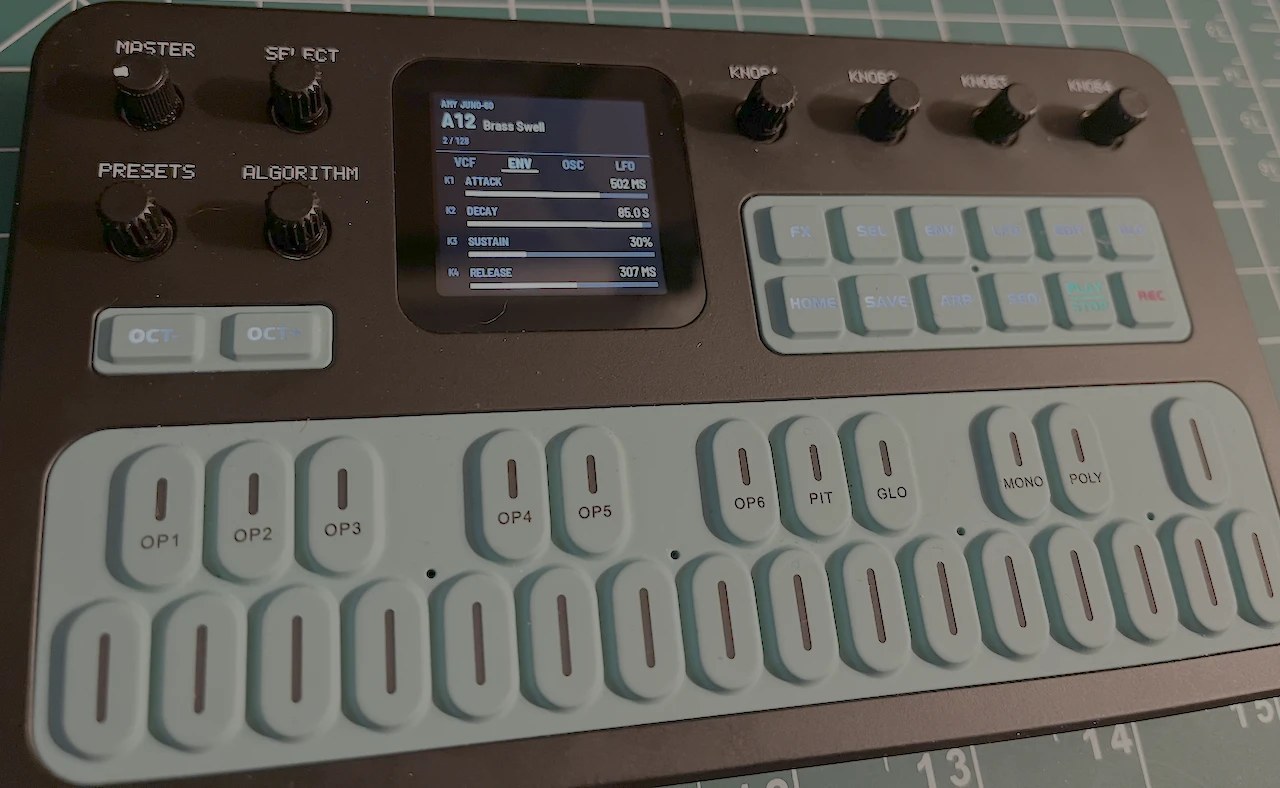
fm1-amy turns the M-VAVE FM-1 into a six-voice polyphonic analog-style synthesizer. It replaces the FM-1's firmware with AMY, a portable synthesizer library, playing AMY's emulations of the 128 factory patches of the Roland Juno-60, loaded just as the AMYboard editor loads them. Pick a preset with the PRESETS knob, then shape it with the four knobs, which mirror the editor's patch pane: oscillators, LFO, filter, envelopes, EQ, chorus, reverb and distortion. Over USB it is also a MIDI instrument, and it can be edited from the AMYboard editor.
fm1-amy is experimental. It has been built, installed and played on one FM-1. Installing it replaces the FM-1's own firmware and is at your own risk. An FM-1 that keeps crashing at start-up drops into a safe mode from which other firmware can be installed, and M-VAVE's firmware can be put back (see If something goes wrong).
fm1-amy is built on X0X, Charles Vestal's groovebox firmware for the FM-1, itself a fork of Felucca by Leo Kuroshita (Hügelton Instruments). It keeps their foundations (the hardware layer, USB, the update loader and installer, the safe mode and the build system) and replaces the instrument entirely: none of X0X's groovebox is used.
Playing it
| Control | What it does |
|---|---|
| Keys | Play the patch: 27 keys from F3 to G5, up to six notes at once |
| OCT- / OCT+ | Shift the keys down or up an octave (-2 to +2; shown at the top right of the screen) |
| PRESETS | Choose the preset, A11 to B88: the Juno-60's 128 factory patches (see Presets) |
| SELECT | Choose the page of knobs, one of eleven (the screen shows the pages either side) |
| FX to PLAY/STOP | Jump straight to a page, in the panel's order: FX OSC A, SEL OSC B, ENV LFO, LFO VCF, EDIT VCF ENV, GLO ADSR, HOME EQ, SAVE CHORUS, ARP REVERB, SEQ ECHO, PLAY/STOP DISTORTION. The page's button is lit; REC does nothing |
| KNOB1 to KNOB4 | Change the page's settings (shown as K1 to K4 on the screen) |
| MASTER | Volume |
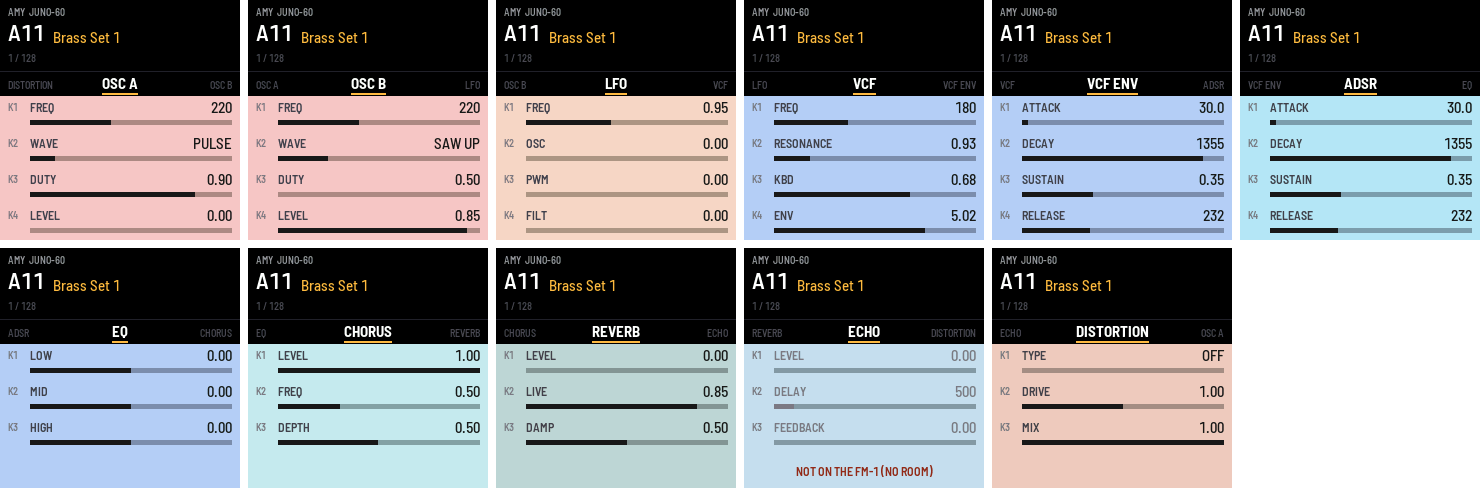
The pages are the sections of the AMYboard editor's patch pane, and each knob is the editor's: the same name, range and curve, sending the same AMY message, so a knob on the FM-1 does exactly what the same knob in the editor does. (The editor's LFO also has a wave selector, which the FM-1 leaves out.) Each page shows its knobs on that section's colour in the editor (salmon for the oscillators, sky blue for the filter, tan for distortion and so on), under a black bar with the page's name, as the editor draws its sections.
| Page | K1 | K2 | K3 | K4 |
|---|---|---|---|---|
| OSC A | freq (50 to 2000 Hz) | wave | duty (0.5 to 0.99) | level |
| OSC B | freq (50 to 2000 Hz) | wave | duty (0.5 to 0.99) | level |
| LFO | freq (0.1 to 20 Hz) | osc: pitch depth (0 to 4) | pwm: pulse-width depth (0 to 0.49) | filt: filter depth (0 to 4) |
| VCF | freq (20 to 8000 Hz) | resonance (0.5 to 16) | kbd: keyboard tracking (0 to 1) | env: filter envelope amount (-10 to 10) |
| VCF ENV | attack (0 to 1000 ms) | decay (0 to 2000 ms) | sustain (0 to 1) | release (0 to 8000 ms) |
| ADSR | attack (0 to 1000 ms) | decay (0 to 2000 ms) | sustain (0 to 1) | release (0 to 8000 ms) |
| EQ | low (-15 to 15 dB) | mid | high | |
| CHORUS | level (0 to 1) | freq (0.1 to 20 Hz) | depth (0.01 to 1) | |
| REVERB | level (0 to 1) | live (0 to 1) | damp (0 to 1) | |
| ECHO | level | delay | feedback | (not available: see below) |
| DISTORTION | type | drive (1/16 to 16) | mix (0 to 1) |
Turning a continuous knob moves it in 128 steps along its range, logarithmically where the editor's knob is logarithmic. The selectors step through their options one detent at a time: the oscillators' wave (sine, pulse, saw up, saw down, triangle, noise, PCM, wavetable, algo; fm1-amy has no samples or wavetables, and "algo" needs FM operators this voice doesn't have, so the last three aren't useful here) and the distortion type (off, clip, fold, clip+fold, crush, all).
Presets
The PRESETS knob loads each Juno-60 preset exactly as the editor's Load Preset button does, so a preset sounds the same on the FM-1 as it does after Load Preset in the editor, and the FM-1's knobs show the same values as the editor's. The screen shows the new preset at once; the FM-1 loads it once the knob has rested for 150 ms, so scrolling through doesn't load every preset on the way.
The editor doesn't load AMY's own Juno patches, which use six oscillators a voice. It loads AMYboard's default patch (AMY patch 257: four oscillators a voice, the filter and amplifier, the LFO, Osc A and Osc B, which is what its knobs control) and then sends five messages that set it up like the Juno patch. In that translation, which approximates the Juno patch:
- OSC A and OSC B are the Juno patch's two loudest sources among its pulse, saw, sub-oscillator and noise (usually the pulse and saw), with the Juno's amplifier level folded into their levels;
- the Juno's envelope becomes both the ADSR (the volume) and VCF ENV (the filter, by the VCF "env" amount), set the same; in the patches that use the Juno's "gate" mode, it becomes VCF ENV only, and the volume just follows the key;
- the LFO is a triangle, and EQ and chorus are as the patch sets them.
Choosing a preset puts the knobs of the first eight pages where the preset sets them, showing its exact values until you turn a knob, so you start from the factory sound and change it from there. Reverb and distortion, which no preset sets, keep their settings across presets.
What it doesn't do (yet):
- Nothing is saved. Your knob changes last until you choose another patch or switch off.
- The keys stay local. The FM-1's own keys play at full velocity and aren't sent out over MIDI (see MIDI and the AMYboard editor).
- No echo. The ECHO page is shown, to match the editor, but does nothing: the FM-1 doesn't have the RAM for echo's delay line beside the reverb's (see How it works).
- Only the Juno presets. AMY also has 128 DX7 patches, but they are left out to fit the FM-1's flash (see How it works).
MIDI and the AMYboard editor
Over USB the FM-1 is a class-compliant MIDI device, "X0X FM-1" (the name comes from X0X); no driver is needed. MIDI channel 1 plays the synth, with note velocity, pitch bend and the sustain pedal (CC 64), so a keyboard or a DAW can play it. Its controllers are AMYboard's, from patch 257's MIDI mappings: CC 7 level, 74 filter freq, 71 resonance, 76 LFO freq, 77 LFO osc depth, 93 chorus level, 73 / 75 / 79 / 72 attack / decay / sustain / release, and 91 reverb level (CC 94, echo level, does nothing here).
The AMYboard editor can edit it live. The editor is made for AMYboard, AMY's own hardware, and talks to it in AMY's wire language over MIDI SysEx; fm1-amy understands enough of that conversation for the editor's synth controls:
- Open the editor in Chrome or Edge (they have Web MIDI) and choose control mode, allowing MIDI with SysEx when the browser asks.
- In the MIDI port settings, choose X0X FM-1 as both the input and the output. The editor picks ports named "AMYboard" by itself, so choose the FM-1 by hand; its warning about the port names can be dismissed.
- The editor's knobs and patch choices for channel 1 now change the FM-1's sound, and its on-screen keyboard plays it. The FM-1's screen follows: its knobs move to what the editor sets, and when the editor loads a Juno preset, the FM-1 names it.
The screen follows MIDI controllers too (patch 257's CCs, above). After a change from the editor
or a controller, the FM-1 reads its synth back from AMY and shows the values as the editor's own
knobs would (the editor's mapping, set_knobs_from_events); a reading that equals one of the
presets names that preset in the header, since the editor's Load Preset sends only messages. A
knob you turn on the FM-1 keeps your value for half a second, so a reading arriving meanwhile
doesn't snatch it back.
What doesn't carry over: AMYboard runs Python sketches, which the FM-1 can't, so reading a sketch from the board gets no answer and writing one has no effect (the editor warns first that it couldn't detect the firmware). Drum kits and DX7 patches don't sound, since fm1-amy has neither AMY's samples nor its DX7 patches.
How it works: the editor sends each AMY message as SysEx F0 00 03 45 <message> F7 and waits for
an acknowledgement (F0 00 03 45 'A' 'K' F7) before sending the next; it pings with zI, to which
the FM-1 answers OK. The AMYboard's own commands are acknowledged and otherwise ignored: Python
(zP), reboot (zB), reading files (zD) and samples. A file or sample upload's data chunks are
counted off and dropped, so they can't be read as AMY messages. AMY's own MIDI output goes back
out over USB too.
The FM-1's keys aren't sent out over MIDI by default: in control mode the editor sends what it
receives back to the board, so every note would play twice. To send them (on channel 1), build
with X0X_AMY_KEYS_OUT=1.
Installing
There is no ready-made firmware file yet: build it first, which gives
build/amy_fw/x0x-amy.fwsc. Then, with the FM-1 plugged in by USB and switched on:
pip3 install mido python-rtmidi
python3 tools/fm1_install.py --info                       # check the FM-1 is found, and what it runs
python3 tools/fm1_install.py build/amy_fw/x0x-amy.fwsc    # install
The installer reads the package and starts the FM-1's update loader, which writes the firmware,
restarts the FM-1 and checks what it runs afterwards. It works from M-VAVE's own firmware
(it was first installed over M-VAVE's V15, which identifies as FM-1_015) and from X0X.
Don't unplug the FM-1 or switch it off while it writes. Afterwards the FM-1
reports FM-1_900, the identity of a development build, and its USB MIDI port is named
"X0X FM-1".
To go back to X0X, install its firmware from X0X's web installer, which can also put M-VAVE's firmware back.
If the install stops with "the update loader did not appear" (the FM-1's screen showed UPDATE / CONFIRM), nothing was written and the FM-1 goes back to what it was running; run the install again. The usual cause is a program doing MIDI thru on the FM-1's port, such as the AMYboard editor in control mode, which sends everything it receives from the board back to it: an echo of the FM-1's own update messages could block the installer's single confirming reply. fm1-amy's firmware ignores those echoes, so this only happens when installing over an older fm1-amy, or over X0X, with such a program open. Closing the editor (or deselecting the FM-1 in it) during the install avoids it.
If something goes wrong
These come from X0X and Felucca, and still work in fm1-amy:
- Crash: the screen turns red, shows where the crash happened, and the FM-1 restarts by itself. If you report a crash, include that address and what you were doing.
- Safe mode: if the firmware crashes twice in a row while starting, the FM-1 starts in safe mode instead: no sound, but USB works, so the installer (or X0X's web installer) can reach it.
- Update mode: hold OCT- and OCT+ together for five seconds. fm1-amy doesn't show X0X's countdown on its screen, but the FM-1 still enters update mode, where an install can finish.
- Rescue: if even safe mode fails twice, the chip drops into its own update mode, which only
tools/fm1_rescue.shcan reach (from a Mac). It puts M-VAVE's V15 firmware back; see "Recovering an FM-1 that won't start" in X0X's manual.
Building
fm1-amy builds with X0X's build system and JieLi's toolchain for the FM-1's chip (an AC791N with a pi32v2 CPU). BUILDING.md has the details; in short, on a Mac you need:
- Python 3 with Pillow:
pip3 install Pillow - Docker, to run JieLi's toolchain, which exists only for x86-64 Linux. Docker Desktop works,
or Colima:
brew install colima docker && colima start --vm-type vz --vz-rosetta(Rosetta runs the x86-64 toolchain on Apple silicon). On x86-64 Linux the toolchain runs without Docker. - JieLi's toolchain:
tools/get_toolchain.shinstalls it to~/.jieli/toolchain. - JieLi's AC79 SDK (Apache-2.0), from which the package takes three files. Clone it to
~/fw-AC79_AIoT_SDK:
If gitee.com can't be reached from your network, a GitHub mirror of the same tag works: the build checks the three files against their SHA-256 hashes.git clone --depth 1 --branch AC79NN_SDK_V1.2.1_2023-12-13 \ https://gitee.com/Jieli-Tech/fw-AC79_AIoT_SDK.git ~/fw-AC79_AIoT_SDK - AMY: a checkout of shorepine/amy, unmodified, at
1.2.207 or later: the build uses AMY's options for leaving out its samples and all but one patch
(shorepine/amy#1250), and refuses an older AMY. The current build is tested with AMY 1.2.207
(commit
17ac9f9e).git clone https://github.com/shorepine/amy.git ~/amy
Then build:
X0X_AMY=1 AMY_DIR=~/amy ./build.sh # build/amy_fw/x0x-amy.fwsc
X0X_AMY_PATCH=N chooses the preset at power-on (0 to 127, default 0 = A11 Brass Set 1).
The build checks the result as X0X's does and fails if anything is out of bounds:
ok image 317536 B; RAM .data+.bss 81624 B of 98304; pool 332240 B of 344064
Without X0X_AMY=1, ./build.sh still builds X0X's groovebox (into build/), since this tree
carries X0X's sources unchanged: the AMY build swaps its engine and screen in at build time.
Updating the presets
The presets are a committed snapshot, tools/amy_k257.json: for each Juno patch, the messages the
editor's Load Preset sends. It is made by running the editor's own translation
(get_wire_commands_for_juno_patch and the wire-code parser in tulip/amyboardweb/static/spss.js
of tulipcc), unchanged, under Node, with AMY's generated
patch list. Building doesn't need Node or tulipcc; when the editor's translation or AMY's Juno
patches change, check and regenerate the snapshot from a tulipcc checkout:
node tools/gen_amy_k257.js ~/tulipcc --check    # is the snapshot current?
node tools/gen_amy_k257.js ~/tulipcc            # rewrite tools/amy_k257.json
Trying it without an FM-1
The same code also builds for a computer, which is how most of fm1-amy was developed:
AMY_DIR=~/amy sh host/build_host_amy.sh                          # build/host/x0x_amy_host
build/host/x0x_amy_host host/amy_pages.x0x OUTDIR                # runs a script, writes WAVs and screenshots
The simulator runs the whole firmware against a simulated FM-1 driven by a script of key presses
and knob turns (host/amy_*.x0x; the commands are listed at the top of host/x0x_host.c), and
writes the audio and the screen to files. At the end it prints how many instructions per sample
the synth took, a guide to whether a change still fits the FM-1's CPU. Scripts can send MIDI in
too (midi 90 3C 64, or sysex i1v0F200Z for an AMY message as the editor sends it), and the
MIDI going out is written to midi_out.txt; host/amy_midi.x0x tests the editor's protocol, and
host/amy_readback.x0x that the screen follows the editor (its Load Preset, single knobs, a CC).
In a browser:
AMY_DIR=~/amy sh web/emu/build_amy.sh                            # needs Emscripten (brew install emscripten)
python3 -m http.server 8000 --directory build/emu_amy            # then open http://localhost:8000/
That's X0X's browser emulator running fm1-amy: click the knobs and keys on the picture of the
FM-1, use the mouse wheel over a knob to turn it, or play the white keys from the computer
keyboard (q to i, a to k). The page's text still describes X0X.
How it works
AMY in place of X0X's engines. X0X renders its parts in the FM-1's audio interrupt, 256
stereo frames at 44.1 kHz at a time. fm1-amy hands that same call to AMY
(firmware/src/app/engine_amy.c), which renders one 256-sample block of synth 1: patch 257,
set up as a Juno preset, with six voices. Everything that touches AMY runs in that interrupt: the keys are read there and
become note messages, and the screen's knob changes reach it through a queue, so the main loop
(the screen, USB) never races the synth. The AMY build leaves out X0X's engine.c and its 909,
808, 303 and break engines; engine_amy.c stands in for them.
The screen (firmware/src/app/ui_amy.c) replaces X0X's. Its knob table is the AMYboard
editor's (amy_parameters.js in tulipcc's tulip/amyboardweb/static/): each knob's name, range,
curve and AMY message template, sent for synth 1. The editor's knobs control AMYboard's default
patch, 257, which is what the FM-1 runs too. A message to the synth naming an oscillator changes
that oscillator in every voice. tools/gen_amy_juno.py turns the preset snapshot into a table:
each preset's name, its messages, and the knob values those messages set. When a preset is
chosen, the audio interrupt sends AMY the editor's base message (K257i1iv6: patch 257 on synth 1
with six voices) and then each of the preset's messages, as the editor does.
Fitting the FM-1. The firmware has 568 KB of flash, 96 KB of RAM for the program's data and a 336 KB pool for large buffers.
| fm1-amy | X0X, for comparison | |
|---|---|---|
| Firmware image | 318 KB | 480 KB |
| Program data (RAM) | 82 KB | 98 KB |
| Pool (fm1-amy: AMY's 256 KB heap, the screen's 69 KB canvas, backup buffers) | 332 KB | 336 KB |
To fit, the build compiles AMY with two of its options: AMY_ONLY_PATCH=257 keeps only patch 257
(the Juno presets come from the snapshot; no DX7 patches), and AMY_NO_BUILTIN_PCM leaves out
AMY's built-in drum samples. The simulator and the browser emulator build AMY the same way. AMY needs about 120 KB of heap with six voices and chorus (measured
with AMY's own six-oscillator Juno voices; patch 257's four need less), and the reverb adds 138 KB when
its level is first raised (measured on a Mac; the delay lines are the same size on the FM-1).
Echo would add another 98 KB (for delays up to 185 ms) to 295 KB (AMY's default 743 ms maximum),
which doesn't fit beside the reverb, so fm1-amy builds AMY without echo. If the reverb's own
allocation ever failed, AMY leaves it off rather than stopping.
The C library. JieLi's toolchain comes with a reduced C library that has neither malloc
nor printf. firmware/src/app/amy_libc.c provides them for the FM-1: a simple allocator over
the heap in the pool, and a printf family for integers and strings (a float prints ?). AMY
formats its own floats without printf or double precision (shorepine/amy#1246), and leaves its
float-printing debug dumps out unless built with AMY_DEBUG (shorepine/amy#1248). The FM-1's FPU
is single precision, and the build fails if any double-precision routine is linked: that would
also catch a float passed to printf, which arrives as a double.
CPU. Measured in the simulator (instructions per sample on a Mac: a comparison, not an FM-1 figure), six held voices take about 940, against about 1,150 for X0X p