
Dikto
Push-to-talk voice typing with ~50ms local STT, built-in AI translation & rewriting, system-wide overlay.
Like having Wispr Flow + DeepL + a clipboard manager in a single open-source app.

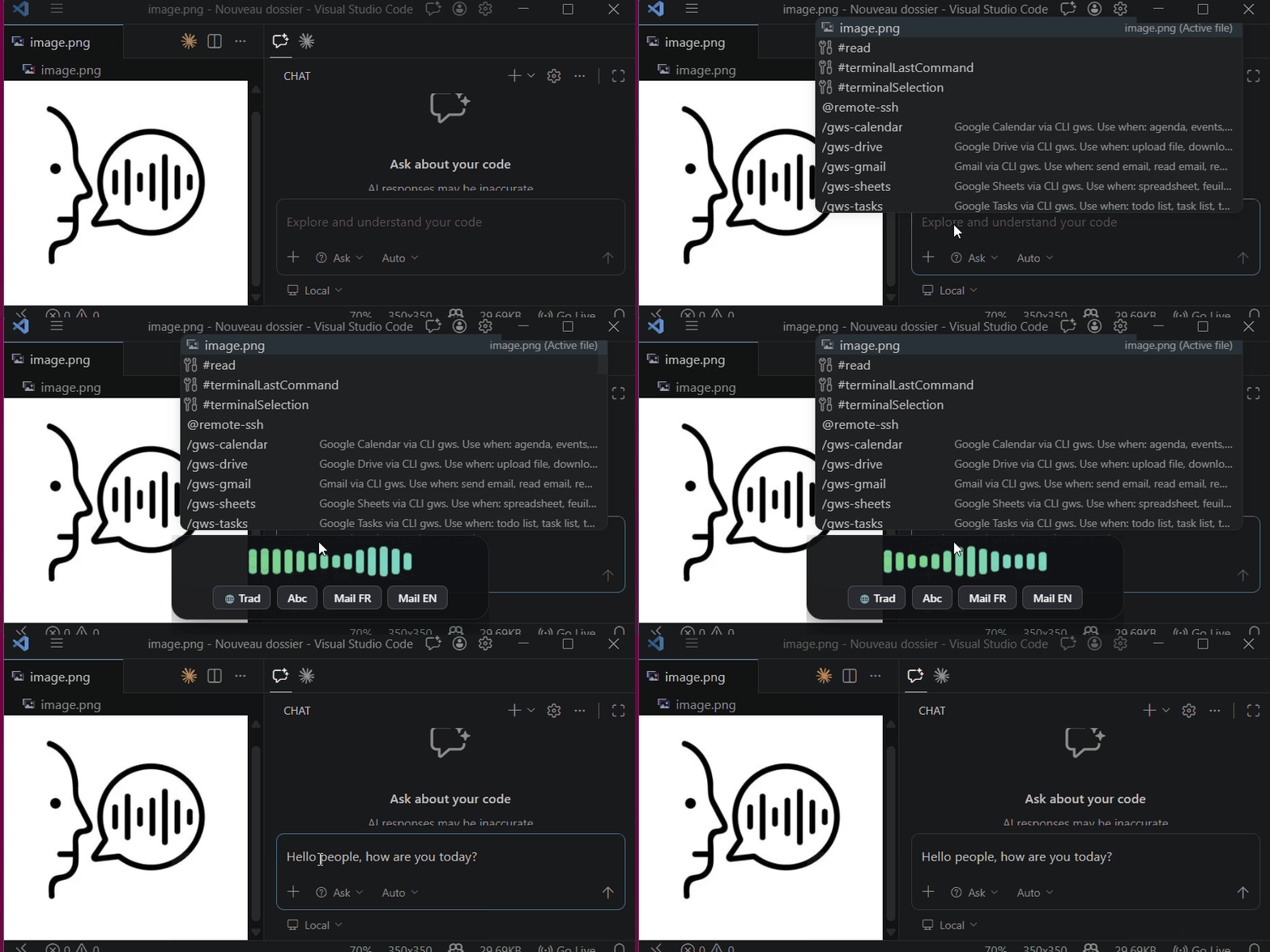
Hold Ctrl+Space, speak, release. Text appears at your cursor in any app.
The problem
You dictate with one tool. Translate with another. Manage your clipboard with a third. None of them talk to each other. Most are macOS-only. Nothing works on Linux/Wayland.
Dikto replaces all three. One tray app, one shortcut, zero cloud dependency for dictation.
See it in action
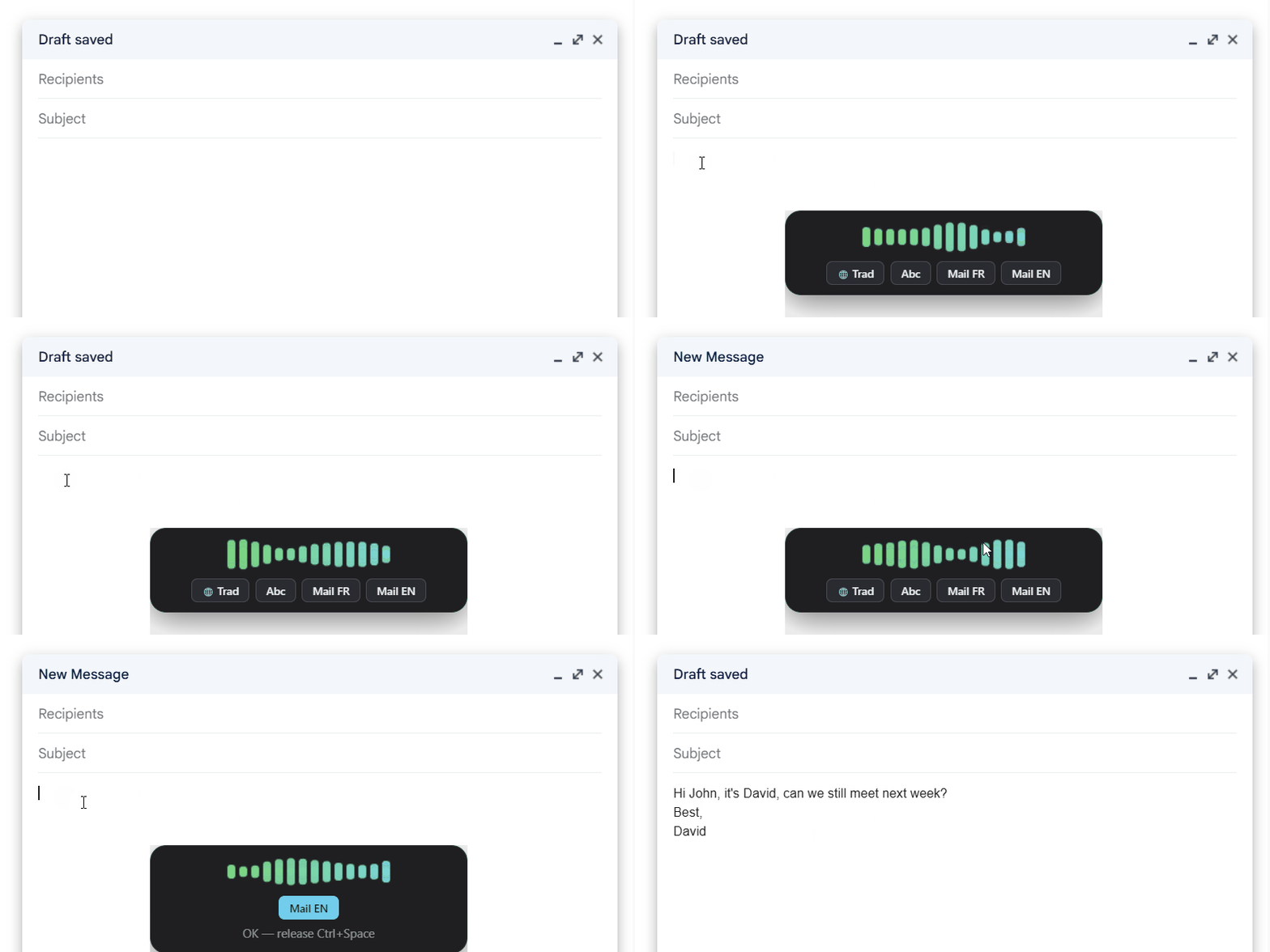
Dictate an email in 5 seconds
Hold Ctrl+Space, speak naturally, click Mail EN before releasing. Dikto transcribes your voice locally, sends only the text to Gemini, and pastes a polished professional email at your cursor.
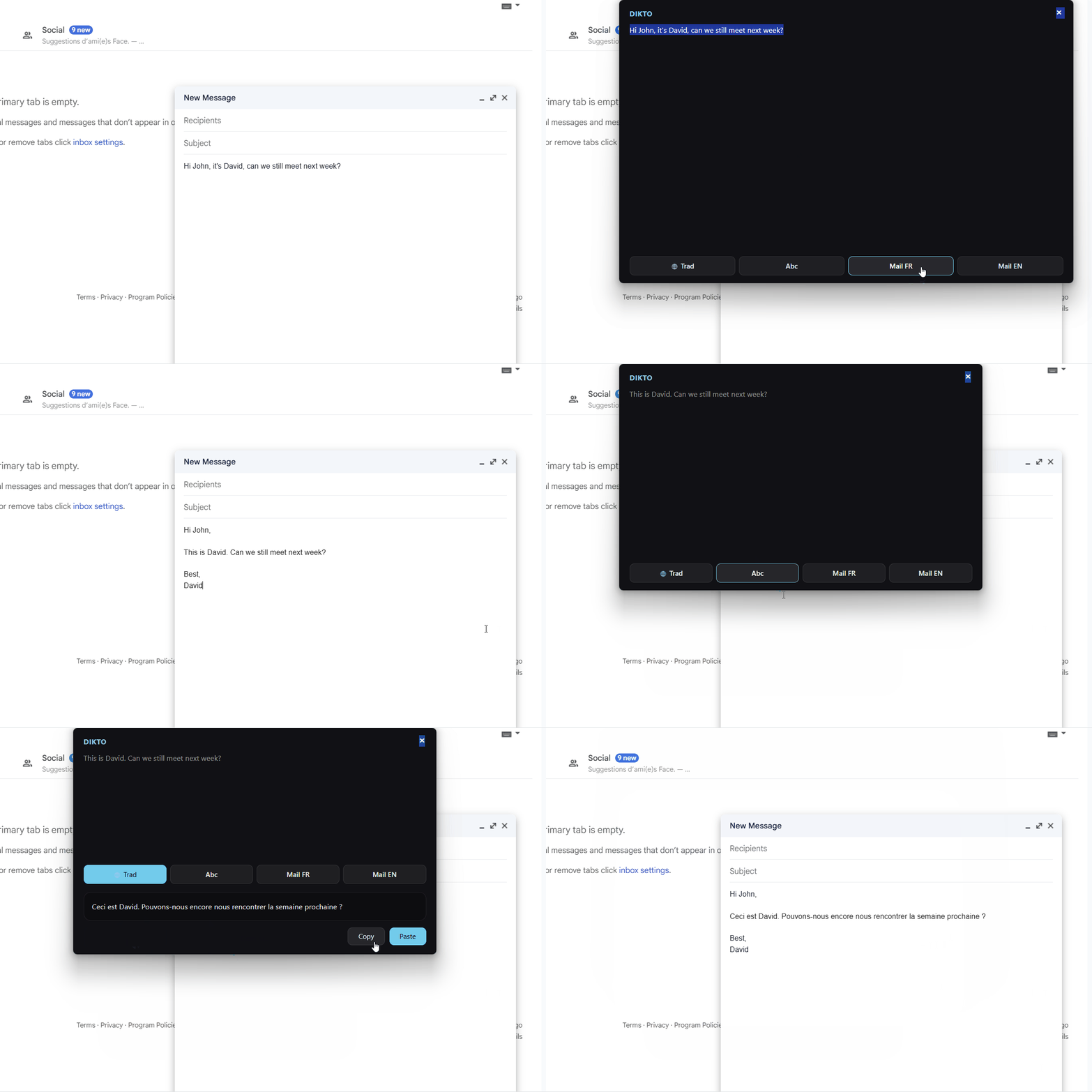
Translate or rewrite any text — without leaving your app
Select text anywhere, double-tap Ctrl+C. An overlay appears with action buttons: translate, correct grammar, rewrite as email. Click, get the result, paste back. No window switching.
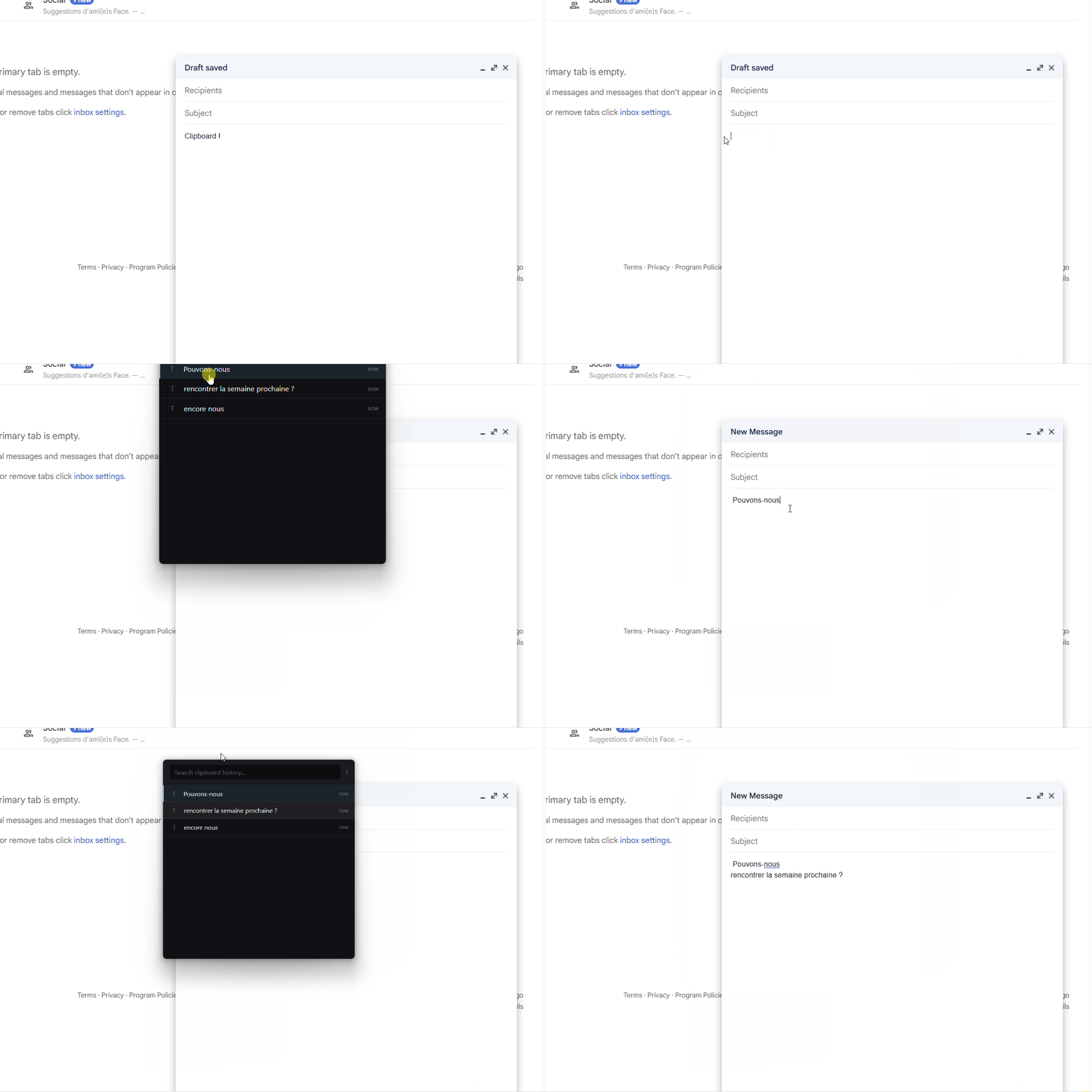
Clipboard history with instant paste
Ctrl+B opens a searchable history of everything you've copied — text and images. Arrow keys to navigate, Enter to paste. It just works.
Features at a glance
| What it does | |
|---|---|
| Push-to-talk | Hold Ctrl+Space, speak, release. Text at cursor. Any app. ~50ms. |
| 100% offline STT | Parakeet TDT v3 (fast and accurate, 25 European languages). Your audio never leaves your machine. |
| Cloud STT (optional) | Switch to ElevenLabs Scribe v2 from the tray for maximum accuracy, with your language forced. Falls back to Parakeet if offline. |
| Smart translate | Built-in DeepL-like translation. Auto-detects language direction. 7 languages. |
| AI overlay | Select text + double Ctrl+C = translate, correct, rewrite. System-wide. |
| Mail mode | Dictate freely, get a polished email with proper greeting and signature. |
| Custom prompts | Create your own Gemini-powered actions: summarize, formalize, code review, anything. |
| Clipboard manager | 100-entry history, search, images, keyboard navigation. |
| Cross-platform | Windows 11 + Linux Fedora/Wayland. 76 MB portable binary. |
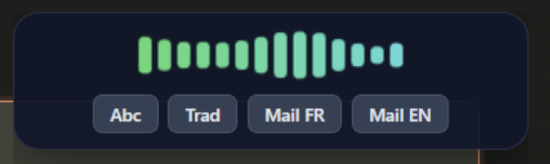
The bubble appears during recording with dynamic action buttons.
How it compares
| Dikto | Freeflow | Amical | Tambourine | Wispr Flow | |
|---|---|---|---|---|---|
| 100% local STT | Yes | Yes | Yes | Yes | No |
| Built-in translation | Yes | No | No | No | No |
| AI overlay on any text | Yes | No | No | No | No |
| Clipboard manager | Yes | No | No | No | No |
| Custom AI prompts | Yes | No | Partial | Partial | No |
| Windows | Yes | No | Yes | Yes | No |
| Linux/Wayland | Yes | No | No | No | No |
| Open source | MIT | MIT | MIT | AGPL | No |
| Price | Free | Free | Free | Free | $8/mo |
Dikto occupies a unique position: the only open-source tool covering Windows + Linux + translation + AI overlay + clipboard in a single binary.
Quick start
1. Download
Grab the latest from the Releases page:
| Platform | Format | Size |
|---|---|---|
| Windows | .exe portable — just run, no install |
~76 MB |
| Windows | NSIS installer (start-at-login support) | ~83 MB |
| Linux | .AppImage |
~114 MB |
2. First launch
The onboarding wizard walks you through:
- Gemini API key — free at aistudio.google.com (optional — dictation works without it)
- Microphone selection
- Keyboard shortcuts overview
3. Download an STT model
From the tray menu, open STT Models and download Parakeet TDT v3 (464 MB).
That's it. Hold Ctrl+Space and talk.
Privacy
| What | Where it goes |
|---|---|
| Your voice | Nowhere. Transcription is 100% local via sherpa-onnx. |
| Transcribed text | Sent to Gemini only when you explicitly click an AI action. Raw dictation never touches the network. |
| API key | Encrypted via Electron safeStorage. Never logged, never in config files. |
No telemetry. No analytics. No account required. Your data stays on your machine.
Build from source
git clone https://github.com/david-digitis/dikto.git
cd dikto
npm install
npx electron .    # use a system terminal, NOT VS Code
npm run build:win    # Windows (.exe + NSIS installer)
npm run build:linux  # Linux (.AppImage)
Linux prerequisites (Fedora / Wayland)
sudo dnf install dotool fuse-libs
sudo systemctl enable --now dotool.service
sudo usermod -aG input $USER   # logout/login required
Install the GNOME extension AppIndicator and KStatusNotifierItem Support for the tray icon.
Tech stack
| Component | Technology |
|---|---|
| Framework | Electron 33 |
| Local STT | sherpa-onnx-node v1.13 — Parakeet TDT v3 |
| Cloud STT | ElevenLabs Scribe v2 (optional) |
| AI | Gemini 2.5 Flash Lite (optional, for translation/rewriting) |
| Hotkeys | uiohook-napi (Windows) / evdev (Linux/Wayland) |
| Auto-paste | VBScript (Windows) / dotool (Linux) |
2 runtime dependencies. No Python, no Docker, no local LLM server, no heavyweight frameworks.
Roadmap
- macOS support
- Ollama / local LLM as alternative to Gemini
- GPU acceleration for STT (CUDA / Metal)
- More STT models (multilingual, specialized)
- Dictation history with search
- Voice commands ("correct that", "translate this")
- Auto-update mechanism
Have an idea? Open an issue — feature requests are welcome.
Contributing
This is my first open-source project and I'd love your help. Whether it's a bug fix, a new feature, better docs, or a translation — all contributions are welcome.
- Fork the repo
- Create a feature branch
- Test on your platform
- Open a PR — let's talk about it
The rules are simple: plain JavaScript, no frameworks in the renderer, no heavy deps. The app has 2 runtime dependencies — let's keep it that way. Privacy first — audio never leaves the machine.
Check out the open issues for ideas on where to start.
Credits
- sherpa-onnx by k2-fsa — the blazing-fast local STT engine that makes offline dictation possible
- NVIDIA Parakeet TDT — the ~50ms model that makes push-to-talk feel instant
- Google Gemini — AI processing for translation, correction, and custom actions
- Electron — cross-platform desktop framework
- uiohook-napi — native system-wide hotkeys
License
MIT — use it, fork it, build on it.
Built by David at Digitis | Voicelab
If Dikto saves you time, a :star: on GitHub helps others discover it.